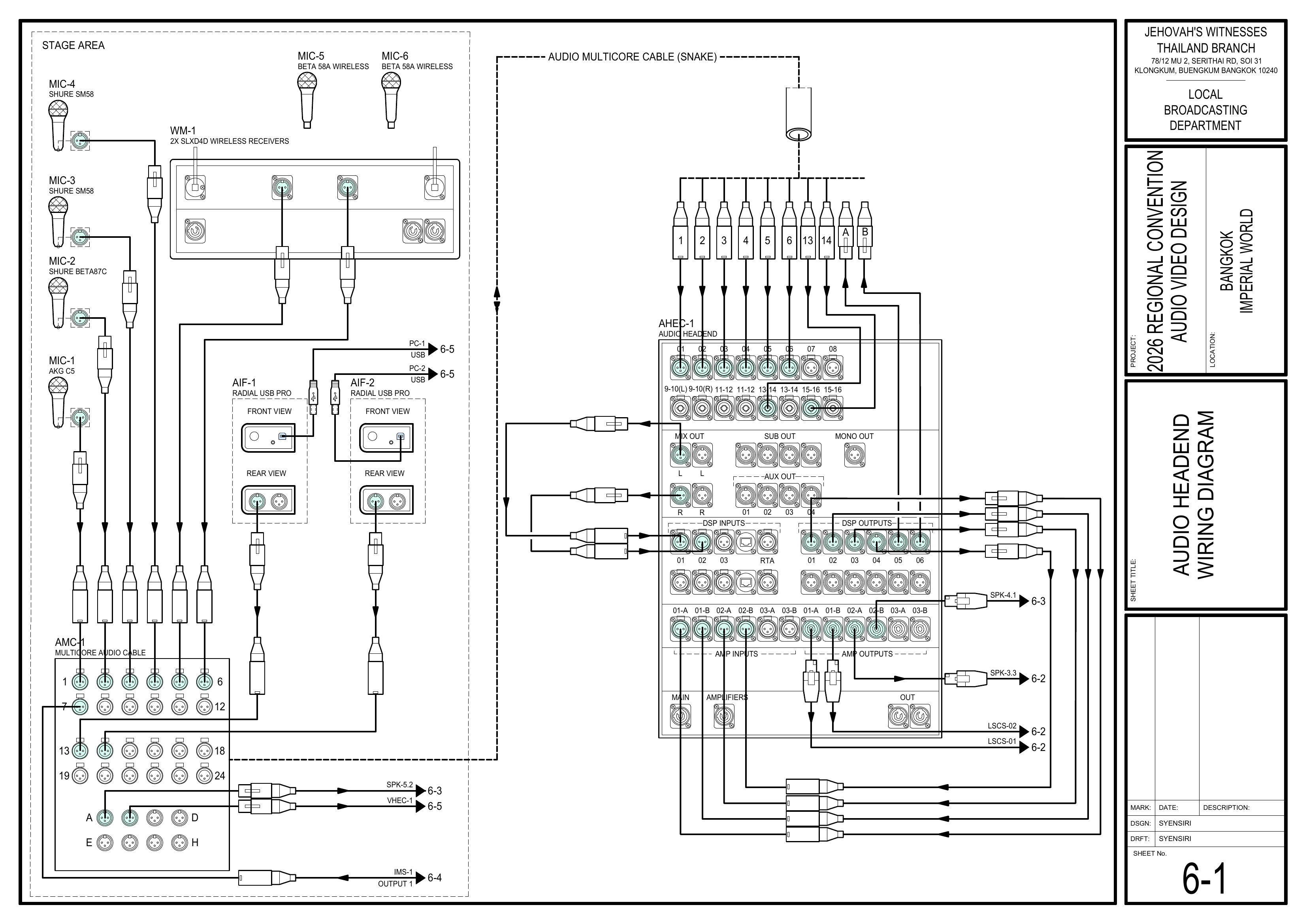
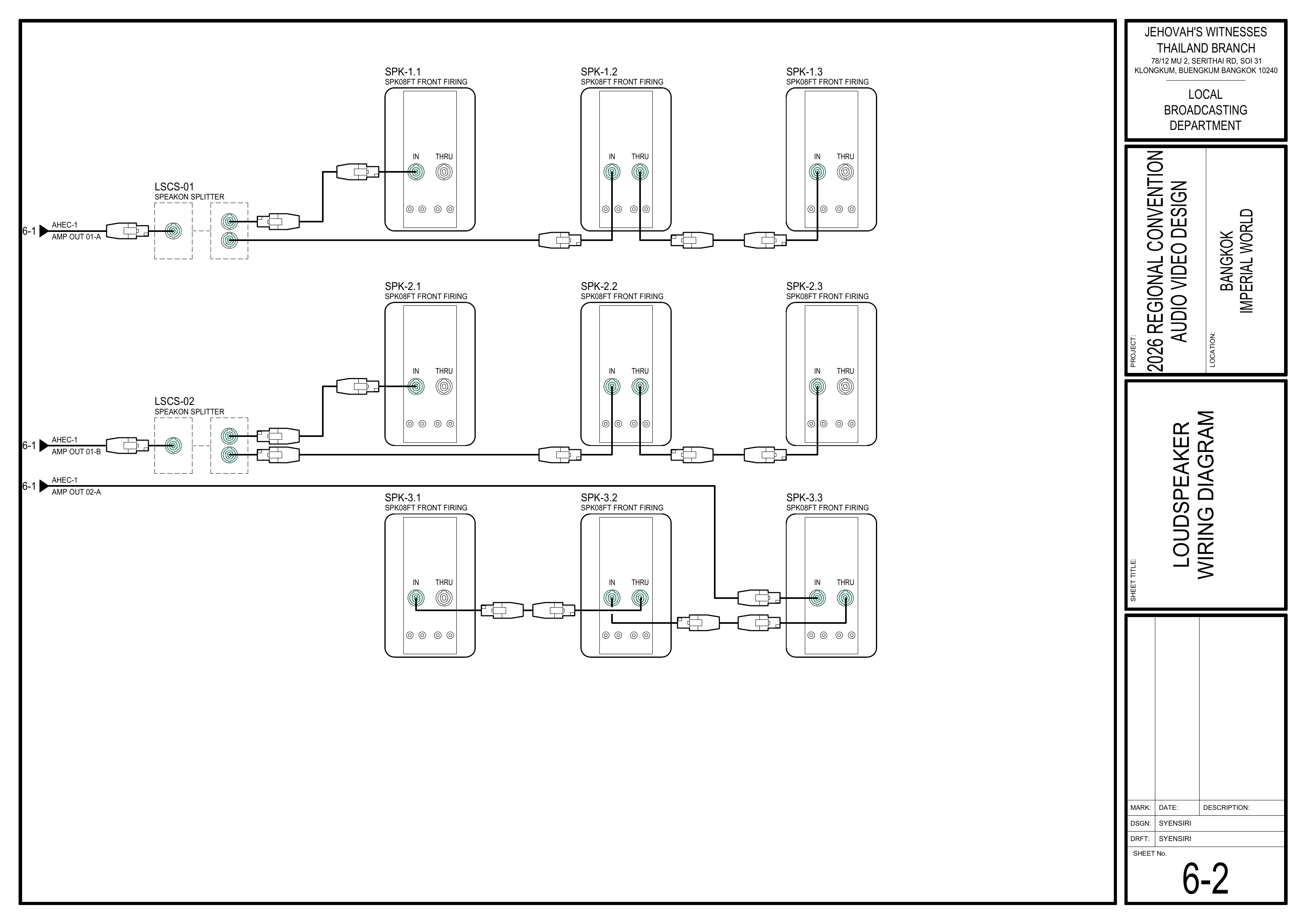
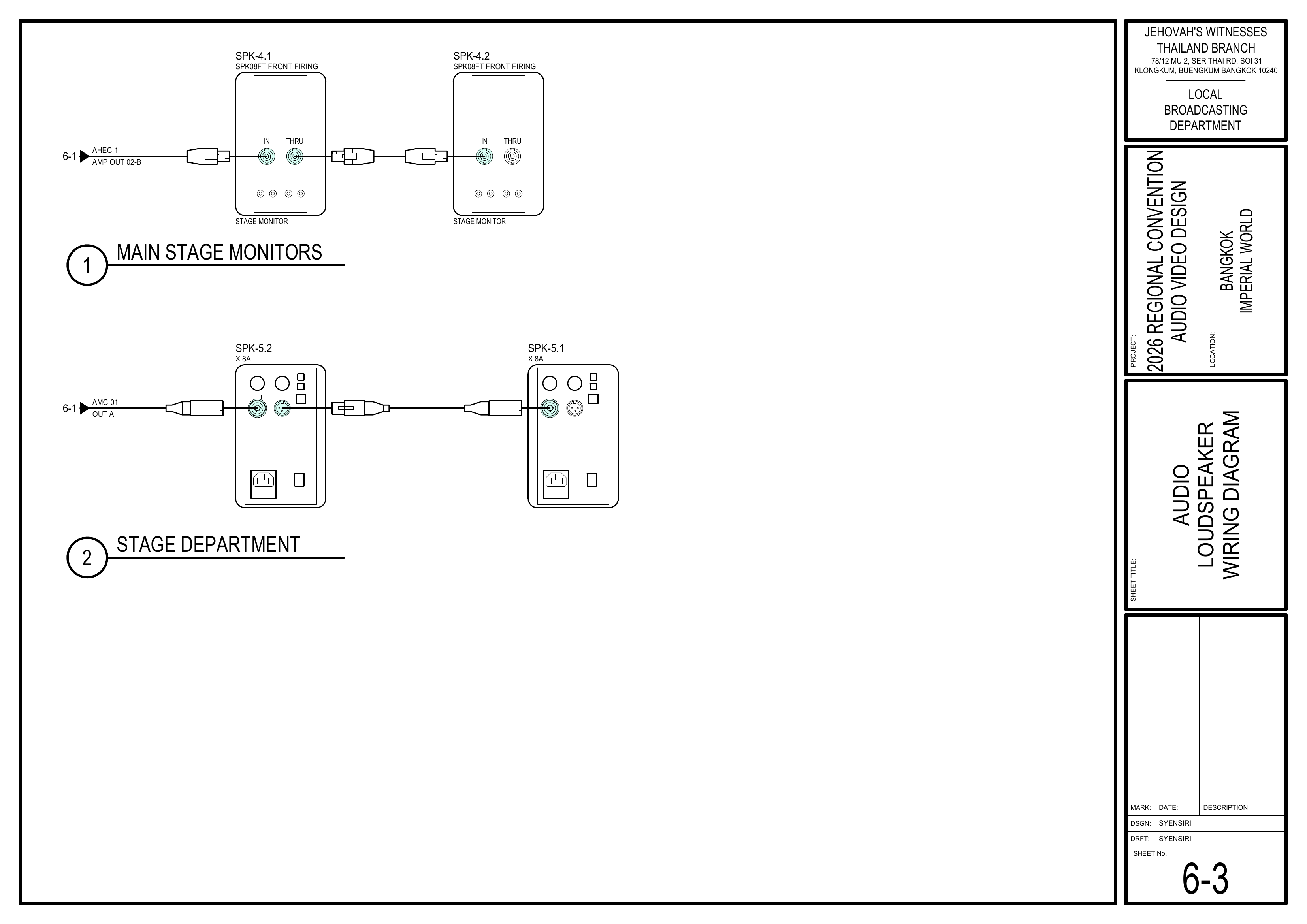
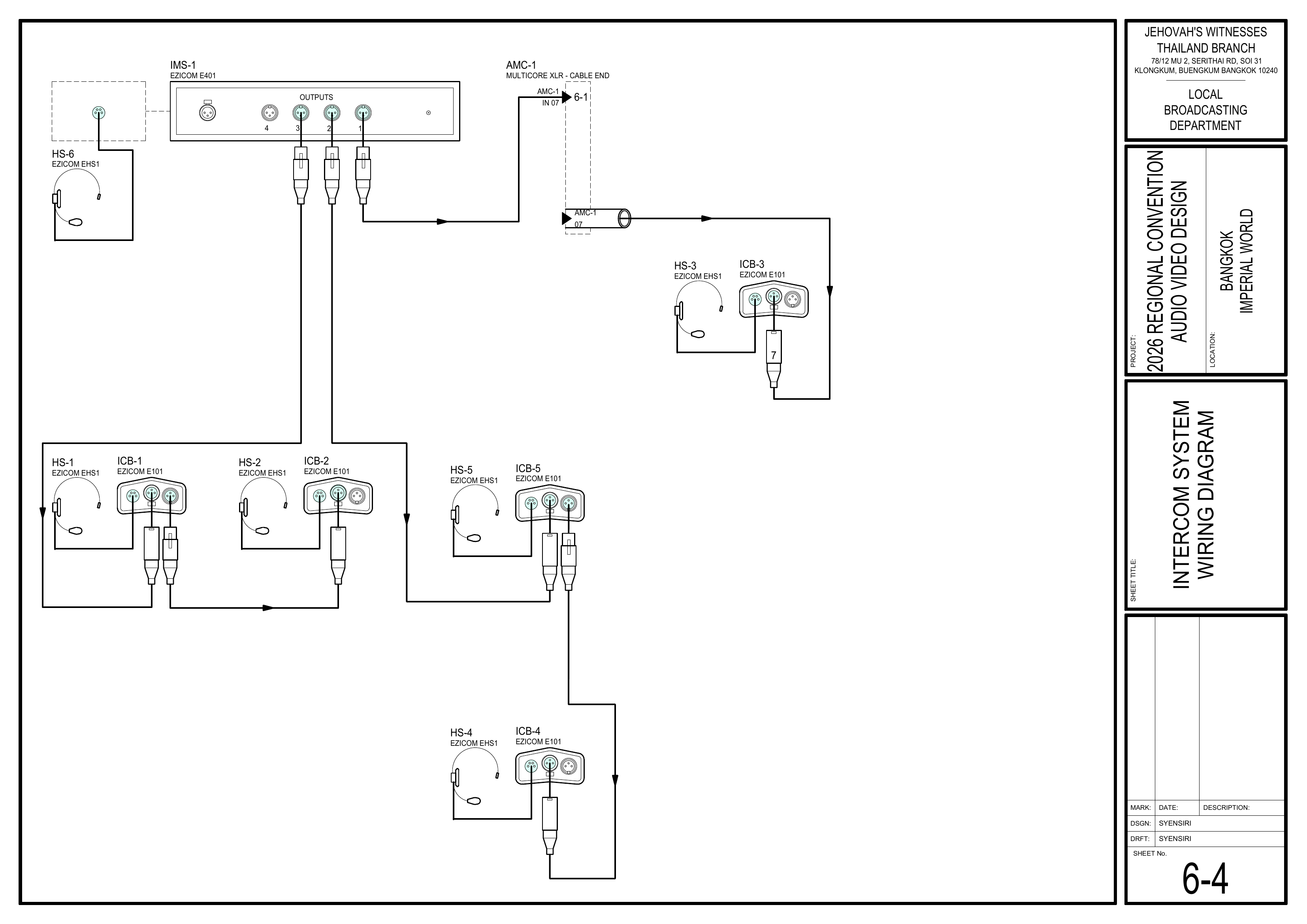
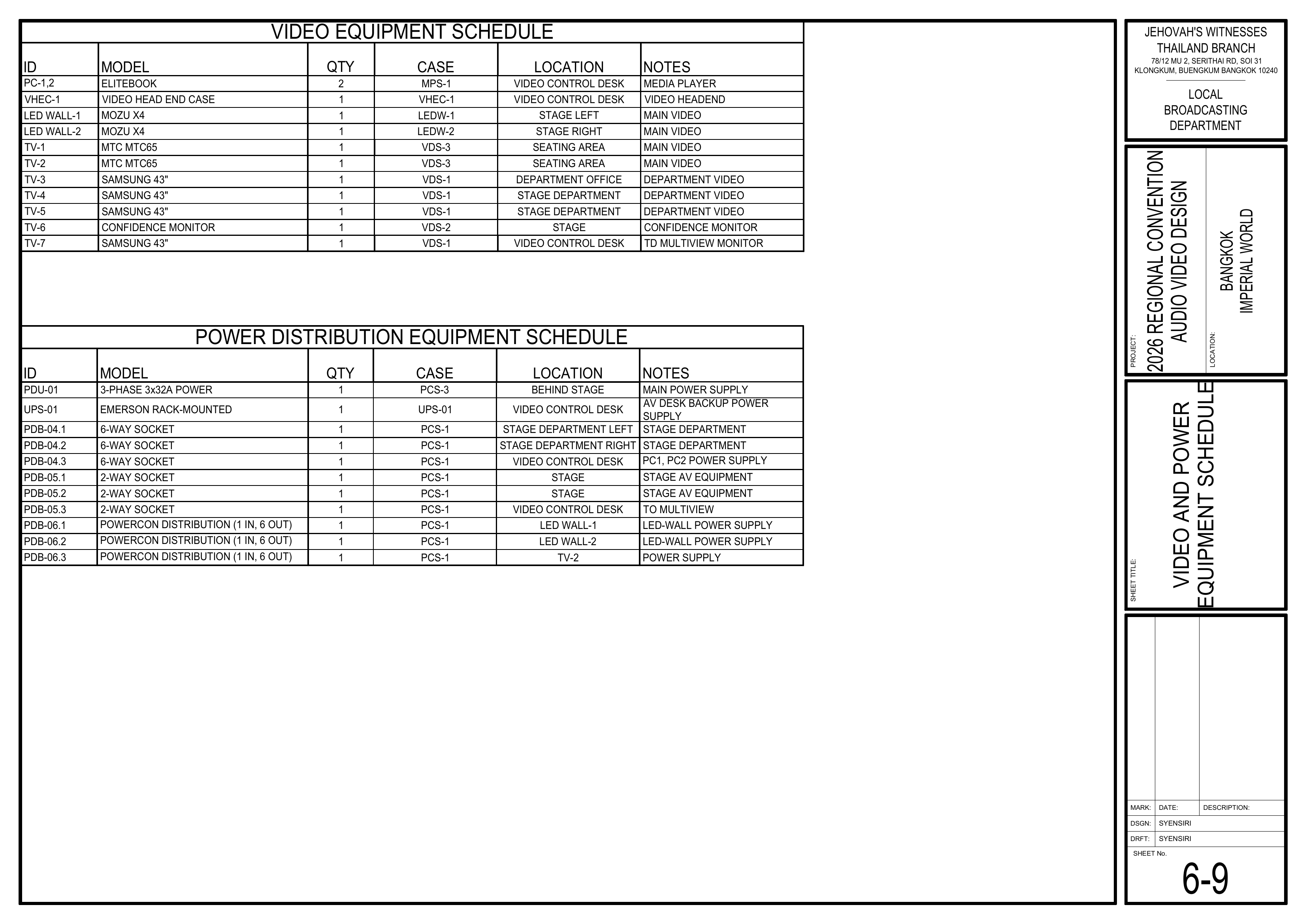
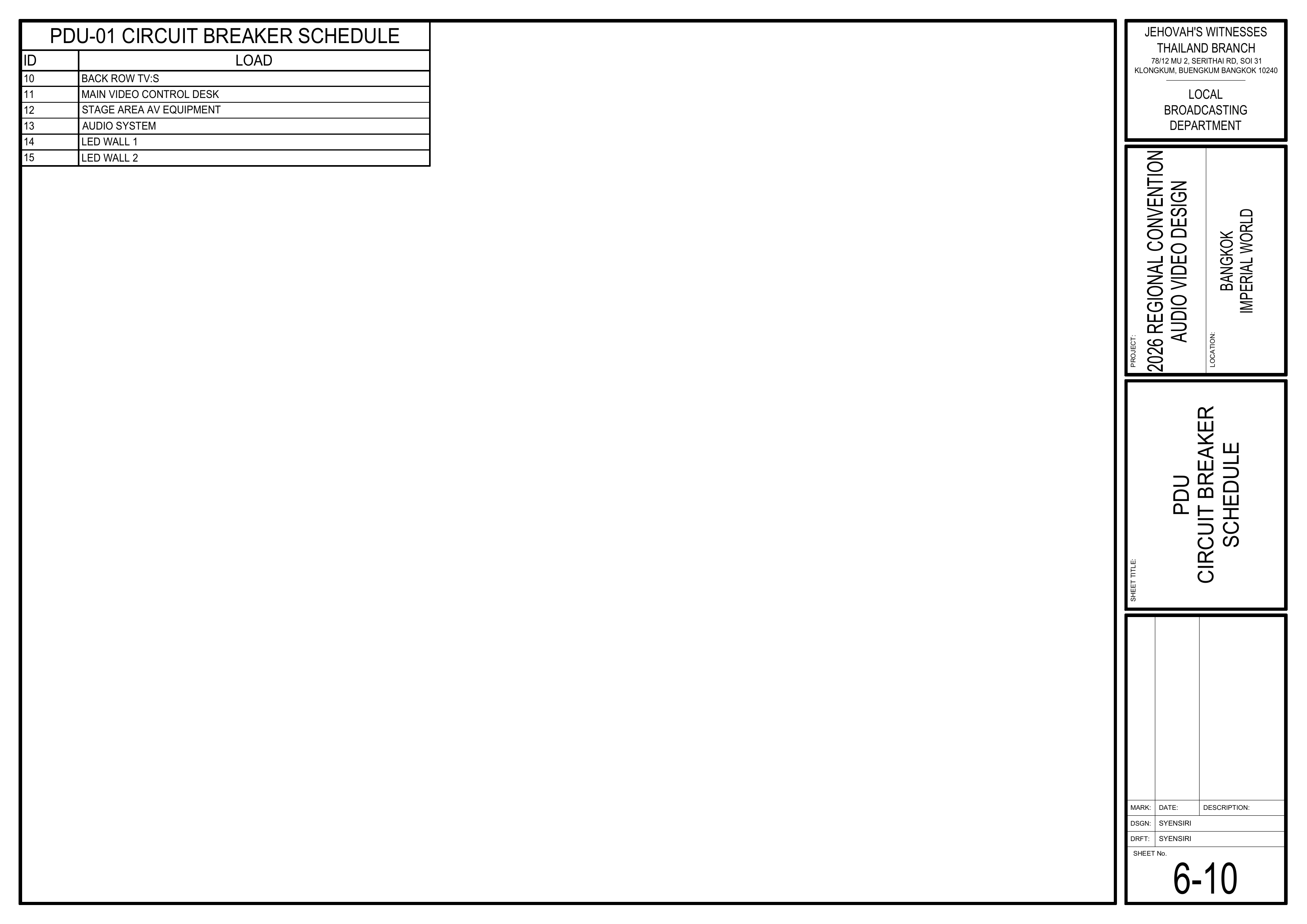
# Setup instructions 搭建说明
This chapter contains the setup instructions for the 2026 Bangkok Regional Convention Audio/Video Department.
本章节包含 2026 年曼谷区域大会影音部的安装说明。
PRIORITY / 优先事项
Please prioritize installing the **audio multicore cable (also known as a snake cable), AMC-1**, and the **loudspeakers** so that the **Audio Head End Case (AHEC-1)** can be commissioned and audio testing can begin as early as possible.
请优先安装**音频多芯线缆(也称“蛇线”)AMC-1**和**扬声器**,以便尽早完成\*\*音频主控设备箱(AHEC-1)\*\*的调试并开始音频测试。
# Setup Teams / 安装小组
### 👥 Installation Crews & Teams / 安装部门与小组
#### Purpose / 目的
This page provides an overview of the installation crews, teams, and keymen for the **2026 Bangkok Regional Convention**.
本页面概述 **2026 年曼谷区域大会**影音部安装部门、小组及负责人。
🔑 Keyman / 负责人:
The 🔑 icon identifies the designated Team Keyman.
🔑 图标表示该小组的负责人。
#### Priority Installation Teams / 优先安装小组
Please prioritize the following teams during setup:
安装期间请优先安排以下小组:
1. **[Audio Cabling / 音频布线][audio-cabling]** — Audio multicore cable (AMC-1) / 音频多芯线缆 (AMC-1)
2. **[Loudspeakers / 扬声器][loudspeakers]** — Groups 1–3 / 第 1–3 组
3. **[Audio Booth (AHEC-1) / 音频控制台组][audio-booth]**
⚠️ Important / 重要提示:
Prioritizing these teams allows AHEC-1 commissioning and audio testing to begin while the remaining teams continue setup.
优先完成这些小组的安装,可以尽早开始 AHEC-1 调试和音频测试,同时其他小组继续安装。
---
#### 🎤 Audio Crew / 音频组
**Crew Overseer / 小组监督:** Gyeong-hwan Lee 李俊辉
| Team / 小组 | Members / 成员 |
| ------ | ------ |
| **[Audio Cabling / 音频布线][audio-cabling]** | • Prasert 🔑
• Lucy 露西
• Zabrina 柏莉娜
• Siiri |
| **[Audio Booth (AHEC-1) / 音频控制台组][audio-booth]** | • Willy 🔑
• Sebastian 杜卫宁
• Yoko 路美莲 |
| **[Loudspeakers / 扬声器][loudspeakers]** | • Alex Jang 🔑
• Yuto Nomura
• Kirakit (Sky) Kittikhun
• Younjoo Jang |
#### 🎬 Video Crew / 视频组
**Crew Overseer / 小组监督:** Tatsuo Shoji 庄子起央
| Team / 小组 | Members / 成员 |
| ------ | ------ |
| **[Video Cabling & TVs / 视频布线及电视][video-cabling]** | • Keiichi 加藤圭一 🔑
• 加藤姐妹
• 金娜
• Kaharu Kida |
| **[Video Booth (VHEC-1) / 视频控制台组][video-booth]** | • Jung 郑英雄 🔑
• Sopa
• Iseul 郑晓露 |
#### 🎭 Stage Crew / 讲台组
**Crew Overseer / 小组监督:** Liu Shan 刘善
| Team / 小组 | Members / 成员 |
| ------ | ------ |
| **[Stage Setup / 讲台安装][stage-setup]** | • Tomohiro 木田智宏 🔑
• Chloe 金素螺
• Sayako
• Kazue Shoji
• Daphne |
#### ⚡ Power Distribution / 电源分配
**Coordinator / 协调人:** JP Bourgeois 柏松
| Team / 小组 | Members / 成员 |
| ------ | ------ |
| **[Power Distribution / 电源分配][power-distribution]** | • Jaturaphat (Dern) 🔑
• Matthias
• Ellie 艾莉 |
[audio-cabling]: https://wiki.linajpenglish.xyz/books/2026-bangkok-convention-av-2026-bangkok-convention-av-2026/page/audio-cabling-setup
[audio-booth]: https://wiki.linajpenglish.xyz/books/2026-bangkok-convention-av-2026-bangkok-convention-av-2026/page/audio-booth-ahec-1-ahec-1
[loudspeakers]: https://wiki.linajpenglish.xyz/books/2026-bangkok-convention-av-2026-bangkok-convention-av-2026/page/loudspeakers-setup
[video-cabling]: https://wiki.linajpenglish.xyz/books/2026-bangkok-convention-av-2026-bangkok-convention-av-2026/page/video-cabling-tvs-setup
[video-booth]: https://wiki.linajpenglish.xyz/books/2026-bangkok-convention-av-2026-bangkok-convention-av-2026/page/video-booth-setup
[stage-setup]: https://wiki.linajpenglish.xyz/books/2026-bangkok-convention-av-2026-bangkok-convention-av-2026/page/stage-layout-setup
[power-distribution]: https://wiki.linajpenglish.xyz/books/2026-bangkok-convention-av-2026-bangkok-convention-av-2026/page/power-distribution-and-intercom-setup
# Schematics Overview / 图纸总览
### 📐 Master Schematics / 图纸总览
**Purpose / 目的**
This page contains all official A/V schematics / 图纸 for the **2026 Bangkok Regional Convention — Imperial World Samrong**.
本页面包含 **2026 年曼谷区域大会 — Imperial World Samrong** 的所有正式影音图纸。
**Full Drawing Set / 完整图纸**
* [📎 Complete PDF / 完整 PDF 文件](https://drive.google.com/file/d/1LinBW8x7FTiWcCa5SnXsM282yU6THkQm/view?usp=drive_link)
💡 Using the Schematics / 图纸使用说明:
Use these schematics together with the latest Event Content List, Bill of Materials (BOM), CO-160, and CO-160a.
请将这些图纸与最新的大会设备清单、物料清单 (BOM)、CO-160 和 CO-160a 一起使用。
Any changes or adjustments to the design must be approved by the Local Broadcasting Department.
任何设计变更或调整都必须得到本地影音广播部批准。
#### Quick Reference by Team / 各小组常用图纸
| Team / 小组 | Frequently Used Schematics / 常用图纸 |
| ------ | ------ |
| **Audio / 音频** | 1-2, 1-5, 4-1, 6-1, 6-2, 6-3, 6-8 |
| **Video / 视频** | 1-3, 4-1, 4-2, 6-5, 6-9 |
| **Stage / 讲台** | 1-1, 4-1, 6-3, 6-8 |
| **Power Distribution / 电源分配** | 1-4, 4-1, 6-4, 6-6, 6-7, 6-9, 6-10 |
---
#### 🗺️ Layout Plans / 布局图
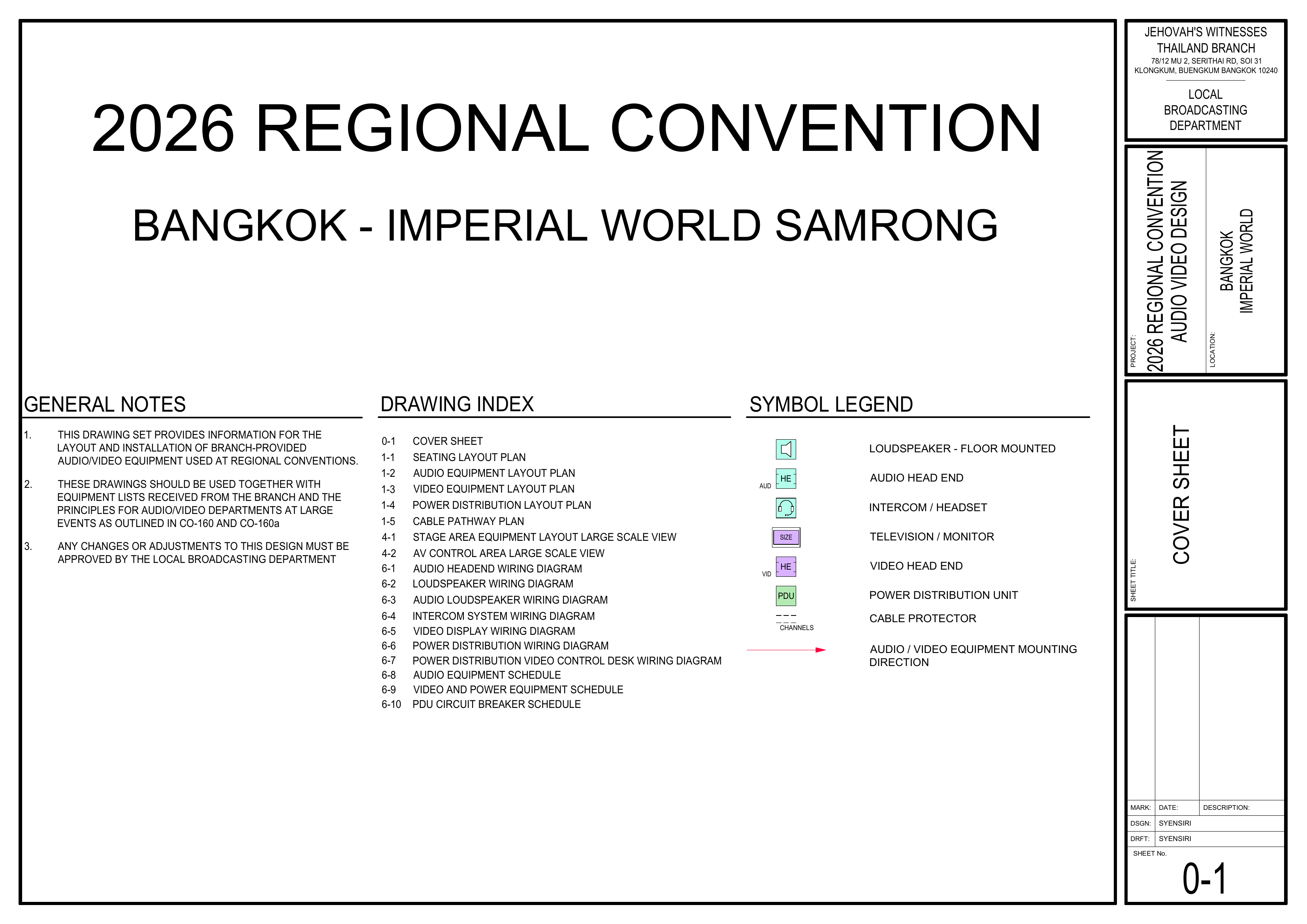
0-1 Cover Sheet / 封面页
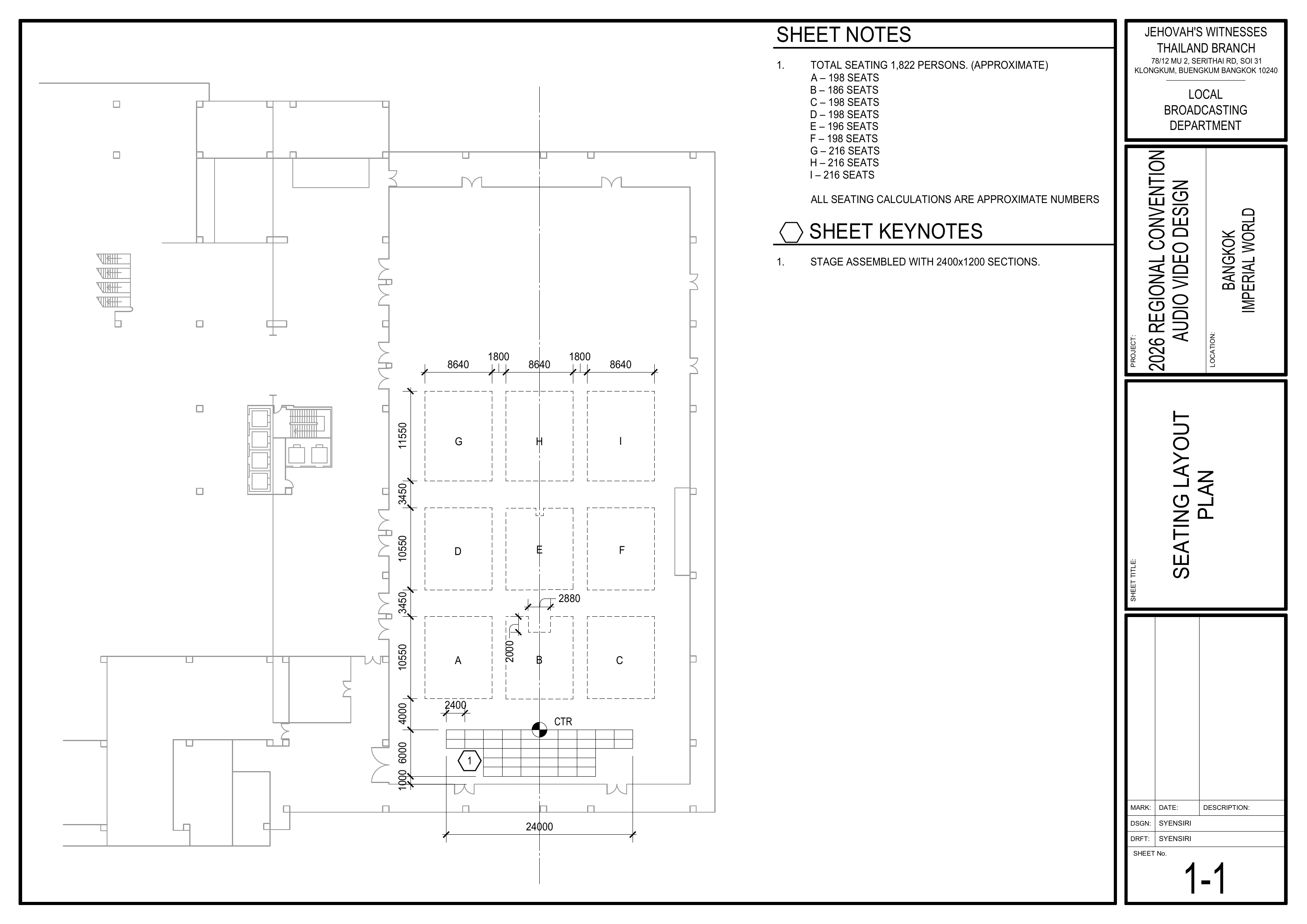
1-1 Seating Layout Plan / 座位布局图
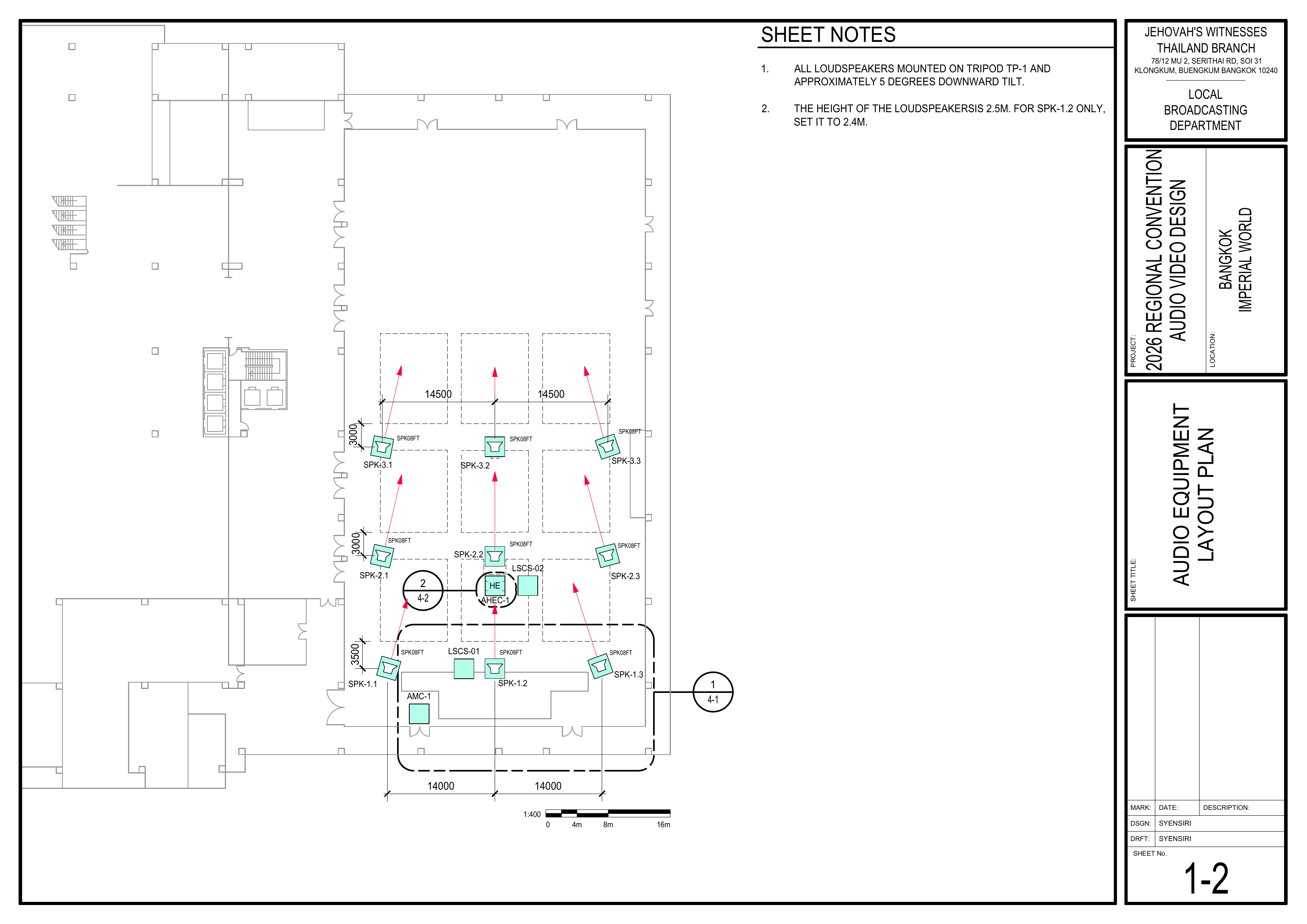
1-2 Audio Equipment Layout Plan / 音频设备布局图
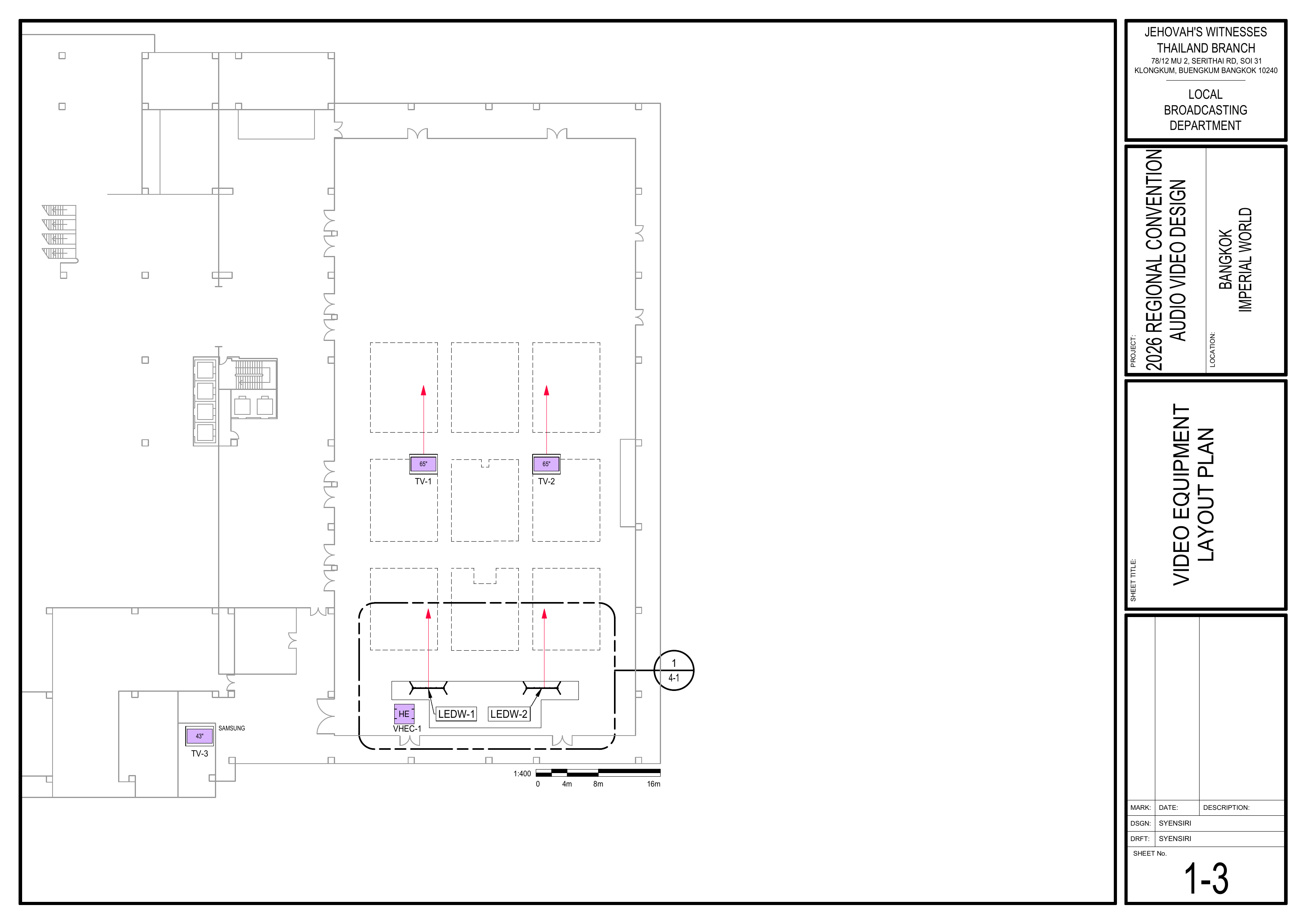
1-3 Video Equipment Layout Plan / 视频设备布局图
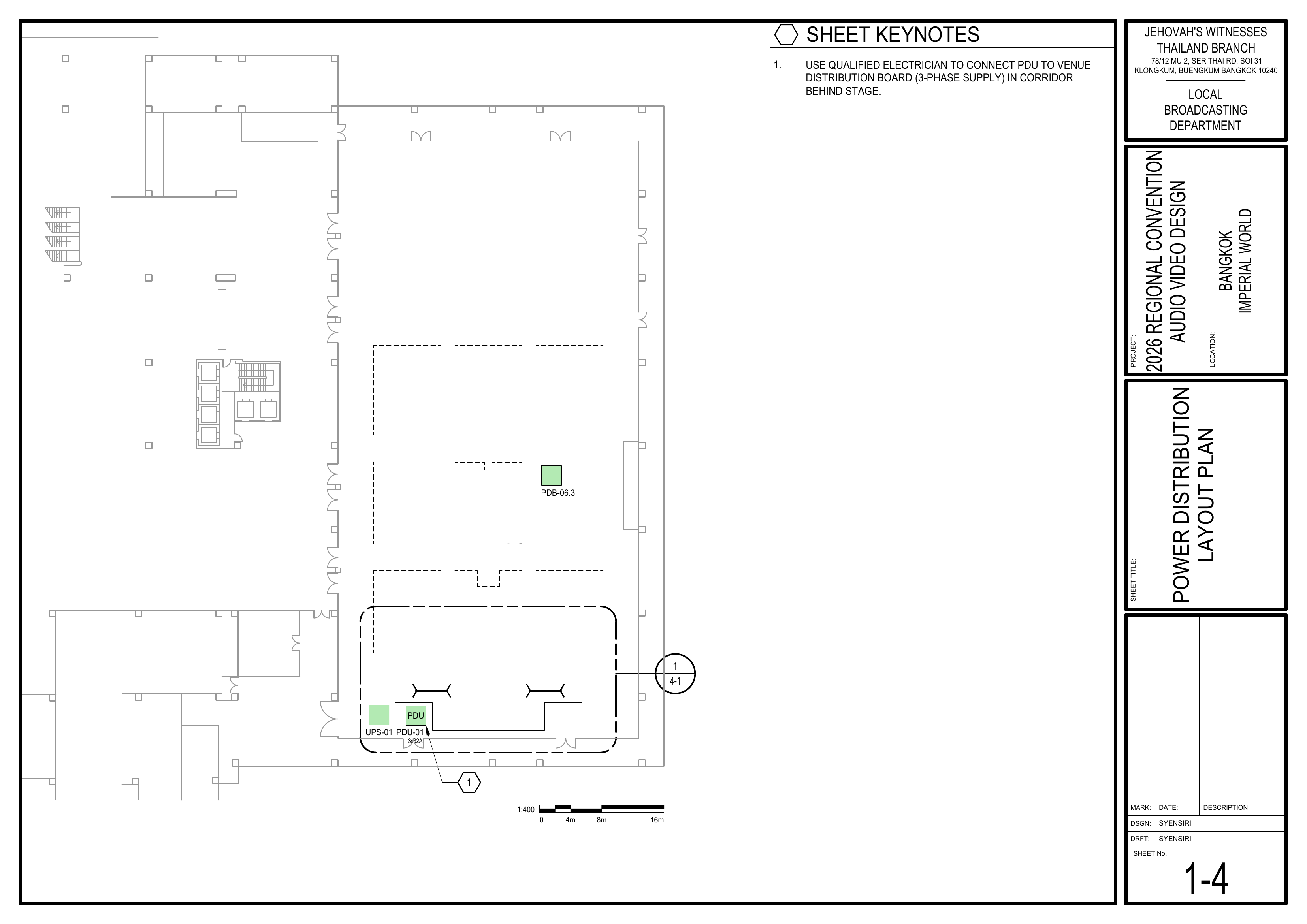
1-4 Power Distribution Layout Plan / 电源分配布局图
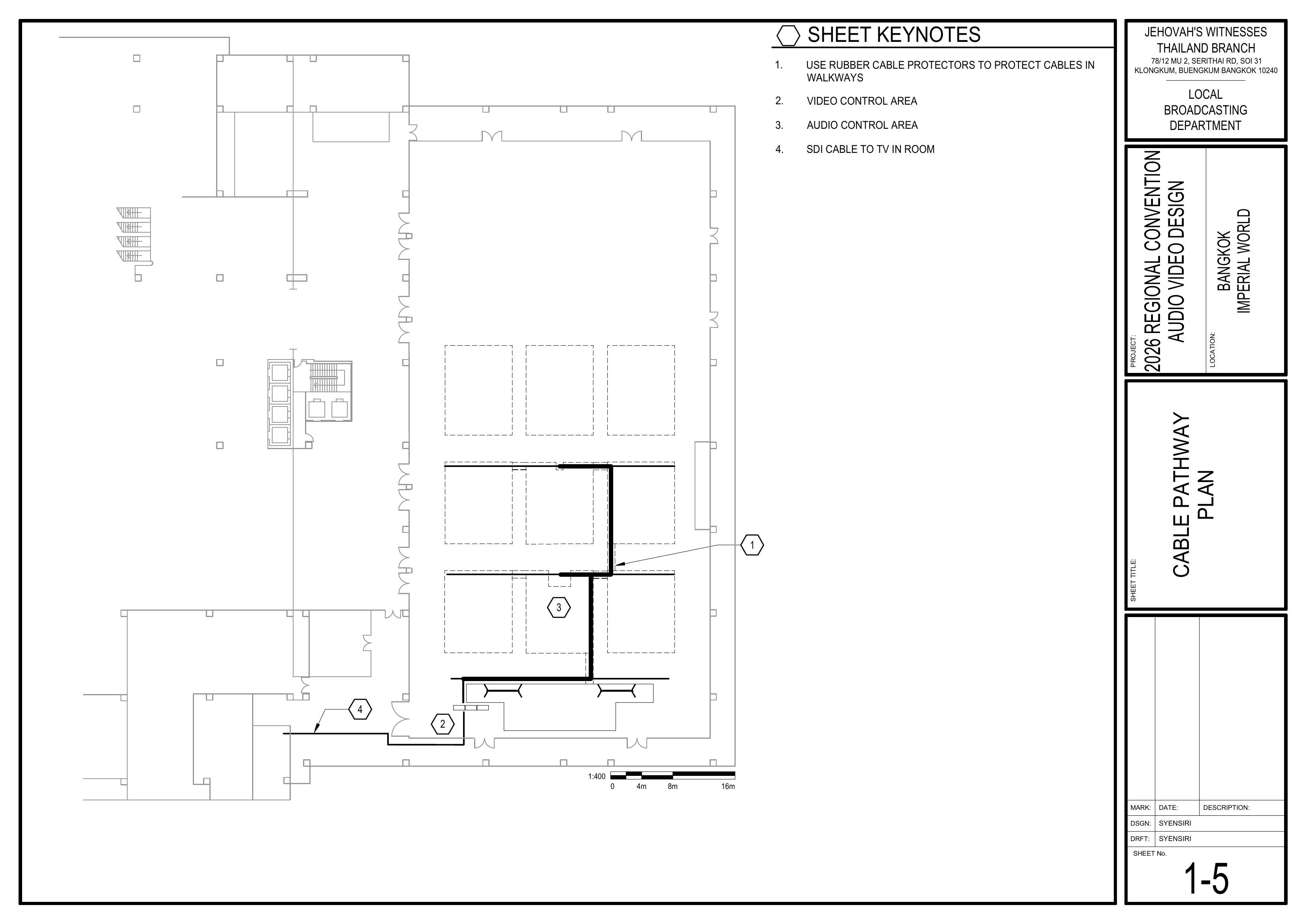
1-5 Cable Pathway Plan / 电缆路径图
---
#### 🔍 Large Scale Views / 大比例图
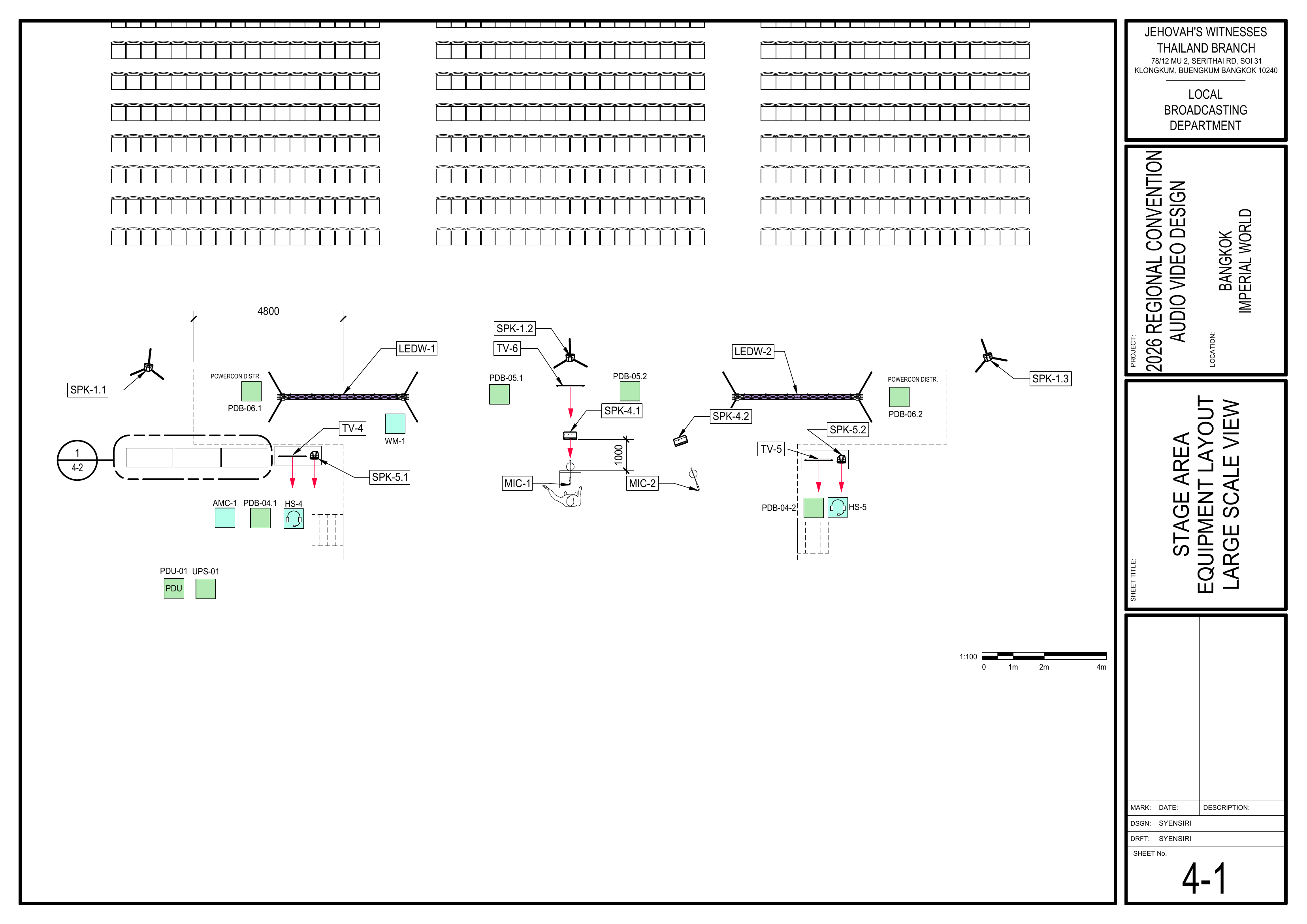
4-1 Stage Area Equipment Layout Large Scale View / 舞台区域设备布局大比例图
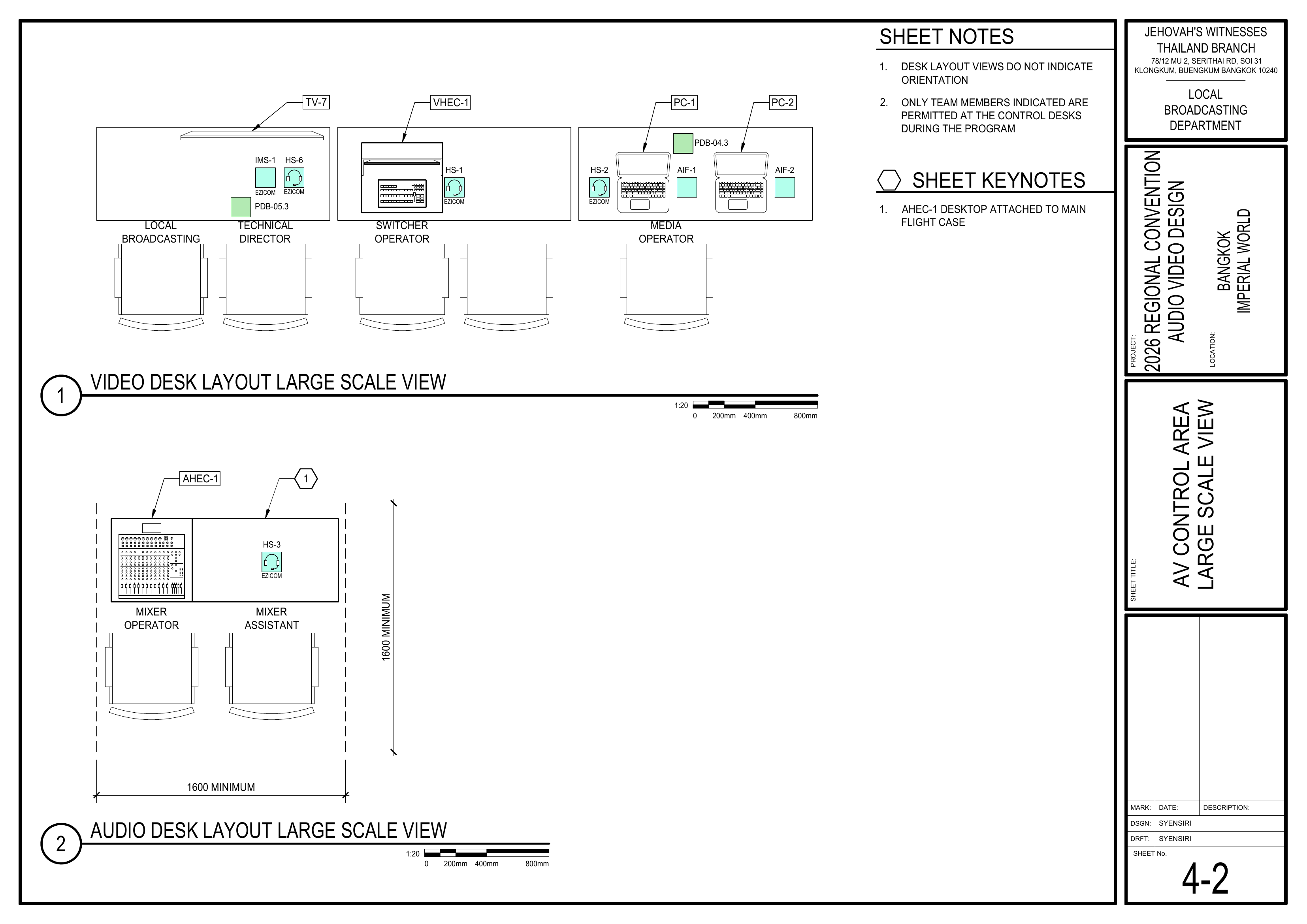
4-2 AV Control Area Large Scale View / 音视频控制区大比例图
---
#### 🔌 Wiring Diagrams / 接线图
6-1 Audio Headend Wiring Diagram / 音频主控接线图
6-2 Loudspeaker Wiring Diagram / 扬声器接线图
6-3 Audio Loudspeaker Wiring Diagram / 讲台及部门扬声器接线图
6-4 Intercom System Wiring Diagram / 对讲系统接线图
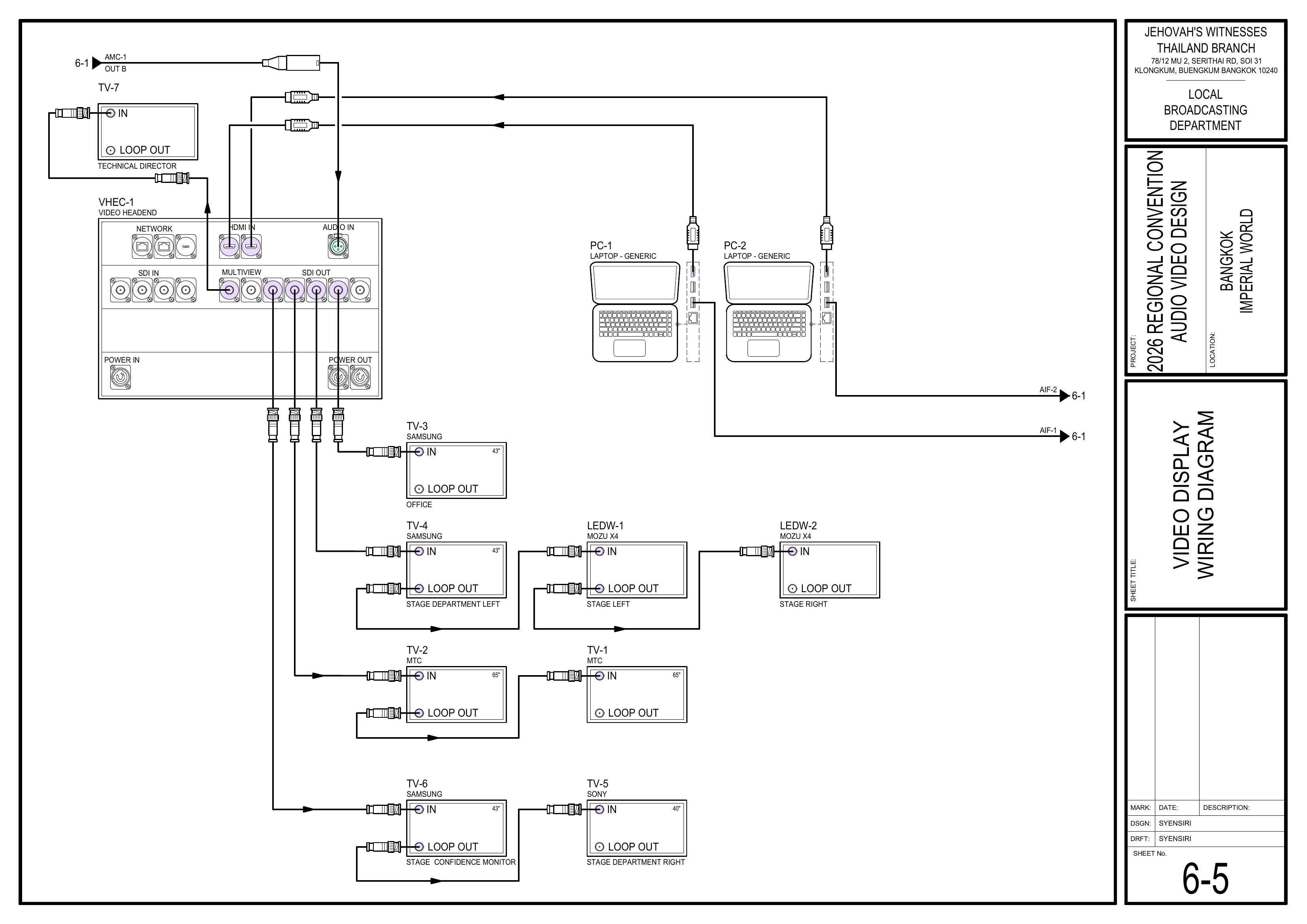
6-5 Video Display Wiring Diagram / 视频显示系统接线图
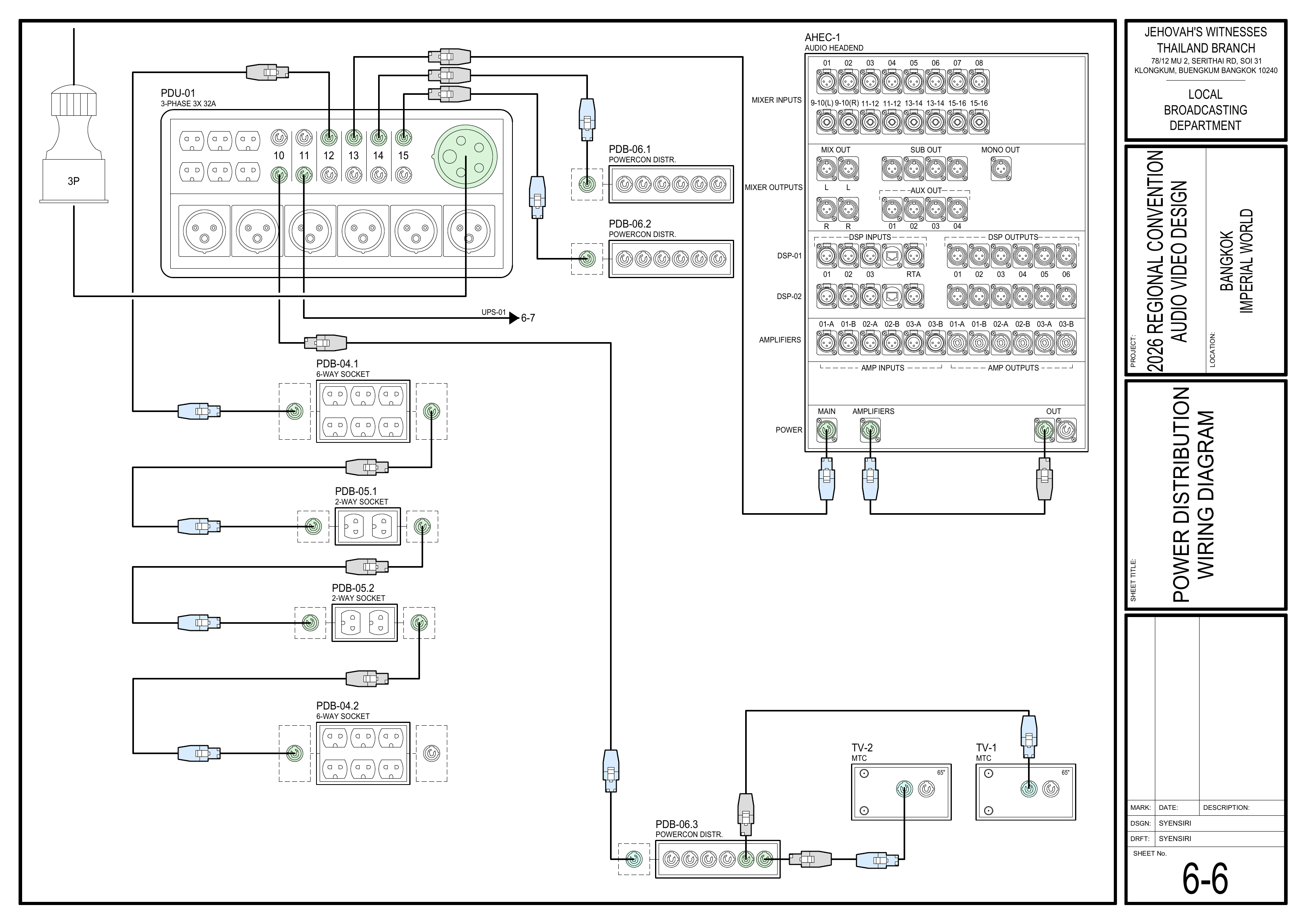
6-6 Power Distribution Wiring Diagram / 电源分配接线图
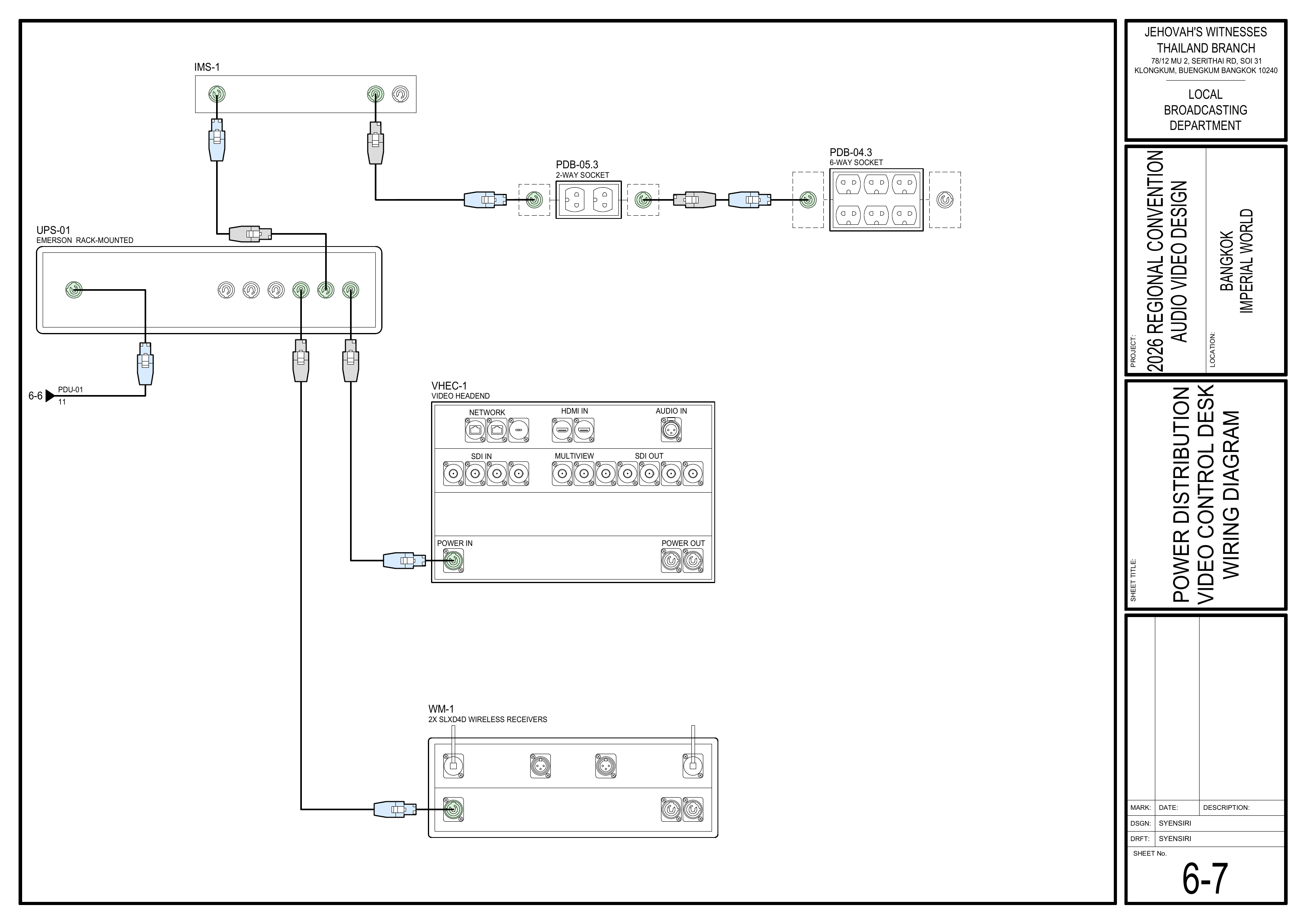
6-7 Power Distribution Video Control Desk Wiring Diagram / 视频控制台电源接线图
---
#### 📋 Equipment Schedules / 设备清单
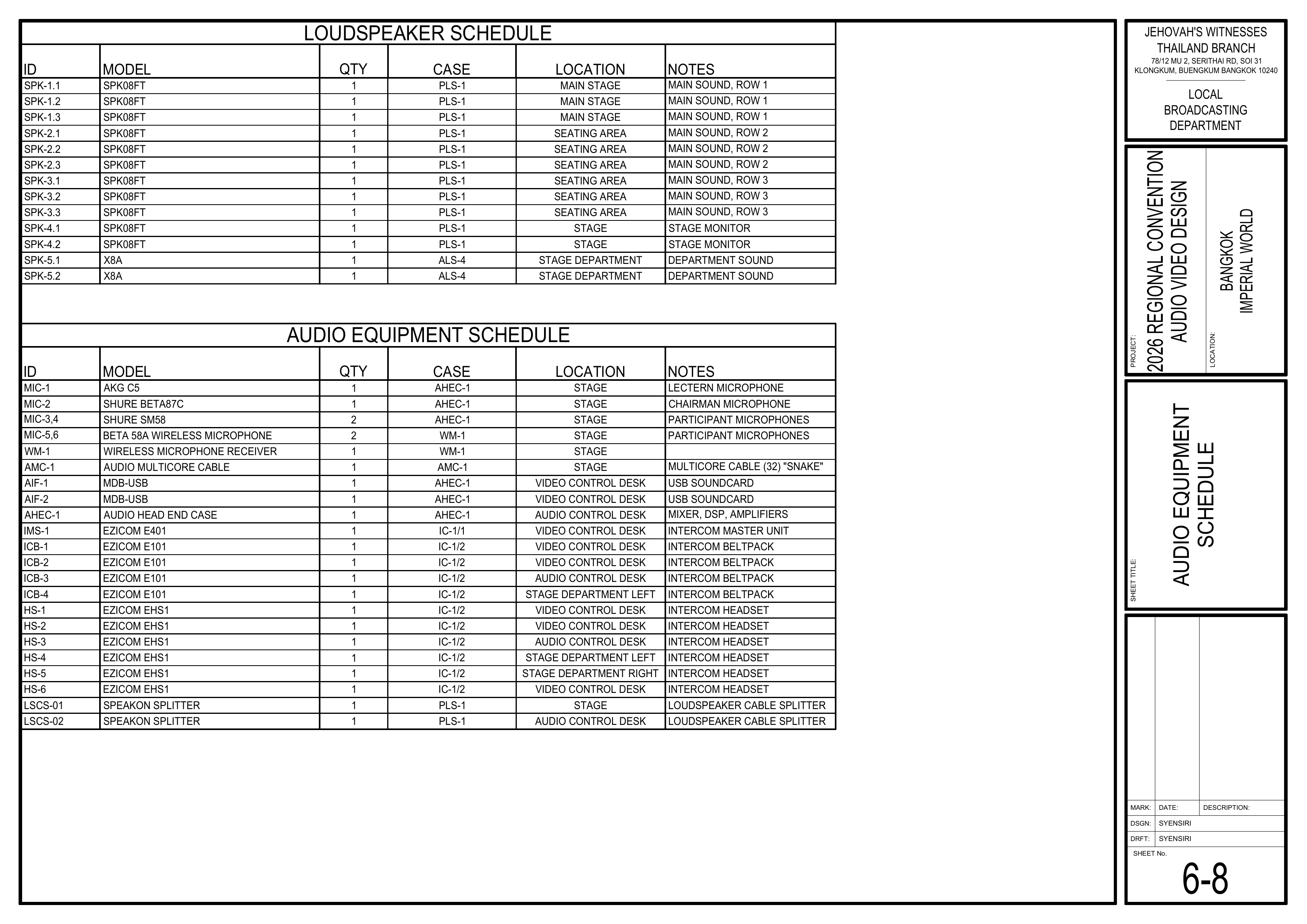
6-8 Audio Equipment Schedule / 音频设备清单
6-9 Video and Power Equipment Schedule / 视频和电源设备清单
6-10 PDU Circuit Breaker Schedule / PDU 断路器清单
# Audio Booth (AHEC-1) / 音频控制台组(AHEC-1)
### 🎤 Audio Booth Team / 音频控制台组
#### Team Information / 小组信息
| Item / 项目 | Information / 信息 |
| --- | --- |
| **Team / 小组** | Audio Booth / 音频控制台组 |
| **Keyman / 负责人** | Willy 🔑 |
| **Crew Overseer / 小组监督** | Gyeong-hwan Lee 李俊辉 |
---
#### 🇬🇧 English Instructions
**Purpose**
Install, connect, and commission the Audio Headend (AHEC-1) according to the schematics before testing and operation.
**Required References**
* **Full Drawing Set:** [📎 Complete PDF](https://drive.google.com/file/d/1LinBW8x7FTiWcCa5SnXsM282yU6THkQm/view?usp=drive_link)
* **Congregation Job Hazard Analysis (DC-85):** [📁 Google Drive Folder](https://drive.google.com/drive/folders/1pmqQ4bBFoGkQkjXcjJ8G3sDhUFyZQOMz?usp=drive_link)
* **CO-160a:** [📎 CO-160a](https://drive.google.com/file/d/1nbmMRpEwRkg_3MdfnRwXcOuUG9Tc-t9F/view) — Chapter 3, **Audio Headend AHEC-1, pages 1–2, Commissioning an Audio Installation**
* **Specific Schematics:**
* 1-2 Audio Equipment Layout Plan
* 1-4 Power Distribution Layout Plan
* 4-2 AV Control Area Large Scale View
* 6-1 Audio Headend Wiring Diagram
* 6-2 Loudspeaker Wiring Diagram
* 6-3 Audio Loudspeaker Wiring Diagram
* 6-6 Power Distribution Wiring Diagram
* 6-8 Audio Equipment Schedule
* **Event Content List:** Case AHEC-1
**Required Equipment Cases**
* **AHEC-1:** Contains the Audio Headend, including the 16-channel mixer, 2x DSPs, 3x amplifiers, power conditioner, and accessories.
* **AIF-1 and AIF-2:** The 2x MDB-USB audio interfaces are stored in AHEC-1 and are used by the Video Booth Team for PC-1 and PC-2 audio. Coordinate their use and return.
**Safety Notes**
⚠️ Safety & Installation Notes
• Strict NO FOOD or DRINK policy at the Audio Booth. (CO-160 2:5)
• Cell phones and tablets can introduce noise into the system; be mindful of this while operating equipment. (CO-160 2:5)
• Do not apply power until the Power Distribution Team confirms that power is ready.
#### Setup Steps
**1. Cable Management**
* Keep cables neat and organized throughout the installation.
* Keep cables away from operator movement areas.
* Attach a tag to each cable identifying its use as connections are made.
**2. Position the Audio Headend**
*Schematics: Pages 1-2 Audio Equipment Layout Plan, 4-2 AV Control Area Large Scale View*
* Move AHEC-1 to the Audio Control Area.
* Position AHEC-1 according to the control-area layout.
* Leave sufficient space for operators and access to the rear connections.
🗺️ View Associated Schematics (Pages 1-2, 4-2)
**3. Connect Audio Equipment**
*Schematics: Pages 6-1 Audio Headend Wiring Diagram, 6-8 Audio Equipment Schedule*
* Connect the audio multicore cable (AMC-1), microphone inputs, loudspeaker outputs, and other audio connections to AHEC-1 according to the schematics.
* Coordinate with the Video Booth Team for the AIF-1 and AIF-2 media audio connections from PC-1 and PC-2.
* Confirm each connection is made to the correctly labeled input or output.
* Keep cables neat and tagged as connections are made.
🗺️ View Audio Headend Schematics (Pages 6-1, 6-8)
**4. Connect to Power**
*Schematics: Pages 1-4 Power Distribution Layout Plan, 6-6 Power Distribution Wiring Diagram*
* Connect AHEC-1 to the power socket provided by the Power Distribution Team.
* Before applying power, make sure all mixer faders, including the MASTER fader, are fully down and all amplifiers are turned off.
* Do not power on AHEC-1 until the Power Distribution Team confirms that power is ready.
🗺️ View Power Schematics (Pages 1-4, 6-6)
**5. Commission the Audio System**
*Reference: [📎 CO-160a](https://drive.google.com/file/d/1nbmMRpEwRkg_3MdfnRwXcOuUG9Tc-t9F/view) — Chapter 3, Audio Headend AHEC-1, pages 1–2, Commissioning an Audio Installation*
*Schematics: Pages 6-1 Audio Headend Wiring Diagram, 6-2 Loudspeaker Wiring Diagram, 6-3 Audio Loudspeaker Wiring Diagram*
* Commission AHEC-1 according to the CO-160a **Commissioning an Audio Installation** procedure.
* Connect to the DSP using VENU360 and recall the event-specific preset if one has been provided by LBD.
* Verify that each loudspeaker output operates in the correct zone and provides the intended coverage.
* Check delays, audio levels, input gain, speech equalization, and feedback reduction as directed in CO-160a.
* Coordinate with the Video Booth Team to confirm audio from AIF-1 and AIF-2 reaches AHEC-1 correctly.
* After the Power Distribution Team completes WM-1 setup and synchronization, confirm that MIC-5 and MIC-6 provide a clean and reliable signal through the audio system.
* Save the venue preset after final adjustments.
* Confirm the complete audio system is ready before walk-throughs.
🗺️ View Audio Commissioning Schematics (Pages 6-1, 6-2, 6-3)
#### Completion Checklist
* [ ] Cables routed neatly and tagged
* [ ] AHEC-1 positioned in the Audio Control Area
* [ ] Audio equipment connected according to the schematics
* [ ] AIF-1 and AIF-2 media audio verified with the Video Booth Team
* [ ] AHEC-1 connected to the power socket
* [ ] Audio system commissioned according to CO-160a
* [ ] Loudspeaker zones, delays, levels, and coverage verified
* [ ] MIC-5 and MIC-6 audio verified after WM-1 synchronization
* [ ] Final DSP settings saved
* [ ] Keyman inspection completed
#### Dismantling
* [ ] Wait for the department briefing and prayer 30 minutes after the program ends on Sunday before dismantling.
* [ ] Power down AHEC-1 according to the [CO-160a](https://drive.google.com/file/d/1nbmMRpEwRkg_3MdfnRwXcOuUG9Tc-t9F/view) shutdown procedure before moving equipment.
* [ ] Bring AHEC-1, external cables, accessories, and related Audio Booth materials to the **designated equipment area for inventory**.
* [ ] Make sure AIF-1 and AIF-2 are returned with AHEC-1.
* [ ] Keep useful cable and equipment labels attached for inventory and packing.
* [ ] Coil cables neatly, avoiding twists, kinks, or strain on connectors.
* [ ] Keep small adapters, power supplies, and accessories together with their assigned equipment.
* [ ] Check the Audio Control Area for any forgotten equipment or materials.
* [ ] Keyman confirms all Audio Booth materials have been brought to the inventory area.
---
#### 🇨🇳 中文说明
**目的**
根据图纸安装、连接并调试音频主控设备 (AHEC-1),为测试和正式运行做好准备。
**参考资料**
* **完整图纸:** [📎 完整 PDF 文件](https://drive.google.com/file/d/1LinBW8x7FTiWcCa5SnXsM282yU6THkQm/view?usp=drive_link)
* **《会众工作危险性分析》(DC-85):** [📁 Google Drive 文件夹](https://drive.google.com/drive/folders/1pmqQ4bBFoGkQkjXcjJ8G3sDhUFyZQOMz?usp=drive_link)
* **CO-160a:** [📎 CO-160a](https://drive.google.com/file/d/1nbmMRpEwRkg_3MdfnRwXcOuUG9Tc-t9F/view) — 第 3 章,**Audio Headend AHEC-1,第 1–2 页,Commissioning an Audio Installation**
* **相关图纸:**
* 1-2 音频设备布局图
* 1-4 电源分配布局图
* 4-2 音视频控制区大比例图
* 6-1 音频主控接线图
* 6-2 扬声器接线图
* 6-3 讲台及部门扬声器接线图
* 6-6 电源分配接线图
* 6-8 音频设备清单
* **大会设备清单:** 设备箱 AHEC-1
**所需设备箱**
* **AHEC-1:** 包含音频主控设备、16 通道混音器、2 台数字信号处理器 (DSP)、3 台功放、电源调节器及附件。
* **AIF-1 和 AIF-2:** 两个 MDB-USB 音频接口存放在 AHEC-1 内,由视频控制台组用于 PC-1 和 PC-2 的音频。请协调取用和归还。
**安全提醒**
⚠️ 安全与安装提示
• 音频控制台严禁饮食。 (CO-160 2:5)
• 手机和平板电脑会让系统出现杂音,操作设备时请留意。 (CO-160 2:5)
• 在电源分配组确认电源准备好之前,不要接通电源。
#### 安装步骤
**1. 线缆管理**
* 在整个安装过程中保持线缆整齐有序。
* 避免让线缆影响操作人员移动。
* 连接线缆时,为每根线缆贴上标签,标明其用途。
**2. 放置音频主控设备**
*图纸:1-2 音频设备布局图、4-2 音视频控制区大比例图*
* 将 AHEC-1 移动到音频控制区。
* 按照控制区布局图摆放 AHEC-1。
* 为操作人员和设备后方接线预留足够空间。
🗺️ 查看相关图纸(图纸 1-2, 4-2)
**3. 连接音频设备**
*图纸:6-1 音频主控接线图、6-8 音频设备清单*
* 按照图纸,将音频多芯线缆 (AMC-1)、麦克风输入、扬声器输出及其他音频连接接到 AHEC-1。
* 与视频控制台组协调 PC-1 和 PC-2 的 AIF-1、AIF-2 媒体音频连接。
* 确认每项连接都接到标签正确的输入或输出端。
* 连接设备时保持线缆整齐,并贴上标签。
🗺️ 查看音频主控相关图纸(图纸 6-1, 6-8)
**4. 连接电源**
*图纸:1-4 电源分配布局图、6-6 电源分配接线图*
* 将 AHEC-1 连接到电源分配组提供的电源插座。
* 接通电源前,确认所有混音器推子(包括 MASTER 推子)都已完全降下,并且所有功放都已关闭。
* 在电源分配组确认电源准备好之前,不要开启 AHEC-1。
🗺️ 查看电源相关图纸(图纸 1-4, 6-6)
**5. 调试音频系统**
*参考资料:[📎 CO-160a](https://drive.google.com/file/d/1nbmMRpEwRkg_3MdfnRwXcOuUG9Tc-t9F/view) — 第 3 章,Audio Headend AHEC-1,第 1–2 页,Commissioning an Audio Installation*
*图纸:6-1 音频主控接线图、6-2 扬声器接线图、6-3 讲台及部门扬声器接线图*
* 按照 CO-160a 的 **Commissioning an Audio Installation** 程序调试 AHEC-1。
* 使用 VENU360 连接 DSP;如果 LBD 已提供大会专用预设,请调用该预设。
* 确认每个扬声器输出对应正确的区域,并达到图纸所示的覆盖范围。
* 按照 CO-160a 检查延迟、音频电平、输入增益、语音均衡及反馈抑制。
* 与视频控制台组协调,确认 AIF-1 和 AIF-2 的音频已正确传送到 AHEC-1。
* 电源分配组完成 WM-1 设置并同步后,确认 MIC-5 和 MIC-6 的信号稳定,并能通过音频系统正常播放。
* 完成最终调整后保存场地预设。
* 在走位练习前确认整个音频系统已经准备好。
🗺️ 查看音频调试相关图纸(图纸 6-1, 6-2, 6-3)
#### 完成检查表
* [ ] 线缆已整齐布设并贴上标签
* [ ] AHEC-1 已放置在音频控制区
* [ ] 已根据图纸连接音频设备
* [ ] 已与视频控制台组确认 AIF-1 和 AIF-2 的媒体音频
* [ ] AHEC-1 已连接到电源插座
* [ ] 音频系统已按照 CO-160a 完成调试
* [ ] 扬声器区域、延迟、电平及覆盖范围已确认
* [ ] WM-1 同步完成后,MIC-5 和 MIC-6 的音频已确认
* [ ] 最终 DSP 设置已保存
* [ ] 负责人已检查确认
#### 拆卸
* [ ] 在星期日节目结束 30 分钟后,等待整个部门的简短会议和祷告后再开始拆卸。
* [ ] 移动设备前,按照 [CO-160a](https://drive.google.com/file/d/1nbmMRpEwRkg_3MdfnRwXcOuUG9Tc-t9F/view) 的关机程序关闭 AHEC-1。
* [ ] 将 AHEC-1、外部线缆、配件及音频控制台组的相关物品带到**指定设备区域进行清点**。
* [ ] 确认 AIF-1 和 AIF-2 已与 AHEC-1 一起归还。
* [ ] 保留有助于清点和装箱的线缆及设备标签。
* [ ] 整齐盘绕线缆,避免扭曲、打结或拉扯接头。
* [ ] 将小型转接器、电源适配器及其他配件与所属设备放在一起。
* [ ] 检查音频控制区是否遗留设备或材料。
* [ ] 负责人确认音频控制台组所有物品都已送到清点区域。
---
#### Related Pages / 相关页面
* [Audio Cabling / 音频布线](https://wiki.linajpenglish.xyz/books/2026-bangkok-convention-av-2026-bangkok-convention-av-2026/page/audio-cabling-setup)
* [Video Booth / 视频控制台组](https://wiki.linajpenglish.xyz/books/2026-bangkok-convention-av-2026-bangkok-convention-av-2026/page/video-booth-setup)
* [Power Distribution / 电源分配](https://wiki.linajpenglish.xyz/books/2026-bangkok-convention-av-2026-bangkok-convention-av-2026/page/power-distribution-and-intercom-setup)
# Audio Cabling Setup / 音频线缆安装
### 🎤 Audio Cabling Team / 音频布线组
#### Team Information / 小组信息
| Item / 项目 | Information / 信息 |
| --- | --- |
| **Team / 小组** | Audio Cabling / 音频布线组 |
| **Keyman / 负责人** | Prasert 🔑 |
| **Team Members / 小组成员** | Lucy 露西
Zabrina 柏莉娜
Siiri |
| **Crew Overseer / 小组监督** | Gyeong-hwan Lee 李俊辉 |
---
#### 🇬🇧 English Instructions
**Purpose**
Install, protect, and label the audio multicore cable and main loudspeaker cabling according to the schematics before system commissioning.
**Required References**
* **Full Drawing Set:** [📎 Complete PDF](https://drive.google.com/file/d/1LinBW8x7FTiWcCa5SnXsM282yU6THkQm/view?usp=drive_link)
* **Congregation Job Hazard Analysis (DC-85):** [📁 Google Drive Folder](https://drive.google.com/drive/folders/1pmqQ4bBFoGkQkjXcjJ8G3sDhUFyZQOMz?usp=drive_link)
* **CO-160a:** [📎 CO-160a](https://drive.google.com/file/d/1nbmMRpEwRkg_3MdfnRwXcOuUG9Tc-t9F/view) — Chapter 3, **Audio Signal Cables (ASC-xx), pages 7–8**
* **Specific Schematics:**
* 1-2 Audio Equipment Layout Plan
* 1-5 Cable Pathway Plan
* 6-2 Loudspeaker Wiring Diagram
* **Event Content List:** Cases AMC-1, ASC-01 ×2, CPS-1, CPS-3
**Required Equipment Cases**
* **AMC-1:** 60 m audio multicore cable with 24x XLR inputs and 8x XLR outputs on a reel.
* **ASC-01 ×2:** XLR audio cables in 5 m, 10 m, and 20 m lengths. Coordinate with the Stage Team for stage requirements.
* **CPS-1:** 3-channel floor cable protectors and rubber mats. Coordinate with the Video Cabling & TVs Team.
* **CPS-3:** Carpet strips for covering cables. Coordinate with the Video Cabling & TVs Team.
* **PLS-1 — Shared Equipment:** speakON cables and splitters for the main loudspeakers. Coordinate with the Loudspeakers Team.
**Safety Notes**
⚠️ Safety & Cable Handling
• Keep walkways and emergency pathways clear.
• Use cable protectors where cables cross walkways.
• Where possible, do not run audio signal cables directly parallel to power cables; cross power cables at right angles.
• When connecting ASC-01 XLR cables, make sure the connected equipment is switched off.
• Keep the attached Velcro with ASC-01 cables.
• Do not use your elbow to wind audio signal cables.
#### Setup Steps
**1. Install the Audio Multicore Cable (AMC-1)**
*Schematics: Pages 1-2 Audio Equipment Layout Plan, 1-5 Cable Pathway Plan*
* Begin at the AMC-1 starting position at front stage left shown on Drawing 1-2.
* Route AMC-1 toward the Audio Control Area according to Drawing 1-5.
* Keep the cable straight and organized while pulling it.
* Confirm the route before securing or covering the cable.
🗺️ View AMC-1 Location and Cable Route (Pages 1-2, 1-5)
**2. Install Main Loudspeaker Cables — Groups 1–3**
*Schematics: Pages 1-2 Audio Equipment Layout Plan, 1-5 Cable Pathway Plan, 6-2 Loudspeaker Wiring Diagram*
* Coordinate with the Loudspeakers Team before routing the cables.
* Use the speakON cables and splitters from PLS-1.
* Route the cables for **Groups 1–3** according to the schematics.
* Confirm the loudspeaker group and destination before routing each cable.
* Leave sufficient cable at each loudspeaker for the Loudspeakers Team to make the final connection.
* **Groups 4 and 5 are handled by the Stage Team.**
🗺️ View Main Loudspeaker Cabling Schematics (Pages 1-2, 1-5, 6-2)
**3. Protect and Manage Cabling**
*Reference: CO-160a, Chapter 3 — Audio Signal Cables (ASC-xx), pages 7–8*
*Schematics: Page 1-5 Cable Pathway Plan*
* When using ASC-01 XLR cables, open the attached Velcro and unwind the cable by rolling it off. Do not remove the Velcro.
* Where possible, avoid routing audio signal cables directly parallel to power cables; cross power cables at right angles.
* Use floor cable protectors where cables cross walkways.
* Use rubber mats or carpet covers where required in seating areas.
* Coordinate shared audio and video cable routes with the Video Cabling & TVs Team.
* When using carpet covers, secure one side first. Secure the other side after all audio and video cabling is complete.
* Confirm all walkways and emergency pathways remain safe.
🗺️ View Cable Pathway Schematic (Page 1-5)
**4. Label and Final Check**
* Label audio cables so their destination or use is clear.
* Confirm AMC-1 and Groups 1–3 loudspeaker cable routes match the schematics.
* Check that cables are neat, protected, and do not create trip hazards.
* Confirm audio signal cable routes are separated from parallel power runs where possible.
* Coordinate with the Audio Crew and Loudspeakers Team before system commissioning.
#### Completion Checklist
* [ ] AMC-1 installed according to the schematics
* [ ] Groups 1–3 loudspeaker cables routed
* [ ] Loudspeaker cabling coordinated with the Loudspeakers Team
* [ ] Groups 4–5 cabling left for the Stage Team
* [ ] Audio cables labeled
* [ ] Audio and power cable routes separated where possible
* [ ] Walkway crossings protected
* [ ] Seating-area cabling protected where required
* [ ] Shared cable protection coordinated with the Video Cabling & TVs Team
* [ ] Walkways and emergency pathways safe
* [ ] Keyman inspection completed
#### Dismantling
* [ ] Wait for the department briefing and prayer 30 minutes after the program ends on Sunday before dismantling.
* [ ] Coordinate with the Loudspeakers Team before removing Groups 1–3 speakON cables.
* [ ] Coordinate with the Video Cabling & TVs Team before removing shared cable protection.
* [ ] Carefully remove carpet covers, rubber mats, and floor cable protectors.
* [ ] Disconnect and carefully coil the Groups 1–3 loudspeaker cables.
* [ ] For ASC-01 XLR cables handled by this team:
* [ ] Wind each cable carefully without using your elbow.
* [ ] Secure the cable with its attached Velcro.
* [ ] Carefully wind AMC-1 back onto its reel.
* [ ] Gather remaining audio cables and bring them to the designated equipment area.
* [ ] Confirm no audio cables or cable-protection materials remain in the seating area.
* [ ] **Note for team leader:** Use the Bill of Materials (BOM) to cross off every box or case before it is brought to the truck:
* [ ] AMC-1
* [ ] ASC-01 ×2 — coordinate with the Stage Team
* [ ] CPS-1 — coordinate with the Video Cabling & TVs Team
* [ ] CPS-3 — coordinate with the Video Cabling & TVs Team
---
#### 🇨🇳 中文说明
**目的**
按照图纸铺设、保护并标识音频多芯线缆和主扩声扬声器线缆,为系统调试做好准备。
**参考资料**
* **完整图纸:** [📎 完整 PDF 文件](https://drive.google.com/file/d/1LinBW8x7FTiWcCa5SnXsM282yU6THkQm/view?usp=drive_link)
* **《会众工作危险性分析》(DC-85):** [📁 Google Drive 文件夹](https://drive.google.com/drive/folders/1pmqQ4bBFoGkQkjXcjJ8G3sDhUFyZQOMz?usp=drive_link)
* **CO-160a:** [📎 CO-160a](https://drive.google.com/file/d/1nbmMRpEwRkg_3MdfnRwXcOuUG9Tc-t9F/view) — 第 3 章,**Audio Signal Cables (ASC-xx),第 7–8 页**
* **相关图纸:**
* 1-2 音频设备布局图
* 1-5 电缆路径图
* 6-2 扬声器接线图
* **大会设备清单:** 设备箱 AMC-1、ASC-01 ×2、CPS-1、CPS-3
**所需设备箱**
* **AMC-1:** 60 米音频多芯线缆,设有 24 个 XLR 输入和 8 个 XLR 输出,安装在线盘上。
* **ASC-01 ×2:** 5 米、10 米和 20 米 XLR 音频线缆。讲台所需线缆请与讲台组协调。
* **CPS-1:** 三槽地面电缆盖板和橡胶垫。使用时请与视频布线及电视组协调。
* **CPS-3:** 用于覆盖线缆的地毯压线条。使用时请与视频布线及电视组协调。
* **PLS-1 — 共用设备:** 主扩声扬声器使用的 speakON 线缆和分配器。铺设时请与扬声器组协调。
**安全提醒**
⚠️ 安全与线缆处理
• 保持通道和紧急疏散路线畅通。
• 线缆穿过通道时必须使用电缆保护装置。
• 在可行的情况下,不要让音频信号线与电源线直接平行铺设;需要交叉时,应以直角交叉。
• 连接 ASC-01 XLR 音频线前,确认所连接的设备已经关闭。
• ASC-01 线缆原有的魔术贴应保留在线缆上。
• 盘绕音频信号线时不要使用手肘绕线。
#### 安装步骤
**1. 铺设音频多芯线缆 (AMC-1)**
*图纸:1-2 音频设备布局图、1-5 电缆路径图*
* 从图纸 1-2 所示的讲台前区左侧 AMC-1 起点开始。
* 按照图纸 1-5 所示路线向音频控制区铺设 AMC-1。
* 拉线过程中保持线缆平整有序。
* 固定或覆盖线缆前确认走线路径。
🗺️ 查看 AMC-1 起点及电缆路线(图纸 1-2, 1-5)
**2. 铺设第 1–3 组主扩声扬声器线缆**
*图纸:1-2 音频设备布局图、1-5 电缆路径图、6-2 扬声器接线图*
* 铺设前与扬声器组协调。
* 使用 PLS-1 中的 speakON 线缆和分配器。
* 按照图纸铺设**第 1–3 组**扬声器线缆。
* 铺设每条线缆前确认扬声器组别和连接位置。
* 在每个扬声器位置预留足够长度,方便扬声器组完成最后连接。
* **第 4 和第 5 组由讲台组负责。**
🗺️ 查看主扩声扬声器布线图纸(图纸 1-2, 1-5, 6-2)
**3. 保护和整理线缆**
*参考资料:CO-160a,第 3 章 — Audio Signal Cables (ASC-xx),第 7–8 页*
*图纸:1-5 电缆路径图*
* 使用 ASC-01 XLR 音频线时,打开线缆原有的魔术贴,以滚开的方式展开线缆。不要把魔术贴从线缆上取下。
* 在可行的情况下,避免音频信号线与电源线直接平行铺设;需要交叉时,应以直角交叉。
* 线缆穿过通道时使用地面电缆盖板。
* 座位区域根据需要使用橡胶垫或地毯盖板。
* 音频和视频线缆共用路线时,与视频布线及电视组协调。
* 使用地毯盖板时,先固定一侧。等所有音频和视频布线完成后再固定另一侧。
* 确保所有通道和紧急疏散路线保持安全畅通。
🗺️ 查看电缆路径图(图纸 1-5)
**4. 标识并进行最终检查**
* 标识音频线缆,使其连接位置或用途清楚可辨。
* 确认 AMC-1 和第 1–3 组扬声器线缆走线符合图纸。
* 确认线缆整齐、受到保护,并且不会造成绊倒危险。
* 在可行的情况下,确认音频信号线没有与电源线直接平行铺设。
* 系统调试前,与音频组和扬声器组协调确认。
#### 完成检查表
* [ ] AMC-1 已按照图纸铺设
* [ ] 第 1–3 组扬声器线缆已铺设
* [ ] 已与扬声器组协调扬声器布线
* [ ] 第 4–5 组留给讲台组负责
* [ ] 音频线缆已标识
* [ ] 音频线和电源线在可行的情况下已分开铺设
* [ ] 穿过通道的线缆已加以保护
* [ ] 座位区域线缆已按需要加以保护
* [ ] 已与视频布线及电视组协调共用的线缆保护
* [ ] 通道和紧急疏散路线安全畅通
* [ ] 负责人已检查确认
#### 拆卸
* [ ] 在星期日节目结束 30 分钟后,等待整个部门的简短会议和祷告后再开始拆卸。
* [ ] 移除第 1–3 组 speakON 线缆前,先与扬声器组协调。
* [ ] 移除共用线缆保护材料前,先与视频布线及电视组协调。
* [ ] 小心移除地毯盖板、橡胶垫和地面电缆盖板。
* [ ] 断开并小心盘绕第 1–3 组扬声器线缆。
* [ ] 本组处理 ASC-01 XLR 音频线时:
* [ ] 小心盘绕每条线缆,不要使用手肘绕线。
* [ ] 使用线缆原有的魔术贴固定。
* [ ] 将 AMC-1 小心卷回线盘。
* [ ] 收集其余音频线缆并带到指定设备集合区域。
* [ ] 确认座位区域没有遗留音频线缆或线缆保护材料。
* [ ] **组长注意:** 在将每个箱子或设备箱搬上卡车前,请使用物料清单 (BOM) 核对并划掉每一项:
* [ ] AMC-1
* [ ] ASC-01 ×2 — 与讲台组协调
* [ ] CPS-1 — 与视频布线及电视组协调
* [ ] CPS-3 — 与视频布线及电视组协调
---
#### Related Pages / 相关页面
* [Audio Booth (AHEC-1) / 音频控制台组](https://wiki.linajpenglish.xyz/books/2026-bangkok-convention-av-2026-bangkok-convention-av-2026/page/audio-booth-ahec-1-ahec-1)
* [Loudspeakers / 扬声器](https://wiki.linajpenglish.xyz/books/2026-bangkok-convention-av-2026-bangkok-convention-av-2026/page/loudspeakers-setup)
* [Stage Setup / 讲台安装](https://wiki.linajpenglish.xyz/books/2026-bangkok-convention-av-2026-bangkok-convention-av-2026/page/stage-layout-setup)
* [Video Cabling & TVs / 视频布线及电视](https://wiki.linajpenglish.xyz/books/2026-bangkok-convention-av-2026-bangkok-convention-av-2026/page/video-cabling-tvs-setup)
# Loudspeakers Setup / 扬声器安装
### 🎤 Loudspeakers Team / 扬声器组
| Team / 小组 | Members / 成员 |
| ------ | ------ |
| **Loudspeakers / 扬声器** | • Alex Jang 🔑 |
---
#### 🇬🇧 English Instructions
**Purpose**
Measure the layout and safely install, connect, raise, aim, and test loudspeaker Groups 1–3 for the main audience sound system.
Assignment Scope:
The Loudspeakers Team installs Groups 1–3 only. The Stage Team is responsible for Groups 4 and 5.
⚠️ Tripod and Loudspeaker Safety
• Install tripods on an even, stable surface and keep emergency pathways clear.
• Secure each tripod with sandbags.
• Use two people when mounting or removing a loudspeaker.
• Connect the speakON cable before raising the loudspeaker.
• Keep hands clear of moving tripod parts and confirm all locks are secure before releasing the tripod.
**Required References**
* **Full Drawing Set:** [📎 Complete PDF](https://drive.google.com/file/d/1LinBW8x7FTiWcCa5SnXsM282yU6THkQm/view?usp=drive_link)
* **Congregation Job Hazard Analysis (DC-85):** [📁 Google Drive Folder](https://drive.google.com/drive/folders/1pmqQ4bBFoGkQkjXcjJ8G3sDhUFyZQOMz?usp=drive_link)
* **Tripod Instructions:** [📎 CO-160a](https://drive.google.com/file/d/1nbmMRpEwRkg_3MdfnRwXcOuUG9Tc-t9F/view) — Chapter 3, **Tripods (TP-1), pages 5–6, Figures 58–59**
* **Specific Schematics:**
* 1-1 Seating Layout Plan
* 1-2 Audio Equipment Layout Plan
* 6-2 Loudspeaker Wiring Diagram
* 6-8 Audio Equipment Schedule
* **Event Content List:** Cases PLS-1, TP-1, SES-1
**Required Equipment Cases**
* **PLS-1:** Contains the SPK08FT passive loudspeakers, speakON splitters, cables, and related accessories.
* Use SPK-1.1 through SPK-3.3.
* Leave SPK-4.1 and SPK-4.2 for the Stage Team.
* **TP-1:** Contains crank-operated loudspeaker tripods and tilt/angle adapters.
* **SES-1:** Contains 5 kg sandbags used to secure the tripods.
#### Assigned Loudspeaker Schedule
*From Page 6-8 Audio Equipment Schedule*
| Group | Loudspeakers | First Audience Row | Height | Aim |
| --- | --- | --- | --- | --- |
| **Group 1** | SPK-1.1, SPK-1.2, SPK-1.3 | **3.5 m** | SPK-1.2: **2.4 m**
Others: **2.5 m** | Follow Drawing 1-2 |
| **Group 2** | SPK-2.1, SPK-2.2, SPK-2.3 | **3.0 m** | **2.5 m** | Follow Drawing 1-2 |
| **Group 3** | SPK-3.1, SPK-3.2, SPK-3.3 | **3.0 m** | **2.5 m** | Follow Drawing 1-2 |
Important:
Check each loudspeaker ID and follow the exact position and coverage arrow shown on Drawing 1-2.
#### Setup Steps
**1. Measure and Mark Loudspeaker Positions**
*Schematics: Pages 1-1 Seating Layout Plan, 1-2 Audio Equipment Layout Plan*
* Measure and mark the positions for SPK-1.1 through SPK-3.3 before opening the tripods.
* Use the Assigned Loudspeaker Schedule above for first-row distances and heights.
* Coordinate with the Stage Team while confirming stage, chair, and aisle spacing.
* Make sure no loudspeaker position obstructs an emergency pathway.
* Mark the assigned loudspeaker ID at each position.
🗺️ View Associated Schematics (Pages 1-1, 1-2)
**2. Install Each Loudspeaker**
*References: Drawing 1-2; Drawing 6-2; CO-160a, Chapter 3, Tripods (TP-1), pages 5–6, Figures 58–59*
Complete one loudspeaker as far as possible before moving to the next.
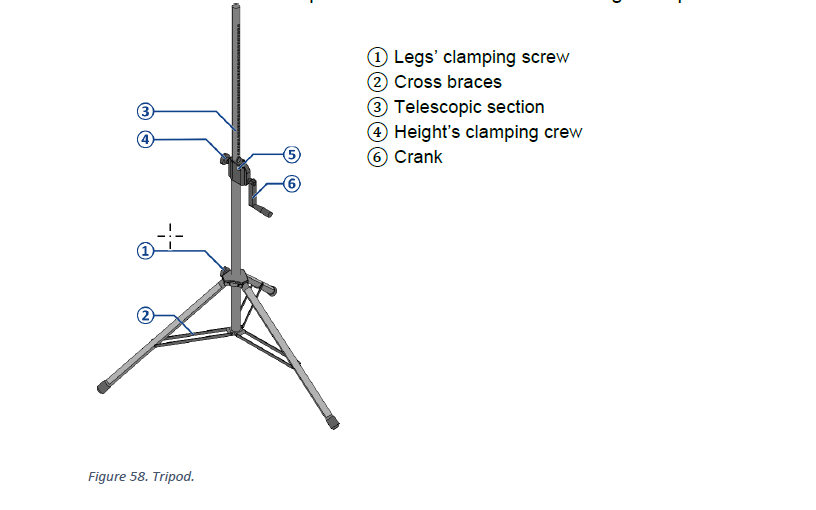
**Set Up the Tripod — Figure 58**
* Position the tripod on an even, stable surface.
* Loosen the leg clamping screw **①** and open the legs until the cross braces **②** are horizontal.
* Retighten the leg clamping screw **①**.
* Orient one tripod leg beneath the direction in which the loudspeaker will be tilted.
* Secure the tripod with the 5 kg sandbags from SES-1.
📘 View TP-1 Tripod — CO-160a Figure 58
[](https://wiki.linajpenglish.xyz/uploads/images/gallery/2026-07/tripod-fig-58.png)
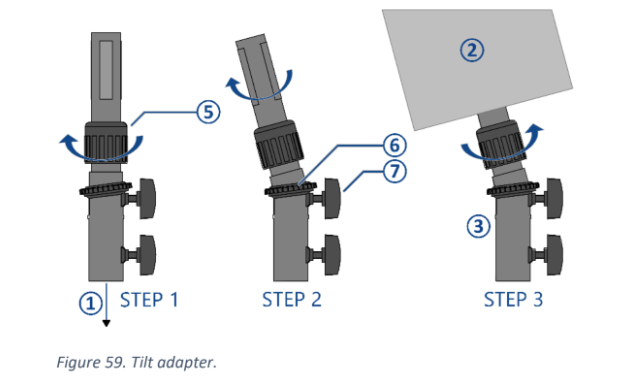
**Install and Aim the Loudspeaker — Figure 59**
* Set the tilt adapter to approximately **5 degrees downward**.
* Tighten the upper clamping screw **⑦**.
* Turn lock ring **⑤** toward **OPEN**.
* Using **two people**, place the loudspeaker onto the adapter.
* Position the tilted loudspeaker above one tripod leg for stability.
* Turn lock ring **⑤** toward **CLOSE** until the loudspeaker is secure.
* Aim the loudspeaker according to the coverage arrow on Drawing 1-2.
📘 View Tilt/Angle Adapter — CO-160a Figure 59
[](https://wiki.linajpenglish.xyz/uploads/images/gallery/2026-07/tripod-fig-59-tilt-adapter.png)
**Connect the speakON Cable — Drawing 6-2**
* Confirm the Audio Cabling Team has routed the correctly labeled speakON cable.
* Connect the speakON cable **before raising the loudspeaker**.
* Leave enough slack so the cable does not pull on the connector when raised.
* Keep the cable clear of the tripod mechanism and walkways.
Cable Not Ready Yet?
Leave the tripod lowered, continue with another loudspeaker, and return after the Audio Cabling Team has routed the cable.
🗺️ View Loudspeaker Wiring Diagram (Page 6-2)
**Raise and Lock the Tripod — Figure 58**
* Loosen the height clamping screw **④**.
* Hold button **⑤** while turning crank **⑥** to raise the telescopic section **③**.
* Raise the loudspeaker to the height shown in the Assigned Loudspeaker Schedule.
* Release button **⑤** and continue turning the crank until the safety pin clicks into place.
* Tighten the height clamping screw **④**.
* Confirm the tripod, adapter, loudspeaker, sandbags, and speakON cable are secure.
**3. Final Positioning and Testing**
* Confirm all Group 1–3 loudspeakers match Drawing 1-2 for position and aiming.
* Confirm heights and first-row distances using the Assigned Loudspeaker Schedule.
* Confirm each loudspeaker has approximately a 5-degree downward tilt.
* Confirm all tripod locks, adapters, sandbags, and cables are secure.
* Make sure no tripod or cable creates a trip hazard or obstructs an emergency pathway.
* Coordinate with the Audio Crew to test each loudspeaker.
* Confirm the correct loudspeaker operates from each output and covers its intended area.
* Correct any placement, aiming, wiring, height, or stability issue before commissioning.
#### Completion Checklist
* [ ] Group 1–3 loudspeakers positioned and aimed according to Drawing 1-2
* [ ] Heights and first-row distances match the Assigned Loudspeaker Schedule
* [ ] All loudspeakers have approximately 5-degree downward tilt
* [ ] Tripods, adapters, locks, sandbags, and speakON cables are secure
* [ ] Emergency pathways and walkways are clear
* [ ] All Group 1–3 loudspeakers tested with the Audio Crew
* [ ] Keyman inspection completed
#### Dismantling
* [ ] Wait for the department briefing and prayer 30 minutes after the program ends on Sunday before dismantling.
* [ ] Lower each tripod completely before removing the loudspeaker.
* [ ] Use two people when removing and carrying each loudspeaker.
* [ ] Collapse the tripod legs and keep the adapters, sandbags, and other accessories together with the loudspeaker equipment.
* [ ] Bring all loudspeakers, tripods, adapters, speakON cables, sandbags, and accessories to the **designated equipment area for inventory**.
* [ ] Coil speakON cables neatly, avoiding twists, kinks, or strain on the connectors.
* [ ] Check all loudspeaker locations for any forgotten equipment or materials.
* [ ] Keyman confirms all Loudspeakers Team materials have been brought to the inventory area.
---
#### 🇨🇳 中文说明
**目的**
根据图纸测量场地布局,并安全地安装、连接、升高、调整和测试第 1–3 组主扩声扬声器。
岗位范围:
扬声器组只负责安装第 1–3 组扬声器。第 4 组和第 5 组扬声器由讲台组负责安装。
⚠️ 三脚架及扬声器安全提示
• 三脚架必须安装在平整、稳定的地面上,并保持紧急疏散通道畅通。
• 使用沙袋固定每个三脚架。
• 安装或拆下扬声器时,必须由两个人共同操作。
• 必须先连接 speakON 线缆,然后才能升高扬声器。
• 双手应远离活动部件,放开三脚架前确认所有锁定装置均已牢固锁定。
**参考资料**
* **完整图纸:** [📎 完整 PDF 文件](https://drive.google.com/file/d/1LinBW8x7FTiWcCa5SnXsM282yU6THkQm/view?usp=drive_link)
* **《会众工作危险性分析》(DC-85):** [📁 Google Drive 文件夹](https://drive.google.com/drive/folders/1pmqQ4bBFoGkQkjXcjJ8G3sDhUFyZQOMz?usp=drive_link)
* **三脚架说明:** [📎 CO-160a](https://drive.google.com/file/d/1nbmMRpEwRkg_3MdfnRwXcOuUG9Tc-t9F/view)——第 3 章,**三脚架(TP-1),第 5–6 页,图 58–59**
* **相关图纸:**
* 1-1 座位布局图
* 1-2 音频设备布局图
* 6-2 扬声器接线图
* 6-8 音频设备清单
* **大会设备清单:** 设备箱 PLS-1、TP-1、SES-1
**所需设备箱**
* **PLS-1:** 包含 SPK08FT 被动扬声器、speakON 分配器、线缆及相关附件。
* 扬声器组使用 SPK-1.1 至 SPK-3.3。
* SPK-4.1 和 SPK-4.2 留给讲台组。
* **TP-1:** 包含手摇升降扬声器三脚架及倾斜角度适配器。
* **SES-1:** 包含用于固定三脚架的 5 公斤沙袋。
#### 所负责的扬声器清单
*摘自图纸 6-8 音频设备清单*
| 组别 | 扬声器 | 与第一排座位的距离 | 高度 | 朝向 |
| --- | --- | --- | --- | --- |
| **第 1 组** | SPK-1.1、SPK-1.2、SPK-1.3 | **3.5 米** | SPK-1.2:**2.4 米**
其他:**2.5 米** | 按照图纸 1-2 |
| **第 2 组** | SPK-2.1、SPK-2.2、SPK-2.3 | **3.0 米** | **2.5 米** | 按照图纸 1-2 |
| **第 3 组** | SPK-3.1、SPK-3.2、SPK-3.3 | **3.0 米** | **2.5 米** | 按照图纸 1-2 |
重要提示:
安装前检查每只扬声器的编号,并按照图纸 1-2 所示的具体位置和声音覆盖箭头进行安装。
#### 安装步骤
**1. 测量并标记扬声器位置**
*图纸:1-1 座位布局图、1-2 音频设备布局图*
* 在展开三脚架前,测量并标记 SPK-1.1 至 SPK-3.3 的位置。
* 按照上方“所负责的扬声器清单”确认第一排座位距离和高度。
* 确认讲台、椅子及通道间距时,与讲台组协调。
* 确保所有扬声器位置都不会阻挡紧急疏散通道。
* 在每个位置标明对应的扬声器编号。
🗺️ 查看相关图纸(图纸 1-1, 1-2)
**2. 安装每只扬声器**
*参考资料:图纸 1-2、图纸 6-2;CO-160a 第 3 章,三脚架(TP-1),第 5–6 页,图 58–59*
尽可能完成一只扬声器的安装后,再开始下一只。
**安装三脚架——图 58**
* 将三脚架放置在平整、稳定的地面上。
* 松开支腿夹紧螺丝 **①**,展开支腿直到横撑 **②** 水平。
* 重新拧紧支腿夹紧螺丝 **①**。
* 将其中一条三脚架支腿朝向扬声器倾斜的方向。
* 使用 SES-1 中的 5 公斤沙袋固定三脚架。
📘 查看 TP-1 三脚架——CO-160a 图 58
[](https://wiki.linajpenglish.xyz/uploads/images/gallery/2026-07/tripod-fig-58.png)
**安装并调整扬声器——图 59**
* 将倾斜适配器调整为向下约 **5 度**。
* 拧紧上方夹紧螺丝 **⑦**。
* 将锁紧环 **⑤** 转到 **OPEN** 方向。
* 由两个人共同将扬声器安装到适配器上。
* 为保持稳定,使倾斜的扬声器位于其中一条三脚架支腿上方。
* 将锁紧环 **⑤** 转到 **CLOSE** 方向,直到扬声器牢固固定。
* 按照图纸 1-2 的声音覆盖箭头调整朝向。
📘 查看倾斜角度适配器——CO-160a 图 59
[](https://wiki.linajpenglish.xyz/uploads/images/gallery/2026-07/tripod-fig-59-tilt-adapter.png)
**连接 speakON 线缆——图纸 6-2**
* 确认音频布线组已经铺设并标识正确的 speakON 线缆。
* **升高扬声器之前**连接 speakON 线缆。
* 留出足够余量,避免升高扬声器时拉扯接头。
* 确保线缆不会卡入三脚架机构,也不会影响通道安全。
线缆尚未铺设到位?
先让三脚架保持在最低位置,继续安装另一只扬声器。音频布线组完成布线后再回来连接并升高。
🗺️ 查看扬声器接线图(图纸 6-2)
**升高并锁定三脚架——图 58**
* 松开高度夹紧螺丝 **④**。
* 按住按钮 **⑤**,同时转动摇柄 **⑥**,升高伸缩杆 **③**。
* 按照“所负责的扬声器清单”升高到所需高度。
* 松开按钮 **⑤**,继续转动摇柄,直到安全锁销卡入到位。
* 拧紧高度夹紧螺丝 **④**。
* 确认三脚架、适配器、扬声器、沙袋和 speakON 线缆均已牢固固定。
**3. 最终定位和测试**
* 确认第 1–3 组所有扬声器的位置和朝向符合图纸 1-2。
* 按照“所负责的扬声器清单”确认高度及与第一排座位的距离。
* 确认每只扬声器向下倾斜约 5 度。
* 确认所有三脚架锁定装置、适配器、沙袋和线缆牢固。
* 确认三脚架和线缆不会造成绊倒危险或阻挡紧急疏散通道。
* 与音频组协调测试每只扬声器。
* 确认每个输出对应正确的扬声器,并覆盖预定区域。
* 在系统调试前纠正任何位置、朝向、接线、高度或稳定性问题。
#### 完成检查表
* [ ] 第 1–3 组扬声器已按照图纸 1-2 正确定位和调整朝向
* [ ] 高度及第一排座位距离符合“所负责的扬声器清单”
* [ ] 所有扬声器均向下倾斜约 5 度
* [ ] 三脚架、适配器、锁定装置、沙袋和 speakON 线缆均牢固
* [ ] 紧急疏散通道和普通通道保持畅通
* [ ] 已与音频组测试第 1–3 组所有扬声器
* [ ] 负责人已检查确认
#### 拆卸
* [ ] 在星期日节目结束 30 分钟后,等待整个部门的简短会议和祷告后再开始拆卸。
* [ ] 拆下扬声器前,先将每个三脚架完全降到最低位置。
* [ ] 拆下和搬运每只扬声器时,由两个人共同操作。
* [ ] 收起三脚架支腿,并将适配器、沙袋及其他配件与扬声器设备放在一起。
* [ ] 将所有扬声器、三脚架、适配器、speakON 线缆、沙袋及配件带到**指定设备区域进行清点**。
* [ ] 整齐盘绕 speakON 线缆,避免扭曲、打结或拉扯接头。
* [ ] 检查所有扬声器位置是否遗留设备或材料。
* [ ] 负责人确认扬声器组所有物品都已送到清点区域
# Power Distribution and Intercom Setup / 电源分配与对讲系统安装
### ⚡ Power Distribution Team / 电源分配组
| Team / 小组 | Members / 成员 |
| ------ | ------ |
| **Power Distribution / 电源分配** | • Jaturaphat (Dern) 🔑 |
---
#### 🇬🇧 English Instructions
**Purpose**
Route power to A/V equipment, install the intercom system, and set up the WM-1 wireless microphone system before final testing.
⚠️ Safety & Installation Notes
• A qualified electrician must connect the main 3-phase PDU (PDU-01) to the venue distribution board.
• Do not overload electrical circuits.
• Do not energize circuits until connections and breaker assignments have been confirmed.
• Protect power cables wherever they create a trip hazard.
**Required References**
* **Full Drawing Set:** [📎 Complete PDF](https://drive.google.com/file/d/1LinBW8x7FTiWcCa5SnXsM282yU6THkQm/view?usp=drive_link)
* **Congregation Job Hazard Analysis (DC-85):** [📁 Google Drive Folder](https://drive.google.com/drive/folders/1pmqQ4bBFoGkQkjXcjJ8G3sDhUFyZQOMz?usp=drive_link)
* **CO-160a:** [📎 CO-160a](https://drive.google.com/file/d/1nbmMRpEwRkg_3MdfnRwXcOuUG9Tc-t9F/view) — Chapter 3, **Wireless Microphones (WM-1), pages 9–10**
* **Specific Schematics:**
* 1-4 Power Distribution Layout Plan
* 4-1 Stage Area Equipment Layout Large Scale View
* 6-1 Audio Headend Wiring Diagram
* 6-4 Intercom System Wiring Diagram
* 6-6 Power Distribution Wiring Diagram
* 6-7 Power Distribution Video Control Desk Wiring Diagram
* 6-8 Audio Equipment Schedule
* 6-9 Video and Power Equipment Schedule
* 6-10 PDU Circuit Breaker Schedule
* **Event Content List:** Cases PCS-1, PCS-3, IC-1/1, IC-1/2, WM-1
**Required Equipment Cases**
* **PCS-1:** Power distribution cables, sockets, 1-phase PDU, and tools.
* **PCS-3:** Main power equipment, 3-phase PDU (PDU-01), and cables.
* **IC-1/1:** Ezicom Intercom Master Station (IMS-1).
* **IC-1/2:** Ezicom beltpacks and headsets.
* **WM-1:** 1 SHURE SLXD4D dual receiver and 2 SHURE BETA 58A handheld wireless microphones (MIC-5 and MIC-6).
#### Setup Steps
**1. Route Power to the A/V Control Area**
*Schematics: Pages 1-4 Power Distribution Layout Plan, 6-6 Power Distribution Wiring Diagram, 6-7 Power Distribution Video Control Desk Wiring Diagram*
* Route power to the Video Booth, Audio Booth, and required control-area equipment.
* Follow the power distribution shown in the schematics.
* Keep power cables neat and protected as they are installed.
🗺️ View Associated Schematics (Pages 1-4, 6-6, 6-7)
**2. Set Up Stage Power and PDU-01**
*Schematics: Pages 1-4 Power Distribution Layout Plan, 6-6 Power Distribution Wiring Diagram, 6-9 Video and Power Equipment Schedule, 6-10 PDU Circuit Breaker Schedule*
* Route power to the stage A/V equipment and LED walls.
* Have a qualified electrician connect PDU-01 to the venue distribution board.
* Set the PDU circuit breakers according to the schedule.
* Confirm the required power points are ready before equipment is energized.
🗺️ View Associated Schematics (Pages 1-4, 6-6, 6-9, 6-10)
**3. Install the Intercom System**
*Schematics: Page 6-4 Intercom System Wiring Diagram*
* Place the Intercom Master Station (IMS-1) at the Video Booth.
* Connect the 2 Stage positions and 1 Audio Booth position according to the schematic.
* Confirm communication between the Video Booth, Audio Booth, and Stage.
🗺️ View Intercom System Schematic (Page 6-4)
**4. Install and Configure WM-1 Wireless Microphones**
*Reference: [📎 CO-160a](https://drive.google.com/file/d/1nbmMRpEwRkg_3MdfnRwXcOuUG9Tc-t9F/view) — Chapter 3, Wireless Microphones (WM-1), pages 9–10*
*Schematics: Pages 4-1 Stage Area Equipment Layout Large Scale View, 6-1 Audio Headend Wiring Diagram, 6-8 Audio Equipment Schedule*
* Position and connect the WM-1 receiver according to the schematics.
* Connect power and turn on the receiver.
* Select `1. Frequency Setup > 1.1 Guided Frequency Setup`, then select `Initialize My System`.
* Turn off MIC-5 and MIC-6, then select `start scan`.
* When the scan is complete, assign the frequencies.
* Turn on each microphone one at a time, align the IR ports, and press `sync`.
* Confirm MIC-5 and MIC-6 are synchronized.
* If manual setup is required, use `1. Frequency Setup > 1.4 Manual Frequency Setup`.
* Coordinate with the Audio Crew for final microphone signal and audio testing.
🗺️ View Associated Schematics (Pages 4-1, 6-1, 6-8)
**5. Final Cable Protection**
* Protect cables wherever they cross or enter a walkway.
* Use the appropriate cable protectors, rubber mats, or carpet covers.
* Keep cable routes neat and clearly identifiable.
* Check all routes for trip hazards before energizing the system.
#### Completion Checklist
* [ ] Power routed to the A/V control area
* [ ] Qualified electrician connected PDU-01
* [ ] PDU circuit breakers set according to the schedule
* [ ] Stage A/V and LED wall power ready
* [ ] Intercom communication confirmed between Video, Audio, and Stage
* [ ] WM-1 receiver positioned, connected, and powered
* [ ] Guided Frequency Setup completed
* [ ] MIC-5 and MIC-6 synchronized
* [ ] Audio Crew notified for final WM-1 testing
* [ ] Power cables protected and routes safe
* [ ] Keyman inspection completed
#### Dismantling
* [ ] Wait for the department briefing and prayer 30 minutes after the program ends on Sunday before dismantling.
* [ ] De-energize the power distribution system before moving equipment or removing power cables.
* [ ] Have a qualified electrician disconnect PDU-01 from the venue distribution board.
* [ ] Turn off MIC-5 and MIC-6 and keep them with WM-1.
* [ ] Remove cable protectors, rubber mats, and carpet covers carefully.
* [ ] Bring all Power Distribution Team equipment, power cables, intercom equipment, WM-1, cable-protection materials, and accessories to the **designated equipment area for inventory**.
* [ ] Coil power and intercom cables neatly, avoiding twists, kinks, or strain on connectors.
* [ ] Keep intercom beltpacks, headsets, adapters, and other small accessories together with their assigned equipment.
* [ ] Check all Power Distribution work areas for forgotten equipment or materials.
* [ ] Keyman confirms all team materials have been brought to the inventory area.
---
#### 🇨🇳 中文说明
**目的**
为音视频设备布设电源、安装对讲系统,并设置 WM-1 无线麦克风系统,为最终测试做好准备。
⚠️ 安全与安装提示
• 必须由合格的电工将主三相 PDU (PDU-01) 连接到场馆配电箱。
• 不要让电路过载。
• 确认所有连接和断路器设置正确后,才能接通电源。
• 电源线可能造成绊倒危险的位置必须加以保护。
**参考资料**
* **完整图纸:** [📎 完整 PDF 文件](https://drive.google.com/file/d/1LinBW8x7FTiWcCa5SnXsM282yU6THkQm/view?usp=drive_link)
* **《会众工作危险性分析》(DC-85):** [📁 Google Drive 文件夹](https://drive.google.com/drive/folders/1pmqQ4bBFoGkQkjXcjJ8G3sDhUFyZQOMz?usp=drive_link)
* **CO-160a:** [📎 CO-160a](https://drive.google.com/file/d/1nbmMRpEwRkg_3MdfnRwXcOuUG9Tc-t9F/view) — 第 3 章,**Wireless Microphones (WM-1),第 9–10 页**
* **相关图纸:**
* 1-4 电源分配布局图
* 4-1 舞台区域设备布局大比例图
* 6-1 音频主控接线图
* 6-4 对讲系统接线图
* 6-6 电源分配接线图
* 6-7 视频控制台电源接线图
* 6-8 音频设备清单
* 6-9 视频和电源设备清单
* 6-10 PDU 断路器清单
* **大会设备清单:** 设备箱 PCS-1、PCS-3、IC-1/1、IC-1/2、WM-1
**所需设备箱**
* **PCS-1:** 电源分配线缆、插座、单相 PDU 和工具。
* **PCS-3:** 主电源设备、三相 PDU (PDU-01) 和线缆。
* **IC-1/1:** Ezicom 对讲系统主机 (IMS-1)。
* **IC-1/2:** Ezicom 对讲系统腰包和耳机。
* **WM-1:** 1 台 SHURE SLXD4D 双通道无线接收机及 2 支 SHURE BETA 58A 手持无线麦克风(MIC-5 和 MIC-6)。
#### 安装步骤
**1. 布置音视频控制区电源**
*图纸:1-4 电源分配布局图、6-6 电源分配接线图、6-7 视频控制台电源接线图*
* 为视频控制台、音频控制台及所需控制区设备布设电源。
* 按照图纸进行电源分配。
* 布线时保持电源线整齐并加以保护。
🗺️ 查看相关图纸(图纸 1-4, 6-6, 6-7)
**2. 安装讲台电源及 PDU-01**
*图纸:1-4 电源分配布局图、6-6 电源分配接线图、6-9 视频和电源设备清单、6-10 PDU 断路器清单*
* 为讲台音视频设备和 LED 屏幕布设电源。
* 由合格的电工将 PDU-01 连接到场馆配电箱。
* 按照清单设置 PDU 断路器。
* 接通设备电源前,确认所有所需电源点已经准备好。
🗺️ 查看相关图纸(图纸 1-4, 6-6, 6-9, 6-10)
**3. 安装对讲系统**
*图纸:6-4 对讲系统接线图*
* 将对讲系统主机 (IMS-1) 放置在视频控制台。
* 按照图纸连接讲台的 2 个位置及音频控制台的 1 个位置。
* 确认视频控制台、音频控制台和讲台之间通讯正常。
🗺️ 查看对讲系统图纸(图纸 6-4)
**4. 安装并设置 WM-1 无线麦克风系统**
*参考资料:[📎 CO-160a](https://drive.google.com/file/d/1nbmMRpEwRkg_3MdfnRwXcOuUG9Tc-t9F/view) — 第 3 章,Wireless Microphones (WM-1),第 9–10 页*
*图纸:4-1 舞台区域设备布局大比例图、6-1 音频主控接线图、6-8 音频设备清单*
* 按照图纸放置并连接 WM-1 接收机。
* 连接电源并开启接收机。
* 选择 `1. Frequency Setup > 1.1 Guided Frequency Setup`,然后选择 `Initialize My System`。
* 关闭 MIC-5 和 MIC-6,然后选择 `start scan`。
* 扫描完成后分配频率。
* 逐一开启麦克风,对准红外(IR)端口,然后按 `sync`。
* 确认 MIC-5 和 MIC-6 均已同步。
* 如需手动设置,请使用 `1. Frequency Setup > 1.4 Manual Frequency Setup`。
* 与音频组协调进行最终麦克风信号和音频测试。
🗺️ 查看相关图纸(图纸 4-1, 6-1, 6-8)
**5. 最终线缆保护**
* 在线缆穿过或进入通道的位置加以保护。
* 根据需要使用电缆盖板、橡胶垫或地毯盖板。
* 保持线缆路线整齐并容易识别。
* 接通系统电源前,检查所有路线是否存在绊倒危险。
#### 完成检查表
* [ ] 电源已布设至音视频控制区
* [ ] 合格电工已连接 PDU-01
* [ ] PDU 断路器已按清单设置
* [ ] 讲台音视频设备和 LED 屏幕电源已准备好
* [ ] 视频、音频和讲台之间的对讲通讯已确认
* [ ] WM-1 接收机已放置、连接并通电
* [ ] Guided Frequency Setup 已完成
* [ ] MIC-5 和 MIC-6 已同步
* [ ] 已通知音频组进行 WM-1 最终测试
* [ ] 电源线已妥善保护,路线安全
* [ ] 负责人已检查确认
#### 拆卸
* [ ] 在星期日节目结束 30 分钟后,等待整个部门的简短会议和祷告后再开始拆卸。
* [ ] 移动设备或拆除电源线前,先切断电源分配系统的电源。
* [ ] 由合格的电工将 PDU-01 从场馆配电箱断开。
* [ ] 关闭 MIC-5 和 MIC-6,并与 WM-1 放在一起。
* [ ] 小心移除电缆盖板、橡胶垫和地毯盖板。
* [ ] 将电源分配组的所有设备、电源线、对讲设备、WM-1、线缆保护材料及配件带到**指定设备区域进行清点**。
* [ ] 整齐盘绕电源线和对讲线缆,避免扭曲、打结或拉扯接头。
* [ ] 将对讲腰包、耳机、转接器及其他小型配件与所属设备放在一起。
* [ ] 检查所有电源分配工作区域是否遗留设备或材料。
* [ ] 负责人确认本组所有物品都已送到清点区域。
# Stage Layout Setup / 讲台布局安装
### 🎭 Stage Team / 讲台组
#### Team Information / 小组信息
| Item / 项目 | Information / 信息 |
| --- | --- |
| **Team / 小组** | Stage Setup / 讲台安装 |
| **Keyman / 负责人** | Tomohiro 木田智宏 🔑 |
| **Team Members / 小组成员** | Chloe 金素螺
Sayako
Kazue Shoji
Daphne |
| **Crew Overseer / 小组监督** | Liu Shan 刘善 |
---
#### 🇬🇧 English Instructions
**Purpose**
Prepare the stage area, install the SPK-4 and SPK-5 loudspeaker groups, route and protect stage audio cables, position microphones, mark participant positions, and confirm the stage is ready for testing and walk-throughs.
**Required References**
* **Full Drawing Set:** [📎 Complete PDF](https://drive.google.com/file/d/1LinBW8x7FTiWcCa5SnXsM282yU6THkQm/view?usp=drive_link)
* **Congregation Job Hazard Analysis (DC-85):** [📁 Google Drive Folder](https://drive.google.com/drive/folders/1pmqQ4bBFoGkQkjXcjJ8G3sDhUFyZQOMz?usp=drive_link)
* **CO-160a:** [📎 CO-160a](https://drive.google.com/file/d/1nbmMRpEwRkg_3MdfnRwXcOuUG9Tc-t9F/view) — Chapter 3, **Audio Signal Cables (ASC-xx), pages 7–8**
* **Specific Schematics:**
* 1-1 Seating Layout Plan
* 4-1 Stage Area Equipment Layout Large Scale View
* 6-1 Audio Headend Wiring Diagram
* 6-3 Audio Loudspeaker Wiring Diagram
* 6-8 Audio Equipment Schedule
* **Event Content List:** Cases MS-1, ASC-01, WM-1, PLS-1 (SPK-4.1 and SPK-4.2), ALS-4
🗺️ View Stage Schematics (Pages 1-1, 4-1, 6-1, 6-3, 6-8)
**Required Equipment Cases**
* **MS-1:** 6 manual floor microphone stands with adjustable booms.
* **ASC-01:** XLR audio cables in 5 m, 10 m, and 20 m lengths. Shared with the Audio Cabling Team.
* **WM-1:** 1 SHURE SLXD4D dual receiver and 2 SHURE BETA 58A handheld wireless microphones (MIC-5 and MIC-6). The **Power Distribution Team** handles receiver setup and synchronization; the Stage Team coordinates placement and use.
* **PLS-1:** Contains SPK-4.1 and SPK-4.2. The Stage Team installs these two stage monitor loudspeakers.
* **ALS-4:** Contains SPK-5.1 and SPK-5.2.
* **AHEC-1 — Shared Equipment:** Wired lectern and participant microphones are stored inside AHEC-1.
* **Local Equipment:** Stage clock and megaphone.
**Safety Notes**
⚠️ Safety & Cable Handling
• Keep participant walkways clear and protect cables wherever they cross a walkway.
• Where possible, do not run XLR audio cables directly parallel to power cables; cross power cables at right angles.
• Make sure connected equipment is switched off before connecting XLR audio cables.
• Keep the attached Velcro with ASC-01 cables and do not use your elbow to wind them.
• Connect the XLR cable before installing a microphone on a boom or stand.
• Keep liquids away from equipment.
#### Setup Steps
**1. Prepare the Stage**
*Schematics: Pages 1-1 Seating Layout Plan, 4-1 Stage Area Equipment Layout Large Scale View*
* **First:** Assist the Loudspeakers Team with chair measurements, including loudspeaker positions, stage position, aisles, seating sections, and related spacing.
* Confirm the positions of SPK-4.1, SPK-4.2, SPK-5.1, and SPK-5.2.
* Install and position the lectern according to the stage layout.
* Remove old or distracting tape.
* Check the stage surface and participant paths for trip hazards.
* Confirm the stage layout follows the schematics.
* Keep the area clear for Audio Crew and Video Crew work.
**2. Install SPK-4 and SPK-5**
*Schematics: Pages 4-1 Stage Area Equipment Layout Large Scale View, 6-3 Audio Loudspeaker Wiring Diagram*
* Retrieve SPK-4.1 and SPK-4.2 from PLS-1.
* Retrieve SPK-5.1 and SPK-5.2 from ALS-4.
* Position all four loudspeakers according to the schematics.
* Place SPK-4.1 and SPK-4.2 horizontally on their sides.
* Position SPK-5.1 and SPK-5.2 according to the locations and orientation shown.
* Leave sufficient space for safe cable connections.
⚠️ Important: SPK-4.1 and SPK-4.2 are stage monitor loudspeakers and must remain horizontally positioned on their sides.
**3. Route, Connect, and Protect Stage Audio Cables**
*Reference: CO-160a, Chapter 3 — Audio Signal Cables (ASC-xx), pages 7–8*
*Schematics: Pages 4-1 Stage Area Equipment Layout Large Scale View, 6-1 Audio Headend Wiring Diagram, 6-3 Audio Loudspeaker Wiring Diagram*
* For ASC-01 XLR cables, open the attached Velcro and unwind the cable by rolling it off. Do not remove the Velcro.
* **MIC-1, MIC-2, MIC-3, MIC-4:** Route XLR cables from the stage microphones to AMC-1.
* **SPK-4.1 and SPK-4.2:** Route and connect the speakON loudspeaker cables.
* **SPK-5.1 and SPK-5.2:** Route and connect the XLR audio cables.
* Coordinate with the **Power Distribution Team** for SPK-5.1 and SPK-5.2 power.
* Where possible, avoid routing XLR audio cables directly parallel to power cables; cross power cables at right angles.
* Route cables neatly along the front edge of the stage and away from participant walking paths.
* Secure stage cables using small pieces of tape where required.
* Use appropriate cable protection wherever cables cross or enter a walkway.
* Confirm every cable is connected to the correctly labeled microphone or loudspeaker.
**4. Label and Position Microphones**
*Schematics: Pages 4-1 Stage Area Equipment Layout Large Scale View, 6-1 Audio Headend Wiring Diagram*
* Label each wired microphone cable with its microphone assignment or use.
* Place one tag at the AMC-1 end and another approximately 2 meters from the microphone.
* Connect the XLR cable before installing the microphone on its boom or stand.
* Position the lectern, chairman, and participant microphones according to the stage layout and program needs.
* The **Power Distribution Team** handles WM-1 receiver setup, frequency scan, and synchronization.
* After WM-1 synchronization is complete, coordinate the placement and use of MIC-5 and MIC-6 on stage.
* Coordinate with the **Audio Crew** for final microphone and loudspeaker testing.
**5. Mark Participant Positions**
*Schematics: Page 4-1 Stage Area Equipment Layout Large Scale View*
* Mark the positions for interviews, Watchtower comments, and their microphone stands.
* Keep markings discreet but clearly visible to participants and stage attendants.
**6. Confirm Stage Readiness**
* Confirm the stage clock is in its designated position and clearly visible.
* Place the megaphone in the agreed, easily accessible location.
* Confirm SPK-4, SPK-5, and all microphones have been tested with the Audio Crew.
* Check that all stage cables are secure and participant paths remain clear.
* Confirm the stage is ready for walk-throughs.
#### Completion Checklist
* [ ] Loudspeakers Team assisted with measurements
* [ ] Stage layout and lectern position confirmed
* [ ] Stage and participant paths clear of trip hazards
* [ ] SPK-4.1 and SPK-4.2 positioned horizontally on their sides
* [ ] SPK-5.1 and SPK-5.2 positioned according to the schematics
* [ ] SPK-4 speakON cables connected
* [ ] SPK-5 XLR audio cables connected
* [ ] SPK-5 power coordinated with the Power Distribution Team
* [ ] MIC-1 through MIC-4 XLR cables routed and protected
* [ ] Microphone cables labeled at the AMC-1 end and approximately 2 m from the microphone
* [ ] Audio and power cable routes separated where possible
* [ ] Walkway crossings protected
* [ ] Wired microphones positioned correctly
* [ ] WM-1 placement coordinated after Power Distribution setup and synchronization
* [ ] SPK-4, SPK-5, and microphones tested with the Audio Crew
* [ ] Participant and microphone stand positions marked
* [ ] Stage clock and megaphone in place
* [ ] Keyman inspection completed
#### Dismantling
* [ ] Wait for the department briefing and prayer 30 minutes after the program ends on Sunday before dismantling.
* [ ] Remove tape and cable protection carefully, and leave the stage area clean.
* [ ] Bring all Stage Team equipment, cables, microphones, stands, loudspeakers, accessories, stage clock, and megaphone to the **designated equipment area for inventory**.
* [ ] Coil ASC-01 XLR cables carefully. Do not use your elbow, and secure each cable with its attached Velcro.
* [ ] Coil remaining cables neatly, avoiding twists, kinks, and sharp bends.
* [ ] Check the stage area for any forgotten equipment or materials.
* [ ] Keyman confirms all Stage Team materials have been brought to the inventory area.
---
#### 🇨🇳 中文说明
**目的**
按照图纸准备讲台区域,安装 SPK-4 和 SPK-5 扬声器组,铺设并保护讲台音频线缆,摆放麦克风,标记节目参与者位置,并确认讲台已准备好进行测试和走位练习。
**参考资料**
* **完整图纸:** [📎 完整 PDF 文件](https://drive.google.com/file/d/1LinBW8x7FTiWcCa5SnXsM282yU6THkQm/view?usp=drive_link)
* **《会众工作危险性分析》(DC-85):** [📁 Google Drive 文件夹](https://drive.google.com/drive/folders/1pmqQ4bBFoGkQkjXcjJ8G3sDhUFyZQOMz?usp=drive_link)
* **CO-160a:** [📎 CO-160a](https://drive.google.com/file/d/1nbmMRpEwRkg_3MdfnRwXcOuUG9Tc-t9F/view) — 第 3 章,**Audio Signal Cables (ASC-xx),第 7–8 页**
* **相关图纸:**
* 1-1 座位布局图
* 4-1 舞台区域设备布局大比例图
* 6-1 音频主控接线图
* 6-3 讲台及部门扬声器接线图
* 6-8 音频设备清单
* **大会设备清单:** 设备箱 MS-1、ASC-01、WM-1、PLS-1(SPK-4.1 和 SPK-4.2)及 ALS-4
🗺️ 查看讲台相关图纸(图纸 1-1, 4-1, 6-1, 6-3, 6-8)
**所需设备箱**
* **MS-1:** 6 个带可调节麦克风悬臂的落地麦克风架。
* **ASC-01:** 5 米、10 米和 20 米 XLR 音频线缆。与音频布线组共用。
* **WM-1:** 1 台 SHURE SLXD4D 双通道无线接收机及 2 支 SHURE BETA 58A 手持无线麦克风(MIC-5 和 MIC-6)。**电源分配组**负责接收机设置和同步;讲台组负责协调麦克风的摆放和使用。
* **PLS-1:** 包含 SPK-4.1 和 SPK-4.2。讲台组负责安装这两只讲台监听扬声器。
* **ALS-4:** 包含 SPK-5.1 和 SPK-5.2。
* **AHEC-1 — 共用设备:** 有线讲台麦克风和节目参与者麦克风存放在 AHEC-1 内。
* **本地设备:** 讲台时钟和手提扩音器。
**安全提醒**
⚠️ 安全与线缆处理
• 保持节目参与者通道畅通,线缆穿过通道时必须加以保护。
• 在可行的情况下,不要让 XLR 音频线与电源线直接平行铺设;需要交叉时,应以直角交叉。
• 连接 XLR 音频线前,确认所连接的设备已经关闭。
• ASC-01 线缆原有的魔术贴应保留在线缆上;盘绕线缆时不要使用手肘绕线。
• 将麦克风安装到悬臂或麦克风架上之前,先连接 XLR 线缆。
• 所有设备附近禁止放置液体。
#### 安装步骤
**1. 准备讲台**
*图纸:1-1 座位布局图、4-1 舞台区域设备布局大比例图*
* **首先:** 协助扬声器组确认测量距离,包括扬声器位置、讲台位置、通道、座位区域和相关间距。
* 确认 SPK-4.1、SPK-4.2、SPK-5.1 和 SPK-5.2 的位置。
* 安装并按照讲台布置摆放讲台(lectern)。
* 移除旧的或容易分散注意力的胶带。
* 检查讲台表面和节目参与者行走路线是否有绊倒危险。
* 确认讲台布置符合图纸。
* 保持区域畅通,方便音频组和视频组工作。
**2. 安装 SPK-4 和 SPK-5**
*图纸:4-1 舞台区域设备布局大比例图、6-3 讲台及部门扬声器接线图*
* 从 PLS-1 取出 SPK-4.1 和 SPK-4.2。
* 从 ALS-4 取出 SPK-5.1 和 SPK-5.2。
* 按照图纸摆放四只扬声器。
* SPK-4.1 和 SPK-4.2 必须横向侧放。
* 按照图纸所示的位置和方向摆放 SPK-5.1 和 SPK-5.2。
* 在扬声器周围预留足够空间,以便安全连接线缆。
⚠️ 重要提示: SPK-4.1 和 SPK-4.2 是讲台监听扬声器,必须保持横向侧放。
**3. 铺设、连接并保护讲台音频线缆**
*参考资料:CO-160a,第 3 章 — Audio Signal Cables (ASC-xx),第 7–8 页*
*图纸:4-1 舞台区域设备布局大比例图、6-1 音频主控接线图、6-3 讲台及部门扬声器接线图*
* 使用 ASC-01 XLR 音频线时,打开线缆原有的魔术贴,以滚开的方式展开线缆。不要把魔术贴从线缆上取下。
* **MIC-1、MIC-2、MIC-3、MIC-4:** 将 XLR 音频线从讲台麦克风铺设到 AMC-1。
* **SPK-4.1 和 SPK-4.2:** 铺设并连接 speakON 扬声器线缆。
* **SPK-5.1 和 SPK-5.2:** 铺设并连接 XLR 音频线缆。
* 与**电源分配组**协调 SPK-5.1 和 SPK-5.2 的电源连接。
* 在可行的情况下,避免 XLR 音频线与电源线直接平行铺设;需要交叉时,应以直角交叉。
* 沿讲台前缘整齐布设线缆,并避开节目参与者的行走路线。
* 根据需要使用少量胶带固定讲台上的线缆。
* 线缆穿过或进入通道时,使用适当的线缆保护装置。
* 确认每条线缆都连接到标签正确的麦克风或扬声器。
**4. 标识并摆放麦克风**
*图纸:4-1 舞台区域设备布局大比例图、6-1 音频主控接线图*
* 在每条有线麦克风线缆上贴上标签,注明对应的麦克风或用途。
* 在线缆连接 AMC-1 的一端贴一个标签,并在距离麦克风约 2 米的位置再贴一个标签。
* 将麦克风安装到悬臂或麦克风架上之前,先连接 XLR 线缆。
* 按照讲台布置和节目需要摆放讲台麦克风、主席麦克风和节目参与者麦克风。
* **电源分配组**负责 WM-1 接收机设置、频率扫描和同步。
* WM-1 同步完成后,协调 MIC-5 和 MIC-6 在讲台上的摆放和使用。
* 与**音频组**协调进行最终麦克风和扬声器测试。
**5. 标记节目参与者位置**
*图纸:4-1 舞台区域设备布局大比例图*
* 标记采访、《守望台》评论以及相应麦克风架的位置。
* 标记要低调,但节目参与者和讲台服务员要看得清楚。
**6. 确认讲台准备就绪**
* 确认讲台时钟已经放在指定位置,并清晰可见。
* 将手提扩音器放在事先指定且容易拿取的位置。
* 与音频组确认 SPK-4、SPK-5 和所有麦克风已经完成测试。
* 确认所有讲台线缆已经固定,节目参与者的行走路线保持畅通。
* 确认讲台已经准备好进行走位练习。
#### 完成检查表
* [ ] 已协助扬声器组完成测量
* [ ] 讲台布置及讲台(lectern)位置已确认
* [ ] 讲台及节目参与者通道没有绊倒危险
* [ ] SPK-4.1 和 SPK-4.2 已横向侧放
* [ ] SPK-5.1 和 SPK-5.2 已按照图纸摆放
* [ ] SPK-4 speakON 线缆已连接
* [ ] SPK-5 XLR 音频线缆已连接
* [ ] 已与电源分配组协调 SPK-5 电源
* [ ] MIC-1 至 MIC-4 XLR 音频线已铺设并加以保护
* [ ] 麦克风线缆已在 AMC-1 端及距麦克风约 2 米处贴上标签
* [ ] 音频线和电源线在可行的情况下已分开铺设
* [ ] 穿过通道的线缆已加以保护
* [ ] 有线麦克风已正确摆放
* [ ] 电源分配组完成 WM-1 设置及同步后,已协调无线麦克风的摆放
* [ ] 已与音频组测试 SPK-4、SPK-5 和麦克风
* [ ] 已标记节目参与者和麦克风架位置
* [ ] 讲台时钟和手提扩音器已放置到位
* [ ] 负责人已检查确认
#### 拆卸
* [ ] 在星期日节目结束 30 分钟后,等待整个部门的简短会议和祷告后再开始拆卸。
* [ ] 小心移除胶带和线缆保护材料,并清理讲台区域。
* [ ] 将讲台组的所有设备、线缆、麦克风、麦克风架、扬声器、配件、讲台时钟和手提扩音器带到**指定设备区域进行清点**。
* [ ] 小心盘绕 ASC-01 XLR 音频线。不要使用手肘绕线,并使用线缆原有的魔术贴固定。
* [ ] 整齐盘绕其余线缆,避免扭曲、打结或急弯。
* [ ] 检查讲台区域是否遗留设备或材料。
* [ ] 负责人确认讲台组所有物品都已送到清点区域。
---
#### Related Pages / 相关页面
* [Audio Cabling / 音频布线](https://wiki.linajpenglish.xyz/books/2026-bangkok-convention-av-2026-bangkok-convention-av-2026/page/audio-cabling-setup)
* [Loudspeakers / 扬声器](https://wiki.linajpenglish.xyz/books/2026-bangkok-convention-av-2026-bangkok-convention-av-2026/page/loudspeakers-setup)
* [Audio Booth (AHEC-1) / 音频控制台组](https://wiki.linajpenglish.xyz/books/2026-bangkok-convention-av-2026-bangkok-convention-av-2026/page/audio-booth-ahec-1-ahec-1)
* [Power Distribution / 电源分配](https://wiki.linajpenglish.xyz/books/2026-bangkok-convention-av-2026-bangkok-convention-av-2026/page/power-distribution-and-intercom-setup)
# Video Booth Setup / 视频控制台安装
### 🎬 Video Booth Team / 视频控制台
| Team / 小组 | Members / 成员 |
| ------ | ------ |
| **Video Booth / 视频控制台组** | • Jung 郑英雄 🔑 |
---
#### 🇬🇧 English Instructions
**Purpose**
This section provides the specific setup and dismantling instructions for the **Video Booth Team**, including setting up the VHEC-1, media players, and multiview monitor during the 2026 Bangkok Regional Convention.
**Required References**
* **Full Drawing Set:** [📎 Complete PDF](https://drive.google.com/file/d/1LinBW8x7FTiWcCa5SnXsM282yU6THkQm/view?usp=drive_link)
* **Congregation Job Hazard Analysis (DC-85):** [📁 Google Drive Folder](https://drive.google.com/drive/folders/1pmqQ4bBFoGkQkjXcjJ8G3sDhUFyZQOMz?usp=drive_link)
* **Specific Schematics:**
* 4-2 AV Control Area Large Scale View
* 6-5 Video Display Wiring Diagram
* 6-7 Power Distribution Video Control Desk Wiring Diagram
* **Event Content List:** Cases VHEC-1, MPS-1, VDS-1, UPS-01
**Required Equipment Cases**
* **VHEC-1:** Contains the Video Headend, including switcher, controller, recorders, converters, and accessories.
* **MPS-1:** Contains 2 notebook media players (PC-1, PC-2) and accessories.
* **VDS-1:** Contains 3x 43" Samsung TVs. TV-7 from this set is used as the TD multiview monitor at the Video Control Desk.
* **UPS-01:** Contains the rack-mounted UPS for backup power.
* **AHEC-1:** **Note:** Take the 2x MDB-USB soundcards (AIF-1 and AIF-2) from the Audio Headend case.
💡 Priority / Operating Notes:
• No Food/Drink: Absolutely no food or drinks should be set on the table with the equipment (CO-160 4:15).
• Interference: Cell phones and tablets can introduce noise into the system. Please be mindful of this while operating the equipment (CO-160 4:15).
#### Setup Steps
**1. Cable Management**
* Keep cables neat and organized throughout the installation.
* Keep cables away from operator movement areas.
* Consider attaching a tag to each cable identifying its use if time permits.
**2. Position Equipment**
*Schematics: Page 4-2 AV Control Area Large Scale View*
* Position the Video Headend (VHEC-1), UPS (UPS-01), media players (PC-1, PC-2), and multiview monitor (TV-7) at the Video Control Desk according to the layout schematic.
🗺️ View AV Control Area Schematic (Page 4-2)
**3. Connect Video & Audio Signal Wiring**
*Schematics: Page 6-5 Video Display Wiring Diagram*
* Connect PC-1 and PC-2 to the VHEC-1 switcher via HDMI.
* Connect the audio outputs of PC-1 and PC-2 using the USB soundcards (AIF-1, AIF-2) and route them to the Audio Headend (AHEC-1).
* Coordinate with the Audio Crew when making the AIF-1 and AIF-2 connections to AHEC-1.
* Connect TV-7 to the VHEC-1 multiview output.
* Keep cables neat and organized as each connection is made.
🗺️ View Video Display Wiring Schematic (Page 6-5)
**4. Connect Power**
*Schematics: Page 6-7 Power Distribution Video Control Desk Wiring Diagram*
* Connect the rack-mounted UPS (UPS-01) to the power supply provided by the Power Distribution Team according to the schematic.
* Connect VHEC-1 to UPS-01 as shown in the schematic.
* Use PDB-04.3 to supply power to PC-1 and PC-2.
* Use PDB-05.3 to supply power to the multiview monitor (TV-7).
* Do not power on equipment until the Power Distribution Team confirms that power is ready.
🗺️ View Video Control Desk Power Schematic (Page 6-7)
**5. Testing**
*Schematics: Pages 4-2 AV Control Area Large Scale View, 6-5 Video Display Wiring Diagram*
* Turn on all equipment only after approval from the Power Distribution Team.
* Thoroughly test video switching, media playback from PC-1 and PC-2, multiview output, and signal routing.
* Coordinate with the Audio Crew to confirm that audio from AIF-1 and AIF-2 reaches AHEC-1 correctly.
* **⚠️ Caution:** The video crew must be careful not to display a confidential or unreleased video where it can be viewed by others during testing (CO-160 4:4).
🗺️ View Testing Schematics (Pages 4-2, 6-5)
#### Completion Checklist
* [ ] Cables routed neatly and labeled where possible
* [ ] VHEC-1 positioned at the Video Control Desk
* [ ] PC-1 and PC-2 connected to VHEC-1
* [ ] AIF-1 and AIF-2 connected and routed to AHEC-1
* [ ] TV-7 connected to multiview output
* [ ] UPS-01 connected and power routed to Video Booth equipment
* [ ] PC-1 and PC-2 powered through PDB-04.3
* [ ] TV-7 powered through PDB-05.3
* [ ] Video switching, media playback from PC-1 and PC-2, and multiview output tested
* [ ] Audio from AIF-1 and AIF-2 verified with the Audio Crew
* [ ] Keyman inspection completed
#### Dismantling
* [ ] Wait for the department briefing and prayer 30 minutes after the program ends on Sunday before dismantling.
* [ ] Power down all Video Booth equipment before moving it.
* [ ] Bring all Video Booth equipment, laptops, monitor, UPS, cables, and accessories to the **designated equipment area for inventory**.
* [ ] Return AIF-1 and AIF-2 with AHEC-1.
* [ ] Keep useful cable and equipment labels attached for inventory and packing.
* [ ] Coil cables neatly and avoid tight bends, kinks, twisting, or strain on connectors.
* [ ] Keep small adapters, converters, power supplies, and accessories together with their assigned equipment.
* [ ] Check the Video Control Desk area for any forgotten equipment or materials.
* [ ] Keyman confirms all Video Booth materials have been brought to the inventory area.
---
#### 🇨🇳 中文说明
**目的**
本页面提供 2026 年曼谷区域大会期间 **视频控制台组** 的具体安装和拆卸说明,包括安装 VHEC-1、媒体播放器和多视图屏幕。
**参考资料**
* **完整图纸:** [📎 完整 PDF 文件](https://drive.google.com/file/d/1LinBW8x7FTiWcCa5SnXsM282yU6THkQm/view?usp=drive_link)
* **《会众工作危险性分析》(DC-85):** [📁 Google Drive 文件夹](https://drive.google.com/drive/folders/1pmqQ4bBFoGkQkjXcjJ8G3sDhUFyZQOMz?usp=drive_link)
* **相关图纸:**
* 4-2 音视频控制区大比例图
* 6-5 视频显示系统接线图
* 6-7 视频控制台电源接线图
* **大会设备清单:** 设备箱 VHEC-1、MPS-1、VDS-1、UPS-01
**所需设备箱**
* **VHEC-1:** 包含视频主控(切换台、控制器、录像机、转换器及附件)。
* **MPS-1:** 包含两台笔记本电脑媒体播放器 (PC-1, PC-2) 及附件。
* **VDS-1:** 包含 3 台 43 英寸三星电视。本组使用其中的 TV-7,作为视频控制台的技术指导员多视图屏幕。
* **UPS-01:** 包含用于备用电源的机架式 UPS。
* **AHEC-1:** **注意:** 需要从音频主控箱中取出 2 个 MDB-USB 声卡 AIF-1 和 AIF-2。
💡 优先事项 / 操作提示:
• 禁止饮食: 绝对不可以把食物和饮料放在摆放设备的桌子上 (CO-160 4:15)。
• 信号干扰: 手机和平板电脑会让系统出现杂音。视频组人员在操作设备时要留意这一点 (CO-160 4:15)。
#### 安装步骤
**1. 线缆管理**
* 在整个安装过程中保持线缆整齐有序。
* 避免让线缆影响操作人员移动。
* 如果时间允许,请考虑为每根线缆贴上标签以标明其用途。
**2. 摆放设备**
*图纸:4-2 音视频控制区大比例图*
* 根据布局图,在视频控制台摆放视频主控 (VHEC-1)、UPS (UPS-01)、媒体播放器 (PC-1, PC-2) 和多视图屏幕 (TV-7)。
🗺️ 查看音视频控制区图纸(图纸 4-2)
**3. 连接视频和音频信号线**
*图纸:6-5 视频显示系统接线图*
* 通过 HDMI 将 PC-1 和 PC-2 连接到 VHEC-1 切换台。
* 使用 USB 声卡(AIF-1、AIF-2)连接 PC-1 和 PC-2 的音频输出,并将其路由到音频主控 (AHEC-1)。
* 将 AIF-1 和 AIF-2 连接到 AHEC-1 时,与音频组协调。
* 将 TV-7 连接到 VHEC-1 的多视图 (Multiview) 输出端。
* 每完成一项连接,都要保持线缆整齐有序。
🗺️ 查看视频显示系统接线图(图纸 6-5)
**4. 连接电源**
*图纸:6-7 视频控制台电源接线图*
* 按照图纸,将机架式 UPS (UPS-01) 连接到电源分配组提供的电源。
* 按照图纸将 VHEC-1 连接到 UPS-01。
* 使用 PDB-04.3 为 PC-1 和 PC-2 供电。
* 使用 PDB-05.3 为多视图屏幕 (TV-7) 供电。
* 在电源分配组确认电源准备好之前,不要开启设备。
🗺️ 查看视频控制台电源图纸(图纸 6-7)
**5. 测试**
*图纸:4-2 音视频控制区大比例图、6-5 视频显示系统接线图*
* 经电源分配组确认后方可开启所有设备。
* 彻底测试视频切换、PC-1 和 PC-2 的媒体播放、多视图输出和信号路径。
* 与音频组协调,确认 AIF-1 和 AIF-2 的音频信号已正确传送到 AHEC-1。
* **⚠️ 警告:** 视频组必须小心,在测试期间不要在其他人能观看到的任何地方播放机密或未发布的视频 (CO-160 4:4)。
🗺️ 查看测试相关图纸(图纸 4-2, 6-5)
#### 完成检查表
* [ ] 线缆已整齐布设,并在可行时贴上标签
* [ ] VHEC-1 已摆放在视频控制台
* [ ] PC-1 和 PC-2 已连接到 VHEC-1
* [ ] AIF-1 和 AIF-2 已连接,并路由到 AHEC-1
* [ ] TV-7 已连接到多视图输出端
* [ ] UPS-01 已连接,电源已分配到视频控制台设备
* [ ] PC-1 和 PC-2 已通过 PDB-04.3 供电
* [ ] TV-7 已通过 PDB-05.3 供电
* [ ] 视频切换、PC-1 和 PC-2 的媒体播放及多视图输出已测试
* [ ] 已与音频组确认 AIF-1 和 AIF-2 的音频信号
* [ ] 负责人已检查确认
#### 拆卸
* [ ] 在星期日节目结束 30 分钟后,等待整个部门的简短会议和祷告后再开始拆卸。
* [ ] 移动设备前,先关闭所有视频控制台设备的电源。
* [ ] 将视频控制台组的所有设备、电脑、显示器、UPS、线缆及配件带到**指定设备区域进行清点**。
* [ ] 将 AIF-1 和 AIF-2 与 AHEC-1 一起归还。
* [ ] 保留有助于清点和装箱的线缆及设备标签。
* [ ] 整齐盘绕线缆,避免急弯、打结、扭曲或拉扯接头。
* [ ] 将小型转接器、转换器、电源适配器及配件与所属设备放在一起。
* [ ] 检查视频控制台区域是否遗留设备或材料。
* [ ] 负责人确认视频控制台组所有物品都已送到清点区域。
# Video Cabling & TVs Setup / 视频布线及电视安装
### 🎬 Video Cabling & TVs Team / 视频布线及电视组
#### Team Information / 小组信息
| Item / 项目 | Information / 信息 |
| --- | --- |
| **Team / 小组** | Video Cabling & TVs / 视频布线及电视组 |
| **Keyman / 负责人** | Keiichi 加藤圭一 🔑 |
| **Team Members / 小组成员** | Sung 成玲
金娜
Kaharu Kida |
| **Crew Overseer / 小组监督** | Tatsuo Shoji 庄子起央 |
---
#### 🇬🇧 English Instructions
**Purpose**
Install the assigned TVs and monitors, route and protect the SDI video cables, and verify that each display receives the correct video signal.
**Required References**
* **Full Drawing Set:** [📎 Complete PDF](https://drive.google.com/file/d/1LinBW8x7FTiWcCa5SnXsM282yU6THkQm/view?usp=drive_link)
* **Congregation Job Hazard Analysis (DC-85):** [📁 Google Drive Folder](https://drive.google.com/drive/folders/1pmqQ4bBFoGkQkjXcjJ8G3sDhUFyZQOMz?usp=drive_link)
* **CO-160a:** [📎 CO-160a](https://drive.google.com/file/d/1nbmMRpEwRkg_3MdfnRwXcOuUG9Tc-t9F/view) — Chapter 4, **Video Signal Cables (VSC-1,2,3), pages 8–9**
* **Specific Schematics:**
* 1-3 Video Equipment Layout Plan
* 1-5 Cable Pathway Plan
* 4-1 Stage Area Equipment Layout Large Scale View
* 6-5 Video Display Wiring Diagram
* 6-6 Power Distribution Wiring Diagram
* 6-9 Video and Power Equipment Schedule
* **Event Content List:** Cases VDS-1, VDS-2, VDS-3 ×2, VSC-01 ×2, VSC-02 ×2, CPS-1, CPS-3
**Required Equipment Cases**
* **VDS-1:** 3x 43" Samsung TVs with table stands.
* **VDS-2:** Stage confidence monitor, digital clock, SDI distributor, and SDI-HDMI converter.
* **VDS-3 ×2:** Each contains a 65" TV with an electrical-lift wheel case.
* **VSC-01 ×2:** Each contains 7x 25 m SDI cables.
* **VSC-02 ×2:** Each contains 5x 50 m SDI cables.
* **CPS-1:** 10x 3-channel floor cable protectors and 10x rubber mats.
* **CPS-3:** Carpet strips for covering cables.
💡 TV Quantity — To Be Confirmed:
The schematics assign four 43" VDS-1 positions: TV-3, TV-4, TV-5, and TV-7. VDS-1 contains only 3x 43" TVs. Confirm the final allocation before distributing the VDS-1 TVs between the Video Cabling & TVs Team and Video Booth Team.
**Safety Notes**
⚠️ SDI Cable Handling
• Handle SDI cables carefully and avoid sharp bends, kinks, or twisting.
• Do not run video signal cables directly parallel to power cables; cross power cables at right angles.
• Use cable protectors wherever cables cross walkways.
• Keep the attached Velcro with each SDI cable.
• Do not use your elbow to wind SDI cables.
#### Setup Steps
**1. Install TVs and Monitors**
*Schematics: Pages 1-3 Video Equipment Layout Plan, 4-1 Stage Area Equipment Layout Large Scale View, 6-9 Video and Power Equipment Schedule*
* Install the displays first so the exact SDI cable destinations can be confirmed.
* Install **TV-1 and TV-2** in the seating area.
* Install **TV-3** in the Accounting Department.
* Install **TV-4 and TV-5** at the Stage Department positions.
* Install **TV-6** as the stage confidence monitor.
* **TV-7** is intended for the Video Control Desk and is handled by the Video Booth Team, subject to final VDS-1 allocation.
* Confirm the final allocation of the 43" VDS-1 TVs before distributing them.
🗺️ View Display Location Schematics (Pages 1-3, 4-1, 6-9)
**2. Pull and Route SDI Cables**
*Reference: CO-160a, Chapter 4 — Video Signal Cables (VSC-1,2,3), pages 8–9*
*Schematics: Pages 1-3 Video Equipment Layout Plan, 1-5 Cable Pathway Plan, 6-5 Video Display Wiring Diagram*
* Open the attached Velcro and unwind each SDI cable. Do not remove the Velcro from the cable.
* Route SDI cables to the confirmed display locations according to the schematics.
* Through the front-middle seating section, follow the route of the audio multicore cable (AMC-1).
* Do not run SDI cables directly parallel to power cables; cross power cables at right angles.
* Avoid sharp bends, kinks, and twisting.
* Keep cables neat and away from walkways wherever possible.
* Consider attaching a destination tag to each SDI cable if time permits.
🗺️ View Cable Routing Schematics (Pages 1-3, 1-5, 6-5)
**3. Protect and Secure Cabling**
*Schematics: Page 1-5 Cable Pathway Plan*
* Use floor cable protectors where cables cross walkways.
* Use rubber mats or carpet covers where required in seating areas.
* Coordinate shared cable routes with the Audio Cabling Team.
* When using carpet covers, secure one side first.
* After all audio and video cabling is finished, secure the remaining side.
* Check all routes for trip hazards before completing the installation.
🗺️ View Cable Pathway Schematic (Page 1-5)
**4. Connect Power and Verify Displays**
*Schematics: Pages 6-5 Video Display Wiring Diagram, 6-6 Power Distribution Wiring Diagram*
* Connect display power after the Power Distribution Team confirms that power is ready.
* Coordinate with the Video Booth Team to confirm that the correct video signal reaches each display.
* Confirm all installed displays show a stable picture.
* Correct any cabling, display, or signal issue before completing setup.
🗺️ View Display Wiring and Power Schematics (Pages 6-5, 6-6)
#### Completion Checklist
* [ ] Final allocation of the 43" VDS-1 TVs confirmed
* [ ] Assigned TVs and monitors installed
* [ ] SDI cables routed to the correct display locations
* [ ] SDI cables handled according to CO-160a
* [ ] SDI and power cable routes separated where possible
* [ ] Walkway crossings protected
* [ ] Seating-area cabling protected where required
* [ ] Shared cable routes secured after audio and video cabling were completed
* [ ] Display power connected after confirmation
* [ ] Correct video signal verified at all installed displays
* [ ] Walkways and cable routes safe
* [ ] Keyman inspection completed
#### Dismantling
* [ ] Wait for the department briefing and prayer 30 minutes after the program ends on Sunday before dismantling.
* [ ] Remove cable protectors, rubber mats, and carpet covers carefully.
* [ ] Bring all Video Cabling & TVs Team displays, cables, cable-protection materials, and accessories to the **designated equipment area for inventory**.
* [ ] Wind SDI cables carefully, allowing each cable to follow its natural shape.
* [ ] Do not use your elbow to wind SDI cables; avoid sharp bends, kinks, and twisting.
* [ ] Secure each SDI cable with its attached Velcro.
* [ ] Keep the work area clear to avoid trip hazards while coiling cables.
* [ ] Check the installation areas for any forgotten equipment or materials.
* [ ] Keyman confirms all team materials have been brought to the inventory area.
---
#### 🇨🇳 中文说明
**目的**
安装本组负责的电视和显示器,铺设并保护 SDI 视频线,并确认每个显示器接收到正确的视频信号。
**参考资料**
* **完整图纸:** [📎 完整 PDF 文件](https://drive.google.com/file/d/1LinBW8x7FTiWcCa5SnXsM282yU6THkQm/view?usp=drive_link)
* **《会众工作危险性分析》(DC-85):** [📁 Google Drive 文件夹](https://drive.google.com/drive/folders/1pmqQ4bBFoGkQkjXcjJ8G3sDhUFyZQOMz?usp=drive_link)
* **CO-160a:** [📎 CO-160a](https://drive.google.com/file/d/1nbmMRpEwRkg_3MdfnRwXcOuUG9Tc-t9F/view) — 第 4 章,**Video Signal Cables (VSC-1,2,3),第 8–9 页**
* **相关图纸:**
* 1-3 视频设备布局图
* 1-5 电缆路径图
* 4-1 舞台区域设备布局大比例图
* 6-5 视频显示系统接线图
* 6-6 电源分配接线图
* 6-9 视频和电源设备清单
* **大会设备清单:** 设备箱 VDS-1、VDS-2、VDS-3 ×2、VSC-01 ×2、VSC-02 ×2、CPS-1、CPS-3
**所需设备箱**
* **VDS-1:** 3 台带桌面支架的 43 英寸 Samsung 电视。
* **VDS-2:** 讲台提示显示器、数字时钟、SDI 分配器及 SDI-HDMI 转换器。
* **VDS-3 ×2:** 每套包含一台 65 英寸电视及电动升降轮箱。
* **VSC-01 ×2:** 每套包含 7 条 25 米 SDI 视频线。
* **VSC-02 ×2:** 每套包含 5 条 50 米 SDI 视频线。
* **CPS-1:** 10 个三槽地面电缆盖板及 10 块橡胶垫。
* **CPS-3:** 用于覆盖线缆的地毯压线条。
💡 电视数量 — 待确认:
图纸中有四个使用 43 英寸 VDS-1 电视的位置:TV-3、TV-4、TV-5 和 TV-7,但 VDS-1 只有 3 台 43 英寸电视。在视频布线及电视组和视频控制台组分配 VDS-1 电视前,请先确认最终安排。
**安全提醒**
⚠️ SDI 线缆处理
• 小心处理 SDI 线缆,避免急弯、打结或扭曲。
• 不要让视频信号线与电源线直接平行铺设;需要交叉时,应以直角交叉。
• 线缆穿过通道时必须使用电缆保护装置。
• 保留每条 SDI 线缆原有的魔术贴。
• 盘绕 SDI 线缆时不要使用手肘绕线。
#### 安装步骤
**1. 安装电视和显示器**
*图纸:1-3 视频设备布局图、4-1 舞台区域设备布局大比例图、6-9 视频和电源设备清单*
* 首先安装显示器,以便确认 SDI 视频线的准确连接位置。
* 将 **TV-1 和 TV-2** 安装在座位区域。
* 将 **TV-3** 安装在会计部。
* 将 **TV-4 和 TV-5** 安装在讲台部门位置。
* 将 **TV-6** 安装为讲台提示显示器。
* **TV-7** 计划用于视频控制台,由视频控制台组负责,但需等待 VDS-1 的最终分配确认。
* 分配 VDS-1 电视前,确认 43 英寸电视的最终安排。
🗺️ 查看显示器位置图纸(图纸 1-3, 4-1, 6-9)
**2. 铺设 SDI 视频线**
*参考资料:CO-160a,第 4 章 — Video Signal Cables (VSC-1,2,3),第 8–9 页*
*图纸:1-3 视频设备布局图、1-5 电缆路径图、6-5 视频显示系统接线图*
* 打开线缆原有的魔术贴,然后展开 SDI 线缆。不要把魔术贴从线缆上取下。
* 按照图纸将 SDI 线缆铺设到已确认的显示器位置。
* 穿过前方中间座位区域时,沿音频多芯线缆 (AMC-1) 的路线铺设。
* 不要让 SDI 视频线与电源线直接平行铺设;需要交叉时,应以直角交叉。
* 避免急弯、打结或扭曲线缆。
* 保持线缆整齐,并尽量避开通道。
* 如果时间允许,可为每条 SDI 线缆贴上连接位置标签。
🗺️ 查看视频布线路线图纸(图纸 1-3, 1-5, 6-5)
**3. 保护并固定线缆**
*图纸:1-5 电缆路径图*
* 线缆穿过通道时使用地面电缆盖板。
* 座位区域根据需要使用橡胶垫或地毯盖板。
* 与音频布线组协调共用的线缆路线。
* 使用地毯盖板时,先固定一侧。
* 等所有音频和视频布线完成后,再固定另一侧。
* 安装完成前再次检查所有路线是否存在绊倒危险。
🗺️ 查看电缆路径图(图纸 1-5)
**4. 连接电源并确认显示器**
*图纸:6-5 视频显示系统接线图、6-6 电源分配接线图*
* 电源分配组确认电源准备好之后,再连接显示器电源。
* 与视频控制台组协调,确认每个显示器收到正确的视频信号。
* 确认所有已安装的显示器画面稳定。
* 完成安装前纠正任何布线、显示器或信号问题。
🗺️ 查看显示器接线及电源图纸(图纸 6-5, 6-6)
#### 完成检查表
* [ ] 43 英寸 VDS-1 电视的最终分配已确认
* [ ] 本组负责的电视和显示器已安装
* [ ] SDI 视频线已铺设到正确的显示器位置
* [ ] SDI 线缆已按照 CO-160a 的要求处理
* [ ] SDI 线和电源线在可行的情况下已分开铺设
* [ ] 穿过通道的线缆已加以保护
* [ ] 座位区域线缆已按需要加以保护
* [ ] 音频和视频布线完成后,共用线缆路线已固定
* [ ] 电源确认后才连接显示器电源
* [ ] 所有显示器已确认收到正确的视频信号
* [ ] 通道和线缆路线安全
* [ ] 负责人已检查确认
#### 拆卸
* [ ] 在星期日节目结束 30 分钟后,等待整个部门的简短会议和祷告后再开始拆卸。
* [ ] 小心移除电缆盖板、橡胶垫和地毯盖板。
* [ ] 将视频布线及电视组的所有显示器、线缆、线缆保护材料及配件带到**指定设备区域进行清点**。
* [ ] 小心盘绕 SDI 线缆,让线缆顺着自然形状收纳。
* [ ] 不要使用手肘绕线,并避免急弯、打结或扭曲。
* [ ] 使用每条 SDI 线缆原有的魔术贴固定。
* [ ] 盘绕线缆时保持工作区域畅通,避免造成绊倒危险。
* [ ] 检查安装区域是否遗留设备或材料。
* [ ] 负责人确认本组所有物品都已送到清点区域。
---
#### Related Pages / 相关页面
* [Video Booth / 视频控制台组](https://wiki.linajpenglish.xyz/books/2026-bangkok-convention-av-2026-bangkok-convention-av-2026/page/video-booth-setup)
* [Audio Cabling / 音频布线](https://wiki.linajpenglish.xyz/books/2026-bangkok-convention-av-2026-bangkok-convention-av-2026/page/audio-cabling-setup)
* [Power Distribution / 电源分配](https://wiki.linajpenglish.xyz/books/2026-bangkok-convention-av-2026-bangkok-convention-av-2026/page/power-distribution-and-intercom-setup)