# Video Cabling & TVs Setup / 视频布线及电视安装
### 🎬 Video Cabling & TVs Team / 视频布线及电视组
#### Team Information / 小组信息
| Item / 项目 | Information / 信息 |
| --- | --- |
| **Team / 小组** | Video Cabling & TVs / 视频布线及电视组 |
| **Keyman / 负责人** | Keiichi 加藤圭一 🔑 |
| **Team Members / 小组成员** | Sung 成玲
金娜
Kaharu Kida |
| **Crew Overseer / 小组监督** | Tatsuo Shoji 庄子起央 |
---
#### 🇬🇧 English Instructions
**Purpose**
Install the assigned TVs and monitors, route and protect the SDI video cables, and verify that each display receives the correct video signal.
**Required References**
* **Full Drawing Set:** [📎 Complete PDF](https://drive.google.com/file/d/1LinBW8x7FTiWcCa5SnXsM282yU6THkQm/view?usp=drive_link)
* **Congregation Job Hazard Analysis (DC-85):** [📁 Google Drive Folder](https://drive.google.com/drive/folders/1pmqQ4bBFoGkQkjXcjJ8G3sDhUFyZQOMz?usp=drive_link)
* **CO-160a:** [📎 CO-160a](https://drive.google.com/file/d/1nbmMRpEwRkg_3MdfnRwXcOuUG9Tc-t9F/view) — Chapter 4, **Video Signal Cables (VSC-1,2,3), pages 8–9**
* **Specific Schematics:**
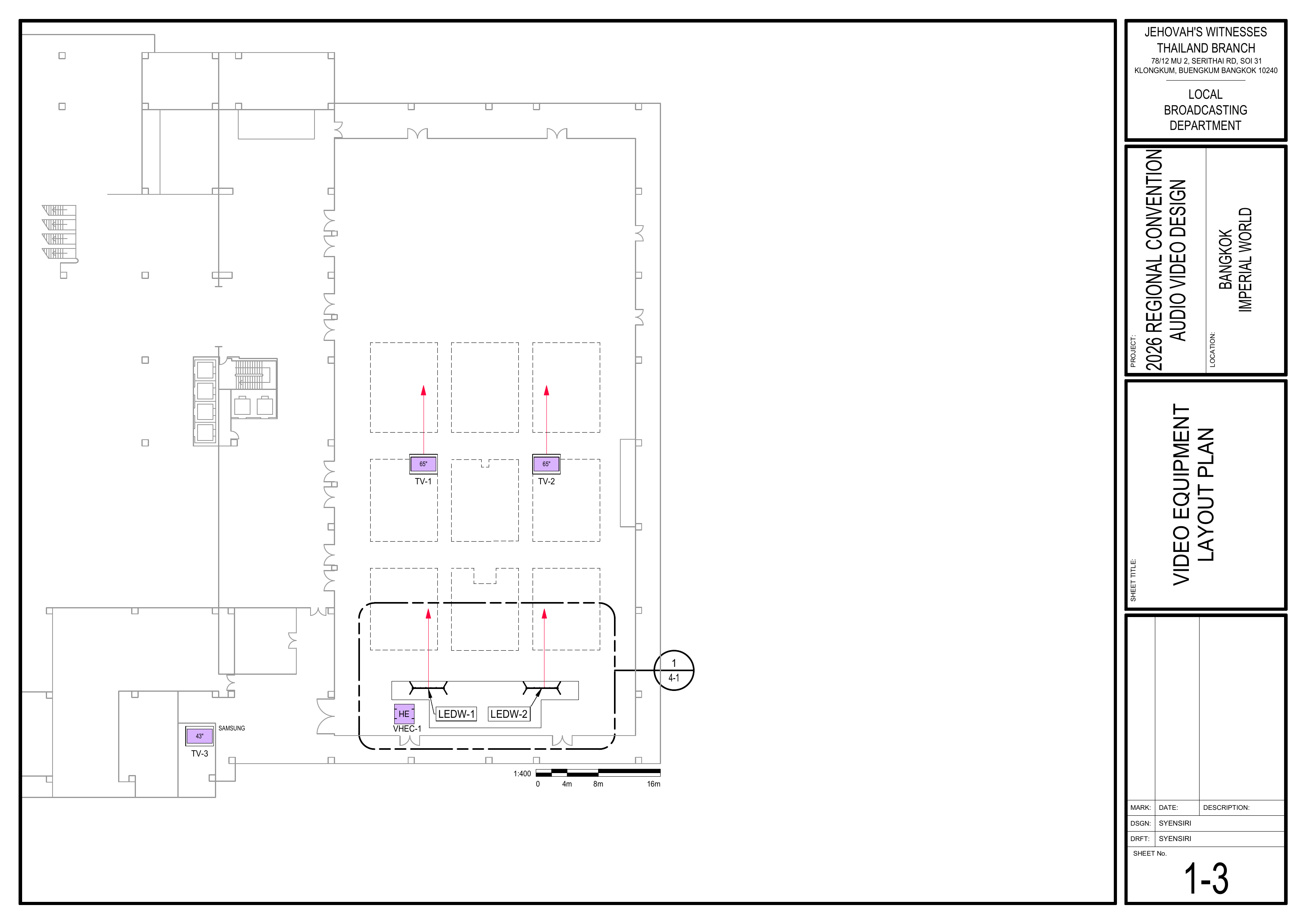
* 1-3 Video Equipment Layout Plan
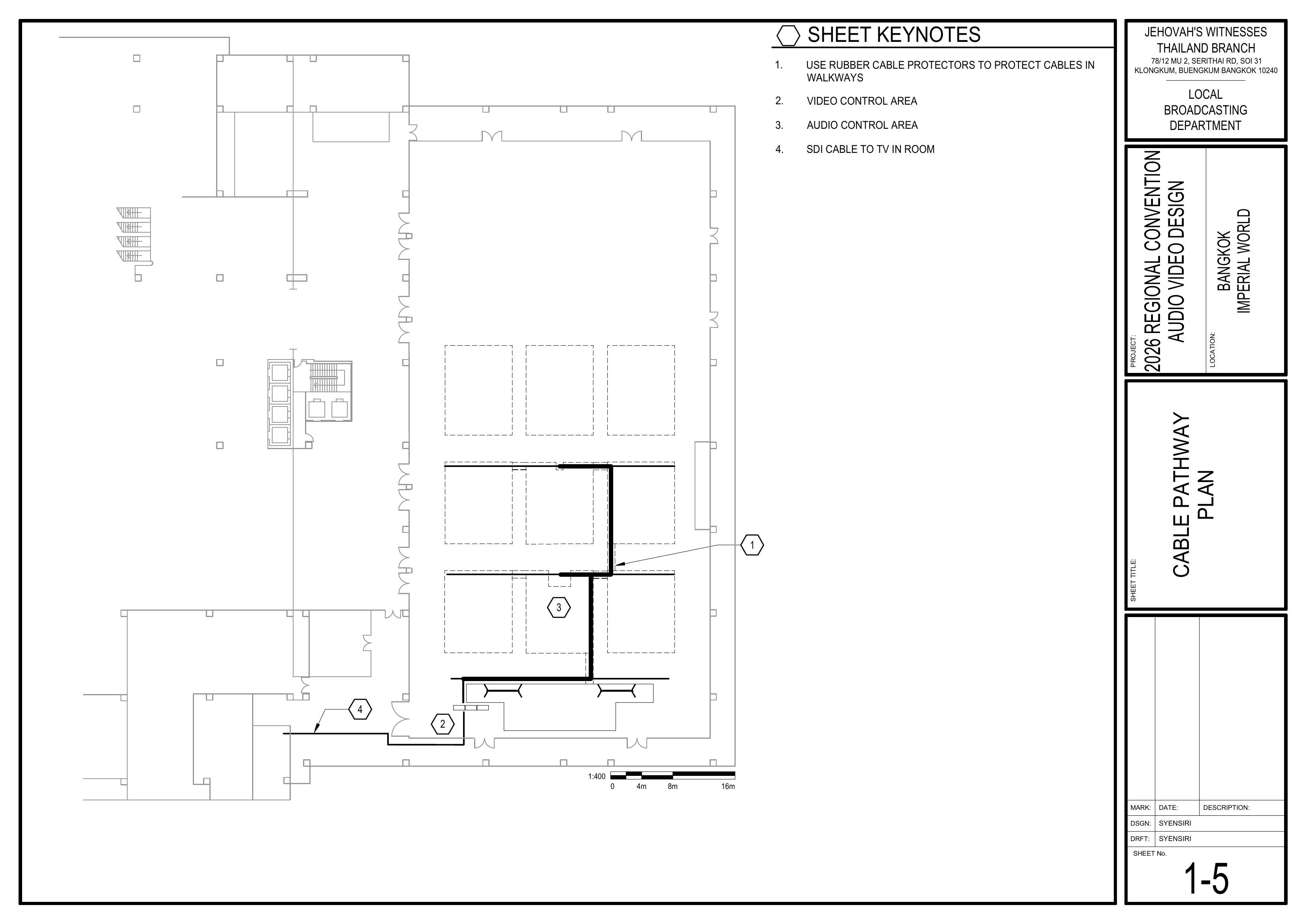
* 1-5 Cable Pathway Plan
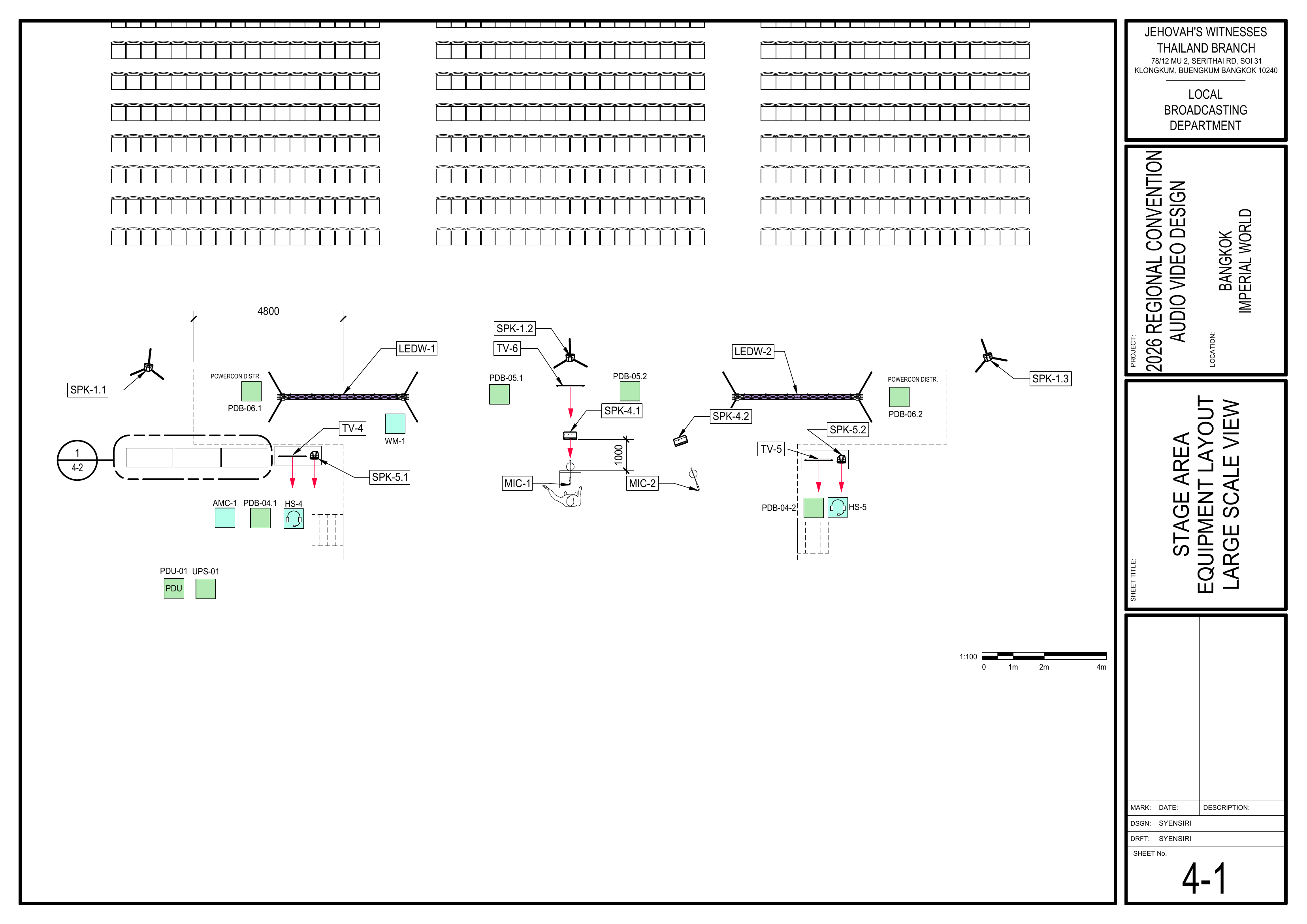
* 4-1 Stage Area Equipment Layout Large Scale View
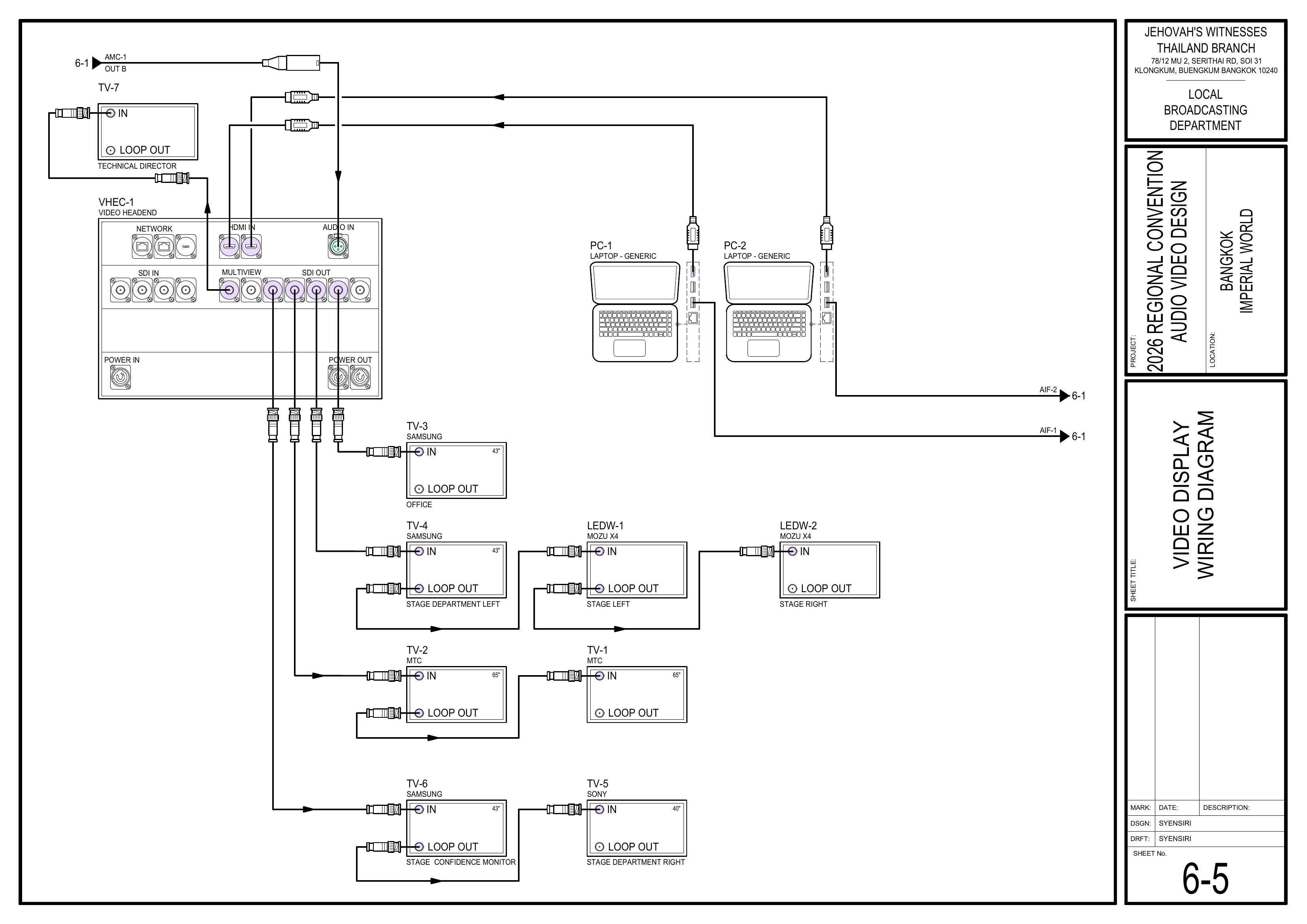
* 6-5 Video Display Wiring Diagram
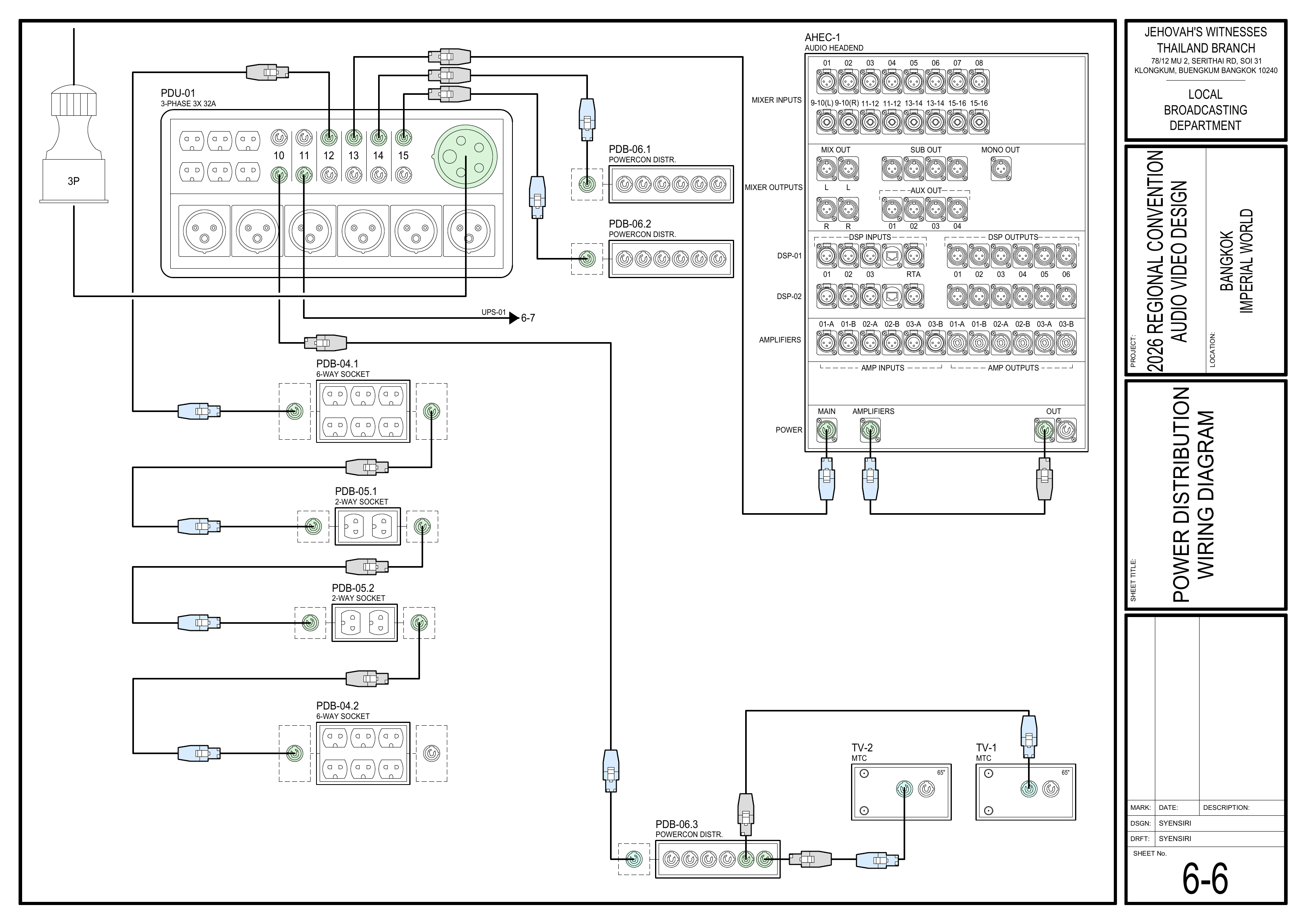
* 6-6 Power Distribution Wiring Diagram
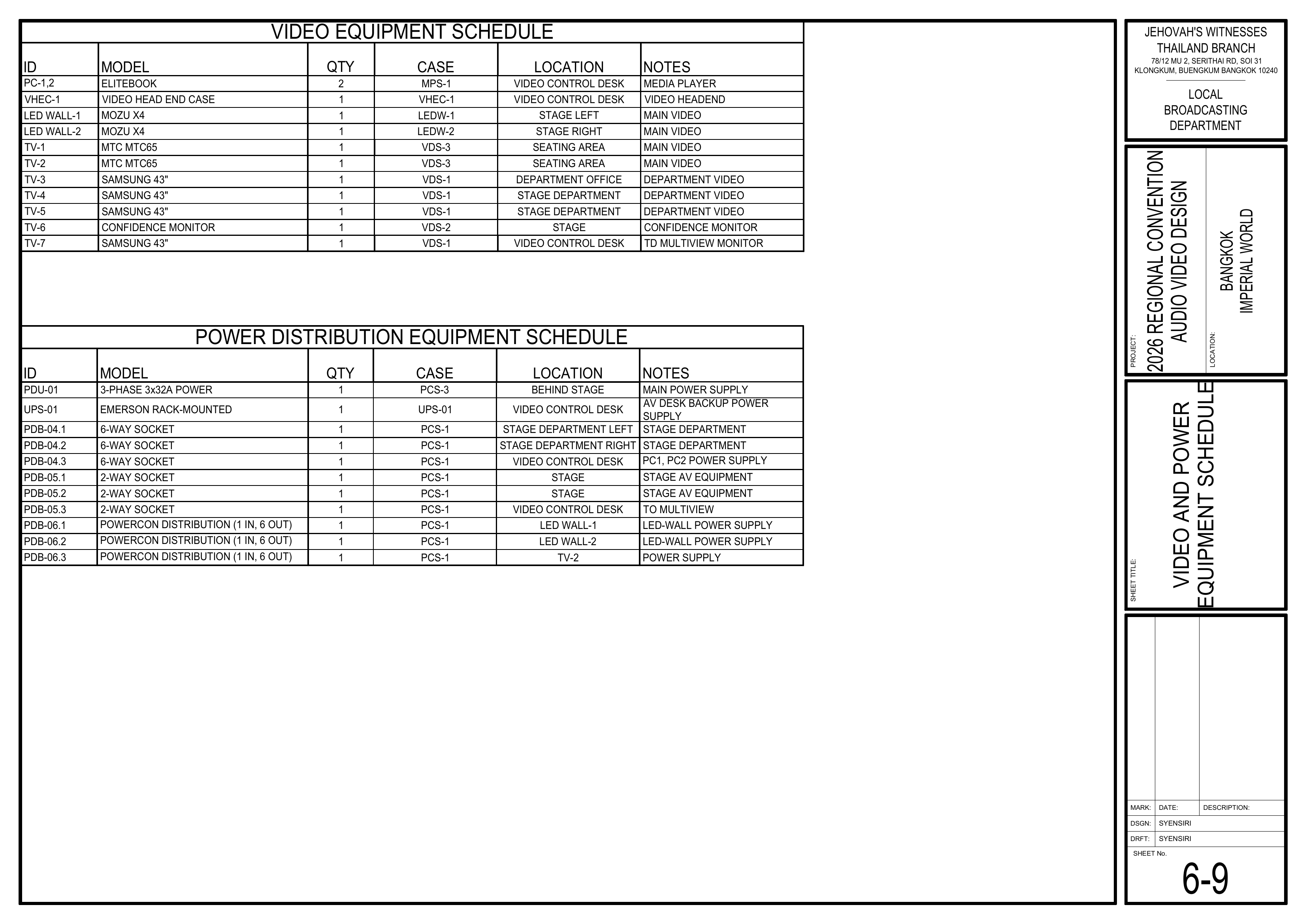
* 6-9 Video and Power Equipment Schedule
* **Event Content List:** Cases VDS-1, VDS-2, VDS-3 ×2, VSC-01 ×2, VSC-02 ×2, CPS-1, CPS-3
**Required Equipment Cases**
* **VDS-1:** 3x 43" Samsung TVs with table stands.
* **VDS-2:** Stage confidence monitor, digital clock, SDI distributor, and SDI-HDMI converter.
* **VDS-3 ×2:** Each contains a 65" TV with an electrical-lift wheel case.
* **VSC-01 ×2:** Each contains 7x 25 m SDI cables.
* **VSC-02 ×2:** Each contains 5x 50 m SDI cables.
* **CPS-1:** 10x 3-channel floor cable protectors and 10x rubber mats.
* **CPS-3:** Carpet strips for covering cables.
💡 TV Quantity — To Be Confirmed:
The schematics assign four 43" VDS-1 positions: TV-3, TV-4, TV-5, and TV-7. VDS-1 contains only 3x 43" TVs. Confirm the final allocation before distributing the VDS-1 TVs between the Video Cabling & TVs Team and Video Booth Team.
**Safety Notes**
⚠️ SDI Cable Handling
• Handle SDI cables carefully and avoid sharp bends, kinks, or twisting.
• Do not run video signal cables directly parallel to power cables; cross power cables at right angles.
• Use cable protectors wherever cables cross walkways.
• Keep the attached Velcro with each SDI cable.
• Do not use your elbow to wind SDI cables.
#### Setup Steps
**1. Install TVs and Monitors**
*Schematics: Pages 1-3 Video Equipment Layout Plan, 4-1 Stage Area Equipment Layout Large Scale View, 6-9 Video and Power Equipment Schedule*
* Install the displays first so the exact SDI cable destinations can be confirmed.
* Install **TV-1 and TV-2** in the seating area.
* Install **TV-3** in the Accounting Department.
* Install **TV-4 and TV-5** at the Stage Department positions.
* Install **TV-6** as the stage confidence monitor.
* **TV-7** is intended for the Video Control Desk and is handled by the Video Booth Team, subject to final VDS-1 allocation.
* Confirm the final allocation of the 43" VDS-1 TVs before distributing them.
🗺️ View Display Location Schematics (Pages 1-3, 4-1, 6-9)
**2. Pull and Route SDI Cables**
*Reference: CO-160a, Chapter 4 — Video Signal Cables (VSC-1,2,3), pages 8–9*
*Schematics: Pages 1-3 Video Equipment Layout Plan, 1-5 Cable Pathway Plan, 6-5 Video Display Wiring Diagram*
* Open the attached Velcro and unwind each SDI cable. Do not remove the Velcro from the cable.
* Route SDI cables to the confirmed display locations according to the schematics.
* Through the front-middle seating section, follow the route of the audio multicore cable (AMC-1).
* Do not run SDI cables directly parallel to power cables; cross power cables at right angles.
* Avoid sharp bends, kinks, and twisting.
* Keep cables neat and away from walkways wherever possible.
* Consider attaching a destination tag to each SDI cable if time permits.
🗺️ View Cable Routing Schematics (Pages 1-3, 1-5, 6-5)
**3. Protect and Secure Cabling**
*Schematics: Page 1-5 Cable Pathway Plan*
* Use floor cable protectors where cables cross walkways.
* Use rubber mats or carpet covers where required in seating areas.
* Coordinate shared cable routes with the Audio Cabling Team.
* When using carpet covers, secure one side first.
* After all audio and video cabling is finished, secure the remaining side.
* Check all routes for trip hazards before completing the installation.
🗺️ View Cable Pathway Schematic (Page 1-5)
**4. Connect Power and Verify Displays**
*Schematics: Pages 6-5 Video Display Wiring Diagram, 6-6 Power Distribution Wiring Diagram*
* Connect display power after the Power Distribution Team confirms that power is ready.
* Coordinate with the Video Booth Team to confirm that the correct video signal reaches each display.
* Confirm all installed displays show a stable picture.
* Correct any cabling, display, or signal issue before completing setup.
🗺️ View Display Wiring and Power Schematics (Pages 6-5, 6-6)
#### Completion Checklist
* [ ] Final allocation of the 43" VDS-1 TVs confirmed
* [ ] Assigned TVs and monitors installed
* [ ] SDI cables routed to the correct display locations
* [ ] SDI cables handled according to CO-160a
* [ ] SDI and power cable routes separated where possible
* [ ] Walkway crossings protected
* [ ] Seating-area cabling protected where required
* [ ] Shared cable routes secured after audio and video cabling were completed
* [ ] Display power connected after confirmation
* [ ] Correct video signal verified at all installed displays
* [ ] Walkways and cable routes safe
* [ ] Keyman inspection completed
#### Dismantling
* [ ] Wait for the department briefing and prayer 30 minutes after the program ends on Sunday before dismantling.
* [ ] Remove cable protectors, rubber mats, and carpet covers carefully.
* [ ] Bring all Video Cabling & TVs Team displays, cables, cable-protection materials, and accessories to the **designated equipment area for inventory**.
* [ ] Wind SDI cables carefully, allowing each cable to follow its natural shape.
* [ ] Do not use your elbow to wind SDI cables; avoid sharp bends, kinks, and twisting.
* [ ] Secure each SDI cable with its attached Velcro.
* [ ] Keep the work area clear to avoid trip hazards while coiling cables.
* [ ] Check the installation areas for any forgotten equipment or materials.
* [ ] Keyman confirms all team materials have been brought to the inventory area.
---
#### 🇨🇳 中文说明
**目的**
安装本组负责的电视和显示器,铺设并保护 SDI 视频线,并确认每个显示器接收到正确的视频信号。
**参考资料**
* **完整图纸:** [📎 完整 PDF 文件](https://drive.google.com/file/d/1LinBW8x7FTiWcCa5SnXsM282yU6THkQm/view?usp=drive_link)
* **《会众工作危险性分析》(DC-85):** [📁 Google Drive 文件夹](https://drive.google.com/drive/folders/1pmqQ4bBFoGkQkjXcjJ8G3sDhUFyZQOMz?usp=drive_link)
* **CO-160a:** [📎 CO-160a](https://drive.google.com/file/d/1nbmMRpEwRkg_3MdfnRwXcOuUG9Tc-t9F/view) — 第 4 章,**Video Signal Cables (VSC-1,2,3),第 8–9 页**
* **相关图纸:**
* 1-3 视频设备布局图
* 1-5 电缆路径图
* 4-1 舞台区域设备布局大比例图
* 6-5 视频显示系统接线图
* 6-6 电源分配接线图
* 6-9 视频和电源设备清单
* **大会设备清单:** 设备箱 VDS-1、VDS-2、VDS-3 ×2、VSC-01 ×2、VSC-02 ×2、CPS-1、CPS-3
**所需设备箱**
* **VDS-1:** 3 台带桌面支架的 43 英寸 Samsung 电视。
* **VDS-2:** 讲台提示显示器、数字时钟、SDI 分配器及 SDI-HDMI 转换器。
* **VDS-3 ×2:** 每套包含一台 65 英寸电视及电动升降轮箱。
* **VSC-01 ×2:** 每套包含 7 条 25 米 SDI 视频线。
* **VSC-02 ×2:** 每套包含 5 条 50 米 SDI 视频线。
* **CPS-1:** 10 个三槽地面电缆盖板及 10 块橡胶垫。
* **CPS-3:** 用于覆盖线缆的地毯压线条。
💡 电视数量 — 待确认:
图纸中有四个使用 43 英寸 VDS-1 电视的位置:TV-3、TV-4、TV-5 和 TV-7,但 VDS-1 只有 3 台 43 英寸电视。在视频布线及电视组和视频控制台组分配 VDS-1 电视前,请先确认最终安排。
**安全提醒**
⚠️ SDI 线缆处理
• 小心处理 SDI 线缆,避免急弯、打结或扭曲。
• 不要让视频信号线与电源线直接平行铺设;需要交叉时,应以直角交叉。
• 线缆穿过通道时必须使用电缆保护装置。
• 保留每条 SDI 线缆原有的魔术贴。
• 盘绕 SDI 线缆时不要使用手肘绕线。
#### 安装步骤
**1. 安装电视和显示器**
*图纸:1-3 视频设备布局图、4-1 舞台区域设备布局大比例图、6-9 视频和电源设备清单*
* 首先安装显示器,以便确认 SDI 视频线的准确连接位置。
* 将 **TV-1 和 TV-2** 安装在座位区域。
* 将 **TV-3** 安装在会计部。
* 将 **TV-4 和 TV-5** 安装在讲台部门位置。
* 将 **TV-6** 安装为讲台提示显示器。
* **TV-7** 计划用于视频控制台,由视频控制台组负责,但需等待 VDS-1 的最终分配确认。
* 分配 VDS-1 电视前,确认 43 英寸电视的最终安排。
🗺️ 查看显示器位置图纸(图纸 1-3, 4-1, 6-9)
**2. 铺设 SDI 视频线**
*参考资料:CO-160a,第 4 章 — Video Signal Cables (VSC-1,2,3),第 8–9 页*
*图纸:1-3 视频设备布局图、1-5 电缆路径图、6-5 视频显示系统接线图*
* 打开线缆原有的魔术贴,然后展开 SDI 线缆。不要把魔术贴从线缆上取下。
* 按照图纸将 SDI 线缆铺设到已确认的显示器位置。
* 穿过前方中间座位区域时,沿音频多芯线缆 (AMC-1) 的路线铺设。
* 不要让 SDI 视频线与电源线直接平行铺设;需要交叉时,应以直角交叉。
* 避免急弯、打结或扭曲线缆。
* 保持线缆整齐,并尽量避开通道。
* 如果时间允许,可为每条 SDI 线缆贴上连接位置标签。
🗺️ 查看视频布线路线图纸(图纸 1-3, 1-5, 6-5)
**3. 保护并固定线缆**
*图纸:1-5 电缆路径图*
* 线缆穿过通道时使用地面电缆盖板。
* 座位区域根据需要使用橡胶垫或地毯盖板。
* 与音频布线组协调共用的线缆路线。
* 使用地毯盖板时,先固定一侧。
* 等所有音频和视频布线完成后,再固定另一侧。
* 安装完成前再次检查所有路线是否存在绊倒危险。
🗺️ 查看电缆路径图(图纸 1-5)
**4. 连接电源并确认显示器**
*图纸:6-5 视频显示系统接线图、6-6 电源分配接线图*
* 电源分配组确认电源准备好之后,再连接显示器电源。
* 与视频控制台组协调,确认每个显示器收到正确的视频信号。
* 确认所有已安装的显示器画面稳定。
* 完成安装前纠正任何布线、显示器或信号问题。
🗺️ 查看显示器接线及电源图纸(图纸 6-5, 6-6)
#### 完成检查表
* [ ] 43 英寸 VDS-1 电视的最终分配已确认
* [ ] 本组负责的电视和显示器已安装
* [ ] SDI 视频线已铺设到正确的显示器位置
* [ ] SDI 线缆已按照 CO-160a 的要求处理
* [ ] SDI 线和电源线在可行的情况下已分开铺设
* [ ] 穿过通道的线缆已加以保护
* [ ] 座位区域线缆已按需要加以保护
* [ ] 音频和视频布线完成后,共用线缆路线已固定
* [ ] 电源确认后才连接显示器电源
* [ ] 所有显示器已确认收到正确的视频信号
* [ ] 通道和线缆路线安全
* [ ] 负责人已检查确认
#### 拆卸
* [ ] 在星期日节目结束 30 分钟后,等待整个部门的简短会议和祷告后再开始拆卸。
* [ ] 小心移除电缆盖板、橡胶垫和地毯盖板。
* [ ] 将视频布线及电视组的所有显示器、线缆、线缆保护材料及配件带到**指定设备区域进行清点**。
* [ ] 小心盘绕 SDI 线缆,让线缆顺着自然形状收纳。
* [ ] 不要使用手肘绕线,并避免急弯、打结或扭曲。
* [ ] 使用每条 SDI 线缆原有的魔术贴固定。
* [ ] 盘绕线缆时保持工作区域畅通,避免造成绊倒危险。
* [ ] 检查安装区域是否遗留设备或材料。
* [ ] 负责人确认本组所有物品都已送到清点区域。
---
#### Related Pages / 相关页面
* [Video Booth / 视频控制台组](https://wiki.linajpenglish.xyz/books/2026-bangkok-convention-av-2026-bangkok-convention-av-2026/page/video-booth-setup)
* [Audio Cabling / 音频布线](https://wiki.linajpenglish.xyz/books/2026-bangkok-convention-av-2026-bangkok-convention-av-2026/page/audio-cabling-setup)
* [Power Distribution / 电源分配](https://wiki.linajpenglish.xyz/books/2026-bangkok-convention-av-2026-bangkok-convention-av-2026/page/power-distribution-and-intercom-setup)