# CABR-2026-10 Assembly A/V

English A/V schedule, setup and pack-up instructions for the 2026/10/11 assembly at Imperial World Samrong, Samut Prakan. Thank you for helping! Crew files: [Shared with crew folder](https://drive.google.com/drive/folders/1WOum_FR7RtVbjyx8-h6Ru21w_Ms2qrza?usp=sharing).

# Schedules

Friday logistics, Saturday installation and pioneer meeting, and Sunday assignments and cues.

# Event overview and key times

<p id="bkmrk-welcome%2C-and-thank-y">Welcome, and thank you for helping with the A/V work for our assembly.</p>
<p id="bkmrk-venue%3A-imperial-worl"><strong>Venue:</strong> Imperial World Samrong, Samut Prakan — 6th floor<br>
<strong>Assembly:</strong> Sunday, 11 October 2026<br>
<strong>Setup:</strong> Saturday, 10 October 2026<br>
<strong>Contacts:</strong> JP Bourgeois, A/V overseer · Alex Li, audio overseer · Jeff Korell, stage overseer<br>
<strong>Emergency:</strong> 093-019-4124 — Bo Nielsen, assembly overseer</p>
<table id="bkmrk-when-what-is-planned">
<thead>
<tr>
<th>When</th>
<th>What is planned</th>
</tr>
</thead>
<tbody>
<tr>
<td><strong>Friday 9 October, 16:30</strong></td>
<td>Safety briefing at the venue (6th floor), led by Trucking; time tentative.</td>
</tr>
<tr>
<td><strong>Friday, 16:45</strong></td>
<td>Kingdom Hall truck delivery. Help move the equipment to the 6th-floor hall.</td>
</tr>
<tr>
<td><strong>Friday, 17:45</strong></td>
<td>Bethel (LBD) A/V truck delivery.</td>
</tr>
<tr>
<td><strong>Saturday 10 October, 08:00</strong></td>
<td>Safety talk and prayer inside the venue, led by JP. Then the five teams begin setup.</td>
</tr>
<tr>
<td><strong>Saturday, by 12:00</strong></td>
<td>Target for setup to be finished so Alex can commission and test the sound system.</td>
</tr><tr><td><strong>Saturday 10 October, 14:00</strong></td><td>Walk-throughs for the first session, second session, and pioneer meeting A/V and Stage, led by JP.</td></tr><tr>
<td><strong>Saturday, 15:00</strong></td>
<td>Special meeting with pioneers. See the <a href="https://wiki.linajpenglish.xyz/books/cabr-2026-10-assembly-av/page/saturday-pioneer-meeting-1500">pioneer meeting page</a>.</td>
</tr>
<tr><td><strong>Sunday 11 October — walk-throughs</strong></td><td>Morning session starts at <strong>08:10</strong>; afternoon session starts at <strong>08:25</strong>. Led by JP.</td></tr><tr>
<td><strong>Sunday 11 October, 09:40 / 13:20</strong></td>
<td>Morning / afternoon music begins. See <a href="https://wiki.linajpenglish.xyz/books/cabr-2026-10-assembly-av/page/sunday-program-assignments-and-av-cues">Sunday assignments and cues</a>.</td>
</tr>
<tr>
<td><strong>Sunday, after the program</strong></td>
<td>Note the actual end time. The teardown safety meeting and prayer begins 30 minutes later. Wait for that meeting before dismantling.</td>
</tr>
</tbody>
</table>
<p id="bkmrk-walk-throughs-are-le">Your keyman or overseer will confirm your reporting time.</p>
<p id="bkmrk-still-to-be-confirme"><strong>Still to be confirmed:</strong> Friday crew, Friday safety-briefing time, Sunday reporting time, Sunday teardown meeting leader, packing area, and return truck time.</p>
<p id="bkmrk-useful-links%3A-shared"><strong>Useful links:</strong> <a href="https://drive.google.com/drive/folders/1WOum_FR7RtVbjyx8-h6Ru21w_Ms2qrza?usp=sharing">Shared crew folder</a> · <a href="https://docs.google.com/spreadsheets/d/1zrcweMSz__MY-mCBP__g6sCuJ-KvDUaxP2co69xNTak/edit">Live roster</a> · <a href="https://wiki.linajpenglish.xyz/attachments/3">CABR-2026 schematics</a> · <a href="https://drive.google.com/drive/folders/1ygTzZu8-Qb2szKemmuaYcKhuZ0C4f1R6">S-343 Stage Layout</a></p>
<p class="callout info" id="bkmrk-note%3Athe-roster%27s-ap"><strong>Note:</strong><br>The roster's April schedule tab belongs to an earlier event. Please use the times in this book.</p>

# Saturday pioneer meeting — 15:00

<p id="bkmrk-special-meeting-with"><strong>Special meeting with pioneers:</strong> Saturday, 10 October 2026 at 15:00, at the same venue.<br>
<strong>Theme:</strong> “Enrich Your Ministry by Setting Goals!” — Proverbs 4:25</p><p id="bkmrk-program-files-download" class="callout info"><strong>Stage Layout (S-343)</strong>
<a href="https://drive.google.com/file/d/16sPPA1uwe_du5HpRRr62cC7ZZpWRbFbL/view?usp=drivesdk" style="display:block;width:100%;min-height:56px;padding:16px;margin:16px 0;border:2px solid #075171;background-color:#ffffff;color:#075171;font-weight:bold;line-height:24px;text-decoration:underline;text-align:center;">PDF — open / download copy</a>
<a href="https://docs.google.com/document/d/14EOvZZoQm6ulPbXgiDeZdQIG_goGTcVl/edit?usp=drivesdk&amp;ouid=116756016559764948144&amp;rtpof=true&amp;sd=true" style="display:block;width:100%;min-height:56px;padding:16px;margin:16px 0;border:2px solid #075171;background-color:#ffffff;color:#075171;font-weight:bold;line-height:24px;text-decoration:underline;text-align:center;">DOCX — open / download copy</a>
PDF updated from the DOCX on 7 October 2026.</p>
<p id="bkmrk-we-aim-to-finish-ins">We aim to finish installation by 12:00. Alex will then commission the audio system, adjust the venue wireless microphones, and test the media and projector connection.</p>
<h2 id="bkmrk-audio-assignments">Audio</h2>
<table id="bkmrk-position-assigned-pe"><thead><tr><th>Position</th><th>Assigned person</th></tr></thead><tbody><tr><td>Mixer operator</td><td><strong>Marcel Lewandowski</strong></td></tr><tr><td>Mixer assistant</td><td><strong>Adam Brier</strong></td></tr><tr><td>Media operator</td><td><strong>Mike Mundell</strong></td></tr></tbody></table>
<h2 id="bkmrk-stage-assignments-heading">Stage</h2>
<table id="bkmrk-stage-assignments"><thead><tr><th>Position</th><th>Assigned person</th></tr></thead><tbody><tr><td>Chairman side mic (Stage right)</td><td><strong>Josh Norton</strong></td></tr><tr><td>Chairman side headset (Stage right)</td><td><strong>Josh Norton</strong></td></tr><tr><td>Participant side mic (Stage left)</td><td><strong>Gerald Berard</strong></td></tr><tr><td>Participant side headset (Stage left)</td><td><strong>Corey DeLoach</strong></td></tr><tr><td>Audience participation mic runner</td><td><strong>Ruben Martinez and Jeff Korell</strong></td></tr></tbody></table>

<p id="bkmrk-before-the-meeting%3A-"><strong>Before the meeting:</strong> Everyone assigned above should attend the walk-through. Test the microphones from the actual speaking positions and listen from different parts of the seating area.</p>
<p id="bkmrk-the-venue-is-lending">The venue is lending at least two wireless microphones. The A/V Booth team will collect them before commissioning. They are sensitive, so Alex will carefully adjust them before use.</p>
<p id="bkmrk-reporting-and-walk-t"><strong>Walk-through:</strong> Saturday, 10 October at <strong>14:00</strong>, led by JP. Reporting time, if different, will be confirmed by your keyman or overseer.</p>

# Sunday program assignments and A/V cues

<p id="bkmrk-program-files-download" class="callout info"><strong>Stage Layout (S-343)</strong>
<a href="https://drive.google.com/file/d/1ZRQQwc1Skb597KKo3L3an_7u676Chk5W/view?usp=drivesdk" style="display: block; box-sizing: border-box; width: 100%; min-height: 56px; padding: 16px; margin: 16px 0; border: 2px solid #075171; border-radius: 8px; background-color: #ffffff; color: #075171; font-weight: bold; line-height: 24px; text-decoration: underline; text-align: center;">PDF — open / download copy</a>
<a href="https://docs.google.com/document/d/1RJjCQJI0P1a91UL7hnf2sASsX-RKBsTi/edit?usp=drivesdk&amp;ouid=116756016559764948144&amp;rtpof=true&amp;sd=true" style="display: block; box-sizing: border-box; width: 100%; min-height: 56px; padding: 16px; margin: 16px 0; border: 2px solid #075171; border-radius: 8px; background-color: #ffffff; color: #075171; font-weight: bold; line-height: 24px; text-decoration: underline; text-align: center;">DOCX — open / download copy</a>
PDF updated from the DOCX on 7 October 2026.</p>
<p id="bkmrk-the-live-roster-is-t">The <a href="https://docs.google.com/spreadsheets/d/1zrcweMSz__MY-mCBP__g6sCuJ-KvDUaxP2co69xNTak/edit">live roster</a> is the assignment source.</p>
<h2 id="bkmrk-audio-assignments">Audio</h2>
<table id="bkmrk-positionmorningafter">
<thead><tr><th>Position</th><th>Morning</th><th>Afternoon</th></tr></thead>
<tbody>
<tr><td>Mixer operator</td><td><strong>Ronan Gav Budd</strong></td><td><strong>Kassander Jensen</strong></td></tr>
<tr><td>Mixer assistant</td><td><strong>Adam Brier</strong></td><td><strong>Mike Mundell</strong></td></tr>
<tr><td>Media operator</td><td><strong>Marcel Lewandowski</strong></td><td><strong>Yuri Chaplygin</strong></td></tr>
<tr><td>Backup</td><td><strong>Dern</strong></td><td><strong>Lacey Cox</strong></td></tr>
</tbody>
</table>
<h2 id="bkmrk-stage-assignments-heading">Stage</h2>
<table id="bkmrk-stage-assignments">
<thead><tr><th>Position</th><th>Morning</th><th>Afternoon</th></tr></thead>
<tbody>
<tr><td>Stage key man</td><td><strong>Jason Kirby</strong></td><td><strong>Matthew Chappelle</strong></td></tr>
<tr><td>Chairman side mic (Stage right)</td><td><strong>Gerald Berard</strong></td><td><strong>Corey DeLoach</strong></td></tr>
<tr><td>Chairman side headset (Stage right)</td><td><strong>Jason Kirby</strong></td><td><strong>Matthew Chappelle</strong></td></tr>
<tr><td>Participant side mic (Stage left)</td><td><strong>Ruben Martinez</strong></td><td><strong>Josh Norton</strong></td></tr>
<tr><td>Participant side headset (Stage left)</td><td><strong>Mike Vigil</strong></td><td><strong>Jeff Korell</strong></td></tr>
</tbody>
</table>


<p id="bkmrk-program-reference%3A-s"><strong>Before the walk-throughs:</strong> The Stage team, mixer operator assistant, and media operator should review the Stage Layout (S-343) above. The AV overseer and his assistants should also be familiar with it.</p>
<p id="bkmrk-walk-throughs-%28led-b"><strong>Walk-throughs (led by JP):</strong> Saturday, 10 October — first session, second session, and pioneer meeting at <strong>14:00</strong>. Sunday, 11 October — morning-session walk-through starts at <strong>08:10</strong>; afternoon-session walk-through starts at <strong>08:25</strong>. Sunday arrival/reporting time is still to be confirmed.</p>
<h2 id="bkmrk-what-each-a%2Fv-role-d">What each A/V role does</h2>
<ul id="bkmrk-mixer-operator-%28co-1"><li value="1"><strong>Mixer operator (CO-160 2:15):</strong> Controls microphone and media levels and listens for feedback or other problems.</li><li value="2"><strong>Mixer assistant (CO-160 2:16):</strong> Follows the program, warns the mixer operator about the next change, and helps communicate instructions.</li><li value="3"><strong>Media operator (CO-160 4:26):</strong> Runs only the approved media and keeps the second computer ready as backup.</li><li value="4"><strong>Audio backup (CO-160 2:15-16):</strong> Knows the setup and can step in if someone needs help or cannot continue.</li><li value="5"><strong>Stage team (CO-160 3:3-4; Appendix F):</strong> Places microphones, gives participants the required reminders, and follows the agreed stage cues.</li></ul>
<h2 id="bkmrk-main-program-cues">Main program cues</h2>
<table id="bkmrk-printed-timeitema%2Fv-"><colgroup><col><col><col></colgroup><tbody><tr><th><p>Printed time</p></th><th><p>Item</p></th><th><p>A/V preparation</p></th></tr><tr><td><p><strong>09:40</strong></p></td><td><p>Morning music</p></td><td><p>Start the approved music and check the playback level.</p></td></tr><tr><td><p><strong>09:50</strong></p></td><td><p>Song 7 and prayer</p></td><td><p>Follow the chairman and the actual stage cue.</p></td></tr><tr><td><p><strong>10:55</strong></p></td><td><p>Song 37 and announcements</p></td><td><p>Prepare the approved media and the next microphone position.</p></td></tr><tr><td><p><strong>11:35</strong></p></td><td><p>Baptism talk</p></td><td><p>Confirm microphone needs and baptism-area arrangements with Jeff.</p></td></tr><tr><td><p><strong>12:05</strong></p></td><td><p>Song 38, then lunch</p></td><td><p>Mute program microphones and display the agreed theme artwork.</p></td></tr><tr><td><p><strong>13:20</strong></p></td><td><p>Afternoon music</p></td><td><p>Start the approved music.</p></td></tr><tr><td><p><strong>13:35</strong></p></td><td><p>Experiences</p></td><td><p>Stage and mixer confirm the participant microphones.</p></td></tr><tr><td><p><strong>14:15</strong></p></td><td><p>Symposium</p></td><td><p>Prepare the speaker and stage microphone changes.</p></td></tr><tr><td><p><strong>15:00</strong></p></td><td><p>Song 88 and announcements</p></td><td><p>Follow the actual cues.</p></td></tr><tr><td><p><strong>15:55</strong></p></td><td><p>Song 161 and prayer</p></td><td><p>The program ends after the song and prayer. Note the actual end time.</p></td></tr></tbody></table>
<p id="bkmrk-display-the-theme-ar">Display the theme artwork before each session, during lunch, and for about 30 minutes after the program. Before the chairman begins, play only the approved music; do not make announcements over the system unless there is an emergency.</p>
<p id="bkmrk-before-attendees-are">Before attendees are admitted, test both media computers, all microphones, every loudspeaker, and the venue projector link. The mixer operator and Alex should listen from several seating areas and agree on what to do if a microphone, computer, or other part fails.</p>
<p id="bkmrk-after-the-final-pray">After the final prayer, wait for the teardown safety meeting and prayer 30 minutes after the actual end. Let the audience leave before lowering speakers or pulling cables.</p>

# Setup instructions

Team tasks with drawing sheets, commissioning, safety and pack-up.

# Setup teams and handoffs

<p id="bkmrk-thank-you-for-helpin">Thank you for helping with the assembly setup on <strong>Saturday, 10 October</strong>. This is the best page to start from. Find your team below, then open that team's page for the detailed instructions.</p>
<p class="callout info" id="bkmrk-before-setup%3Aeveryon"><strong>Before setup:</strong><br>Everyone helping with installation or dismantling — including helpers who are not normally part of A/V — should <a href="https://wiki.linajpenglish.xyz/attachments/4" target="_blank"><strong>download and review A-149-E (PDF)</strong></a>. Each A/V keyman will also review the team's <a href="https://drive.google.com/drive/folders/1jNylk3J4Rlk-swVDgbmtG0OZU2-GmWFR">DC-83 job hazard analysis</a> before work begins.</p>
<h2 id="bkmrk-key-times-for-saturd">Key times for Saturday</h2>
<ul id="bkmrk-08%3A00-%E2%80%94-safety-talk-"><li value="1"><strong>08:00</strong> — Meet at the venue for the safety talk and prayer. Keymen then review the DC-83 and work area with their teams.</li><li value="2"><strong>After the talk</strong> — Power, Audio Cabling, Loudspeakers, Stage and A/V Booth begin together.</li><li value="3"><strong>By 12:00</strong> — Installation should be ready to hand over to Alex for commissioning and system tests.</li><li value="4"><strong>By 14:00</strong> — AHEC commissioning should be complete so attendees can enter.</li></ul>
<h2 id="bkmrk-find-your-team">Find your team</h2>
<p id="bkmrk-your-team-page-has-t">Your team page has the drawings and step-by-step instructions.</p>
<ul id="bkmrk-audio-cabling-%E2%80%94-lace"><li value="1"><a href="https://wiki.linajpenglish.xyz/books/cabr-2026-10-assembly-av/page/audio-cabling"><strong>Audio Cabling</strong></a> — <strong>Lacey Cox 🔑</strong><br>Ruben Martinez; Zabrina Bourgeois; Karina Li; Layo Kirby; TaSanee Kirby; Meyana Barnhart; Ittikorn "Joeu"; Pinja Keskinen; Bethany Mundell; Sebastien Machez</li><li value="2"><a href="https://wiki.linajpenglish.xyz/books/cabr-2026-10-assembly-av/page/av-booth-and-commissioning"><strong>A/V Booth</strong></a> — <strong>Micah Phillips 🔑</strong><br>Mint Phillips; Brendan Coonce</li><li value="3"><a href="https://wiki.linajpenglish.xyz/books/cabr-2026-10-assembly-av/page/stage-and-microphones"><strong>Stage</strong></a> — <strong>Jason Kirby 🔑</strong><br>Gerald Berard; SuMalei Kirby; Matthew Chappelle</li><li value="4"><a href="https://wiki.linajpenglish.xyz/books/cabr-2026-10-assembly-av/page/loudspeakers"><strong>Loudspeakers</strong></a> — <strong>Corey DeLoach 🔑</strong><br>Melissa DeLoach; Mike Vigil; Lilia Vigil; Mike Mundell; Malachi Jenkins</li><li value="5"><a href="https://wiki.linajpenglish.xyz/books/cabr-2026-10-assembly-av/page/power-distribution"><strong>Power</strong></a> — <strong>Jeff Korell 🔑</strong><br>April Korell</li></ul>
<p id="bkmrk-come-prepared%3A-wear-"><strong>Come prepared:</strong> Wear suitable work shoes and bring work gloves. Follow your keyman's instructions if additional PPE is needed.</p>
<p id="bkmrk-if-you-are-also-help">If you are also helping with Friday delivery or unloading, see <a href="https://wiki.linajpenglish.xyz/books/cabr-2026-10-assembly-av/page/friday-transport-and-saturday-installation"><strong>Friday transport and Saturday installation</strong></a>.</p>
<p id="bkmrk-if-you-are-unsure-wh">If you are unsure which team you are on, please ask JP before starting work.</p>
<h2 id="bkmrk-how-teams-help-each-">How teams help each other</h2>
<p id="bkmrk-start-early-on-the-b">Start early on the <strong>booth power</strong>, <strong>30 m AMC-3 audio multicore (snake) cable</strong>, the six passive loudspeakers with their <strong>speakON cables</strong>, and the Stage team's <strong>XLR microphone cable runs</strong>. This lets testing begin while smaller tasks are still being finished.</p>
<p id="bkmrk-when-your-team-is-fi"><strong>When your team is finished:</strong> Stage, Loudspeakers and Power should check with Lacey and help Audio Cabling with the remaining cable work until it is ready for testing.</p>
<p id="bkmrk-keep-exits-and-walkw">Keep exits and walkways clear, protect every floor crossing, and ask your keyman if anything in the room does not match the current drawing.</p>
<p id="bkmrk-sunday-teardown-team">For Sunday, use the <a href="https://wiki.linajpenglish.xyz/books/cabr-2026-10-assembly-av/page/safety-dismantling-and-references">confirmed dismantling teams and instructions</a>. Follow the teardown safety meeting and your dismantling keyman.</p>

# Schematics and equipment overview

<p id="bkmrk-the-cabr-2026-schema">The <strong>CABR-2026 schematic</strong> is the drawing set for this assembly. <a href="https://wiki.linajpenglish.xyz/attachments/3">Download the full PDF</a>. The <a href="https://wiki.linajpenglish.xyz/attachments/2">October BOM</a> is the equipment list.</p>
<p id="bkmrk-if-you-are-a-crew-me">If you are a crew member, you do not need to memorize this page. Follow your keyman and your team's short instructions. Keymen use the exact measurements and connections below.</p>
<p class="callout warning" id="bkmrk-important%3Aif-the-roo"><strong>Important:</strong><br>If the room does not match the drawing, stop and tell JP or Alex. Do not change the design on your own. Any change that affects the approved design must be confirmed through LBD.</p>
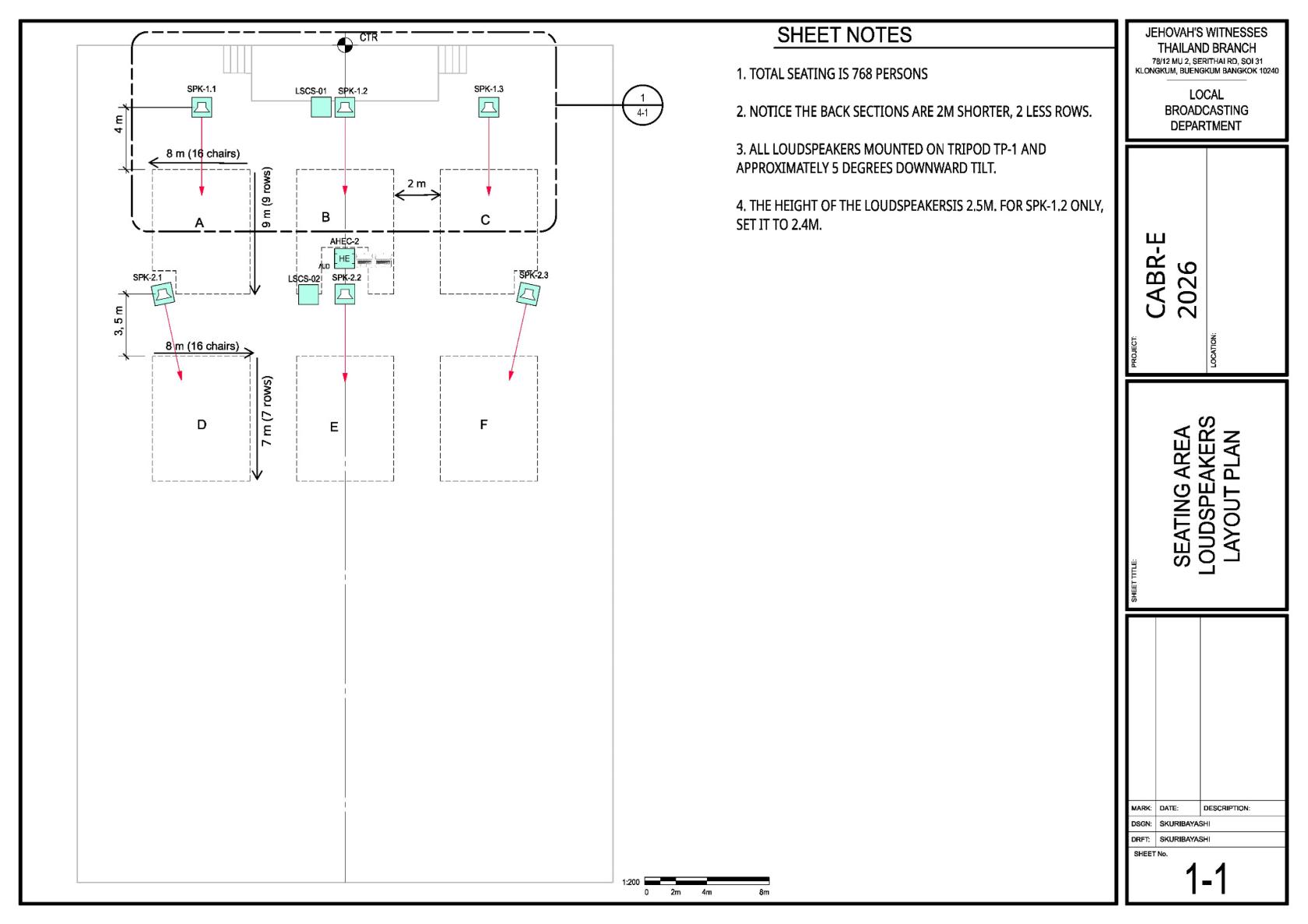
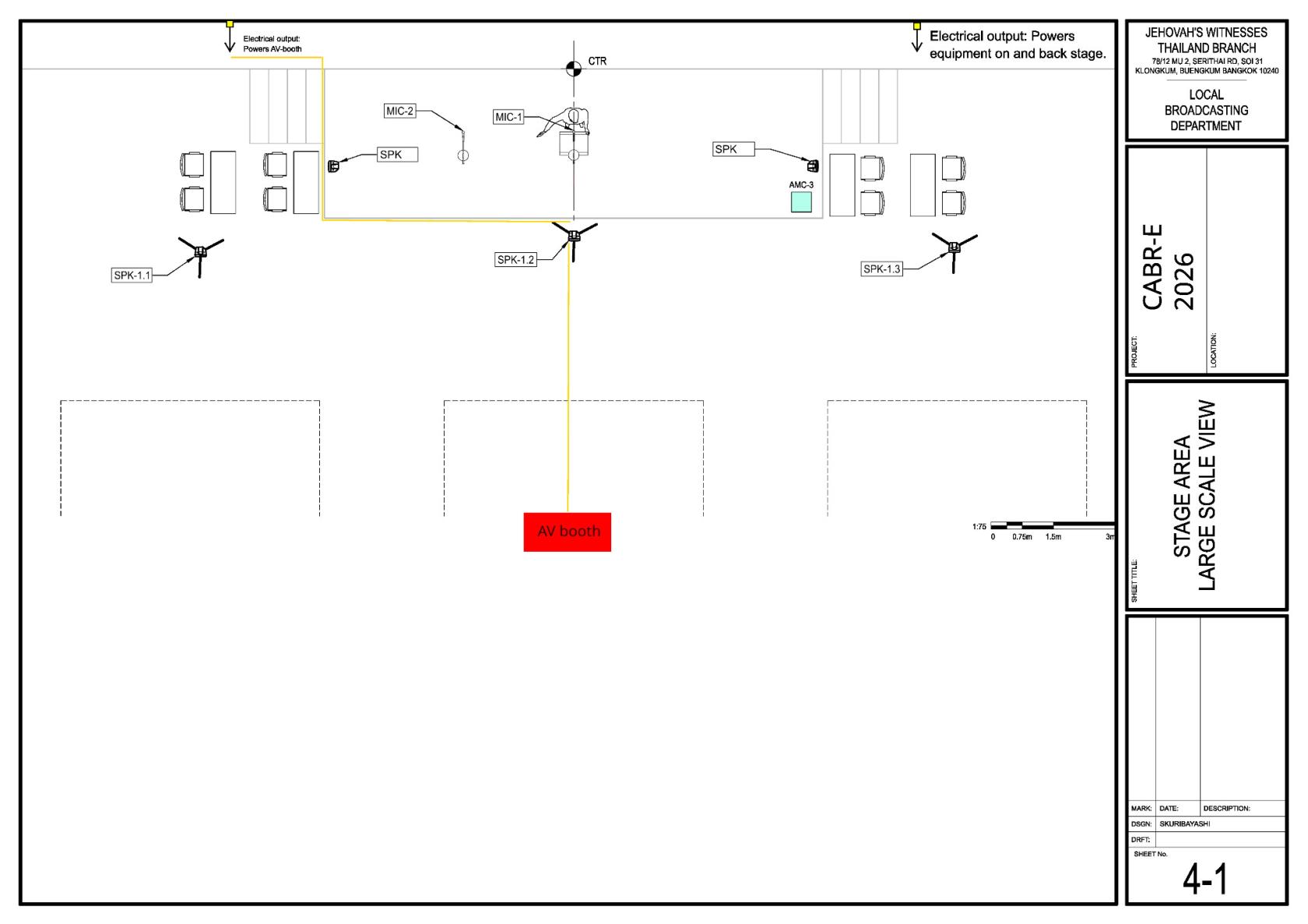
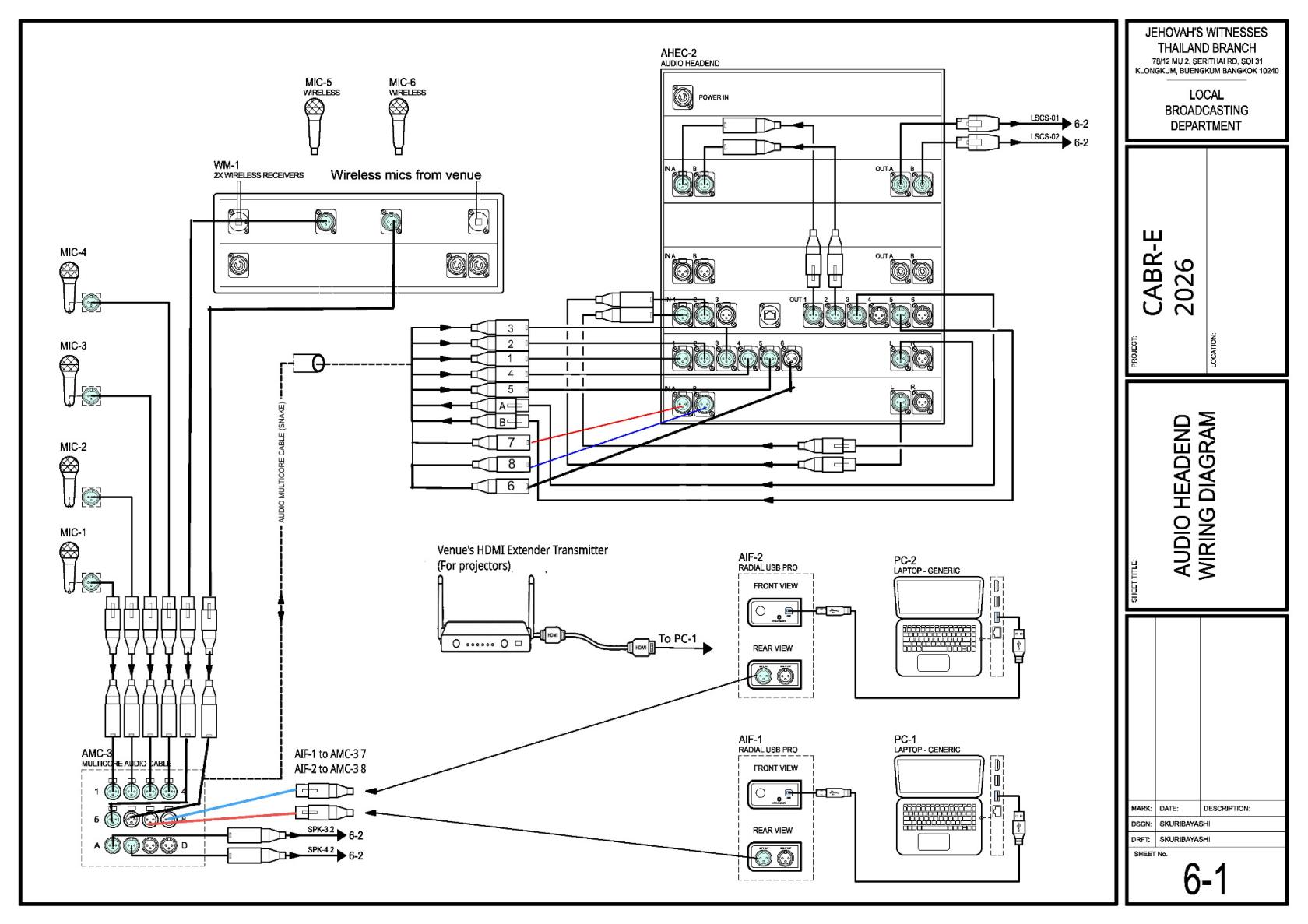
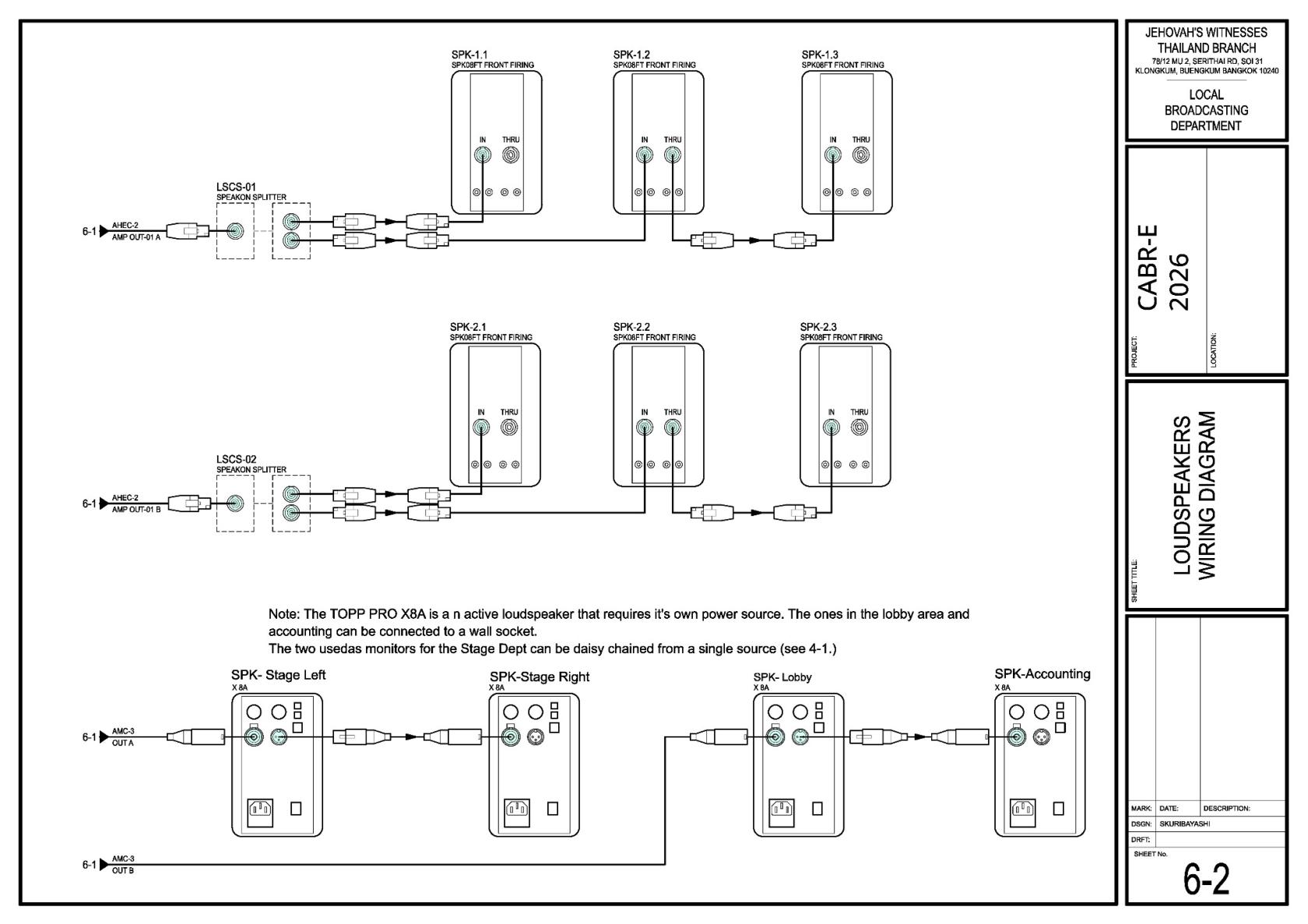
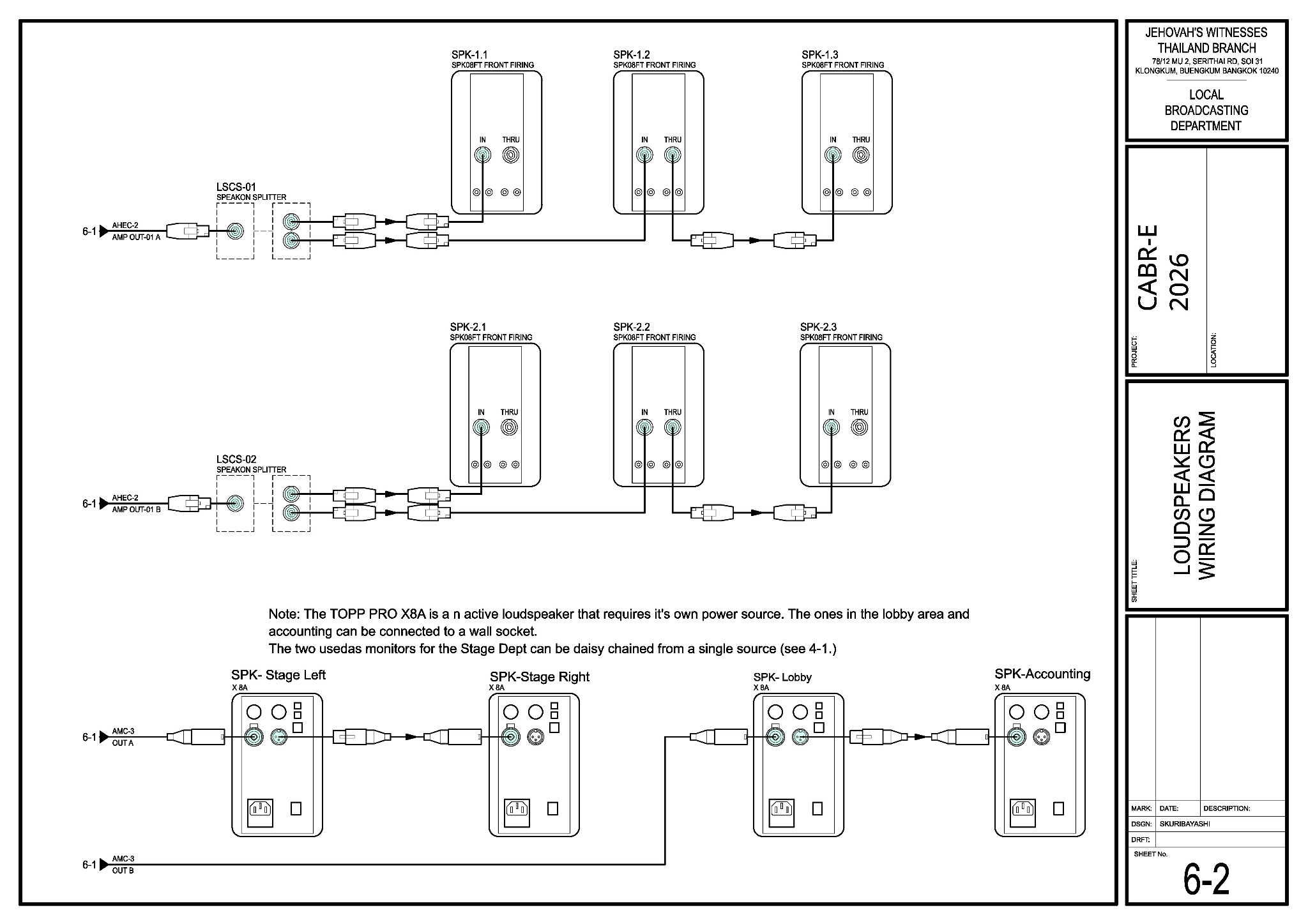
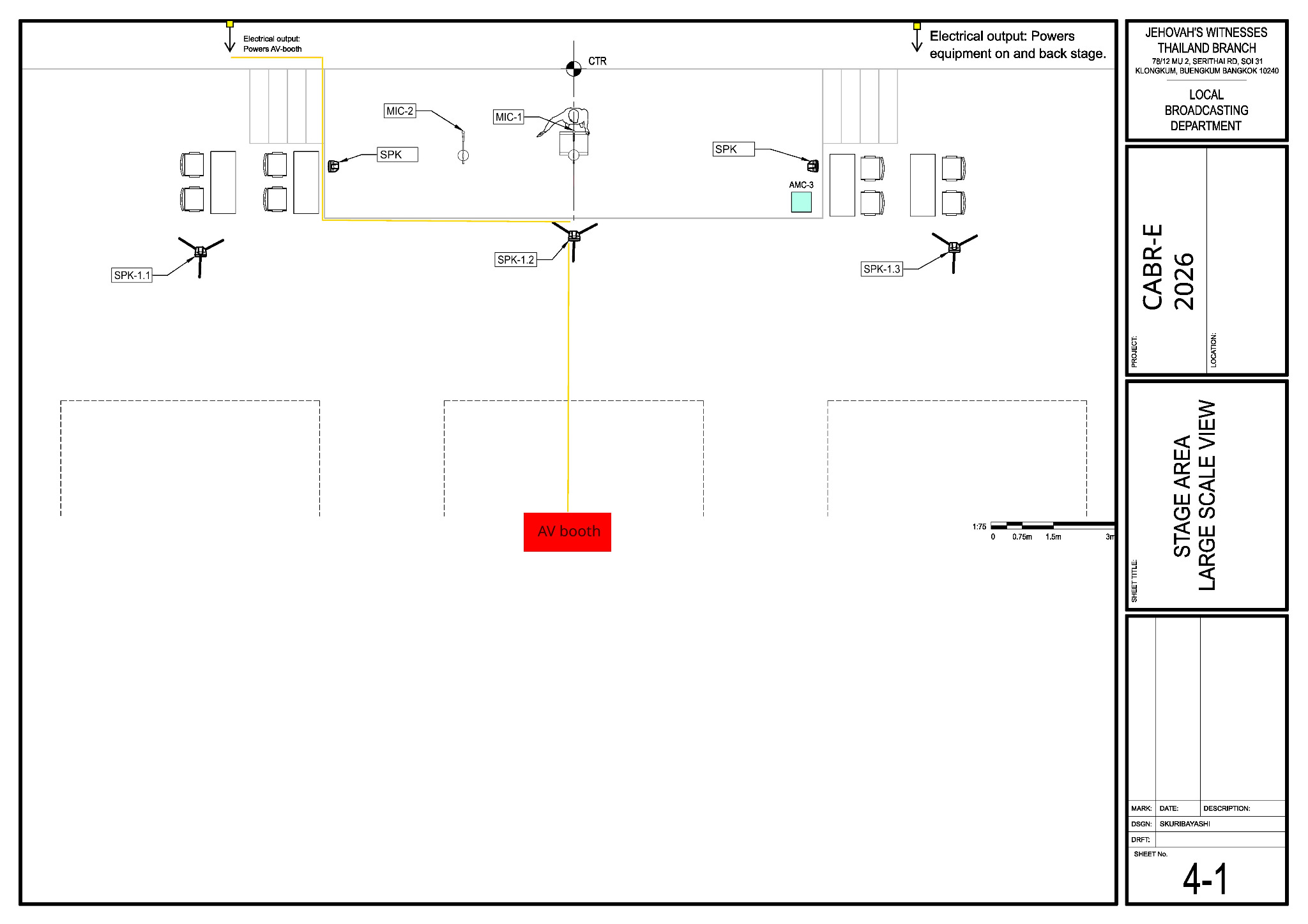
<table id="bkmrk-sheet-what-it-shows-"><colgroup><col><col><col></colgroup><tbody><tr><th><p>Sheet</p></th><th><p>What it shows</p></th><th><p>Main teams</p></th></tr><tr><td><p><strong>1-1</strong></p></td><td><p>Seating and six passive-loudspeaker positions</p></td><td><p>Loudspeakers, Audio Cabling, A/V Booth</p></td></tr><tr><td><p><strong>4-1</strong></p></td><td><p>Stage microphones, monitors and power routes</p></td><td><p>Stage, Power, Audio Cabling, Loudspeakers</p></td></tr><tr><td><p><strong>6-1</strong></p></td><td><p>A/V booth and audio connections</p></td><td><p>A/V Booth, Audio Cabling, Stage</p></td></tr><tr><td><p><strong>6-2</strong></p></td><td><p>Passive and active loudspeaker connections</p></td><td><p>Loudspeakers, Audio Cabling, Power</p></td></tr></tbody></table>
<details id="bkmrk-view-sheet-1-1-%E2%80%94-sea"><summary>View Sheet 1-1 — seating and loudspeakers</summary><p><a href="https://wiki.linajpenglish.xyz/uploads/images/gallery/2026-09/scaled-1680-/cabr-2026-sheet-1-1-jpg.jpeg" target="_blank"><img src="https://wiki.linajpenglish.xyz/uploads/images/gallery/2026-09/scaled-1680-/cabr-2026-sheet-1-1-jpg.jpeg" alt="Sheet 1-1 seating and loudspeaker layout"></a></p></details>
<details id="bkmrk-view-sheet-4-1-%E2%80%94-sta"><summary>View Sheet 4-1 — stage area</summary><p><a href="https://wiki.linajpenglish.xyz/uploads/images/gallery/2026-09/scaled-1680-/cabr-2026-sheet-4-1-jpg.jpeg" target="_blank"><img src="https://wiki.linajpenglish.xyz/uploads/images/gallery/2026-09/scaled-1680-/cabr-2026-sheet-4-1-jpg.jpeg" alt="Sheet 4-1 stage area"></a></p></details>
<details id="bkmrk-view-sheet-6-1-%E2%80%94-a%2Fv"><summary>View Sheet 6-1 — A/V booth wiring</summary><p><a href="https://wiki.linajpenglish.xyz/uploads/images/gallery/2026-09/scaled-1680-/cabr-2026-sheet-6-1-jpg.jpeg" target="_blank"><img src="https://wiki.linajpenglish.xyz/uploads/images/gallery/2026-09/scaled-1680-/cabr-2026-sheet-6-1-jpg.jpeg" alt="Sheet 6-1 A/V booth wiring"></a></p></details>
<details id="bkmrk-view-sheet-6-2-%E2%80%94-lou"><summary>View Sheet 6-2 — loudspeaker wiring</summary><p><a href="https://wiki.linajpenglish.xyz/uploads/images/gallery/2026-09/scaled-1680-/cabr-2026-sheet-6-2-jpg.jpeg" target="_blank"><img src="https://wiki.linajpenglish.xyz/uploads/images/gallery/2026-09/scaled-1680-/cabr-2026-sheet-6-2-jpg.jpeg" alt="Sheet 6-2 loudspeaker wiring"></a></p></details>
<h2 id="bkmrk-heavy-cases">Heavy cases</h2>
<table id="bkmrk-case-main-contents-w"><colgroup><col><col><col></colgroup><tbody><tr><th><p>Case</p></th><th><p>Main contents</p></th><th><p>Weight / handling</p></th></tr><tr><td><p>AHEC-2/1</p></td><td><p>Audio rack</p></td><td><p>25 kg — use a helper</p></td></tr><tr><td><p>PLS-1</p></td><td><p>Six passive loudspeakers</p></td><td><p>150 kg, wheeled — Trucking help on Friday</p></td></tr><tr><td><p>TP-1</p></td><td><p>Six speaker tripods</p></td><td><p>100 kg, wheeled — Trucking help on Friday</p></td></tr><tr><td><p>ALS-4</p></td><td><p>Four active loudspeakers</p></td><td><p>50 kg, wheeled</p></td></tr><tr><td><p>SES-1</p></td><td><p>Ten 5 kg sandbags</p></td><td><p>50 kg total — unload one at a time</p></td></tr><tr><td><p>MS-1</p></td><td><p>Microphone stands</p></td><td><p>30 kg, wheeled</p></td></tr><tr><td><p>PCS-2</p></td><td><p>Power equipment</p></td><td><p>50 kg, wheeled</p></td></tr><tr><td><p>CPS-1</p></td><td><p>Cable covers and mats</p></td><td><p>60 kg, wheeled</p></td></tr></tbody></table>
<p id="bkmrk-any-case-over-20-kg-">Any case over 20 kg needs enough helpers. Roll wheeled cases and close all latches before moving them.</p>
<h2 id="bkmrk-keyman-reference">Keyman reference</h2>
<table id="bkmrk-item-arrangement-pas"><colgroup><col><col></colgroup><tbody><tr><th><p>Item</p></th><th><p>Arrangement</p></th></tr><tr><td><p>Passive speakers</p></td><td><p>Six on TP-1 tripods, about 5° down; normally 2.5 m high, except SPK-1.2 at 2.4 m.</p></td></tr><tr><td><p>Stage monitors</p></td><td><p>Two active speakers fed from AMC-3 return A by  <strong>XLR cable</strong>.</p></td></tr><tr><td><p>Lobby and Accounting</p></td><td><p>Two active speakers fed from AMC-3 return B by  <strong>XLR cable</strong>.</p></td></tr><tr><td><p>Microphones</p></td><td><p>MIC-1–4 use  <strong>XLR cables</strong>  to AMC-3 inputs 1–4; the venue wireless receivers use  <strong>XLR cables</strong>  to inputs 5–6.</p></td></tr><tr><td><p>Media computers</p></td><td><p>Each PC connects to its AIF by  <strong>USB cable</strong>; AIF-1 connects to AMC-3 input 7 by  <strong>XLR cable</strong>, and AIF-2 to input 8 by  <strong>XLR cable</strong>.</p></td></tr><tr><td><p>Projectors</p></td><td><p>PC-1 <strong>HDMI cable</strong> to the venue HDMI extender transmitter.</p></td></tr><tr><td><p>DSP outputs</p></td><td><p><strong>XLR cables:</strong>  DSP output 3 to AMC-3 return A; output 5 to return B. Output 4 is not used.</p></td></tr></tbody></table>
<p id="bkmrk-the-venue-also-provi">The venue also provides at least two wireless microphones and the HDMI extender. Alex arranges the two media computers. These items are not in the BOM.</p>

# Friday transport and Saturday installation

<h2 id="bkmrk-friday%2C-9-october">Friday, 9 October</h2>
<p id="bkmrk-friday-crew%3A-to-be-c"><strong>Friday crew:</strong> JP, Zabrina, Mike Vigil and Lilia Vigil list Friday availability. Lacey Cox is also confirmed to help with unloading.<br><strong>Trucking contact:</strong> Korawat Sungmongkol, Trucking and Equipment overseer.</p>
<table id="bkmrk-timewhat-happens16%3A3"><colgroup><col><col></colgroup><tbody><tr><th><p>Time</p></th><th><p>What happens</p></th></tr><tr><td><p><strong>16:30</strong></p></td><td><p>Safety briefing at the venue (6th floor), led by Trucking; time tentative.</p></td></tr><tr><td><p><strong>16:45</strong></p></td><td><p>Kingdom Hall truck delivery. Help move the equipment to the 6th-floor hall.</p></td></tr><tr><td><p><strong>17:45</strong></p></td><td><p>Bethel (LBD) A/V truck delivery. Count the cases against the  <a href="https://wiki.linajpenglish.xyz/attachments/2">October BOM</a>.</p></td></tr></tbody></table>
<p class="callout warning" id="bkmrk-close-every-latch-be"><strong>Case handling:</strong><br>Close all latches before moving a case. Roll wheeled cases on a clear route, use the lift, and use enough helpers for loads over 20 kg or bulky items. Wear work shoes and gloves. Move the PLS-1 and TP-1 cases with Trucking’s help. Store the cases together, closed and clear of exits in the 6th-floor hall overnight.</p>
<p id="bkmrk-if-a-case-is-missing">If a case is missing or damaged, tell JP. Photograph damage and report it to LBD: 02-821-6620 · <a href="mailto:InboxLBD.TH@jw.org">InboxLBD.TH@jw.org</a>.</p>
<h2 id="bkmrk-saturday%2C-10-october">Saturday, 10 October</h2>
<table id="bkmrk-timewhat-happens08%3A0"><colgroup><col><col></colgroup><tbody><tr><th><p>Time</p></th><th><p>What happens</p></th></tr><tr><td><p><strong>08:00</strong></p></td><td><p>Safety talk and prayer, led by JP. Each keyman then reviews the team's DC-83 and the work area.</p></td></tr><tr><td><p><strong>After the talk</strong></p></td><td><p>Power, Audio Cabling, Loudspeakers, Stage and A/V Booth begin together.</p></td></tr><tr><td><p><strong>Morning</strong></p></td><td><p>Keymen guide the work. Keep exits clear and protect every floor crossing.</p></td></tr><tr><td><p><strong>By 12:00</strong></p></td><td><p>Setup is handed to Alex for commissioning, microphone adjustment, sound checks, media tests and projector tests.</p></td></tr><tr><td><p><strong>By 14:00</strong></p></td><td><p>Have the AHEC commissioned so attendees can enter.</p></td></tr></tbody></table>
<p id="bkmrk-the-priority-is-to-m">The priority is to make the booth power, <strong>30 m AMC-3 audio multicore (snake) cable</strong>, six passive loudspeakers with their <strong>speakON cables</strong>, and <strong>XLR stage-microphone cables</strong> ready early enough for testing.</p>
<p id="bkmrk-team-pages%3A-audio-ca">Team pages: <a href="https://wiki.linajpenglish.xyz/books/cabr-2026-10-assembly-av/page/audio-cabling">Audio Cabling</a> · <a href="https://wiki.linajpenglish.xyz/books/cabr-2026-10-assembly-av/page/av-booth-and-commissioning">A/V Booth</a> · <a href="https://wiki.linajpenglish.xyz/books/cabr-2026-10-assembly-av/page/loudspeakers">Loudspeakers</a> · <a href="https://wiki.linajpenglish.xyz/books/cabr-2026-10-assembly-av/page/stage-and-microphones">Stage</a> · <a href="https://wiki.linajpenglish.xyz/books/cabr-2026-10-assembly-av/page/power-distribution">Power</a></p>

# Audio cabling

<table id="bkmrk-keyman-%F0%9F%94%91-crew-lacey-">
<thead>
<tr>
<th>Keyman 🔑</th>
<th>Crew</th>
</tr>
</thead>
<tbody>
<tr>
<td><strong>Lacey Cox</strong></td>
<td>Ruben Martinez; Zabrina Bourgeois; Karina Li; Layo Kirby; TaSanee Kirby; Meyana Barnhart; Ittikorn "Joeu"; Pinja Keskinen; Bethany Mundell; Sebastien Machez</td>
</tr>
</tbody>
</table>
<p id="bkmrk-your-team-runs%2C-labe">Your team routes, labels and protects the main audio cabling.</p>
<p class="callout info" id="bkmrk-routing-only%3Aaudio-c"><strong>Routing and handoff:</strong><br>Audio Cabling delivers labelled cable ends; the receiving team makes the equipment connections. Stage owns the on-stage XLR microphone cable runs, and Power owns mains cables.</p>
<p id="bkmrk-before-starting%2C-mee">Before starting, meet Lacey, review the team’s <a href="https://drive.google.com/file/d/1sZ204eAPVb1tjwBTys0j-k2rt-696zJI/view">DC-83</a>, and open the <a href="https://wiki.linajpenglish.xyz/attachments/3">schematics</a>.</p>
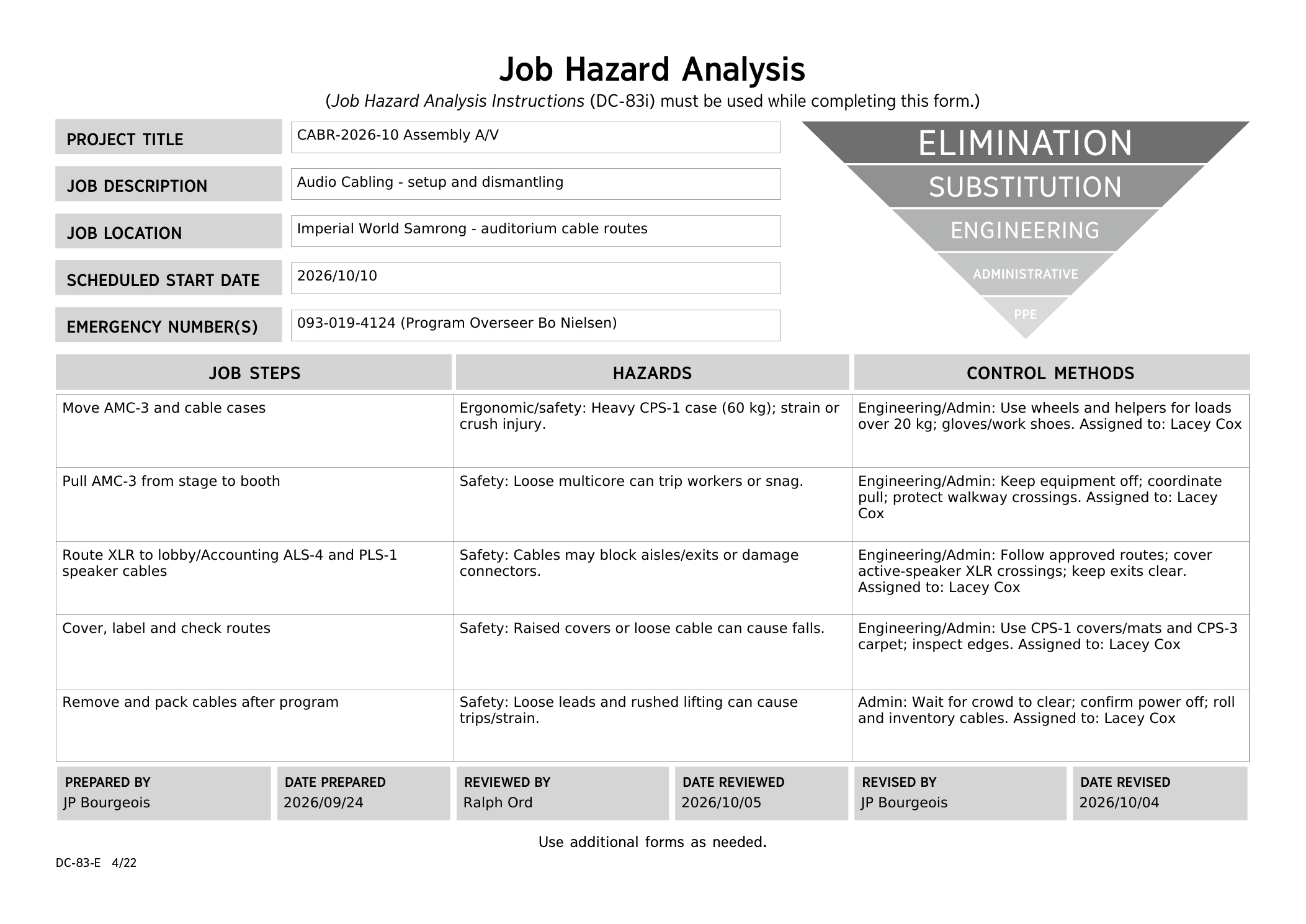
<details id="bkmrk-dc83-saturday-review"><summary><strong>DC-83 — Saturday morning safety review</strong></summary><p>Reviewed by Ralph Ord on 5 October 2026. <a href="https://drive.google.com/file/d/1sZ204eAPVb1tjwBTys0j-k2rt-696zJI/view" target="_blank">Open the final PDF</a>.</p><p><a href="https://wiki.linajpenglish.xyz/uploads/images/gallery/2026-10/cabr-2026-dc-83-01-audio-cabling-final.png" target="_blank"><img src="https://wiki.linajpenglish.xyz/uploads/images/gallery/2026-10/scaled-1680-/cabr-2026-dc-83-01-audio-cabling-final.png" alt="Final Audio cabling DC-83, reviewed by Ralph Ord on 5 October 2026"></a></p></details>
<p class="callout warning" id="bkmrk-safety%3Aaccounting-is"><strong>Safety:</strong><br>Roll heavy cases and use helpers for loads over 20 kg; wear work shoes and gloves. Keep equipment switched off while pulling the multicore cable. Keep exits and walking paths clear. Accounting is beside the baptism area: agree that route with the Baptism overseer and keep cables and connectors away from wet floors.</p>
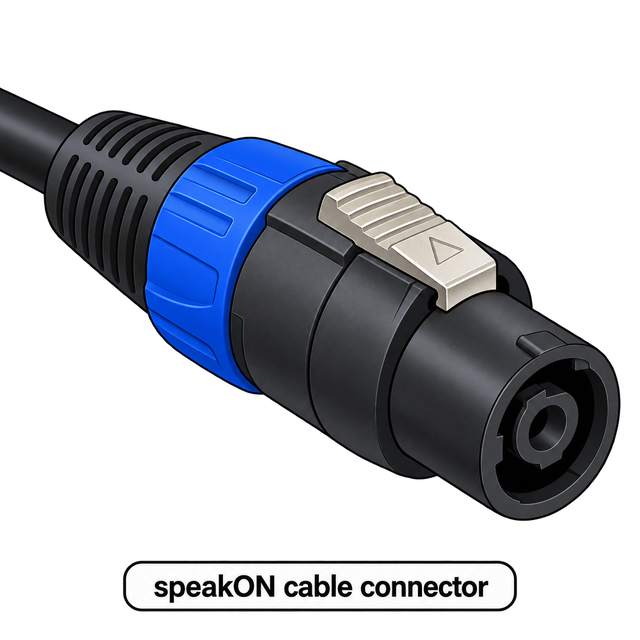
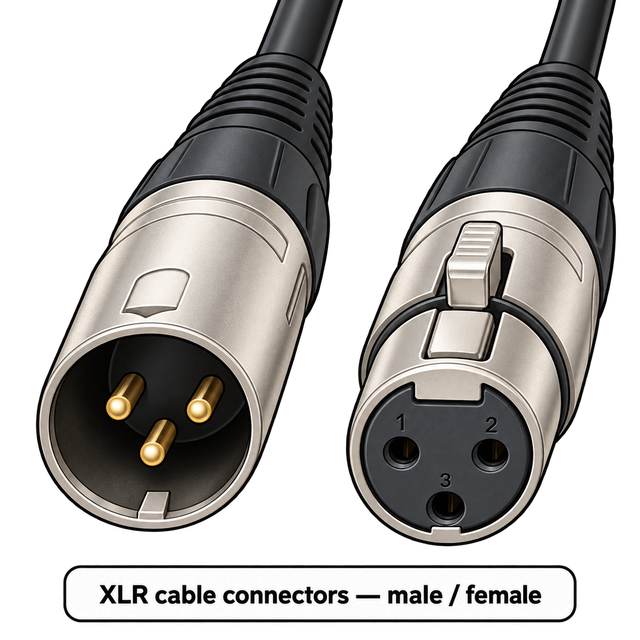
<details id="bkmrk-connector-quick-reference"><summary><strong>🔌 Connector quick reference — speakON / XLR</strong></summary><p>Open this only if you need help identifying the cable ends.</p><p><a href="https://wiki.linajpenglish.xyz/uploads/images/gallery/2026-10/cabr-speakon-connector.png" target="_blank"><img src="https://wiki.linajpenglish.xyz/uploads/images/gallery/2026-10/scaled-1680-/cabr-speakon-connector.png" width="300" alt="speakON cable connector"></a> <a href="https://wiki.linajpenglish.xyz/uploads/images/gallery/2026-10/cabr-xlr-connectors.png" target="_blank"><img src="https://wiki.linajpenglish.xyz/uploads/images/gallery/2026-10/scaled-1680-/cabr-xlr-connectors.png" width="300" alt="XLR cable connectors — male and female"></a></p></details>
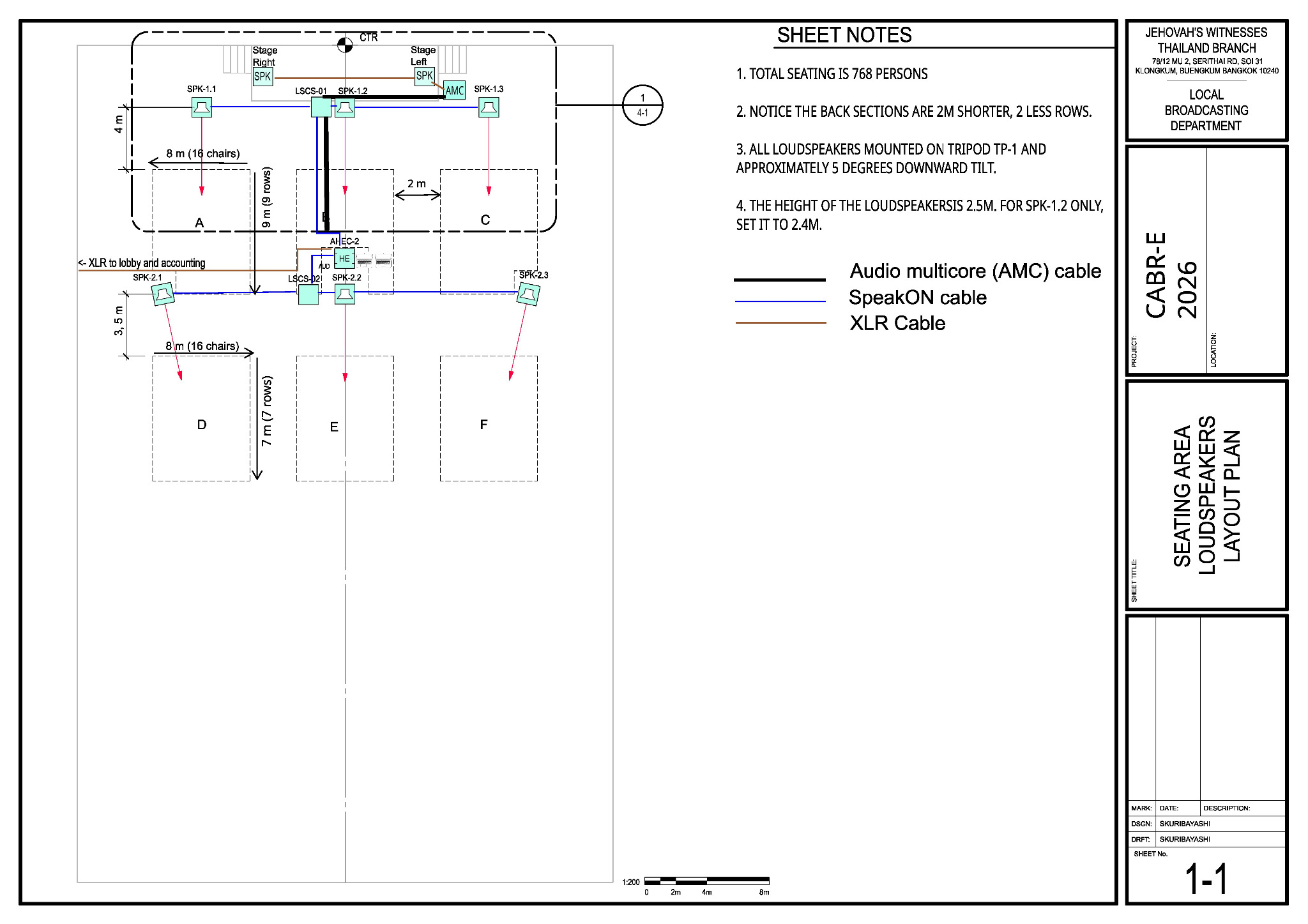
<p id="bkmrk-main-reference-%E2%80%94-she"><strong>Audio Cabling reference — annotated Sheet 1-1.</strong> This edited view adds cable routes and stage monitors specifically for the Audio Cabling team; these annotations are not included in the original schematics PDF. Use the original schematics for the full technical drawing set.</p>
<p id="bkmrk-"><a href="https://wiki.linajpenglish.xyz/uploads/images/gallery/2026-10/cabr-audio-cabling-annotated.jpg" target="_blank"><img src="https://wiki.linajpenglish.xyz/uploads/images/gallery/2026-10/cabr-audio-cabling-annotated.jpg" alt="Annotated Sheet 1-1 for Audio Cabling, with cable routes, stage monitors and cable-type legend"></a></p>
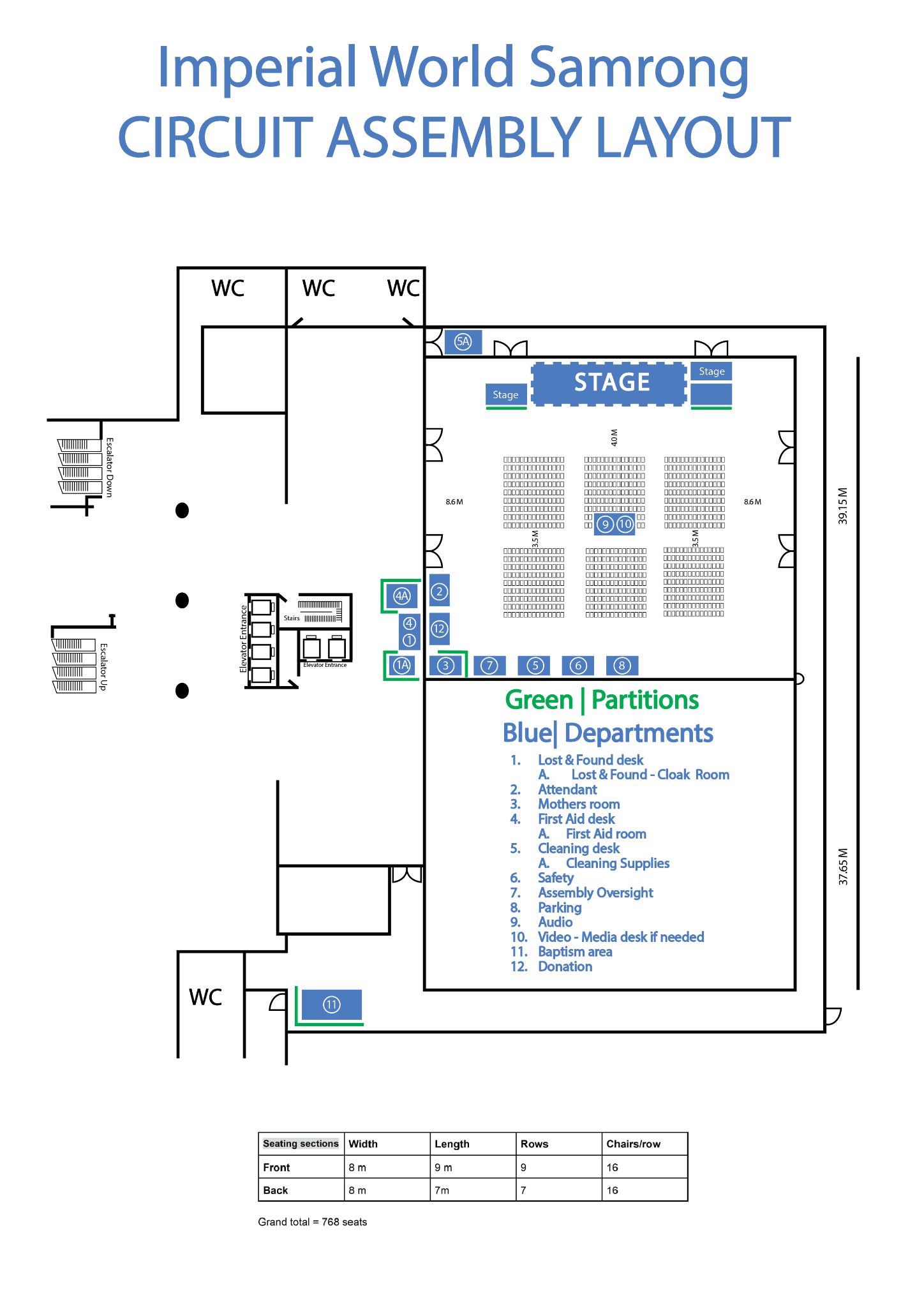
<details id="bkmrk-%F0%9F%97%BA%EF%B8%8F-view-venue-layout"><summary><strong>🗺️ View venue layout — departments and room orientation</strong></summary><p>Use this only to orient yourself to departments, partitions and room features. Use the CABR schematics for A/V placement.</p><p><a href="https://wiki.linajpenglish.xyz/uploads/images/gallery/2026-09/imperial-world-samrong-circuit-assembly-layout.png" target="_blank"><img src="https://wiki.linajpenglish.xyz/uploads/images/gallery/2026-09/scaled-1680-/imperial-world-samrong-circuit-assembly-layout.png" alt="Imperial World Samrong circuit assembly venue layout showing departments and partitions"></a></p></details>
<details id="bkmrk-%F0%9F%94%8C-view-sheet-6-2-%E2%80%94-l"><summary><strong>🔌 View Sheet 6-2 — loudspeaker wiring and splitters</strong></summary><p><a href="https://wiki.linajpenglish.xyz/uploads/images/gallery/2026-09/cabr-2026-sheet-6-2-jpg.jpeg" target="_blank"><img src="https://wiki.linajpenglish.xyz/uploads/images/gallery/2026-09/scaled-1680-/cabr-2026-sheet-6-2-jpg.jpeg" alt="CABR-2026 Sheet 6-2 showing LSCS-01 and LSCS-02 speakON splitters and loudspeaker wiring"></a></p></details>
<h2 id="bkmrk-what-your-team-does">What your team does</h2>
<ol id="bkmrk-start-at-the-stage-a">
<li>Coordinate the pull with Lacey. Carefully lay the <strong>30 m AMC-3 audio multicore (snake) cable</strong> from stage to booth; avoid sharp bends, protect connectors, and leave both ends ready for Stage and A/V Booth.</li>
<li>Run the labelled <strong>speakON loudspeaker cables</strong> to the six passive-speaker positions. <strong>LSCS-01</strong> is the front-group speakON splitter; <strong>LSCS-02</strong> is the rear-group splitter. Leave enough slack and hand each speakON cable to Loudspeakers before the speaker is raised.</li>
<li>At the <strong>stage end of the AMC-3 audio multicore (snake) cable</strong>, the two XLR return lines come out as <strong>return A</strong> and <strong>return B</strong>. Route <strong>return A</strong> to the stage monitors and <strong>return B</strong> to the lobby and Accounting. Label and protect the runs, then leave the cable ends for the <strong>Loudspeakers team to connect</strong> to the active speakers.</li>
<li>Make the MIC-1–4 XLR cables and AMC-3 handoff ready for Stage. Confirm their routing to AMC-3 inputs 1–4 and labels are complete; help if needed.</li>
<li>Run labelled <strong>XLR cables</strong> from the venue wireless-receiver location to AMC-3 inputs 5–6, ready for A/V Booth to connect.</li>
<li>Protect floor crossings with <strong>CPS-1 cable covers/mats or CPS-3 carpet</strong>. Inspect the edges for raised or loose areas before handing over the runs. Help trace any cable that fails its test.</li>
</ol>
<p id="bkmrk-extra-help%3A-when-sta"><strong>Extra help:</strong> When Stage, Loudspeakers and Power finish their own work, they should check with Lacey and help Audio Cabling with the remaining cable work.</p>
<h3 id="bkmrk-cable-routing-remind">Cable routing reminders</h3>
<ul id="bkmrk-unroll-cables-carefu">
<li>Unroll cables without twists or kinks; keep attached Velcro with the cable.</li>
<li>Avoid running audio cables parallel to power cables where practical; cross at <strong>right angles</strong>.</li>
<li>Use only as much tape as needed.</li>
<li>Before handoff, confirm each cable type, label and destination against the schematic.</li>
</ul>
<h2 id="bkmrk-for-the-keyman">For the keyman</h2>
<table id="bkmrk-run-route-drawing-am">
<thead>
<tr>
<th>Run</th>
<th>Route</th>
<th>Drawing</th>
</tr>
</thead>
<tbody>
<tr>
<td>AMC-3</td>
<td><strong>30 m AMC-3 audio multicore (snake) cable</strong>: stage box → AHEC-2 at the booth</td>
<td>4-1, 6-1</td>
</tr>
<tr>
<td>Front speakers</td>
<td><strong>speakON cable</strong>: Amplifier A → LSCS-01 <strong>(speakON splitter)</strong> → SPK-1.1 / 1.2 → 1.3</td>
<td>1-1, 6-2</td>
</tr>
<tr>
<td>Rear speakers</td>
<td><strong>speakON cable</strong>: Amplifier B → LSCS-02 <strong>(speakON splitter)</strong> → SPK-2.1 / 2.2 → 2.3</td>
<td>1-1, 6-2</td>
</tr>
<tr>
<td>Stage monitors</td>
<td><strong>XLR cable</strong>: AMC-3 return A → Stage Left → Stage Right</td>
<td>4-1, 6-2</td>
</tr>
<tr>
<td>Lobby / Accounting</td>
<td><strong>XLR cable</strong>: AMC-3 return B → Lobby → Accounting</td>
<td>6-2</td>
</tr>
</tbody>
</table>
<p id="bkmrk-when-the-routes-are-">When the protected routes pass their tests, tell Lacey and Alex. For teardown, follow the <a href="https://wiki.linajpenglish.xyz/books/cabr-2026-10-assembly-av/page/safety-dismantling-and-references">confirmed dismantling teams and instructions</a>: wait for the audience to clear and the briefing to finish, confirm power is off, then coil and inventory the cables.</p>

# A/V booth and commissioning

<table id="bkmrk-keyman-%F0%9F%94%91-crew-audio-">
<thead>
<tr>
<th>Keyman 🔑</th>
<th>Crew</th>
<th>Audio overseer</th>
</tr>
</thead>
<tbody>
<tr>
<td><strong>Micah Phillips</strong></td>
<td>Mint Phillips; Brendan Coonce</td>
<td><strong>Alex Li</strong></td>
</tr>
</tbody>
</table>
<p id="bkmrk-your-team-sets-up-th">Your team sets up the audio rack and the two media computers, connects the venue wireless microphones and projector link, and helps Alex test the complete system.</p>
<p id="bkmrk-media-computer-plan%3A"><strong>Media-computer plan:</strong> Alex will bring one laptop; Yuri Chaplygin will bring a second laptop as the backup.</p>
<p id="bkmrk-before-starting%2C-mee">Before starting, meet Micah, review the team’s <a href="https://drive.google.com/file/d/1z-e-_Md913F9WYMMlYIyNufmTdVyEFb2/view">DC-83</a>, and open Sheet 6-1 in the <a href="https://wiki.linajpenglish.xyz/attachments/3">schematics</a>.</p>
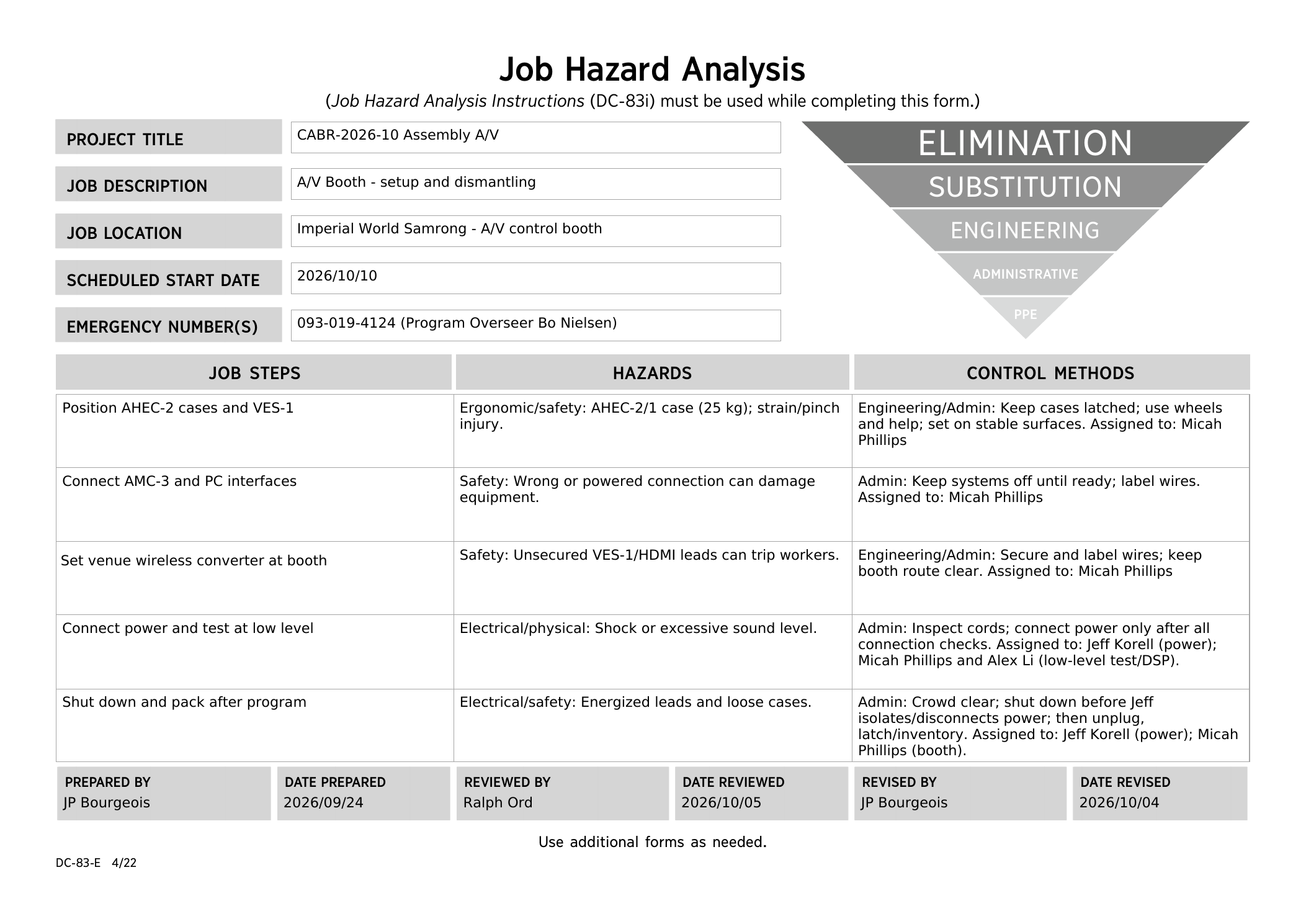
<details id="bkmrk-dc83-saturday-review"><summary><strong>DC-83 — Saturday morning safety review</strong></summary><p>Reviewed by Ralph Ord on 5 October 2026. <a href="https://drive.google.com/file/d/1z-e-_Md913F9WYMMlYIyNufmTdVyEFb2/view" target="_blank">Open the final PDF</a>.</p><p><a href="https://wiki.linajpenglish.xyz/uploads/images/gallery/2026-10/cabr-2026-dc-83-02-av-booth-final.png" target="_blank"><img src="https://wiki.linajpenglish.xyz/uploads/images/gallery/2026-10/scaled-1680-/cabr-2026-dc-83-02-av-booth-final.png" alt="Final A/V booth DC-83, reviewed by Ralph Ord on 5 October 2026"></a></p></details>
<p class="callout warning" id="bkmrk-booth-safety"><strong>Safety:</strong><br>Keep cases latched while moving them; use wheels and a helper for the 25 kg AHEC-2/1 case. Set equipment on stable surfaces and keep the operator route clear. Keep systems switched off while making connections.</p>
<p id="bkmrk-current-cabr-2026-sh"><strong>Current CABR-2026 Sheet 6-1 — audio headend wiring</strong></p>
<p id="bkmrk-"><a href="https://wiki.linajpenglish.xyz/uploads/images/gallery/2026-09/scaled-1680-/cabr-2026-sheet-6-1-jpg.jpeg" target="_blank"><img src="https://wiki.linajpenglish.xyz/uploads/images/gallery/2026-09/scaled-1680-/cabr-2026-sheet-6-1-jpg.jpeg" alt="CABR-2026 Sheet 6-1 showing AHEC-2, AMC-3, wireless receivers, media interfaces, media computers and projector HDMI transmitter connections"></a></p>
<h2 id="bkmrk-what-your-team-does">What your team does</h2>
<ol id="bkmrk-put-the-ahec-2-audio">
<li>Set up the AHEC-2 audio rack and the two media computers at the A/V booth.
<details><summary><strong>🗺️ View Sheet 1-1 — A/V booth location</strong></summary><p><a href="https://wiki.linajpenglish.xyz/uploads/images/gallery/2026-09/scaled-1680-/cabr-2026-sheet-1-1-jpg.jpeg" target="_blank"><img src="https://wiki.linajpenglish.xyz/uploads/images/gallery/2026-09/scaled-1680-/cabr-2026-sheet-1-1-jpg.jpeg" alt="CABR-2026 Sheet 1-1 showing the A/V booth location within the seating area"></a></p></details></li>
<li>Check the labels and connect the booth/headend ends of the <strong>30 m AMC-3 audio multicore (snake) cable</strong>, <strong>speakON passive-speaker output cables</strong> and <strong>XLR active-speaker return cables</strong> as Sheet 6-1 shows. Audio Cabling delivers the ends; the receiving teams connect their equipment.</li>
<li>Connect each media computer to its AIF by <strong>USB cable</strong>. Then run an <strong>XLR cable</strong> from AIF-1 to AMC-3 input 7 and another <strong>XLR cable</strong> from AIF-2 to input 8. Label both ends.</li>
<li>Collect the venue wireless microphones and receivers. Audio Cabling brings the <strong>XLR cables</strong> to the receiver and AMC-3 locations; connect the receivers to AMC-3 inputs 5–6.</li>
<li>Connect the PC-1 <strong>HDMI cable</strong> to the venue’s HDMI transmitter. Label the cable and secure it and the transmitter.</li>
<li>After all connection checks, <strong>Jeff Korell inspects the cords and connects booth power</strong>. Confirm final speaker positions with Corey and Alex before the sound check and keep them unchanged afterward. Micah and Alex switch on, test at low level and commission the system; test the projectors with venue staff.</li>
</ol>
<h2 id="bkmrk-for-micah%2C-alex-and-">For Micah, Alex and the operators</h2>
<table id="bkmrk-signal-connection-%2F-">
<thead>
<tr>
<th>Signal</th>
<th>Connection / starting point</th>
</tr>
</thead>
<tbody>
<tr>
<td>PC-1 / PC-2 audio</td>
<td><strong>USB cable</strong> from each PC to its AIF; <strong>XLR cables</strong> from AIF-1 / AIF-2 to AMC-3 inputs 7 / 8. AIF Mono on; Ground Lift off; gain about 11 o'clock; media-player volume 100%. Fine-tune during the sound check.</td>
</tr>
<tr>
<td>Wireless microphones</td>
<td><strong>XLR cables:</strong> venue receivers → AMC-3 inputs 5–6; adjust carefully for feedback.</td>
</tr>
<tr>
<td>Passive speakers</td>
<td><strong>speakON cables:</strong> amplifier output A to the front group; output B to the rear group.</td>
</tr>
<tr>
<td>Stage monitors</td>
<td><strong>XLR cable:</strong> DSP output 3 → AMC-3 return A → stage monitors.</td>
</tr>
<tr>
<td>Lobby / Accounting</td>
<td><strong>XLR cable:</strong> DSP output 5 → AMC-3 return B → lobby / Accounting. Output 4 is not used.</td>
</tr>
</tbody>
</table>
<p id="bkmrk-keep-food-and-drinks">Keep food and drinks away from the equipment tables. Personal devices can cause noise, so keep them away from audio equipment if interference is heard.</p>
<p id="bkmrk-use-only-approved-me">Use approved media and keep files and outlines private. Get Alex’s approval before connecting the media computers to the internet. Display the theme artwork before each session, during lunch and for about 30 minutes after the program. After the event, delete the media and outlines from both computers as directed.</p>
<h2 id="bkmrk-commissioning-the-ah">Commissioning the AHEC-2</h2>
<p class="callout info" id="bkmrk-use-co-160a-for-the-"><strong>For the full commissioning procedure, open</strong> <a href="https://drive.google.com/file/d/1nbmMRpEwRkg_3MdfnRwXcOuUG9Tc-t9F/view" target="_blank">CO-160a</a> and go to <strong>Chapter 3 → Audio Headend → AHEC-2, pages 3–4 → “Commissioning an Audio Installation.”</strong> The points below are only a quick guide.</p>
<ol id="bkmrk-connect-to-the-dsp.-">
<li><strong>Connect to the DSP.</strong> Use a laptop with an Ethernet port or adapter and an Ethernet cable. CO-160a shows the network settings and how to connect with the DLM System Control Editor.</li>
<li><strong>Load the starting preset.</strong> Use the LBD preset or the venue/event preset if one is available.</li>
<li><strong>Test each output zone.</strong> Use the approved audio test material and confirm that each output feeds the correct loudspeakers. If an output does not match Sheet 1-1 or 6-2, stop and correct the connection with Alex before continuing.</li>
<li><strong>Check delays and levels.</strong> Use the click track to listen where front and rear zones overlap. Then balance the zones with pink noise and an SPL meter. CO-160a sets <strong>82 dB-SPL</strong> as the maximum target at the seats closest to a loudspeaker.</li>
<li><strong>Make speech clear and stable.</strong> Have several people read at the main microphone. Follow CO-160a to improve speech intelligibility and reduce feedback without making voices sound unnatural.</li>
<li><strong>Finish the whole-system test.</strong> Confirm both media computers, all microphones, every loudspeaker zone, stage monitors, lobby/Accounting feeds and the projector link. Save the final DSP settings when commissioning is complete.</li>
</ol>
<p id="bkmrk-before-attendees-are-1">Before attendees are admitted, Alex and the operators should listen from several seating areas and agree on a simple backup plan for a failed microphone or computer.</p>
<p id="bkmrk-sunday-teardown-assi">Follow the <a href="https://wiki.linajpenglish.xyz/books/cabr-2026-10-assembly-av/page/safety-dismantling-and-references">confirmed dismantling teams and instructions</a>. After the audience has cleared and the safety meeting has finished, Micah leads system shutdown; <strong>Jeff isolates and disconnects power before the booth team unplugs cables</strong>. Latch and inventory the cases, and return venue equipment to venue staff.</p>

# Loudspeakers

<table id="bkmrk-keyman-%F0%9F%94%91-crew-corey-"><colgroup><col></col><col></col></colgroup><tbody><tr><th>Keyman 🔑

</th><th>Crew

</th></tr><tr><td>**Corey DeLoach**

</td><td>Melissa DeLoach; Mike Vigil; Lilia Vigil; Mike Mundell; Malachi Jenkins

</td></tr></tbody></table>

Your team places and aims six passive loudspeakers, two stage monitors and the active speakers for the lobby and Accounting.

Before starting, meet Corey, review the [Loudspeakers DC-83](https://drive.google.com/file/d/1ZMx9WjHQ8D52uALgd1F9kOd6WMNhWre8/view), and open Sheets 1-1, 4-1 and 6-2 in the [schematics](https://wiki.linajpenglish.xyz/attachments/3).

<details id="bkmrk-dc83-saturday-review"><summary>**DC-83 — Saturday morning safety review**</summary>

Reviewed by Ralph Ord on 5 October 2026. [Open the final PDF](https://drive.google.com/file/d/1ZMx9WjHQ8D52uALgd1F9kOd6WMNhWre8/view).

[![Final Loudspeakers DC-83, reviewed by Ralph Ord on 5 October 2026](https://wiki.linajpenglish.xyz/uploads/images/gallery/2026-10/scaled-1680-/cabr-2026-dc-83-04-loudspeakers-final.png)](https://wiki.linajpenglish.xyz/uploads/images/gallery/2026-10/cabr-2026-dc-83-04-loudspeakers-final.png)

</details><p class="callout warning">**Safety:**  
Use two people to mount or remove a loudspeaker. Wear hard hats while working with raised speakers. Keep hands clear of moving parts. Connect the **speakON cable before raising**, and check every lock is secure before letting go.</p>

<details id="bkmrk-speakon-connector-reference"><summary>**🔌 What a speakON connector looks like**</summary>

[![speakON cable connector](https://wiki.linajpenglish.xyz/uploads/images/gallery/2026-10/scaled-1680-/cabr-speakon-connector.png)](https://wiki.linajpenglish.xyz/uploads/images/gallery/2026-10/cabr-speakon-connector.png)

</details>## What your team does

1. With Corey, mark the six passive-speaker positions from Sheet 1-1. Keep exits and walking paths clear.
2. Set up the passive speakers using the quick guide below; complete each as far as practical before moving on.
3. Place the two stage monitors on the stage floor as shown on Sheet 4-1. Agree the exact positions with Stage.
4. Place the lobby and Accounting active speakers on stable surfaces near safe wall sockets. These speakers do not use the passive-speaker tripods.
5. For all active speakers: the labelled **XLR return cables** start at the **stage end of the AMC-3 audio multicore (snake) cable**. **Return A** feeds the stage monitors; **return B** feeds the lobby and Accounting. Audio Cabling routes and labels these runs; **your team connects them to the active speakers**. Power handles mains connections. Confirm both handoffs and final positions with those teams before final placement and testing. Keep connections accessible and cables clear of walking paths and wet areas.
6. Test every speaker with A/V Booth and walk the seating area with Alex. Adjust audio levels only as directed.

## Set up each passive loudspeaker — CO-160a quick guide

These steps come from **CO-160a Chapter 3, Tripods (TP-1), pages 5–6, Figures 58–59**. Use the current CABR-2026 drawings for the actual speaker position, height and aiming.

**Current CABR-2026 Sheet 6-2 — loudspeaker wiring**

[![CABR-2026 Sheet 6-2 showing passive and active loudspeaker wiring](https://wiki.linajpenglish.xyz/uploads/images/gallery/2026-09/scaled-1680-/cabr-2026-sheet-6-2-jpg.jpeg)](https://wiki.linajpenglish.xyz/uploads/images/gallery/2026-09/scaled-1680-/cabr-2026-sheet-6-2-jpg.jpeg)

### 1. Open and secure the tripod — Figure 58

- On an even, stable surface, loosen leg clamping screw **①**. Open the legs until cross braces **②** are horizontal, then retighten.
- Keep one leg forward and two at the back, with the loudspeaker’s tilt above the forward leg (as mentioned in the DC-83.)<details id="bkmrk-tripod-orientation-guide"><summary>View tripod orientation image</summary>
    
    This image illustrates tripod leg orientation only. The chair blocks do **not** represent actual placement relative to chairs; use Sheet 1-1 and Corey’s agreed layout.
    
    [![Visual guide to tripod leg orientation. The chair blocks do not represent the actual speaker layout.](https://wiki.linajpenglish.xyz/uploads/images/gallery/2026-10/scaled-1680-/tripod-leg-orientation.png)](https://wiki.linajpenglish.xyz/uploads/images/gallery/2026-10/tripod-leg-orientation.png)
    
    </details>
- Add the **5 kg sandbags** Corey assigns.

<details id="bkmrk-%F0%9F%93%98-view-co-160a-figur"><summary>📘 View CO-160a Figure 58 — TP-1 tripod</summary>

[![CO-160a Figure 58 showing TP-1 tripod setup and controls](https://wiki.linajpenglish.xyz/uploads/images/gallery/2026-07/scaled-1680-/tripod-fig-58.png)](https://wiki.linajpenglish.xyz/uploads/images/gallery/2026-07/tripod-fig-58.png)

</details>### 2. Mount and aim the loudspeaker — Figure 59

- Set the adapter to about **5° downward** and tighten upper clamping screw **⑦**. Turn lock ring **⑤** toward **OPEN**.
- With **two people**, mount the loudspeaker on the adapter.
- Turn lock ring **⑤** toward **CLOSE** until secure, then aim according to the current CABR-2026 drawing.

<details id="bkmrk-%F0%9F%93%98-view-co-160a-figur-1"><summary>📘 View CO-160a Figure 59 — tilt/angle adapter</summary>

[![CO-160a Figure 59 showing the loudspeaker tilt-angle adapter](https://wiki.linajpenglish.xyz/uploads/images/gallery/2026-07/scaled-1680-/tripod-fig-59-tilt-adapter.png)](https://wiki.linajpenglish.xyz/uploads/images/gallery/2026-07/tripod-fig-59-tilt-adapter.png)

</details>### 3. Connect the speakON cable before raising

- Connect the correct labelled **speakON cable** from Audio Cabling **before raising the loudspeaker**.
- Leave enough slack to avoid pulling on the connector; keep the cable clear of the tripod mechanism and walkways.
- If the cable is not ready, leave the tripod lowered and return to it later.

### 4. Raise and lock the tripod — Figure 58

- Loosen height clamping screw **④**. Hold button **⑤** while turning crank **⑥** to raise telescopic section **③** to the height in the table below.
- Release button **⑤** and continue cranking until the safety pin clicks into place.
- Tighten height clamping screw **④**.
- Check the tripod, adapter, loudspeaker, sandbags, **speakON cable** and all locks before moving away.

## For the keyman

<table id="bkmrk-group-position-and-h"><colgroup><col></col><col></col><col></col></colgroup><tbody><tr><th>Group

</th><th>Position and height

</th><th>Aim — about 5° down

</th></tr><tr><td>Front: SPK-1.1, 1.2, 1.3

</td><td>About 4 m from the first row; normally 2.5 m high, with 1.2 at 2.4 m

</td><td>Toward sections A, B and C

</td></tr><tr><td>Rear: SPK-2.1, 2.2, 2.3

</td><td>About 3.5 m from the first row; 2.5 m high

</td><td>Toward sections D, E and F

</td></tr></tbody></table>

If a raised speaker is above a walkway, keep at least 2.1 m clear underneath or use a barrier.

**When your speaker work is finished:** Check with Lacey and help Audio Cabling with the remaining cable work.

Roll the heavy PLS-1, TP-1 and ALS-4 cases with enough helpers. See [Safety, dismantling and references](https://wiki.linajpenglish.xyz/books/cabr-2026-10-assembly-av/page/safety-dismantling-and-references) for Sunday’s confirmed assignments and sequence. Wait until the audience has left, power is off and the teardown briefing is finished. Lower the tripod completely before two people remove the loudspeaker.

# Stage and microphones

## Saturday stage setup

<table id="bkmrk-keyman-%F0%9F%94%91-crew-stage-"><thead><tr><th>Keyman 🔑</th><th>Crew</th><th>Stage overseer</th></tr></thead><tbody><tr><td>**Jason Kirby**</td><td>Gerald Berard; SuMalei Kirby; Matthew Chappelle; Cameron Korell</td><td>**Jeff Korell**</td></tr></tbody></table>

Your team prepares the stage microphones and stands, runs the on-stage XLR microphone cables, and helps participants use the microphones correctly.

Before starting, meet Jason, review the team’s [DC-83](https://drive.google.com/file/d/1jmSkW2mjXFH51ekZ_yCRvrWzHmWvppAG/view), and open Sheets 4-1 and 6-1 in the [schematics](https://wiki.linajpenglish.xyz/attachments/3).

<details id="bkmrk-dc83-saturday-review"><summary>**DC-83 — Saturday morning safety review**</summary>

Reviewed by Ralph Ord on 5 October 2026. [Open the final PDF](https://drive.google.com/file/d/1jmSkW2mjXFH51ekZ_yCRvrWzHmWvppAG/view).

[![Final Stage and microphones DC-83, reviewed by Ralph Ord on 5 October 2026](https://wiki.linajpenglish.xyz/uploads/images/gallery/2026-10/scaled-1680-/cabr-2026-dc-83-03-stage-cw-final.png)](https://wiki.linajpenglish.xyz/uploads/images/gallery/2026-10/cabr-2026-dc-83-03-stage-cw-final.png)

</details><p class="callout warning">**Safety:**  
Watch the stage edge and keep access clear. Coordinate with Power and Loudspeakers in the shared work area. Roll the 30 kg MS-1 case with helpers and wear work shoes. Keep equipment switched off while connecting the XLR cables.</p>

<details id="bkmrk-xlr-connector-reference"><summary>**🔌 What XLR connectors look like**</summary>

[![XLR cable connectors — male and female](https://wiki.linajpenglish.xyz/uploads/images/gallery/2026-10/scaled-1680-/cabr-xlr-connectors.png)](https://wiki.linajpenglish.xyz/uploads/images/gallery/2026-10/cabr-xlr-connectors.png)

</details>**Main reference — Sheet 4-1.** Use it for microphone, lectern and stage-monitor positions and on-stage cable routes.

[![CABR-2026 Sheet 4-1 showing stage microphones, lectern, stage monitors and stage cable routes](https://wiki.linajpenglish.xyz/uploads/images/gallery/2026-09/scaled-1680-/cabr-2026-sheet-4-1-jpg.jpeg)](https://wiki.linajpenglish.xyz/uploads/images/gallery/2026-09/cabr-2026-sheet-4-1-jpg.jpeg)

## What your team does

1. Remove old or loose tape and mark the stage edge. Confirm the lectern, participant and microphone positions with Jeff.
2. Run the four **XLR microphone cables** between AMC-3 inputs 1–4 and the microphone positions. Confirm the handoff, routes and labels with Audio Cabling; ask for help if needed. 
    - If the XLR cable has attached Velcro, open it and **roll the cable off**; do not remove the Velcro.
    - Route the XLR cables neatly along the stage edge and **away from participant walking paths**.
    - Where practical, do not run XLR audio cables parallel to power cables. If they must cross, **cross at right angles**.
    - Use only small pieces of tape where needed, and use proper cable protection anywhere an XLR cable crosses or enters a walkway.
    - Label each XLR cable at the AMC-3 end and again near its microphone position.
3. Connect each **XLR microphone cable** to its assigned AMC-3 input (1–4) and to the matching microphone before mounting the microphone. Set each stand firmly and tape the cable flat, away from the stage edge.
4. Agree the two stage-monitor positions with the Loudspeakers team.
5. Check stand stability and cable slack, then test every microphone position at low level with Alex and A/V Booth. Train the stage assistants on microphone placement and handoffs, including the venue wireless microphones.
6. Attend the program walk-through and follow the [S-343 Stage Layout](https://drive.google.com/drive/folders/1ygTzZu8-Qb2szKemmuaYcKhuZ0C4f1R6) for chairman microphone positions, participant entry and exit, interviews, demonstrations and other stage cues. Before each participant goes on stage, give the required reminders from CO-160 Appendix F and confirm where the participant should stand or sit.

## Sunday program assignments

<table id="bkmrk-sunday-stage-assignments"><thead><tr><th>Position</th><th>Morning</th><th>Afternoon</th></tr></thead><tbody><tr id="bkmrk-sunday-stage-keymen"><td>Stage key man</td><td>**Jason Kirby**</td><td>**Matthew Chappelle**</td></tr><tr><td>Chairman side mic (Stage right)

</td><td>**Gerald Berard**

</td><td>**Corey DeLoach**

</td></tr><tr><td>Chairman side headset (Stage right)

</td><td>**Jason Kirby**

</td><td>**Matthew Chappelle**

</td></tr><tr><td>Participant side mic (Stage left)

</td><td>**Ruben Martinez**

</td><td>**Josh Norton**

</td></tr><tr><td>Participant side headset (Stage left)

</td><td>**Mike Vigil**

</td><td>**Jeff Korell**

</td></tr></tbody></table>

## Microphone positions

<table id="bkmrk-microphone-position-"><thead><tr><th>Microphone</th><th>Position</th><th>AMC-3 input</th></tr></thead><tbody><tr><td>MIC-1</td><td>Lectern</td><td>1</td></tr><tr><td>MIC-2</td><td>Floor stand beside the lectern</td><td>2</td></tr><tr><td>MIC-3 and MIC-4</td><td>As Jeff directs</td><td>3 and 4</td></tr><tr><td>Venue wireless microphones</td><td>Roving use as assigned</td><td>Receivers on 5 and 6</td></tr></tbody></table>

Baptism arrangements and the exact positions for experiences are confirmed at the program walk-through.

**When your stage setup is finished:** Check with Lacey and help Audio Cabling with the remaining cable work.

## Sunday dismantling

**Stage dismantling keyman: Jeff Korell.** Crew: Gerald Berard, SuMalei Kirby, Matthew Chappelle and Cameron Korell. See the [full dismantling team roster](https://wiki.linajpenglish.xyz/books/cabr-2026-10-assembly-av/page/safety-dismantling-and-references). Wait for the audience to clear and the teardown briefing to finish; confirm power is off. Work back from the stage edge while removing microphones, tape and stands, and inventory the equipment as it is packed.

# Power distribution

<table id="bkmrk-keyman-%F0%9F%94%91-crew-jeff-k">
<thead>
<tr>
<th>Keyman 🔑</th>
<th>Crew</th>
</tr>
</thead>
<tbody>
<tr>
<td><strong>Jeff Korell</strong></td>
<td>April Korell</td>
</tr>
</tbody>
</table>
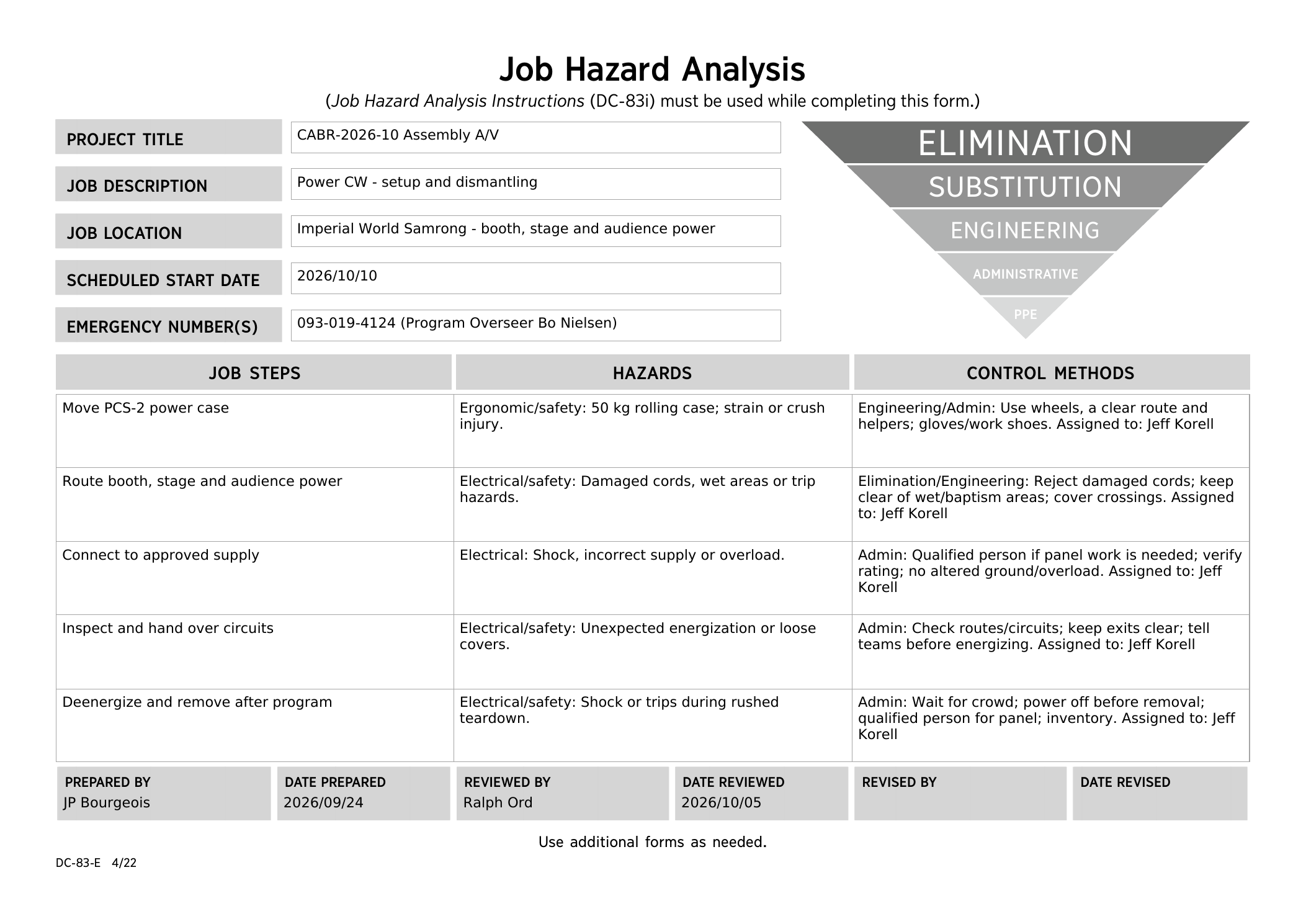
<p id="bkmrk-your-team-safely-run">Your team safely runs mains power to the A/V booth, the stage, and the active loudspeakers. Audio Cabling handles audio cables.</p>
<p id="bkmrk-before-starting%2C-rev">Before starting, review the team’s <a href="https://drive.google.com/file/d/17Y751mvB-K3WesVb5xsT0ZZMKY85fy7L/view">DC-83</a> and Sheet 4-1 in the <a href="https://wiki.linajpenglish.xyz/attachments/3">schematics</a>.</p>
<details id="bkmrk-dc83-saturday-review"><summary><strong>DC-83 — Saturday morning safety review</strong></summary><p>Reviewed by Ralph Ord on 5 October 2026. <a href="https://drive.google.com/file/d/17Y751mvB-K3WesVb5xsT0ZZMKY85fy7L/view" target="_blank">Open the final PDF</a>.</p><p><a href="https://wiki.linajpenglish.xyz/uploads/images/gallery/2026-10/cabr-2026-dc-83-05-power-cw-final.png" target="_blank"><img src="https://wiki.linajpenglish.xyz/uploads/images/gallery/2026-10/scaled-1680-/cabr-2026-dc-83-05-power-cw-final.png" alt="Final Power distribution DC-83, reviewed by Ralph Ord on 5 October 2026"></a></p></details>
<p id="bkmrk-main-reference-%E2%80%94-she"><strong>Main reference — Sheet 4-1.</strong> Use it for venue outlets, stage power, stage monitors and the route to the A/V booth.</p>
<p id="bkmrk-"><a href="https://wiki.linajpenglish.xyz/uploads/images/gallery/2026-09/cabr-2026-sheet-4-1-jpg.jpeg" target="_blank"><img src="https://wiki.linajpenglish.xyz/uploads/images/gallery/2026-09/scaled-1680-/cabr-2026-sheet-4-1-jpg.jpeg" alt="CABR-2026 Sheet 4-1 showing stage equipment, venue outlets and power routes"></a></p>
<p class="callout warning" id="bkmrk-electrical-safety%3Aon"><strong>Safety:</strong><br>Roll the 50 kg PCS-2 case on a clear route with helpers; wear work shoes and gloves.<br><br><strong>Electrical work:</strong> Only a qualified person performs panel work or other work requiring a qualification. Never alter an equipment ground. Set aside damaged cords, avoid overloaded circuits, and keep power away from the baptism area and wet floors.</p>
<h2 id="bkmrk-what-your-team-does">What your team does</h2>
<ol id="bkmrk-confirm-the-two-venu">
<li>Confirm the two approved venue outlets on Sheet 4-1 and verify supply ratings against the expected loads. Agree routes with Stage and Audio Cabling before laying mains cables through their work area.</li>
<li>From the left outlet, run the booth supply along the stage front and down the centre route to the A/V booth.</li>
<li>From the right outlet, run power for stage equipment, including both stage monitors. Coordinate final connections with Stage and Loudspeakers.</li>
<li>Confirm safe wall sockets for the lobby and Accounting speakers; run their mains supply and coordinate final connections with Loudspeakers.</li>
<li>Protect every floor crossing and inspect circuits, routes and cover edges; keep exits and participant paths clear. <strong>Tell the teams before energizing any supply.</strong> Jeff connects booth power only after A/V Booth’s connection checks.</li>
<li>When power work is safely complete, check with Lacey and help Audio Cabling with the remaining cable work and floor crossings.</li>
</ol>
<p id="bkmrk-agree-the-route-with">Where practical, keep mains power separate from audio cables; cross at <strong>right angles</strong> where they meet.</p>
<p id="bkmrk-the-venue-wireless-r">The venue wireless receivers at the stage may also need power; confirm this with the venue technician.</p>
<p id="bkmrk-the-pcs-2-case-weigh">Follow the <a href="https://wiki.linajpenglish.xyz/books/cabr-2026-10-assembly-av/page/safety-dismantling-and-references">confirmed dismantling teams and instructions</a>. After the audience has cleared and the safety meeting has finished, let the teams shut down their equipment. <strong>Jeff isolates and disconnects power before cords are removed.</strong> Use a qualified person for panel work and inventory the power equipment.</p>

# Safety, dismantling and references

<p id="bkmrk-your-safety-matters-">Your safety matters more than any deadline. The detailed guidance is in CO-160 Chapter 6, A-149, and each team's <a href="https://drive.google.com/drive/folders/1jNylk3J4Rlk-swVDgbmtG0OZU2-GmWFR">DC-83 job hazard analysis</a>.</p>
<table id="bkmrk-contact-name-%2F-infor">
<thead>
<tr>
<th>Contact</th>
<th>Name / information</th>
</tr>
</thead>
<tbody>
<tr>
<td>Emergency</td>
<td>093-019-4124 — Bo Nielsen, assembly overseer</td>
</tr>
<tr>
<td>First aid</td>
<td>First Aid desk — Kye Hadley</td>
</tr>
<tr>
<td>Safety overseer</td>
<td>Ralph Ord</td>
</tr>
</tbody>
</table>
<h2 id="bkmrk-during-delivery-and-">During delivery and setup</h2>
<ul id="bkmrk-attend-the-safety-br">
<li>Attend the safety briefing and your keyman's DC-83 review. Know the nearest exit and keep all exits and walkways clear.</li>
<li>Use enough helpers for anything over 20 kg or bulky. Roll wheeled cases. Wear work shoes and gloves; use hard hats for raised-speaker work.</li>
<li>Close case latches before moving equipment. Inspect cables, cover floor crossings and check cover edges for raised or loose areas.</li>
<li>Keep tripods level, locked and sandbagged. Connect the <strong>speakON loudspeaker cable</strong> before raising a speaker and keep others clear.</li>
<li>Report an incident, near miss, damaged item or unsafe condition immediately. Stop work if something is unsafe.</li>
<li>Keep food and drinks away from A/V equipment.</li>
</ul>
<h2 id="bkmrk-sunday-dismantling">Sunday dismantling</h2>
<p id="bkmrk-confirmed-dismantling-teams">Use the dismantling teams below and follow your keyman after the teardown safety meeting.</p>
<table id="bkmrk-dismantling-team-roster"><thead><tr><th>Dismantling team</th><th>Keyman</th><th>Crew</th></tr></thead><tbody><tr><td>Cabling (Video and Audio)</td><td><strong>Lacey Cox</strong></td><td>Ronan Gav Budd; Ruben Martinez; Layo Kirby; TaSanee Kirby; Meyana Barnhart; Marcel Lewandowski; Adam Brier; Kassander Jensen; Pinja Keskinen; Yuri Chaplygin; Bethany Mundell; Sebastien Machez</td></tr><tr><td>A/V Booth</td><td><strong>Micah Phillips</strong></td><td>Mint Phillips; Dern; Brendan Coonce</td></tr><tr><td>Stage</td><td><strong>Jeff Korell</strong></td><td>Gerald Berard; SuMalei Kirby; Matthew Chappelle; Cameron Korell</td></tr><tr><td>Loudspeakers</td><td><strong>Corey DeLoach</strong></td><td>Melissa DeLoach; Mike Vigil; Lilia Vigil; Mike Mundell; Malachi Jenkins</td></tr><tr><td>Packing</td><td><strong>Jason Kirby</strong></td><td>Zabrina Bourgeois; Karina Li; April Korell</td></tr></tbody></table>
<p id="bkmrk-packing-bom-check"><strong>Cabling:</strong> Also gather the rugs used to secure cable runs.</p>
<ol id="bkmrk-note-the-actual-prog">
<li>Note the actual program end. Let the audience leave. The teardown safety meeting and prayer begins 30 minutes after the actual end; wait for it before starting.</li>
<li>The meeting leader will name the teams, keymen, packing area and work order. Shut down equipment; Jeff isolates and disconnects power before anyone unplugs cables.</li>
<li>With two people wearing hard hats, lower each tripod completely before removing its loudspeaker. Remove stands, microphones, cables and covers without creating trip hazards. Return venue equipment to venue staff.
<ul>
<li>Coil XLR cables and other audio cables neatly. Do not wrap them around your elbow; avoid twists and sharp bends, and keep any attached Velcro with the cable.</li>
</ul>
</li>
<li>Bring every item to the packing area. Packing checks each item against the <a href="https://wiki.linajpenglish.xyz/attachments/2">October BOM</a> before cases go to the truck. Put each item back in its correct box; cable colour tags match the box. Before leaving, make one quick check of the work area for anything left behind.</li>
<li>Report and photograph damage. Close every latch, and strap wheeled cases in the truck rather than relying on the wheel locks.</li>
</ol>
<h2 id="bkmrk-reference-links">Reference links</h2>
<ul id="bkmrk-shared-crew-folder-l">
<li><a href="https://drive.google.com/drive/folders/1WOum_FR7RtVbjyx8-h6Ru21w_Ms2qrza?usp=sharing">Shared crew folder</a></li>
<li><a href="https://docs.google.com/spreadsheets/d/1zrcweMSz__MY-mCBP__g6sCuJ-KvDUaxP2co69xNTak/edit">Live roster</a></li>
<li><a href="https://drive.google.com/drive/folders/1jNylk3J4Rlk-swVDgbmtG0OZU2-GmWFR">DC-83 job hazard analyses</a></li>
<li><a href="https://wiki.linajpenglish.xyz/attachments/3">CABR-2026 schematic PDF</a></li>
<li><a href="https://wiki.linajpenglish.xyz/attachments/2">October equipment BOM</a></li>
<li><a href="https://www.jw.org/en/library/programs/2026-2027-Circuit-Assembly-Program-With-Branch-Representative/Find-Exquisite-Delight-in-Jehovah/">Official English program</a></li>
</ul>
<p id="bkmrk-thank-you-for-your-l">Thank you for your loving support and careful work.</p>