Audio Booth (AHEC-1) / 音响控制台 (AHEC-1)

🎤 Audio Booth (AHEC-1)Crew / 音响控制台 (AHEC-1)

音响组

Crew Overseer / 小组监督: Gyeong-hwan Lee 李俊辉

Team / 小组:小组 Members / 成员 Audio Booth / 音频控制台小组音频控制台 Keyman / 负责人:• Willy 🔑 Members / 成员:
• Sebastian 杜卫宁

Purpose🇬🇧 /English 目的Instructions

Purpose
Install, connect, label, and commission allthe equipmentAudio inHeadend (AHEC-1) according to the audio boothschematics before thetesting conventionand program begins. 在大会开始前安装、连接、标识并调试音响控制台的所有设备。operation.

⚠️ Safety & Installation Notes / 安全提醒
• Keep all walkways clear. / 保持所有通道畅通。
• Verify power sources before connecting equipment. / 连接设备前确认电源。
• Do not energize equipment until all connections have been verified. / 确认连接无误前不要开启设备。
• Maintain a clean and organized work area. / 保持工作区域整洁有序。
• Strict NO FOOD or DRINK policy in the booth.
/• 控制台内严禁饮食。Cell phones and tablets can introduce noise into the system; be mindful of this while operating equipment.
• Do not apply power until instructed by the Power Distribution Team.


Required References

    Full Drawing Set: 📎 Complete PDF Event Content List: Case AHEC-1

    Required Equipment Cases

      AHEC-1: Contains the Audio Headend, 16-channel mixer, 2x DSPs, 3x amplifiers, and accessories.

      Setup Steps / 安装步骤

      1. Position the Audio Headend
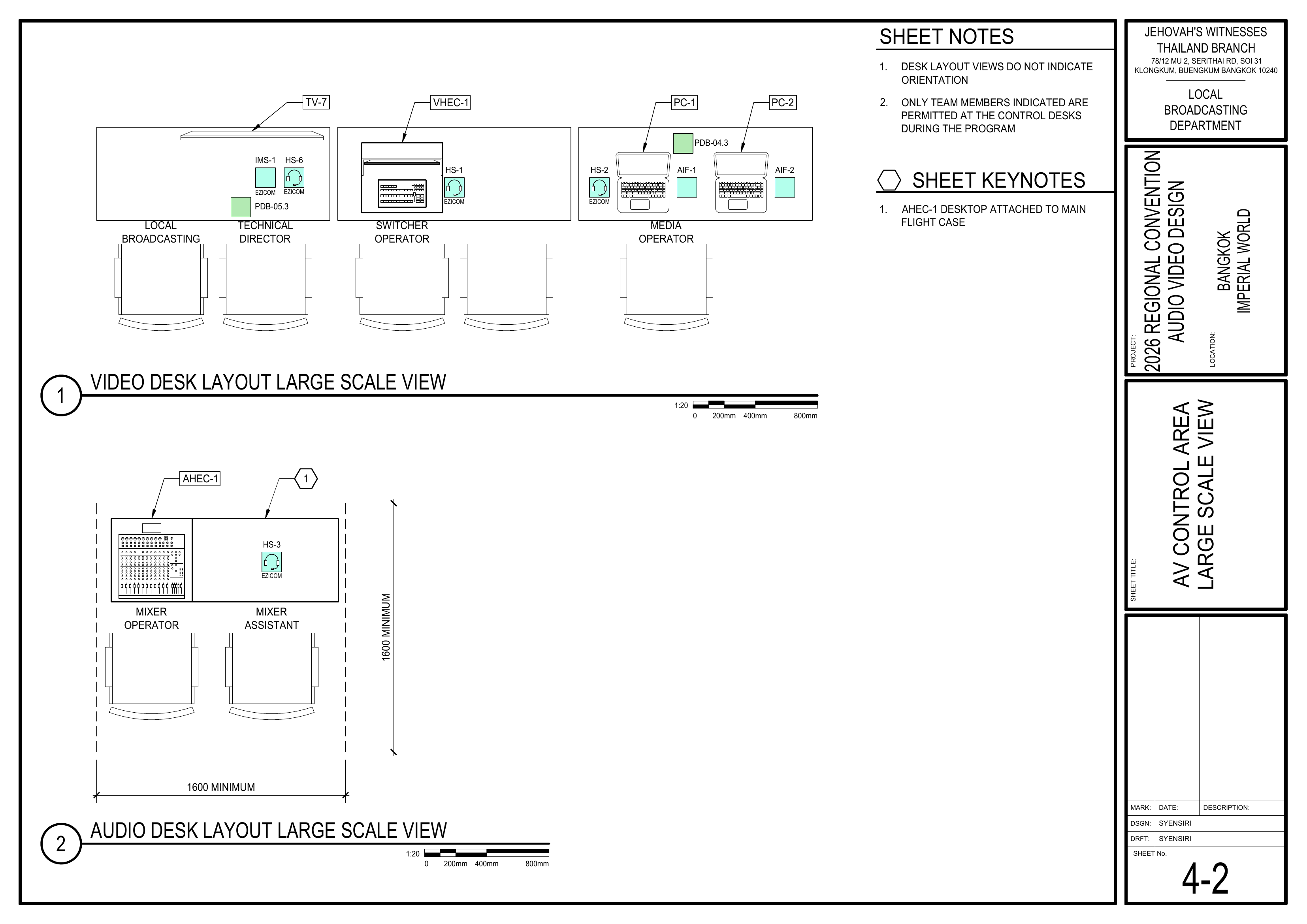
      Schematics: Pages 1-2 Audio Equipment /Layout 摆放设备Plan, 4-2 AV Control Area Large Scale View

      • English:Move AHEC-1 to the Audio Control Area.
      Position allthe equipment according to the boothdesk layout.layout Verify table orientation and operator positions. Confirm adequate space for cabling and operation. 中文: 按照控制台布局图摆放所有设备。确认桌面方向及操作员位置。确保有足够空间进行布线和操作。plans.
      🗺️ View Booth LayoutAssociated Schematics (Pages 1-2, 4-2)

      {{@master_page_id#1-2-audio-equipment-layout-plan-音频设备布局图}}
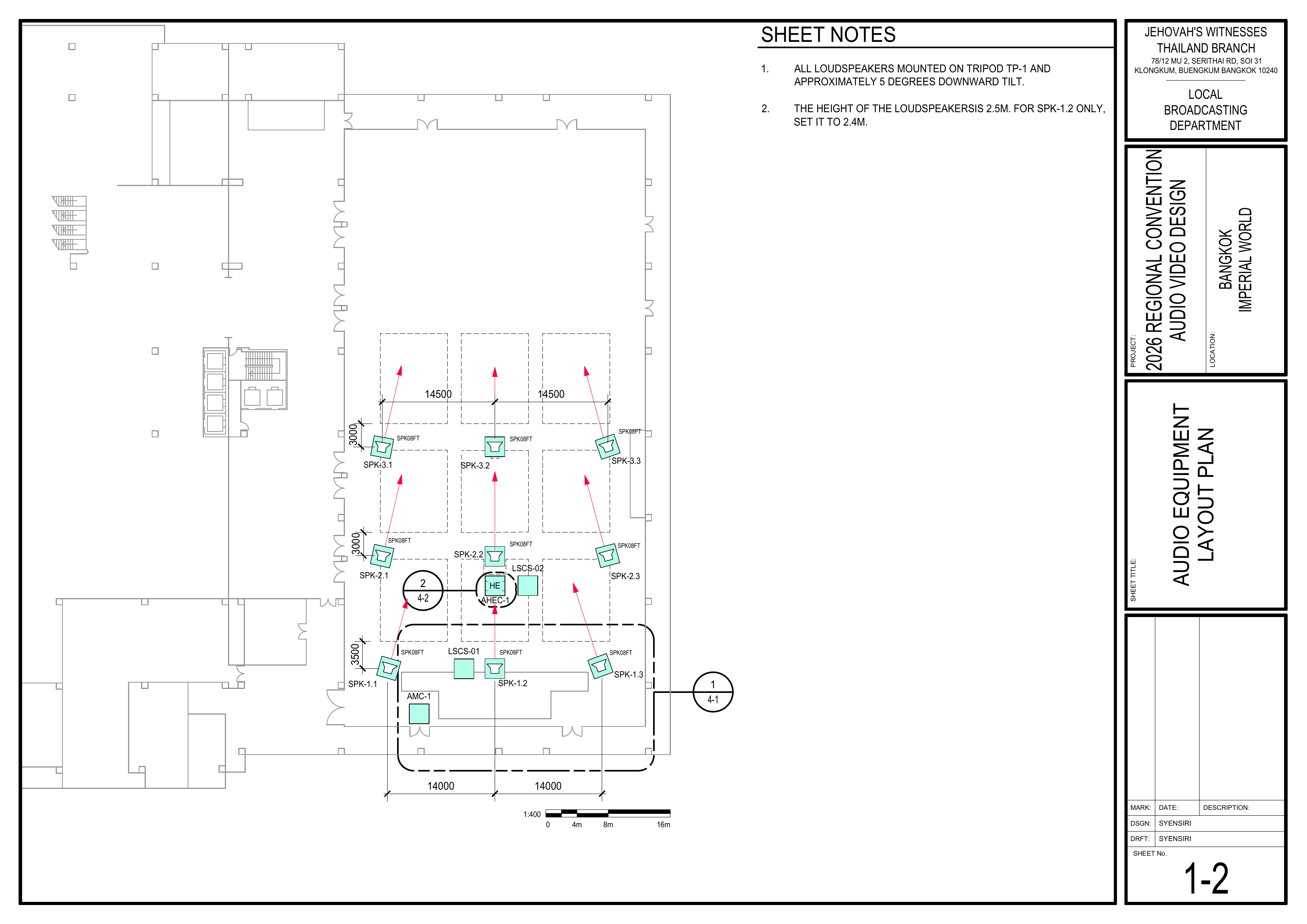
      1-2 Audio Equipment Layout Plan showing loudspeaker positions, audio headend, and sound coverage direction / 音频设备布局图,显示扬声器位置、音频主控设备及声音覆盖方向

      {{@master_page_id#4-2-av-control-area-音视频控制区-large-scale-view}}
      4-2 AV Control Area Large Scale View showing video desk, audio desk, operator positions, intercom, laptops, and control equipment / 音视频控制区大比例图,显示视频控制台、音频控制台、操作员位置、对讲设备、电脑及控制设备

      2. Connect Audio Equipment
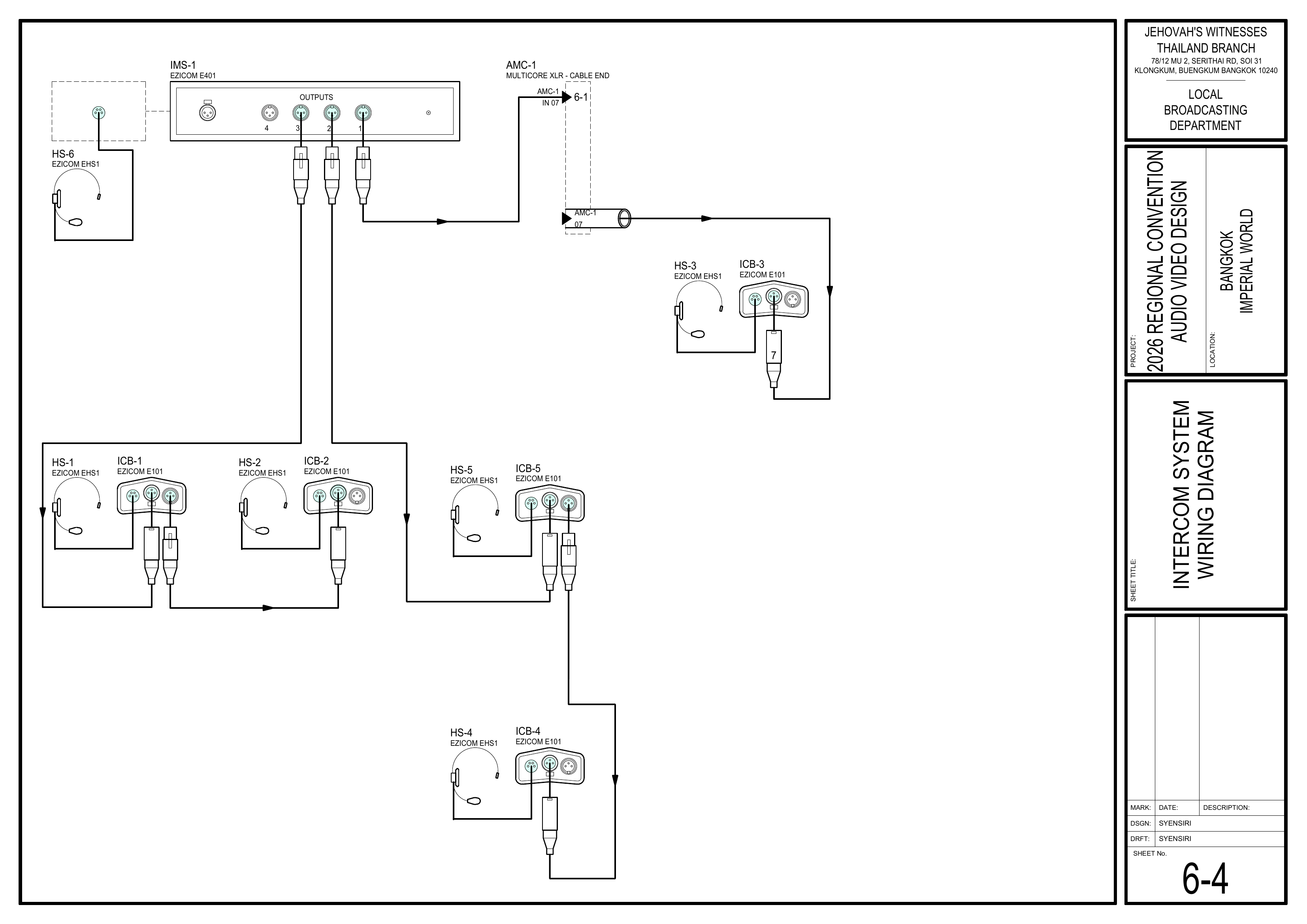
      /Schematics: 连接音频设备Pages 6-1 Audio Headend Wiring Diagram, 6-4 Intercom System Wiring Diagram

      • English:Connect Connectall audio equipment according to the modulesschematics.
      part of AHEC-1. Connect snake cable inputs and outputs. Attach a tag to each cable identifying its use.
      🗺️ View Associated Schematics (Pages 6-1, 6-4)
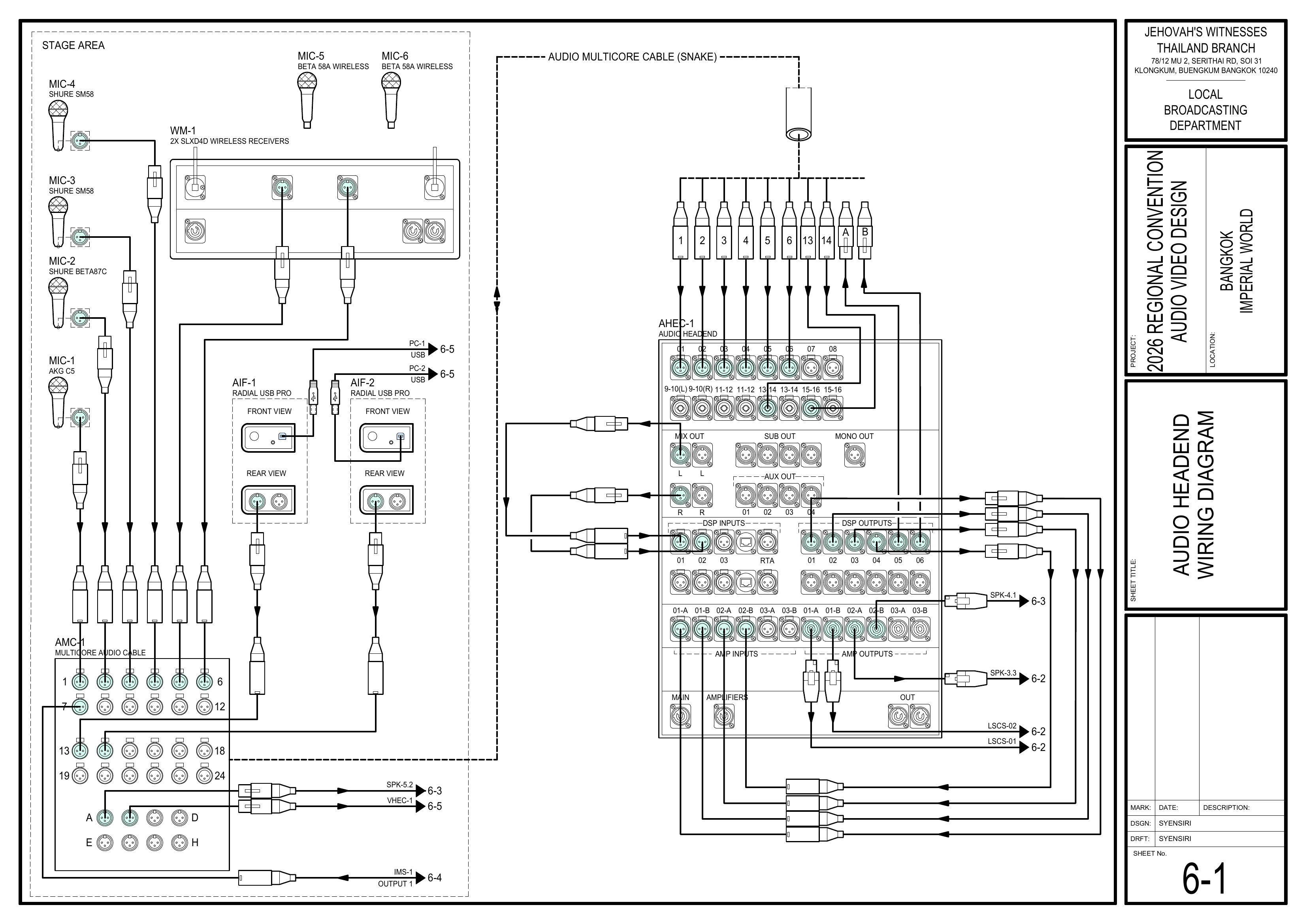
      6-1 Audio Headend Wiring Diagram showing microphones, wireless receivers, audio interfaces, audio multicore cable, and AHEC-1 connections / 音频主控接线图,显示麦克风、无线接收器、音频接口、多芯音频线及 AHEC-1 接线

      6-4 Intercom System Wiring Diagram showing IMS-1 master unit, intercom belt packs, headsets, and cable connections / 对讲系统接线图,显示 IMS-1 主机、对讲腰包、耳机及线缆连接

      3. Connect to Power
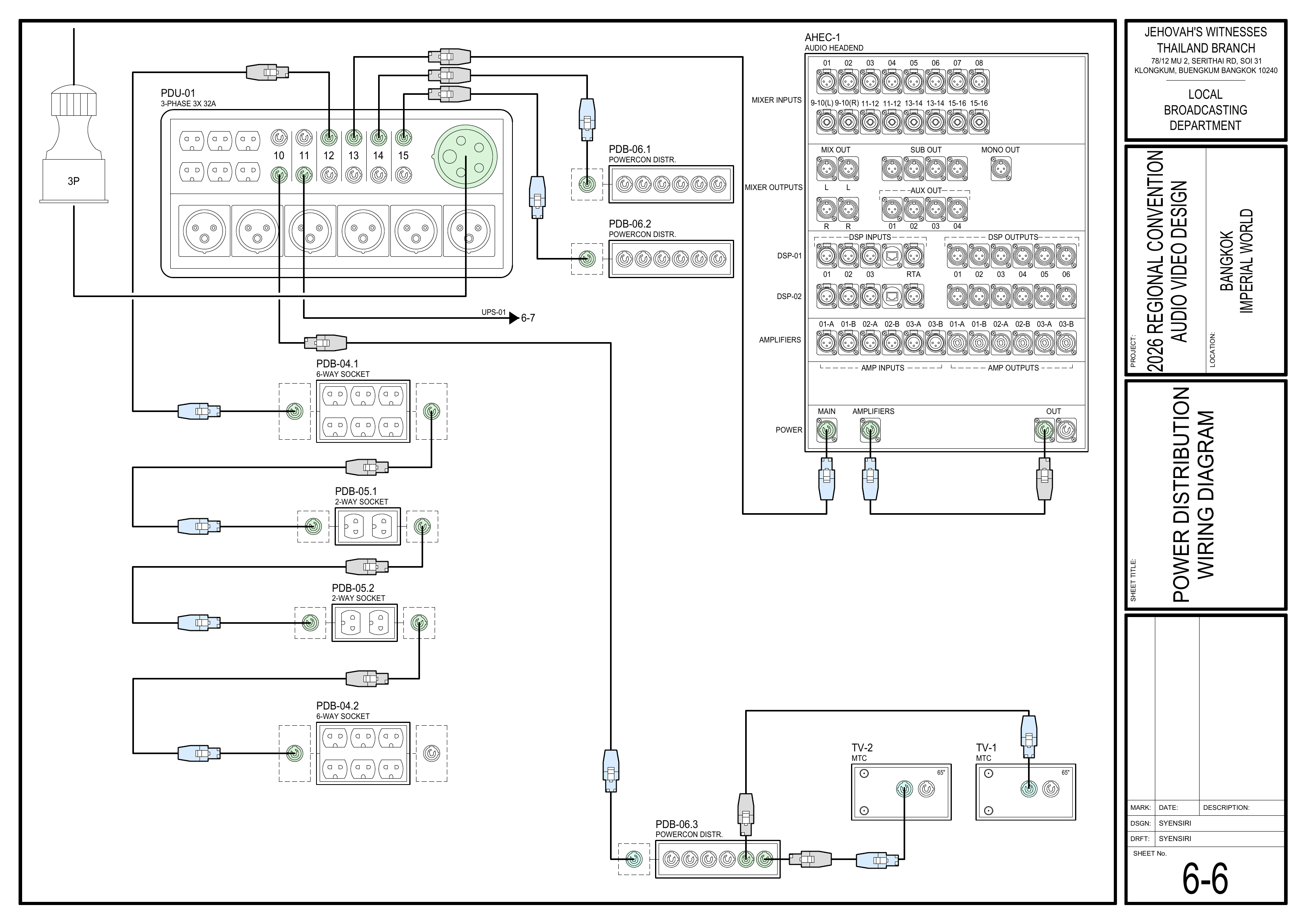
      Schematics: Pages 1-4 Power Distribution Layout Plan, 6-6 Power Distribution Wiring Diagram

        Connect the Audio Booth to the power socket provided by the Power Distribution Team. Do not power on the system until the Power Distribution Team confirms that power is ready.
        中文:🗺️ View Power Schematics (Pages 1-4, 6-6) 连接
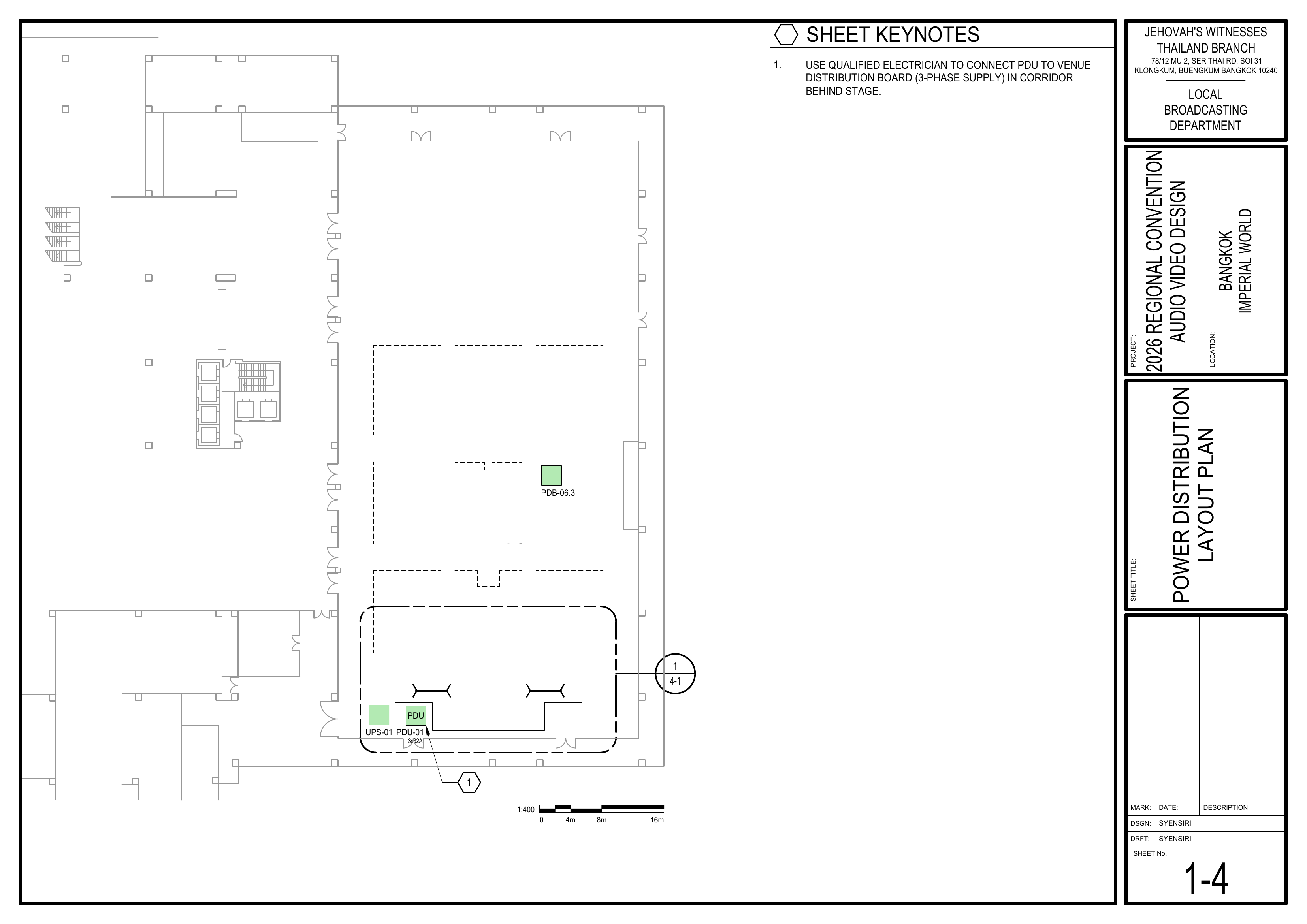
        1-4 Power Distribution Layout Plan showing PDU, UPS, and power distribution locations / 电源分配布局图,显示 PDU、UPS 及电源分配位置
        AHEC-
        6-6 Power Distribution Wiring Diagram showing PDU-01, power sockets, audio headend power, TVs, and LED wall power distribution / 电源分配接线图,显示 PDU-01、电源插座、音频主控供电、电视及 LED 屏幕电源分配

        4. Commission the Audio System
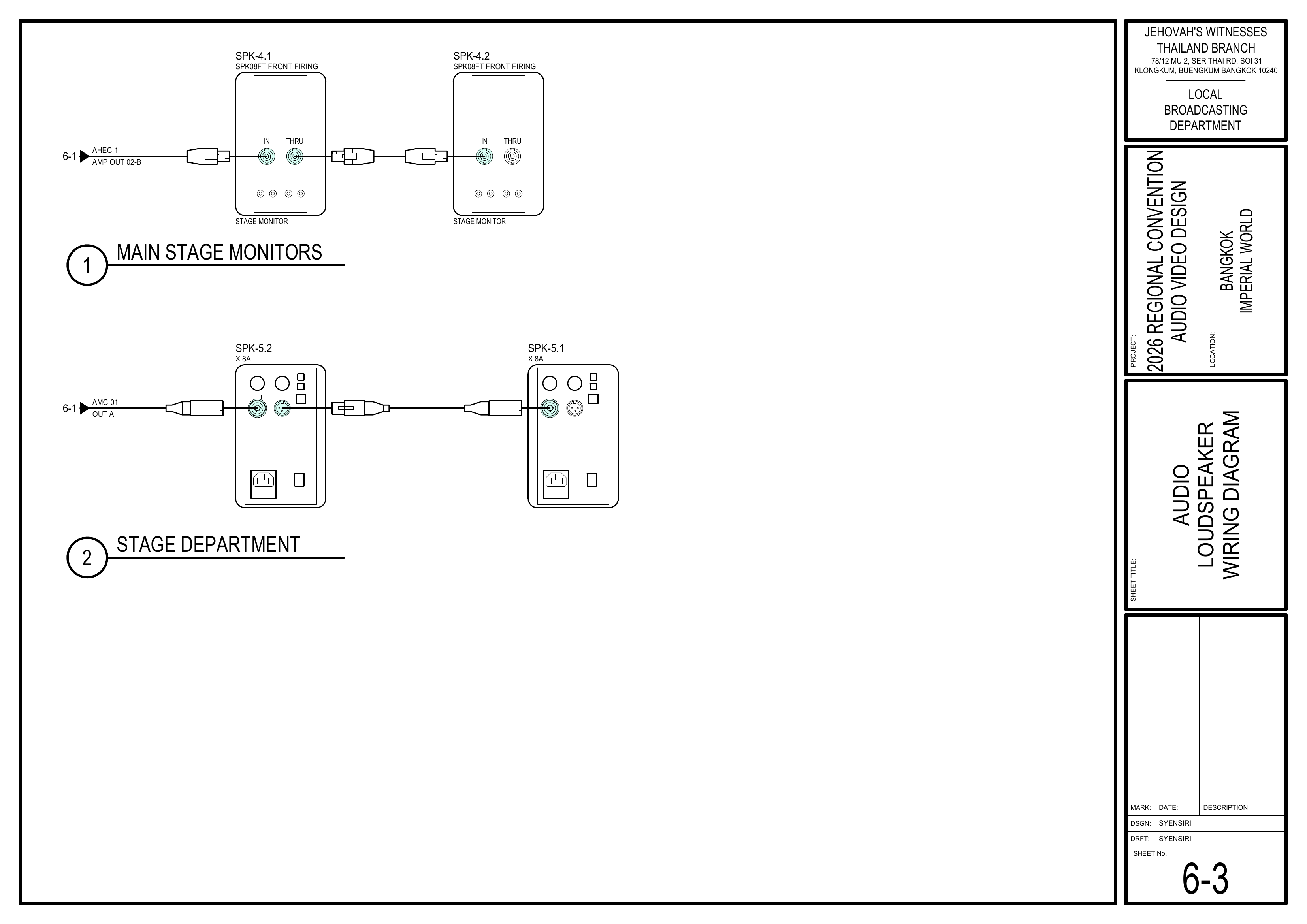
        Schematics: Pages 6-1 的模块部分。连接主蛇线(snakeAudio cable)输入及输出。在每条线缆上贴上标签,注明其用途。Headend Wiring Diagram, 6-2 Loudspeaker Wiring Diagram, 6-3 Audio Loudspeaker Wiring Diagram

          Commission the audio system as outlined in the CO-160a guidelines. Verify amplifier settings, DSP configurations, and test inputs/outputs before handing over for walk-throughs.
          🗺️ View Audio HeadendCommissioning Wiring DiagramSchematics (PagePages 6-1)1, 6-2, 6-3)

          {{@master_page_id#6-1-audio-headend-wiring-diagram-音频主控接线图}}
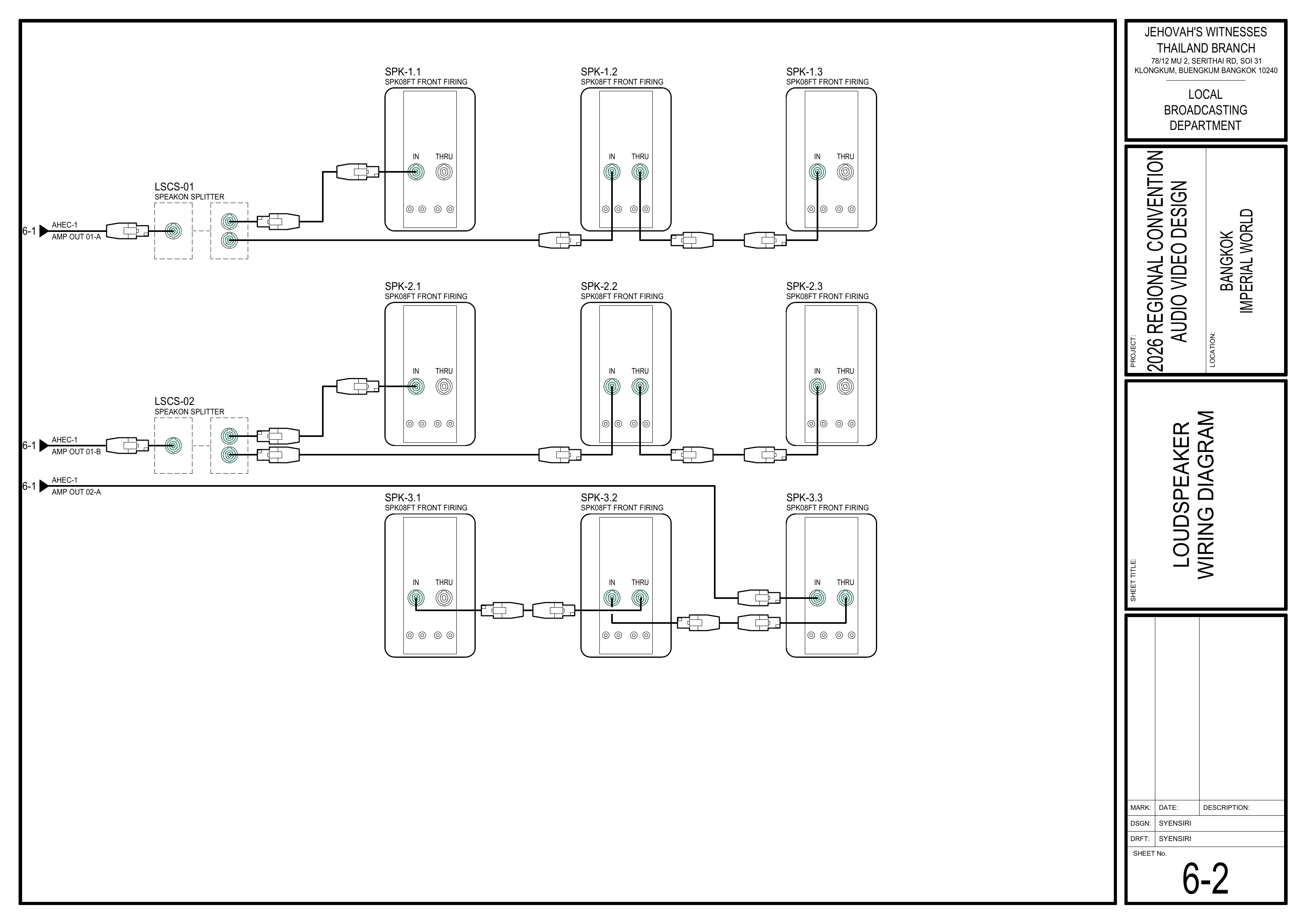
          6-1 Audio Headend Wiring Diagram showing microphones, wireless receivers, audio interfaces, audio multicore cable, and AHEC-1 connections / 音频主控接线图,显示麦克风、无线接收器、音频接口、多芯音频线及 AHEC-1 接线

          6-2 Loudspeaker Wiring Diagram showing SPK08FT loudspeaker connections, SpeakON splitters, and amplifier outputs / 扬声器接线图,显示 SPK08FT 扬声器连接、SpeakON 分配器及功放输出

          6-3 Audio Loudspeaker Wiring Diagram showing main stage monitor speakers and stage department sound connections / 讲台及部门扬声器接线图,显示主舞台监听扬声器及舞台部门声音连接
          3. Connect Power / 连接电源
            English: Connect the AHEC-1 power distribution equipment. Connect Booth to power socket and confirm with the power team we can power up the AHEC. 中文: 连接 AHEC-1 电源分配设备。将控制台连接到电源插座,并与供电组确认 AHEC 可以通电启动。
            🗺️ View Power Distribution Wiring Diagram (Page 6-6)

            {{@master_page_id#6-6-power-distribution-wiring-diagram-电源分配接线图}}

            4. Commission Systems / 系统调试
              English: Commission the Audio system. Follow the CO-160a for details (AHEC-1). 中文: 调试音频系统。详情请参阅 CO-160a (AHEC-1)。 Reference: Get CO-160a here / 在此获取 CO-160a

              Completion Checklist / 完成检查表

              • EquipmentAHEC-1 positioned /in 设备已摆放Audio Control Area
              • Audio equipment connected &according taggedto / 音频设备已连接并贴上标签schematics
              • PowerEvery connectedcable /tagged 电源已连接identifying its use
              • SystemBooth connected to power socket
               Audio system commissioned /according 系统已调试to CO-160a  Keyman inspection completed

              Dismantling / 拆卸Procedure

              📌 NoteWait / 提示: Before dismantling,for the whole department willbriefing meetand togetherprayer 30 minminutes after the program ends on Sunday forbefore adismantling. short briefingPower down the audio headend and prayer.
              在星期日节目结束 30 分钟后,等待整个部门的简短会议和祷告后再开始拆除工作。
                Power offdisconnect all equipment.signal /and 关闭所有设备电源。power cables. Disconnect audio cabling. / 拔除音频线缆。 Disconnect power distribution equipment. / 断开电源分配设备。 Coil and organizelabel all cables. / 整理并卷好线缆。  Pack equipmentthe inmixer, designatedDSPs, cases.amplifiers, /and 将设备装入指定箱体。accessories securely back into the AHEC-1 case.  Gather all equipment and returnbring it to the collectiondesignated area. / 收集所有设备并将其送回集合区域。 Note for team leader: Use the Bill of Materials (BOM) to cross off every box or case before it is brought to the truck:
                   AHEC-1

                  🇨🇳 中文说明

                  目的
                  根据图纸安装、连接并调试音频主控设备 (AHEC-1),为测试和正式运行做好准备。

                  ⚠️ 安全与安装提示
                  • 控制台内严禁饮食。
                  • 手机和平板电脑也会让系统出现杂音,操作设备时请留意。
                  • 未经配电组确认,不要接通电源。

                  参考资料

                    完整图纸: 📎 完整 PDF 文件 大会设备清单: 设备箱 AHEC-1

                    所需设备箱

                      AHEC-1: 包含音频主控设备、16 通道混音器、2 台数字信号处理器 (DSP)、3 台功放及附件。

                      安装步骤

                      1. 放置音频主控设备
                      图纸:1-2 音频设备布局图、4-2 音视频控制区大比例图

                        将 AHEC-1 移动到音频控制区。 按照控制台布局图摆放设备。
                        🗺️ 查看相关图纸(图纸 1-2, 4-2)
                        1-2 Audio Equipment Layout Plan showing loudspeaker positions, audio headend, and sound coverage direction / 音频设备布局图,显示扬声器位置、音频主控设备及声音覆盖方向

                        4-2 AV Control Area Large Scale View showing video desk, audio desk, operator positions, intercom, laptops, and control equipment / 音视频控制区大比例图,显示视频控制台、音频控制台、操作员位置、对讲设备、电脑及控制设备

                        2. 连接音频设备
                        图纸:6-1 音频主控接线图、6-4 对讲系统接线图

                          根据图纸连接所有音频设备。 为每根线缆贴上标签,标明其用途。
                          🗺️ 查看相关图纸(图纸 6-1, 6-4)
                          6-1 Audio Headend Wiring Diagram showing microphones, wireless receivers, audio interfaces, audio multicore cable, and AHEC-1 connections / 音频主控接线图,显示麦克风、无线接收器、音频接口、多芯音频线及 AHEC-1 接线

                          6-4 Intercom System Wiring Diagram showing IMS-1 master unit, intercom belt packs, headsets, and cable connections / 对讲系统接线图,显示 IMS-1 主机、对讲腰包、耳机及线缆连接

                          3. 连接电源
                          图纸:1-4 电源分配布局图、6-6 电源分配接线图

                            将音频控制台连接到配电组提供的电源插座。 未经配电组确认电源已准备好之前,不要开启系统。
                            🗺️ 查看电源相关图纸(图纸 1-4, 6-6)
                            1-4 Power Distribution Layout Plan showing PDU, UPS, and power distribution locations / 电源分配布局图,显示 PDU、UPS 及电源分配位置

                            6-6 Power Distribution Wiring Diagram showing PDU-01, power sockets, audio headend power, TVs, and LED wall power distribution / 电源分配接线图,显示 PDU-01、电源插座、音频主控供电、电视及 LED 屏幕电源分配

                            4. 调试音频系统
                            图纸:6-1 音频主控接线图、6-2 扬声器接线图、6-3 讲台及部门扬声器接线图

                              参照 CO-160a 指南调试音频系统。 在移交进行走位练习前,核实功放设置、DSP 配置,并测试输入/输出信号。
                              🗺️ 查看音频调试相关图纸(图纸 6-1, 6-2, 6-3)
                              6-1 Audio Headend Wiring Diagram showing microphones, wireless receivers, audio interfaces, audio multicore cable, and AHEC-1 connections / 音频主控接线图,显示麦克风、无线接收器、音频接口、多芯音频线及 AHEC-1 接线

                              6-2 Loudspeaker Wiring Diagram showing SPK08FT loudspeaker connections, SpeakON splitters, and amplifier outputs / 扬声器接线图,显示 SPK08FT 扬声器连接、SpeakON 分配器及功放输出

                              6-3 Audio Loudspeaker Wiring Diagram showing main stage monitor speakers and stage department sound connections / 讲台及部门扬声器接线图,显示主舞台监听扬声器及舞台部门声音连接

                              完成检查表

                                 AHEC-1 已放置在音频控制区  已根据图纸连接音频设备  每根线缆已贴标签标明用途  控制台已连接电源插座  音频系统已按照 CO-160a 完成调试  负责人已检查确认

                                拆卸步骤

                                   在星期日节目结束 30 分钟后,等待整个部门的简短会议和祷告后再开始拆除工作。  关闭音频主控设备电源,并断开所有信号线和电源线。  整理并标识所有线缆。  将混音器、DSP、功放及附件安全地装回 AHEC-1 设备箱内。  将所有设备带到指定集合区域。  组长注意: 在将每个箱子或设备箱搬上卡车前,请使用物料清单 (BOM) 核对并划掉每一项:
                                     AHEC-1