
Audio Booth (AHEC-1) / 音频控制台组(AHEC-1)
🎤 Audio Crew / 音响组
Crew Overseer / 小组监督: Gyeong-hwan Lee 李俊辉
| Team / 小组 | |
|---|---|
| Audio Booth / 音频控制台组 | • Willy 🔑 |
🇬🇧 English Instructions
Purpose
Install, connect, and commission the Audio Headend (AHEC-1) according to the schematics before testing and operation.
⚠️ Safety & Installation Notes
• Strict NO FOOD or DRINK policy in the booth.
• Cell phones and tablets can introduce noise into the system; be mindful of this while operating equipment.
• Do not apply power until instructed by the Power Distribution Team.
Required References
- Full Drawing Set: 📎 Complete PDF
- Congregation Job Hazard Analysis (DC-85): 📁 Google Drive Folder
- Event Content List: Case AHEC-1
Required Equipment Cases
- AHEC-1: Contains the Audio Headend, 16-channel mixer, 2x DSPs, 3x amplifiers, and accessories.
Setup Steps
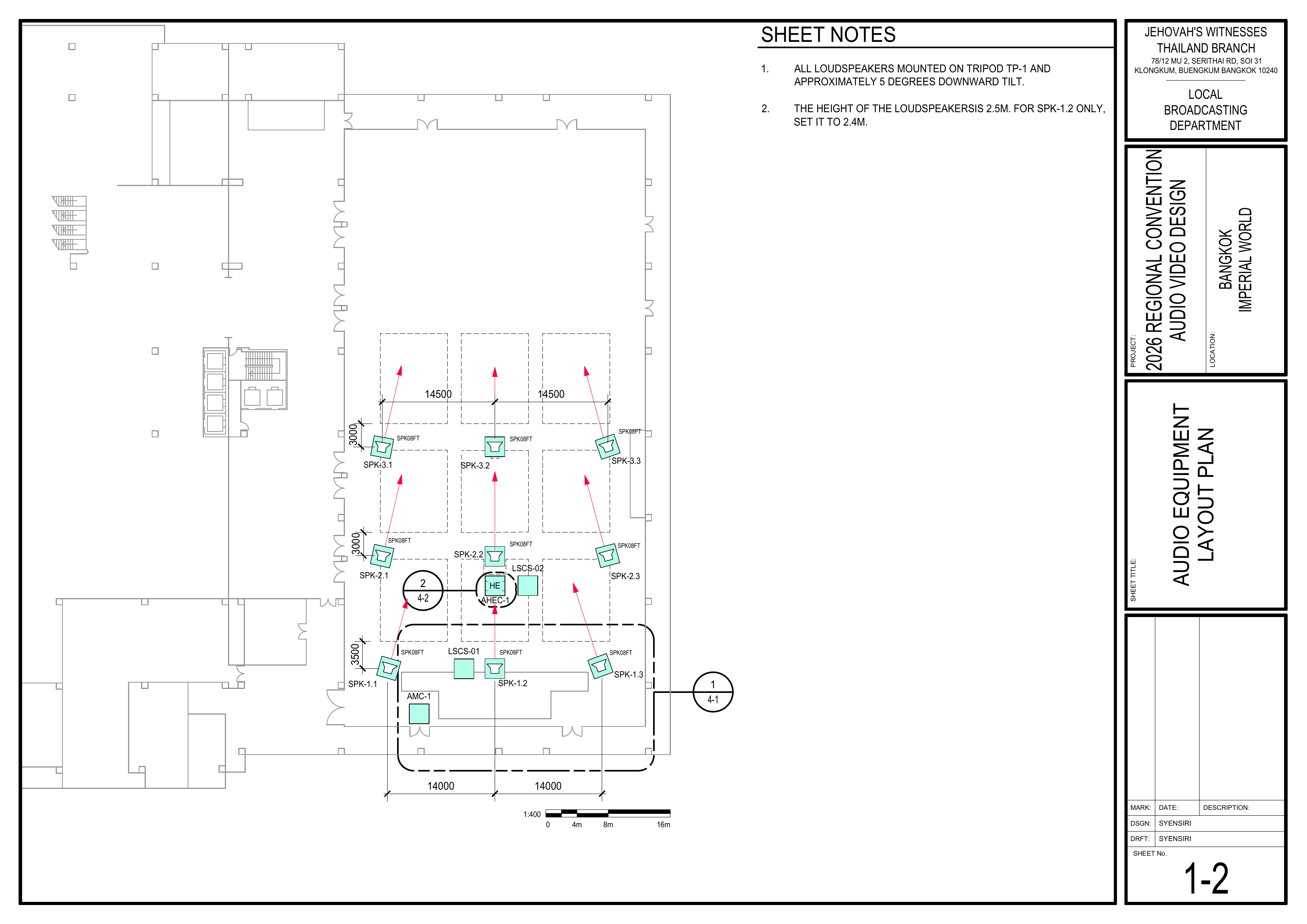
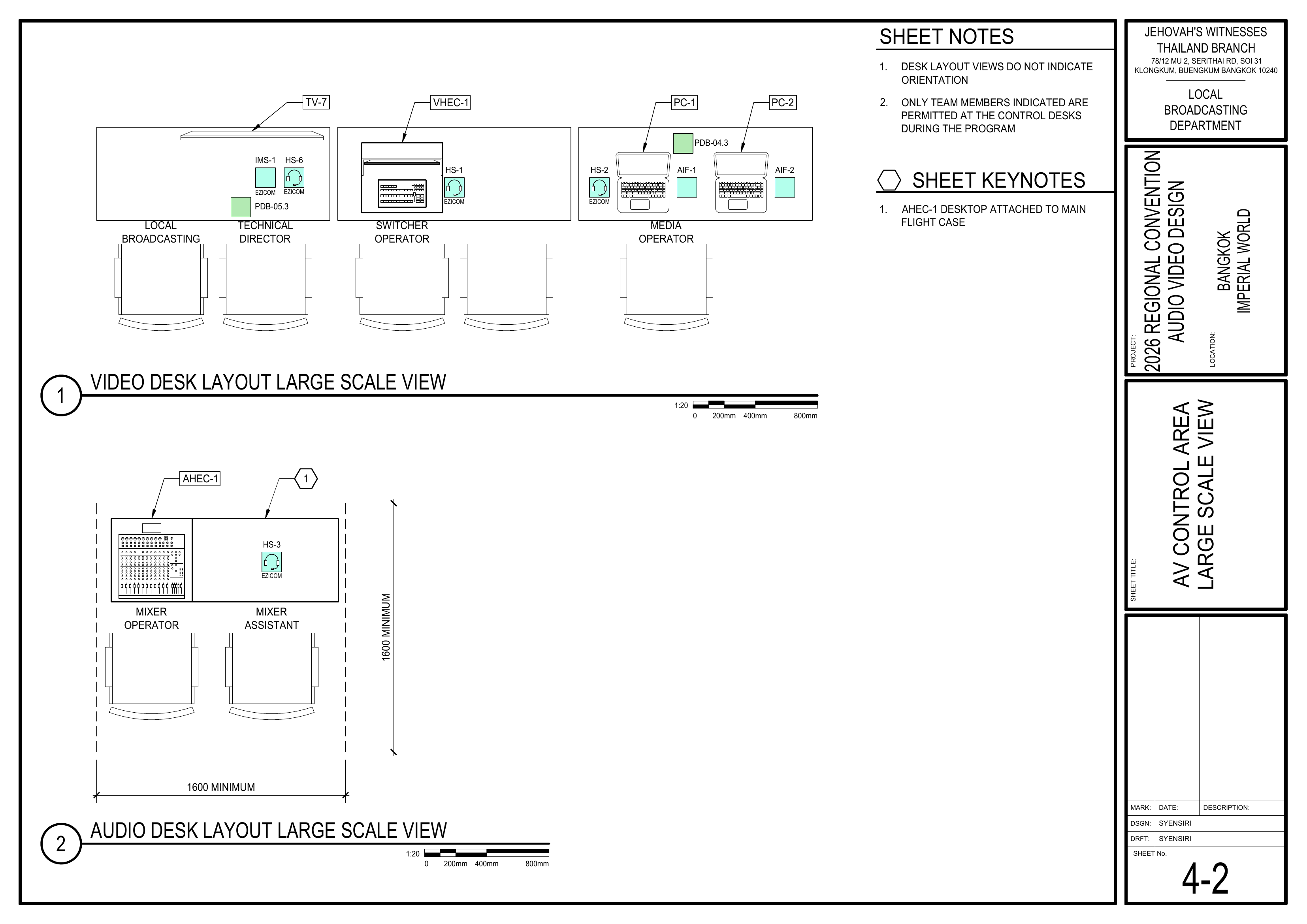
1. Position the Audio Headend
Schematics: Pages 1-2 Audio Equipment Layout Plan, 4-2 AV Control Area Large Scale View
- Move AHEC-1 to the Audio Control Area.
- Position the equipment according to the desk layout plans.
🗺️ View Associated Schematics (Pages 1-2, 4-2)
2. Connect Audio Equipment
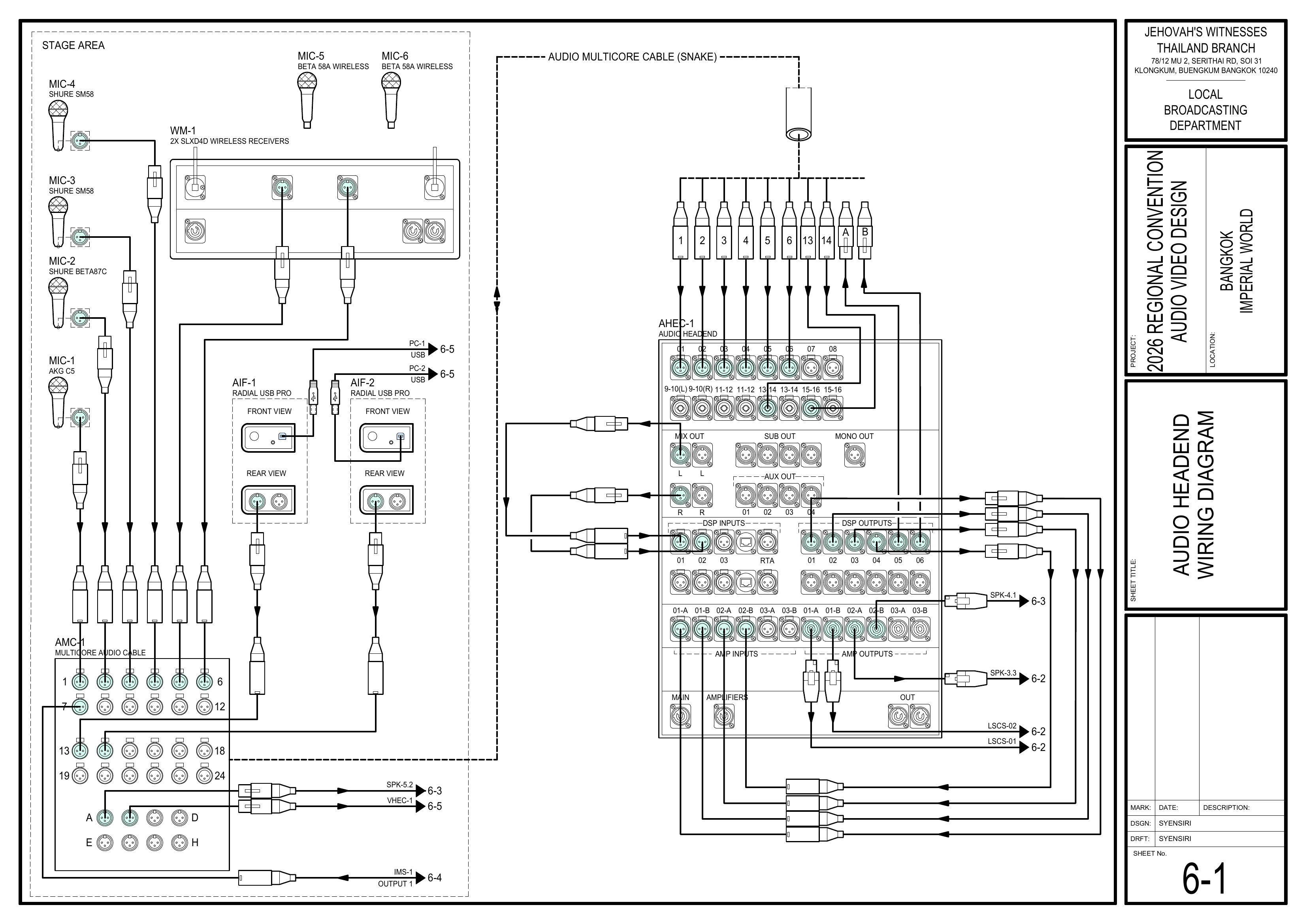
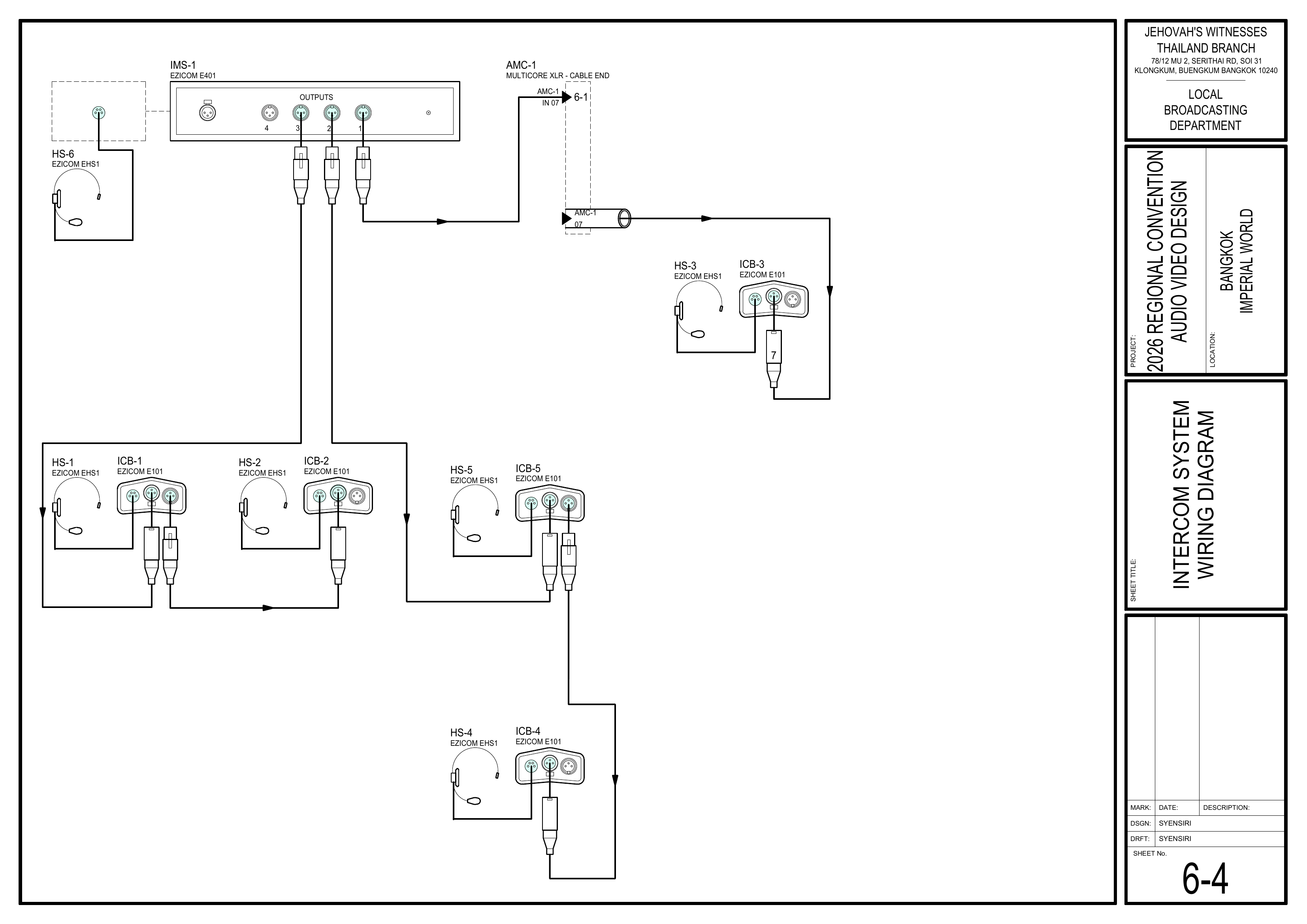
Schematics: Pages 6-1 Audio Headend Wiring Diagram, 6-4 Intercom System Wiring Diagram
- Connect all audio equipment according to the schematics.
- Attach a tag to each cable identifying its use.
🗺️ View Associated Schematics (Pages 6-1, 6-4)
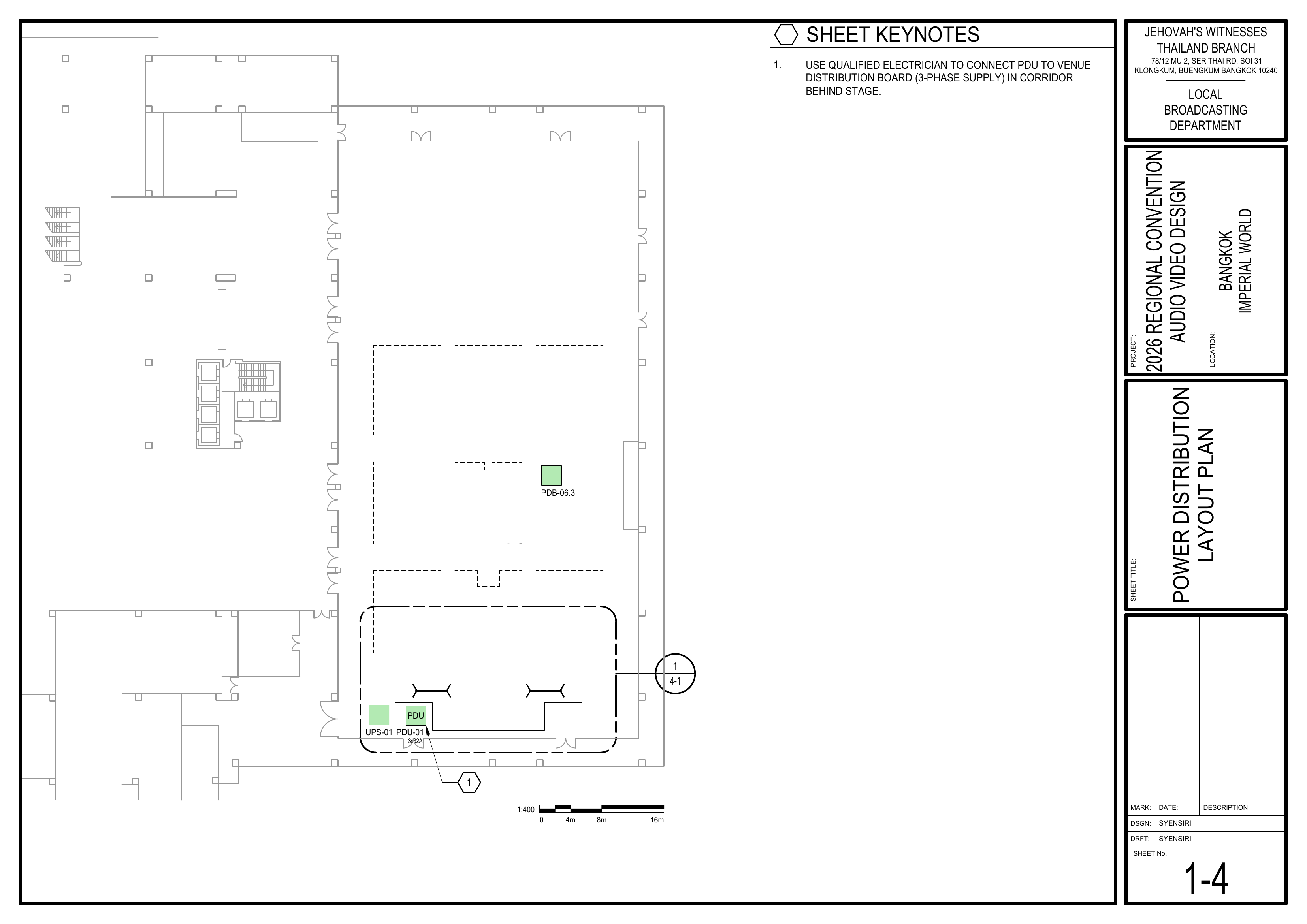
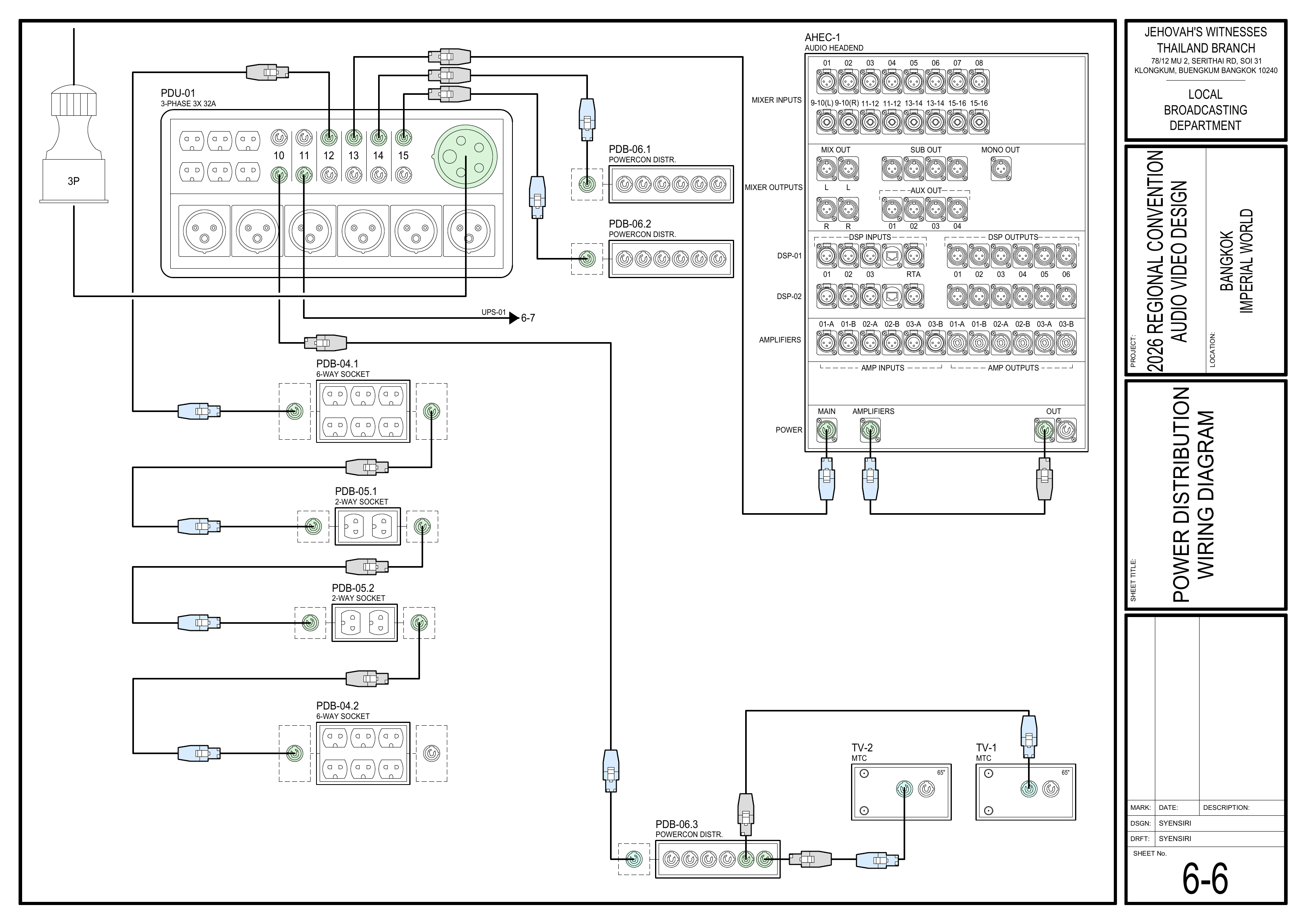
3. Connect to Power
Schematics: Pages 1-4 Power Distribution Layout Plan, 6-6 Power Distribution Wiring Diagram
- Connect the Audio Booth to the power socket provided by the Power Distribution Team.
- Do not power on the system until the Power Distribution Team confirms that power is ready.
🗺️ View Power Schematics (Pages 1-4, 6-6)
4. Commission the Audio System
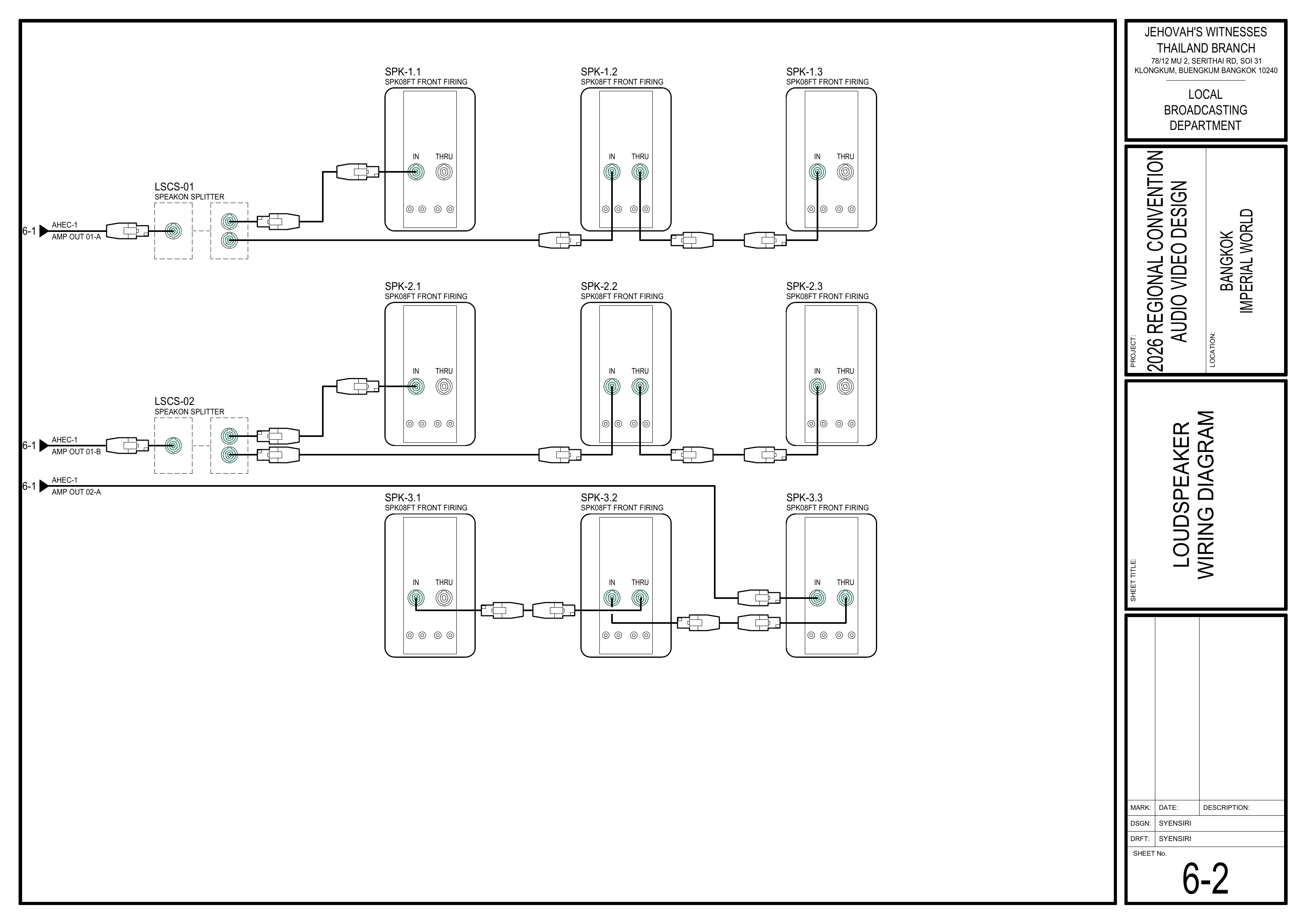
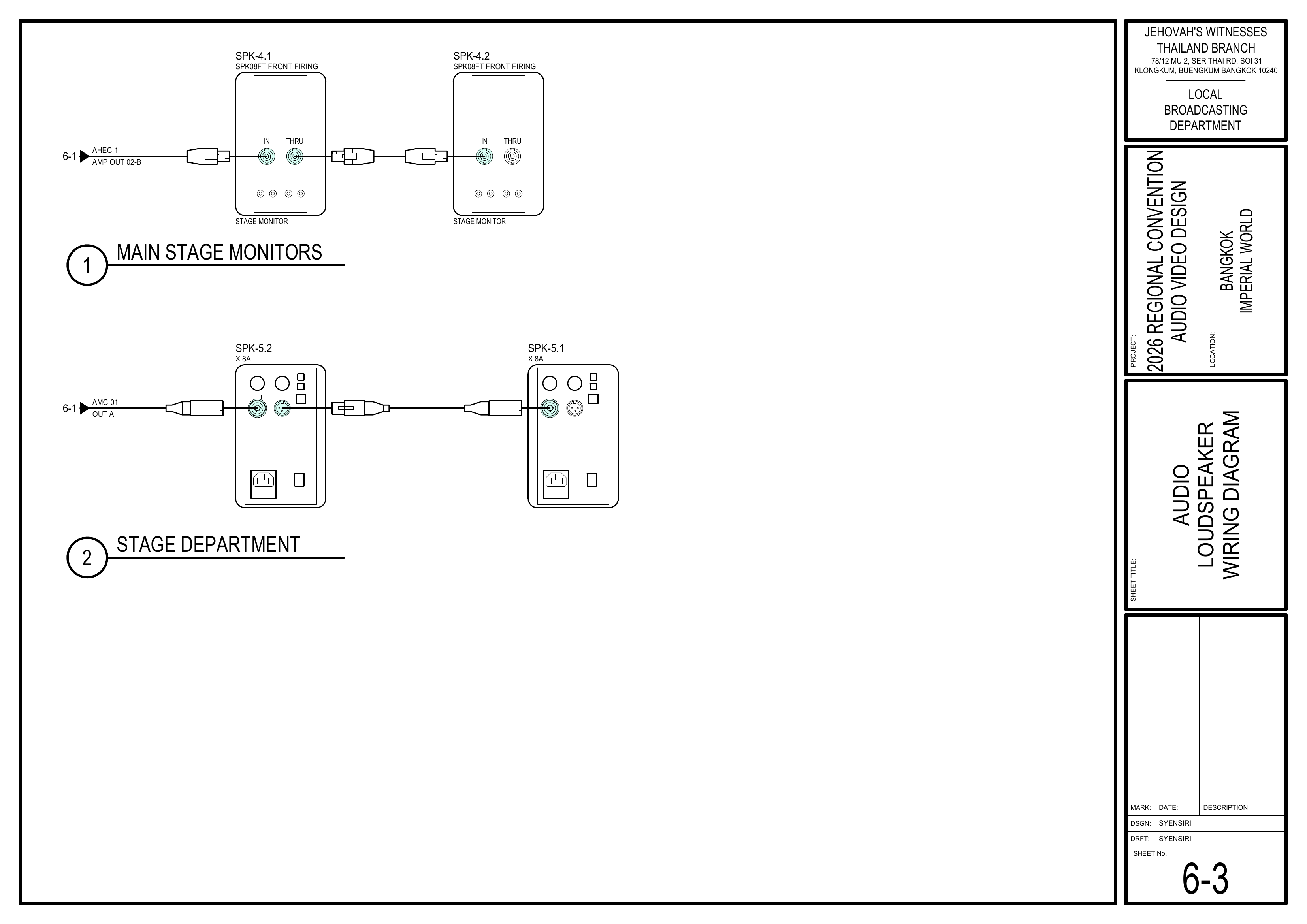
Schematics: Pages 6-1 Audio Headend Wiring Diagram, 6-2 Loudspeaker Wiring Diagram, 6-3 Audio Loudspeaker Wiring Diagram
- Commission the audio system as outlined in the CO-160a guidelines.
- Verify amplifier settings, DSP configurations, and test inputs/outputs before handing over for walk-throughs.
🗺️ View Audio Commissioning Schematics (Pages 6-1, 6-2, 6-3)
Completion Checklist
- AHEC-1 positioned in Audio Control Area
- Audio equipment connected according to schematics
- Every cable tagged identifying its use
- Booth connected to power socket
- Audio system commissioned according to CO-160a
- Keyman inspection completed
Dismantling Procedure
- Wait for the department briefing and prayer 30 minutes after the program ends on Sunday before dismantling.
- Power down the audio headend and disconnect all signal and power cables.
- Coil and label all cables.
- Pack the mixer, DSPs, amplifiers, and accessories securely back into the AHEC-1 case.
- Gather all equipment and bring it to the designated area.
- Note for team leader: Use the Bill of Materials (BOM) to cross off every box or case before it is brought to the truck:
- AHEC-1
🇨🇳 中文说明
目的
根据图纸安装、连接并调试音频主控设备 (AHEC-1),为测试和正式运行做好准备。
⚠️ 安全与安装提示
• 控制台内严禁饮食。
• 手机和平板电脑也会让系统出现杂音,操作设备时请留意。
• 未经配电组确认,不要接通电源。
参考资料
- 完整图纸: 📎 完整 PDF 文件
- 《会众工作危险性分析》(DC-85): 📁 Google Drive 文件夹
- 大会设备清单: 设备箱 AHEC-1
所需设备箱
- AHEC-1: 包含音频主控设备、16 通道混音器、2 台数字信号处理器 (DSP)、3 台功放及附件。
安装步骤
1. 放置音频主控设备
图纸:1-2 音频设备布局图、4-2 音视频控制区大比例图
- 将 AHEC-1 移动到音频控制区。
- 按照控制台布局图摆放设备。
🗺️ 查看相关图纸(图纸 1-2, 4-2)
2. 连接音频设备
图纸:6-1 音频主控接线图、6-4 对讲系统接线图
- 根据图纸连接所有音频设备。
- 为每根线缆贴上标签,标明其用途。
🗺️ 查看相关图纸(图纸 6-1, 6-4)
3. 连接电源
图纸:1-4 电源分配布局图、6-6 电源分配接线图
- 将音频控制台连接到配电组提供的电源插座。
- 未经配电组确认电源已准备好之前,不要开启系统。
🗺️ 查看电源相关图纸(图纸 1-4, 6-6)
4. 调试音频系统
图纸:6-1 音频主控接线图、6-2 扬声器接线图、6-3 讲台及部门扬声器接线图
- 参照 CO-160a 指南调试音频系统。
- 在移交进行走位练习前,核实功放设置、DSP 配置,并测试输入/输出信号。
🗺️ 查看音频调试相关图纸(图纸 6-1, 6-2, 6-3)
完成检查表
- AHEC-1 已放置在音频控制区
- 已根据图纸连接音频设备
- 每根线缆已贴标签标明用途
- 控制台已连接电源插座
- 音频系统已按照 CO-160a 完成调试
- 负责人已检查确认
拆卸步骤
- 在星期日节目结束 30 分钟后,等待整个部门的简短会议和祷告后再开始拆除工作。
- 关闭音频主控设备电源,并断开所有信号线和电源线。
- 整理并标识所有线缆。
- 将混音器、DSP、功放及附件安全地装回 AHEC-1 设备箱内。
- 将所有设备带到指定集合区域。
- 组长注意: 在将每个箱子或设备箱搬上卡车前,请使用物料清单 (BOM) 核对并划掉每一项:
- AHEC-1