
Audio Booth (AHEC-1) / 音频控制台组(AHEC-1)
🎤 Audio Booth Team / 音频控制台组
Crew Overseer / 小组监督: Gyeong-hwan Lee 李俊辉
| Team / 小组 | Members / 成员 |
|---|---|
| Audio Booth / 音频控制台组 | • Willy 🔑 |
🇬🇧 English Instructions
Purpose
Install, connect, and commission the Audio Headend (AHEC-1) according to the schematics before testing and operation.
⚠️ Safety & Installation Notes
• Strict NO FOOD or DRINK policy at the Audio Booth. (CO-160 2:5)
• Cell phones and tablets can introduce noise into the system; be mindful of this while operating equipment. (CO-160 2:5)
• Do not apply power until the Power Distribution Team confirms that power is ready.
Required References
- Full Drawing Set: 📎 Complete PDF
- Congregation Job Hazard Analysis (DC-85): 📁 Google Drive Folder
- CO-160a: Chapter 3 — Audio Headend AHEC-1, pages 1–2, Commissioning an Audio Installation
- Specific Schematics:
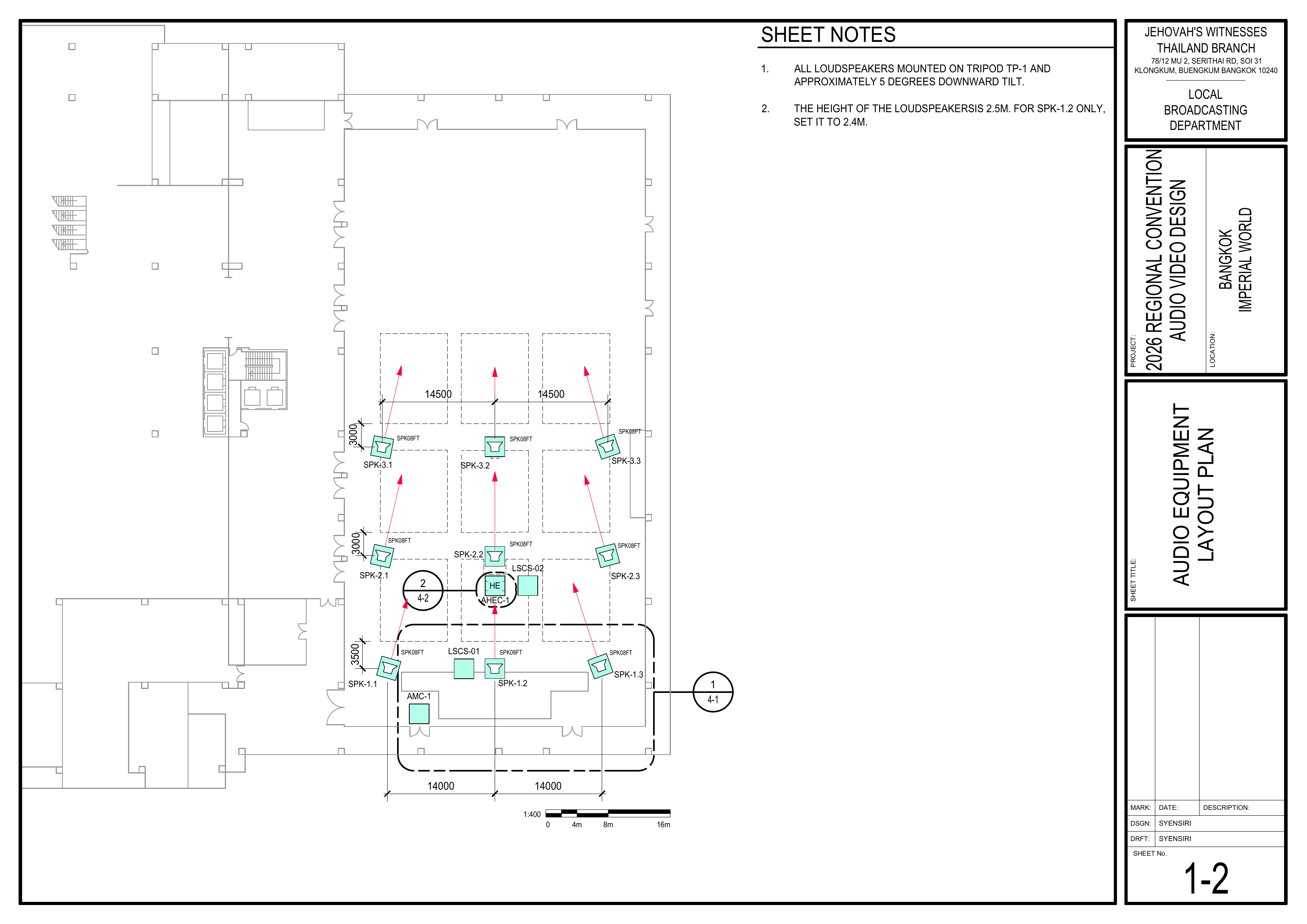
- 1-2 Audio Equipment Layout Plan
- 1-4 Power Distribution Layout Plan
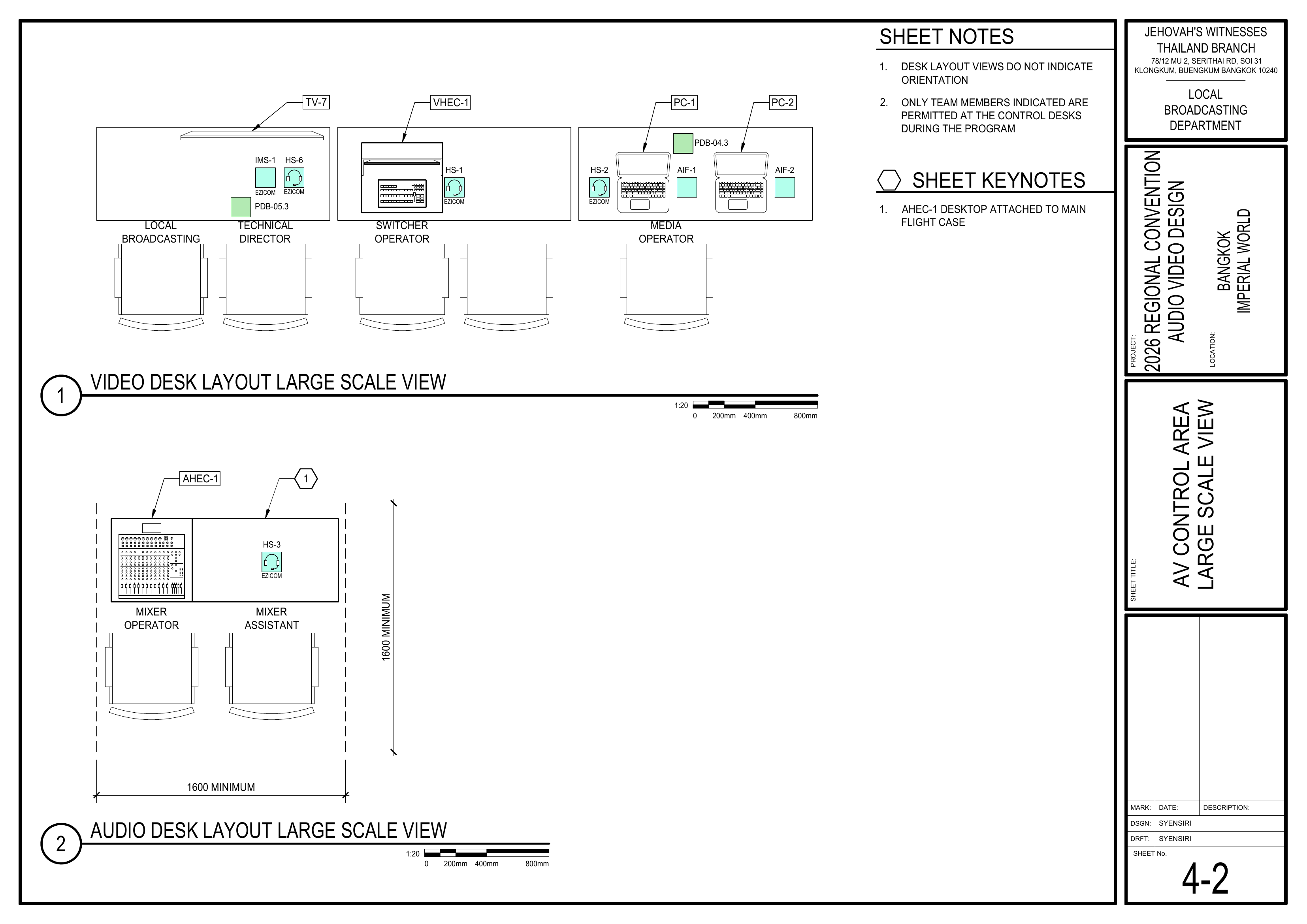
- 4-2 AV Control Area Large Scale View
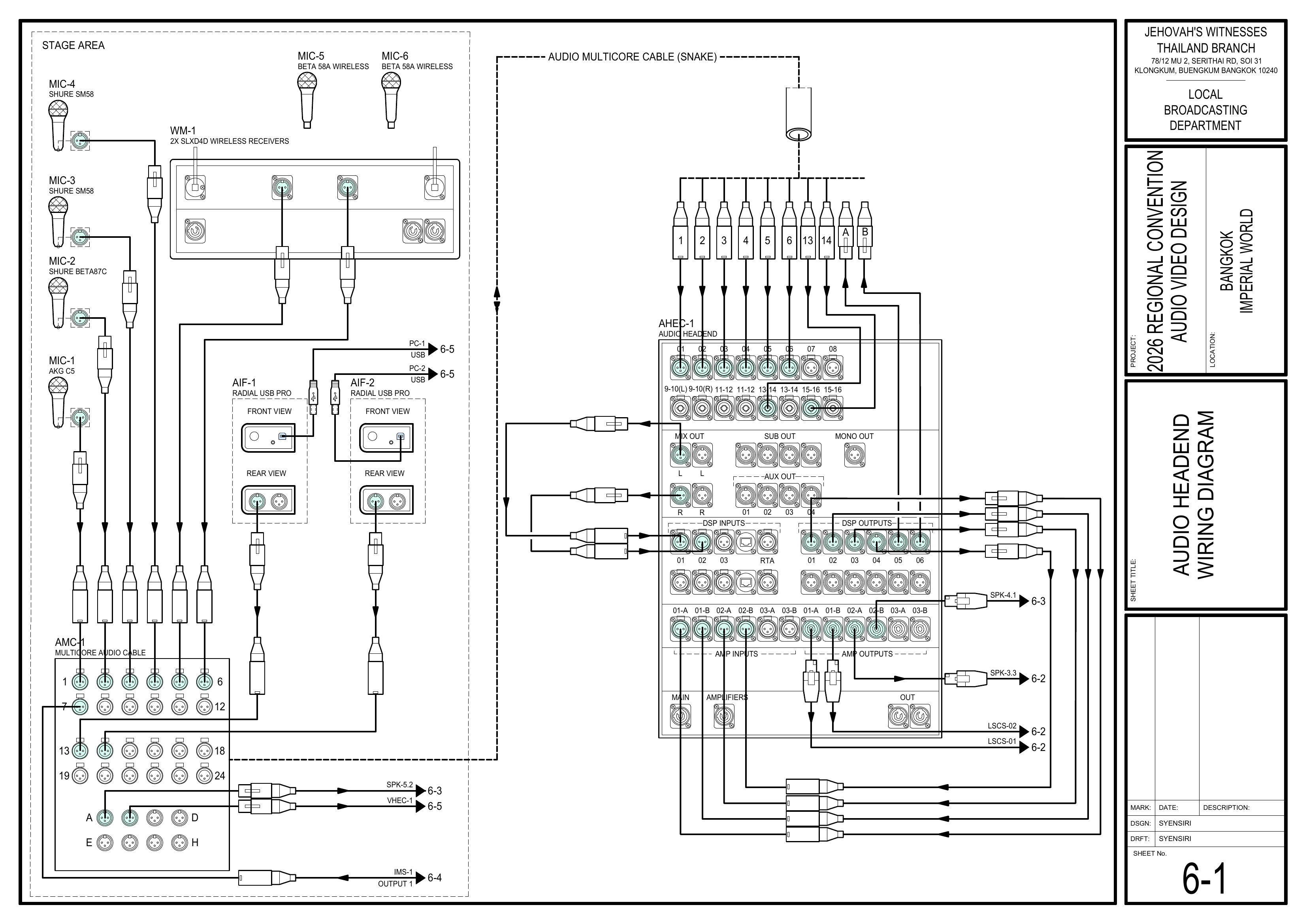
- 6-1 Audio Headend Wiring Diagram
- 6-2 Loudspeaker Wiring Diagram
- 6-3 Audio Loudspeaker Wiring Diagram
- 6-6 Power Distribution Wiring Diagram
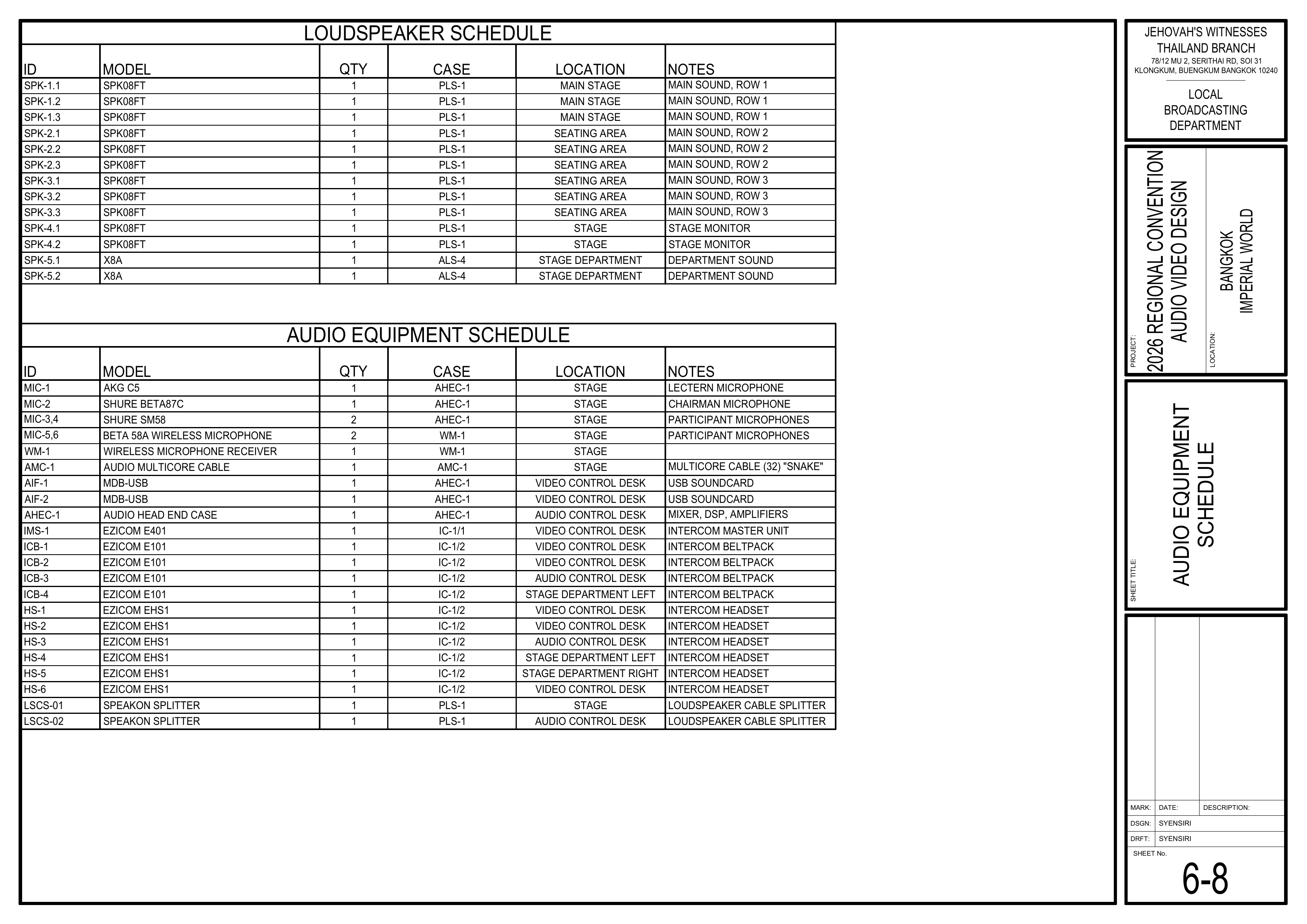
- 6-8 Audio Equipment Schedule
- Event Content List: Case AHEC-1
Required Equipment Cases
- AHEC-1: Contains the Audio Headend, including the 16-channel mixer, 2x DSPs, 3x amplifiers, power conditioner, and accessories.
- AIF-1 and AIF-2: The 2x MDB-USB audio interfaces are stored in AHEC-1 and are used by the Video Booth Team for PC-1 and PC-2 audio. Coordinate their use and return.
Setup Steps
1. Cable Management
- Keep cables neat and organized throughout the installation.
- Keep cables away from operator movement areas.
- Attach a tag to each cable identifying its use as connections are made.
2. Position the Audio Headend
Schematics: Pages 1-2 Audio Equipment Layout Plan, 4-2 AV Control Area Large Scale View
- Move AHEC-1 to the Audio Control Area.
- Position AHEC-1 according to the control-area layout.
- Leave sufficient space for operators and access to the rear connections.
🗺️ View Associated Schematics (Pages 1-2, 4-2)
3. Connect Audio Equipment
Schematics: Pages 6-1 Audio Headend Wiring Diagram, 6-8 Audio Equipment Schedule
- Connect the audio multicore cable (AMC-1), microphone inputs, loudspeaker outputs, and other audio connections to AHEC-1 according to the schematics.
- Coordinate with the Video Booth Team for the AIF-1 and AIF-2 media audio connections from PC-1 and PC-2.
- Confirm that each connection is made to the correctly labeled input or output.
- Keep cables neat and tagged as connections are made.
🗺️ View Audio Headend Schematics (Pages 6-1, 6-8)
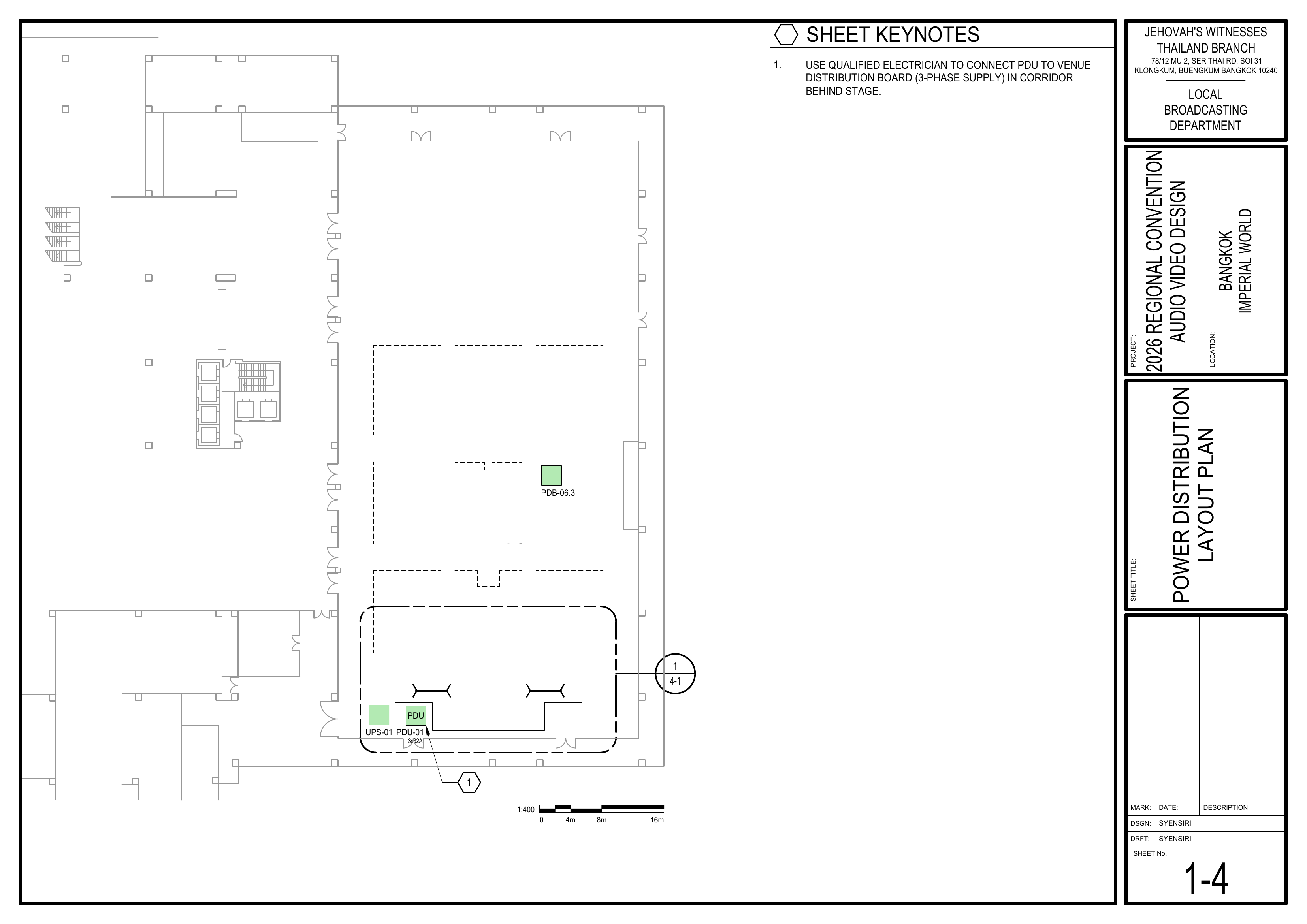
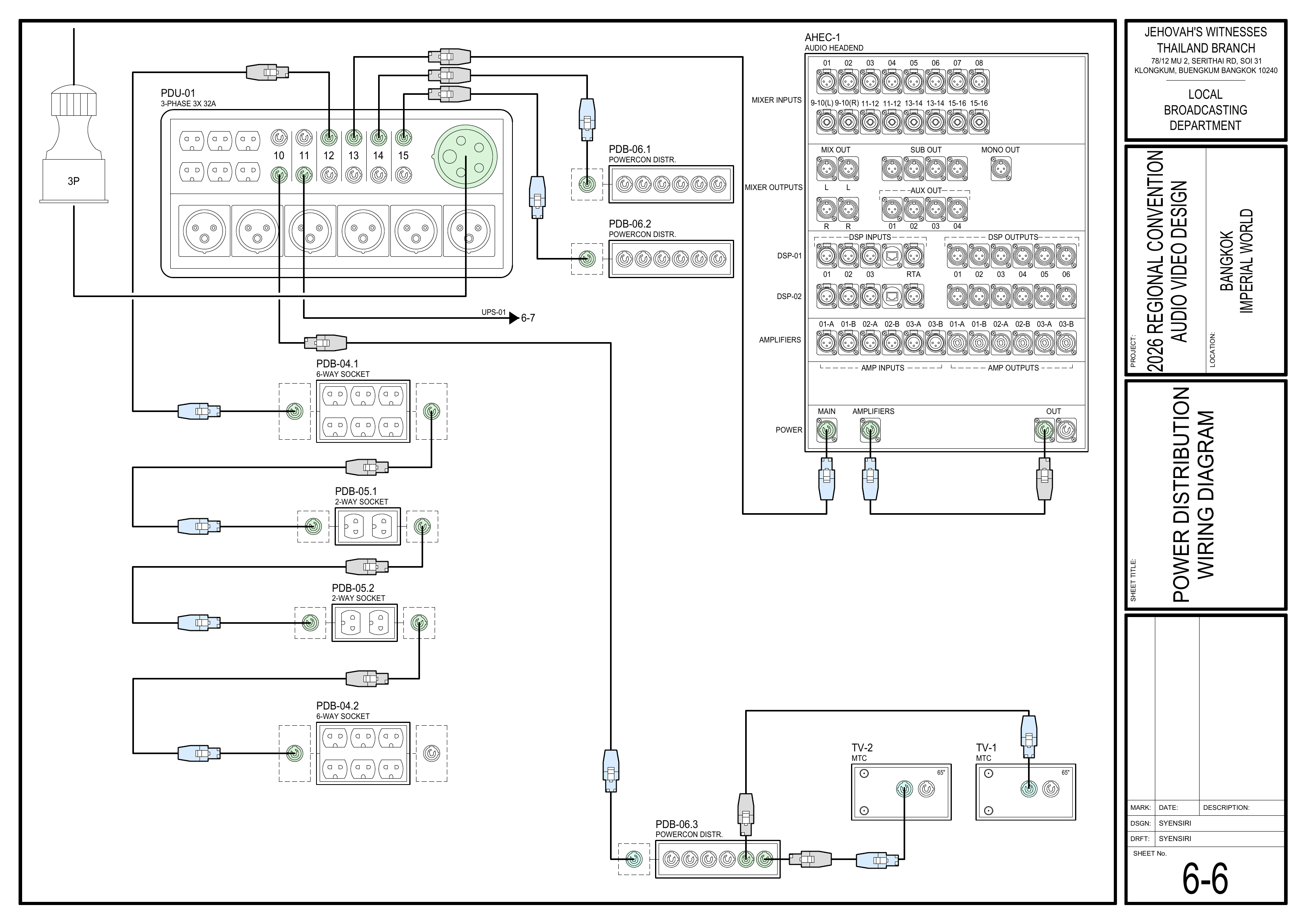
4. Connect to Power
Schematics: Pages 1-4 Power Distribution Layout Plan, 6-6 Power Distribution Wiring Diagram
- Connect AHEC-1 to the power socket provided by the Power Distribution Team.
- Before applying power, make sure all mixer faders, including the MASTER fader, are fully down and all amplifiers are turned off.
- Do not power on AHEC-1 until the Power Distribution Team confirms that power is ready.
🗺️ View Power Schematics (Pages 1-4, 6-6)
5. Commission the Audio System
Reference: CO-160a, Chapter 3 — Audio Headend AHEC-1, pages 1–2, Commissioning an Audio Installation
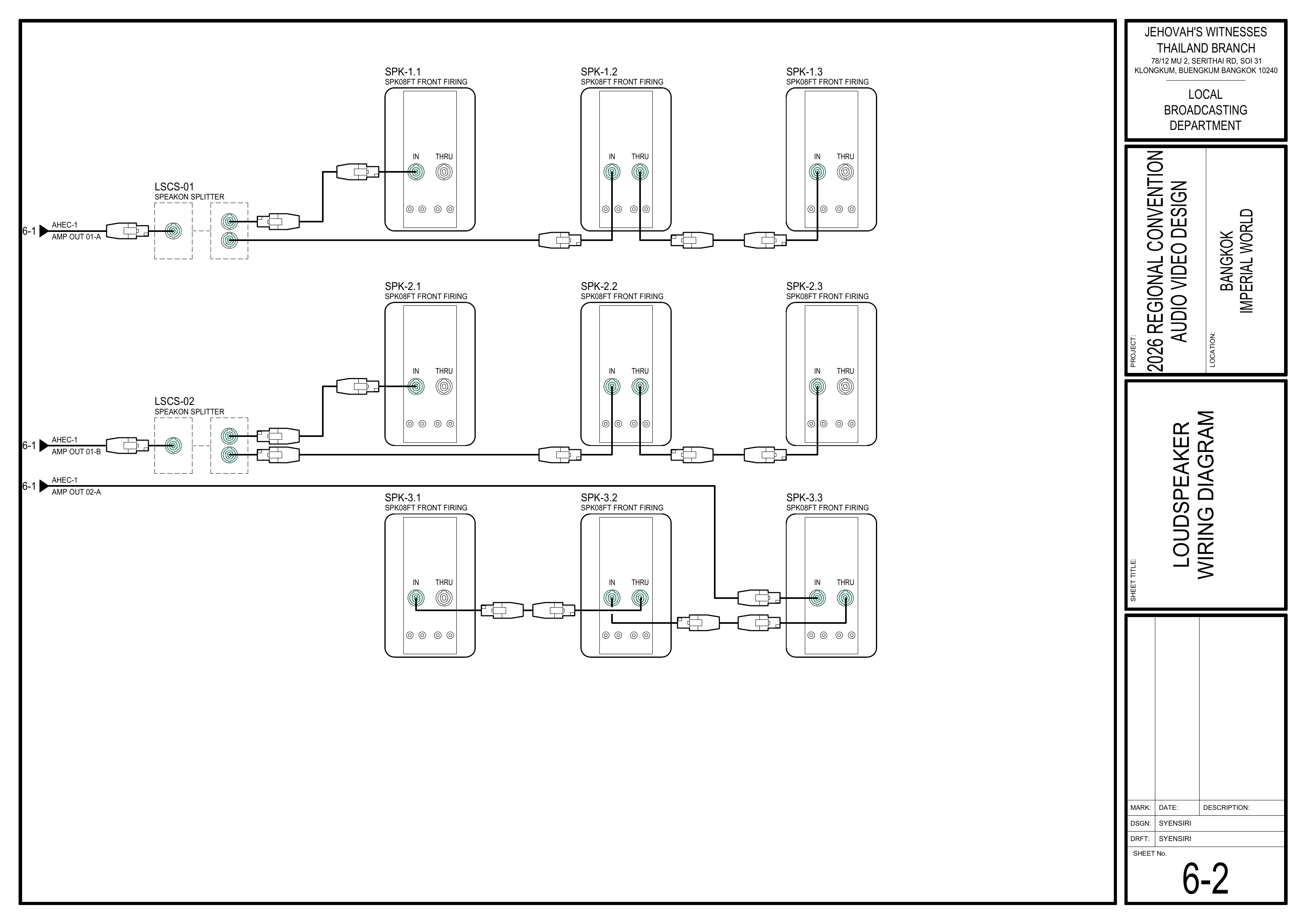
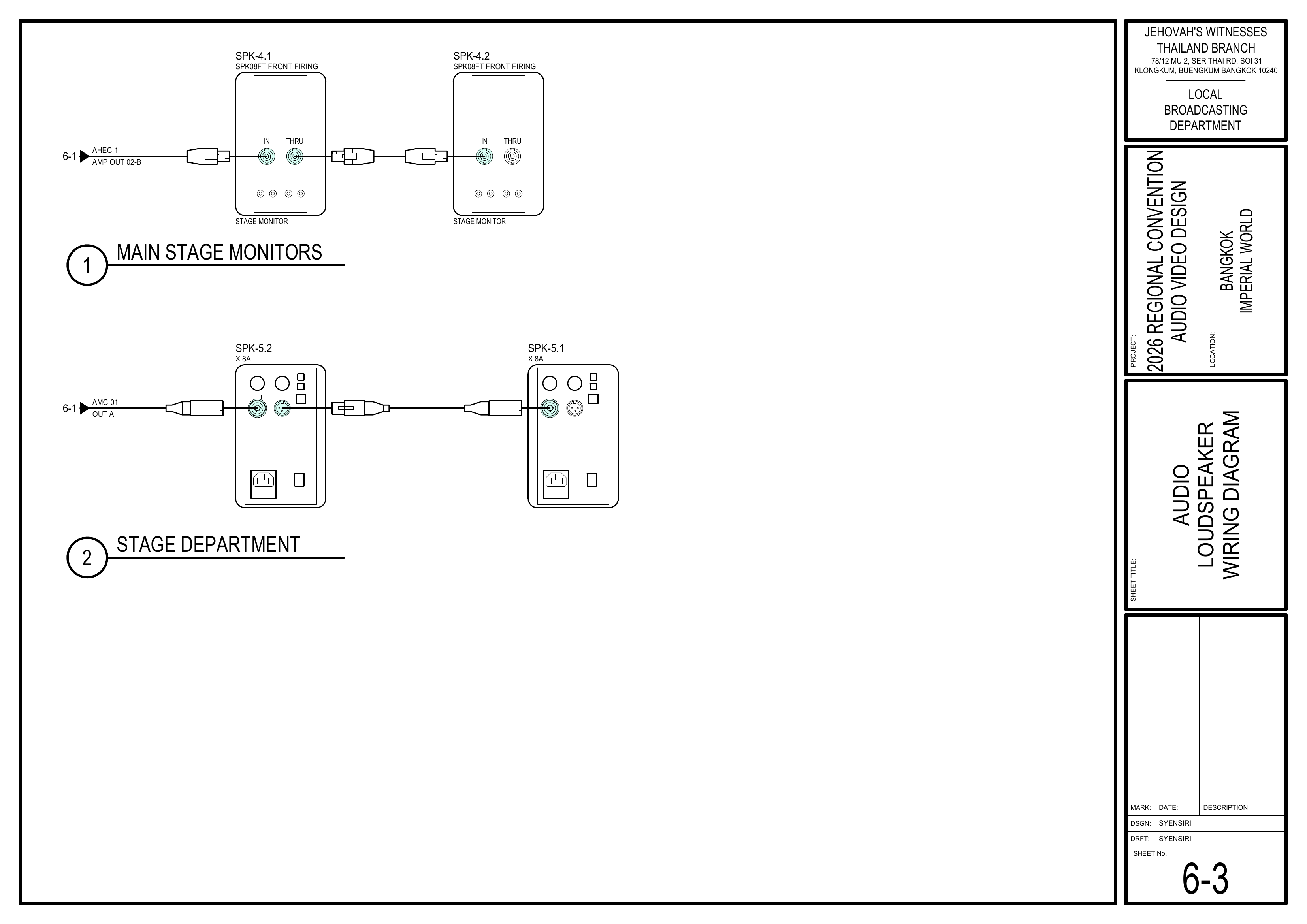
Schematics: Pages 6-1 Audio Headend Wiring Diagram, 6-2 Loudspeaker Wiring Diagram, 6-3 Audio Loudspeaker Wiring Diagram
- Commission AHEC-1 according to the CO-160a Commissioning an Audio Installation procedure.
- Connect to the DSP using VENU360 and recall the event-specific preset if one has been provided by LBD.
- Verify that each loudspeaker output operates in the correct zone and provides the intended coverage.
- Check delays, audio levels, input gain, speech equalization, and feedback reduction as directed in CO-160a.
- Coordinate with the Video Booth Team to confirm audio from AIF-1 and AIF-2 reaches AHEC-1 correctly.
- After the Power Distribution Team completes WM-1 setup and synchronization, confirm that MIC-5 and MIC-6 provide a clean and reliable signal through the audio system.
- Save the venue preset after final adjustments.
- Confirm the complete audio system is ready before walk-throughs.
🗺️ View Audio Commissioning Schematics (Pages 6-1, 6-2, 6-3)
Completion Checklist
- Cables routed neatly and tagged
- AHEC-1 positioned in the Audio Control Area
- Audio equipment connected according to the schematics
- AIF-1 and AIF-2 media audio verified with the Video Booth Team
- AHEC-1 connected to the power socket
- Audio system commissioned according to CO-160a
- Loudspeaker zones, delays, levels, and coverage verified
- MIC-5 and MIC-6 audio verified after WM-1 synchronization
- Final DSP settings saved
- Keyman inspection completed
Dismantling Procedure
- Wait for the department briefing and prayer 30 minutes after the program ends on Sunday before dismantling.
- Power down AHEC-1 according to the CO-160a shutdown
procedure:procedure - moving
Mute all DSP inputs and outputs.equipment. -
LowerBringallAHEC-1,mixerexternalfaderscables, accessories, andamplifierrelatedcontrols.Audio Booth materials to the designated equipment area for inventory. -
SwitchMakeoff the amplifiers.
🇨🇳 中文说明
目的
根据图纸安装、连接并调试音频主控设备 (AHEC-1),为测试和正式运行做好准备。
⚠️ 安全与安装提示
• 音频控制台严禁饮食。 (CO-160 2:5)
• 手机和平板电脑会让系统出现杂音,操作设备时请留意。 (CO-160 2:5)
• 在电源分配组确认电源准备好之前,不要接通电源。
参考资料
- 完整图纸: 📎 完整 PDF 文件
- 《会众工作危险性分析》(DC-85): 📁 Google Drive 文件夹
- CO-160a: 第 3 章 — Audio Headend AHEC-1,第 1–2 页,Commissioning an Audio Installation
- 相关图纸:
- 1-2 音频设备布局图
- 1-4 电源分配布局图
- 4-2 音视频控制区大比例图
- 6-1 音频主控接线图
- 6-2 扬声器接线图
- 6-3 讲台及部门扬声器接线图
- 6-6 电源分配接线图
- 6-8 音频设备清单
- 大会设备清单: 设备箱 AHEC-1
所需设备箱
- AHEC-1: 包含音频主控设备、16 通道混音器、2 台数字信号处理器 (DSP)、3 台功放、电源调节器及附件。
- AIF-1 和 AIF-2: 两个 MDB-USB 音频接口存放在 AHEC-1 内,由视频控制台组用于 PC-1 和 PC-2 的音频。请协调取用和归还。
安装步骤
1. 线缆管理
- 在整个安装过程中保持线缆整齐有序。
- 避免让线缆影响操作人员移动。
- 连接线缆时,为每根线缆贴上标签,标明其用途。
2. 放置音频主控设备
图纸:1-2 音频设备布局图、4-2 音视频控制区大比例图
- 将 AHEC-1 移动到音频控制区。
- 按照控制区布局图摆放 AHEC-1。
- 为操作人员和设备后方接线预留足够空间。
🗺️ 查看相关图纸(图纸 1-2, 4-2)
3. 连接音频设备
图纸:6-1 音频主控接线图、6-8 音频设备清单
- 按照图纸,将音频多芯线缆 (AMC-1)、麦克风输入、扬声器输出及其他音频连接接到 AHEC-1。
- 与视频控制台组协调 PC-1 和 PC-2 的 AIF-1、AIF-2 媒体音频连接。
- 确认每项连接都接到标签正确的输入或输出端。
- 连接设备时保持线缆整齐,并贴上标签。
🗺️ 查看音频主控相关图纸(图纸 6-1, 6-8)
4. 连接电源
图纸:1-4 电源分配布局图、6-6 电源分配接线图
- 将 AHEC-1 连接到电源分配组提供的电源插座。
- 接通电源前,确认所有混音器推子(包括 MASTER 推子)都已完全降下,并且所有功放都已关闭。
- 在电源分配组确认电源准备好之前,不要开启 AHEC-1。
🗺️ 查看电源相关图纸(图纸 1-4, 6-6)
5. 调试音频系统
参考资料:CO-160a,第 3 章 — Audio Headend AHEC-1,第 1–2 页,Commissioning an Audio Installation
图纸:6-1 音频主控接线图、6-2 扬声器接线图、6-3 讲台及部门扬声器接线图
- 按照 CO-160a 的 Commissioning an Audio Installation 程序调试 AHEC-1。
- 使用 VENU360 连接 DSP;如果 LBD 已提供大会专用预设,请调用该预设。
- 确认每个扬声器输出对应正确的区域,并达到图纸所示的覆盖范围。
- 按照 CO-160a 检查延迟、音频电平、输入增益、语音均衡及反馈抑制。
- 与视频控制台组协调,确认 AIF-1 和 AIF-2 的音频已正确传送到 AHEC-1。
- 电源分配组完成 WM-1 设置并同步后,确认 MIC-5 和 MIC-6 的信号稳定,并能通过音频系统正常播放。
- 完成最终调整后保存场地预设。
- 在走位练习前确认整个音频系统已经准备好。
🗺️ 查看音频调试相关图纸(图纸 6-1, 6-2, 6-3)
完成检查表
- 线缆已整齐布设并贴上标签
- AHEC-1 已放置在音频控制区
- 已根据图纸连接音频设备
- 已与视频控制台组确认 AIF-1 和 AIF-2 的媒体音频
- AHEC-1 已连接到电源插座
- 音频系统已按照 CO-160a 完成调试
- 扬声器区域、延迟、电平及覆盖范围已确认
- WM-1 同步完成后,MIC-5 和 MIC-6 的音频已确认
- 最终 DSP 设置已保存
- 负责人已检查确认
拆卸步骤拆卸
- 在星期日节目结束 30 分钟后,
等待整个部门的简短会议和祷告后再开始拆除工作。等待整个部门的简短会议和祷告后再开始拆卸。 - 移动设备前,按照 CO-160a
的程序关闭的关机程序关闭 AHEC-1: 将所有 DSP 输入和输出静音。