
Loudspeakers Setup / 扬声器安装
🎤 Loudspeakers Team / 扬声器组
| Team / 小组 | Members / 成员 |
|---|---|
| Loudspeakers / 扬声器 | • Alex Jang 🔑 • Yuto Nomura • Prasert • Kittikhun |
🇬🇧 English Instructions
Purpose
Measure chair distances according to the schematics and install loudspeaker groups 1-5 for the audience, stage, and accounting/departments.
Required References
- Full Drawing Set: 📎 Complete PDF
Required Equipment Cases
- PLS-1: Contains the SPK08FT passive loudspeakers used for groups 1-4 (main sound and stage monitors), plus Speakon splitters, cables, and extenders.
- ALS-4: Contains the TOPP Pro X-8A active loudspeakers used for group 5 (stage department).
- TP-1: Contains the adjustable elevator tripods to elevate all loudspeakers.
- SES-1: Contains heavy-duty 5kg sandbags to secure the tripods.
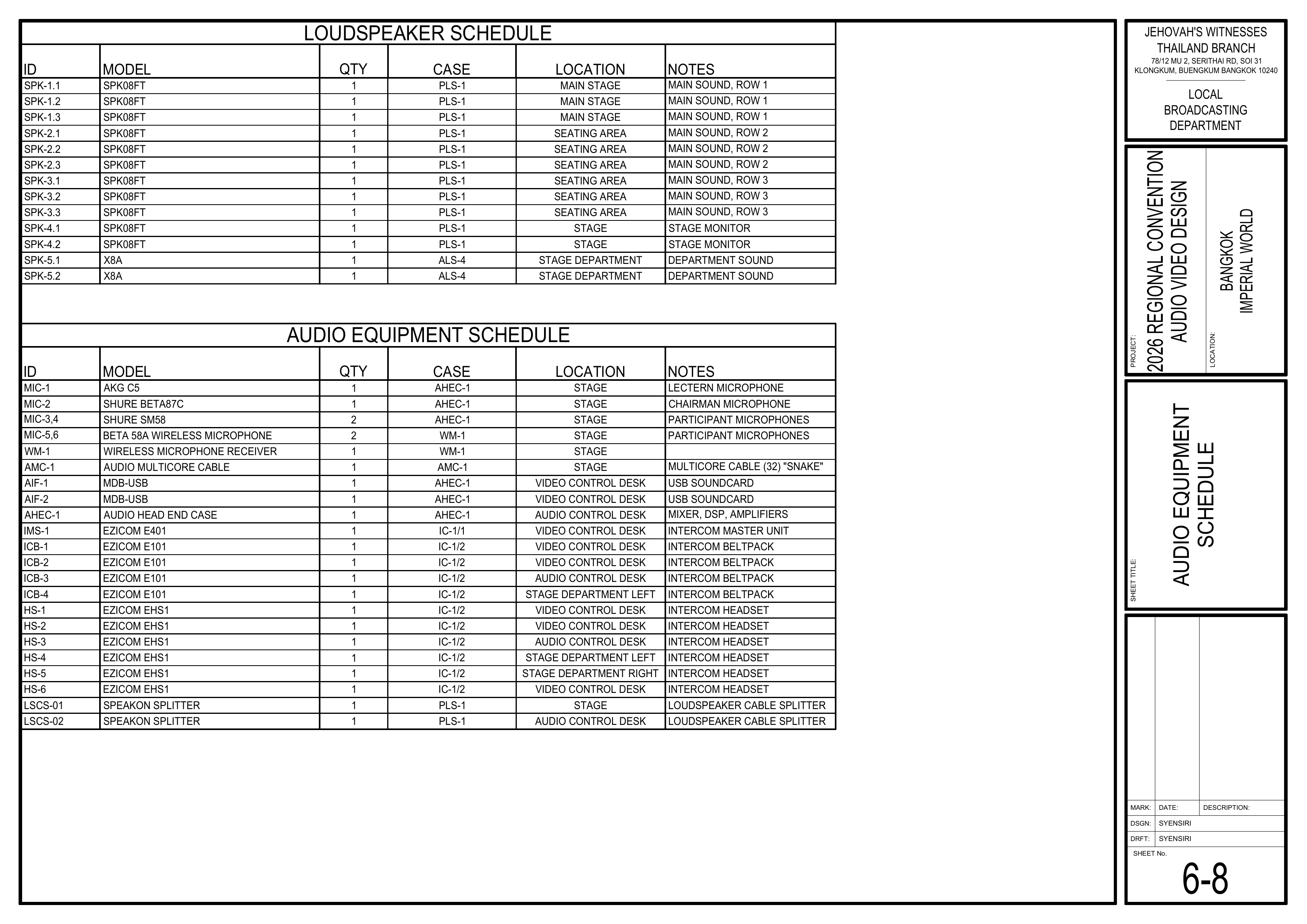
Loudspeaker & Splitter Schedule
From Page 6-8 Audio Equipment Schedule
Setup Steps
1. Measure Distances
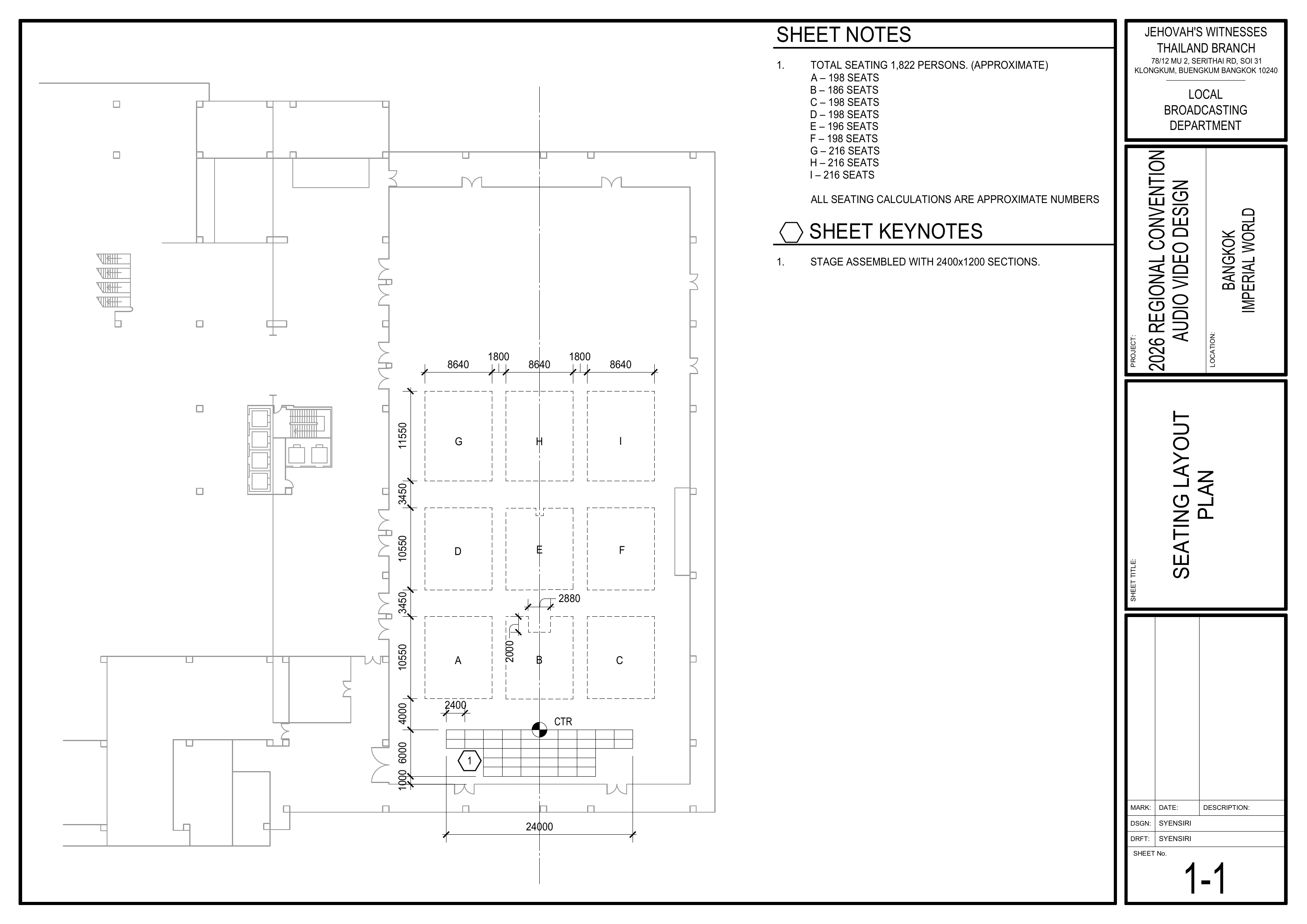
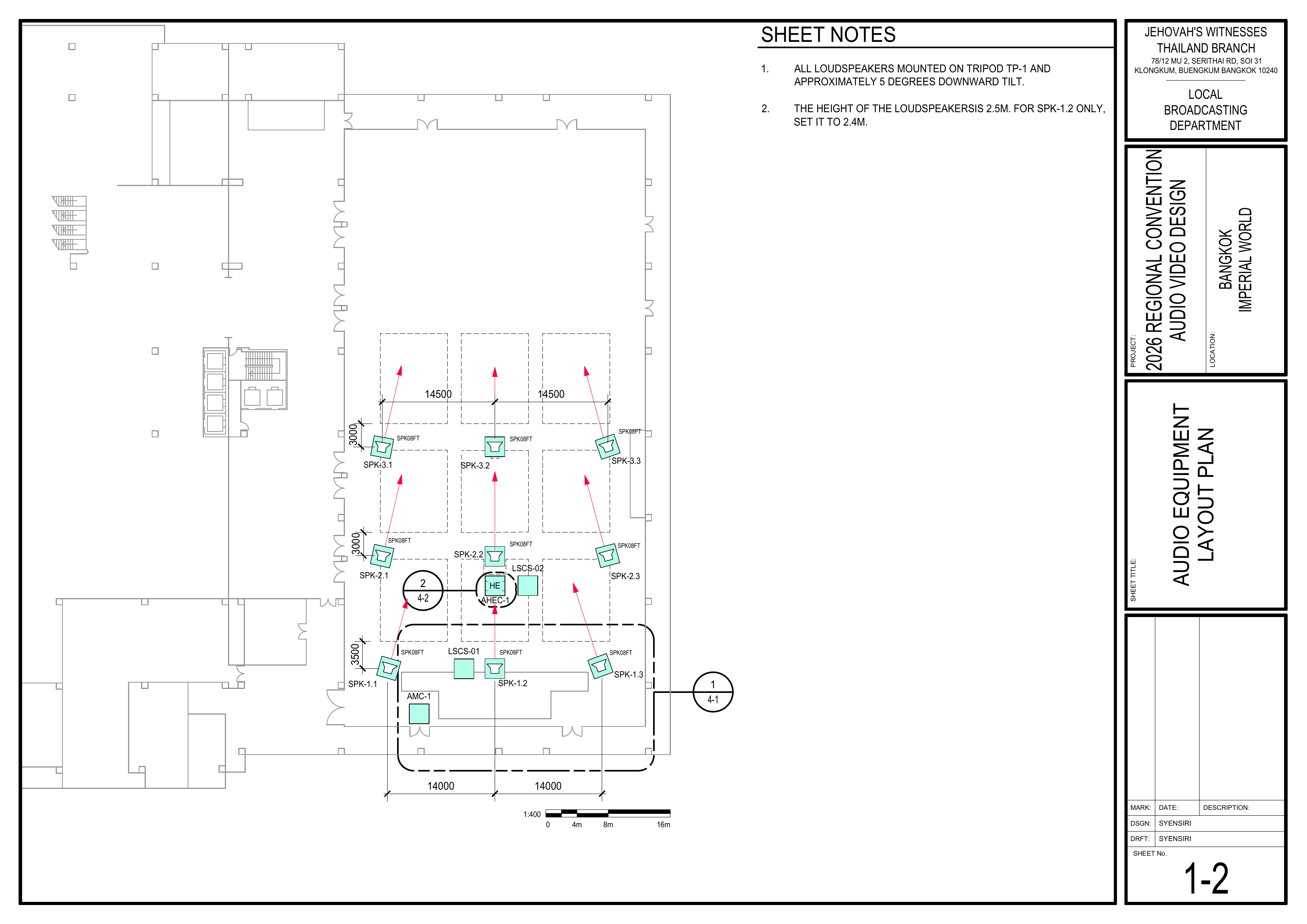
Schematics: Pages 1-1 Seating Layout Plan, 1-2 Audio Equipment Layout Plan
- First, measure chair distances according to the schematics, including speakers, stage, aisles, and seating sections.
🗺️ View Associated Schematics (Pages 1-1, 1-2)
2. Position Equipment
- Bring the loudspeaker cases (PLS-1, ALS-4) and the elevator tripods (TP-1) to the installation areas.
- Bring the 5kg heavy-duty sandbags (SES-1) to secure the tripods.
3. Install Loudspeaker Groups 1 to 5
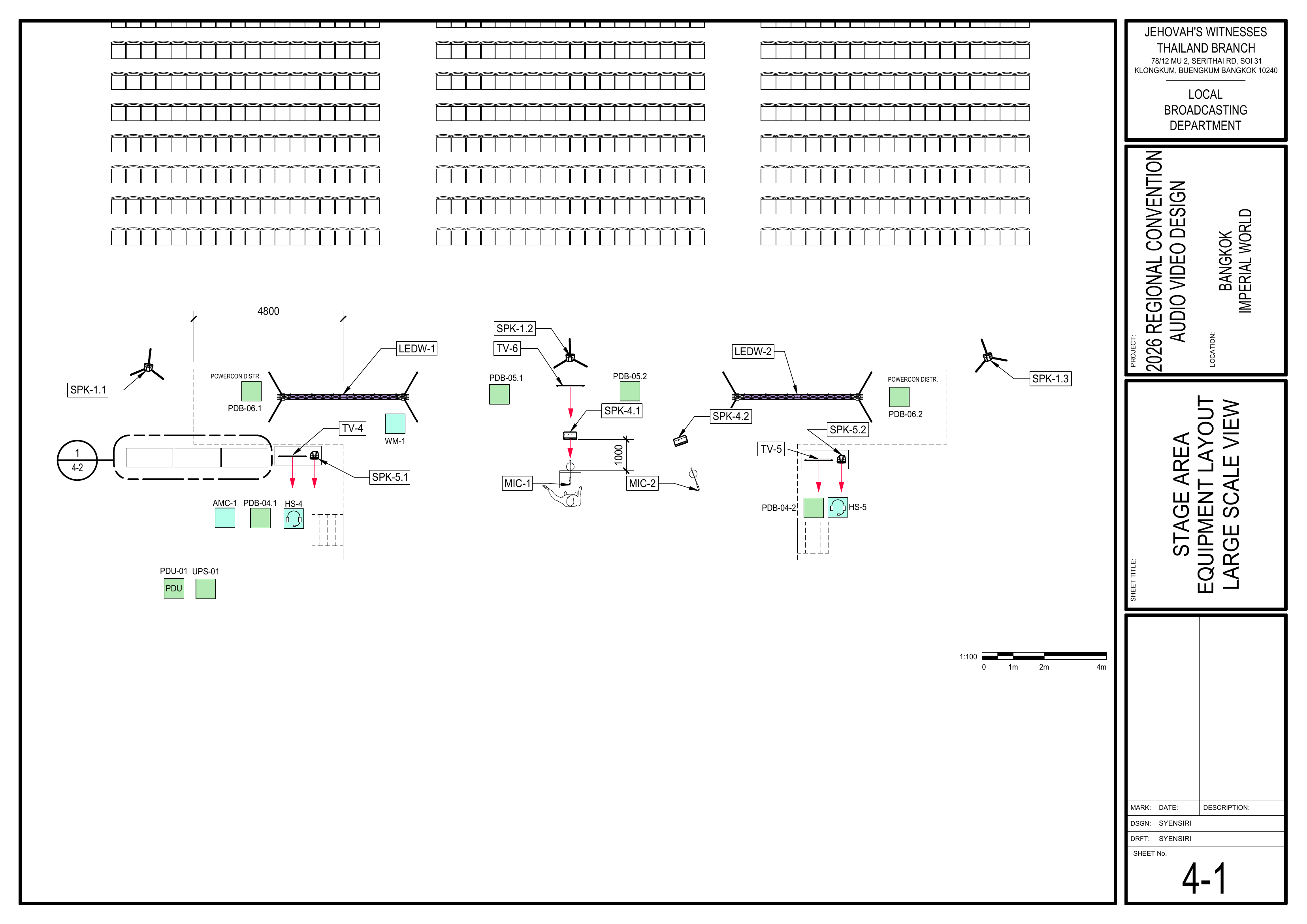
Schematics: Pages 1-2 Audio Equipment Layout Plan, 4-1 Stage Area Equipment Layout, 6-8 Audio Equipment Schedule
- Install loudspeaker groups 1-5 according to the
schematics.schematics and the table above. Groups 1, 2, and 3 (SPK08FT) are for the main sound; Group 4 (SPK08FT) is for stage monitors; Group 5 (X8A) is for department sound. - Mount all loudspeakers on Tripod TP-1 with an approximate 5-degree downward tilt.
- Set the height of the loudspeakers to 2.5m, except for SPK-1.
22, which should be set to 2.4m. - Use the 5kg sandbags to secure the tripods.
🗺️ View Associated Schematics (Pages 1-2, 4-1)1, 6-8)
Note: Page 6-8 Audio Equipment Schedule is referenced in the full drawing set, but it is not currently included as an image on the master schematics page. Add it to the master page first if you want it embedded here.
4. Connect Wiring
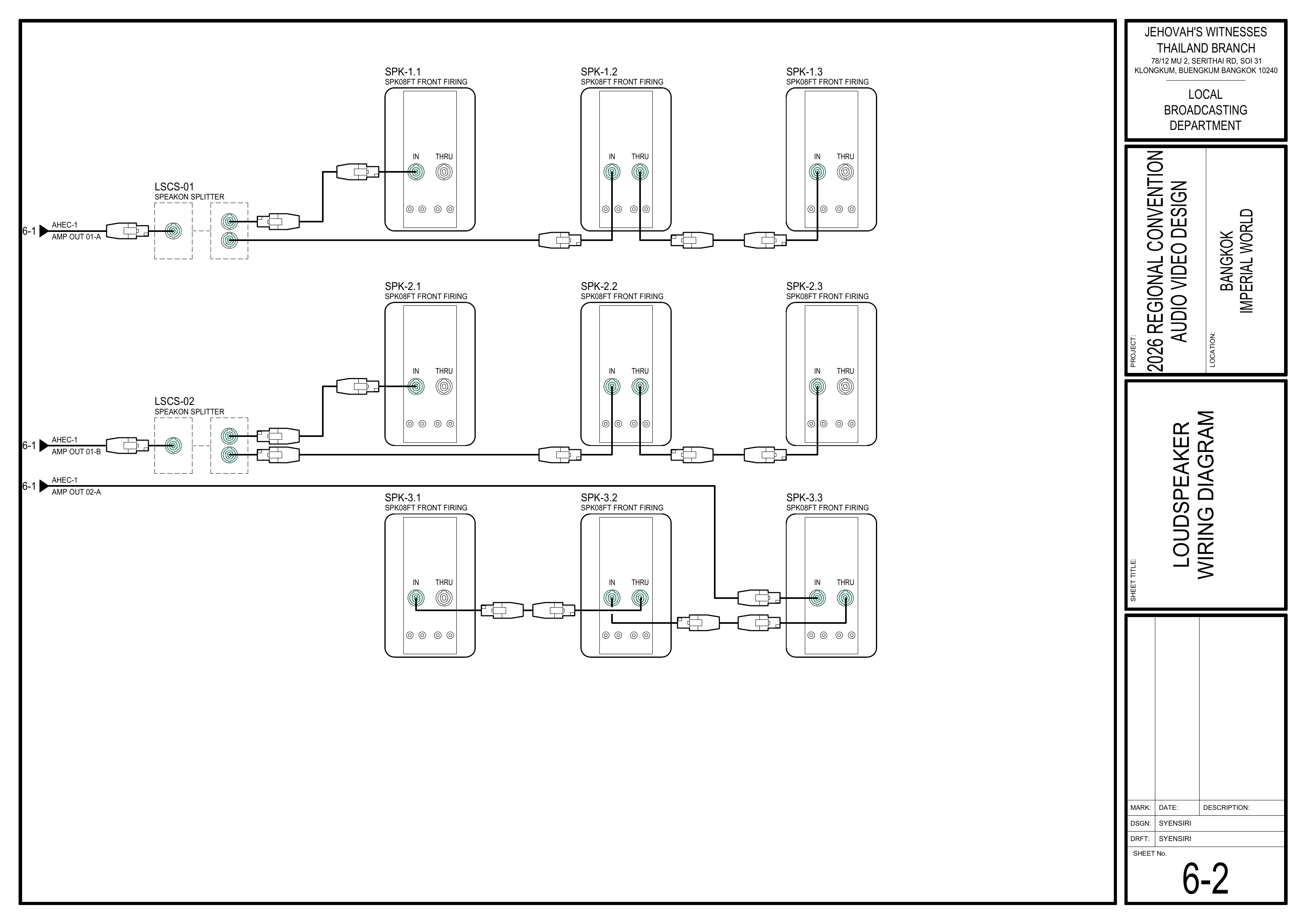
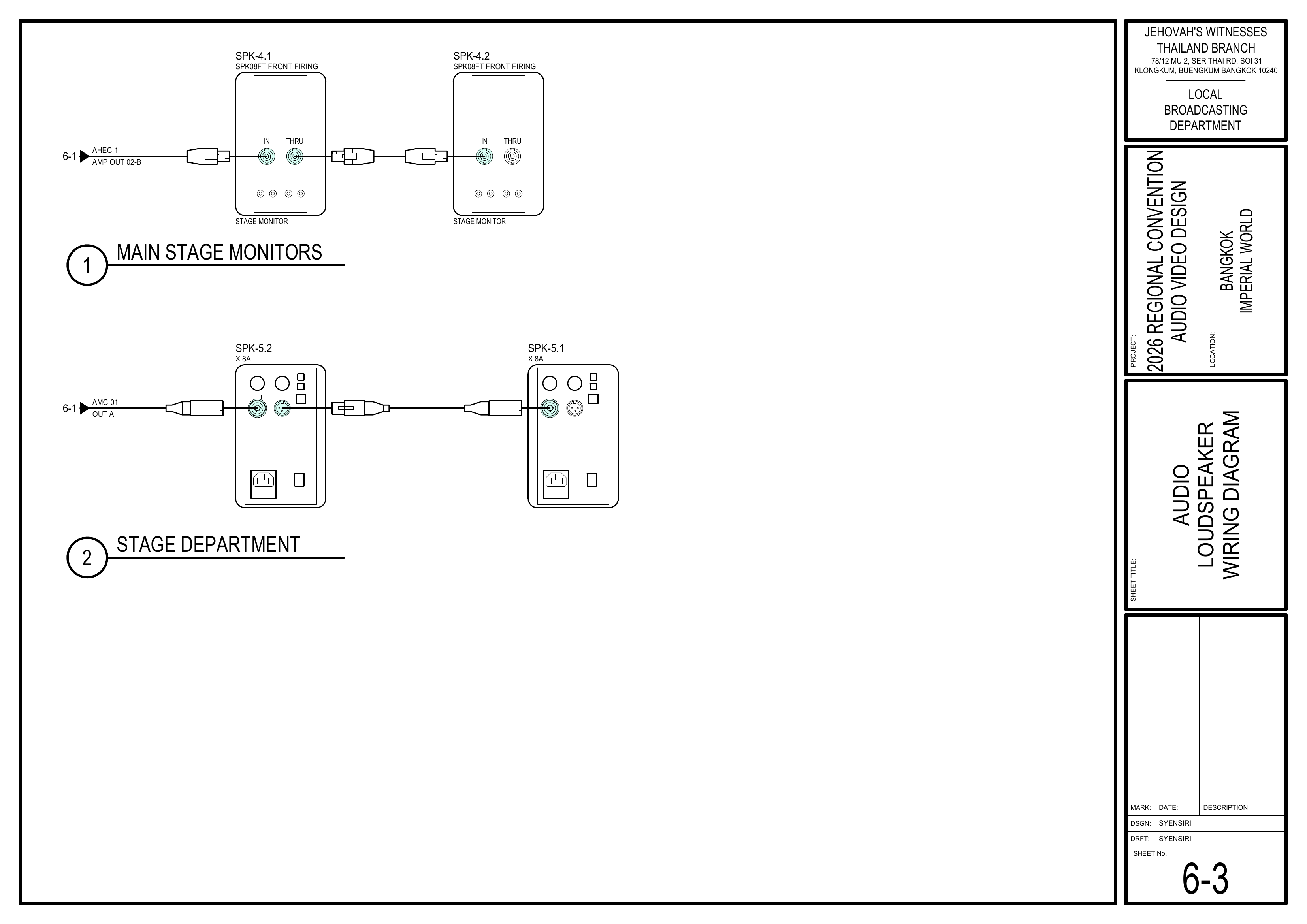
Schematics: Pages 6-2 Loudspeaker Wiring Diagram, 6-3 Audio Loudspeaker Wiring Diagram
- Connect all Speakon cables for the main speakers and XLR cables for the active speakers.
- Attach the wiring before raising the speaker to the desired height.
🗺️ View Associated Schematics (Pages 6-2, 6-3)
Completion Checklist
- Distances measured
- Loudspeaker groups 1-5 installed
- Height set to 2.5m (SPK-1.2 at 2.4m)
- Downward tilt set to 5 degrees
- Tripods secured with sandbags
- Cables connected before raising
Dismantling Procedure
- Wait for the department briefing and prayer 30 minutes after the program ends on Sunday before dismantling.
- Lower the tripods and disconnect the cables carefully.
- Gather all equipment and bring it to the designated area.
- Note for team leader: Use the Bill of Materials (BOM) to cross off every box or case before it is brought to the truck:
- PLS-1
- ALS-4
- TP-1
- SES-1
🇨🇳 中文说明
目的
根据图纸测量椅子距离,并安装观众区、讲台和会计/部门的 1-5 组扬声器。
参考资料
- 完整图纸: 📎 完整 PDF 文件
- 相关图纸:
- 1-1 座位布局图
所需设备箱
- PLS-1: 包含用于 1-4 组(主音响和讲台监听)的 SPK08FT 被动扬声器,以及 Speakon 分配器、线缆和延长线。
- ALS-4: 包含用于第 5 组(讲台部门)的 TOPP Pro X-8A 有源扬声器。
- TP-1: 包含用于所有扬声器的可调节升降三脚架。
- SES-1: 包含用于固定三脚架的重型 5 公斤沙袋。
扬声器及分配器清单
摘自图纸 6-8 音频设备清单
安装步骤
1. 测量距离
图纸:1-1 座位布局图、1-2 音频设备布局图
- 首先,根据图纸测量椅子距离,包括扬声器、讲台、通道和座位区域等。
🗺️ 查看相关图纸(图纸 1-1, 1-2)
2. 摆放设备
- 将扬声器箱(PLS-1, ALS-4)和三脚架 (TP-1) 移动到安装区域。
- 拿取 5 公斤重型沙袋 (SES-1) 来固定三脚架。
3. 安装 1 至 5 组扬声器
图纸:1-2 音频设备布局图、4-1 舞台区域设备布局图、6-8 音频设备清单
根据图纸安装根据图纸和上表安装 1-5 组扬声器。1、2、3 组 (SPK08FT) 为主音响;第 4 组 (SPK08FT) 为讲台监听;第 5 组 (X8A) 为部门音响。- 所有扬声器安装在 TP-1 三脚架上,并向下倾斜约 5 度。
- 扬声器高度设为 2.5 米,只有 SPK-1.2 须设为 2.4 米。
- 使用 5 公斤沙袋固定三脚架。
🗺️ 查看相关图纸(图纸 1-2, 4-1)1, 6-8)
提示: 完整图纸中引用了 6-8 音频设备清单,但目前主图纸页面没有包含该图片。如果要在这里嵌入,请先将 6-8 添加到主图纸页面。
4. 连接线缆
图纸:6-2 扬声器接线图、6-3 讲台及部门扬声器接线图
- 为主扬声器连接所有 Speakon 线缆,并为有源扬声器连接 XLR 线。
- 将电线连接好之后,才把扩音器升到需要的高度。
🗺️ 查看相关图纸(图纸 6-2, 6-3)
完成检查表
- 距离已测量
- 1-5 组扬声器已安装
- 高度已设为 2.5 米(SPK-1.2 为 2.4 米)
- 倾斜度已设为向下 5 度
- 三脚架已使用沙袋固定
- 升起前已连接线缆
- 负责人已检查确认
拆卸步骤
- 在星期日节目结束 30 分钟后,等待整个部门的简短会议和祷告后再开始拆除工作。
- 降下三脚架并小心拔除所有线缆。
- 收集所有设备并带到指定区域。
- 组长注意: 在将每个箱子或设备箱搬上卡车前,请使用物料清单 (BOM) 核对并划掉每一项:
- PLS-1
- ALS-4
- TP-1
- SES-1