
Loudspeakers Setup / 扬声器安装
🎤 Loudspeakers Team / 扬声器组
| Team / 小组 | Members / 成员 |
|---|---|
| Loudspeakers / 扬声器 | • Alex Jang 🔑 • Yuto Nomura • Prasert • Kittikhun |
🇬🇧 English Instructions
Purpose
Measure chair distances according to the schematicslayout and installsafely install, connect, raise, aim, and test loudspeaker groupsGroups 1-51–3 for the audience,main stage,audience sound system.
Assignment Scope:
The Loudspeakers Team installs loudspeaker Groups 1–3 only. The Stage Team is responsible for Groups 4 and accounting/departments.5.
⚠️ Tripod and Loudspeaker Safety
• Install each tripod on an even, stable surface.
• Keep tripods out of emergency pathways and avoid creating trip hazards.
• Secure each tripod with sandbags to prevent it from tipping over.
• Use two people when mounting or removing a loudspeaker.
• Keep hands clear of moving tripod parts while adjusting the height.
• Connect the speakON cable before raising the loudspeaker.
• Do not release the tripod until all locking mechanisms are securely engaged.
Required References
- Full Drawing Set: 📎 Complete PDF
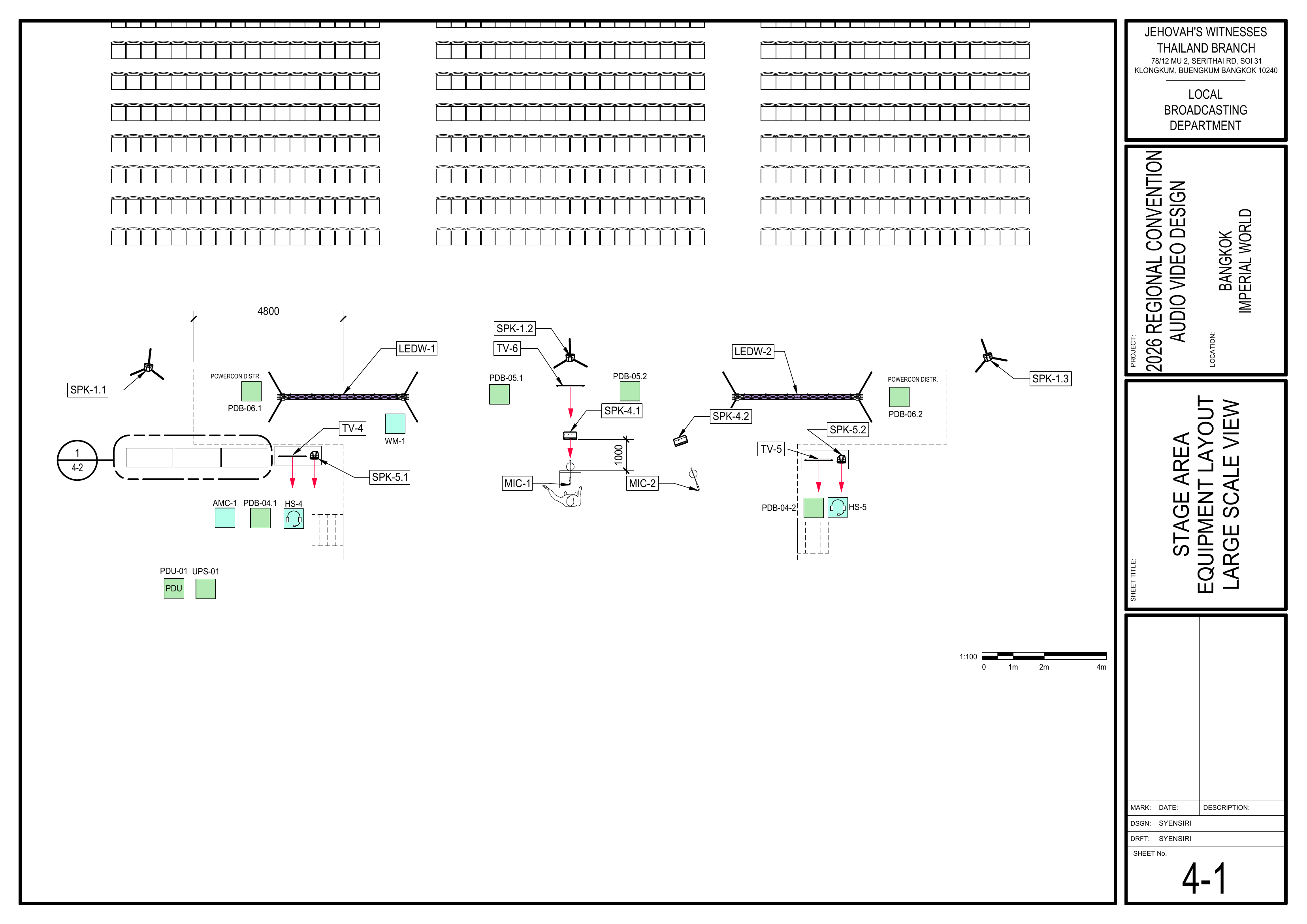
- 1-1 Seating Layout Plan
- 1-2 Audio Equipment Layout Plan
4-1 Stage Area Equipment Layout
Required Equipment Cases
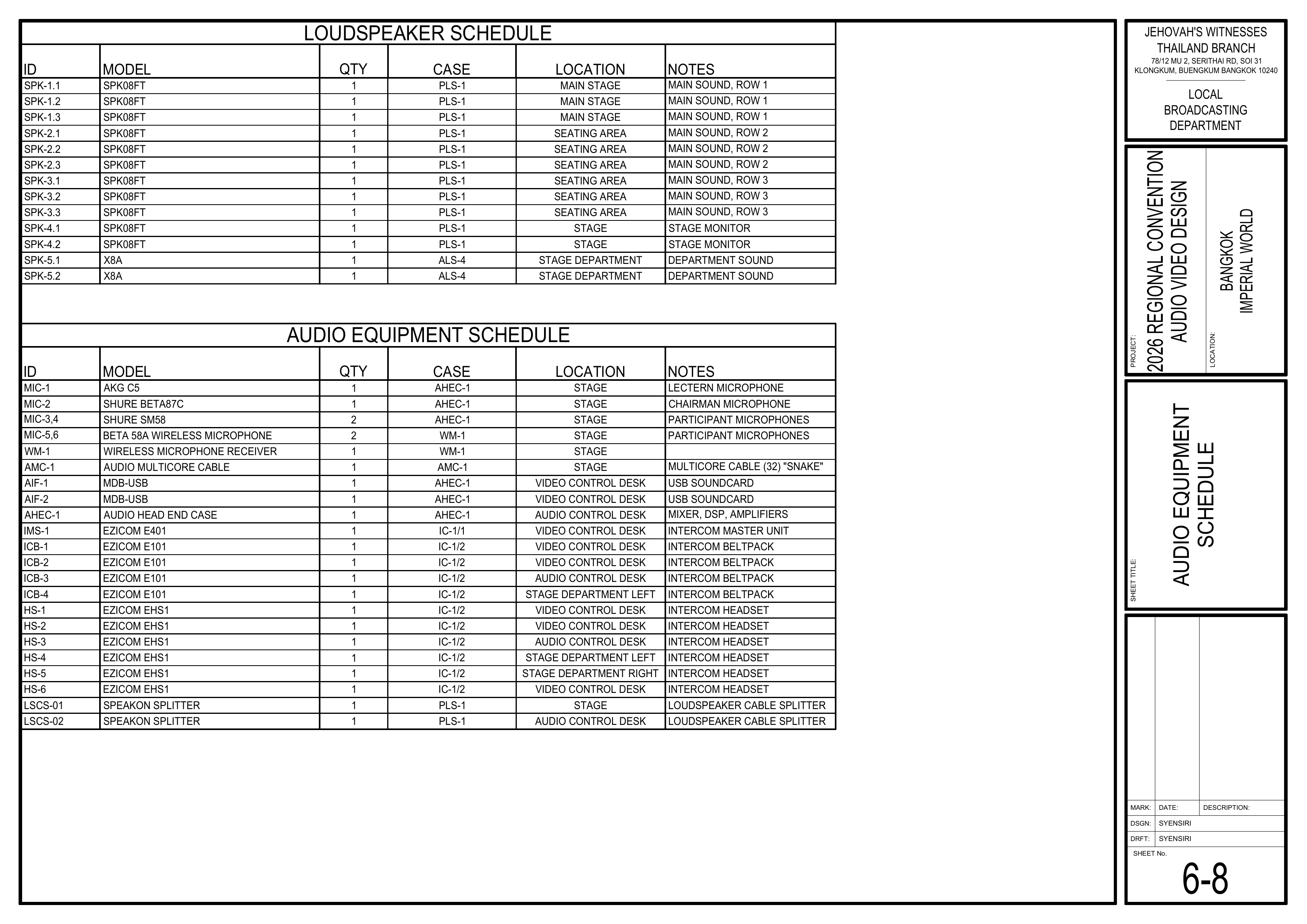
- PLS-1: Contains the SPK08FT passive
loudspeakersloudspeakers,used for groups 1-4 (main sound and stage monitors), plus SpeakonspeakON splitters, cables, andextenders.related accessories. - The Loudspeakers Team uses SPK-1.1 through SPK-3.3.
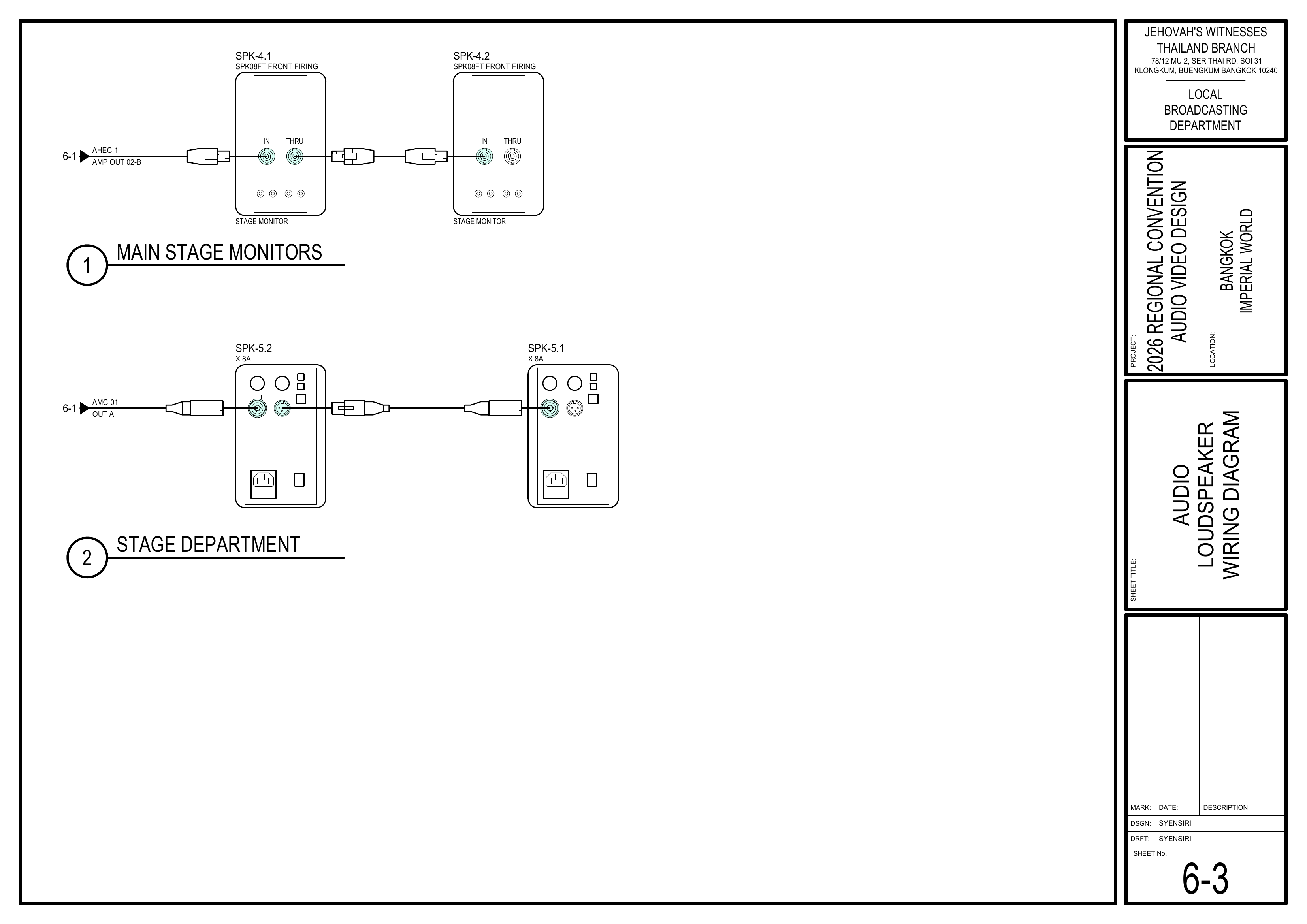
ALS-4:LeaveContainsSPK-4.1 and SPK-4.2 for theTOPPStageProTeam.
Assigned Loudspeaker & Splitter Schedule
From Page 6-8 Audio Equipment Schedule
Others: 2.5 m
Important:
The exact position and aiming direction differ for each loudspeaker. Check the loudspeaker ID and follow the position and coverage arrows shown on Drawing 1-2.
Setup Steps
1. Measure Distancesand Mark All Loudspeaker Positions
Schematics: Pages 1-1 Seating Layout Plan,Plan and 1-2 Audio Equipment Layout Plan
First,Measuremeasurethechairstage,distancesaisles, seating sections, and loudspeaker positions according to theschematics,schematics.
🗺️ View Associated Schematics (— Pages 1-1,1 and 1-2)2
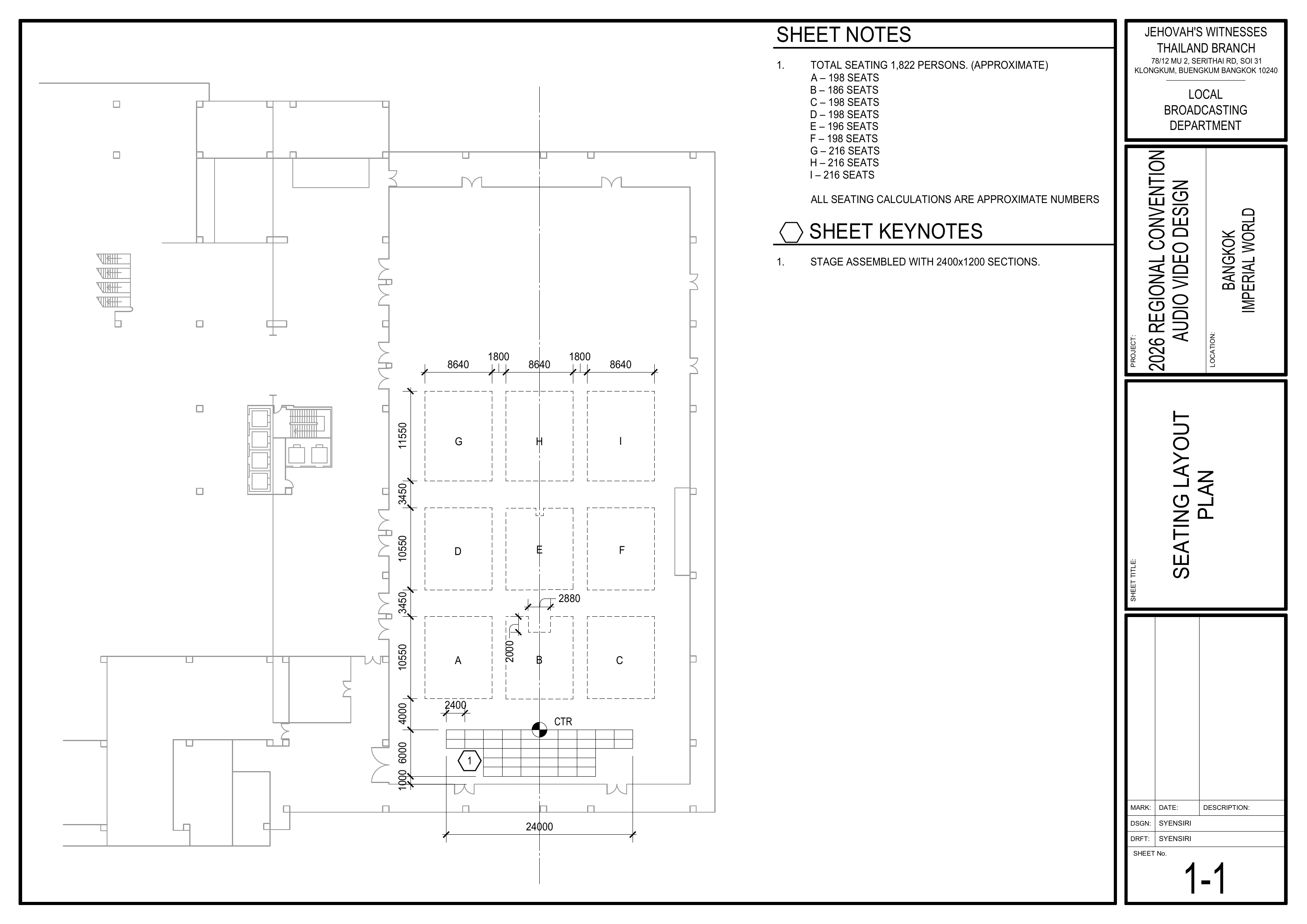
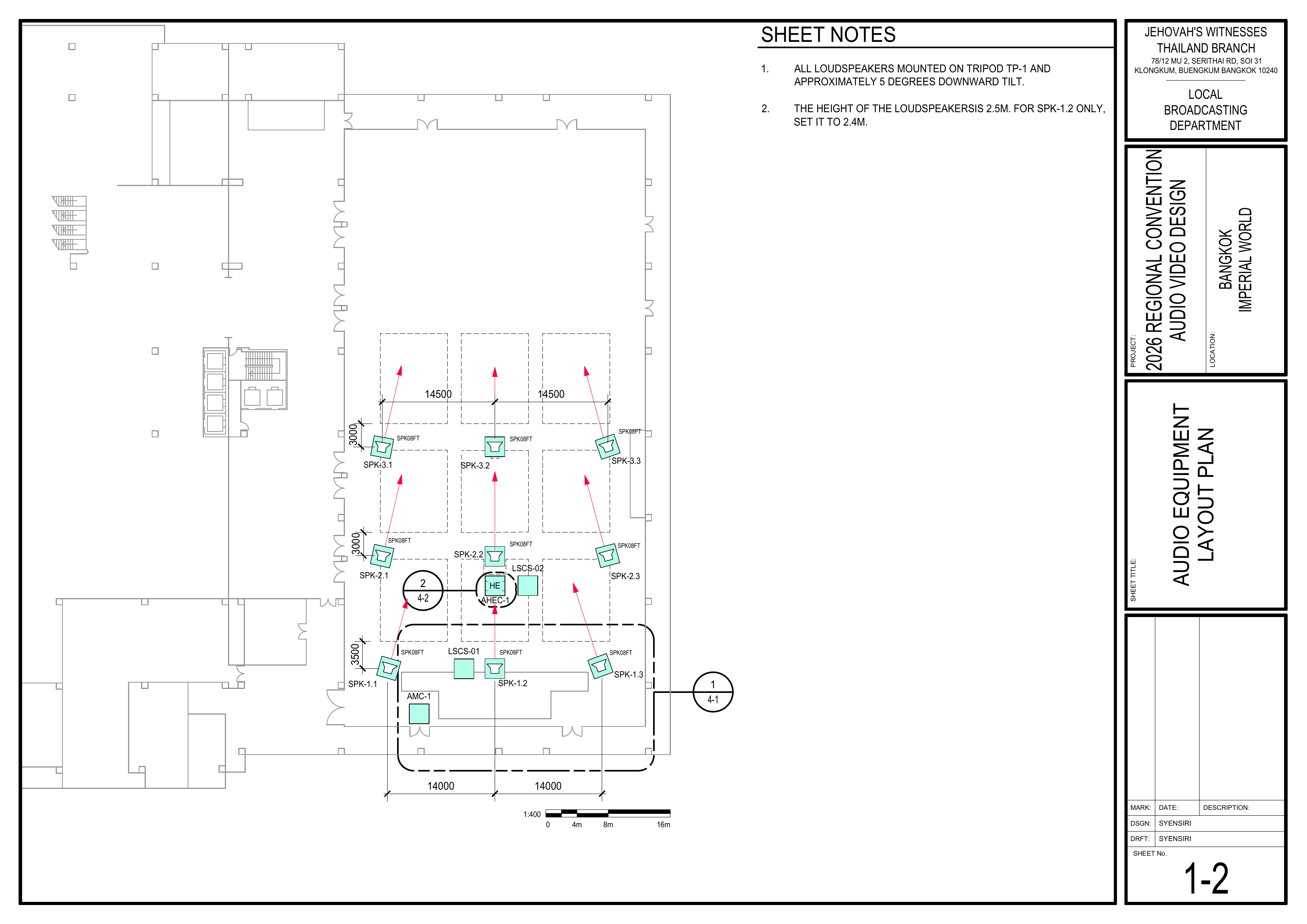
2. PositionCompletely EquipmentInstall One Loudspeaker
References: Drawing 1-2; Drawing 6-2; CO-160a, Chapter 3, Tripods, pages 5–6, Figures 58–59
Work Method:
Complete the tripod setup, loudspeaker installation, tilt adjustment, speakON connection, height adjustment, and safety check for one loudspeaker before beginning the next one.
Pre-installation Checks
BringThe loudspeaker ID matches the marked installation position.
Set Up the Tripod — Figure 58
📘 View TP-1 Tripod — CO-160a Figure 58
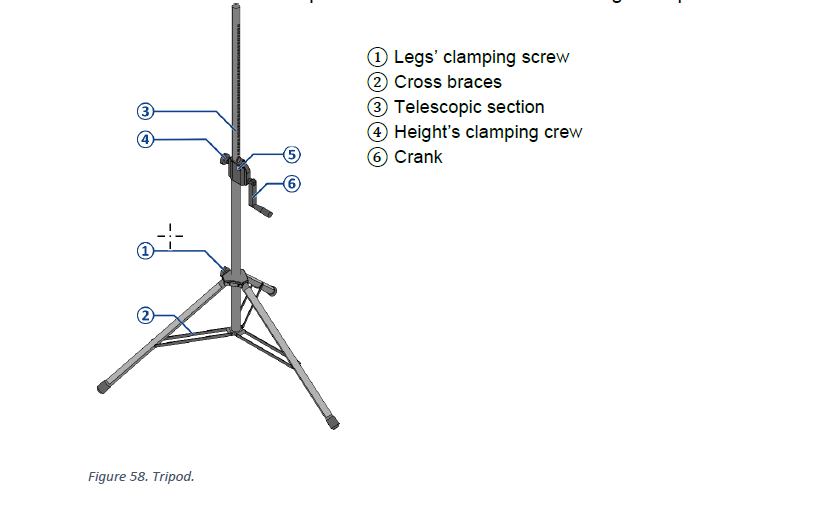
Set the Tilt Adapter and Install the elevatorLoudspeaker tripods— (TP-1)Figure 59
📘 View Tilt/Angle Adapter — CO-160a Figure 59
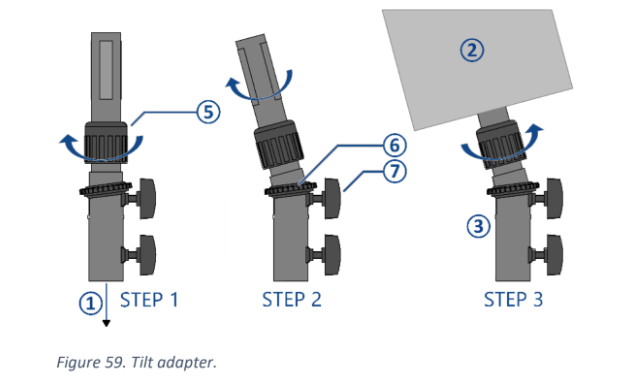
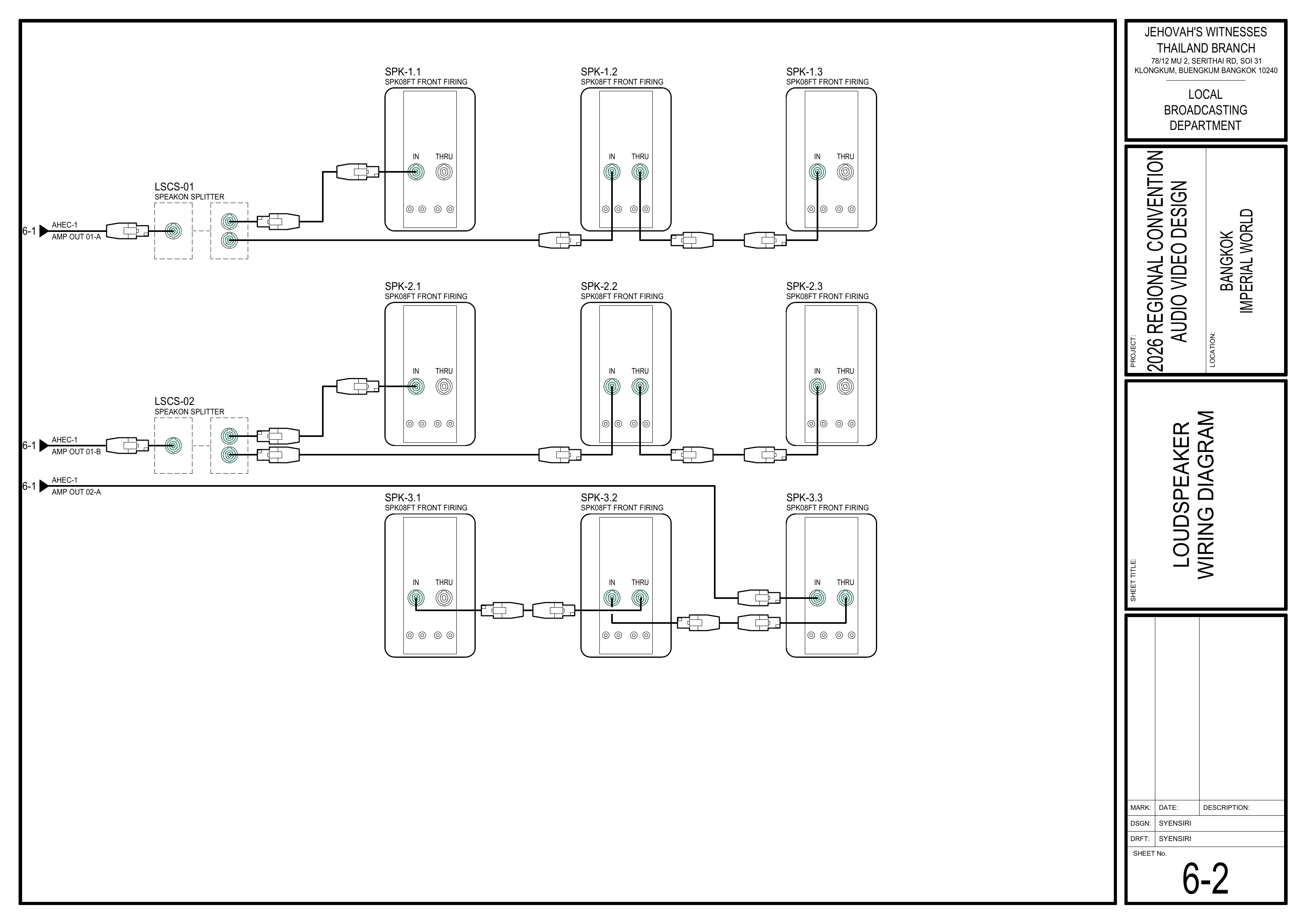
Connect the speakON Cable — Drawing 6-2
3.Cable InstallNot LoudspeakerReady GroupsYet?
1The Audio Cabling Team may not have routed the speakON cable to 5
this Schematics:loudspeaker Pagesyet. 1-2In Audiothat Equipmentcase, Layoutleave Plan,the 4-1tripod Stagelowered, Areaproceed Equipmentwith Layout,installing 6-8the Audionext Equipmentloudspeaker, Scheduleand return later to connect the cable and raise the tripod.
InstallConnectloudspeakerthegroupsspeakON1-5 accordingcable to theschematicsloudspeakerandbefore raising thetabletripod.
🗺️ View AssociatedLoudspeaker SchematicsWiring (PagesDiagram 1-2,— 4-1,Page 6-8)2
4.Raise Connectand WiringLock the Tripod — Figure 58
Schematics: Pages 6-2 Loudspeaker Wiring Diagram, 6-3 Audio Loudspeaker Wiring Diagram
ConnecttheTheroutedloudspeakerSpeakoniscablessecurelyto Groups 1–4mounted and theXLRspeakONcablescable is connected.
⚠️ Pinch Hazard:
Keep hands clear of the moving telescopic section, crank, locking pin, and clamping mechanism while adjusting the tripod height.
Check the Completed Loudspeaker
3. Repeat for the Remaining Loudspeakers
m
4. Final Positioning and Testing
Completion Checklist
-
DistancesAllmeasuredGroup 1–3 loudspeakers are in the correct positions and aimed according to Drawing 1-2 -
LoudspeakerGroupgroups11-is 3.5installedm from its first audience row; Groups 2 and 3 are 3.0 m -
HeightSPK-1.2 is set to 2.5m4(SPK-1.2m;atall other loudspeakers are set to 2.4m)5 m -
DownwardAlltiltloudspeakers,settripods,toadapters,5locks,degreessandbags, and speakON cables are secure -
TripodsEmergencysecuredpathwayswithandsandbags
Dismantling Procedure
- Wait for the department briefing and prayer 30 minutes after the program ends on Sunday before dismantling.
- Lower each tripod completely before disconnecting the
tripodsspeakON cable or removing the loudspeaker.
⚠️ Pinch Hazard:
Keep hands clear of the telescopic section, crank, locking pin, and disconnectclamping mechanism while lowering the cablestripods.
carefully.
🇨🇳 中文说明
目的
根据图纸测量椅子距离,并安装观众区、讲台和会计/部门的根据图纸测量场地布局,并安全地安装、连接、升高、调整和测试第 1-1–3 组主扩声扬声器。
岗位范围:
扬声器组只负责安装第 1–3 组扬声器。第 4 组和第 5 组扬声器。组扬声器由讲台组负责安装。
⚠️ 三脚架及扬声器安全提示
• 每个三脚架都必须安装在平整、稳定的地面上。
• 三脚架不可放在紧急疏散通道内,也不可造成绊倒危险。
• 使用沙袋固定每个三脚架,防止其倾倒。
• 安装或拆下扬声器时,必须由两个人共同操作。
• 调整三脚架高度时,双手应远离活动部件。
• 必须先连接 speakON 线缆,然后才能升高扬声器。
• 放开三脚架之前,所有锁定装置都必须牢固锁定。
参考资料
- 完整图纸: 📎 完整 PDF 文件
- 三脚架说明: 📎 CO-160a——第 3 章,三脚架(TP-1),第 5–6 页,图 58–59
- 1-1 座位布局图
- 1-2 音频设备布局图
4-1 舞台区域设备布局图
所需设备箱
- PLS-1:
包含用于 1-4 组(主音响和讲台监听)的包含 SPK08FT被动扬声器,以及 Speakon被动扬声器、speakON 分配器、线缆和延长线。线缆及相关附件。 - 扬声器组使用 SPK-1.1 至 SPK-3.3。
ALS-4:SPK-4.1包含用于第和5SPK-4.2组(讲台部门)的留给讲台组安装。
扬声器及分配器清单所负责的扬声器清单
摘自图纸 6-8 音频设备清单
其他:2.5
重要提示:
每只扬声器的具体位置和朝向可能不同。安装前应检查扬声器编号,并按照图纸 1-2 所示的位置和声音覆盖箭头进行安装。
安装步骤
1. 测量距离测量并标记所有扬声器位置
图纸:1-1 座位布局图、座位布局图和 1-2 音频设备布局图
首先,根据图纸测量椅子距离,包括扬声器、讲台、通道和座位区域等。按照图纸测量讲台、通道、座位区域和扬声器的位置。
🗺️ 查看相关图纸(查看相关图纸——图纸 1-1,1 和 1-2)2
2. 摆放设备完整安装一只扬声器
参考资料:图纸 1-2、图纸 6-2;CO-160a 第 3 章,三脚架,第 5–6 页,图 58–59
工作方法:
完成一只扬声器的三脚架安装、扬声器安装、角度调整、speakON 接线、高度调整和安全检查后,再开始安装下一只。
安装前检查
将扬声器箱(PLS-1,ALS-4)和三脚架 (TP-1) 移动到安装区域。扬声器编号与标记的安装位置一致。拿取安装位置与图纸 1-2 一致。
3.安装三脚架——图 安装 1 至 5 组扬声器58
图纸:1-2 音频设备布局图、4-1 舞台区域设备布局图、6-8 音频设备清单
根据图纸和上表安装 1-5 组扬声器。1、2、3 组 (SPK08FT) 为主音响;第 4 组 (SPK08FT) 为讲台监听;第 5 组 (X8A) 为部门音响。将三脚架放置在平整、稳定的地面上。所有扬声器安装在TP-1 三脚架上,并向下倾斜约 5 度。三脚架不会阻挡紧急疏散通道,也不会造成绊倒危险。扬声器高度设为松开支腿夹紧螺丝2.5①。
🗺️📘 查看相关图纸(图纸查看 1-2,TP-1 4-1,三脚架——CO-160a 6-8)图 58
4.调整倾斜适配器并安装扬声器——图 连接线缆59
图纸:6-2 扬声器接线图、6-3 讲台及部门扬声器接线图
将已铺设的倾斜适配器可在Speakon0–15线缆连接到第度之间调整,最大承重为1–425组扬声器,并将公斤。
📘 查看倾斜角度适配器——CO-160a 图 59
连接 speakON 线缆——图纸 6-2
线缆尚未铺设到位?
音频布线组可能尚未将 speakON 线缆铺设到这只扬声器的位置。在这种情况下,先让三脚架保持在最低位置,继续安装下一只扬声器,稍后再回来连接线缆并升高三脚架。
🗺️ 查看相关图纸(查看扬声器接线图——图纸 6-2, 6-3)2
🗺️ 查看扬声器接线图——图纸 6-2
升高并锁定三脚架——图 58
⚠️ 夹伤危险:
调整三脚架高度时,双手应远离活动的伸缩杆、摇柄、安全锁销及夹紧装置。
检查已完成的扬声器
3. 重复安装其余扬声器
4. 最终定位和测试
完成检查表
-
距离已测量第 1–3 组所有扬声器都位于正确位置,并按照图纸 1-2 调整朝向 -
1-第 1 组与第一排座位相距 3.5组扬声器已安装米;第 2 组和第 3 组相距 3.0 米 -
高度已设为SPK-1.2 高度为 2.4 米;其他所有扬声器高度为 2.5米(SPK-1.2 为 2.4 米)米 -
倾斜度已设为向下所有扬声器、三脚架、适配器、锁定装置、沙袋和5speakON度线缆均已牢固固定 -
三脚架已使用沙袋固定紧急疏散通道和普通通道没有绊倒危险 -
升起前已连接线缆已与音频组成功测试所有扬声器 - 负责人已检查确认
拆卸步骤
- 在星期日节目结束 30 分钟后,等待整个部门的简短会议和祷告后再开始拆除工作。
-
降下三脚架并小心拔除所有线缆。完全降下三脚架后,再断开 speakON 线缆并拆下扬声器。
组长注意:⚠️ 夹伤危险:
在将每个箱子或设备箱搬上卡车前,请使用物料清单降下三脚架时,双手应远离伸缩杆、摇柄、安全锁销和夹紧装置。
(BOM) 核对并划掉每一项:
- 从适配器上拆下扬声器,并带到指定的 PLS-1 设备集合区域。
-
ALS-4移除沙袋并收起三脚架支腿。 -
TP-1收集三脚架、适配器、speakON 线缆和沙袋。 -
SES-1将所有设备带到指定的集合区域。