
Loudspeakers Setup / 扬声器安装
🎤 Loudspeakers Team / 扬声器组
| Team / 小组 | Members / 成员 |
|---|---|
| Loudspeakers / 扬声器 | • Alex Jang 🔑 |
🇬🇧 English Instructions
Purpose
Measure the layout and safely install, connect, raise, aim, and test loudspeaker Groups 1–3 for the main audience sound system.
Assignment Scope:
The Loudspeakers Team installs loudspeaker Groups 1–3 only. The Stage Team is responsible for Groups 4 and 5.
⚠️ Tripod and Loudspeaker Safety
• Install each tripodtripods on an even, stable surface.
surface •and Keep tripods out ofkeep emergency pathways and avoid creating trip hazards.clear.
• Secure each tripod with sandbags to prevent it from tipping over.sandbags.
• Use two people when mounting or removing a loudspeaker.
• Keep hands clear of moving tripod parts while adjusting the height.
• Connect the speakON cable before raising the loudspeaker.
• DoKeep nothands releaseclear of moving tripod parts and confirm all locks are secure before releasing the tripod until all locking mechanisms are securely engaged.tripod.
Required References
- Full Drawing Set: 📎 Complete PDF
- Congregation Job Hazard Analysis (DC-85): 📁 Google Drive Folder
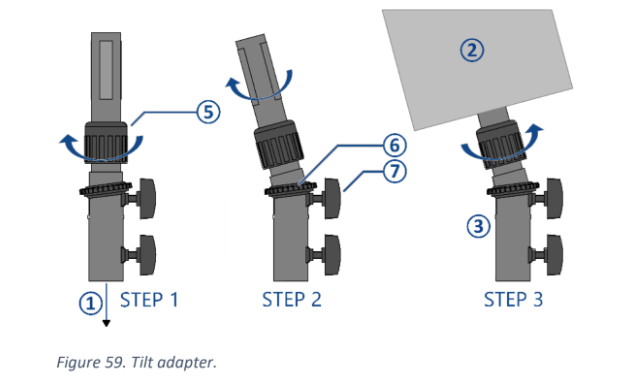
- Tripod Instructions: 📎 CO-160a — Chapter 3, Tripods (TP-1), pages 5–6, Figures 58–59
- Specific Schematics:
- 1-1 Seating Layout Plan
- 1-2 Audio Equipment Layout Plan
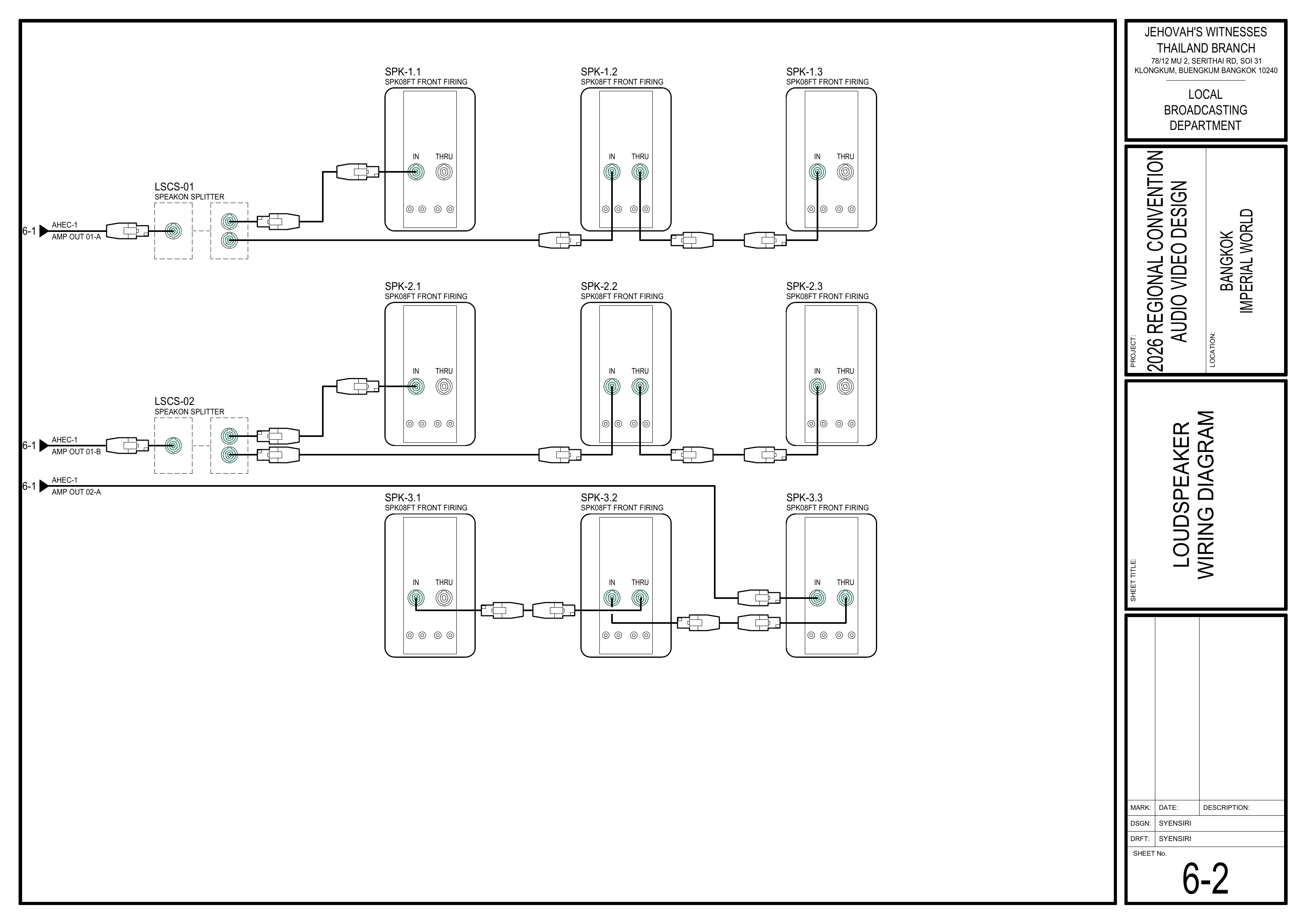
- 6-2 Loudspeaker Wiring Diagram
- 6-8 Audio Equipment Schedule
- Event Content List: Cases PLS-1, TP-1, SES-1
Required Equipment Cases
- PLS-1: Contains the SPK08FT passive loudspeakers, speakON splitters, cables, and related accessories.
The Loudspeakers Team usesUse SPK-1.1 through SPK-3.3.- Leave SPK-4.1 and SPK-4.2 for the Stage Team.
- TP-1: Contains crank-operated loudspeaker tripods and
attachedtilt/angle adapters. - SES-1: Contains
heavy-duty5 kg sandbags used to secure the tripods.
Assigned Loudspeaker Schedule
From Page 6-8 Audio Equipment Schedule
| Group | Loudspeakers |
|---|
Others: 2.5 m Follow
Important:
The exact position and aiming direction differ forCheck each loudspeaker. Check the loudspeaker ID and follow the exact position and coverage arrowsarrow shown on Drawing 1-2.
Setup Steps
1. Measure and Mark All Loudspeaker Positions
Schematics: Pages 1-1 Seating Layout Plan andPlan, 1-2 Audio Equipment Layout Plan
- Measure
the stage, aisles, seating sections,andloudspeaker positions according to the schematics.
🗺️ View Associated Schematics — (Pages 1-1 and1, 1-22)
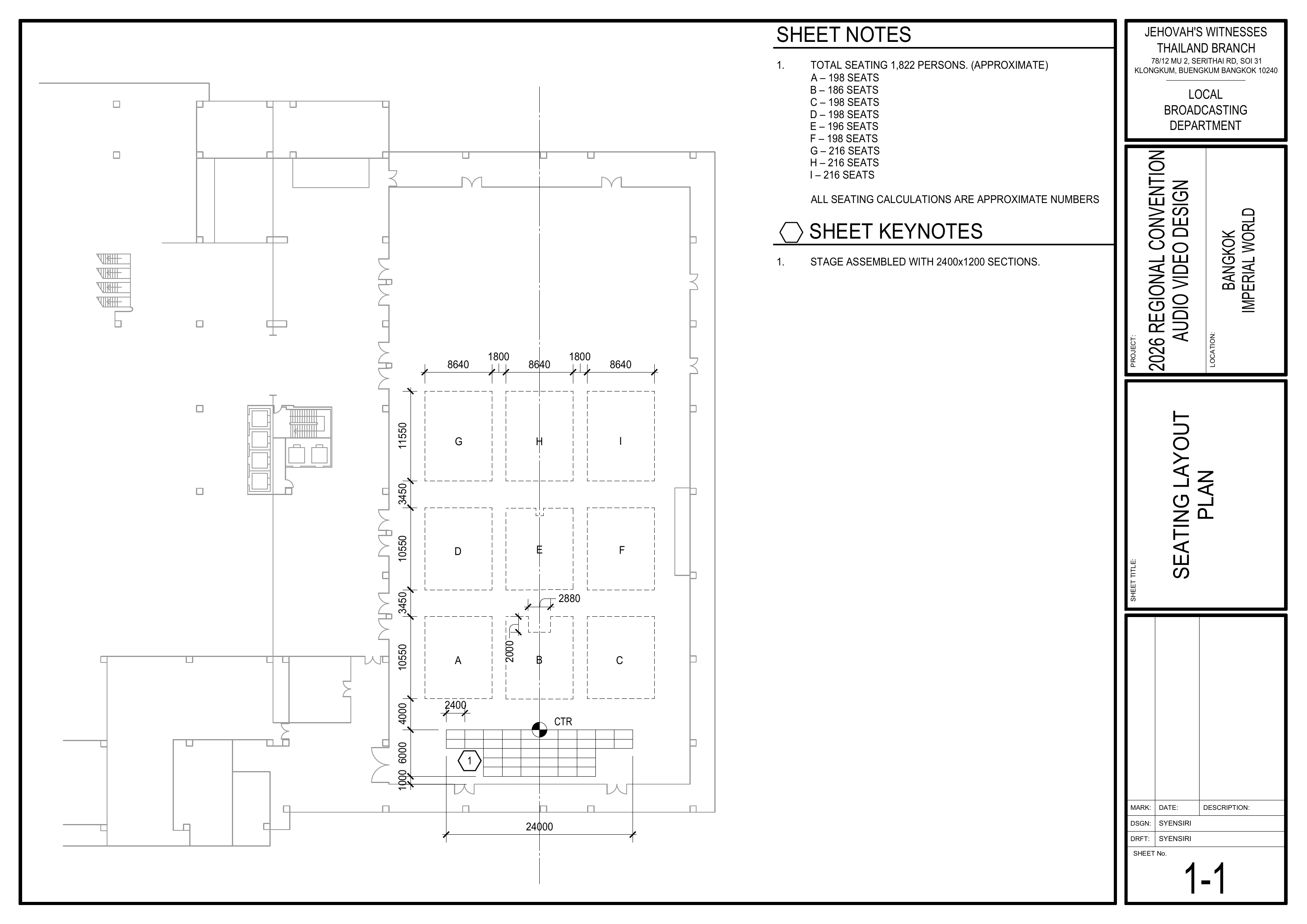
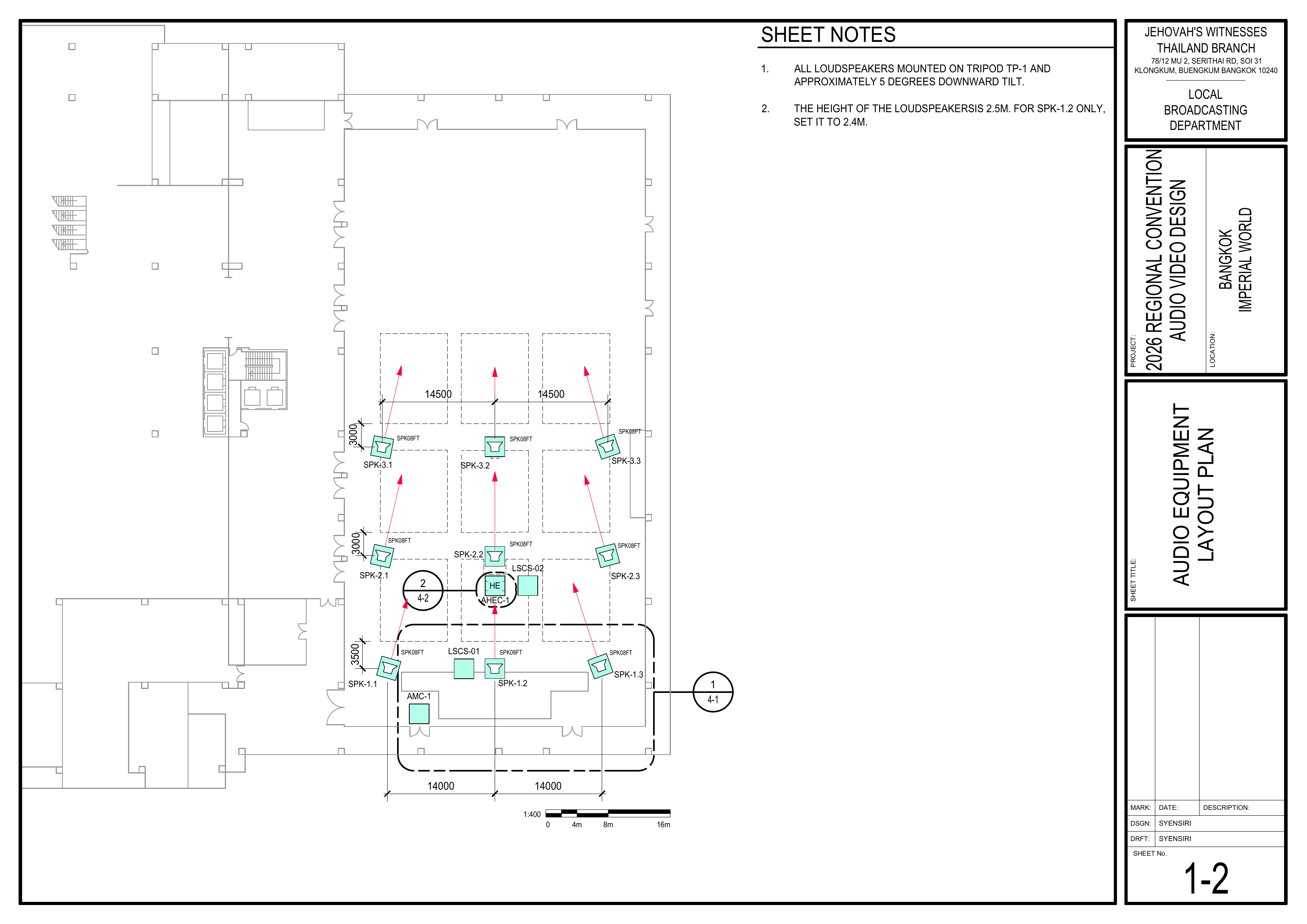
2. Completely Install OneEach Loudspeaker
References: Drawing 1-2; Drawing 6-2; CO-160a, Chapter 3, Tripods,Tripods (TP-1), pages 5–6, Figures 58–59
Work Method:
Complete the tripod setup, loudspeaker installation, tilt adjustment, speakON connection, height adjustment, and safety check for one loudspeaker as far as possible before beginning the next one.
Pre-installation Checks
Set Up the Tripod — Figure 58
- Position the tripod on an even, stable surface.
The tripod does not obstruct an emergency pathway or create a trip hazard.
📘 View TP-1 Tripod — CO-160a Figure 58
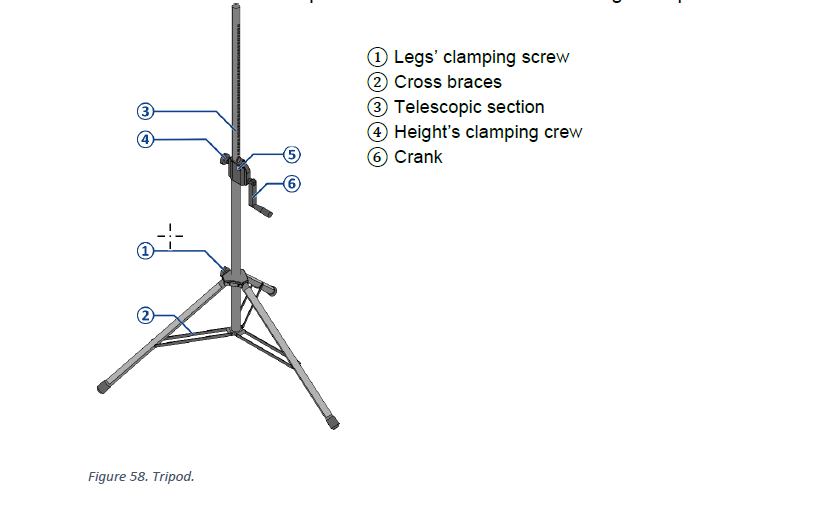
Set the Tilt AdapterInstall and InstallAim the Loudspeaker — Figure 59
The tilt adapter may be adjusted between 0–15 degrees and has a maximum load capacity of 25 kg.
📘 View Tilt/Angle Adapter — CO-160a Figure 59
Connect the speakON Cable — Drawing 6-2
- Confirm
Thethe Audio Cabling Team has routedandthe correctly labeledthe correctspeakON cable.
Cable Not Ready Yet?
TheLeave the tripod lowered, continue with another loudspeaker, and return after the Audio Cabling Team may not havehas routed the speakON cable to this loudspeaker yet. In that case, leave the tripod lowered, proceed with installing the next loudspeaker, and return later to connect the cable and raise the tripod.cable.
🗺️ View Loudspeaker Wiring Diagram — (Page 6-22)
Raise and Lock the Tripod — Figure 58
The loudspeaker is securely mounted and the speakON cable is connected.
⚠️ Pinch Hazard:
Keep hands clear of
Check the Completed Loudspeaker
3. Repeat for the Remaining Loudspeakers
4. Final Positioning and Testing
- Confirm
AllallGroupsGroup 1–3 loudspeakersare in the positions shown onmatch Drawing 1-2.2 for position and aiming. - Confirm
Groupheights1andisfirst-row3.5distancesmusingfromtheitsAssignedfirstLoudspeakeraudience row.Schedule. - Confirm
Groups 2 and 3 are 3.0 m from their first audience rows.
Completion Checklist
-
AllGroup 1–3 loudspeakersare in the correct positionspositioned and aimed according to Drawing 1-2 -
Group 1 is 3.5 m from its first audience row; Groups 2Heights and3first-rowaredistances3.0matchm
Dismantling Procedure
- Wait for the department briefing and prayer 30 minutes after the program ends on Sunday before dismantling.
- Lower each tripod completely before disconnecting the speakON cable or removing the loudspeaker.
⚠️ Pinch Hazard:
Keep hands clear of the telescopic section, crank, locking pin, and clamping mechanism while lowering the tripods.
🇨🇳 中文说明
目的
根据图纸测量场地布局,并安全地安装、连接、升高、调整和测试第 1–3 组主扩声扬声器。
岗位范围:
扬声器组只负责安装第 1–3 组扬声器。第 4 组和第 5 组扬声器由讲台组负责安装。
⚠️ 三脚架及扬声器安全提示
• 每个三脚架都必须安装在平整、稳定的地面上。三脚架必须安装在平整、稳定的地面上,并保持紧急疏散通道畅通。
• 三脚架不可放在紧急疏散通道内,也不可造成绊倒危险。
• 使用沙袋固定每个三脚架,防止其倾倒。使用沙袋固定每个三脚架。
• 安装或拆下扬声器时,必须由两个人共同操作。
• 调整三脚架高度时,双手应远离活动部件。
• 必须先连接 speakON 线缆,然后才能升高扬声器。
• 放开三脚架之前,所有锁定装置都必须牢固锁定。双手应远离活动部件,放开三脚架前确认所有锁定装置均已牢固锁定。
参考资料
- 完整图纸: 📎 完整 PDF 文件
- 《会众工作危险性分析》(DC-85): 📁 Google Drive 文件夹
- 三脚架说明: 📎 CO-160a——第 3 章,三脚架(TP-1),第 5–6 页,图 58–59
- 相关图纸:
- 1-1 座位布局图
- 1-2 音频设备布局图
- 6-2 扬声器接线图
- 6-8 音频设备清单
- 大会设备清单: 设备箱 PLS-1、TP-1、SES-1
所需设备箱
- PLS-1: 包含 SPK08FT 被动扬声器、speakON 分配器、线缆及相关附件。
- 扬声器组使用 SPK-1.1 至 SPK-3.3。
- SPK-4.1 和 SPK-4.2
留给讲台组安装。留给讲台组。
- TP-1:
包含带手摇升降装置的扬声器三脚架及连接在三脚架上的倾斜角度适配器。包含手摇升降扬声器三脚架及倾斜角度适配器。 - SES-1:
包含用于固定三脚架的重型包含用于固定三脚架的 5 公斤沙袋。
所负责的扬声器清单
摘自图纸 6-8 音频设备清单
| 组别 | 扬声器 |
|---|
其他:2.5 米 按照图纸 1-2
重要提示:
每只扬声器的具体位置和朝向可能不同。安装前应检查扬声器编号,安装前检查每只扬声器的编号,并按照图纸 1-2 所示的位置和声音覆盖箭头进行安装。所示的具体位置和声音覆盖箭头进行安装。
安装步骤
1. 测量并标记所有扬声器位置测量并标记扬声器位置
图纸:1-1 座位布局图和 座位布局图、1-2 音频设备布局图
按照图纸测量讲台、通道、座位区域和扬声器的位置。
🗺️ 查看相关图纸——查看相关图纸(图纸 1-1 和1, 1-22)
2. 完整安装一只扬声器安装每只扬声器
参考资料:图纸 1-2、图纸 6-2;CO-160a 第 3 章,三脚架,三脚架(TP-1),第 5–6 页,图 58–59
工作方法:
完成一只扬声器的三脚架安装、扬声器安装、角度调整、speakON 接线、高度调整和安全检查后,再开始安装下一只。
尽可能完成一只扬声器的安装后,再开始下一只。
安装前检查
安装三脚架——图 58
- 将三脚架放置在平整、稳定的地面上。
三脚架不会阻挡紧急疏散通道,也不会造成绊倒危险。
📘 查看 TP-1 三脚架——CO-160a 图 58
调整倾斜适配器并安装扬声器—安装并调整扬声器——图 59
倾斜适配器可在 0–15 度之间调整,最大承重为 25 公斤。
📘 查看倾斜角度适配器——CO-160a 图 59
连接 speakON 线缆——图纸 6-2
音频布线组已经铺设并标识正确的确认音频布线组已经铺设并标识正确的 speakON 线缆。
线缆尚未铺设到位?
音频布线组可能尚未将 speakON 线缆铺设到这只扬声器的位置。在这种情况下,先让三脚架保持在最低位置,继续安装下一只扬声器,稍后再回来连接线缆并升高三脚架。继续安装另一只扬声器。音频布线组完成布线后再回来连接并升高。
🗺️ 查看扬声器接线图——查看扬声器接线图(图纸 6-2
🗺️ 查看扬声器接线图——图纸 6-22)
升高并锁定三脚架——图 58
⚠️ 夹伤危险:
调整三脚架高度时,双手应远离活动的伸缩杆、摇柄、安全锁销及夹紧装置。
检查已完成的扬声器
3. 重复安装其余扬声器
4. 最终定位和测试
第确认第 1–3组所有扬声器都位于图纸组所有扬声器的位置和朝向符合图纸 1-2 所示的位置。2。第 1 组与第一排座位之间的距离为 3.5 米。按照“所负责的扬声器清单”确认高度及与第一排座位的距离。第 2 组和第 3 组与第一排座位之间的距离为 3.0 米。
完成检查表
- 第 1–3
组所有扬声器都位于正确位置,并按照图纸组扬声器已按照图纸 1-2调整朝向正确定位和调整朝向 -
第 1 组与第一排座位相距 3.5 米;第 2 组和第 3 组相距 3.0 米高度及第一排座位距离符合“所负责的扬声器清单” -
SPK-1.2所有扬声器均向下倾斜约高度为 2.4 米;其他所有扬声器高度为 2.5米度 -
所有扬声器、三脚架、适配器、锁定装置、沙袋和 speakON线缆均已牢固固定线缆均牢固 -
紧急疏散通道和普通通道没有绊倒危险紧急疏散通道和普通通道保持畅通 -
已与音频组成功测试所有扬声器已与音频组测试第 1–3 组所有扬声器 - 负责人已检查确认
拆卸步骤
- 在星期日节目结束 30 分钟后,等待整个部门的简短会议和祷告后再开始拆除工作。
- 完全降下三脚架后,再断开 speakON 线缆并拆下扬声器。
⚠️ 夹伤危险:
降下三脚架时,双手应远离伸缩杆、摇柄、安全锁销和夹紧装置。