
Power Distribution and Intercom Setup / 电源分配与对讲系统安装
⚡ Power Distribution Team / 电源分配组
| Team / 小组 | Members / 成员 |
|---|---|
| Power Distribution / 电源分配 | • Jaturaphat (Dern) 🔑 |
🇬🇧 English Instructions
Purpose
Route power to A/V equipment, install the intercom system, and set up the WM-1 wireless microphone system before final testing.
⚠️ Safety & Installation Notes
• A qualified electrician must connect the main 3-phase PDU (PDU-01) to the venue distribution board.
• Do not overload electrical circuits.
• Do not energize circuits until connections and breaker assignments have been confirmed.
• Protect power cables wherever they create a trip hazard.
Required References
- Full Drawing Set: 📎 Complete PDF
- Congregation Job Hazard Analysis (DC-85): 📁 Google Drive Folder
- CO-160a: 📎 CO-160a — Chapter 3, Wireless Microphones (WM-1), pages 9–10
- Specific Schematics:
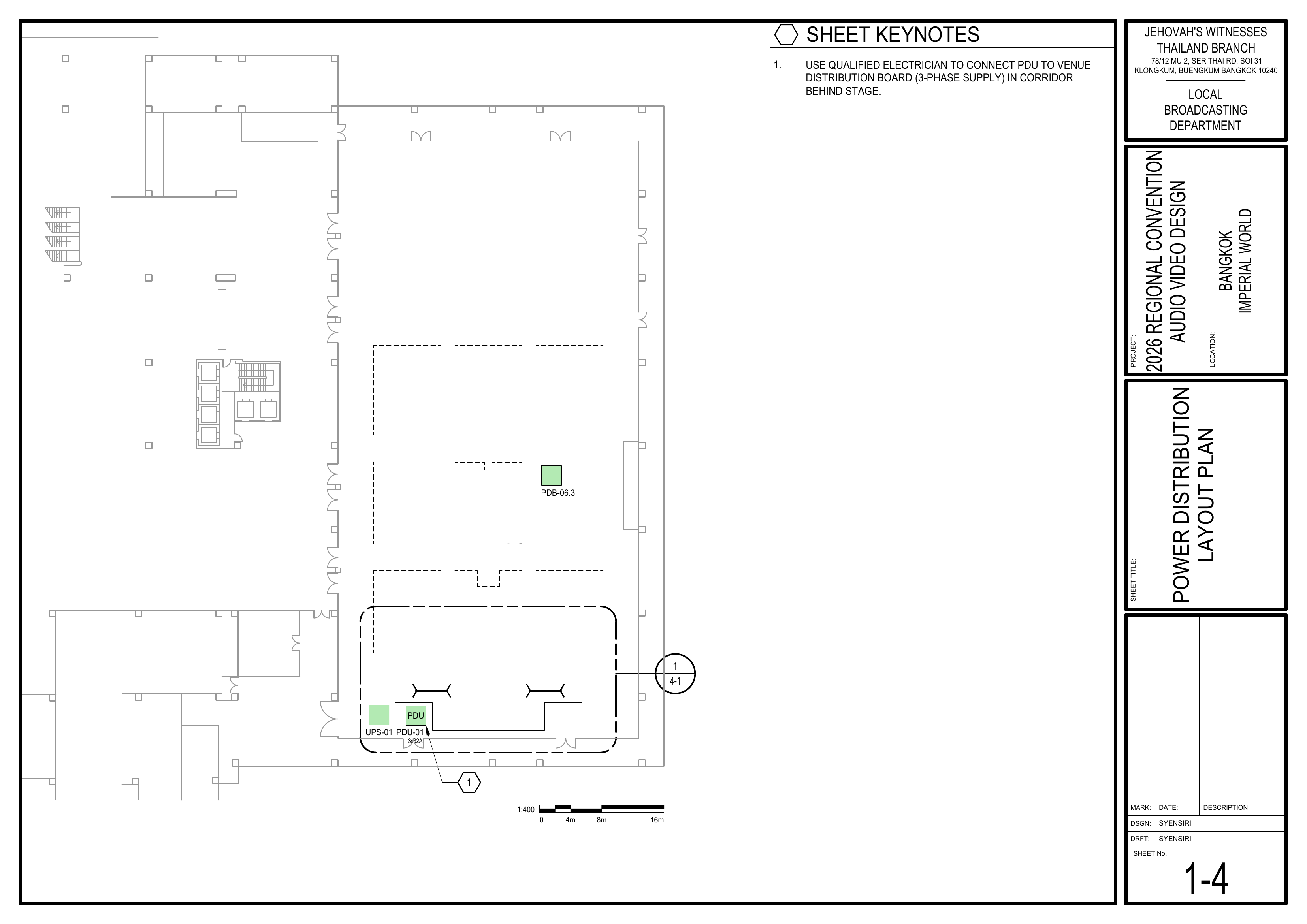
- 1-4 Power Distribution Layout Plan
- 4-1 Stage Area Equipment Layout Large Scale View
- 6-1 Audio Headend Wiring Diagram
- 6-4 Intercom System Wiring Diagram
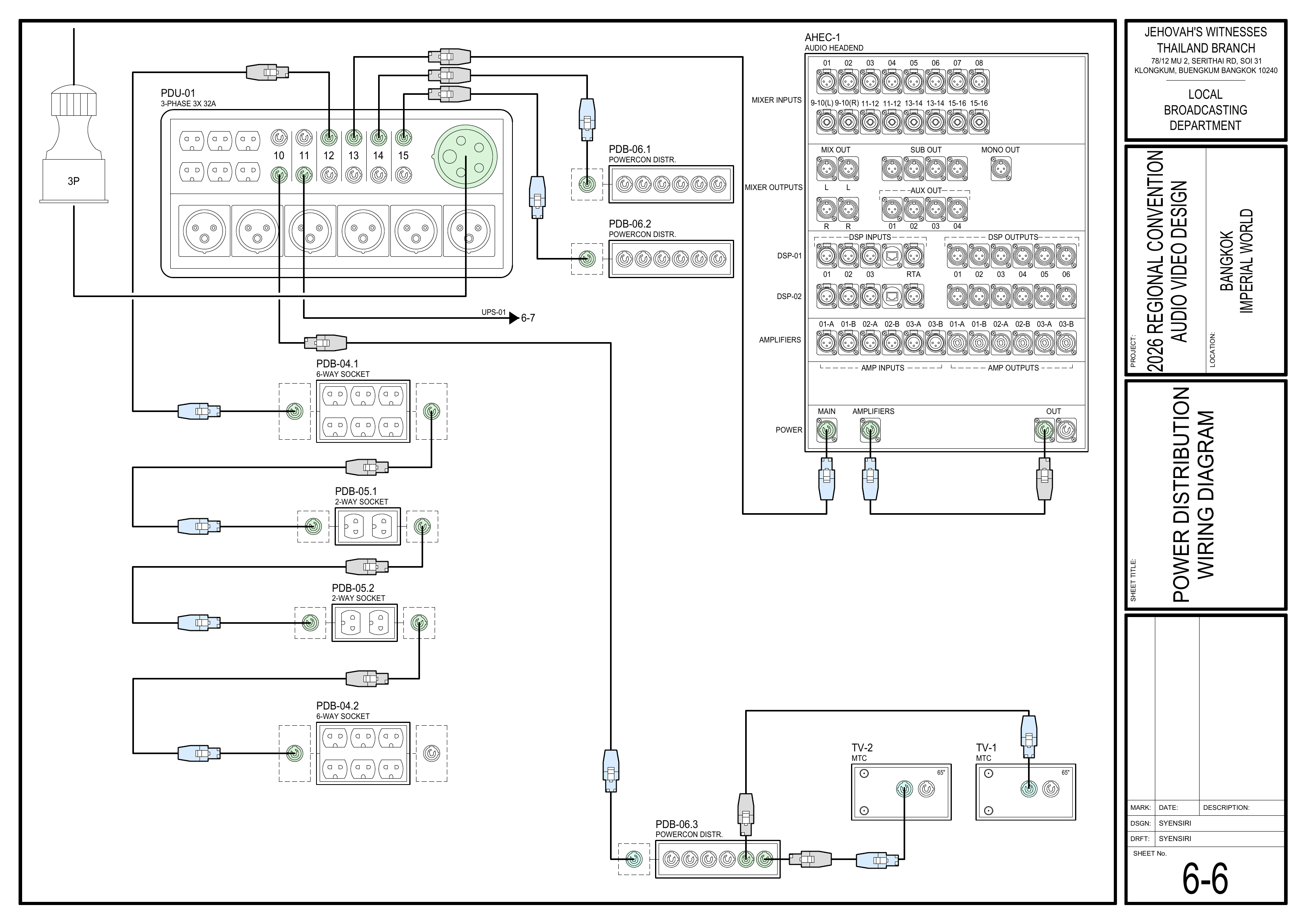
- 6-6 Power Distribution Wiring Diagram
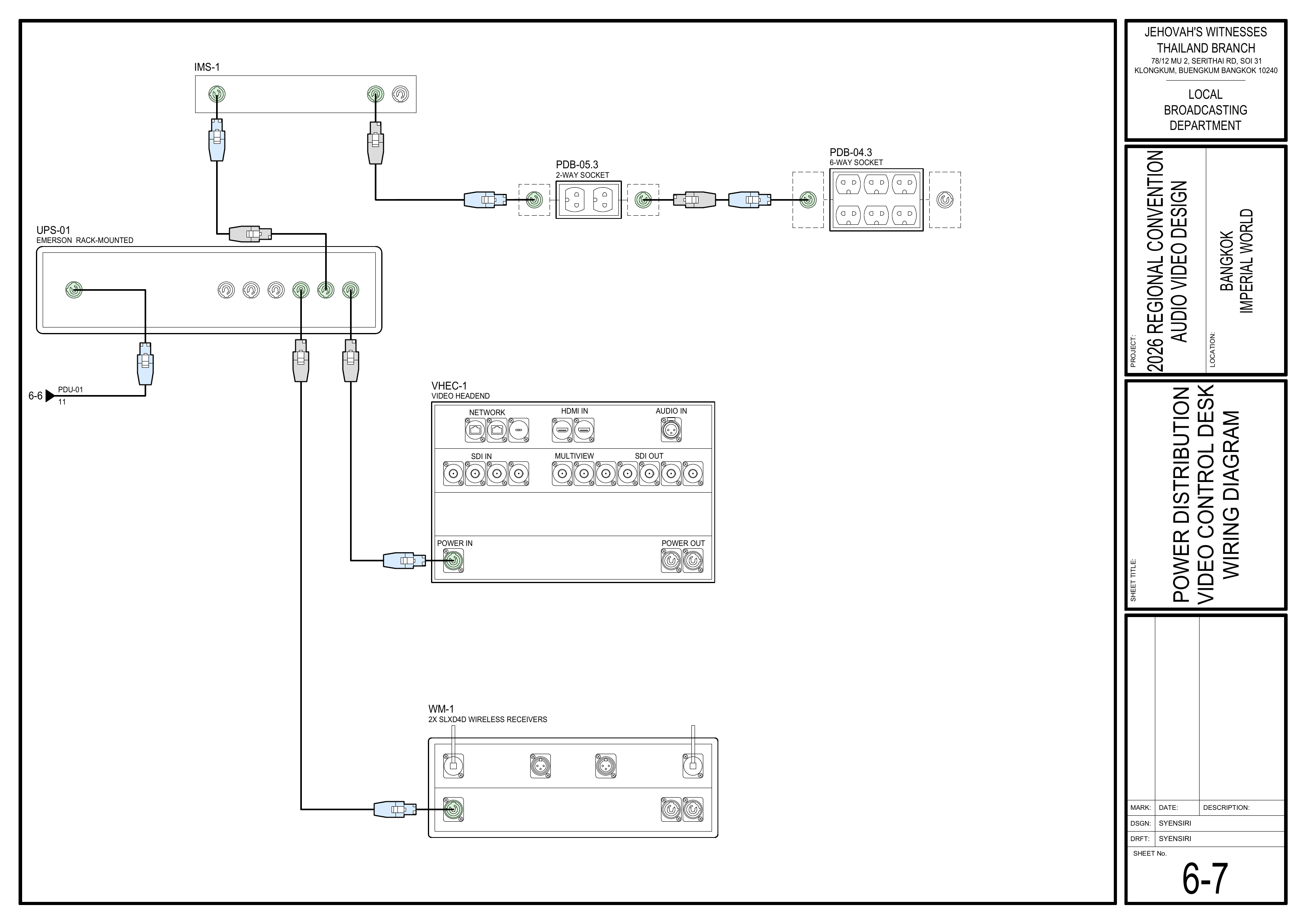
- 6-7 Power Distribution Video Control Desk Wiring Diagram
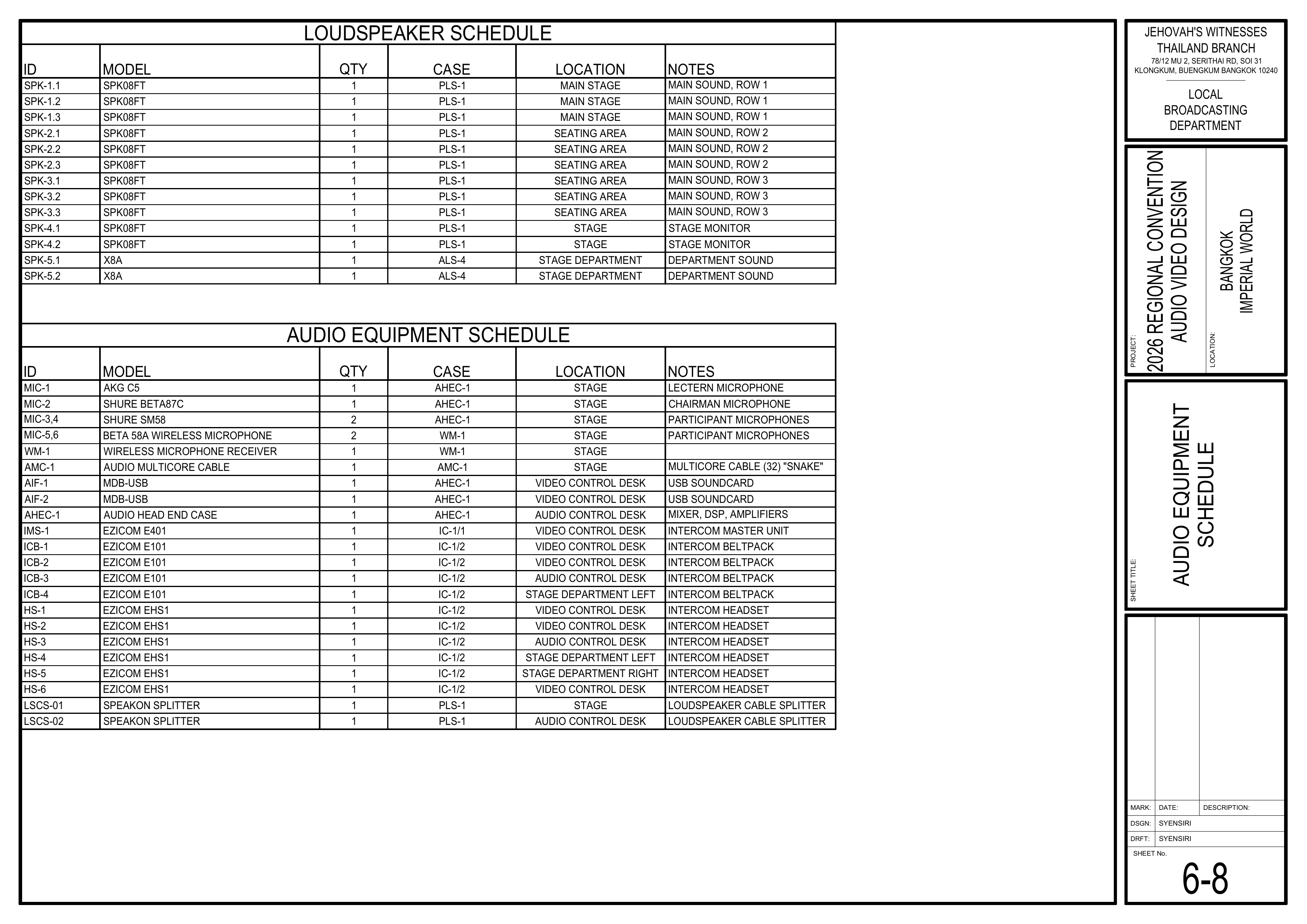
- 6-8 Audio Equipment Schedule
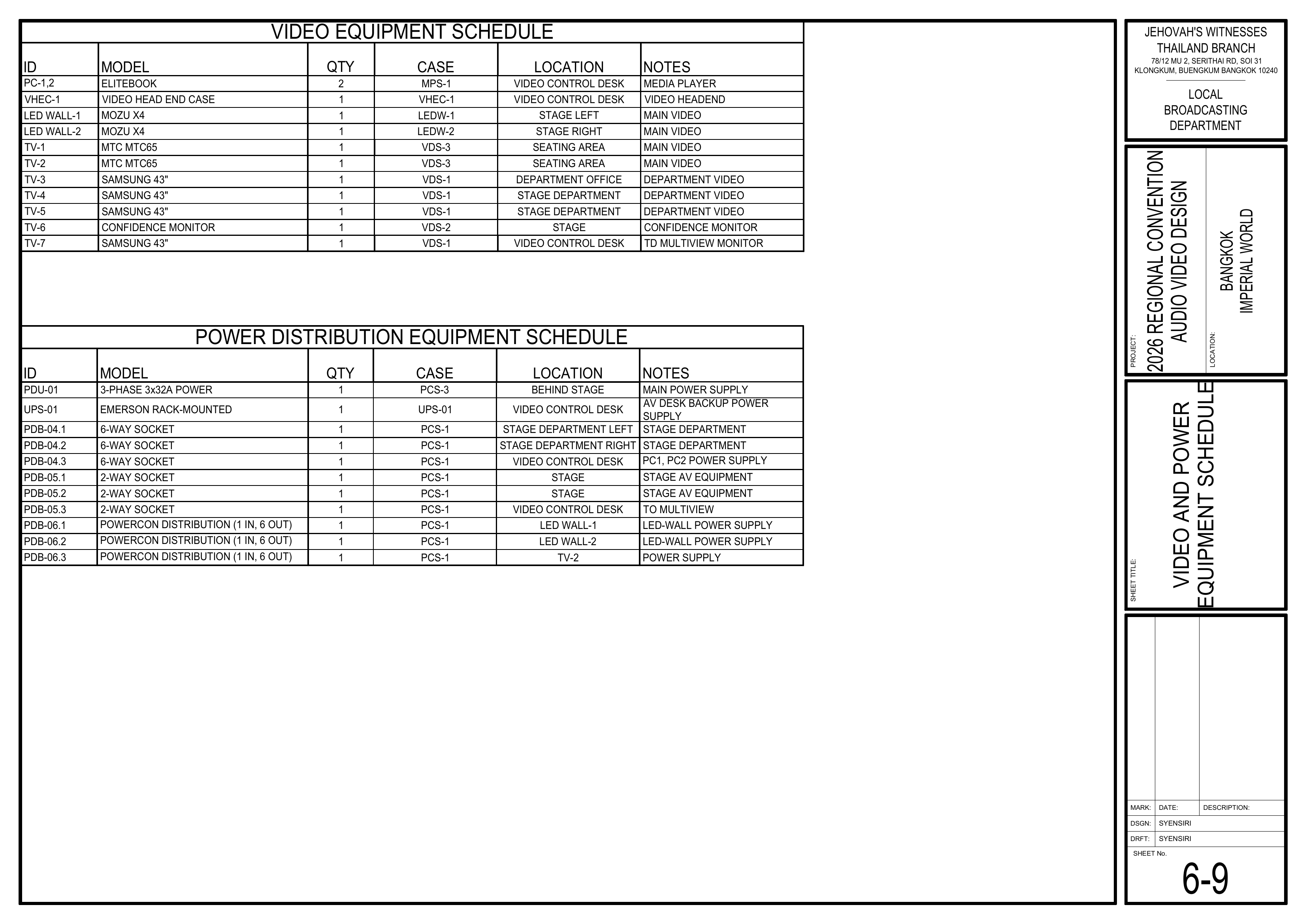
- 6-9 Video and Power Equipment Schedule
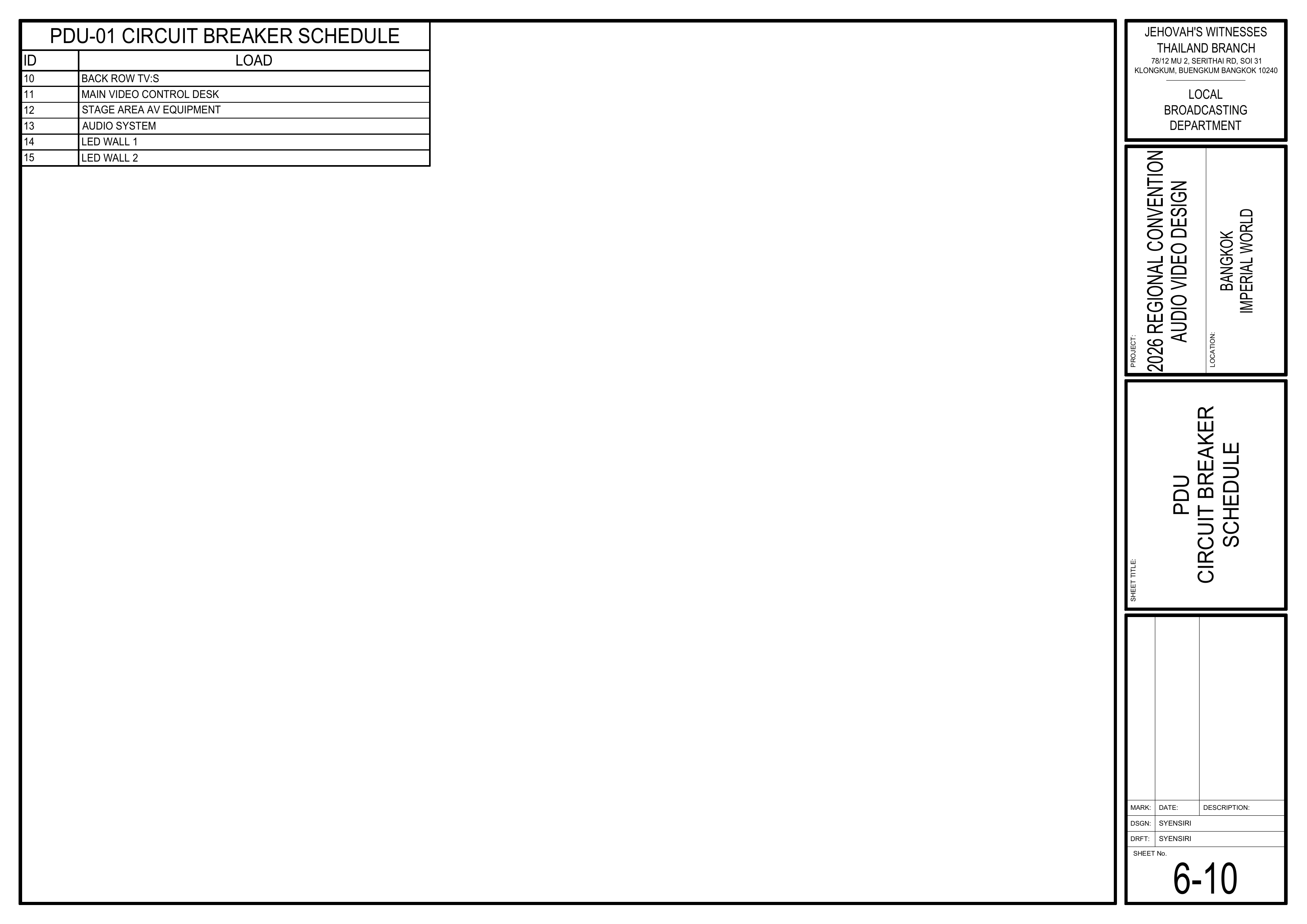
- 6-10 PDU Circuit Breaker Schedule
- Event Content List: Cases PCS-1, PCS-3, IC-1/1, IC-1/2, WM-1
Required Equipment Cases
- PCS-1: Power distribution cables, sockets, 1-phase PDU, and tools.
- PCS-3: Main power equipment, 3-phase PDU (PDU-01), and cables.
- IC-1/1: Ezicom Intercom Master Station (IMS-1).
- IC-1/2: Ezicom beltpacks and headsets.
- WM-1: 1 SHURE SLXD4D dual receiver and 2 SHURE BETA 58A handheld wireless microphones (MIC-5 and MIC-6).
Setup Steps
1. Route Power to the A/V Control Area
Schematics: Pages 1-4 Power Distribution Layout Plan, 6-6 Power Distribution Wiring Diagram, 6-7 Power Distribution Video Control Desk Wiring Diagram
- Route power to the Video Booth, Audio Booth, and required control-area equipment.
- Follow the power distribution shown in the schematics.
- Keep power cables neat and protected as they are installed.
🗺️ View Associated Schematics (Pages 1-4, 6-6, 6-7)
2. Set Up Stage Power and PDU-01
Schematics: Pages 1-4 Power Distribution Layout Plan, 6-6 Power Distribution Wiring Diagram, 6-9 Video and Power Equipment Schedule, 6-10 PDU Circuit Breaker Schedule
- Route power to the stage A/V equipment and LED walls.
- Have a qualified electrician connect PDU-01 to the venue distribution board.
- Set the PDU circuit breakers according to the schedule.
- Confirm the required power points are ready before equipment is energized.
🗺️ View Associated Schematics (Pages 1-4, 6-6, 6-9, 6-10)
3. Install the Intercom System
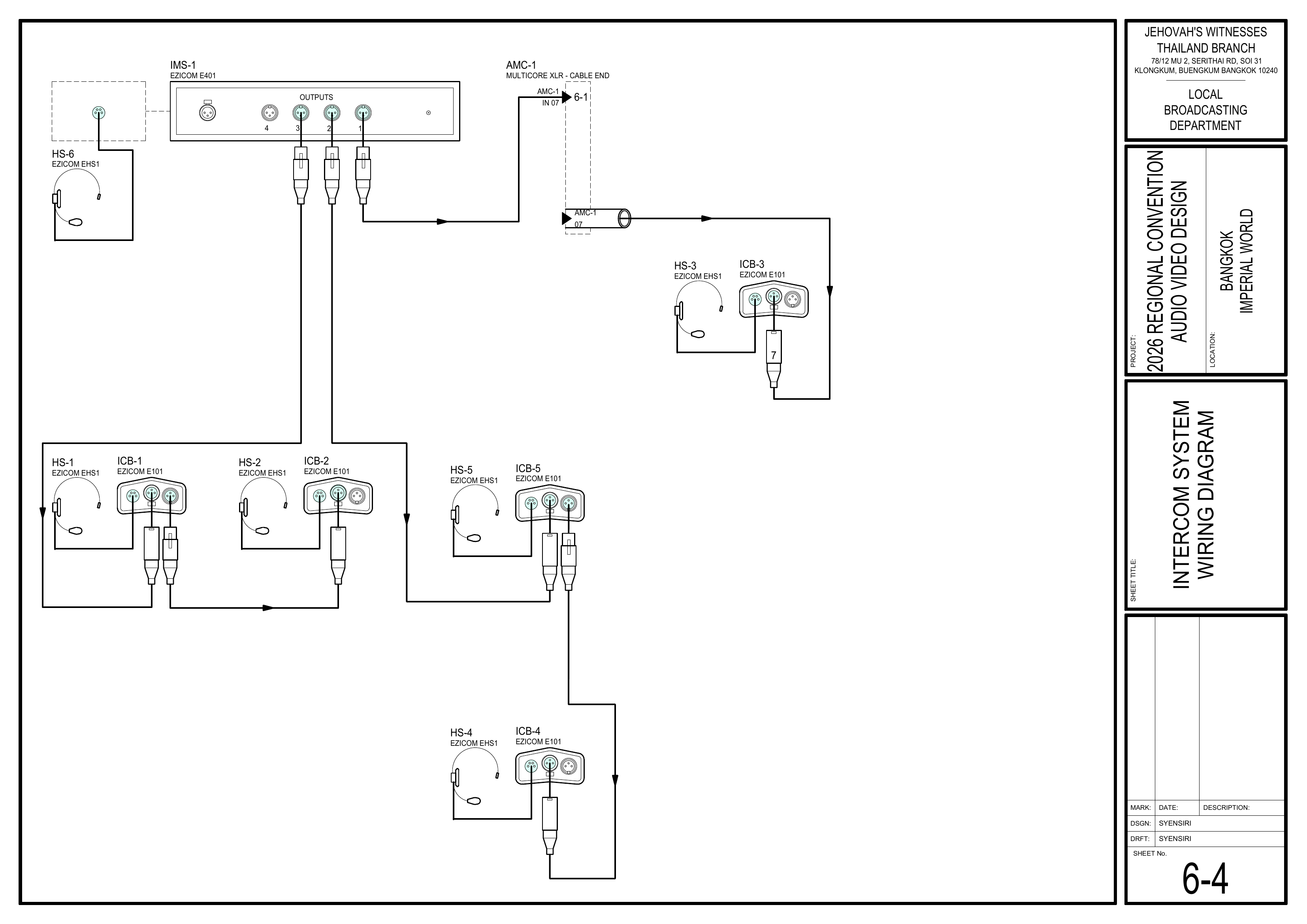
Schematics: Page 6-4 Intercom System Wiring Diagram
- Place the Intercom Master Station (IMS-1) at the Video Booth.
- Connect the 2 Stage positions and 1 Audio Booth position according to the schematic.
- Confirm communication between the Video Booth, Audio Booth, and Stage.
🗺️ View Intercom System Schematic (Page 6-4)
4. Install and Configure WM-1 Wireless Microphones
Reference: 📎 CO-160a — Chapter 3, Wireless Microphones (WM-1), pages 9–10
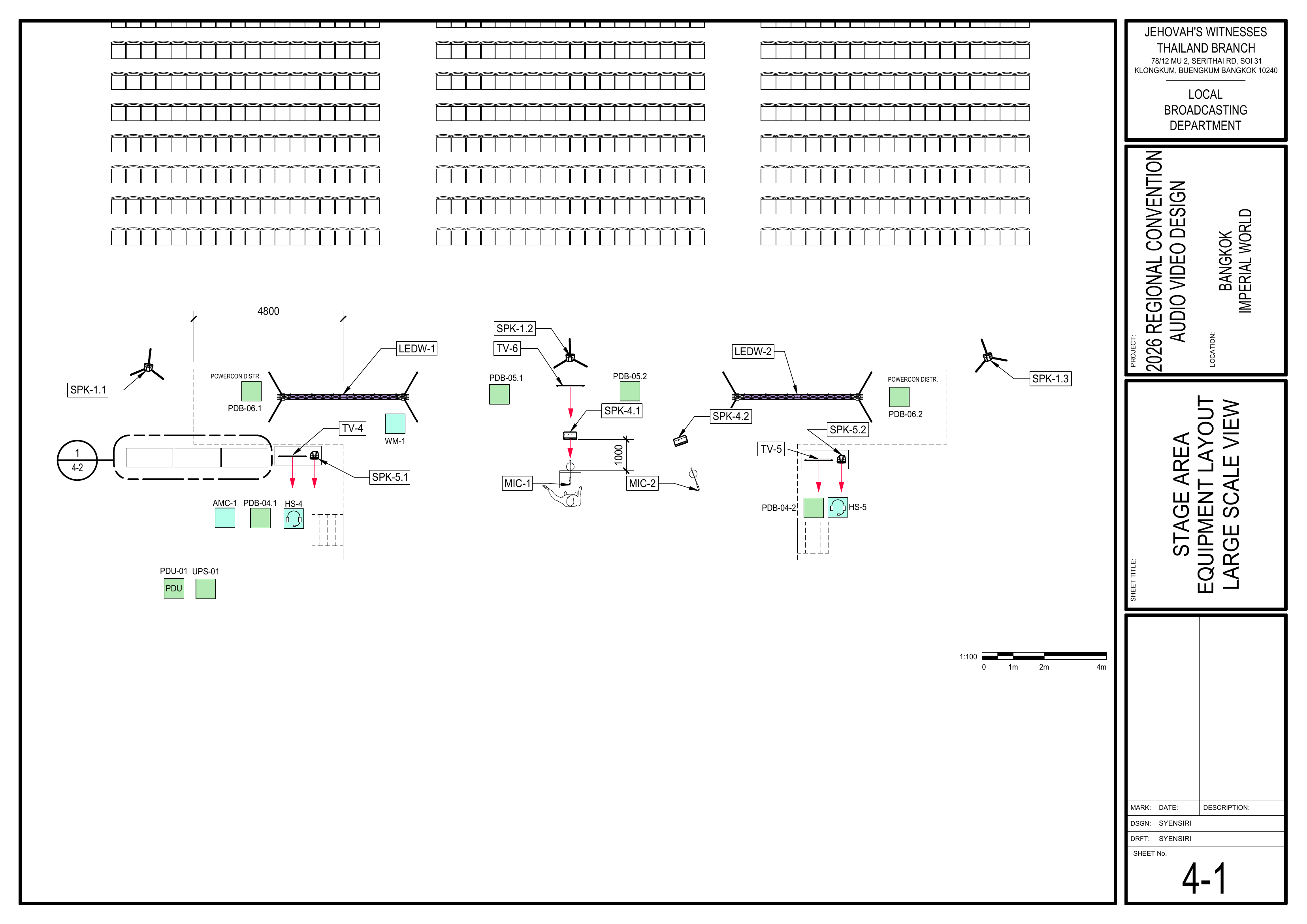
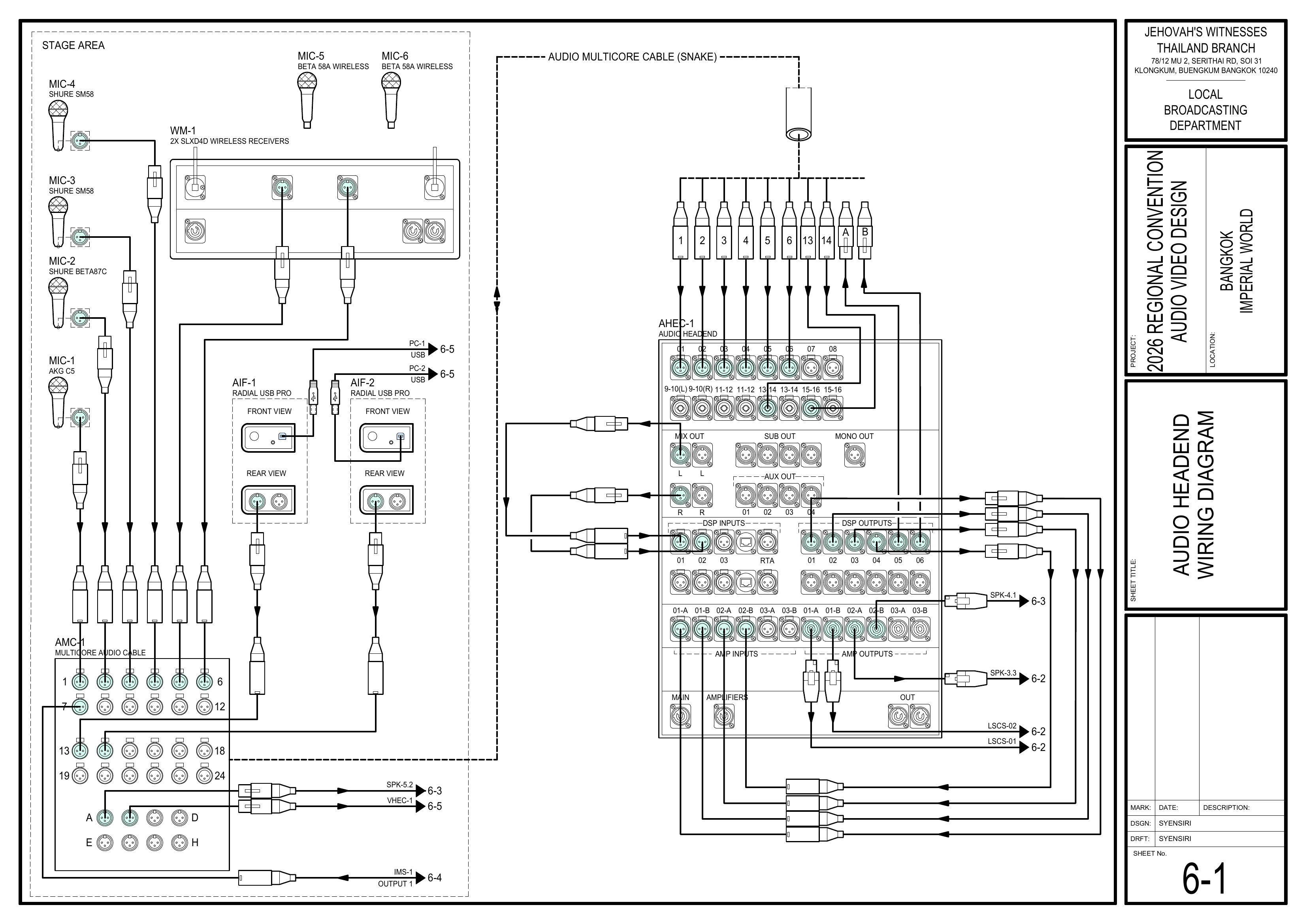
Schematics: Pages 4-1 Stage Area Equipment Layout Large Scale View, 6-1 Audio Headend Wiring Diagram, 6-8 Audio Equipment Schedule
- Position and connect the WM-1 receiver according to the schematics.
- Connect power and turn on the receiver.
- Select
1. Frequency Setup > 1.1 Guided Frequency Setup, then selectInitialize My System. - Turn off MIC-5 and MIC-6, then select
start scan. - When the scan is complete, assign the frequencies.
- Turn on each microphone one at a time, align the IR ports, and press
sync. - Confirm MIC-5 and MIC-6 are synchronized.
- If manual setup is required, use
1. Frequency Setup > 1.4 Manual Frequency Setup. - Coordinate with the Audio Crew for final microphone signal and audio testing.
🗺️ View Associated Schematics (Pages 4-1, 6-1, 6-8)
5. Final Cable Protection
- Protect cables wherever they cross or enter a walkway.
- Use the appropriate cable protectors, rubber mats, or carpet covers.
- Keep cable routes neat and clearly identifiable.
- Check all routes for trip hazards before energizing the system.
Completion Checklist
- Power routed to the A/V control area
- Qualified electrician connected PDU-01
- PDU circuit breakers set according to the schedule
- Stage A/V and LED wall power ready
- Intercom communication confirmed between Video, Audio, and Stage
- WM-1 receiver positioned, connected, and powered
- Guided Frequency Setup completed
- MIC-5 and MIC-6 synchronized
- Audio Crew notified for final WM-1 testing
- Power cables protected and routes safe
- Keyman inspection completed
Dismantling Procedure
- Wait for the department briefing and prayer 30 minutes after the program ends on Sunday before dismantling.
- Carefully power down the equipment.
- Turn off MIC-5 and MIC-6 and return them to WM-1.
- Disconnect WM-1, intercom equipment, and power cables.
- Remove cable protection carefully.
- Coil and label cables.
- Gather all equipment and bring it to the designated area.
- Note for team leader: Use the Bill of Materials (BOM) to cross off every box or case before it is brought to the truck:
- PCS-1
- PCS-3
- IC-1/1
- IC-1/2
- WM-1
🇨🇳 中文说明
目的
为音视频设备布设电源、安装对讲系统,并设置 WM-1 无线麦克风系统,为最终测试做好准备。
⚠️ 安全与安装提示
• 必须由合格的电工将主三相 PDU (PDU-01) 连接到场馆配电箱。
• 不要让电路过载。
• 确认所有连接和断路器设置正确后,才能接通电源。
• 电源线可能造成绊倒危险的位置必须加以保护。
参考资料
- 完整图纸: 📎 完整 PDF 文件
- 《会众工作危险性分析》(DC-85): 📁 Google Drive 文件夹
- CO-160a: 📎 CO-160a — 第 3 章,Wireless Microphones (WM-1),第 9–10 页
- 相关图纸:
- 1-4 电源分配布局图
- 4-1 舞台区域设备布局大比例图
- 6-1 音频主控接线图
- 6-4 对讲系统接线图
- 6-6 电源分配接线图
- 6-7 视频控制台电源接线图
- 6-8 音频设备清单
- 6-9 视频和电源设备清单
- 6-10 PDU 断路器清单
- 大会设备清单: 设备箱 PCS-1、PCS-3、IC-1/1、IC-1/2、WM-1
所需设备箱
- PCS-1: 电源分配线缆、插座、单相 PDU 和工具。
- PCS-3: 主电源设备、三相 PDU (PDU-01) 和线缆。
- IC-1/1: Ezicom 对讲系统主机 (IMS-1)。
- IC-1/2: Ezicom 对讲系统腰包和耳机。
- WM-1: 1 台 SHURE SLXD4D 双通道无线接收机及 2 支 SHURE BETA 58A 手持无线麦克风(MIC-5 和 MIC-6)。
安装步骤
1. 布置音视频控制区电源
图纸:1-4 电源分配布局图、6-6 电源分配接线图、6-7 视频控制台电源接线图
- 为视频控制台、音频控制台及所需控制区设备布设电源。
- 按照图纸进行电源分配。
- 布线时保持电源线整齐并加以保护。
🗺️ 查看相关图纸(图纸 1-4, 6-6, 6-7)
2. 安装讲台电源及 PDU-01
图纸:1-4 电源分配布局图、6-6 电源分配接线图、6-9 视频和电源设备清单、6-10 PDU 断路器清单
- 为讲台音视频设备和 LED 屏幕布设电源。
- 由合格的电工将 PDU-01 连接到场馆配电箱。
- 按照清单设置 PDU 断路器。
- 接通设备电源前,确认所有所需电源点已经准备好。
🗺️ 查看相关图纸(图纸 1-4, 6-6, 6-9, 6-10)
3. 安装对讲系统
图纸:6-4 对讲系统接线图
- 将对讲系统主机 (IMS-1) 放置在视频控制台。
- 按照图纸连接讲台的 2 个位置及音频控制台的 1 个位置。
- 确认视频控制台、音频控制台和讲台之间通讯正常。
🗺️ 查看对讲系统图纸(图纸 6-4)
4. 安装并设置 WM-1 无线麦克风系统
参考资料:📎 CO-160a — 第 3 章,Wireless Microphones (WM-1),第 9–10 页
图纸:4-1 舞台区域设备布局大比例图、6-1 音频主控接线图、6-8 音频设备清单
- 按照图纸放置并连接 WM-1 接收机。
- 连接电源并开启接收机。
- 选择
1. Frequency Setup > 1.1 Guided Frequency Setup,然后选择Initialize My System。 - 关闭 MIC-5 和 MIC-6,然后选择
start scan。 - 扫描完成后分配频率。
- 逐一开启麦克风,对准红外(IR)端口,然后按
sync。 - 确认 MIC-5 和 MIC-6 均已同步。
- 如需手动设置,请使用
1. Frequency Setup > 1.4 Manual Frequency Setup。 - 与音频组协调进行最终麦克风信号和音频测试。
🗺️ 查看相关图纸(图纸 4-1, 6-1, 6-8)
5. 最终线缆保护
- 在线缆穿过或进入通道的位置加以保护。
- 根据需要使用电缆盖板、橡胶垫或地毯盖板。
- 保持线缆路线整齐并容易识别。
- 接通系统电源前,检查所有路线是否存在绊倒危险。
完成检查表
- 电源已布设至音视频控制区
- 合格电工已连接 PDU-01
- PDU 断路器已按清单设置
- 讲台音视频设备和 LED 屏幕电源已准备好
- 视频、音频和讲台之间的对讲通讯已确认
- WM-1 接收机已放置、连接并通电
- Guided Frequency Setup 已完成
- MIC-5 和 MIC-6 已同步
- 已通知音频组进行 WM-1 最终测试
- 电源线已妥善保护,路线安全
- 负责人已检查确认
拆卸步骤
- 在星期日节目结束 30 分钟后,等待整个部门的简短会议和祷告后再开始拆除工作。
- 小心关闭设备电源。
- 关闭 MIC-5 和 MIC-6,并放回 WM-1。
- 断开 WM-1、对讲设备和电源线。
- 小心移除线缆保护材料。
- 整理并标识线缆。
- 收集所有设备并带到指定区域。
- 组长注意: 在将每个箱子或设备箱搬上卡车前,请使用物料清单 (BOM) 核对并划掉每一项:
- PCS-1
- PCS-3
- IC-1/1
- IC-1/2
- WM-1