
Stage Layout Setup / 讲台布局安装
🎭 Stage Team / 讲台组
Crew Overseer / 小组监督: Liu Shan 刘善
| Team / 小组 | Members / 成员 |
|---|---|
| Stage Setup / 讲台安装 | • Tomohiro 木田智宏 🔑 • Ellie 艾莉 |
🇬🇧 English Instructions
Purpose
Prepare the stage area, install microphone cabling, mark participant positions, and secure all stage cables according to the schematics before audio testing and walk-throughs.
⚠️ Safety & Installation Notes
• Tape down and cover all cables.
• Do not leave loose cables where participants will walk.
• Keep liquids away from all equipment.
• Installation Note: When installing microphones on booms/stands, please have the XLR cable already connected.
Required References
- Full Drawing Set: 📎 Complete PDF
- Event Content List: Cases MS-1, ASC-01, WM-1
Required Equipment Cases
- MS-1: Contains 6 manual floor microphone stands with adjustable booms.
- ASC-01: Contains XLR cables (5m, 10m, and 20m lengths).
- WM-1: Contains wireless microphones (BETA 58A) and receivers.
- Note: Wired lectern/participant microphones are stored inside the AHEC-1 case.
Setup Steps
1. Prepare the Stage
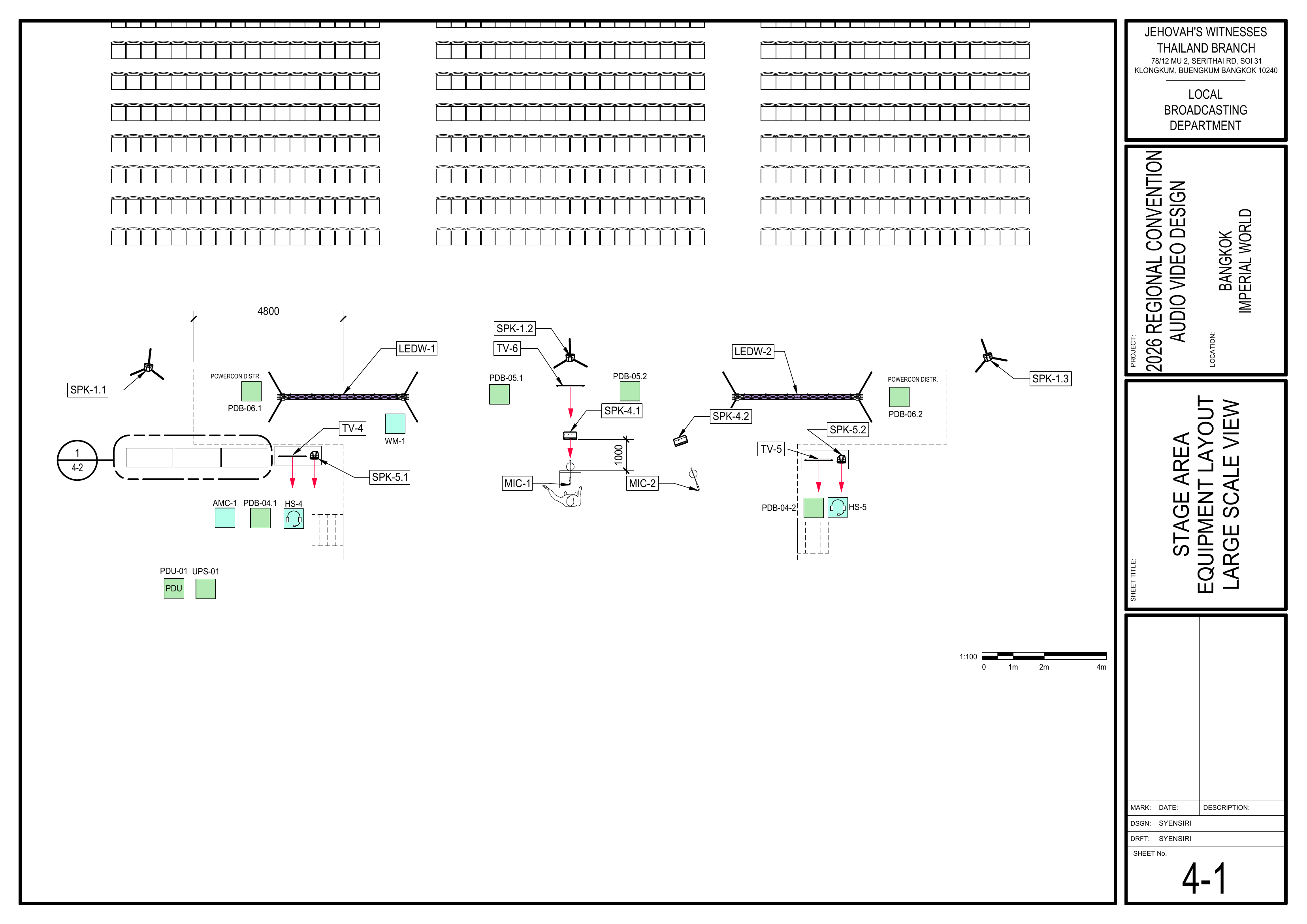
Schematics: Page 4-1 Stage Area Equipment Layout Large Scale View
- First: Assist the Loudspeakers Team with chair measurements, including speakers, stage, aisles, and related spacing.
- Remove old or distracting tape from the stage.
- Check the stage surface for trip hazards.
- Confirm the stage layout follows the schematics.
- Keep the area clear for Audio Crew and Video Crew work.
🗺️ View Associated Schematic (Page 4-1)
2. Pull XLR Cables for Microphones
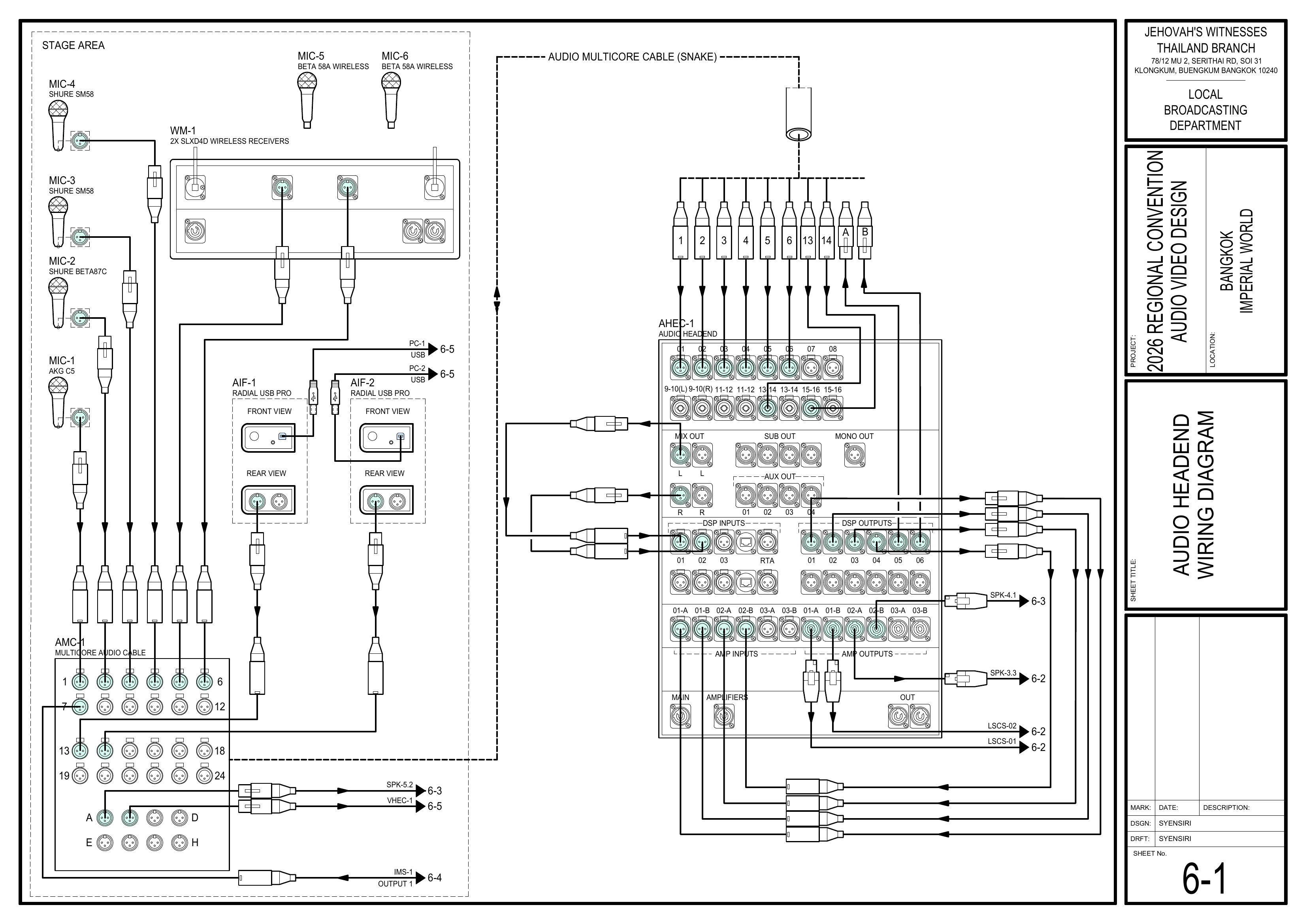
Schematics: Pages 4-1 Stage Area Equipment Layout Large Scale View, 6-1 Audio Headend Wiring Diagram
- Route the microphone XLR cables to the audio multicore cable (AMC-1) for MIC-1, MIC-2, MIC-3, and MIC-4.
- Pull XLR cables up onto the stage and fasten using small pieces of tape.
- Route cables neatly along the front edge of the stage, away from participant walking paths.
- Secure cables with tape as they are installed.
🗺️ View Associated Schematics (Pages 4-1, 6-1)
3. Label Microphone Cables
Schematics: Page 6-1 Audio Headend Wiring Diagram
- Attach a tag to each cable identifying its microphone assignment or use.
- Place one tag at the audio multicore cable (AMC-1) end.
- Place another tag approximately 2 meters from the microphone.
🗺️ View Audio Headend Wiring Diagram (Page 6-1)
4. Position Microphones
Schematics: Page 4-1 Stage Area Equipment Layout Large Scale View
- Place microphones according to the stage layout and program needs.
- Confirm lectern, chairman, and participant microphone positions.
- Coordinate with the Audio Crew for testing.
🗺️ View Stage Area Equipment Layout (Page 4-1)
5. Mark Participant Positions
Schematics: Page 4-1 Stage Area Equipment Layout Large Scale View
- Put tape down where interviews, Watchtower comments, and their microphone stands should be placed.
- Keep markings discreet but visible to participants.
🗺️ View Stage Area Equipment Layout (Page 4-1)
Completion Checklist
- Assisted Loudspeakers Team with measurements
- Stage surface cleared of trip hazards and old tape
- XLR cables pulled, routed neatly, and taped down
- All cables tagged at
snakethe AMC-1 end and2m2 m from the microphone - Microphones positioned correctly on stage
- Participant and microphone stand positions marked with tape
- Keyman inspection completed
Dismantling Procedure
- Wait for the department briefing and prayer 30 minutes after the program ends on Sunday before dismantling.
- Remove stage microphones and stands.
- Disconnect the XLR cables from the microphones and
snakethecable.audio multicore cable (AMC-1). - Remove tape and carpet covers carefully.
- Coil and label all cables.
- Gather all stage equipment and bring it to the designated area.
- Check the stage for forgotten tape, cables, microphones, or accessories.
- Note for team leader: Use the Bill of Materials (BOM) to cross off every box or case before it is brought to the truck:
- MS-1
- ASC-01
- WM-1
🇨🇳 中文说明
目的
根据图纸准备讲台区域、安装麦克风线缆、标记节目参与者位置,并固定所有讲台线缆,为音频测试和走位练习做好准备。
⚠️ 安全与安装提示
• 所有线缆都要用胶带固定并覆盖。
• 节目参与者行走的位置不要留下松散线缆。
• 所有设备附近禁止放置液体。
• 安装提示: 将麦克风安装到麦克风悬臂架上之前,请先连接好 XLR 线缆。
参考资料
- 完整图纸: 📎 完整 PDF 文件
- 大会设备清单: 设备箱 MS-1, ASC-01, WM-1
所需设备箱
- MS-1: 包含 6 个带可调节麦克风悬臂的落地麦克风架。
- ASC-01: 包含 XLR 音频线缆(5 米、10 米和 20 米长度)。
- WM-1: 包含无线麦克风 (BETA 58A) 和接收器。
- 注意: 有线讲台/参与者麦克风存放在 AHEC-1 设备箱内。
安装步骤
1. 准备讲台
图纸:4-1 舞台区域设备布局图大比例图
- 首先: 协助扬声器组确认椅子测量距离,包括扬声器、讲台、通道和相关间距。
- 移除讲台上旧的或容易分散注意力的胶带。
- 检查讲台表面是否有绊倒危险。
- 确认讲台布置符合图纸。
- 保持区域畅通,方便音频组和视频组工作。
🗺️ 查看相关图纸(图纸 4-1)
2. 铺设麦克风 XLR 线缆
图纸:4-1 舞台区域设备布局图大比例图、6-1 音频主控接线图
- 将 MIC-1、MIC-2、MIC-3 和 MIC-4 的麦克风 XLR 线缆铺设到音频多芯线缆(AMC-1)。
- 将 XLR 线缆拉上讲台,并用少量胶带固定。
- 沿讲台前缘整齐布设线缆,线缆应远离节目参与者的行走路线。
- 安装过程中使用胶带固定线缆。
🗺️ 查看相关图纸(图纸 4-1, 6-1)
3. 标识麦克风线缆
图纸:6-1 音频主控接线图
- 在每条线缆上贴上标签,注明对应的麦克风或用途。
- 在线缆连接音频多芯线缆(AMC-1)的那一端贴一个标签。
- 在距离麦克风约 2 米的位置再贴另一个标签。
🗺️ 查看音频主控接线图(图纸 6-1)
4. 摆放麦克风
图纸:4-1 舞台区域设备布局图大比例图
- 按照讲台布置和节目需要摆放麦克风。
- 确认讲台麦克风、主席麦克风和节目参与者麦克风位置。
- 与音频组协调进行测试。
🗺️ 查看舞台区域设备布局图(图纸 4-1)
5. 标记节目参与者位置
图纸:4-1 舞台区域设备布局图大比例图
- 在采访人员、《守望台》评论员及其麦克风架应该摆放的位置贴上标记胶带。
- 标记要低调,但节目参与者要看得清楚。
🗺️ 查看舞台区域设备布局图(图纸 4-1)
完成检查表
- 已协助扬声器组完成测量
- 讲台表面已清理,无绊倒危险及旧胶带
- XLR 线缆已铺设、整齐走线并用胶带固定
- 所有线缆已贴标签(
多芯线端及距麦克风AMC-1 端及距麦克风 2 米处) - 麦克风已在讲台上正确摆放
- 已用胶带标记节目参与者和麦克风架位置
- 负责人已检查确认
拆卸步骤
- 在星期日节目结束 30 分钟后,等待整个部门的简短会议和祷告后再开始拆除工作。
- 拆下讲台麦克风和麦克风架。
-
从麦克风和多芯音频线拆除从麦克风和音频多芯线缆(AMC-1)断开 XLR线缆。音频线。 - 小心移除胶带和地毯覆盖物。
- 整理并标识所有线缆。
- 将所有讲台设备带到指定区域。
- 检查讲台是否遗留胶带、线缆、麦克风或配件。
- 组长注意: 在将每个箱子或设备箱搬上卡车前,请使用物料清单 (BOM) 核对并划掉每一项:
- MS-1
- ASC-01
- WM-1