
Video Booth Setup / 视频控制台安装
🎬 Video Booth Team / 视频控制台
| Team / 小组 | Members / 成员 |
|---|---|
| Video Booth / 视频控制台组 | • Jung 郑英雄 🔑 |
🇬🇧 English Instructions
Purpose
This section provides the specific setup and dismantling instructions for the Video Booth Team, including setting up the VHEC-1, media players, and multiview monitor during the 2026 Bangkok Regional Convention.
Required References
- Full Drawing Set: 📎 Complete PDF
- Congregation Job Hazard Analysis (DC-85): 📁 Google Drive Folder
- Specific Schematics:
- 4-2 AV Control Area Large Scale View
- 6-5 Video Display Wiring Diagram
- 6-7 Power Distribution Video Control Desk Wiring Diagram
- Event Content List: Cases VHEC-1, MPS-1, VDS-1, UPS-01
Required Equipment Cases
- VHEC-1: Contains the Video Headend, including switcher, controller, recorders, converters, and accessories.
- MPS-1: Contains 2 notebook media players (PC-1, PC-2) and accessories.
- VDS-1: Contains 3x 43" Samsung TVs. TV-7 from this set is used as the TD multiview monitor at the Video Control Desk.
- UPS-01: Contains the rack-mounted UPS for backup power.
- AHEC-1: Note: Take the 2x MDB-USB soundcards (AIF-1 and AIF-2) from the Audio Headend case.
💡 Priority / Operating Notes:
• No Food/Drink: Absolutely no food or drinks should be set on the table with the equipment (CO-160 4:15).
• Interference: Cell phones and tablets can introduce noise into the system. Please be mindful of this while operating the equipment (CO-160 4:15).
Setup Steps
1. Cable Management
- Keep cables neat and organized throughout the installation.
- Keep cables away from operator movement areas.
- Consider attaching a tag to each cable identifying its use if time permits.
2. Position Equipment
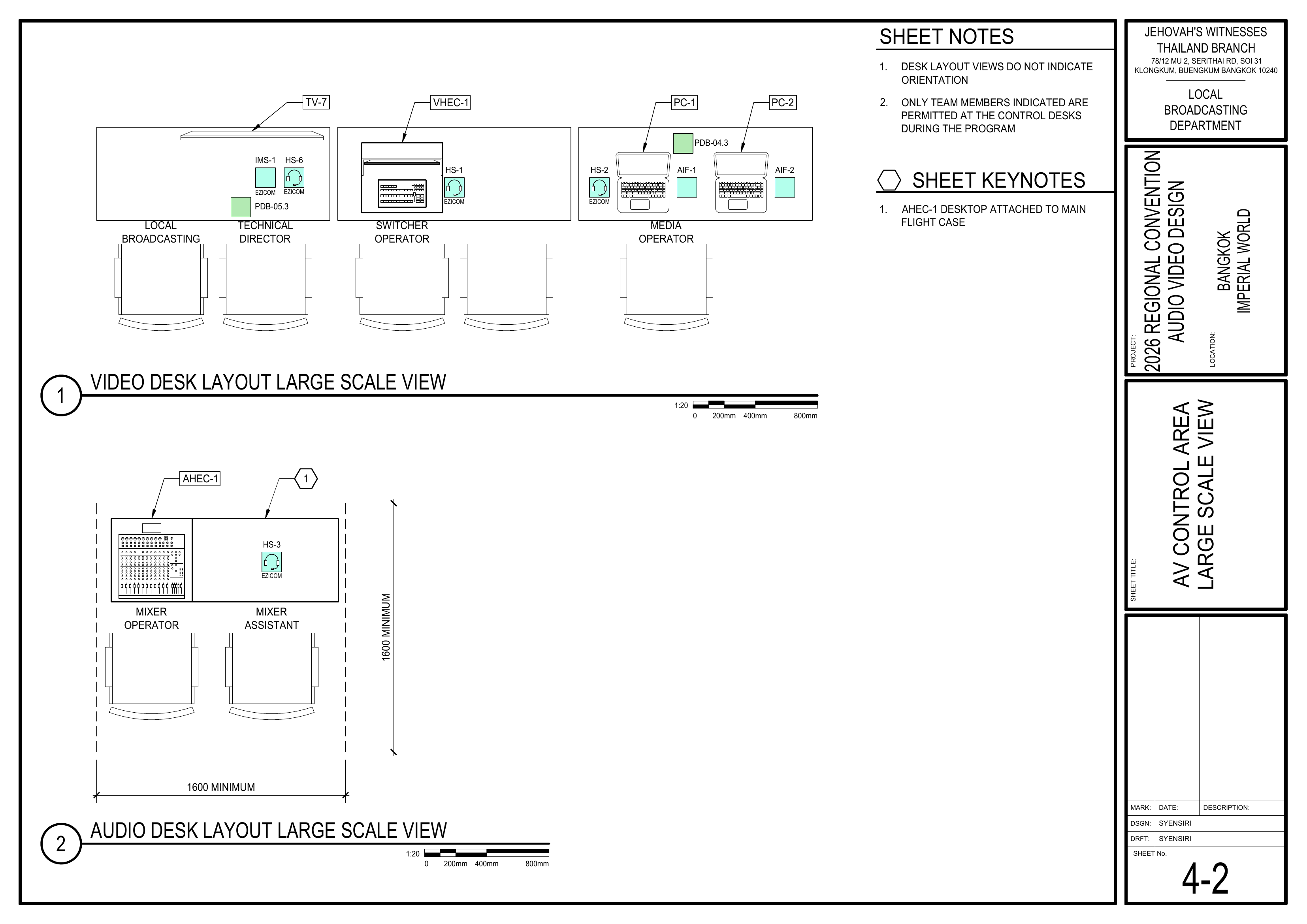
Schematics: Page 4-2 AV Control Area Large Scale View
- Position the Video Headend (VHEC-1), UPS (UPS-01), media players (PC-1, PC-2), and multiview monitor (TV-7) at the Video Control Desk according to the layout schematic.
🗺️ View AV Control Area Schematic (Page 4-2)
3. Connect Video & Audio Signal Wiring
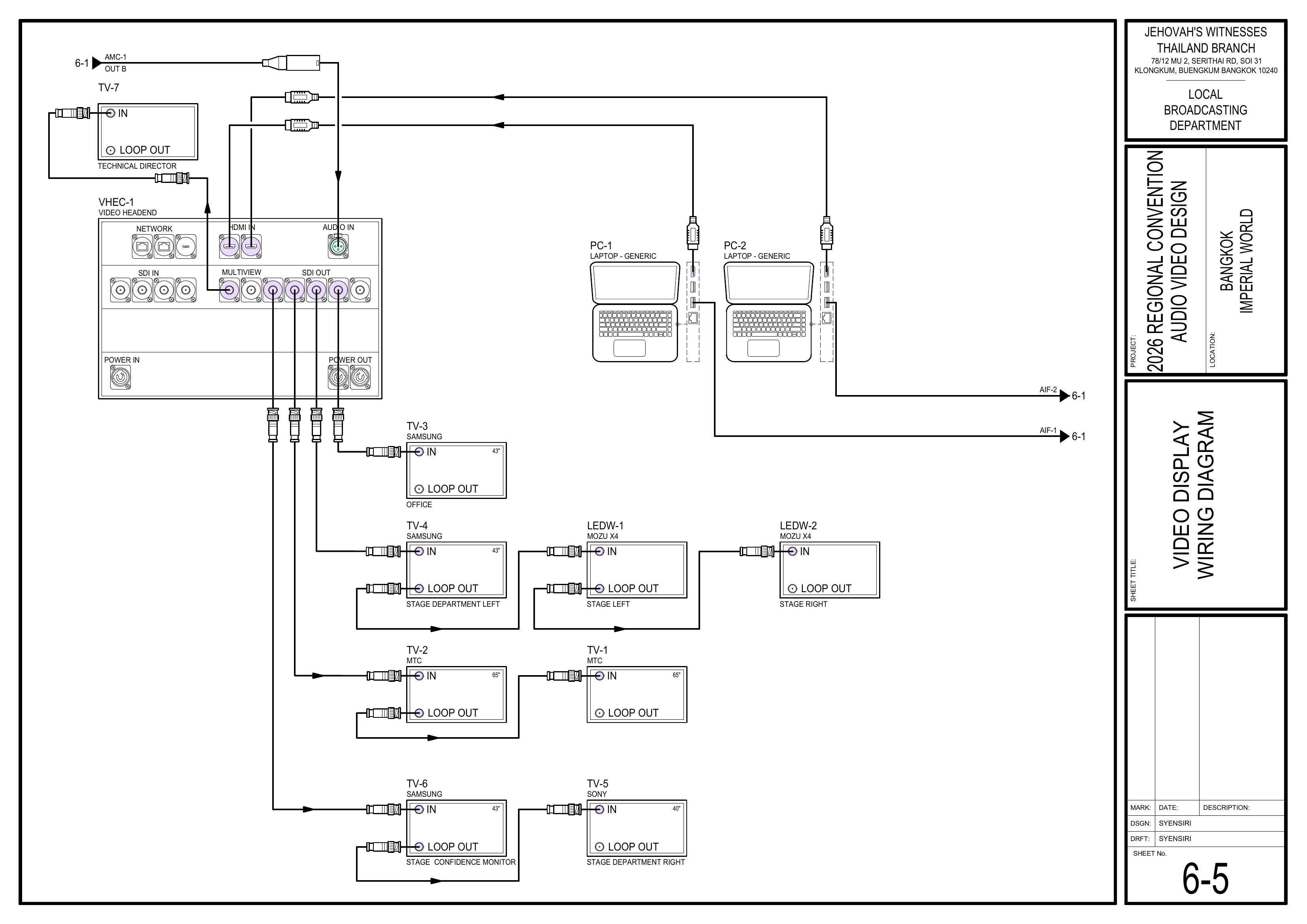
Schematics: Page 6-5 Video Display Wiring Diagram
- Connect PC-1 and PC-2 to the VHEC-1 switcher via HDMI.
- Connect the audio outputs of PC-1 and PC-2 using the USB soundcards (AIF-1, AIF-2) and route them to the Audio Headend (AHEC-1).
- Coordinate with the Audio Crew when making the AIF-1 and AIF-2 connections to AHEC-1.
- Connect TV-7 to the VHEC-1 multiview output.
- Keep cables neat and organized as each connection is made.
🗺️ View Video Display Wiring Schematic (Page 6-5)
4. Connect Power
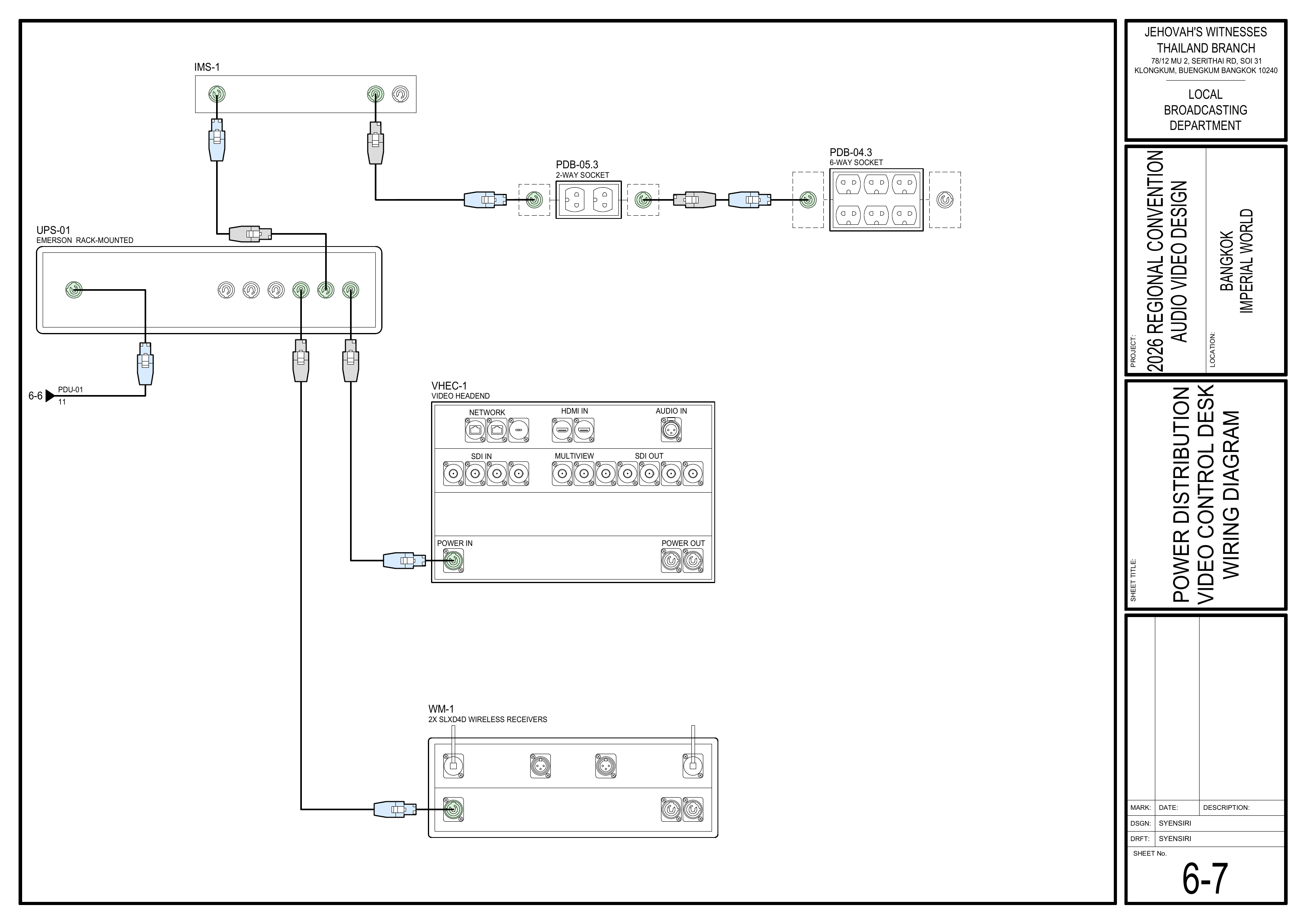
Schematics: Page 6-7 Power Distribution Video Control Desk Wiring Diagram
- Connect the rack-mounted UPS (UPS-01) to the power supply provided by the Power Distribution Team according to the schematic.
- Connect VHEC-1 to UPS-01 as shown in the schematic.
- Use PDB-04.3 to supply power to PC-1 and PC-2.
- Use PDB-05.3 to supply power to the multiview monitor (TV-7).
- Do not power on equipment until the Power Distribution Team confirms that power is ready.
🗺️ View Video Control Desk Power Schematic (Page 6-7)
5. Testing
Schematics: Pages 4-2 AV Control Area Large Scale View, 6-5 Video Display Wiring Diagram
- Turn on all equipment only after approval from the Power Distribution Team.
- Thoroughly test video switching, media playback from PC-1 and PC-2, multiview output, and signal routing.
- Coordinate with the Audio Crew to confirm that audio from AIF-1 and AIF-2 reaches AHEC-1 correctly.
- ⚠️ Caution: The video crew must be careful not to display a confidential or unreleased video where it can be viewed by others during testing (CO-160 4:4).
🗺️ View Testing Schematics (Pages 4-2, 6-5)
Completion Checklist
- Cables routed neatly and labeled where possible
- VHEC-1 positioned at the Video Control Desk
- PC-1 and PC-2 connected to VHEC-1
- AIF-1 and AIF-2 connected and routed to AHEC-1
- TV-7 connected to multiview output
- UPS-01 connected and power routed to Video Booth equipment
- PC-1 and PC-2 powered through PDB-04.3
- TV-7 powered through PDB-05.3
- Video switching, media playback from PC-1 and PC-2, and multiview output tested
- Audio from AIF-1 and AIF-2 verified with the Audio Crew
- Keyman inspection completed
Dismantling Procedure
- Wait for the department briefing and prayer 30 minutes after the program ends on Sunday before dismantling.
-
Carefully powerPower down allequipment.Video Booth equipment before moving it. -
DisconnectBringsignalall Video Booth equipment, laptops, monitor, UPS, cables, andpower cables.
🇨🇳 中文说明
目的
本页面提供 2026 年曼谷区域大会期间 视频控制台组 的具体安装和拆卸说明,包括安装 VHEC-1、媒体播放器和多视图屏幕。
参考资料
- 完整图纸: 📎 完整 PDF 文件
- 《会众工作危险性分析》(DC-85): 📁 Google Drive 文件夹
- 相关图纸:
- 4-2 音视频控制区大比例图
- 6-5 视频显示系统接线图
- 6-7 视频控制台电源接线图
- 大会设备清单: 设备箱 VHEC-1、MPS-1、VDS-1、UPS-01
所需设备箱
- VHEC-1: 包含视频主控(切换台、控制器、录像机、转换器及附件)。
- MPS-1: 包含两台笔记本电脑媒体播放器 (PC-1, PC-2) 及附件。
- VDS-1: 包含 3 台 43 英寸三星电视。本组使用其中的 TV-7,作为视频控制台的技术指导员多视图屏幕。
- UPS-01: 包含用于备用电源的机架式 UPS。
- AHEC-1: 注意: 需要从音频主控箱中取出 2 个 MDB-USB 声卡 AIF-1 和 AIF-2。
💡 优先事项 / 操作提示:
• 禁止饮食: 绝对不可以把食物和饮料放在摆放设备的桌子上 (CO-160 4:15)。
• 信号干扰: 手机和平板电脑会让系统出现杂音。视频组人员在操作设备时要留意这一点 (CO-160 4:15)。
安装步骤
1. 线缆管理
- 在整个安装过程中保持线缆整齐有序。
- 避免让线缆影响操作人员移动。
- 如果时间允许,请考虑为每根线缆贴上标签以标明其用途。
2. 摆放设备
图纸:4-2 音视频控制区大比例图
- 根据布局图,在视频控制台摆放视频主控 (VHEC-1)、UPS (UPS-01)、媒体播放器 (PC-1, PC-2) 和多视图屏幕 (TV-7)。
🗺️ 查看音视频控制区图纸(图纸 4-2)
3. 连接视频和音频信号线
图纸:6-5 视频显示系统接线图
- 通过 HDMI 将 PC-1 和 PC-2 连接到 VHEC-1 切换台。
- 使用 USB 声卡(AIF-1、AIF-2)连接 PC-1 和 PC-2 的音频输出,并将其路由到音频主控 (AHEC-1)。
- 将 AIF-1 和 AIF-2 连接到 AHEC-1 时,与音频组协调。
- 将 TV-7 连接到 VHEC-1 的多视图 (Multiview) 输出端。
- 每完成一项连接,都要保持线缆整齐有序。
🗺️ 查看视频显示系统接线图(图纸 6-5)
4. 连接电源
图纸:6-7 视频控制台电源接线图
- 按照图纸,将机架式 UPS (UPS-01) 连接到电源分配组提供的电源。
- 按照图纸将 VHEC-1 连接到 UPS-01。
- 使用 PDB-04.3 为 PC-1 和 PC-2 供电。
- 使用 PDB-05.3 为多视图屏幕 (TV-7) 供电。
- 在电源分配组确认电源准备好之前,不要开启设备。
🗺️ 查看视频控制台电源图纸(图纸 6-7)
5. 测试
图纸:4-2 音视频控制区大比例图、6-5 视频显示系统接线图
- 经电源分配组确认后方可开启所有设备。
- 彻底测试视频切换、PC-1 和 PC-2 的媒体播放、多视图输出和信号路径。
- 与音频组协调,确认 AIF-1 和 AIF-2 的音频信号已正确传送到 AHEC-1。
- ⚠️ 警告: 视频组必须小心,在测试期间不要在其他人能观看到的任何地方播放机密或未发布的视频 (CO-160 4:4)。
🗺️ 查看测试相关图纸(图纸 4-2, 6-5)
完成检查表
- 线缆已整齐布设,并在可行时贴上标签
- VHEC-1 已摆放在视频控制台
- PC-1 和 PC-2 已连接到 VHEC-1
- AIF-1 和 AIF-2 已连接,并路由到 AHEC-1
- TV-7 已连接到多视图输出端
- UPS-01 已连接,电源已分配到视频控制台设备
- PC-1 和 PC-2 已通过 PDB-04.3 供电
- TV-7 已通过 PDB-05.3 供电
- 视频切换、PC-1 和 PC-2 的媒体播放及多视图输出已测试
- 已与音频组确认 AIF-1 和 AIF-2 的音频信号
- 负责人已检查确认
拆卸步骤拆卸
- 在星期日节目结束 30 分钟后,
等待整个部门的简短会议和祷告后再开始拆除工作。等待整个部门的简短会议和祷告后再开始拆卸。 -
小心关闭所有设备电源。移动设备前,先关闭所有视频控制台设备的电源。 -
拆除信号线和电源线。