
Video Cabling & TVs Setup / 视频布线及电视安装
🎬 Video Cabling & TVs Team / 视频布线组
视频布线及电视组
| Team / 小组 | Members / 成员 |
|---|---|
| Video Cabling & TVs / |
• Keiichi 加藤圭一 🔑 • Jaturaphat (Dern) • |
🇬🇧 English Instructions
Purpose
PullThis section provides the specific setup and coverdismantling allinstructions for the Video Cabling & TVs Team. This team is responsible for setting up displays around the venue and routing SDI video cables, set up the HDMI splitters, and position the TV monitors accordingcables to the schematics before system commissioning.
⚠️ Safety & Installation Notes
• Keep walkways clear.
• Protect all cables crossing walkways.
• Installation Note: When putting carpet covers down, tape one side only. Tape the other side once installation is finished.
them.
Required References
- Full Drawing Set: 📎 Complete PDF
- Specific Schematics:
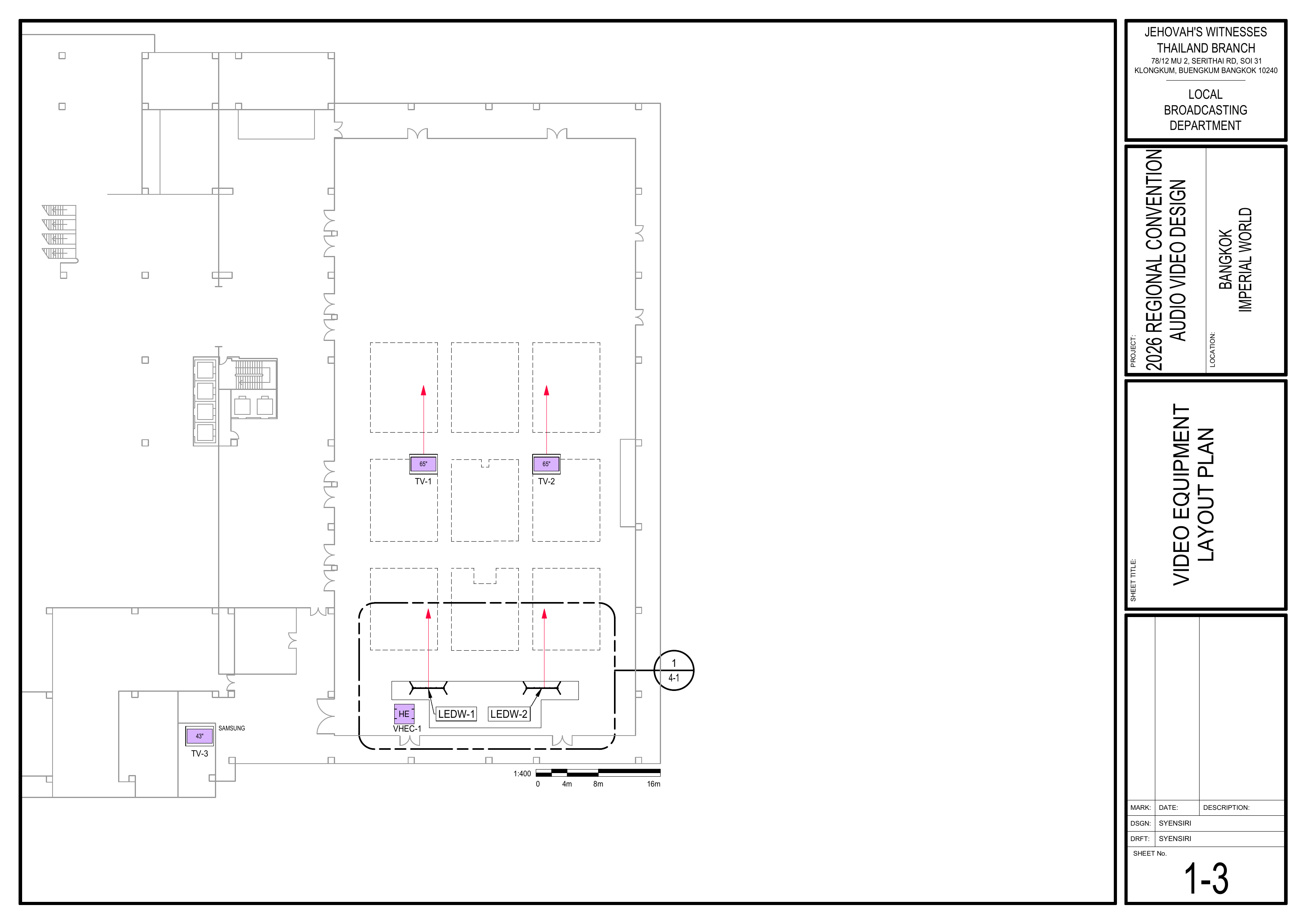
- 1-3 Video Equipment Layout Plan
Required Equipment Cases
- VDS-1, VDS-2, VDS-3: Contains TVs, confidence monitors, and their stands.
Setup Steps
1. Install TVs and Monitors First
Schematics: Page 1-3 Video Equipment Layout Plan
🗺️ View Video Equipment Layout Schematic (Page 1-3)
2. Pull SDI Cables
Schematics: Pages 1-3 Video Equipment Layout Plan, 1-5 Cable Pathway Plan
- Pull and route SDI cables to the confirmed TV locations according to the schematics.
🗺️ View Associated Schematics (Pages 1-3, 1-5)
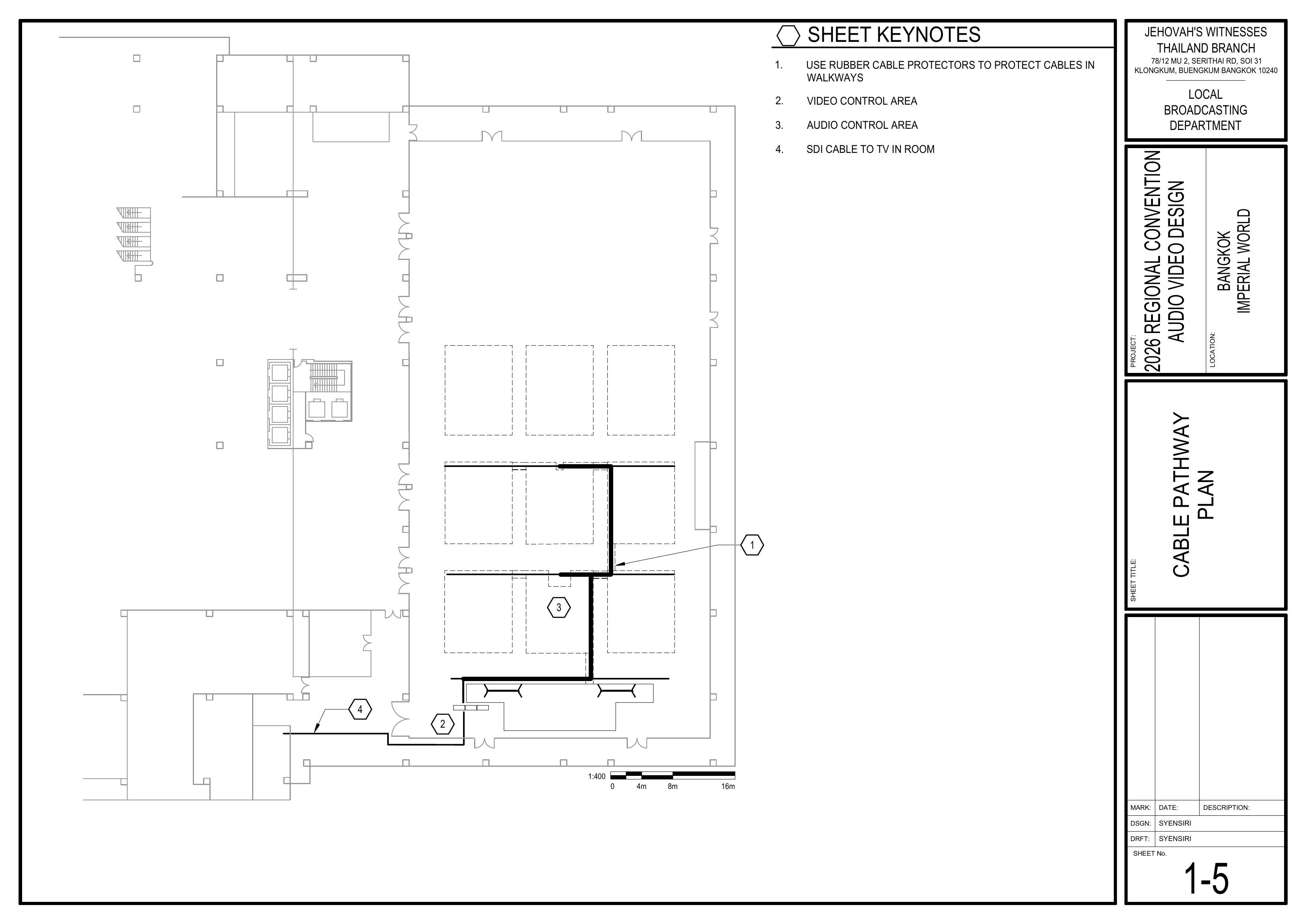
2.3. ProtectInstall CablingCable Protection
Schematics: Page 1-5 Cable Pathway Plan
Cover cabling with tape and carpet.Use rubbercoverscable protectors when crossingwalkways,walkways.
🗺️ View Cable Pathway PlanSchematic (Page 1-5)
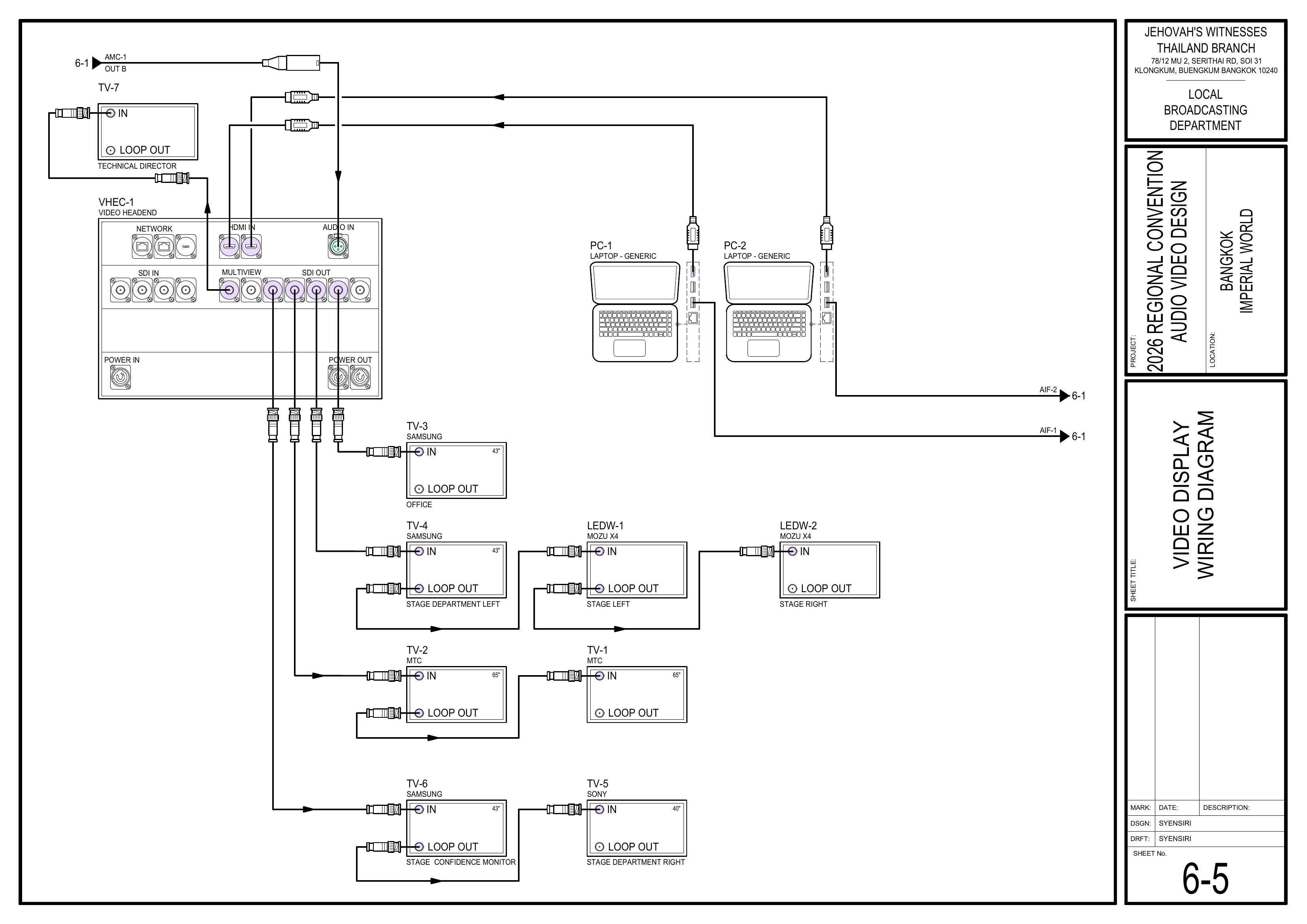
3.4. InstallSecure TVs and MonitorsCabling
Schematics: Pages 1-3 Video Equipment Layout Plan, 6-5 Video Display Wiring Diagram
PositionCover theTVcablingmonitorswith(VDS-1,tapeVDS-2,andVDS-3)carpetinonce both theseating area, stage,audio anddepartmentvideoareascablingaccordingare completely finished.
🗺️ View TV and Monitor Schematics (Pages 1-3, 6-5)
Completion Checklist
- TVs and monitors installed
Dismantling Procedure
- Wait for the department briefing and prayer 30 minutes after the program ends on Sunday before dismantling.
- Carefully disconnect all SDI and power cables from the TVs.
- VDS-1
🇨🇳 中文说明
目的
根据图纸铺设并覆盖所有本页面提供 视频布线及电视安装组 的具体安装和拆卸说明。该小组负责在场馆各处安装显示屏幕,并将 SDI 视频线缆,设置 HDMI 分配器,并安装电视监视器,为系统调试做好准备。
⚠️ 安全与安装提示
• 保持通道畅通。
• 所有经过通道的线缆都必须加以保护。
• 安装提示: 铺设地毯压线盖时,先只用胶带固定一侧。等整体安装完成后再固定另一侧。
视频线布置连接到这些屏幕。
参考资料
- 完整图纸: 📎 完整 PDF 文件
- 相关图纸:
- 1-3 视频设备布局图
所需设备箱
安装步骤
1. 铺设首先安装电视和屏幕
图纸:1-3 视频设备布局图
🗺️ 查看视频设备布局图(图纸 1-3)
2. 布置 SDI 视频线
图纸:1-3 视频设备布局图、1-5 电缆路径图
根据图纸铺设根据图纸,将 SDI视频线缆。在穿过前排中间座位区时,请沿着主音频蛇线视频线拉到已经确认好的电视位置。
🗺️ 查看相关图纸(图纸 1-3, 1-5)
2.3. 保护线缆安装线缆保护盖板
图纸:1-5 电缆路径图
使用胶带和地毯覆盖并保护线缆。线缆穿越通道时必须使用橡胶过线槽进行保护,椅子下方使用地毯压线盖。在穿过过道时使用橡胶电缆盖板。
🗺️ 查看电缆路径图(图纸 1-5)
4. 安装电视监视器固定线缆
图纸:1-3 视频设备布局图、6-5 视频显示系统接线图
按照视频设备布局图,将电视监视器(VDS-1、VDS-2、VDS-3)摆放到观众区、讲台及各部门位置。等音频和视频的布线都完全结束后,用胶带和地毯把线缆盖好固定。
🗺️ 查看电视及监视器图纸(图纸 1-3, 6-5)
完成检查表
-
SDI 线缆已铺设并正确走线电视和屏幕已安装 -
中间区域的线缆已沿着音频蛇线铺设TV-3 已放置在会计部 -
线缆已保护(通道使用橡胶盖板,椅子下使用地毯)SDI 视频线已拉到确认好的电视位置 -
电视监视器已摆放到位前方中间座位区的 SDI 线缆已沿主音频线路线走线
拆卸步骤
- 在星期日节目结束 30 分钟后,等待整个部门的简短会议和祷告后再开始拆除工作。
-
收集所有视频线缆、分配器和电视,并带到指定集合区域。小心地从电视上拔除所有 SDI 视频线和电源线。 -
收集所有用于固定线缆的地毯。小心移除电缆盖板和地毯盖板。 -
确认座位区域没有遗留线缆。整理并标识 SDI 视频线。
- VDS-1