
Video Cabling & TVs Setup / 视频布线及电视安装
🎬 Video Cabling & TVs Team / 视频布线及电视组
| Team / 小组 | Members / 成员 |
|---|---|
| Video Cabling & TVs / 视频布线及电视 | • Keiichi 加藤圭一 🔑 |
🇬🇧 English Instructions
Purpose
This section provides the specific setup and dismantling instructions for the Video Cabling & TVs Team. This team is responsible for setting up displays around the venue and routing SDI video cables to them.
Required References
- Full Drawing Set: 📎 Complete PDF
- Congregation Job Hazard Analysis (DC-85): 📁 Google Drive Folder
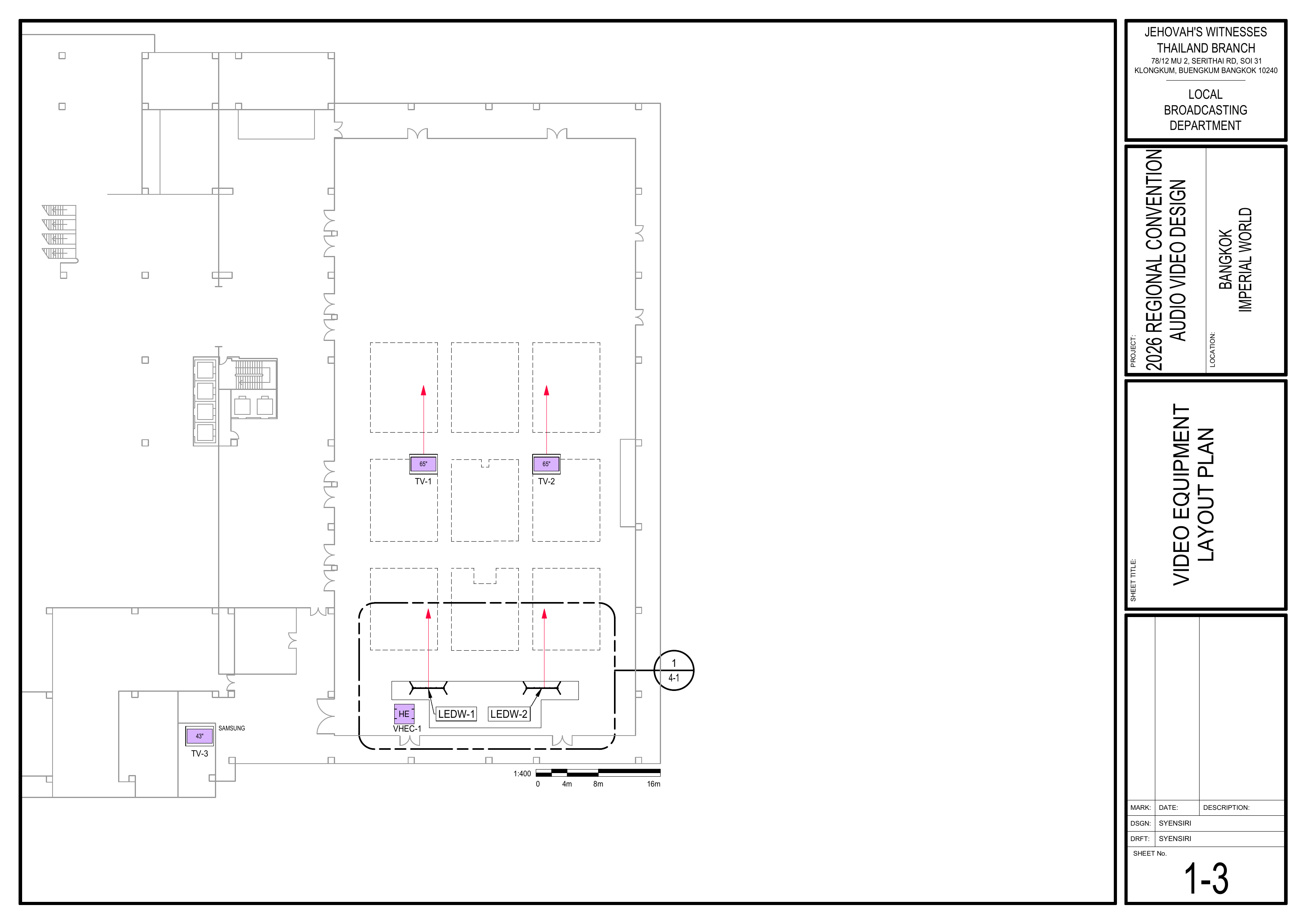
- 1-3 Video Equipment Layout Plan
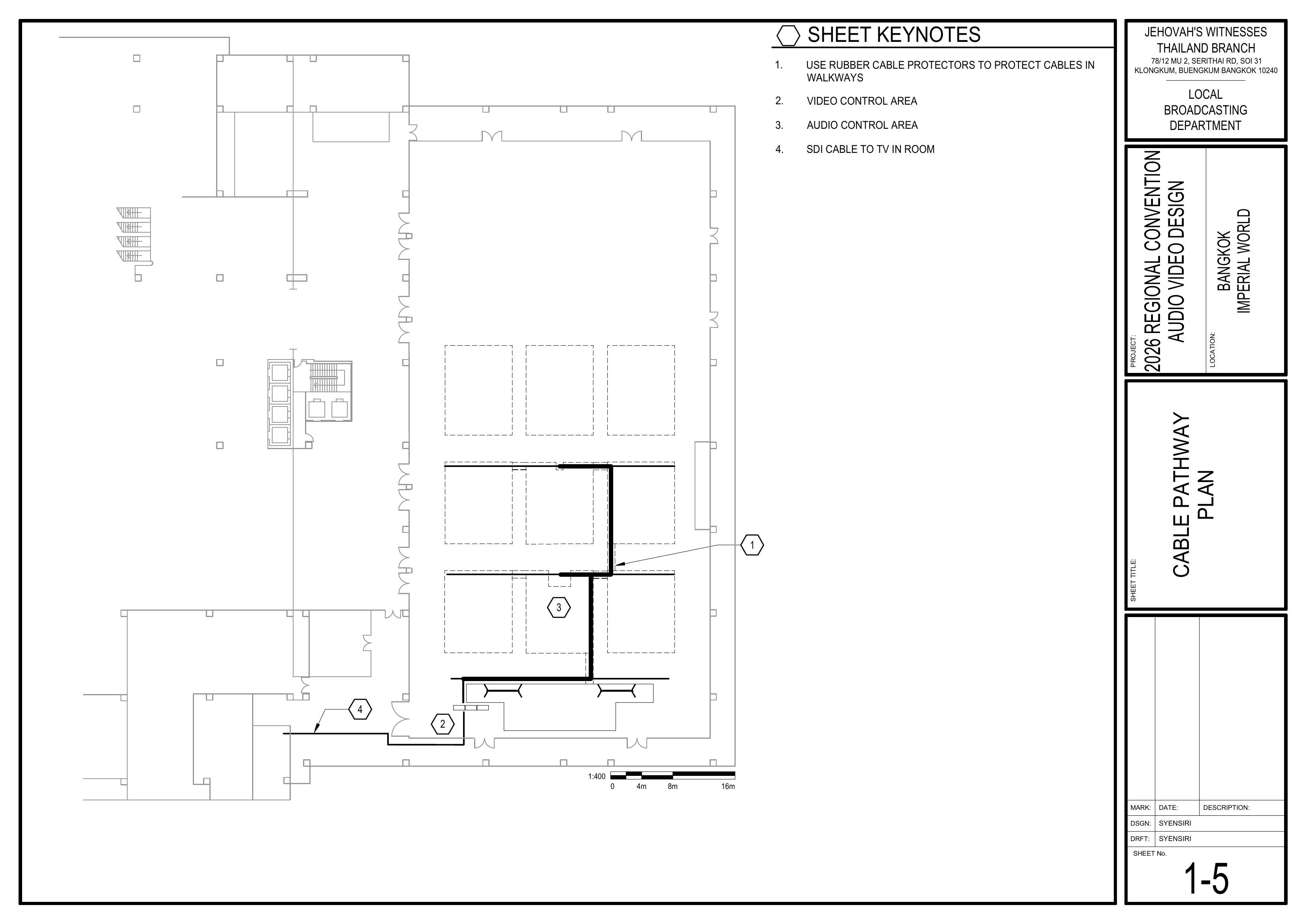
- 1-5 Cable Pathway Plan
Required Equipment Cases
- VDS-
1, VDS-2, VDS-3:1: ContainsTVs,3xconfidence43"monitors,SamsungandTVstheirwith table stands. - VDS-2: Contains the stage confidence monitor, digital clock, SDI distributor, and SDI-HDMI converter.
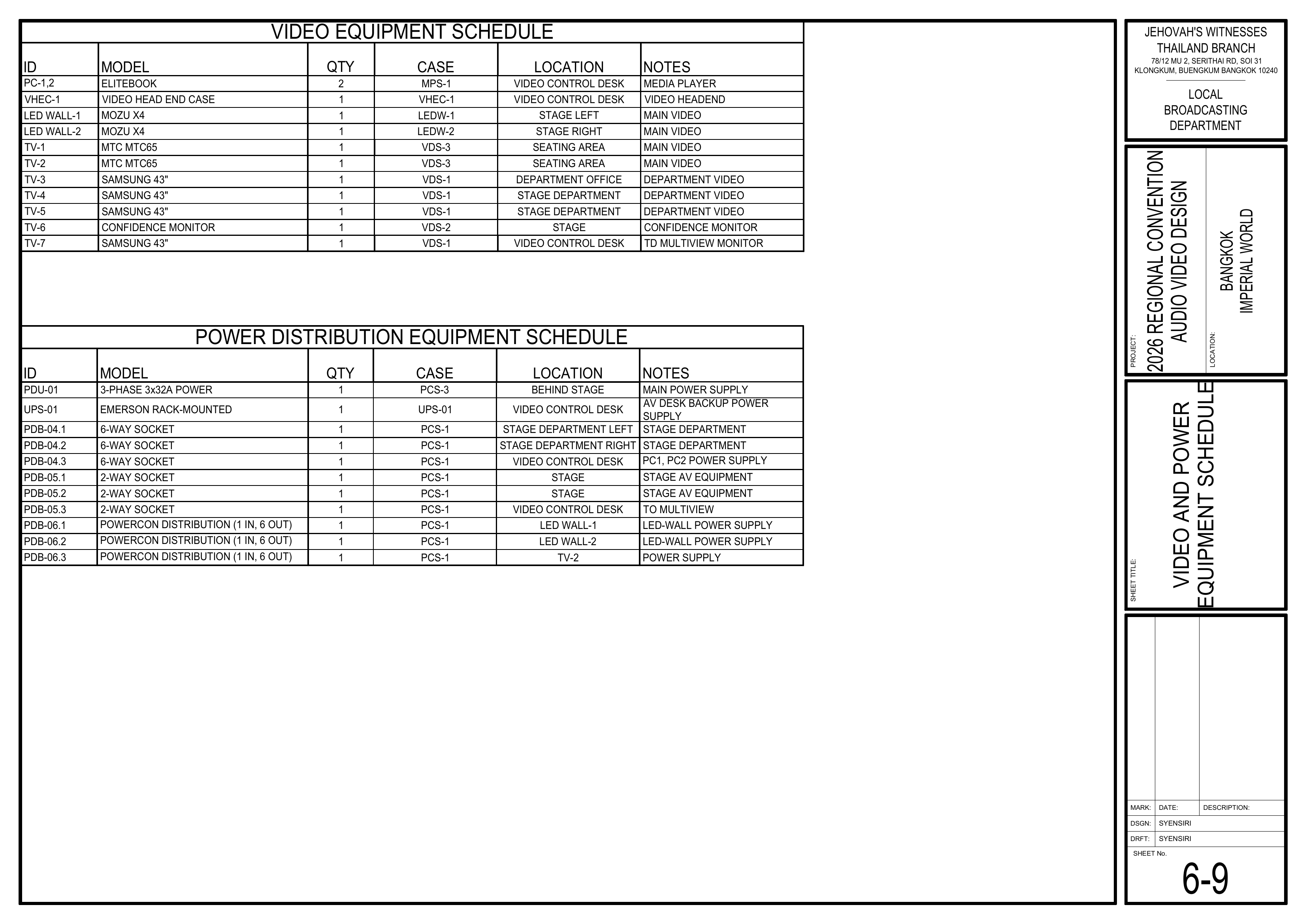
The schematics assign four 43" VDS-1 TVs: TV-3, TV-4, TV-5, and TV-7. The current BOM/Event Content List provides only 3x 43" TVs in VDS-1. Confirm the source and final assignment of the additional 43" TV before VDS-1 equipment is distributed between the Video Cabling & TVs Team and Video Booth Team.
Setup Steps
1. Install TVs and Monitors
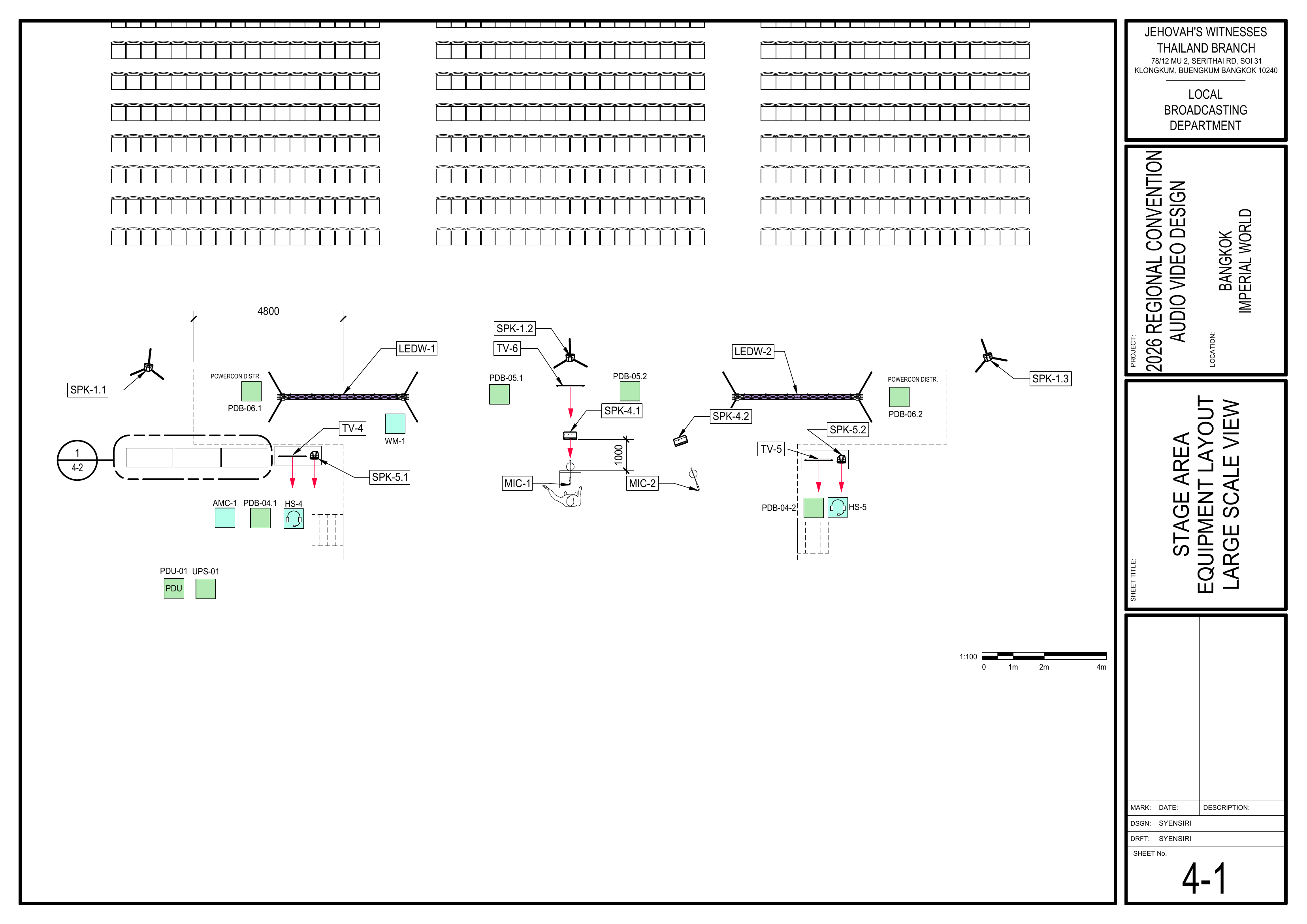
Schematics: PagePages 1-3 Video Equipment Layout PlanPlan, 4-1 Stage Area Equipment Layout Large Scale View, 6-9 Video and Power Equipment Schedule
- Install
allthe TVs and monitorsaround the venuefirst so the team can confirm the exact locations where SDI cables need to be pulled. - Confirm each
TVdisplay location before running cables. Note:Install TV-1 and TV-2 in the seating area.
🗺️ View VideoDisplay EquipmentLocation Layout SchematicSchematics (PagePages 1-3)3, 4-1, 6-9)
2. Pull SDI Cables
Schematics: Pages 1-3 Video Equipment Layout Plan, 1-5 Cable Pathway PlanPlan, 6-5 Video Display Wiring Diagram
- Pull and route SDI cables to the confirmed
TVdisplay locations according to the schematics. - When passing through the front-middle seating section, follow the route of the audio multicore cable (AMC-1).
- Keep SDI cables neat and avoid crossing walkways unless necessary.
- Handle SDI cables
carefully during installation.carefully. Avoid sharp bends, kinks, and twisting. - Consider attaching a tag to each SDI cable identifying its destination if time permits.
🗺️ View AssociatedCable Routing Schematics (Pages 1-3, 1-5, 6-5)
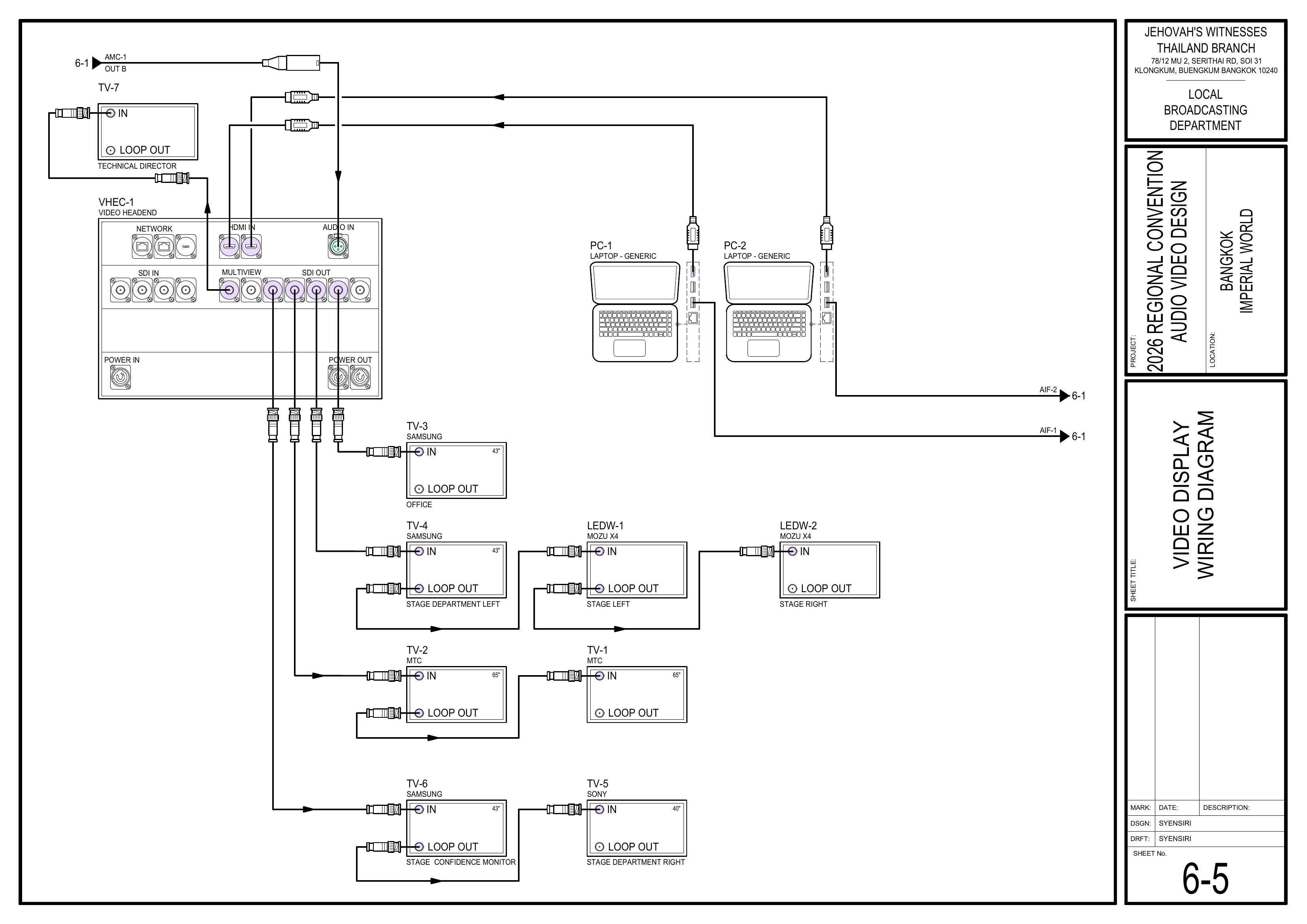
3. Install Cable Protection
Schematics: Page 1-5 Cable Pathway Plan
- Use rubber cable protectors
whenwherecrossingcables cross walkways. - Use carpet covers for cables running
underthrough seating areas. - Coordinate with the Audio Cabling Team so
cable protection is installed neatly for bothshared audio and video cableroutes.routes are protected neatly.
🗺️ View Cable Pathway Schematic (Page 1-5)
4. Secure Cabling
CoverWait until both thecablingAudiowithCablingtapeTeam andcarpetVideoonceCablingboth& TVs Team have finished pulling cables before fully securing shared cable routes.
5. Connect Power and Verify Displays
Schematics: Pages 6-5 Video Display Wiring Diagram, 6-6 Power Distribution Wiring Diagram
🗺️ View Display Wiring and Power Schematics (Pages 6-5, 6-6)
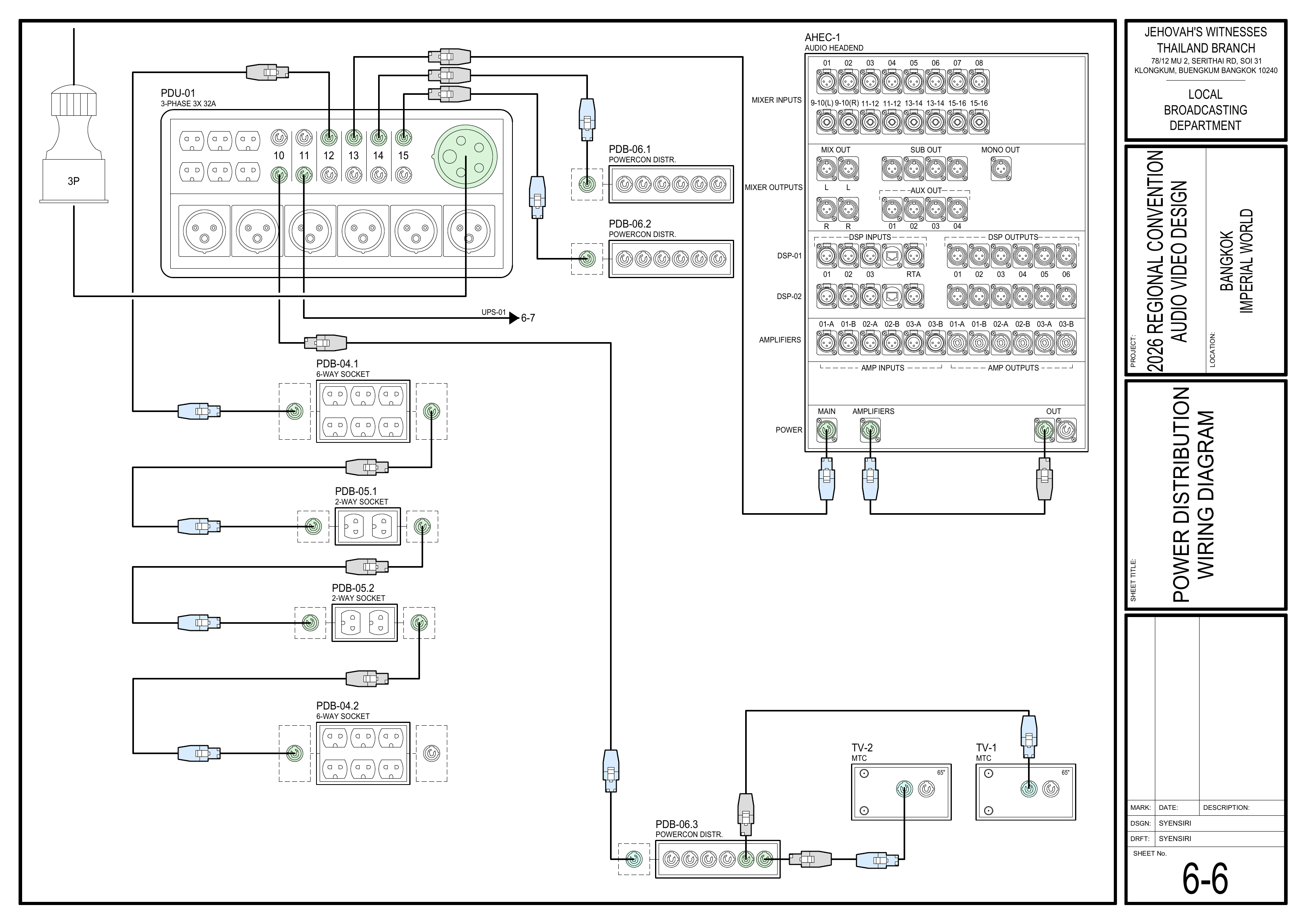
Completion Checklist
- Final allocation of the 43" VDS-1 TVs confirmed
Dismantling Procedure
⚠️ SDI Cable Handling
SDI cables are fragile. When coiling them, allow the cable to follow its natural shape. Do not wrap the cable around your arm and elbow, and avoid sharp bends, kinks, or twisting.
- Wait for the department briefing and prayer 30 minutes after the program ends on Sunday before dismantling.
- Carefully
disconnectpower down the displays.
- VDS-1
- VDS-2
- VDS-3 ×2
- VSC-01 ×2
- VSC-02 ×2
- CPS-1
- CPS-3
🇨🇳 中文说明
目的
本页面提供 视频布线及电视安装组视频布线及电视组 的具体安装和拆卸说明。该小组负责在场馆各处安装显示屏幕,并将 SDI 视频线布置连接到这些屏幕。
参考资料
- 完整图纸: 📎 完整 PDF 文件
- 《会众工作危险性分析》(DC-85): 📁 Google Drive 文件夹
- 1-3 视频设备布局图
- 1-5 电缆路径图
- 4-1 舞台区域设备布局大比例图
所需设备箱
- VDS-
1,1: 包含 3 台 43 英寸三星电视及桌面支架。
图纸将 4 台 43 英寸 VDS-1 电视分别指定为 TV-3、TV-4、TV-5 和 TV-7,但目前的 BOM/大会设备清单中,VDS-1 只有 3 台 43 英寸电视。在视频布线及电视组和视频控制台组分配 VDS-1 设备前,请先确认额外一台 43 英寸电视的来源和最终委派位置。
安装步骤
1. 首先安装电视和屏幕安装电视和屏幕
图纸:1-3 视频设备布局图视频设备布局图、4-1 舞台区域设备布局大比例图、6-9 视频和电源设备清单
首先在场馆各处安装所有电视和屏幕,这样团队就能确认首先安装电视和屏幕,以便确认 SDI 视频线需要拉到的确切位置。拉线前确认每台电视的位置。拉线前确认每台显示设备的位置。注意:在座位区域安装 TV-1 和 TV-2。
🗺️ 查看视频设备布局图(查看显示设备位置图纸(图纸 1-3)3, 4-1, 6-9)
2. 布置 SDI 视频线
图纸:1-3 视频设备布局图、1-5 电缆路径图电缆路径图、6-5 视频显示系统接线图
- 根据图纸,将 SDI
视频线拉到已经确认好的电视位置。视频线拉到已经确认好的显示设备位置。 - 穿过前方中间座位区时,请沿着音频多芯线缆(AMC-1)的路线铺设 SDI
线缆。视频线。 - 保持 SDI 视频线整齐,尽量避免穿过过道。
安装时应小心处理小心处理 SDI 视频线,避免急弯、打结和扭转。
🗺️ 查看相关图纸(查看线缆路线图纸(图纸 1-3, 1-5, 6-5)
3. 安装线缆保护盖板
图纸:1-5 电缆路径图
在穿过过道时使用橡胶电缆盖板。在线缆穿过过道的位置使用橡胶电缆盖板。座位区域下方的线缆使用地毯盖板。座位区域内的线缆使用地毯盖板。- 与音频布线组协调,
确保音频和视频线缆路线都整齐地受到保护。确保共用的音频和视频线缆路线整齐并受到保护。
🗺️ 查看电缆路径图(图纸 1-5)
4. 固定线缆
等音频和视频的布线都完全结束后,用胶带和地毯把线缆盖好固定。等音频布线组和视频布线及电视组都完成拉线后,再完全固定共用的线缆路线。注意:在过道铺设地毯盖板时,只需先用胶带固定一侧。等整个安装完成后再用胶带固定另一侧。使用适当的胶带、地毯盖板、橡胶垫或电缆盖板整齐固定线缆。如果时间允许,请考虑为每根在座位区域使用地毯盖板时,先固定一侧。等整个安装完成后再固定另一侧。
5. 连接电源并确认显示设备
图纸:6-5 视频显示系统接线图、6-6 电源分配接线图
🗺️ 查看显示系统接线和电源图纸(图纸 6-5, 6-6)
完成检查表
-
电视和屏幕已安装已确认 43 英寸 VDS-1 电视的最终分配安排
拆卸步骤
⚠️ SDI 视频线收纳提示
SDI 视频线较为脆弱。盘绕时应让线缆顺着其自然形状,不要绕着手臂和手肘收线,并避免急弯、打结或扭转。
- 在星期日节目结束 30 分钟后,等待整个部门的简短会议和祷告后再开始拆除工作。
-
小心地从电视上拔除所有小心关闭显示设备电源。
- VDS-1
- VDS-2
- VDS-3 ×2
- VSC-01 ×2
- VSC-02 ×2
- CPS-1
- CPS-3