
Audio Cabling Setup / 音频线缆安装
🎤 Audio Cabling Team / 音频布线组
Team Information / 小组信息
| Item / 项目 | Information / 信息 |
|---|---|
| Team / 小组 | Audio Cabling / 音频布线组 |
| Keyman / 负责人 | Prasert 🔑 |
| Team Members / 小组成员 | Lucy 露西 Zabrina 柏莉娜 Siiri |
| Crew Overseer / 小组监督 | Gyeong-hwan Lee 李俊辉 |
🇬🇧 English Instructions
Purpose
Install, protect, and label the audio multicore cable and main loudspeaker cabling according to the schematics before system commissioning.
Required References
- Full Drawing Set: 📎 Complete PDF
- Congregation Job Hazard Analysis (DC-85): 📁 Google Drive Folder
- CO-160a: 📎 CO-160a — Chapter 3, Audio Signal Cables (ASC-xx), pages 7–8
- Specific Schematics:
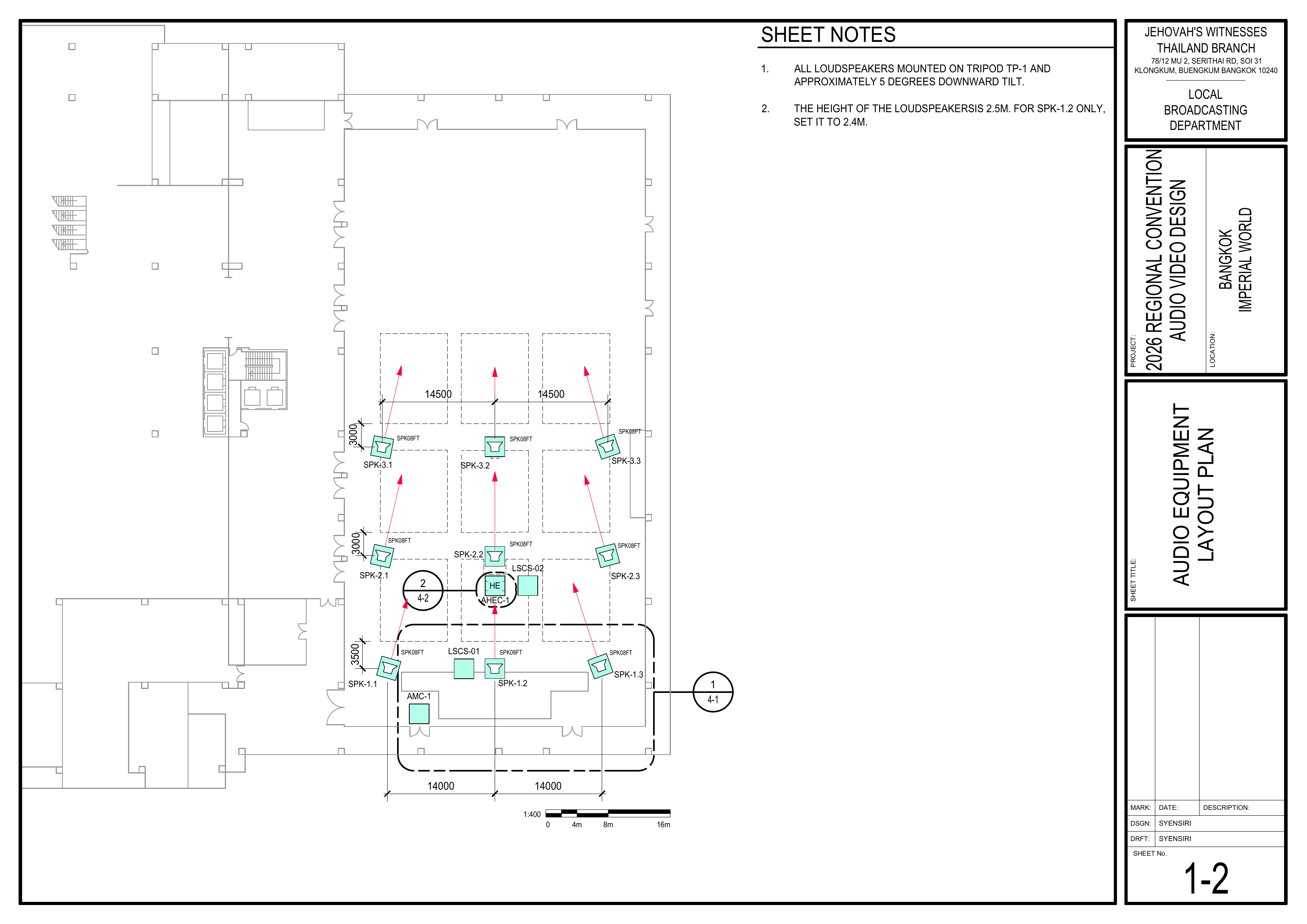
- 1-2 Audio Equipment Layout Plan
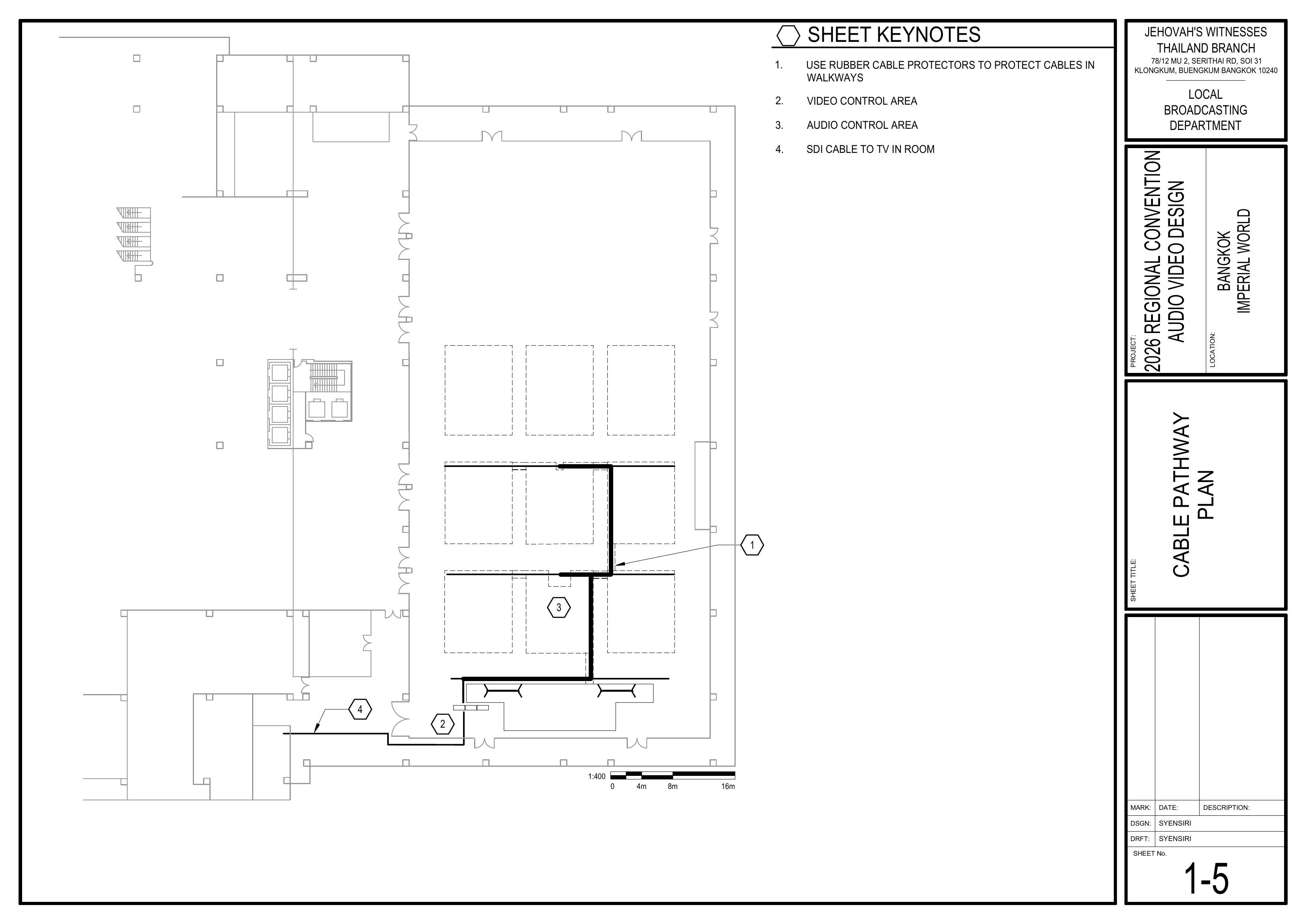
- 1-5 Cable Pathway Plan
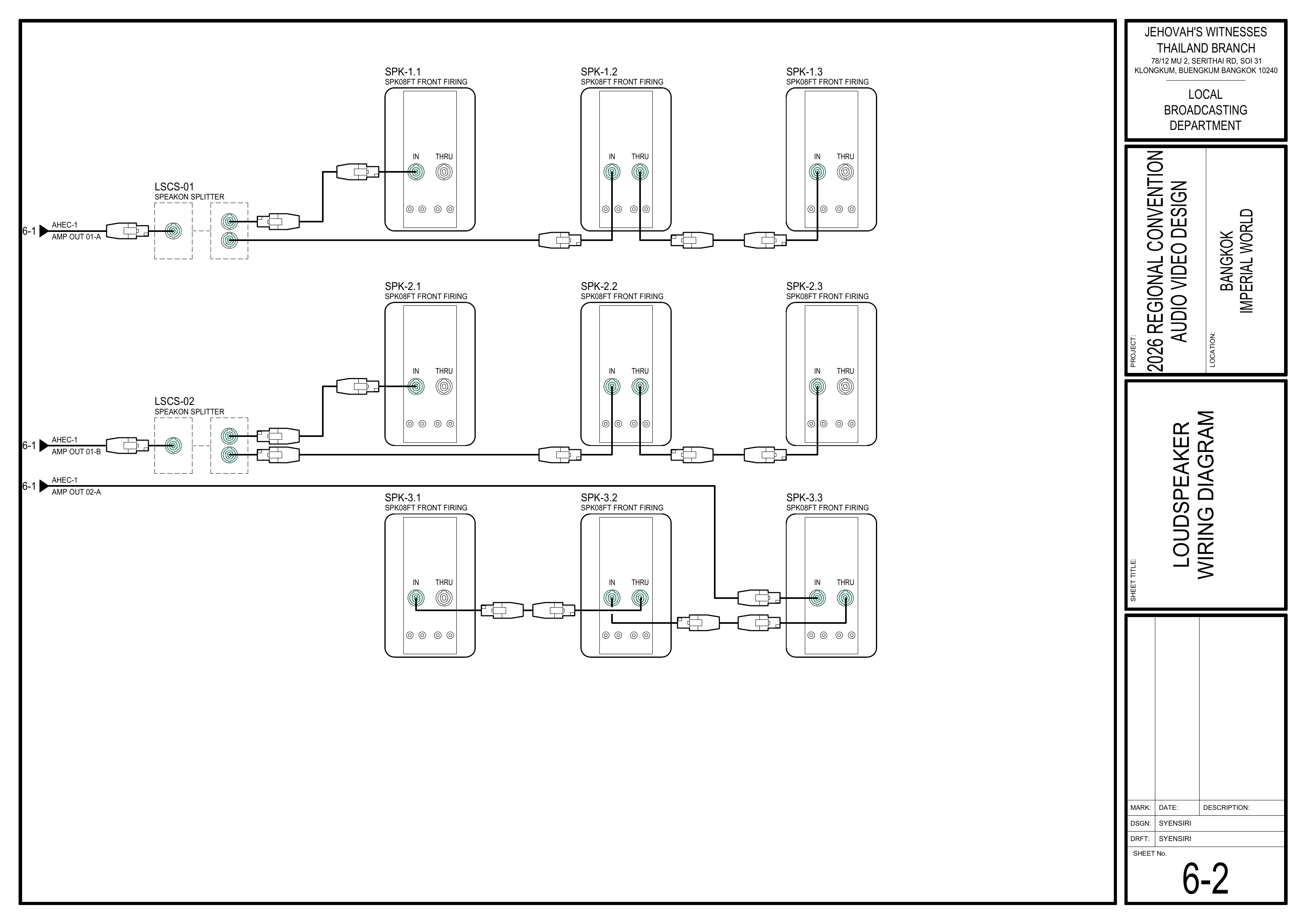
- 6-2 Loudspeaker Wiring Diagram
- Event Content List: Cases AMC-1, ASC-01 ×2, CPS-1, CPS-3
Required Equipment Cases
- AMC-1: 60 m audio multicore cable with 24x XLR inputs and 8x XLR outputs on a reel.
- ASC-01 ×2: XLR audio cables in 5 m, 10 m, and 20 m lengths. Coordinate with the Stage Team for stage requirements.
- CPS-1: 3-channel floor cable protectors and rubber mats. Coordinate with the Video Cabling & TVs Team.
- CPS-3: Carpet strips for covering cables. Coordinate with the Video Cabling & TVs Team.
- PLS-1 — Shared Equipment: speakON cables and splitters for the main loudspeakers. Coordinate with the Loudspeakers Team.
Safety Notes
⚠️ Safety & Cable Handling
• Keep walkways and emergency pathways clear.
• Use cable protectors where cables cross walkways.
• Where possible, do not run audio signal cables directly parallel to power cables; cross power cables at right angles.
• When connecting ASC-01 XLR cables, make sure the connected equipment is switched off.
• Keep the attached Velcro with ASC-01 cables.
• Do not use your elbow to wind audio signal cables.
Setup Steps
1. Install the Audio Multicore Cable (AMC-1)
Schematics: Pages 1-2 Audio Equipment Layout Plan, 1-5 Cable Pathway Plan
- Begin at the AMC-1 starting position at front stage left shown on Drawing 1-2.
- Route AMC-1 toward the Audio Control Area according to Drawing 1-5.
- Keep the cable straight and organized while pulling it.
- Confirm the route before securing or covering the cable.
🗺️ View AMC-1 Location and Cable Route (Pages 1-2, 1-5)
2. Install Main Loudspeaker Cables — Groups 1–3
Schematics: Pages 1-2 Audio Equipment Layout Plan, 1-5 Cable Pathway Plan, 6-2 Loudspeaker Wiring Diagram
- Coordinate with the Loudspeakers Team before routing the cables.
- Use the speakON cables and splitters from PLS-1.
- Route the cables for Groups 1–3 according to the schematics.
- Confirm the loudspeaker group and destination before routing each cable.
- Leave sufficient cable at each loudspeaker for the Loudspeakers Team to make the final connection.
- Groups 4 and 5 are handled by the Stage Team.
🗺️ View Main Loudspeaker Cabling Schematics (Pages 1-2, 1-5, 6-2)
3. Protect and Manage Cabling
Reference: CO-160a, Chapter 3 — Audio Signal Cables (ASC-xx), pages 7–8
Schematics: Page 1-5 Cable Pathway Plan
- When using ASC-01 XLR cables, open the attached Velcro and unwind the cable by rolling it off. Do not remove the Velcro.
- Where possible, avoid routing audio signal cables directly parallel to power cables; cross power cables at right angles.
- Use floor cable protectors where cables cross walkways.
- Use rubber mats or carpet covers where required in seating areas.
- Coordinate shared audio and video cable routes with the Video Cabling & TVs Team.
- When using carpet covers, secure one side first. Secure the other side after all audio and video cabling is complete.
- Confirm all walkways and emergency pathways remain safe.
🗺️ View Cable Pathway Schematic (Page 1-5)
4. Label and Final Check
- Label audio cables so their destination or use is clear.
- Confirm AMC-1 and Groups 1–3 loudspeaker cable routes match the schematics.
- Check that cables are neat, protected, and do not create trip hazards.
- Confirm audio signal cable routes are separated from parallel power runs where possible.
- Coordinate with the Audio Crew and Loudspeakers Team before system commissioning.
Completion Checklist
- AMC-1 installed according to the schematics
- Groups 1–3 loudspeaker cables routed
- Loudspeaker cabling coordinated with the Loudspeakers Team
- Groups 4–5 cabling left for the Stage Team
- Audio cables labeled
- Audio and power cable routes separated where possible
- Walkway crossings protected
- Seating-area cabling protected where required
- Shared cable protection coordinated with the Video Cabling & TVs Team
- Walkways and emergency pathways safe
- Keyman inspection completed
Dismantling
- Wait for the department briefing and prayer 30 minutes after the program ends on Sunday before dismantling.
- Coordinate with the Loudspeakers Team before removing Groups 1–3 speakON cables.
- Coordinate with the Video Cabling & TVs Team before removing shared cable protection.
- Carefully remove carpet covers, rubber mats, and floor cable protectors.
- Disconnect and carefully coil the Groups 1–3 loudspeaker cables.
- For ASC-01 XLR cables handled by this team:
- Wind each cable carefully without using your elbow.
- Secure the cable with its attached Velcro.
- Carefully wind AMC-1 back onto its reel.
- Gather remaining audio cables and bring them to the designated equipment area.
- Confirm no audio cables or cable-protection materials remain in the seating area.
- Note for team leader: Use the Bill of Materials (BOM) to cross off every box or case before it is brought to the truck:
- AMC-1
- ASC-01 ×2 — coordinate with the Stage Team
- CPS-1 — coordinate with the Video Cabling & TVs Team
- CPS-3 — coordinate with the Video Cabling & TVs Team
🇨🇳 中文说明
目的
按照图纸铺设、保护并标识音频多芯线缆和主扩声扬声器线缆,为系统调试做好准备。
参考资料
- 完整图纸: 📎 完整 PDF 文件
- 《会众工作危险性分析》(DC-85): 📁 Google Drive 文件夹
- CO-160a: 📎 CO-160a — 第 3 章,Audio Signal Cables (ASC-xx),第 7–8 页
- 相关图纸:
- 1-2 音频设备布局图
- 1-5 电缆路径图
- 6-2 扬声器接线图
- 大会设备清单: 设备箱 AMC-1、ASC-01 ×2、CPS-1、CPS-3
所需设备箱
- AMC-1: 60 米音频多芯线缆,设有 24 个 XLR 输入和 8 个 XLR 输出,安装在线盘上。
- ASC-01 ×2: 5 米、10 米和 20 米 XLR 音频线缆。讲台所需线缆请与讲台组协调。
- CPS-1: 三槽地面电缆盖板和橡胶垫。使用时请与视频布线及电视组协调。
- CPS-3: 用于覆盖线缆的地毯压线条。使用时请与视频布线及电视组协调。
- PLS-1 — 共用设备: 主扩声扬声器使用的 speakON 线缆和分配器。铺设时请与扬声器组协调。
安全提醒
⚠️ 安全与线缆处理
• 保持通道和紧急疏散路线畅通。
• 线缆穿过通道时必须使用电缆保护装置。
• 在可行的情况下,不要让音频信号线与电源线直接平行铺设;需要交叉时,应以直角交叉。
• 连接 ASC-01 XLR 音频线前,确认所连接的设备已经关闭。
• ASC-01 线缆原有的魔术贴应保留在线缆上。
• 盘绕音频信号线时不要使用手肘绕线。
安装步骤
1. 铺设音频多芯线缆 (AMC-1)
图纸:1-2 音频设备布局图、1-5 电缆路径图
- 从图纸 1-2 所示的讲台前区左侧 AMC-1 起点开始。
- 按照图纸 1-5 所示路线向音频控制区铺设 AMC-1。
- 拉线过程中保持线缆平整有序。
- 固定或覆盖线缆前确认走线路径。
🗺️ 查看 AMC-1 起点及电缆路线(图纸 1-2, 1-5)
2. 铺设第 1–3 组主扩声扬声器线缆
图纸:1-2 音频设备布局图、1-5 电缆路径图、6-2 扬声器接线图
- 铺设前与扬声器组协调。
- 使用 PLS-1 中的 speakON 线缆和分配器。
- 按照图纸铺设第 1–3 组扬声器线缆。
- 铺设每条线缆前确认扬声器组别和连接位置。
- 在每个扬声器位置预留足够长度,方便扬声器组完成最后连接。
- 第 4 和第 5 组由讲台组负责。
🗺️ 查看主扩声扬声器布线图纸(图纸 1-2, 1-5, 6-2)
3. 保护和整理线缆
参考资料:CO-160a,第 3 章 — Audio Signal Cables (ASC-xx),第 7–8 页
图纸:1-5 电缆路径图
- 使用 ASC-01 XLR 音频线时,打开线缆原有的魔术贴,以滚开的方式展开线缆。不要把魔术贴从线缆上取下。
- 在可行的情况下,避免音频信号线与电源线直接平行铺设;需要交叉时,应以直角交叉。
- 线缆穿过通道时使用地面电缆盖板。
- 座位区域根据需要使用橡胶垫或地毯盖板。
- 音频和视频线缆共用路线时,与视频布线及电视组协调。
- 使用地毯盖板时,先固定一侧。等所有音频和视频布线完成后再固定另一侧。
- 确保所有通道和紧急疏散路线保持安全畅通。
🗺️ 查看电缆路径图(图纸 1-5)
4. 标识并进行最终检查
- 标识音频线缆,使其连接位置或用途清楚可辨。
- 确认 AMC-1 和第 1–3 组扬声器线缆走线符合图纸。
- 确认线缆整齐、受到保护,并且不会造成绊倒危险。
- 在可行的情况下,确认音频信号线没有与电源线直接平行铺设。
- 系统调试前,与音频组和扬声器组协调确认。
完成检查表
- AMC-1 已按照图纸铺设
- 第 1–3 组扬声器线缆已铺设
- 已与扬声器组协调扬声器布线
- 第 4–5 组留给讲台组负责
- 音频线缆已标识
- 音频线和电源线在可行的情况下已分开铺设
- 穿过通道的线缆已加以保护
- 座位区域线缆已按需要加以保护
- 已与视频布线及电视组协调共用的线缆保护
- 通道和紧急疏散路线安全畅通
- 负责人已检查确认
拆卸
- 在星期日节目结束 30 分钟后,等待整个部门的简短会议和祷告后再开始拆卸。
- 移除第 1–3 组 speakON 线缆前,先与扬声器组协调。
- 移除共用线缆保护材料前,先与视频布线及电视组协调。
- 小心移除地毯盖板、橡胶垫和地面电缆盖板。
- 断开并小心盘绕第 1–3 组扬声器线缆。
- 本组处理 ASC-01 XLR 音频线时:
- 小心盘绕每条线缆,不要使用手肘绕线。
- 使用线缆原有的魔术贴固定。
- 将 AMC-1 小心卷回线盘。
- 收集其余音频线缆并带到指定设备集合区域。
- 确认座位区域没有遗留音频线缆或线缆保护材料。
- 组长注意: 在将每个箱子或设备箱搬上卡车前,请使用物料清单 (BOM) 核对并划掉每一项:
- AMC-1
- ASC-01 ×2 — 与讲台组协调
- CPS-1 — 与视频布线及电视组协调
- CPS-3 — 与视频布线及电视组协调
No comments to display
No comments to display