
Audio cabling
| Keyman 🔑 | Crew |
|---|---|
| Lacey Cox | Ruben Martinez; Zabrina Bourgeois; Karina Li; Layo Kirby; TaSanee Kirby; Ronan Gav Budd; Meyana Barnhart |
Your team runs,routes, labels and protects the main audio cabling. Loudspeakers places the speakers, Stage runs the XLR microphone cables on the stage, and Power runs all electrical cables. Make sure Stage has the correct XLR cables and AMC-3 handoff, confirm their stage run is complete, and help if they need it.
Routing only:and handoff:
Audio Cabling doesdelivers notlabelled needcable to plug cables intoends; the loudspeakers,receiving team makes the equipment connections. Stage owns the on-stage monitors,XLR AHEC-2, AMC-3 stage box/multicore, wireless receivers, or other equipment. Run eachmicrophone cable to the correct location, leave enough slack, label it, protect the route,runs, and handPower theowns endmains to the team that will make the connection.cables.
Before starting, meet Lacey, review the team'team’s DC-83, and open the schematics.
Safety:
Roll heavy cases and use helpers for loads over 20 kg; wear work shoes and gloves. Keep equipment switched off while pulling the multicore cable. Keep exits clear and coverwalking everypaths floorclear. crossing.Accounting is beside the baptism area: agree that route with the Baptism overseer and keep cables and connectors away from wet floors.
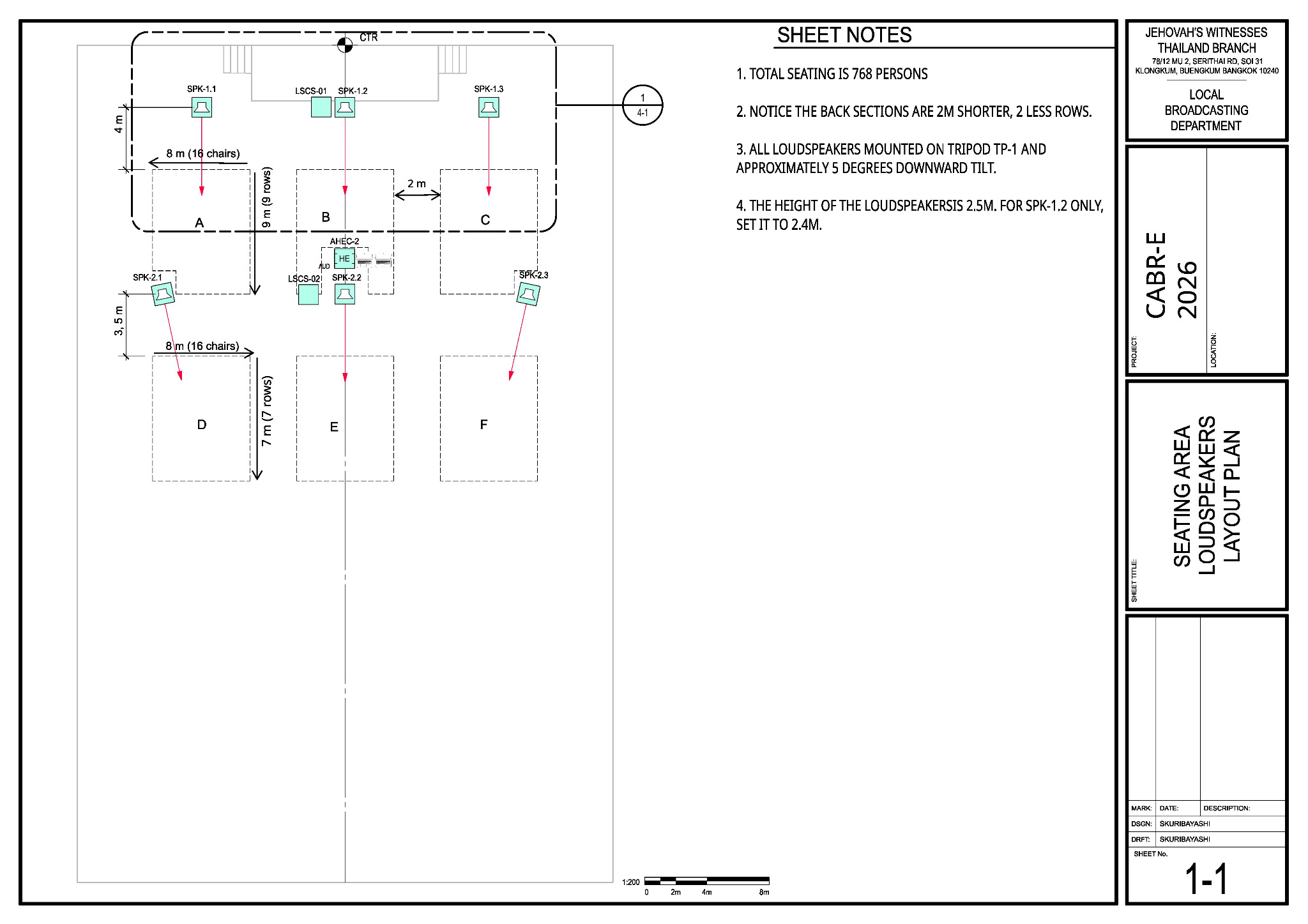
Main reference — Sheet 1-1:1. seating and loudspeaker layout
Use Sheet 1-1 as the main referenceit for the A/V booth, loudspeaker positions and cable destinations.
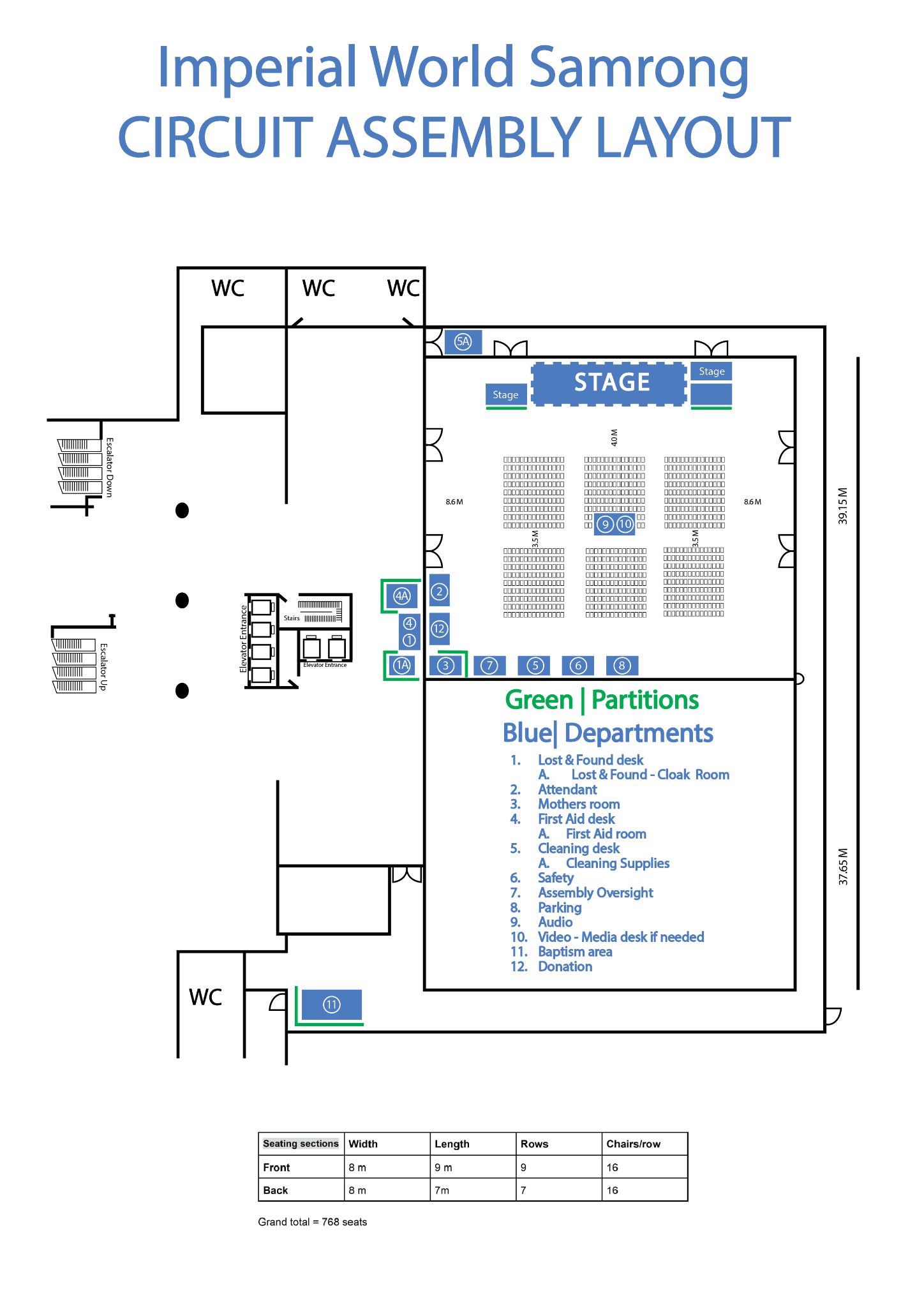
🗺️ View venue layout — departments and room orientation
Use this only to orient yourself to departments, partitions and room features. Use the CABR schematics for A/V placement.
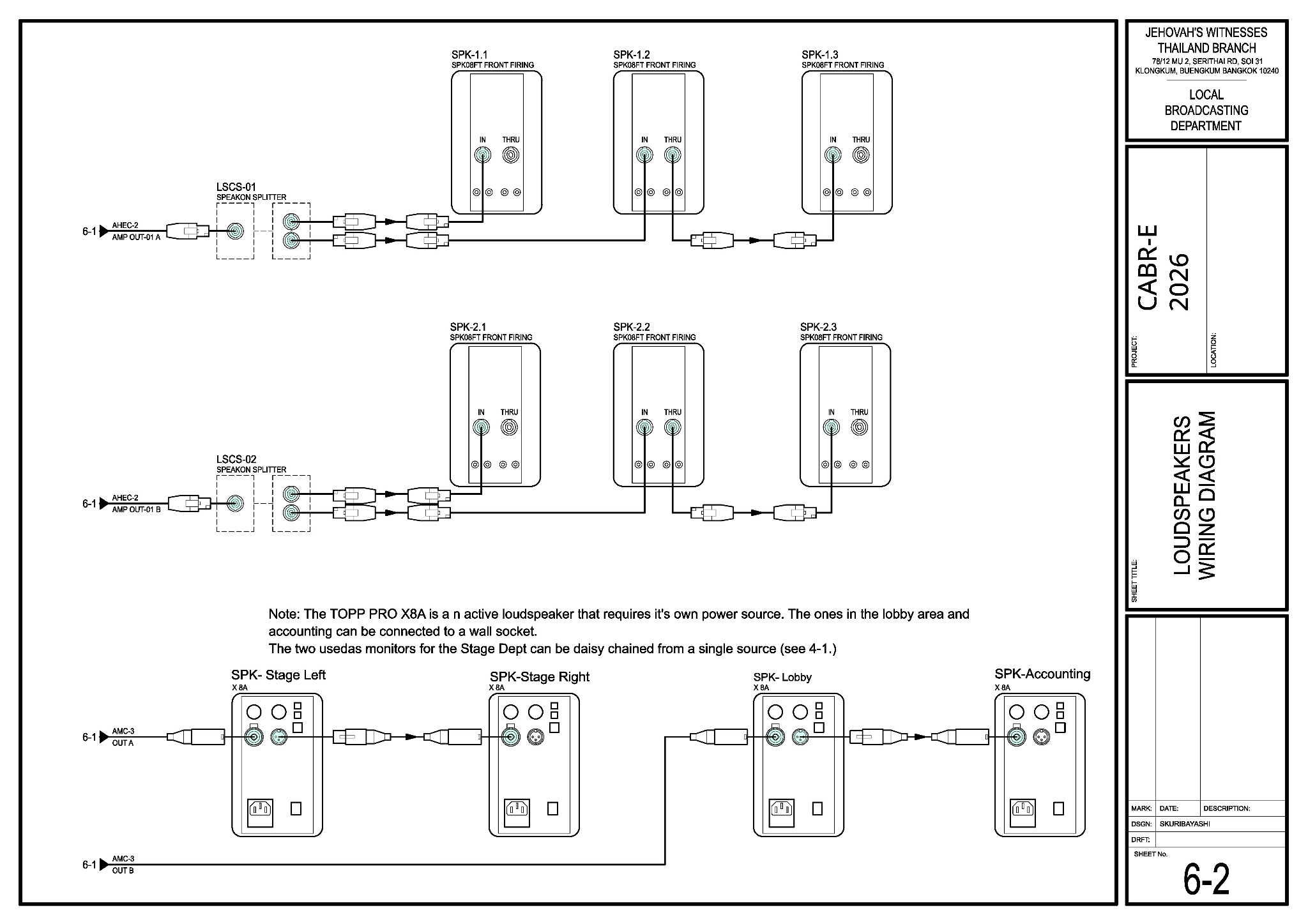
🔌 View Sheet 6-2 — loudspeaker wiring and splitters
There are two speakON splitters: LSCS-01 feeds the front loudspeaker group and LSCS-02 feeds the rear loudspeaker group.
What your team does
Start atCoordinate thestagepullandwithcarefullyLacey. Carefully lay the 30 m AMC-3 audio multicore (snake) cable from stage tothebooth;A/V booth. Avoidavoid sharp bends, protectitsconnectors, and leave both ends ready for Stage and A/VBooth to connect.Booth.- Run the labelled speakON loudspeaker cables to the six passive-speaker
positions with the Loudspeakers team.positions. LSCS-01and LSCS-02 areis thetwofront-group speakONsplitters:splitter; LSCS-02LSCS-01 servesis thefrontrear-groupand LSCS-02 serves the rear group.splitter. Leave enough slack and handovereach speakON cable to Loudspeakers before the speaker is raised. - Run the two XLR active-speaker cables: return A to the
stage-monitorstagelocationsmonitors and return B to the lobby andAccounting speaker locations.Accounting. Leave the labelled endsreadyfortheLoudspeakers/A/VteamsBooth to connect. Stage runsMake thefour XLR microphone cablesbetween AMC-3 inputsMIC-1–4and the microphone positions. Make sure the correctXLR cables and AMC-3 handoffarereadyready,forthenStage.confirmConfirmwith Stage that thetheir routing to AMC-3 inputs 1–4 and labels arecomplete.complete;Help themhelp if needed.- Run labelled XLR cables
betweenfrom the venue wireless-receiver locationand theto AMC-3inputinputs 5–6 location. Leave the labelled ends6, ready for A/V Booth to connect. CoverProtectallfloor crossings with CPS-1 cablecovers,covers/mats orcarpet.CPS-3Handcarpet. Inspect thelabellededgesendsfortoraised or loose areas before handing over theA/Vruns.Booth, Stage and Loudspeaker teams, then helpHelp trace anylinecable that fails its test.
Extra help: When Stage, Loudspeakers and Power finish their own work, they should check with Lacey and help Audio Cabling with the remaining cable work.
Cable routing reminders
- Unroll cables
carefully instead of pulling them intowithout twists orkinks.kinks;Keep anykeep attached Velcro with the cable. KeepAvoidaudio cables away from participant paths and normal walkways where practical.
Safety:Accounting is beside the baptism area. Agree the route with the Baptism overseer and keep every cable away from wet floors.
For the keyman
The routes below show where each cable goes; Audio Cabling does not make the equipment connections.
| Run | Route | Drawing |
|---|---|---|
| AMC-3 | 30 m AMC-3 audio multicore (snake) cable: stage box → AHEC-2 at the booth | 4-1, 6-1 |
| Front speakers | speakON cable: Amplifier A → LSCS-01 (speakON splitter) → SPK-1.1 / 1.2 → 1.3 | 1-1, 6-2 |
| Rear speakers | speakON cable: Amplifier B → LSCS-02 (speakON splitter) → SPK-2.1 / 2.2 → 2.3 | 1-1, 6-2 |
| Stage monitors | XLR cable: AMC-3 return A → Stage Left → Stage Right | 4-1, 6-2 |
| Lobby / Accounting | XLR cable: AMC-3 return B → Lobby → Accounting | 6-2 |
When the protected routes arepass protectedtheir and the line tests pass,tests, tell Lacey and Alex. SundayFor teardownteardown, assignmentsfollow willthe beconfirmed addeddismantling later;teams and instructions: wait for the teardownaudience to clear and the briefing beforeto removingfinish, anything.confirm power is off, then coil and inventory the cables.