
A/V booth and commissioning
| Keyman 🔑 | Crew | Audio overseer |
|---|---|---|
| Micah Phillips | Nico Martinez; Mint Phillips | Alex Li |
Your team sets up the audio rack and the two media computers, connects the venue wireless microphones and projector link, and helps Alex test the complete system.
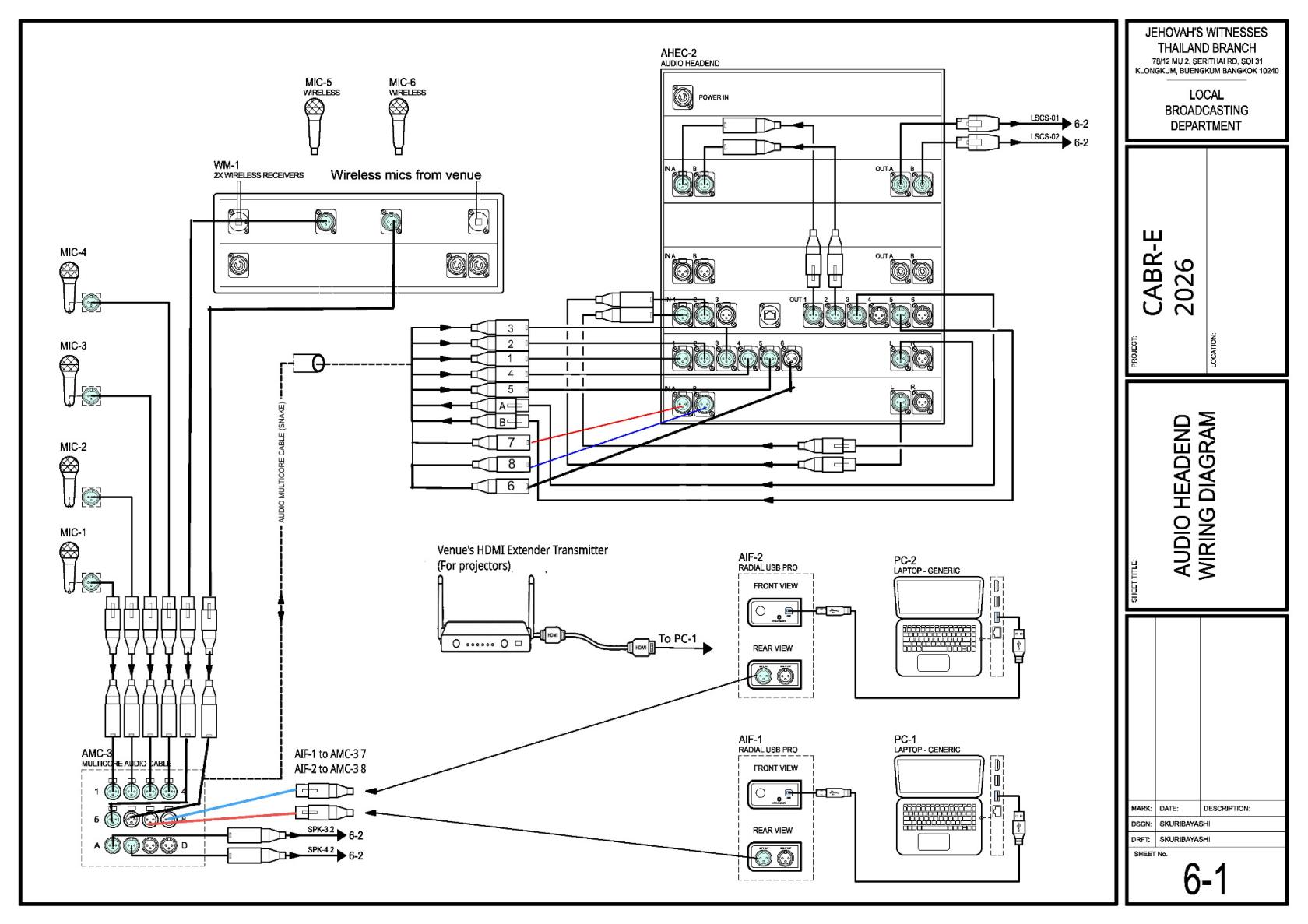
Before starting, meet Micah, review the team's DC-83, and open sheet 6-1 in the schematics. Keep equipment switched off while making connections. Lift the 25 kg rack with a helper.
Current CABR-2026 Sheet 6-1 — audio headend wiring
What your team does
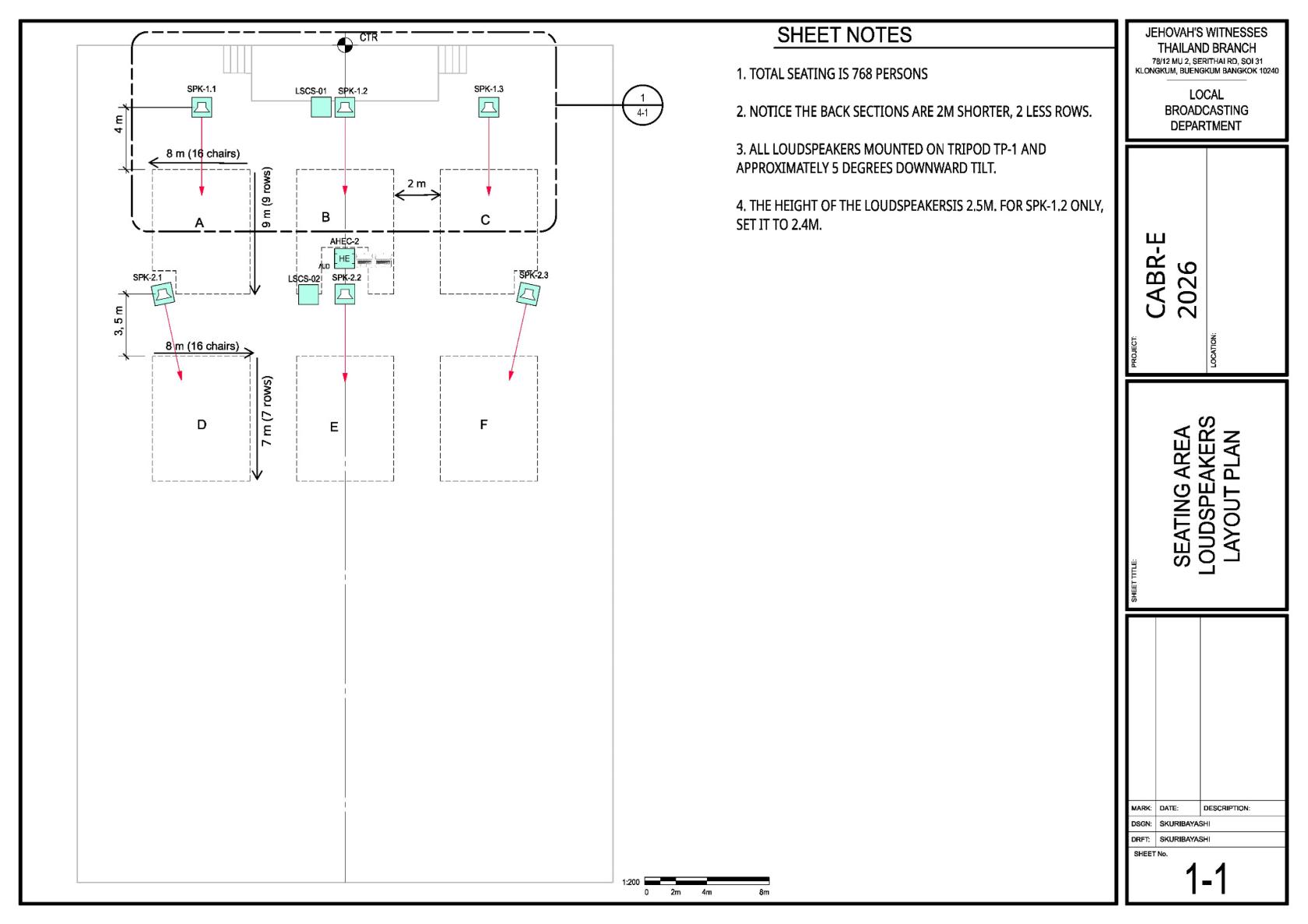
PutSet up the AHEC-2 audio rackat area 9and the two media computers attablethe10.A/V booth. Keep the operator aisle clear.🗺️ View Sheet 1-1 — A/V booth location
- Wait for Power to hand over the booth supply. Connect the main audio cable, speaker outputs and returns exactly as sheet 6-1 shows.
- Connect PC-1 through AIF-1 to AMC-3 input 7, and PC-2 through AIF-2 to input 8. Label both ends.
- Collect the venue wireless microphones and receivers. Connect the receivers to inputs 5–6.
- Connect PC-1 HDMI to the venue's HDMI transmitter and test the projectors with venue staff.
- Switch on only after the connections are checked. Test at low level, then commission the system with Alex.
For Micah, Alex and the operators
| Signal | Connection / starting point |
|---|---|
| PC-1 / PC-2 audio | AIF Mono on; Ground Lift off; gain about 11 o'clock; media-player volume 100%. Fine-tune during the sound check. |
| Wireless microphones | Venue receivers → inputs 5–6; adjust carefully for feedback. |
| Passive speakers | Amplifier output A to the front group; output B to the rear group. |
| Stage monitors | DSP output 3 → AMC-3 return A. |
| Lobby / Accounting | DSP output 5 → AMC-3 return B. Output 4 is not used. |
Keep food and drinks away from the equipment tables. Personal devices can cause noise, so keep them away from audio equipment if interference is heard.
Use only approved media. Keep media files and outlines private, and do not connect the media computers to the internet unless Alex has approved a specific need. Display the theme artwork before each session, during lunch, and for about 30 minutes after the program. After the event, delete the event media and outlines from both computers as directed.
Commissioning the AHEC-2
Use CO-160a for the actual commissioning procedure.
Open CO-160a and go to Chapter 3 → Audio Headend → AHEC-2, pages 3–4 → “Commissioning an Audio Installation.” The points below are only a quick guide.
- Connect to the DSP. Use a laptop with an Ethernet port or adapter and an Ethernet cable. CO-160a shows the network settings and how to connect with the DLM System Control Editor.
- Load the starting preset. Use the LBD preset or the venue/event preset if one is available.
- Test each output zone. Use the approved audio test material and confirm that each output feeds the correct loudspeakers. If something does not match Sheet 1-1 or 6-2, fix the connection or speaker position before continuing.
- Check delays and levels. Use the click track to listen where front and rear zones overlap. Then balance the zones with pink noise and an SPL meter. CO-160a sets 82 dB-SPL as the maximum target at the seats closest to a loudspeaker.
- Make speech clear and stable. Have several people read at the main microphone. Follow CO-160a to improve speech intelligibility and reduce feedback without making voices sound unnatural.
- Finish the whole-system test. Confirm both media computers, all microphones, every loudspeaker zone, stage monitors, lobby/Accounting feeds and the projector link. Save the final DSP settings when commissioning is complete.
Before attendees are admitted, Alex and the operators should listen from several seating areas and agree on a simple backup plan for a failed microphone or computer.
Sunday teardown assignments will be added later. At teardown, wait for the safety meeting, switch off before unplugging, and return the venue equipment to venue staff.