Team
Keyman 🔑
Crew
LoudspeakersCorey DeLoach
Melissa DeLoach; Mike Vigil; Lilia Vigil; Meyana BarnhartVigil
Purpose Thank you for helping everyone hear the program clearly! Your team measuressafely places and marks, then safely installs, connects, raises, aims and tests the six passive loudspeakers (SPK-1.1 to SPK-2.3).loudspeakers. You also place the four active speakers: two stage monitors,monitors and the active speakers for the lobby and Accounting.
AssignmentBefore scope starting, Audiomeet CablingCorey, runsreview the speakONteam's DC-83, and XLRopen cables.sheets Power1-1, confirms4-1 and 6-2 in the outlets for the active speakers.schematics.
⚠️Use Tripod and loudspeaker safety
• Please set tripods on an even, stable floor and keep emergency paths clear.
• Put at least one sandbag on every tripod. The other four (there are ten sandbags) go on the tripods nearest walkways or doors, as Corey directs.
• If a speaker hangs over a walkway, keep at least 2.1 m clear underneath, or put up a barrier.
• Always use two people to mount or remove a loudspeaker,loudspeaker. and wearWear hard hats while working onwith raised speakers. •Open each tripod fully on level ground, lock it, and add at least one sandbag. Connect the speakONspeaker cable before raising the loudspeaker.speaker.
Keep
hands
What clearyour ofteam movingdoes
partsandWith checkCorey, every lock.
• Rollmark the PLS-1six (150positions kg), TP-1 (100 kg) and ALS-4 (50 kg) cases with enough helpers, never carried. On Friday, PLS-1 and TP-1 move with the Trucking Department's help.
CaseContentsPLS-1 (passive loudspeaker set)Six SPK08FT passive loudspeakers, cables and extendersTP-1 (speaker tripods)Six adjustable tripodsSES-1 (safety equipment)Ten 5 kg sandbagsALS-4 (active loudspeaker set)Four TOPP Pro X-8 active speakers
Passive loudspeaker schedule
Fromfrom sheet 1-1
GroupLoudspeakersPositionTo first rowHeightAimFrontSPK-1.1, SPK-1.2, SPK-1.3In front of sections A, B, C. SPK-1.2 is on the centre line at the stage front.4 mSPK-1.2: 2.4 m Others: 2.5 mStraight toward A, B, CRearSPK-2.1, SPK-2.2, SPK-2.3Between the front and back sections. SPK-2.2 is beside the A/V booth.3.5 m2.5 mSPK-2.1 and SPK-2.3 angled in toward D and F; SPK-2.2 toward E
All six go on TP-1 tripods with about 5° downward tilt.
Active speaker schedule
From sheets 4-1 and 6-2
SpeakerPlaceSignal (Audio Cabling)PowerSPK-Stage LeftStage floor, front (sheet 4-1)AMC-3 (audio multicore) return AStage supplySPK-Stage RightStage floor, front (sheet 4-1)Linked from Stage LeftStage supplySPK-LobbyLobby, on a stable surfaceAMC-3 return BWall socketSPK-AccountingAccounting, on a stable surfaceLinked from LobbyWall socket
The BOM has no stands for the active speakers. The TP-1 tripods are for the passive speakers only.
Helpful tip
Please check each loudspeaker ID and follow its position and aiming arrow on sheet 1-1.
Setup steps
1. Measure and markSheet: 1-1
Check the chair sections against sheet 1-1: front sections 16 chairs × 9 rows (8 m × 9 m), back sections 16 chairs × 7 rows (8 m × 7 m), with 3 m aisles. Please let Alex know about any difference.Mark the six speaker positions and IDs, using the distances in the schedule.Makemake sure no positionspeaker or tripod blocks an emergency path.exit.🗺️ View Sheet 1-1
Sheet 1-1 — Seating Area Loudspeakers Layout Plan
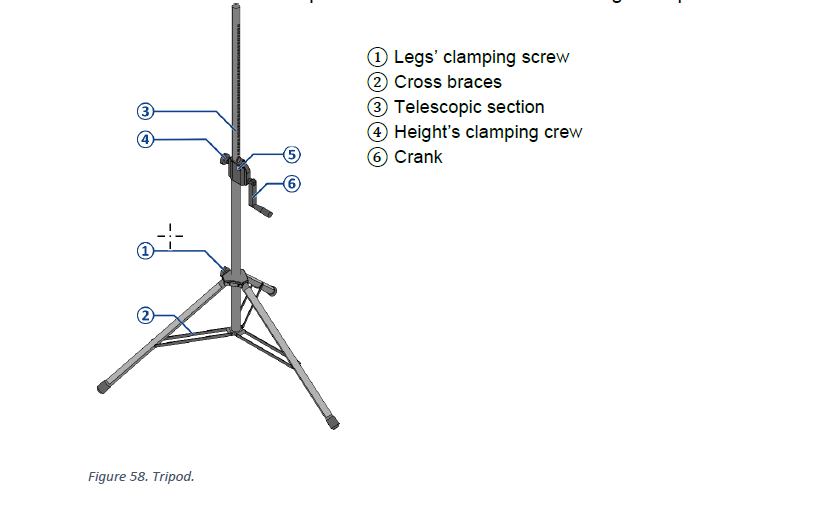
2. Set up each tripodCO-160a Figure 58
Open the legs fully on an even floor and tightenlock theeach tripod. Point one tripod leg clamp.
Turn one leg towardin the direction the speaker willtilts tilt.and Putadd the sandbags on.Corey 📘 View TP-1 tripod — CO-160a Figure 58
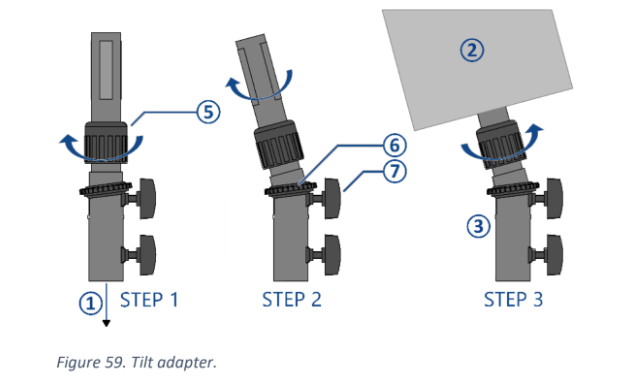
3. Mount and aimCO-160a Figure 59
Set the tilt adapter to about 5° downward.assigns.
With two people, placemount the loudspeakerpassive onspeaker, connect its labelled cable, aim it from the adapterdrawing, and then raise and lock it.the tripod.
Aim it along the arrow on sheet 1-1.📘 View Tilt adapter — CO-160a Figure 59
4. Connect the speakON cableSheet: 6-2
Check that the cable label matches the speaker ID.Connect it before raising. Leave some slack and keep it clear of the tripod mechanism.
Cable not ready yet?
No problem. Leave the tripod lowered, move on to another speaker, and come back when Audio Cabling has run the cable.
🗺️ View Sheet 6-2
Sheet 6-2 — Loudspeakers Wiring Diagram
5. Raise and lock
Raise to the schedule height (2.5 m; SPK-1.2: 2.4 m), then check that the safety pin is engaged.Tighten every lock, and please avoid ladders.Check the tripod, adapter, speaker, sandbags and cable.
6. Place the activetwo speakersstage Sheets: 4-1, 6-2
Lobby and Accounting: on a stable surface next to a wall socket.Stage monitors:monitors on the stage floor as sheet 4-1 shows. Agree positionsthe exact position with Stage.
ConnectPlace the XLRlobby first,and thenAccounting powerspeakers onceon stable surfaces near safe wall sockets. These active speakers do not use the Powerpassive-speaker team confirms the outlet.🗺️ View Sheet 4-1
Sheet 4-1 — Stage Area Large Scale View
7. Final check and test
Confirm positions, heights, tilt and aim against sheet 1-1.tripods.
Test eachevery speaker with the A/V Booth team,team. and walkWalk the seating area with Alex.Alex and adjust only as directed.
CompletionFor checklistthe keyman
Six
Group
Position and height
Aim
Front: SPK-1.1, 1.2, 1.3
About 4 m from the first row; normally 2.5 m high, with 1.2 at 2.4 m
Toward sections A, B and C
Rear: SPK-2.1, 2.2, 2.3
About 3.5 m from the first row; 2.5 m high
Toward sections D, E and F
All six passive speakers placeduse and aimed as sheet 1-1 shows
Heights and first-row distances match the schedule Aboutabout 5° downward tilttilt. onIf eacha raised speaker is Tripods,above locks,a sandbagswalkway, keep at least 2.1 m clear underneath or use a barrier.
The PLS-1, TP-1 and cablesALS-4 secure
cases are Stage monitors, lobbyheavy and Accountingmust speakersbe placed and powered Emergency paths and walkways clear All speakers tested Final check by the keyman
Dismantling
Thank you for your careful work! After the program on Sunday:
Please wait for the egress and packing safety meetingrolled with prayer,enough 30helpers. minutesSunday afterteardown theassignments programwill ends.be added Startlater; oncedo not lower any speaker until the audience has leftleft, power is off, and the powerteardown briefing is off.finished.
Lower each tripod fully before removing the speaker, always with two people. Collapse the tripods, and keep the sandbags and accessories with the cases. Bring all speakers, tripods, sandbags and active speakers to the packing area. Check every position for forgotten items; the keyman does a final check.