
Power distribution
| Keyman 🔑 | Crew |
|---|---|
| Jeff Korell | April Korell |
Your team safely runs mains power to the A/V booth, the stage, and the active loudspeakers. Audio Cabling handles audio cables.
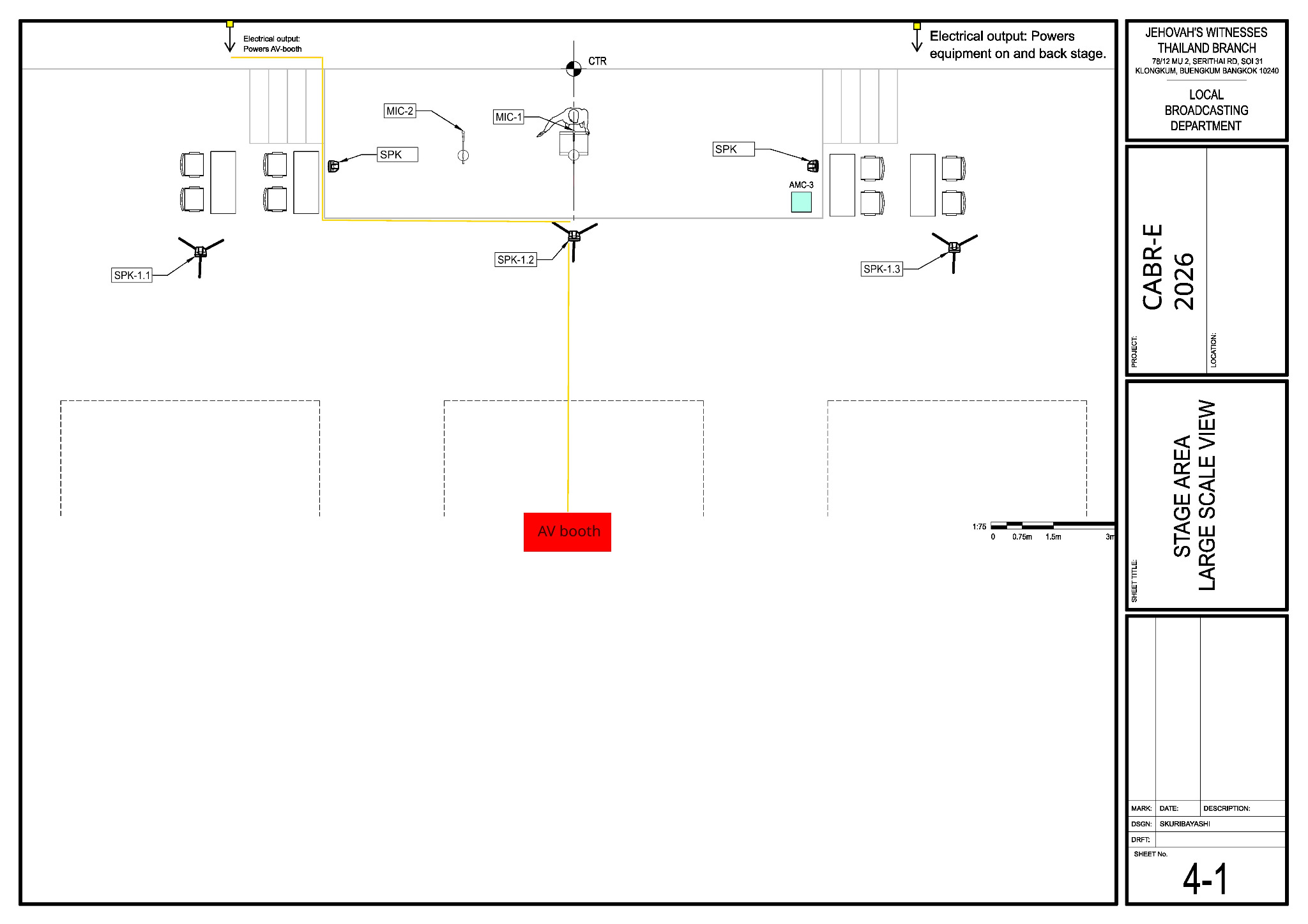
Before starting, review the team's DC-83 and sheet 4-1 in the schematics.
Main reference — Sheet 4-1: stage area equipment and power layout
Use Sheet 4-1 for the venue outlets, stage power route, stage monitors and the path toward the A/V booth.
Electrical safety:
Only a qualified person performs electrical work that requires a qualification. Never change an equipment ground. Set aside damaged cords, avoid overloaded circuits, and keep power away from the baptism area and wet floors.
What your team does
- Confirm the two venue outlets shown on sheet 4-1 and check the expected loads.
- From the left outlet, run the booth supply along the stage front and then down the centre route to the A/V booth.
- From the right outlet, supply the stage equipment, including the two stage monitors.
- Confirm safe wall sockets for the lobby and Accounting speakers. Keep the Accounting supply away from the baptism area.
- Cover every floor crossing. Tell the nearby teams before switching on, then hand the checked booth supply to the A/V Booth team.
- When the power work is safely finished, check with Lacey and help Audio Cabling with the remaining cable work, including floor crossings.
Power routing reminders
- Agree the route with Stage and Audio Cabling before laying mains power through their work area.
- Where practical, keep mains power separate from audio cables. If they must cross, cross them at right angles.
- Keep participant paths and exits clear, and protect any floor crossing before the area is used.
The venue wireless receivers at the stage may also need power; confirm this with the venue technician.
The PCS-2 case weighs about 50 kg and should be rolled with a helper. Sunday teardown assignments will be added later. At teardown, wait for the safety meeting and make sure power is off before anything is disconnected.