
Power distribution
| Keyman 🔑 | Crew |
|---|---|
| Jeff Korell | April Korell |
Your team safely runs mains power to the A/V booth, the stage, and the active loudspeakers. Audio Cabling handles audio cables.
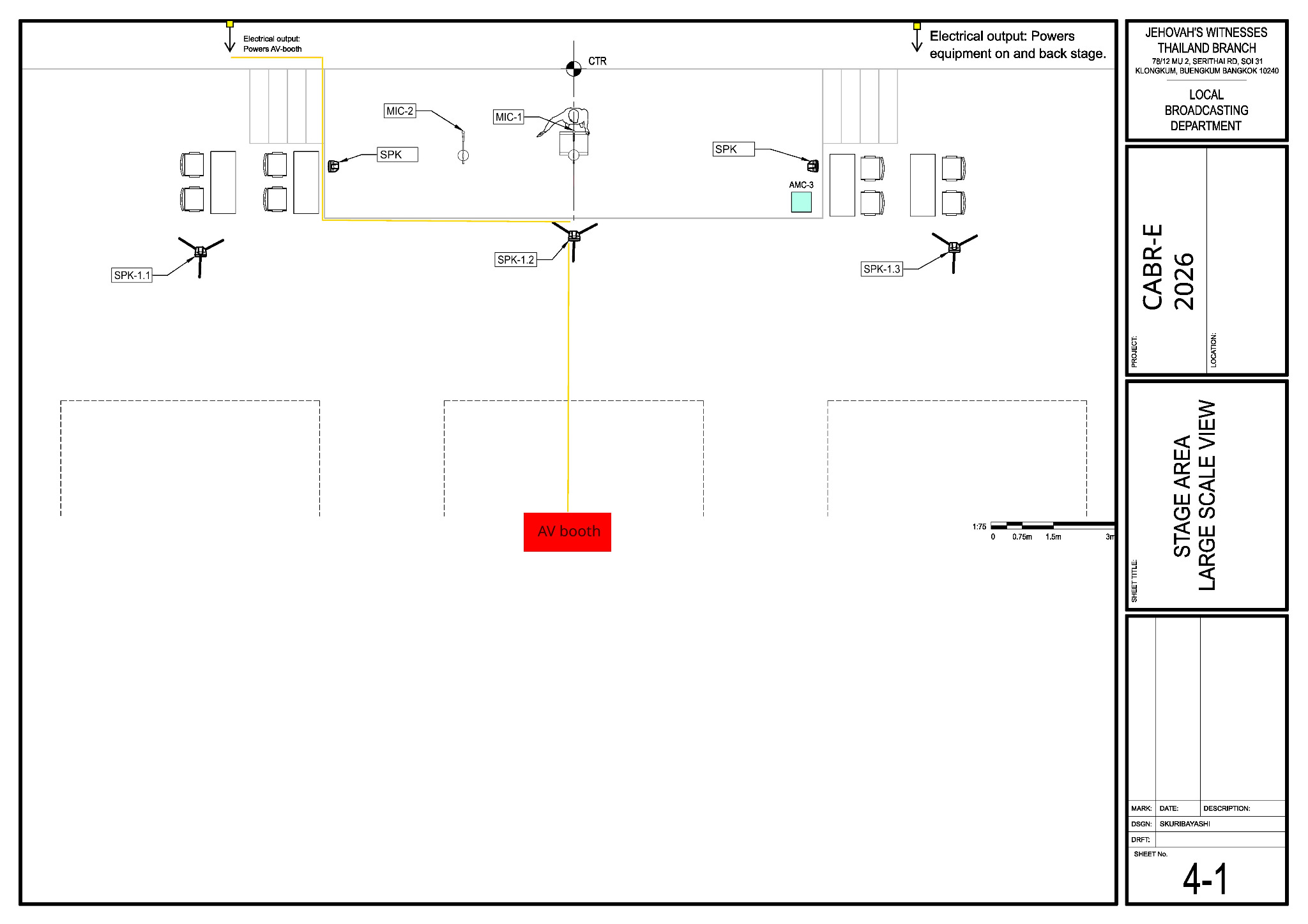
Before starting, review the team'team’s DC-83 and sheetSheet 4-1 in the schematics.
Main reference — Sheet 4-1:1. stage area equipment and power layout
Use Sheet 4-1it for the venue outlets, stage power route,power, stage monitors and the pathroute towardto the A/V booth.
Safety:
Roll the 50 kg PCS-2 case on a clear route with helpers; wear work shoes and gloves.
Electrical safety:work:
Only a qualified person performs electricalpanel work thator requiresother work requiring a qualification. Never changealter an equipment ground. Set aside damaged cords, avoid overloaded circuits, and keep power away from the baptism area and wet floors.
What your team does
- Confirm the two approved venue outlets
shownonsheetSheet 4-1 andcheckverify supply ratings against the expected loads. Agree routes with Stage and Audio Cabling before laying mains cables through their work area. - From the left outlet, run the booth supply along the stage front and
thendown the centre route to the A/V booth. - From the right outlet, run
the mains-powersupplyforthestage equipment, includingthe twoboth stage monitors. Coordinatethefinalpower connectionconnections withtheStageStage/Loudspeakersandteams.Loudspeakers. - Confirm safe wall sockets for the lobby and Accounting
speakers, thenspeakers; runthetheirmains-powermains supplytoandthose speaker locations. Coordinate thecoordinate finalpower connectionconnections with Loudspeakers.Keep the Accounting supply away from the baptism area. CoverProtect every floorcrossing.crossing and inspect circuits, routes and cover edges; keep exits and participant paths clear. Tell thenearbyteams beforeswitchingenergizingon,anythensupply.handJeffthe checkedconnects boothsupplypowertoonlytheafter A/VBoothBooth’steam.connection checks.- When
thepower work is safelyfinished,complete, check with Lacey and help Audio Cabling with the remaining cablework,workincludingand floor crossings.
Power routing reminders
Where practical, keep mains power separate from audio cables. If they must cross,cables; cross them at right angles.
The venue wireless receivers at the stage may also need power; confirm this with the venue technician.
TheFollow PCS-2the caseconfirmed weighsdismantling about 50 kgteams and shouldinstructions. beAfter rolledthe withaudience ahas helper.cleared Sunday teardown assignments will be added later. At teardown, wait forand the safety meeting has finished, let the teams shut down their equipment. Jeff isolates and make suredisconnects power is off before anythingcords isare disconnected.removed. Use a qualified person for panel work and inventory the power equipment.