
Stage and microphones
| Keyman 🔑 | Crew | Stage overseer |
|---|---|---|
| Jason Kirby | Gerald Berard; SuMalei Kirby; Matthew Chappelle; Cameron Korell | Jeff Korell |
Your team prepares the stage microphones and stands, worksruns withthe AudioXLR Cablingaudio cables on the stage XLR audio cables, and helps participants use the microphones correctly. Confirm the cable handoff and finished routing with Audio Cabling, and ask them to help if needed.
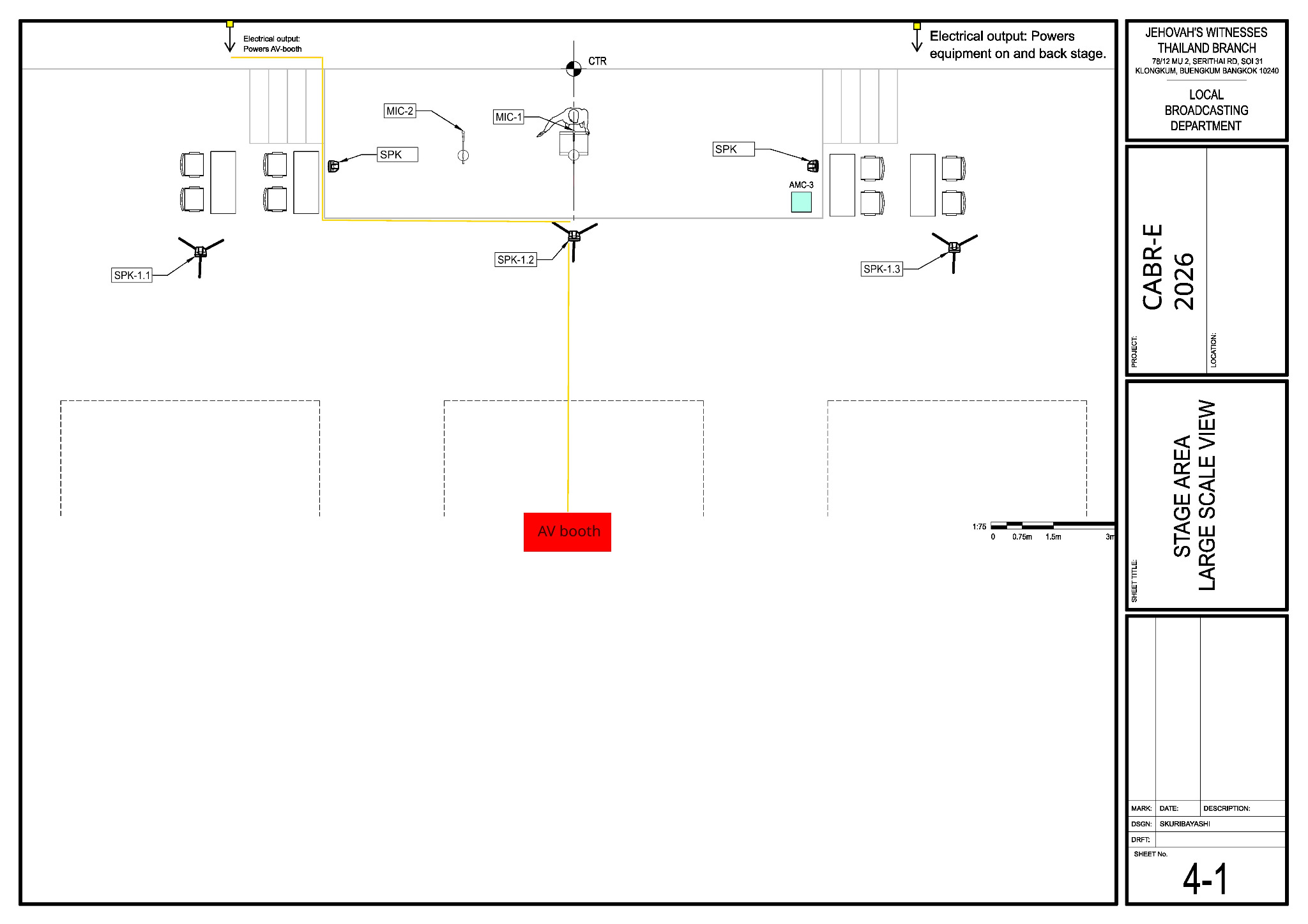
Before starting, meet Jason, review the team's DC-83, and open sheets 4-1 and 6-1 in the schematics. Watch the stage edge and keep every cable flat.
Main reference — Sheet 4-1: stage area equipment layout
Use Sheet 4-1 for the microphone, lectern and stage-monitor positions and for the on-stage cable routes.
What your team does
- Remove old or distracting tape. Confirm the lectern, participant and microphone positions with Jeff.
WithStageAudiorunsCabling, runthe four XLR microphone cablestobetween AMC-3 inputs 1–4.4 and the microphone positions. Confirm the route and labels with Audio Cabling; ask them to help if needed.- If the XLR cable has attached Velcro, open it and roll the cable off; do not remove the Velcro.
Microphone positions
| Microphone | Position | AMC-3 input |
|---|---|---|
| MIC-1 | Lectern | 1 |
| MIC-2 | Floor stand beside the lectern | 2 |
| MIC-3 and MIC-4 | As Jeff directs | 3 and 4 |
| Venue wireless microphones | Roving use as assigned | Receivers on 5 and 6 |
Baptism arrangements and the exact positions for experiences are confirmed at the program walk-through.
Sunday teardown assignments will be added later. Wait for the teardown briefing before removing microphones, tape or stands.