
Stage and microphones
Saturday stage setup
| Keyman 🔑 | Crew | Stage overseer |
|---|---|---|
| Jason Kirby | Gerald Berard; SuMalei Kirby; Matthew Chappelle; Cameron Korell | Jeff Korell |
Your team prepares the stage microphones and stands, runs the on-stage XLR audiomicrophone cables on the stage,cables, and helps participants use the microphones correctly. Confirm the cable handoff and finished routing with Audio Cabling, and ask them to help if needed.
Before starting, meet Jason, review the team'team’s DC-83, and open sheetsSheets 4-1 and 6-1 in the schematics.
Safety:
Watch the stage edge and keep everyaccess cableclear. flat.Coordinate with Power and Loudspeakers in the shared work area. Roll the 30 kg MS-1 case with helpers and wear work shoes. Keep equipment switched off while connecting the XLR cables.
Main reference — Sheet 4-1:1. stage area equipment layout
Use Sheet 4-1it for the microphone, lectern and stage-monitor positions and for the on-stage cable routes.
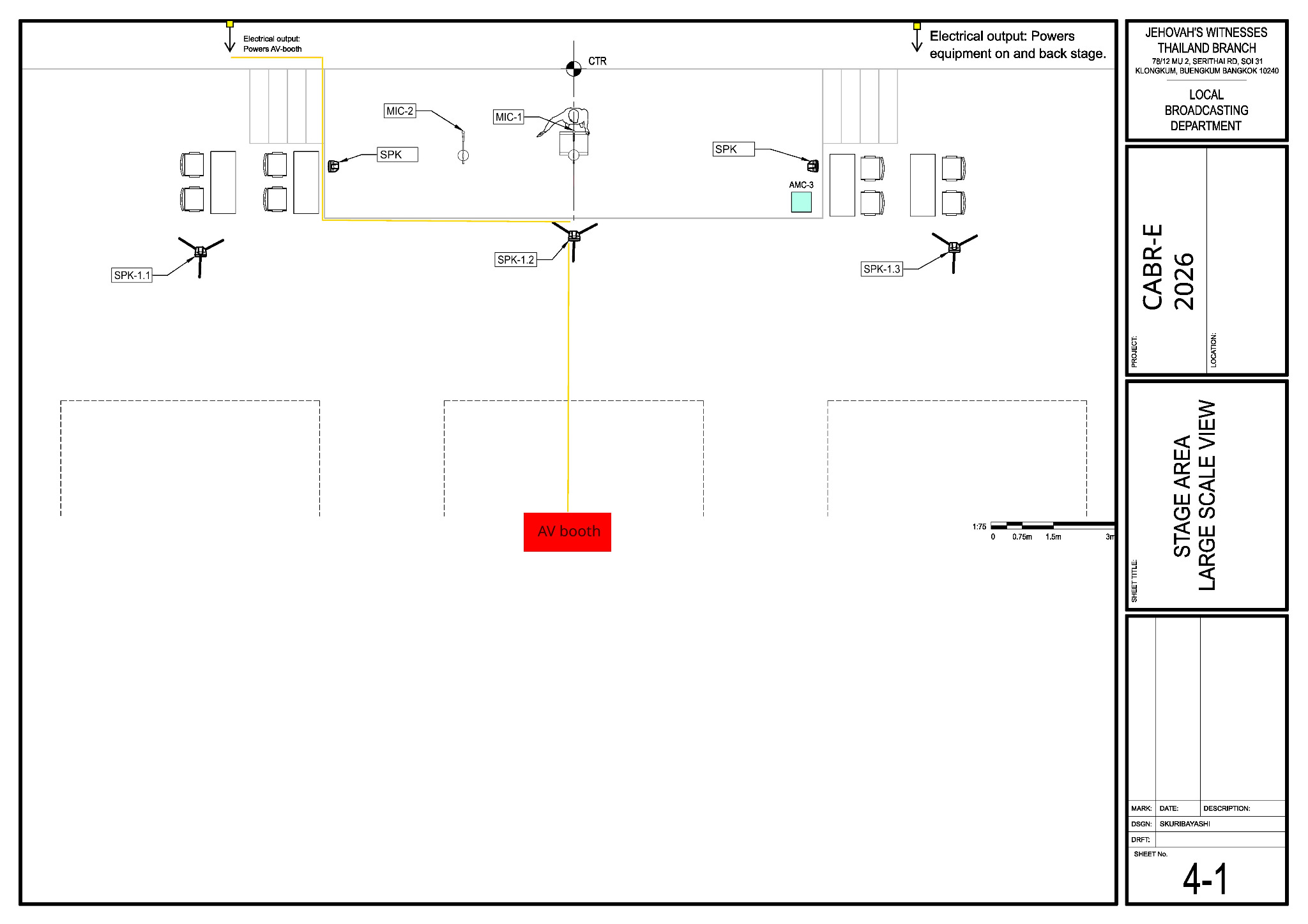
What your team does
- Remove old or
distractingloosetape.tape and mark the stage edge. Confirm the lectern, participant and microphone positions with Jeff. Stage runsRun the four XLR microphone cables between AMC-3 inputs 1–4 and the microphone positions. Confirm theroutehandoff, routes and labels with Audio Cabling; askthem tofor help if needed.- If the XLR cable has attached Velcro, open it and roll the cable off; do not remove the Velcro.
- Route the XLR cables neatly along the stage edge and away from participant walking paths.
- Where practical, do not run XLR audio cables parallel to power cables. If they must cross, cross at right angles.
- Use only small pieces of tape where needed, and use proper cable protection anywhere an XLR cable crosses or enters a walkway.
- Label each XLR cable at the AMC-3 end and again near its microphone position.
- Connect each XLR microphone cable to its assigned AMC-3 input (1–4) and to the matching microphone before mounting the microphone. Set each stand firmly and tape the cable flat, away from the stage edge.
- Agree the two stage-monitor positions with the Loudspeakers team.
TestCheck stand stability and cable slack, then test every microphone position at low level withAlex.Alex and A/V Booth. Train the stage assistants oncorrectmicrophone placement andpractise thehandoffs, including the venue wireless microphones.- Attend the program walk-through and follow the S-343 Stage Layout for chairman microphone positions, participant entry and exit, interviews, demonstrations and other stage cues. Before each participant goes on stage, give the required reminders from CO-160 Appendix F and confirm where the participant should stand or sit.
Sunday program assignments
Stage-side note: Participant side is Stage left; chairman side is Stage right.
Stage key men: Jason Kirby — morning; Matthew Chappelle — afternoon.
| Position | Morning | Afternoon |
|---|---|---|
Chairman side mic (Stage right) | Gerald Berard | Corey DeLoach |
Chairman side headset (Stage right) | Jason Kirby | Matthew Chappelle |
Participant side mic (Stage left) | Ruben Martinez | Nico Martinez |
Participant side headset (Stage left) | Mike Vigil | Jeff Korell |
Microphone positions
| Microphone | Position | AMC-3 input |
|---|---|---|
| MIC-1 | Lectern | 1 |
| MIC-2 | Floor stand beside the lectern | 2 |
| MIC-3 and MIC-4 | As Jeff directs | 3 and 4 |
| Venue wireless microphones | Roving use as assigned | Receivers on 5 and 6 |
Baptism arrangements and the exact positions for experiences are confirmed at the program walk-through.
When your stage setup is finished: Check with Lacey and help Audio Cabling with the remaining cable work.
Sunday dismantling
Stage dismantling keyman: Jeff Korell. Crew: Gerald Berard, SuMalei Kirby, Matthew Chappelle and Cameron Korell. See the full dismantling team roster. Wait for the audience to clear and the teardown briefing beforeto finish; confirm power is off. Work back from the stage edge while removing microphones, tape orand stands.stands, and inventory the equipment as it is packed.