Audio Cabling Setup / 音频线缆安装

🎤 Audio Cabling Team / 音频布线组

ItemTeam / 项目小组 NameMembers / 姓名成员 KeymanAudio To be assignedCabling / 待安排音频布线 • Hyunbong Tak 卓亮 🔑
• Liang Ping 梁平
• Zabrina 柏莉娜
• Siiri
\# Name / 姓名
1
2
3
4
5
6

Purpose

🇬🇧 /English 目的

Instructions

Purpose
Install, protect, and label all audio cabling according to the Schematicsschematics before system commissioning.

根据图纸安装、保护并标识所有音频线缆,为系统调试做好准备。


⚠️ Required References / 参考资料 Schematics / 图纸 Safety & Installation Notes
/• 安全提醒
    Keep walkways clear.
    /• 保持通道畅通。 Protect all cables crossing walkways.
    /• 所有经过通道的线缆都必须加以保护。 Confirm routing before securing cables.
    /• 固定线缆前确认走线路径。Installation Note: When putting carpet covers down, tape one side only. Tape the other side once installation is finished.

    Required References

      Full Drawing Set: 📎 Complete PDF Event Content List: Cases AMC-1, ASC-01, CPS-1, CPS-3

      Required

      Equipment Cases

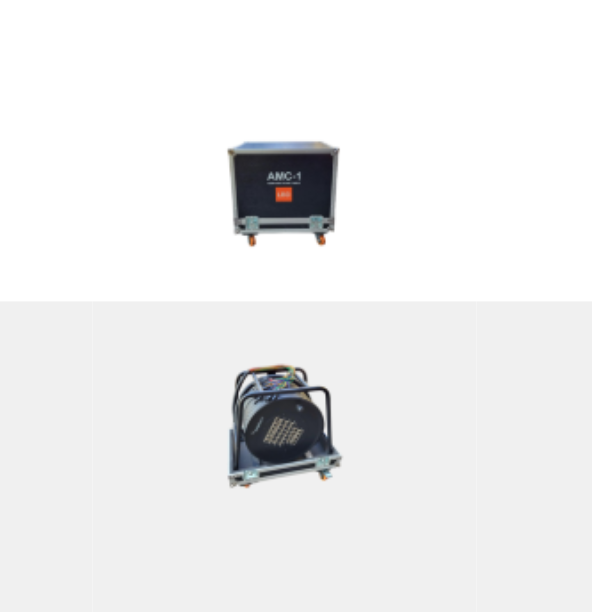
        AMC-1: Contains the 60m audio multicore cable (snake) with 24x XLR in and 8x XLR out on a reel. ASC-01: Contains XLR cables (5m, 10m, and 20m lengths). CPS-1: Contains 10x 3-channel plastic flap floor cable protectors and 10x rubber mats. CPS-3: Contains carpet strips for covering cables.

        Setup Steps

        / 安装步骤

        1. Install audio multicore cable/cable
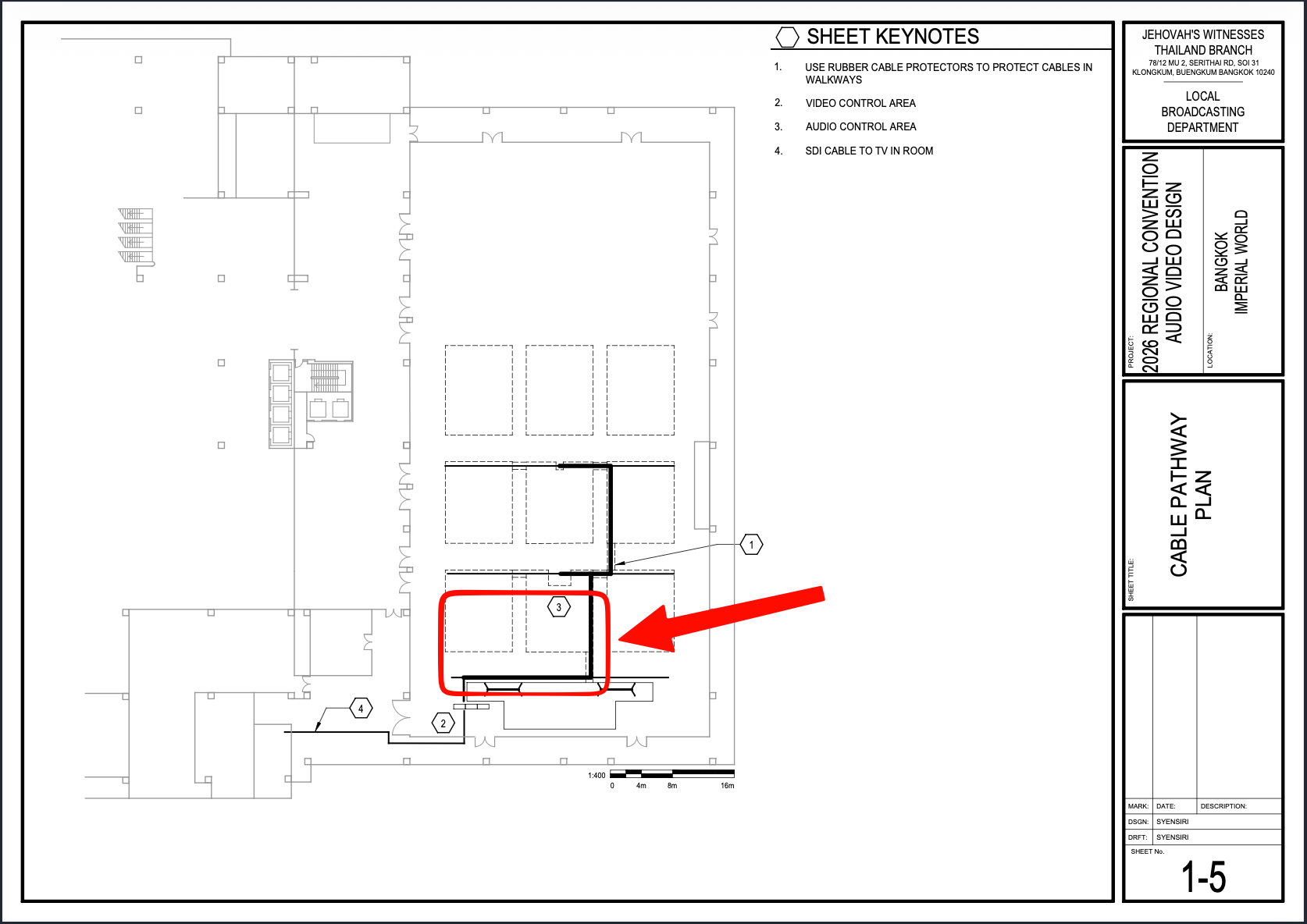
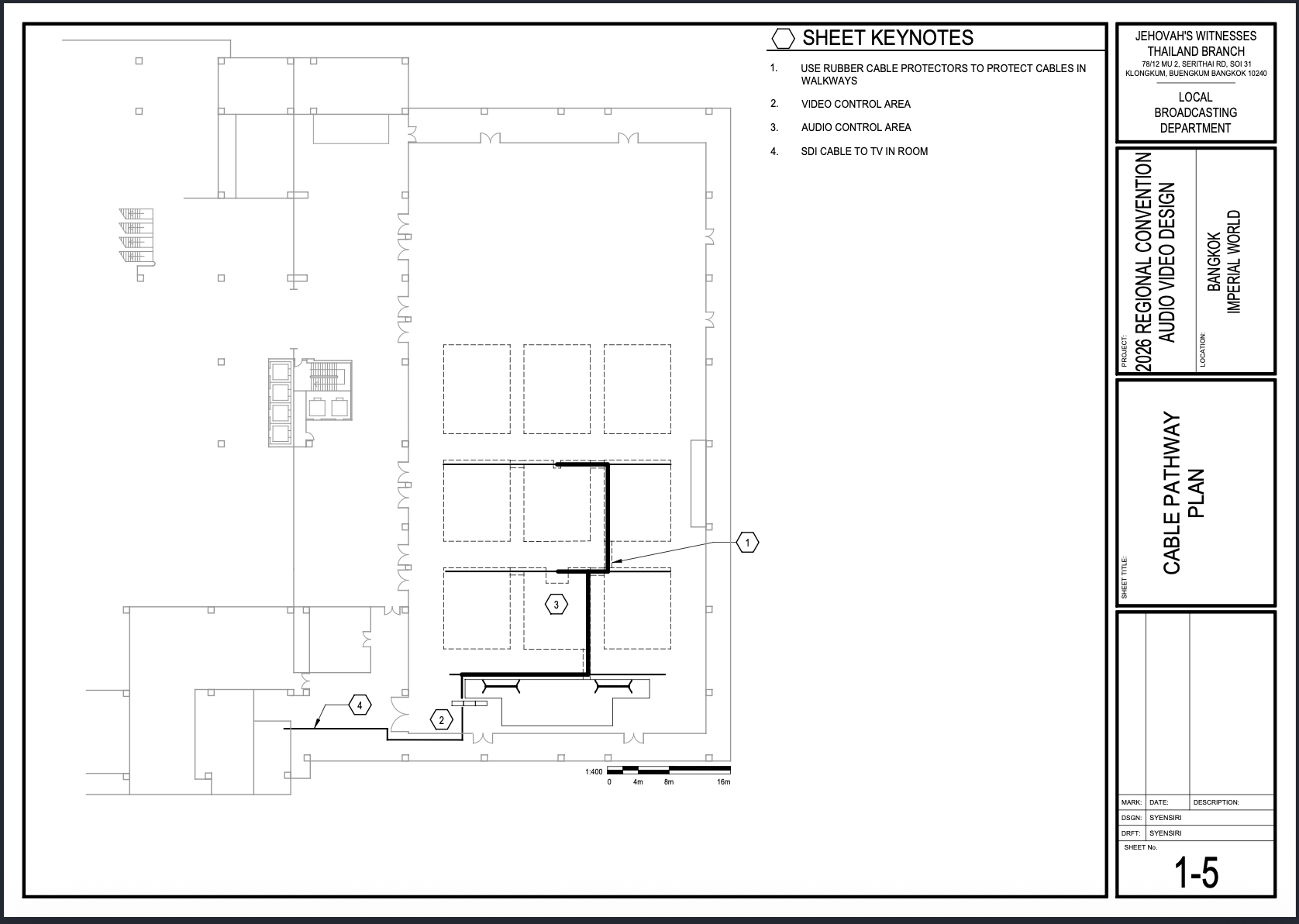
        铺设主音频蛇线Schematics: Schematics / 图纸 Page 1-5 Cable ViewPathway Photo / 查看图片 SCR-20260624-rdfr.png SCR-20260622-bfkd.png EnglishPlan
        • Pull the snake cable (AMC-1), aka snake cable, according to the Schematics.
        schematics. Start atfrom front stage left, close to the frontvideo stage-leftcontrol position,area, between [2]1] and [3]2].
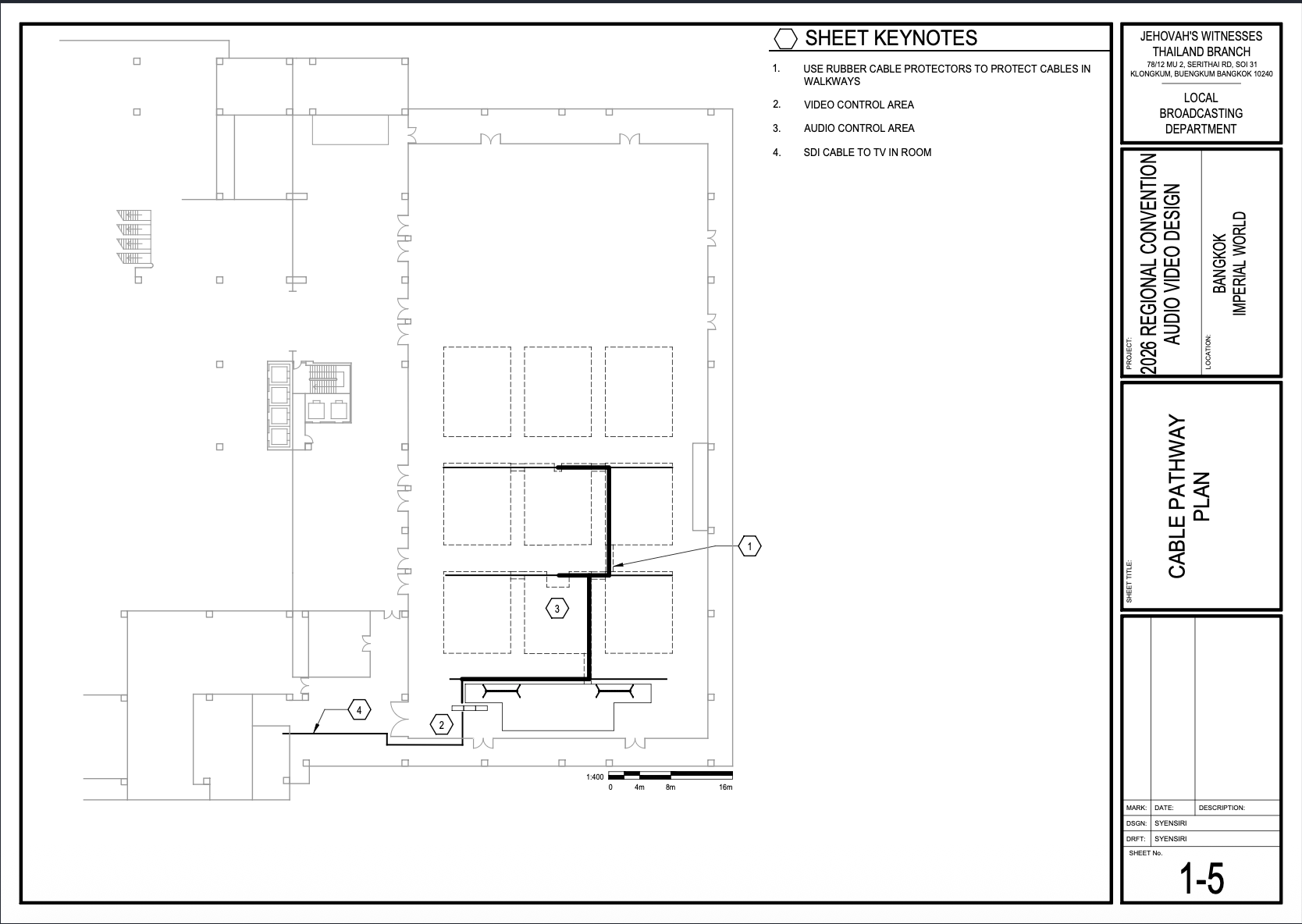
        🗺️ View Cable Pathway Plan (Page 1-5)
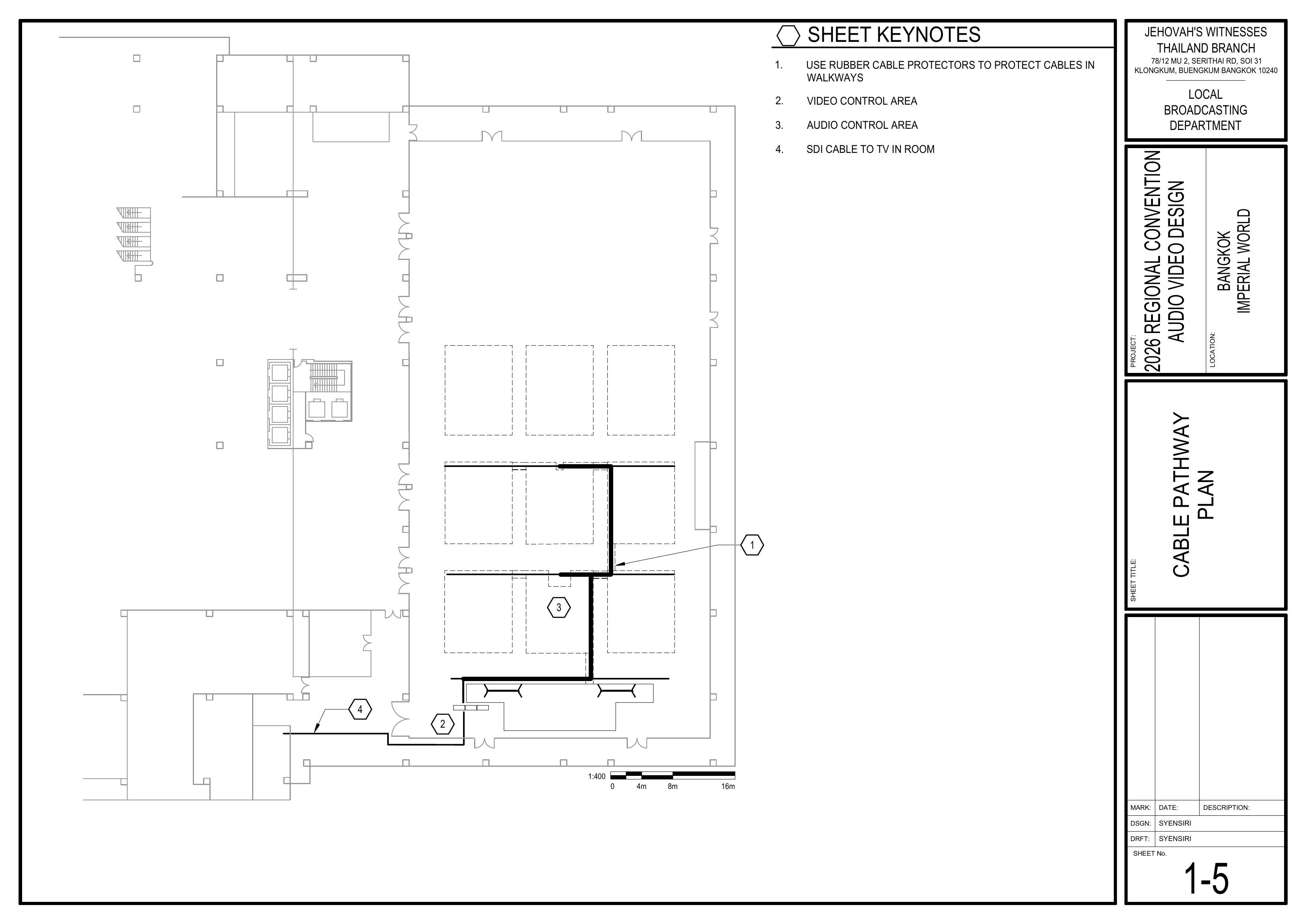
        1-5 Cable Pathway Plan showing cable routes, control areas, and walkway cable protection points / 电缆路径图,显示线缆路线、控制区域及走道线缆保护位置

        中文

          根据图纸铺设蛇线(AMC-1)。 从讲台前区左侧的位置开始,位于 [2] 和 [3] 之间。

          2. Install Speaker Cables
          /Schematics: 铺设扬声器线缆

          Schematics / 图纸

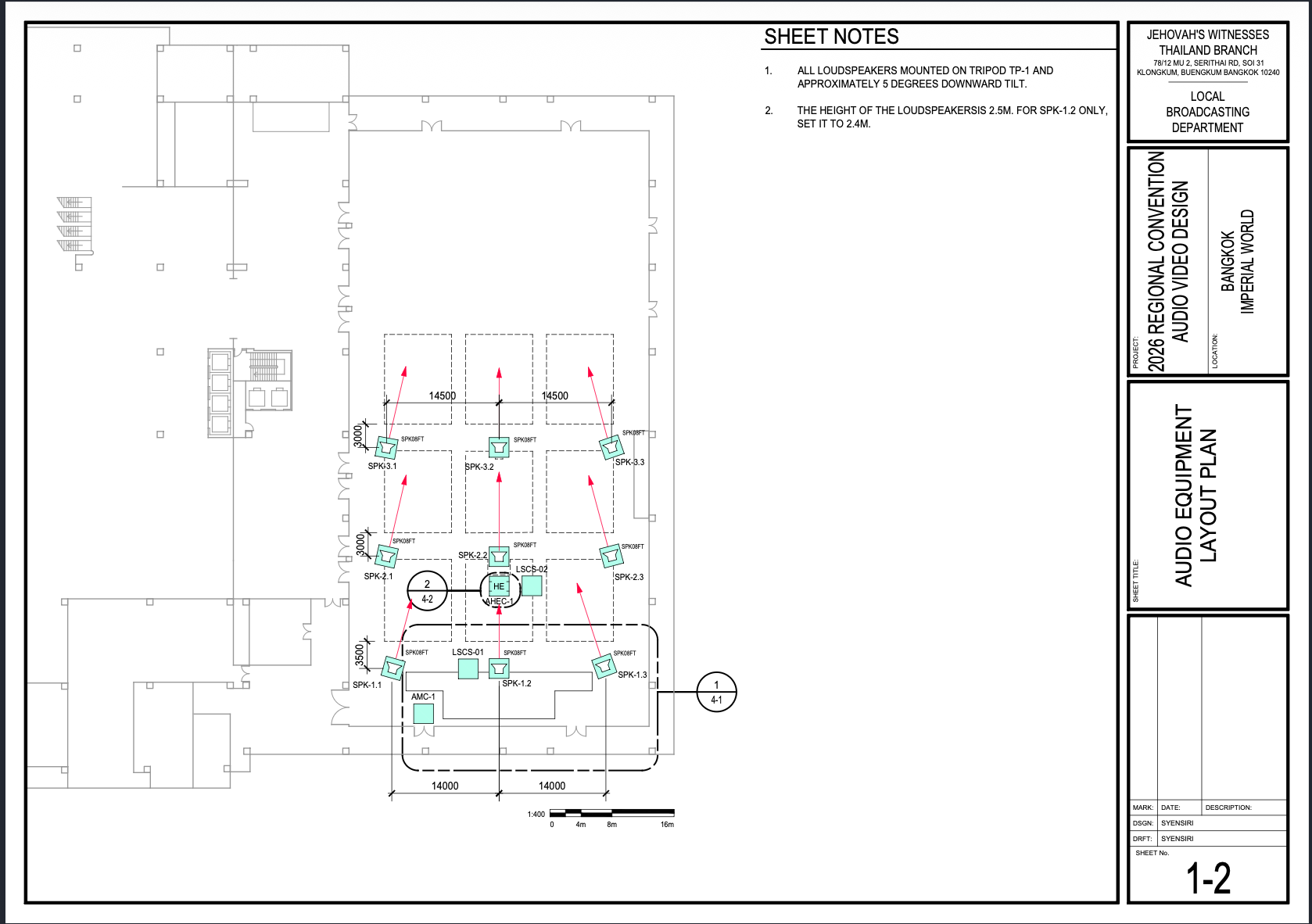
            Pages 1-2,2 Audio Equipment Layout Plan, 1-5,5 Cable Pathway Plan, 4-1 Stage
            ViewArea PhotosEquipment / 查看图片

            image.png

            image.png

            image.png

            EnglishLayout

            • Pull all speakerspeakon cables for speakers according to the Schematics.
            schematics. Connect eachspeaker loudspeakergroups group.1, 2, 3, and 4. Verify cable labels before connection.
            🗺️ View Associated Schematics (Pages 1-2, 1-5, 4-1)
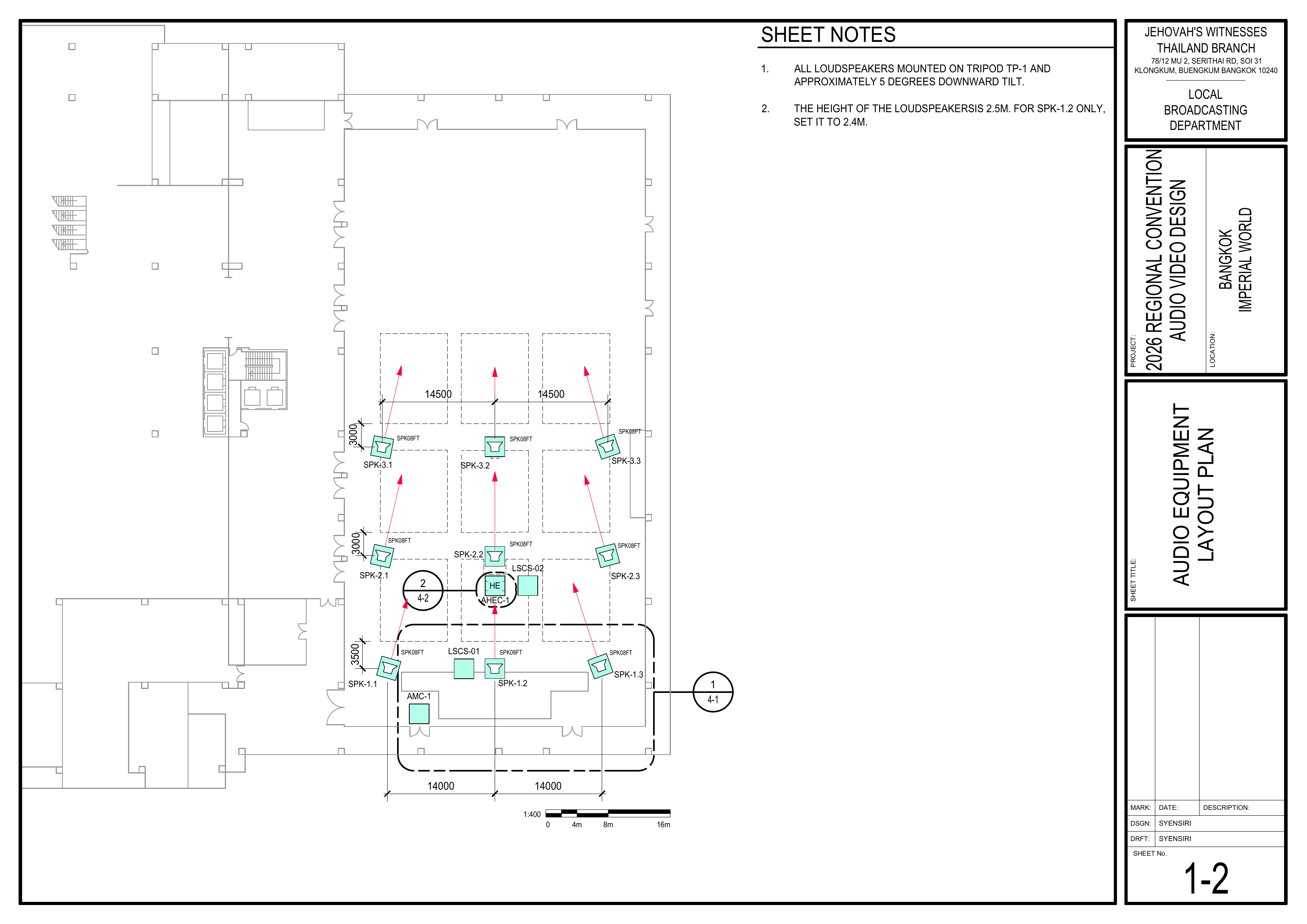
            1-2 Audio Equipment Layout Plan showing loudspeaker positions, audio headend, and sound coverage direction / 音频设备布局图,显示扬声器位置、音频主控设备及声音覆盖方向

            1-5 Cable Pathway Plan showing cable routes, control areas, and walkway cable protection points / 电缆路径图,显示线缆路线、控制区域及走道线缆保护位置

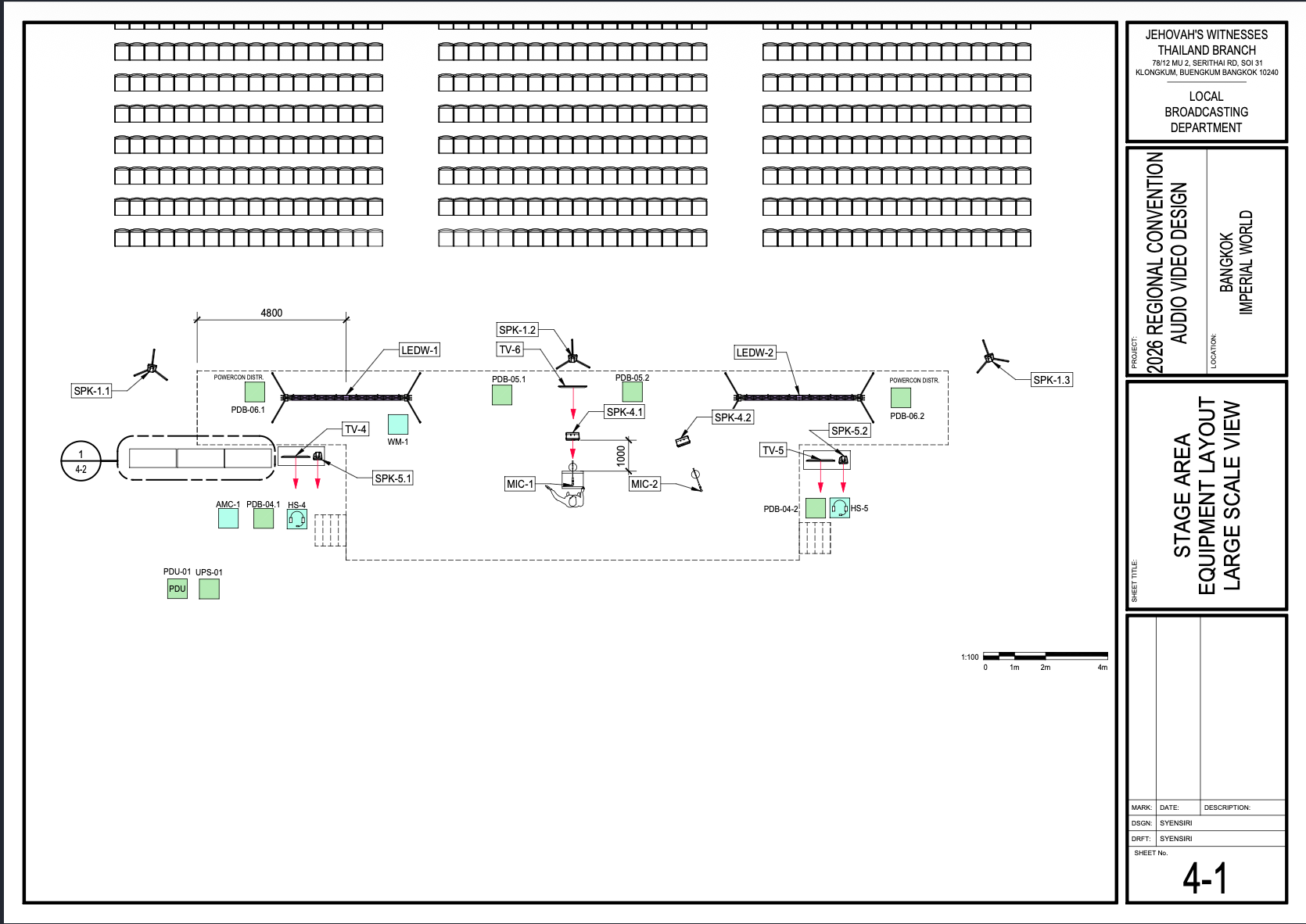
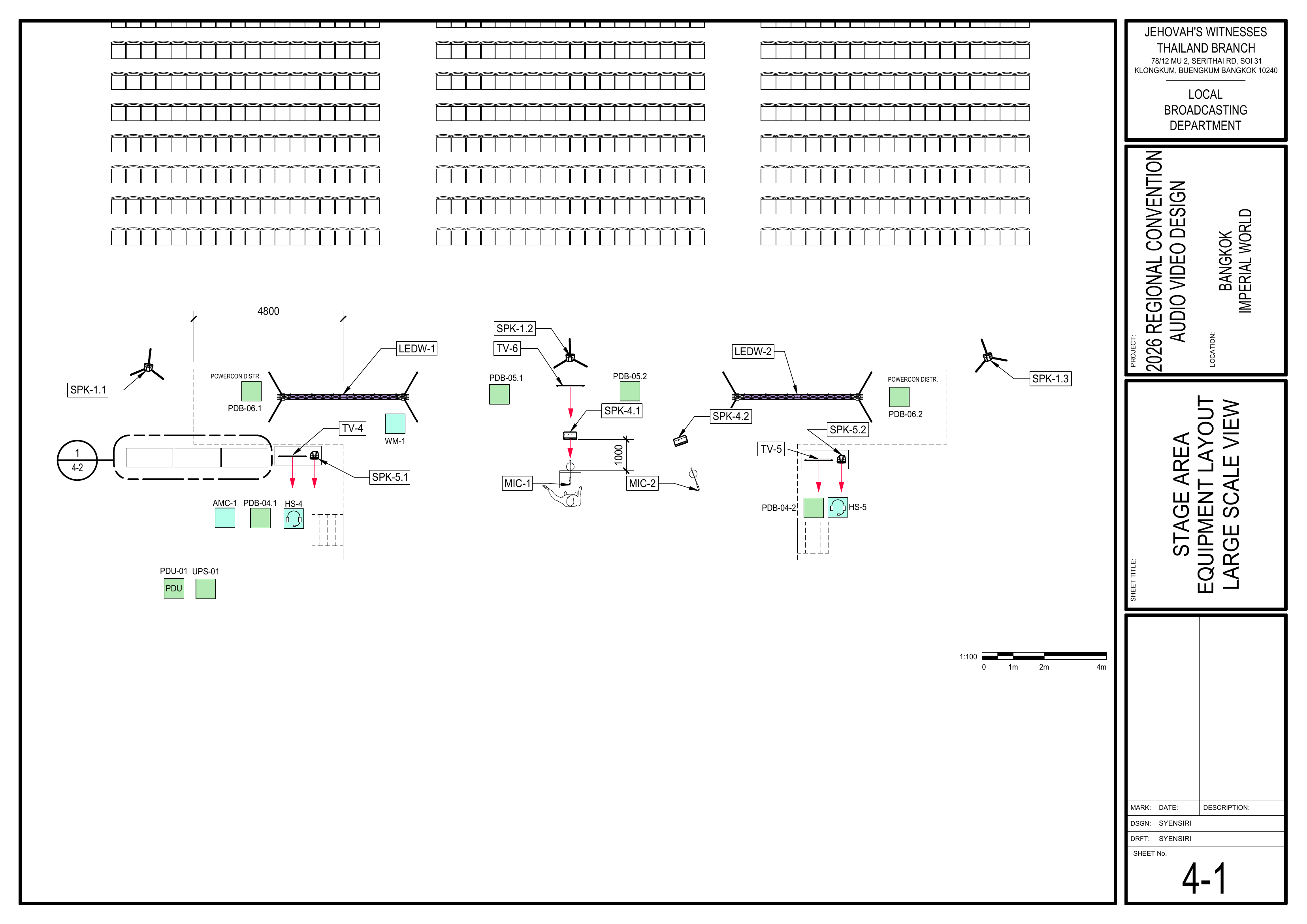
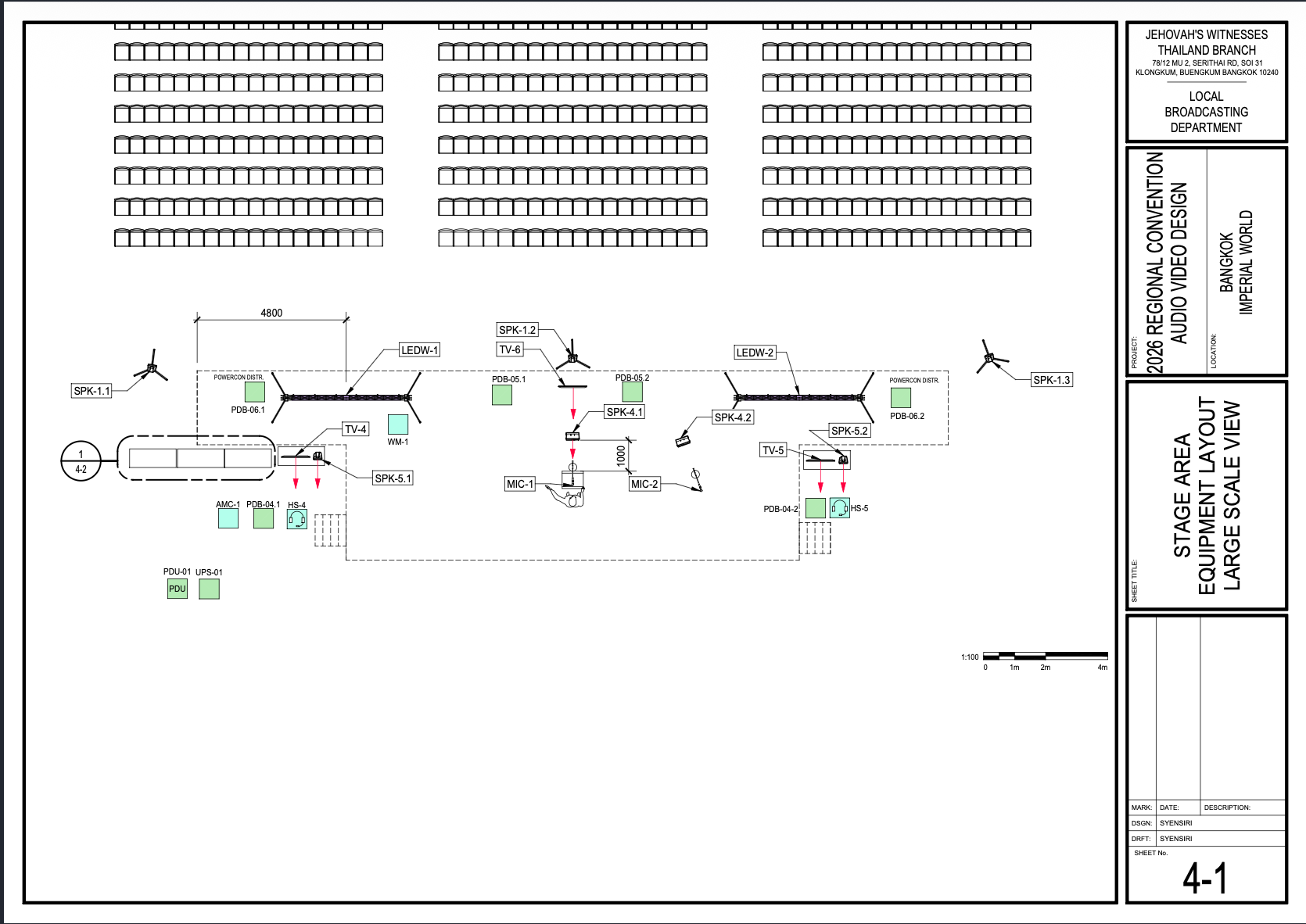
            4-1 Stage Area Equipment Layout Large Scale View showing microphones, speakers, monitors, LED walls, and power distribution around the stage / 舞台区域设备布局大比例图,显示麦克风、扬声器、显示器、LED 屏幕及舞台电源分配

            中文

              按照图纸铺设所有扬声器线缆。 连接各扬声器组。 连接前确认线缆标签正确。

              3. Protect Cabling
              /Schematics: 保护线缆

              Schematics / 图纸

                Pages 1-5,5 Cable Pathway Plan, 4-1 Stage
                ViewArea PhotoEquipment / 查看图片

                image.png

                image-1782094468409.png

                EnglishLayout

                • Use tape, carpet covers, orand floor cable channels (rubber covers) where required.
                required to cover and protect cables. Ensure all walkways remain safe. Use cable channels when crossing a walkway.walkway, and carpet covers for cables under chairs.

                中文🗺️ View Cable Protection Schematics (Pages 1-5, 4-1)
                  1-5 Cable Pathway Plan showing cable routes, control areas, and walkway cable protection points / 电缆路径图,显示线缆路线、控制区域及走道线缆保护位置
                  根据需要使用胶带、地毯压线盖或地面线槽(橡胶过线槽)固定和保护线缆。
                  确保所有通道保持安全畅通。线缆穿越通道时,必须使用线槽(过线槽)进行保护。
                  4-1 Stage Area Equipment Layout Large Scale View showing microphones, speakers, monitors, LED walls, and power distribution around the stage / 舞台区域设备布局大比例图,显示麦克风、扬声器、显示器、LED 屏幕及舞台电源分配

                  Completion Checklist / 完成检查表

                  • Snake cable installed / 主蛇线已铺设
                  • Speaker cables installed /(Groups 扬声器线缆已铺设1-4)
                  • Routing matches Schematics / 走线符合图纸schematics
                  • Cables protected /(tape 线缆已保护and covers secured)
                  • Walkways safe / 通道安全
                  • Keyman inspection completed / 负责人已检查确认

                  Dismantling /Procedure

                  拆卸

                  Procedure / 步骤

                  English

                    •  Wait for the department briefing and prayer 30 minutes after the program ends on Sunday before dismantling.
                   Gather all audio cabling.cabling and bring it to the designated area.  Remove carpet covers and floor channels. Gather all rugs used to hold down cabling too. Bring all equipment to the designated collection area. Confirm no cables remain in the seating area.  Note for team leader: Use the Bill of Materials (BOM) to cross off every box or case before it is brought to the truck:
                     AMC-1  ASC-01  CPS-1  CPS-3

                    🇨🇳 中文说明

                    中文目的
                    根据图纸安装、保护并标识所有音频线缆,为系统调试做好准备。

                    ⚠️ 安全与安装提示
                    • 保持通道畅通。
                    • 所有经过通道的线缆都必须加以保护。
                    • 固定线缆前确认走线路径。
                    • 安装提示: 铺设地毯压线盖时,先只用胶带固定一侧。等整体安装完成后再固定另一侧。

                    参考资料

                      • 收集所有音频线缆。完整图纸: 📎 完整 PDF 文件
                      • 移除地毯覆盖物和线槽。大会设备清单: 设备箱 AMC-1, ASC-01, CPS-1, CPS-3

                    所需设备箱

                      AMC-1: 包含 60 米主音频多芯线(蛇线),配有 24 个 XLR 输入和 8 个 XLR 输出及线盘。 将所有设备带到指定集合区域。ASC-01: 包含 XLR 音频线缆(5 米、10 米和 20 米长度)。 CPS-1: 包含 10 个 3 槽塑料地面线缆保护盖板和 10 个橡胶垫。 CPS-3: 包含用于保护线缆的地毯压线条。

                      安装步骤

                      1. 铺设主音频蛇线
                      图纸:1-5 电缆路径图

                        根据图纸铺设蛇线(AMC-1)。从讲台前区左侧(靠近视频控制区),位于 [1] 和 [2] 之间开始铺设。
                        🗺️ 查看电缆路径图(图纸 1-5)
                        1-5 Cable Pathway Plan showing cable routes, control areas, and walkway cable protection points / 电缆路径图,显示线缆路线、控制区域及走道线缆保护位置

                        2. 铺设扬声器线缆
                        图纸:1-2 音频设备布局图、1-5 电缆路径图、4-1 舞台区域设备布局图

                          按照图纸铺设所有扬声器线缆。连接第 1、2、3 和 4 组扬声器。连接前确认线缆标签正确。
                          🗺️ 查看相关图纸(图纸 1-2, 1-5, 4-1)
                          1-2 Audio Equipment Layout Plan showing loudspeaker positions, audio headend, and sound coverage direction / 音频设备布局图,显示扬声器位置、音频主控设备及声音覆盖方向

                          1-5 Cable Pathway Plan showing cable routes, control areas, and walkway cable protection points / 电缆路径图,显示线缆路线、控制区域及走道线缆保护位置

                          4-1 Stage Area Equipment Layout Large Scale View showing microphones, speakers, monitors, LED walls, and power distribution around the stage / 舞台区域设备布局大比例图,显示麦克风、扬声器、显示器、LED 屏幕及舞台电源分配

                          3. 保护线缆
                          图纸:1-5 电缆路径图、4-1 舞台区域设备布局图

                            根据需要使用胶带、地毯和线缆盖板覆盖并保护线缆。确保所有通道保持安全畅通。线缆穿越通道时必须使用橡胶过线槽进行保护,椅子下方使用地毯压线盖。
                            🗺️ 查看线缆保护相关图纸(图纸 1-5, 4-1)
                            1-5 Cable Pathway Plan showing cable routes, control areas, and walkway cable protection points / 电缆路径图,显示线缆路线、控制区域及走道线缆保护位置

                            4-1 Stage Area Equipment Layout Large Scale View showing microphones, speakers, monitors, LED walls, and power distribution around the stage / 舞台区域设备布局大比例图,显示麦克风、扬声器、显示器、LED 屏幕及舞台电源分配

                            完成检查表

                               主蛇线已铺设  第 1-4 组扬声器线缆已铺设  走线符合图纸  线缆已保护(胶带和盖板已固定)  通道安全  负责人已检查确认

                              拆卸步骤

                                 在星期日节目结束 30 分钟后,等待整个部门的简短会议和祷告后再开始拆除工作。  收集所有音频线缆并带到指定集合区域。  移除地毯覆盖物和地面线槽。收集所有用于固定线缆的地毯。  确认座位区域没有遗留线缆。
                                组长注意: 在将每个箱子或设备箱搬上卡车前,请使用物料清单 (BOM) 核对并划掉每一项:
                                   AMC-1  ASC-01  CPS-1  CPS-3