
Audio Cabling Setup / 音频线缆安装
🎤 Audio Cabling Team / 音频布线组
| Team / 小组 | Members / 成员 |
|---|---|
| Audio Cabling / 音频布线安装 | • Prasert 🔑 |
🇬🇧 English Instructions
Purpose
Install, protect, and label allthe audio multicore cable and main loudspeaker cabling according to the schematics before system commissioning.
⚠️ Safety & Installation Notes
• Keep walkways clear during installation.
• Protect all cables that cross walkways.
• Confirm the cable route before securing cables.
• Coordinate shared cable protection with the Video Cabling & TVs Team.
• When using carpet covers, secure one side first. Secure the other side after all audio and video cabling is finished.
Required References
- Full Drawing Set: 📎 Complete PDF
- Congregation Job Hazard Analysis (DC-85): 📁 Google Drive Folder
- Specific Schematics:
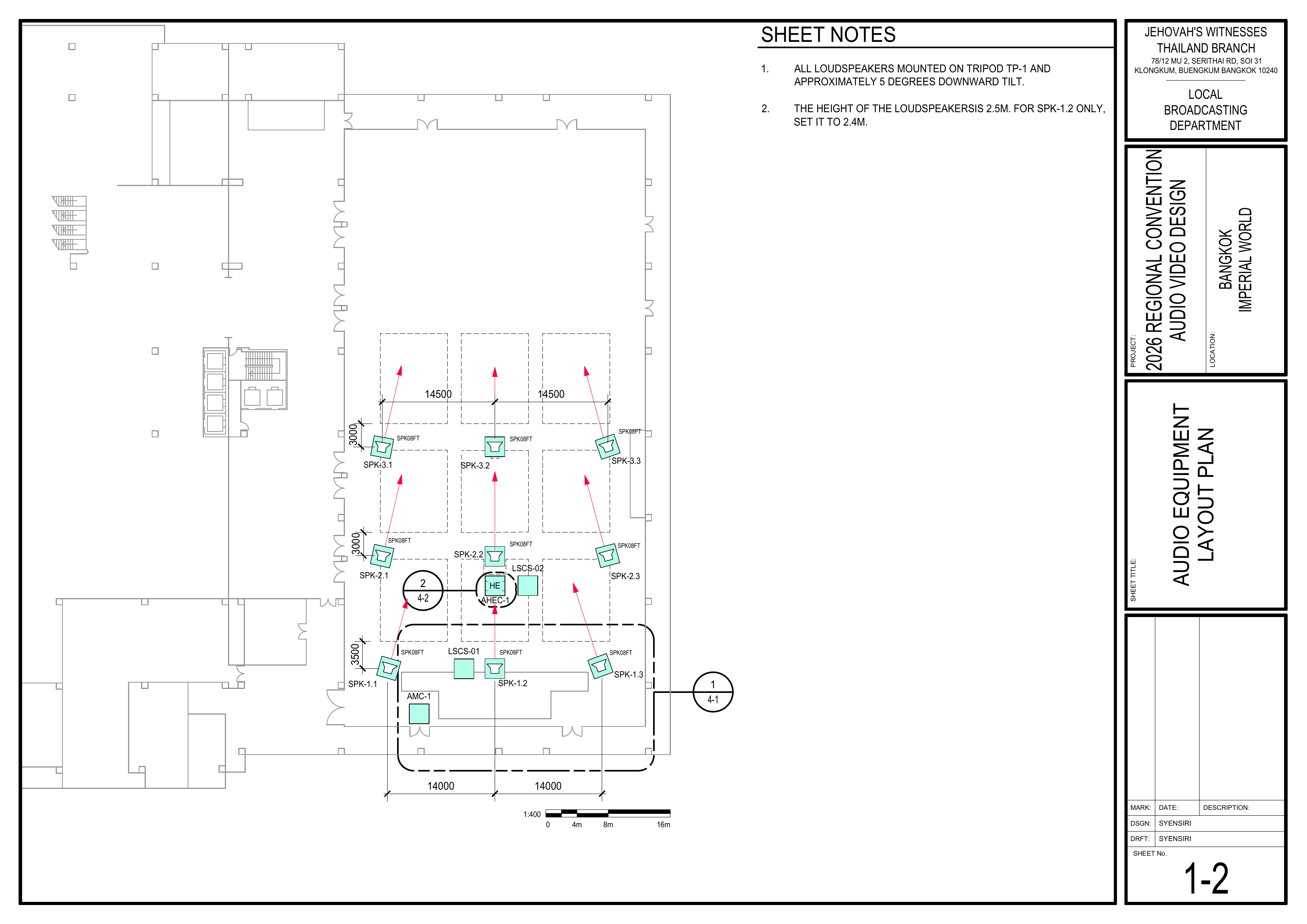
- 1-2 Audio Equipment Layout Plan
Required Equipment Cases
- AMC-1: Contains
athe 60 m audio multicore cable(alsowithknown24xasXLRainputssnakeandcable)8x XLR outputs on a reel. - ASC-01:
Contains2 sets are supplied for the event. Each contains XLR cables(5m,in10m,5 m, 10 m, and20m20lengths).m lengths. Coordinate with the Stage Team for stage XLR cable requirements. - CPS-1: Contains 10x 3-channel
plastic flapfloor cable protectors and 10x rubber mats. Coordinate use with the Video Cabling & TVs Team. - CPS-3: Contains carpet strips for covering cables. Coordinate use with the Video Cabling & TVs Team.
Setup Steps
1. Install the Audio Multicore Cable
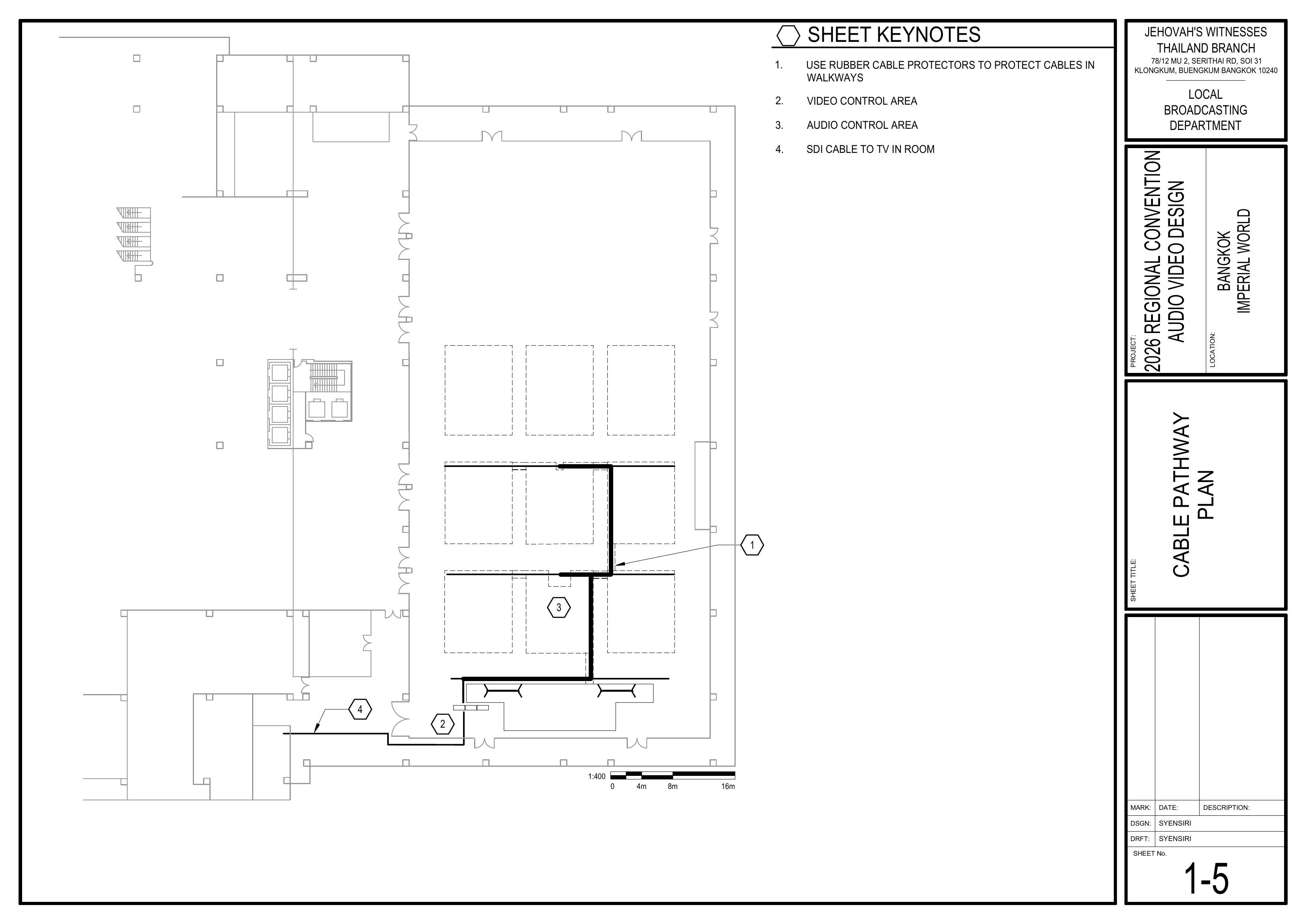
Schematics: Pages 1-2 Audio Equipment Layout Plan andPlan, 1-5 Cable Pathway Plan
- Route the audio multicore cable (AMC-1), also known as the snake cable, according to the schematics.
- Begin at the AMC-1 starting position at front stage left
(p.shown on Page 1-2),2.
🗺️ View AMC-1 Location and Cable Route (p.Pages 1-2, 1-5).
2. Install SpeakerMain Loudspeaker Cables — Groups 1–3
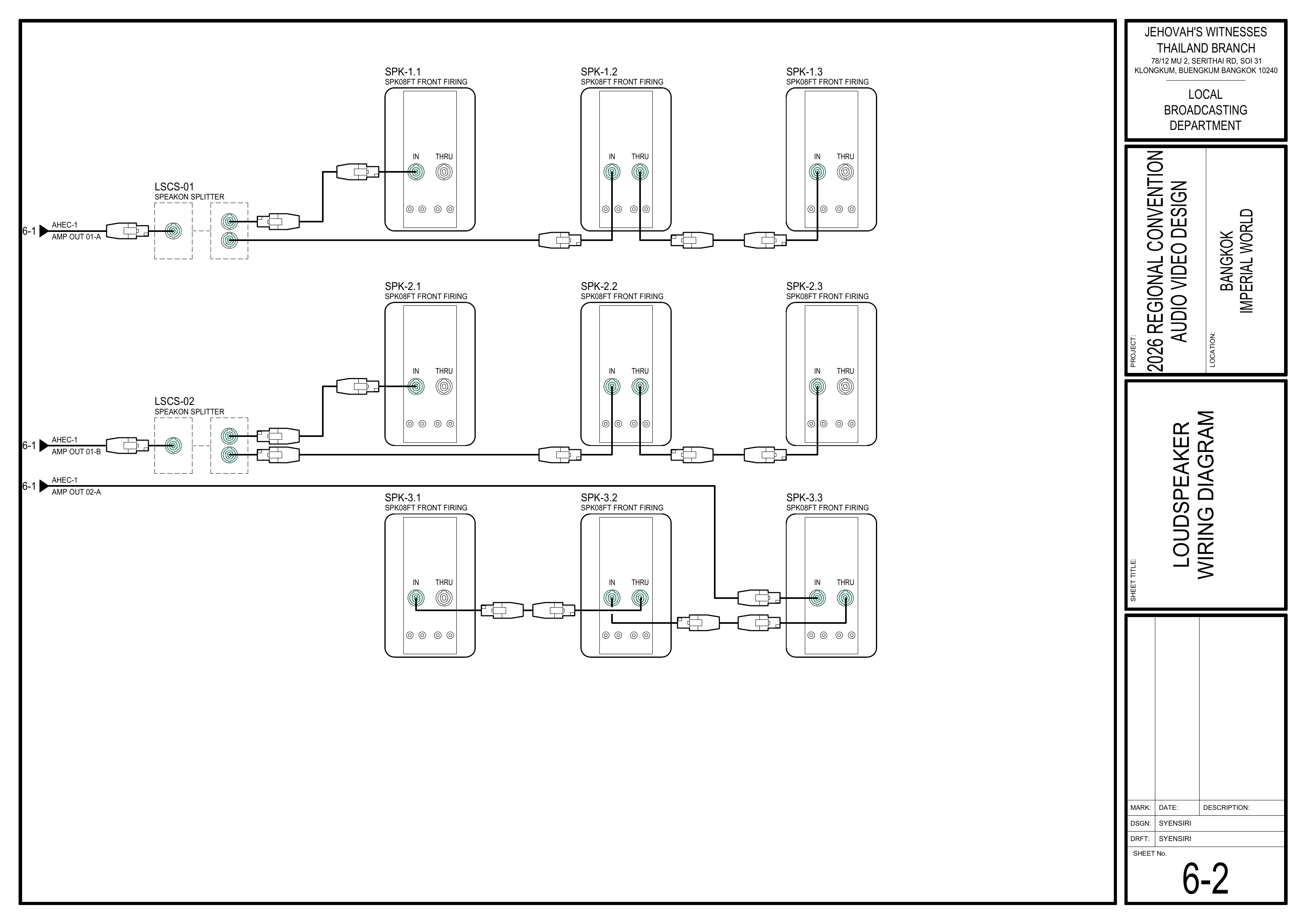
Schematics: Pages 1-2 Audio Equipment Layout Plan, 1-5 Cable Pathway Plan, 4-16-2 StageLoudspeaker AreaWiring Equipment LayoutDiagram
RouteCoordinateallwith the Loudspeakers Team before routing the main loudspeaker cables.
🗺️ View Main Loudspeaker Cabling Schematics (Pages 1-2, 1-5, 6-2)
3. Protect Cabling
Schematics: PagesPage 1-5 Cable Pathway Plan, 4-1 Stage Area Equipment LayoutPlan
- Use
tape, carpet covers, andfloor cablechannelsprotectors(where cables cross walkways.
🗺️ View Cable Pathway Schematic (Page 1-5)
4. Label and Final Check
Completion Checklist
- Audio multicore cable (AMC-1) installed
-
SpeakerGroups 1–3 loudspeaker cablesinstalledrouted
Dismantling Procedure
- Wait for the department briefing and prayer 30 minutes after the program ends on Sunday before dismantling.
-
GatherCoordinateall audio cabling and bring it towith thedesignatedLoudspeakersarea.Team before removing Groups 1–3 speakON cables.
- AMC-1
- ASC-01 ×2 — coordinate with the Stage Team
- CPS-1 — coordinate with the Video Cabling & TVs Team
- CPS-3 — coordinate with the Video Cabling & TVs Team
🇨🇳 中文说明
目的
根据图纸安装、保护并标识所有音频线缆,按照图纸铺设、保护并标识音频多芯线缆和主扩声扬声器线缆,为系统调试做好准备。
⚠️ 安全与安装提示
• 安装过程中保持通道畅通。
• 所有穿过通道的线缆都必须加以保护。
• 固定线缆前先确认走线路径。
• 与视频布线及电视组协调共用的线缆保护材料。
• 使用地毯盖板时,先固定一侧。等所有音频和视频布线完成后再固定另一侧。
参考资料
- 完整图纸: 📎 完整 PDF 文件
- 《会众工作危险性分析》(DC-85): 📁 Google Drive 文件夹
- 相关图纸:
- 1-2 音频设备布局图
所需设备箱
- AMC-1: 包含一条安装在线盘上的 60
米音频多芯线缆(也称“蛇线”)。米音频多芯线缆,设有 24 个 XLR 输入和 8 个 XLR 输出。 - ASC-01:
包含本次大会共提供XLR2音频线缆(套。每套包含 5 米、10 米和 20米长度)。米 XLR 音频线缆。讲台所需的 XLR 线缆请与讲台组协调。 - CPS-1: 包含 10
个 3 槽塑料地面线缆保护盖板和个三槽地面电缆盖板和 10个橡胶垫。块橡胶垫。使用时请与视频布线及电视组协调。 - CPS-3:
包含用于保护线缆的地毯压线条。包含用于覆盖线缆的地毯压线条。使用时请与视频布线及电视组协调。
安装步骤
1. 铺设音频多芯线缆
图纸:1-2 音频设备布局图和 音频设备布局图、1-5 电缆路径图
- 按照图纸铺设音频多芯线缆(AMC-1,也称“蛇线”)。
从讲台前区左侧、靠近视频控制区的从图纸 1-2 所示的讲台前区左侧 AMC-1 起点开始铺设。该位置位于
🗺️ 查看 AMC-1 起点及电缆路线(图纸 1-2, 1-5)
2. 铺设扬声器线缆铺设第 1–3 组主扩声扬声器线缆
图纸:1-2 音频设备布局图、1-5 电缆路径图、4-16-2 舞台区域设备布局图扬声器接线图
按照图纸铺设所有扬声器线缆:铺设主扩声扬声器线缆前,与扬声器组协调。
🗺️ 查看主扩声扬声器布线图纸(图纸 1-2, 1-5, 6-2)
3. 保护线缆
图纸:1-5 电缆路径图、4-1 舞台区域设备布局图电缆路径图
根据需要使用胶带、地毯和线缆盖板覆盖并保护线缆。确保所有通道保持安全畅通。线缆穿越通道时必须使用橡胶过线槽进行保护,椅子下方使用地毯压线盖。线缆穿过通道时使用地面电缆盖板。
🗺️ 查看电缆路径图(图纸 1-5)
4. 标识并进行最终检查
完成检查表
- 音频多芯线缆(AMC-1)已铺设
- 第
1-41–3 组扬声器线缆已铺设
拆卸步骤
- 在星期日节目结束 30 分钟后,等待整个部门的简短会议和祷告后再开始拆除工作。
-
收集所有音频线缆并带到指定集合区域。移除第 1–3 组 speakON 线缆前,先与扬声器组协调。 -
移除地毯覆盖物和地面线槽。收集所有用于固定线缆的地毯。移除共用的线缆保护材料前,先与视频布线及电视组协调。 -
确认座位区域没有遗留线缆。小心移除地毯盖板、橡胶垫和地面电缆盖板。
- AMC-1
- ASC-01 ×2 — 与讲台组协调
- CPS-1 — 与视频布线及电视组协调
- CPS-3 — 与视频布线及电视组协调