Video Cabling & TVs / 视频布线及电视视频布线及电视组
Keyman / 负责人• Keiichi 加藤圭一 🔑
Team Members / 小组成员
加藤姐妹 金娜
Crew Overseer / 小组监督
Tatsuo Shoji 庄子起央
🇬🇧 English Instructions
Purpose This section providesInstall the specificassigned setupTVs and dismantlingmonitors, instructions for the Video Cabling & TVs Team. This team is responsible for setting up displays around the venueroute and routingprotect the SDI video cablescables, toand them.verify that each display receives the correct video signal.
💡 TV Quantity — To Be Confirmed:
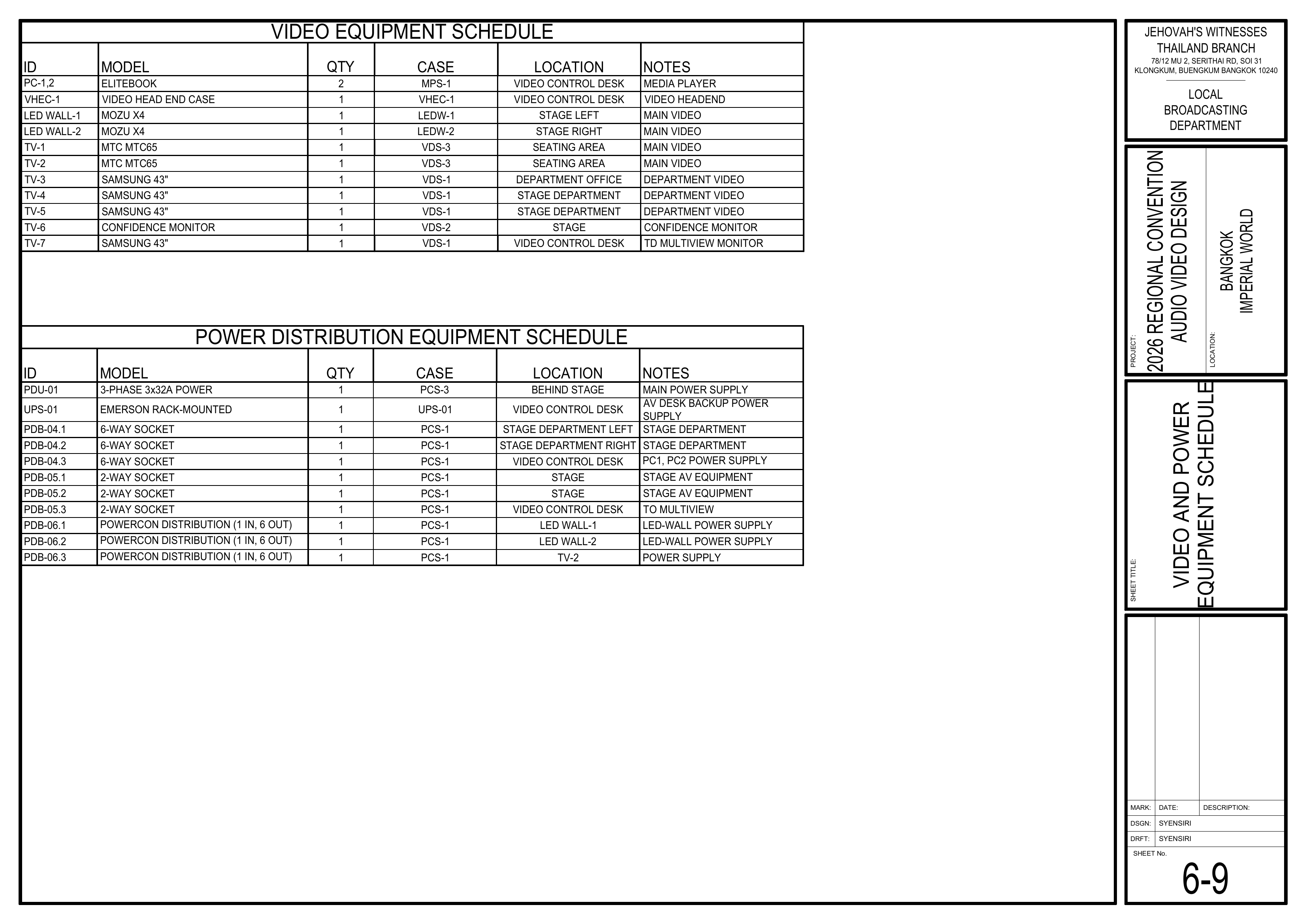
The schematics assign four 43" VDS-1 TVs:positions: TV-3, TV-4, TV-5, and TV-7. TheVDS-1 current BOM/Event Content List providescontains only 3x 43" TVs in VDS-1.TVs. Confirm the source and final assignmentallocation ofbefore distributing the additional 43" TV before VDS-1 equipment is distributedTVs between the Video Cabling & TVs Team and Video Booth Team.
Safety Notes
⚠️ SDI Cable Handling
• Handle SDI cables carefully and avoid sharp bends, kinks, or twisting.
• Do not run video signal cables directly parallel to power cables; cross power cables at right angles.
• Use cable protectors wherever cables cross walkways.
• Keep the attached Velcro with each SDI cable.
• Do not use your elbow to wind SDI cables.
Setup Steps
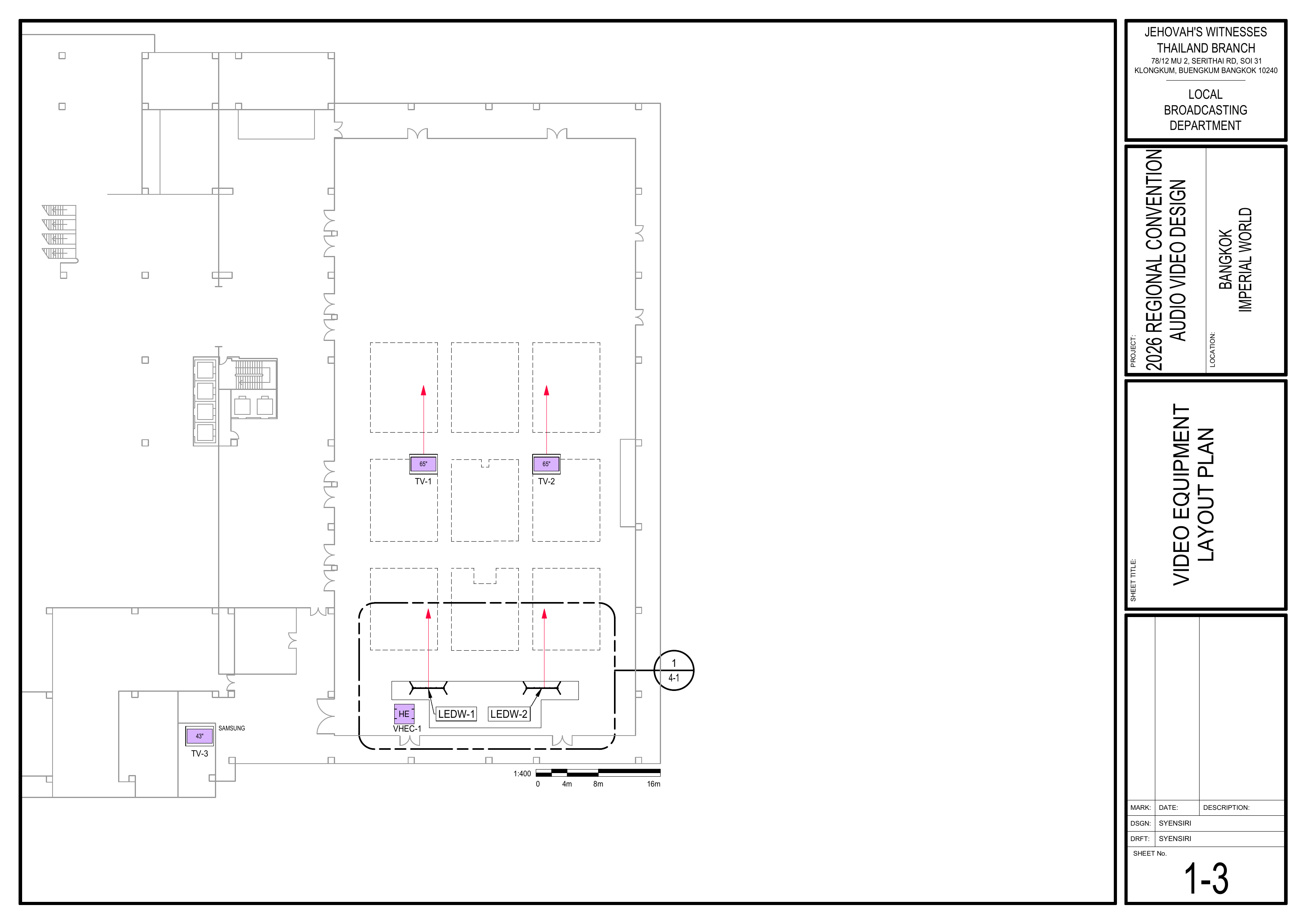
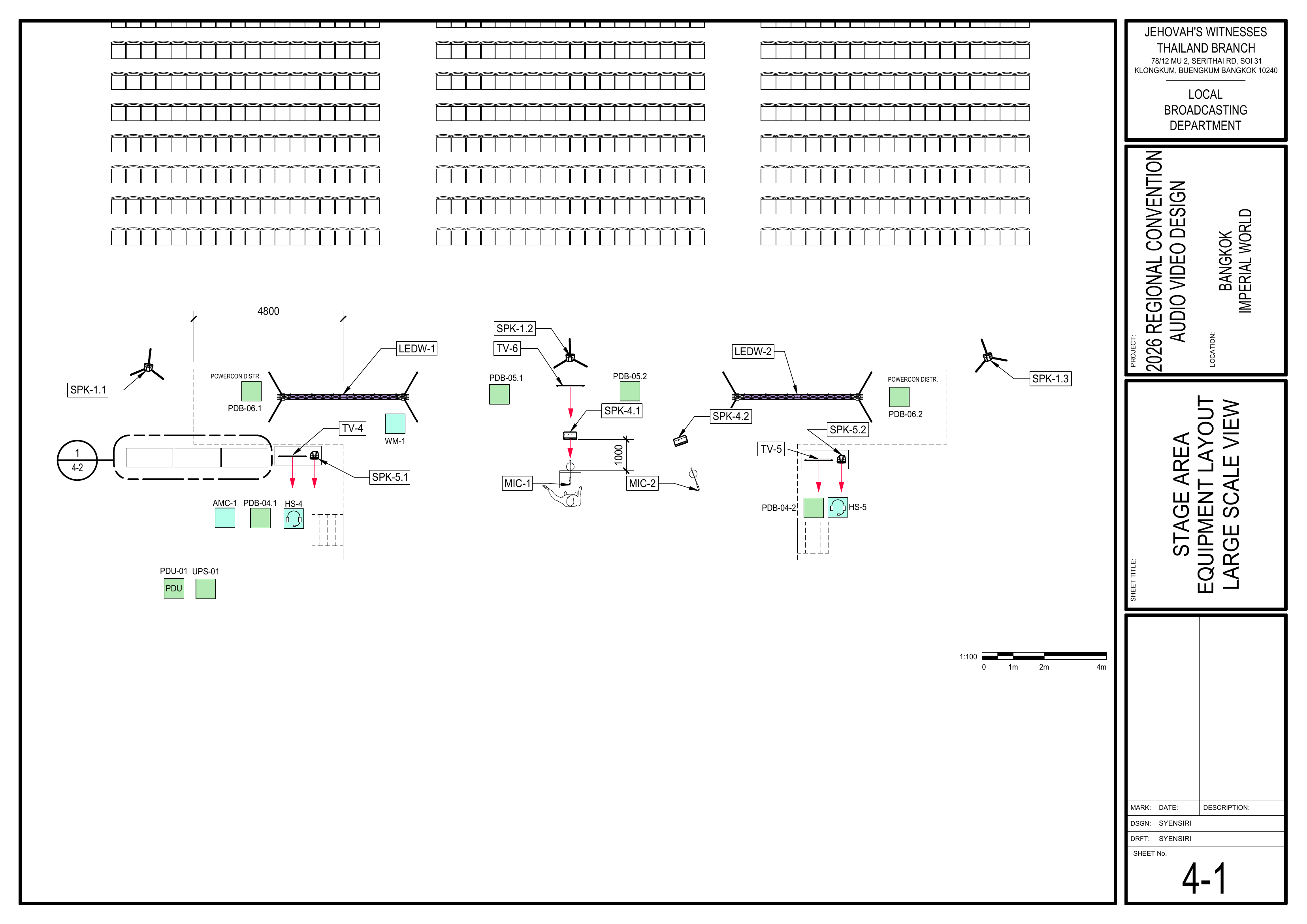
1. Install TVs and Monitors Schematics: Pages 1-3 Video Equipment Layout Plan, 4-1 Stage Area Equipment Layout Large Scale View, 6-9 Video and Power Equipment Schedule
Install the TVs and monitorsdisplays first so the teamexact SDI cable destinations can confirm the exact locations where SDI cables need to be pulled.
Confirm each display location before running cables.confirmed.
Install TV-1 and TV-2 in the seating area.
Install TV-3 in the Accounting Department.
Install TV-4 and TV-5 at the Stage Department positions.
Install TV-6 as the stage confidence monitor.
TV-7 is installedintended atfor the Video Control Desk and is handled by the Video Booth Team.Team, subject to final VDS-1 allocation.
Confirm the final allocation of the 43" VDS-1 TVs before distributing them between the two teams.them.
🗺️ View Display Location Schematics (Pages 1-3, 4-1, 6-9)
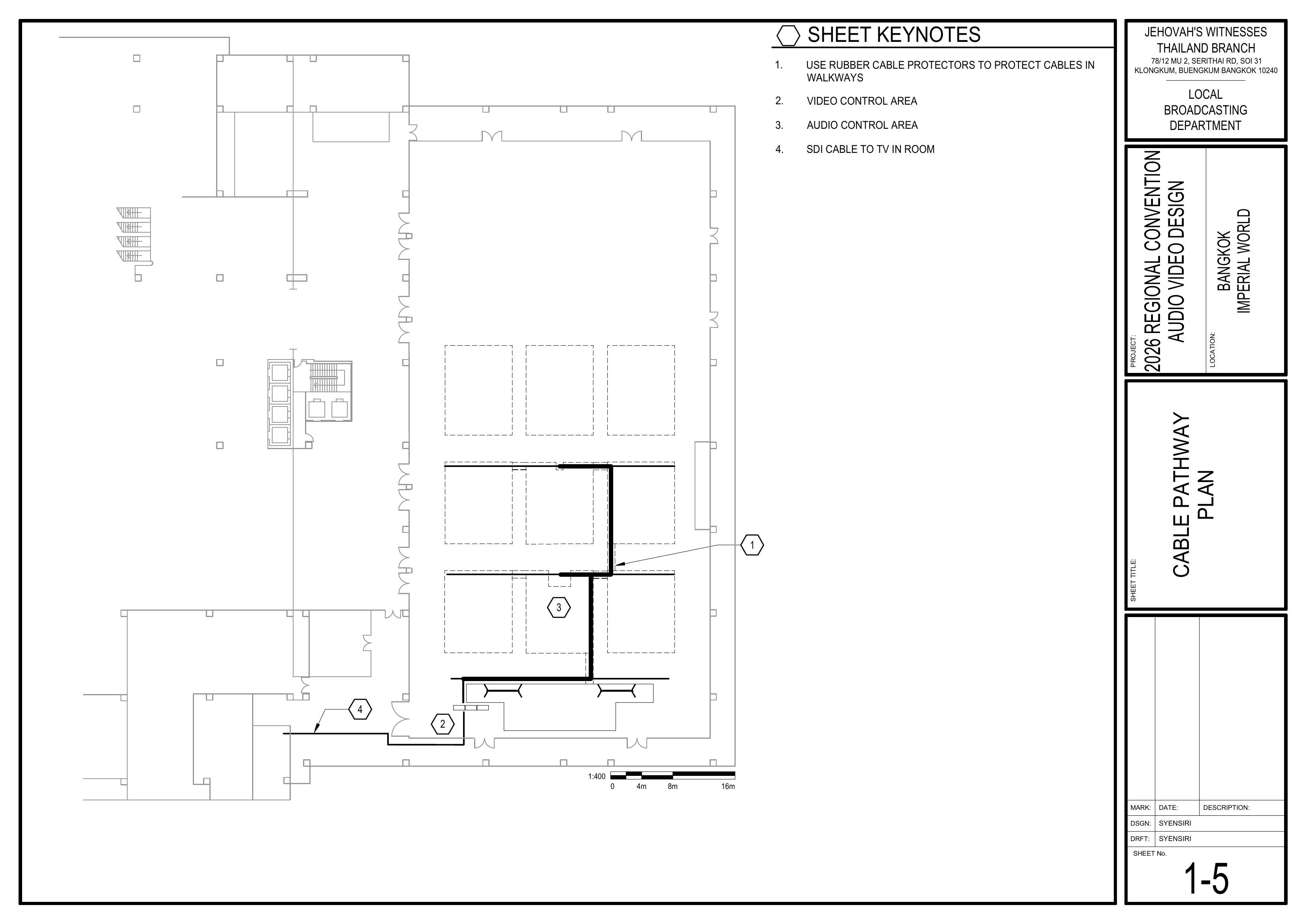
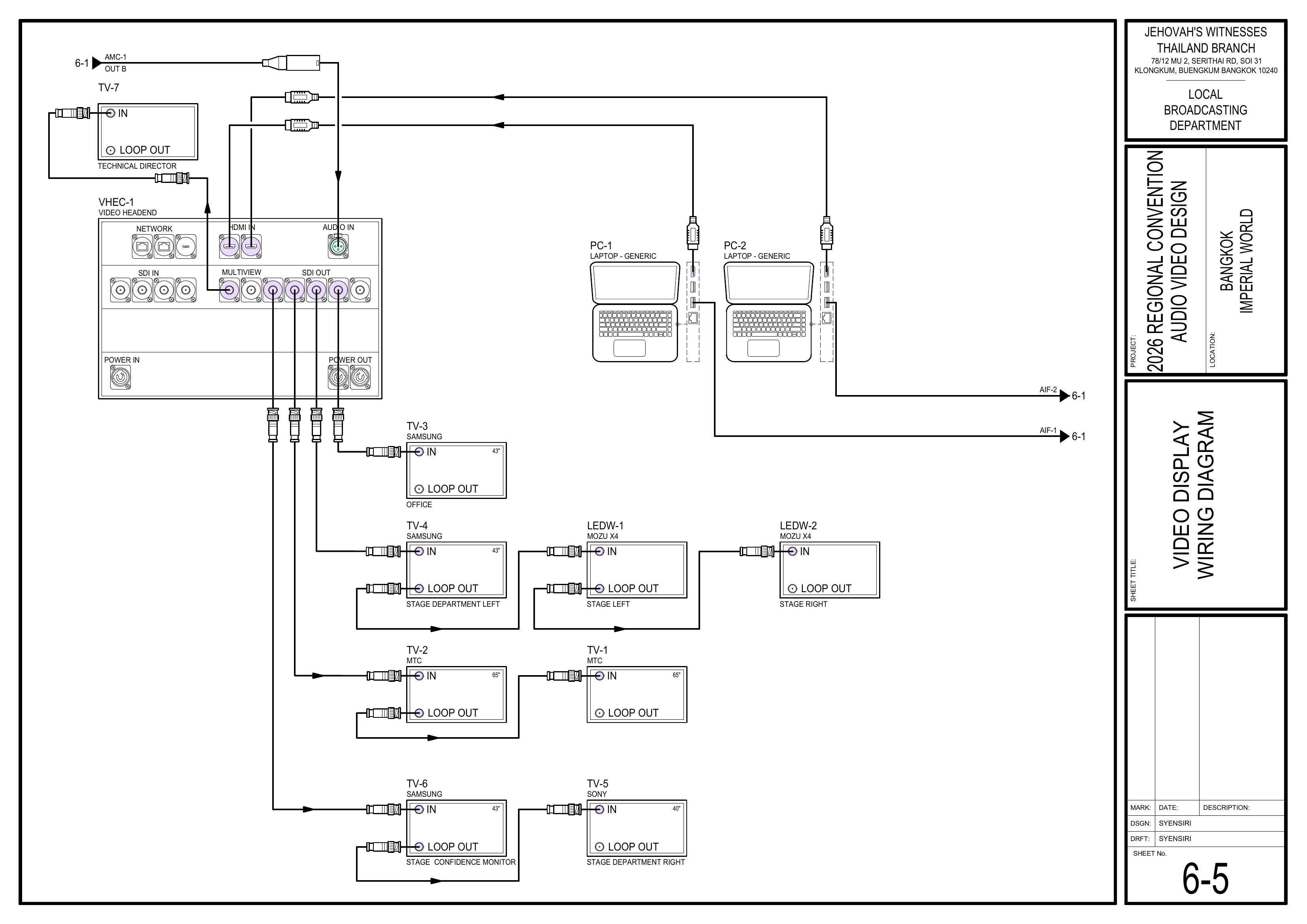
2. Pull and Route SDI Cables Reference: CO-160a, Chapter 4 — Video Signal Cables (VSC-1,2,3), pages 8–9 Schematics: Pages 1-3 Video Equipment Layout Plan, 1-5 Cable Pathway Plan, 6-5 Video Display Wiring Diagram
PullOpen the attached Velcro and routeunwind each SDI cable. Do not remove the Velcro from the cable.
Route SDI cables to the confirmed display locations according to the schematics.
When passing throughThrough the front-middle seating section, follow the route of the audio multicore cable (AMC-1).
KeepDo not run SDI cables neatdirectly andparallel avoidto crossingpower walkwayscables; unlesscross necessary.power cables at right angles.
Handle SDI cables carefully. Avoid sharp bends, kinks, and twisting.
Keep cables neat and away from walkways wherever possible.
Consider attaching a destination tag to each SDI cable identifying its destination if time permits.
🗺️ View Cable Routing Schematics (Pages 1-3, 1-5, 6-5)
Use rubberfloor cable protectors where cables cross walkways.
Use rubber mats or carpet covers forwhere cablesrequired running throughin seating areas.
Coordinate shared cable routes with the Audio Cabling TeamTeam.
soWhen sharedusing carpet covers, secure one side first.
After all audio and video cablecabling is finished, secure the remaining side.
Check all routes arefor protectedtrip neatly.hazards before completing the installation.
🗺️ View Cable Pathway Schematic (Page 1-5)
4. Secure Cabling
Wait until both the Audio Cabling Team and Video Cabling & TVs Team have finished pulling cables before fully securing shared cable routes.Secure cables neatly using the appropriate tape, carpet covers, rubber mats, or cable protectors.When using carpet covers in seating areas, secure one side first. Secure the other side after the entire installation is finished.Recheck all cable routes for trip hazards before completing the installation.
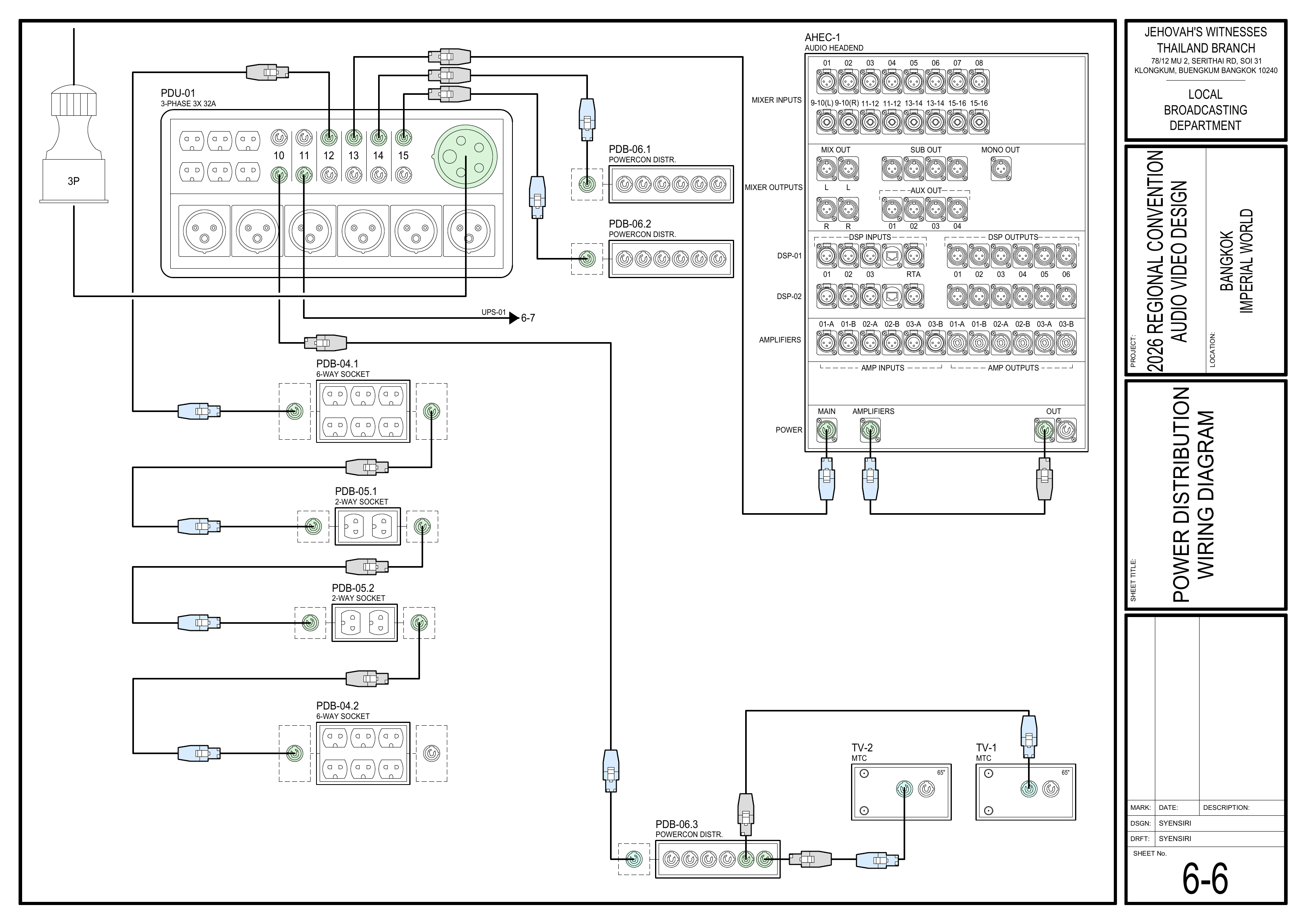
5. Connect Power and Verify Displays Schematics: Pages 6-5 Video Display Wiring Diagram, 6-6 Power Distribution Wiring Diagram
Coordinate with the Power Distribution Team before connecting or powering on displays.
Connect the required display power after the Power Distribution Team confirms that power is ready.
Coordinate with the Video Booth Team to confirm that the correct video signal reaches each display.
Confirm that all installed displays operate correctly and show a stable picture.
Correct any cabling, display, or signal issue before completing setup.
🗺️ View Display Wiring and Power Schematics (Pages 6-5, 6-6)
Completion Checklist
Final allocation of the 43" VDS-1 TVs confirmed
TV-1Assigned TVs and TV-2monitors installed in the seating area
TV-3 placed in the Accounting Department TV-4 and TV-5 installed at the Stage Department positions TV-6 confidence monitor installed TV-7 allocation coordinated with the Video Booth Team
SDI cables pulledrouted to confirmedthe correct display locations
SDI routecables followshandled theaccording audioto multicoreCO-160a
SDI and power cable (AMC-1)routes throughseparated thewhere front-middle seating sectionpossible
Walkway cablescrossings protected with rubber cable protectors
Seating-area cablescabling protected withwhere carpet coversrequired
CablingShared cable routes secured after both audio and video cabling arewere completed
Display power connected after confirmation from the Power Distribution TeamVideoCorrect video signal verified at all installed displays
withtheWalkways Videoand Boothcable Teamroutes safe
Keyman inspection completed
Dismantling Procedure
Wait for the department briefing and prayer 30 minutes after the program ends on Sunday before dismantling.
Carefully power down the displays.
Disconnect all SDI and power cables from the displays.Remove cable protectors, rubber mats, and carpet covers carefully.
CoilBring all Video Cabling & TVs Team displays, cables, cable-protection materials, and accessories to the designated equipment area for inventory.
Wind SDI cables carefully, allowing each cable to follow its natural shape.
Avoid Do not use your elbow to wind SDI cables; avoid sharp bends, kinks, and twisting.
LabelSecure cableseach asSDI neededcable beforewith packing.its attached Velcro.
GatherKeep allthe displays,work cables,area and cable-protection materials and bring themclear to theavoid designatedtrip area.hazards while coiling cables.
NoteCheck the installation areas for teamany leader:forgotten Use the Bill of Materials (BOM) to cross off every boxequipment or casematerials.
beforeitKeyman isconfirms all team materials have been brought to the truck:inventory