
Stage Layout Setup / 讲台布局安装
🎭 Stage Team / 讲台组
Team Information / 小组信息
| Item / 项目 | Information / 信息 |
|---|---|
| Team / 小组 | Stage Setup / 讲台安装 |
| Keyman / 负责人 | Tomohiro 木田智宏 🔑 |
| Team Members / 小组成员 | Chloe 金素螺 Sayako Kazue Shoji Daphne |
| Crew Overseer / 小组监督 | Liu Shan 刘善 |
🇬🇧 English Instructions
Purpose
Prepare the stage area, install the SPK-4 and SPK-5 loudspeaker groups, route and protect stage audio cables, position microphones, mark participant positions, and confirm the stage is ready for testing and walk-throughs.
Required References
- Full Drawing Set: 📎 Complete PDF
- Congregation Job Hazard Analysis (DC-85): 📁 Google Drive Folder
- CO-160a: 📎 CO-160a — Chapter 3, Audio Signal Cables (ASC-xx), pages 7–8
- Specific Schematics:
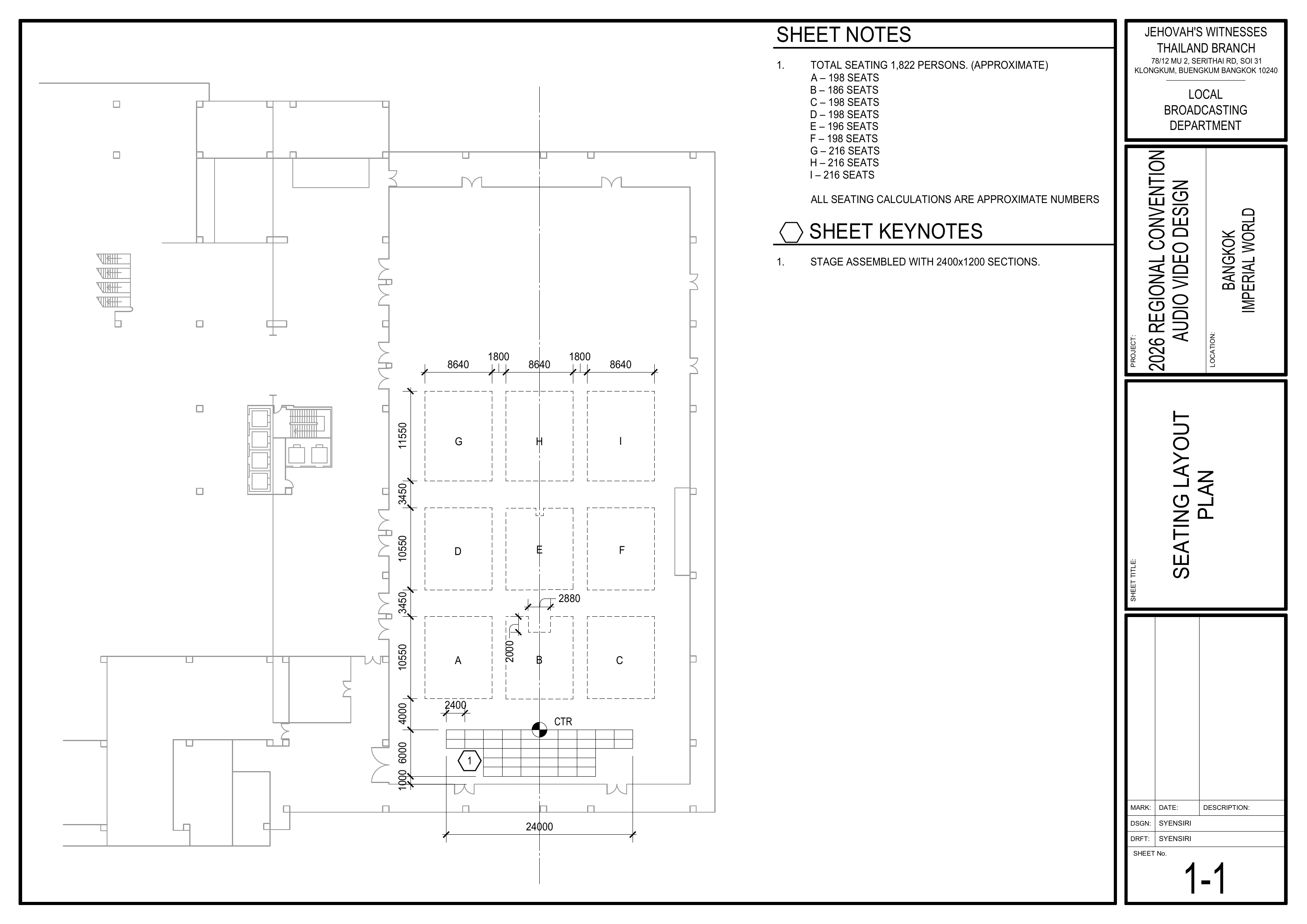
- 1-1 Seating Layout Plan
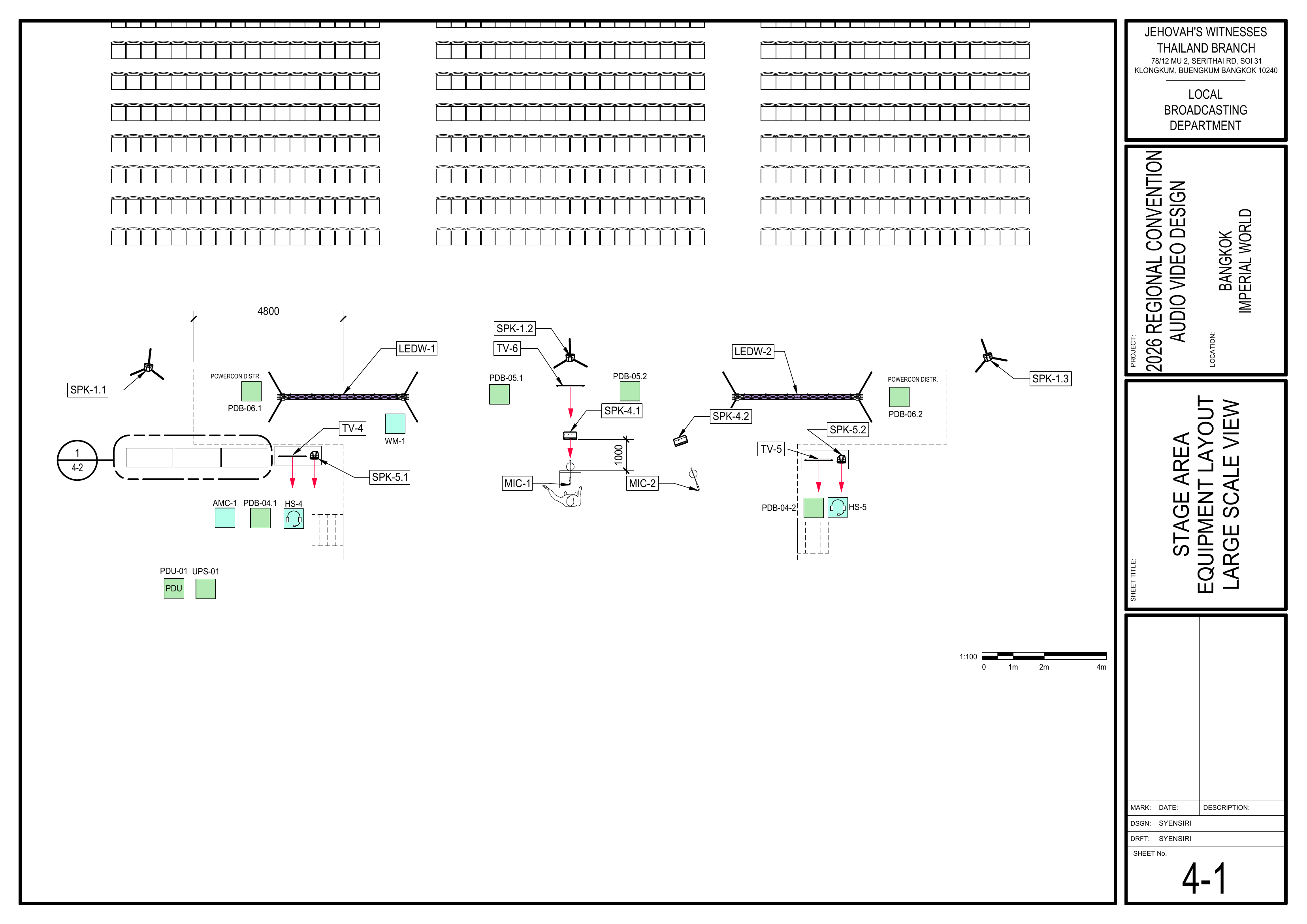
- 4-1 Stage Area Equipment Layout Large Scale View
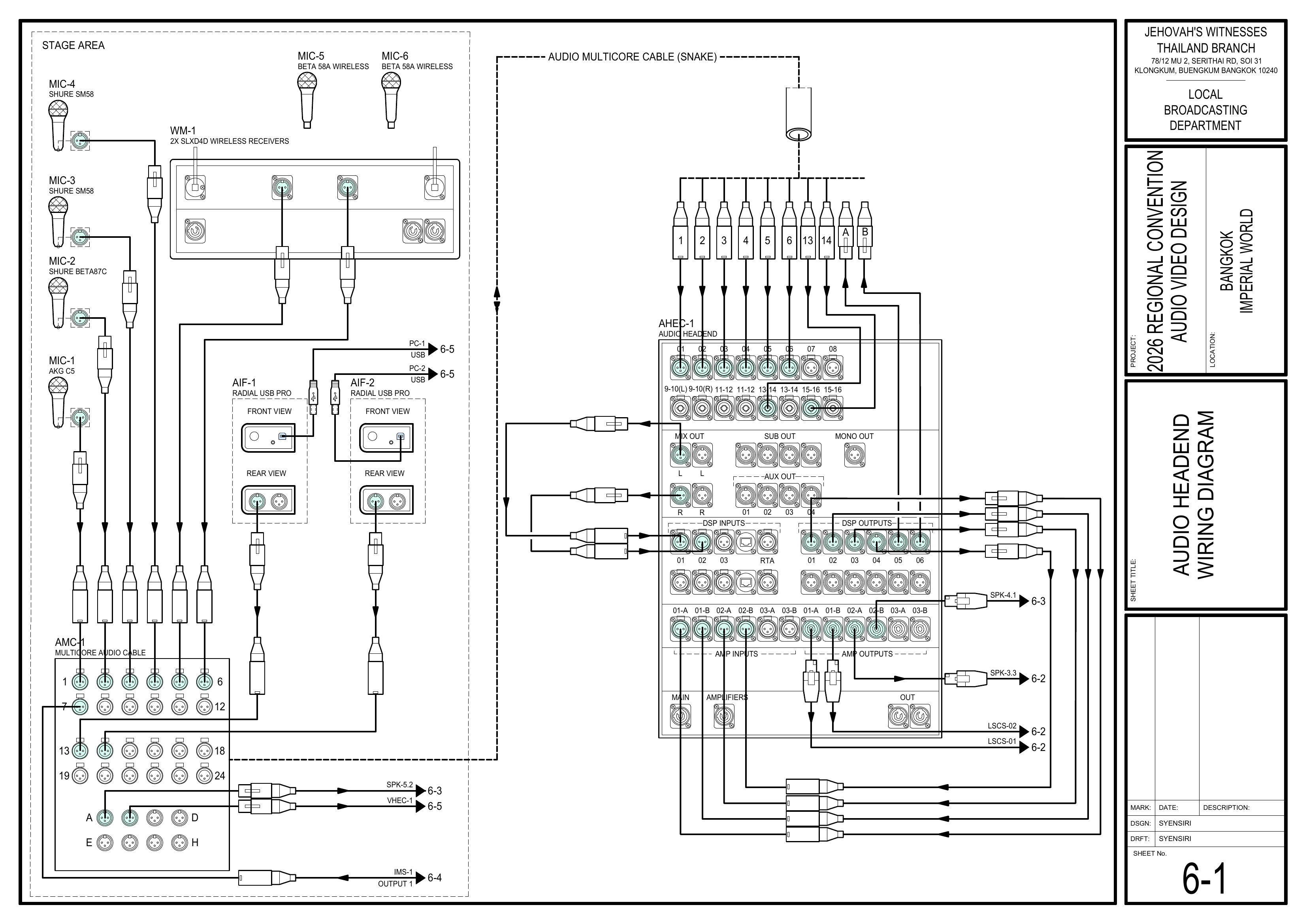
- 6-1 Audio Headend Wiring Diagram
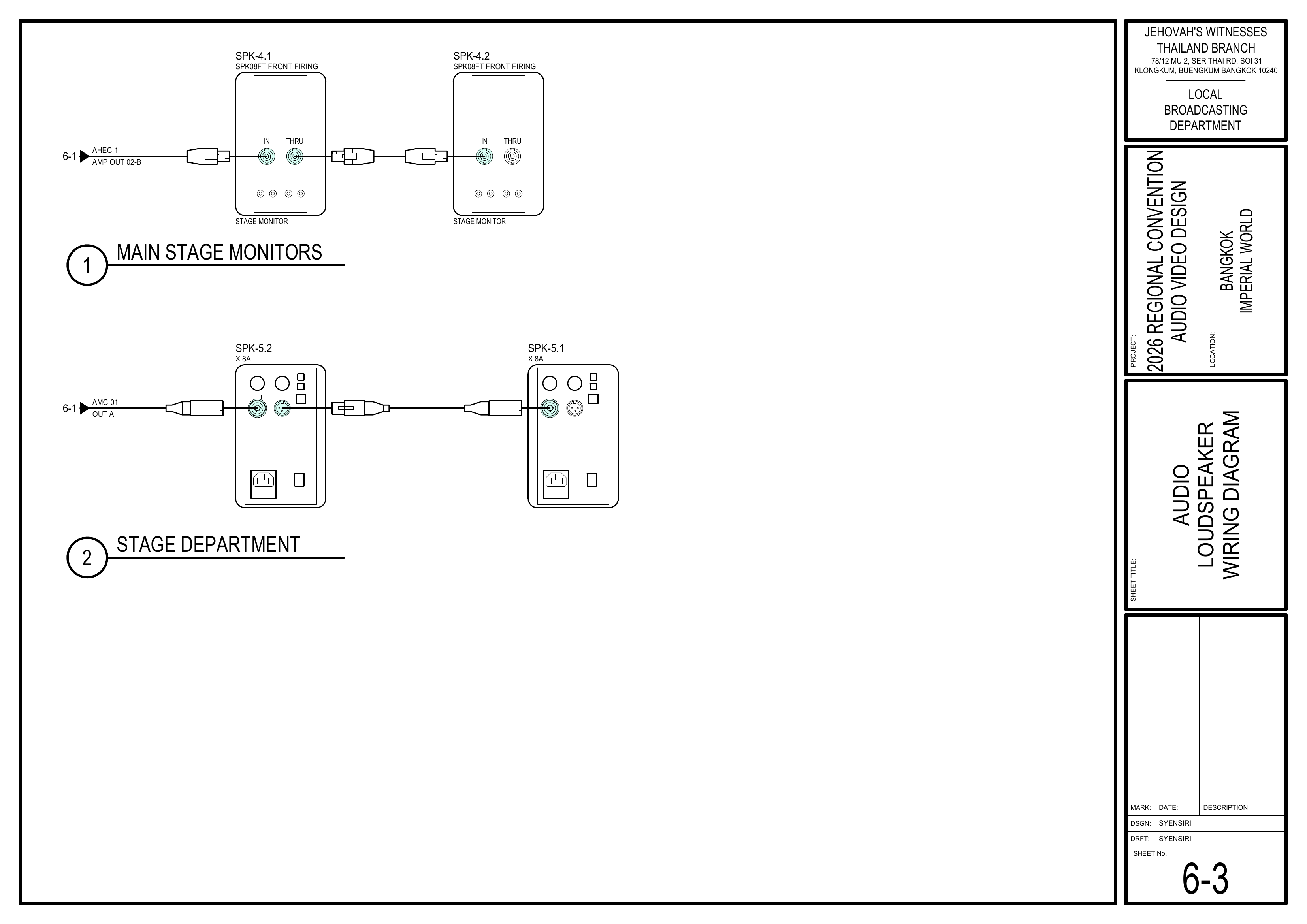
- 6-3 Audio Loudspeaker Wiring Diagram
- 6-8 Audio Equipment Schedule
- Event Content List: Cases MS-1, ASC-01, WM-1, PLS-1 (SPK-4.1 and SPK-4.2), ALS-4
🗺️ View Stage Schematics (Pages 1-1, 4-1, 6-1, 6-3, 6-8)
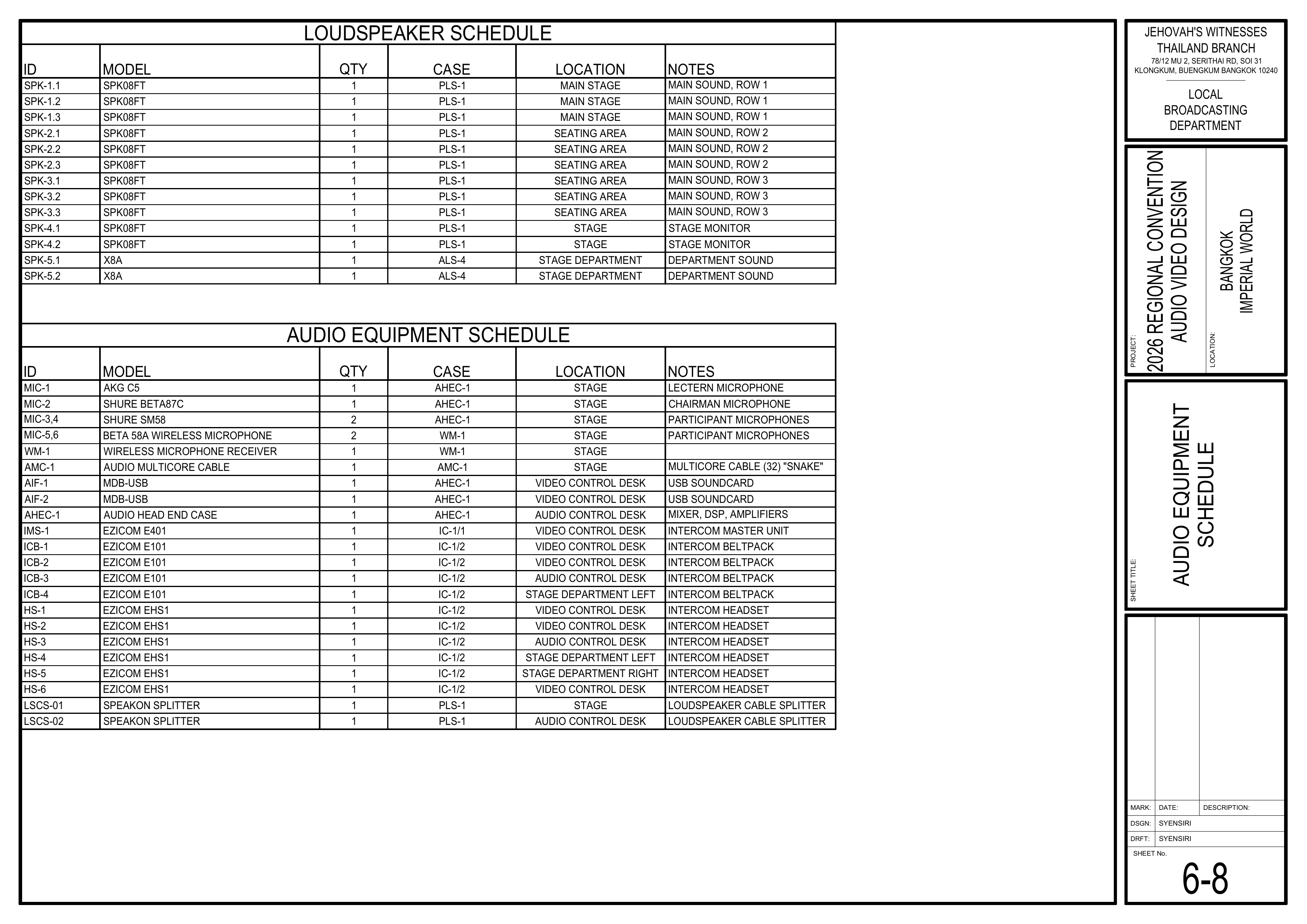
Required Equipment Cases
- MS-1: 6 manual floor microphone stands with adjustable booms.
- ASC-01: XLR audio cables in 5 m, 10 m, and 20 m lengths. Shared with the Audio Cabling Team.
- WM-1: 1 SHURE SLXD4D dual receiver and 2 SHURE BETA 58A handheld wireless microphones (MIC-5 and MIC-6). The Power Distribution Team handles receiver setup and synchronization; the Stage Team coordinates placement and use.
- PLS-1: Contains SPK-4.1 and SPK-4.2. The Stage Team installs these two stage monitor loudspeakers.
- ALS-4: Contains SPK-5.1 and SPK-5.2.
- AHEC-1 — Shared Equipment: Wired lectern and participant microphones are stored inside AHEC-1.
- Local Equipment: Stage clock and megaphone.
Safety Notes
⚠️ Safety & Cable Handling
• Keep participant walkways clear and protect cables wherever they cross a walkway.
• Where possible, do not run XLR audio cables directly parallel to power cables; cross power cables at right angles.
• Make sure connected equipment is switched off before connecting XLR audio cables.
• Keep the attached Velcro with ASC-01 cables and do not use your elbow to wind them.
• Connect the XLR cable before installing a microphone on a boom or stand.
• Keep liquids away from equipment.
Setup Steps
1. Prepare the Stage
Schematics: Pages 1-1 Seating Layout Plan, 4-1 Stage Area Equipment Layout Large Scale View
- First: Assist the Loudspeakers Team with chair measurements, including loudspeaker positions, stage position, aisles, seating sections, and related spacing.
- Confirm the positions of SPK-4.1, SPK-4.2, SPK-5.1, and SPK-5.2.
- Install and position the lectern according to the stage layout.
- Remove old or distracting tape.
- Check the stage surface and participant paths for trip hazards.
- Confirm the stage layout follows the schematics.
- Keep the area clear for Audio Crew and Video Crew work.
2. Install SPK-4 and SPK-5
Schematics: Pages 4-1 Stage Area Equipment Layout Large Scale View, 6-3 Audio Loudspeaker Wiring Diagram
- Retrieve SPK-4.1 and SPK-4.2 from PLS-1.
- Retrieve SPK-5.1 and SPK-5.2 from ALS-4.
- Position all four loudspeakers according to the schematics.
- Place SPK-4.1 and SPK-4.2 horizontally on their sides.
- Position SPK-5.1 and SPK-5.2 according to the locations and orientation shown.
- Leave sufficient space for safe cable connections.
⚠️ Important: SPK-4.1 and SPK-4.2 are stage monitor loudspeakers and must remain horizontally positioned on their sides.
3. Route, Connect, and Protect Stage Audio Cables
Reference: CO-160a, Chapter 3 — Audio Signal Cables (ASC-xx), pages 7–8
Schematics: Pages 4-1 Stage Area Equipment Layout Large Scale View, 6-1 Audio Headend Wiring Diagram, 6-3 Audio Loudspeaker Wiring Diagram
- For ASC-01 XLR cables, open the attached Velcro and unwind the cable by rolling it off. Do not remove the Velcro.
- MIC-1, MIC-2, MIC-3, MIC-4: Route XLR cables from the stage microphones to AMC-1.
- SPK-4.1 and SPK-4.2: Route and connect the speakON loudspeaker cables.
- SPK-5.1 and SPK-5.2: Route and connect the XLR audio cables.
- Coordinate with the Power Distribution Team for SPK-5.1 and SPK-5.2 power.
- Where possible, avoid routing XLR audio cables directly parallel to power cables; cross power cables at right angles.
- Route cables neatly along the front edge of the stage and away from participant walking paths.
- Secure stage cables using small pieces of tape where required.
- Use appropriate cable protection wherever cables cross or enter a walkway.
- Confirm every cable is connected to the correctly labeled microphone or loudspeaker.
4. Label and Position Microphones
Schematics: Pages 4-1 Stage Area Equipment Layout Large Scale View, 6-1 Audio Headend Wiring Diagram
- Label each wired microphone cable with its microphone assignment or use.
- Place one tag at the AMC-1 end and another approximately 2 meters from the microphone.
- Connect the XLR cable before installing the microphone on its boom or stand.
- Position the lectern, chairman, and participant microphones according to the stage layout and program needs.
- The Power Distribution Team handles WM-1 receiver setup, frequency scan, and synchronization.
- After WM-1 synchronization is complete, coordinate the placement and use of MIC-5 and MIC-6 on stage.
- Coordinate with the Audio Crew for final microphone and loudspeaker testing.
5. Mark Participant Positions
Schematics: Page 4-1 Stage Area Equipment Layout Large Scale View
- Mark the positions for interviews, Watchtower comments, and their microphone stands.
- Keep markings discreet but clearly visible to participants and stage attendants.
6. Confirm Stage Readiness
- Confirm the stage clock is in its designated position and clearly visible.
- Place the megaphone in the agreed, easily accessible location.
- Confirm SPK-4, SPK-5, and all microphones have been tested with the Audio Crew.
- Check that all stage cables are secure and participant paths remain clear.
- Confirm the stage is ready for walk-throughs.
Completion Checklist
- Loudspeakers Team assisted with measurements
- Stage layout and lectern position confirmed
- Stage and participant paths clear of trip hazards
- SPK-4.1 and SPK-4.2 positioned horizontally on their sides
- SPK-5.1 and SPK-5.2 positioned according to the schematics
- SPK-4 speakON cables connected
- SPK-5 XLR audio cables connected
- SPK-5 power coordinated with the Power Distribution Team
- MIC-1 through MIC-4 XLR cables routed and protected
- Microphone cables labeled at the AMC-1 end and approximately 2 m from the microphone
- Audio and power cable routes separated where possible
- Walkway crossings protected
- Wired microphones positioned correctly
- WM-1 placement coordinated after Power Distribution setup and synchronization
- SPK-4, SPK-5, and microphones tested with the Audio Crew
- Participant and microphone stand positions marked
- Stage clock and megaphone in place
- Keyman inspection completed
Dismantling
- Wait for the department briefing and prayer 30 minutes after the program ends on Sunday before dismantling.
- Remove tape and cable protection carefully, and leave the stage area clean.
- Bring all Stage Team equipment, cables, microphones, stands, loudspeakers, accessories, stage clock, and megaphone to the designated equipment area for inventory.
- Coil ASC-01 XLR cables carefully. Do not use your elbow, and secure each cable with its attached Velcro.
- Coil remaining cables neatly, avoiding twists, kinks, and sharp bends.
- Check the stage area for any forgotten equipment or materials.
- Keyman confirms all Stage Team materials have been brought to the inventory area.
🇨🇳 中文说明
目的
按照图纸准备讲台区域,安装 SPK-4 和 SPK-5 扬声器组,铺设并保护讲台音频线缆,摆放麦克风,标记节目参与者位置,并确认讲台已准备好进行测试和走位练习。
参考资料
- 完整图纸: 📎 完整 PDF 文件
- 《会众工作危险性分析》(DC-85): 📁 Google Drive 文件夹
- CO-160a: 📎 CO-160a — 第 3 章,Audio Signal Cables (ASC-xx),第 7–8 页
- 相关图纸:
- 1-1 座位布局图
- 4-1 舞台区域设备布局大比例图
- 6-1 音频主控接线图
- 6-3 讲台及部门扬声器接线图
- 6-8 音频设备清单
- 大会设备清单: 设备箱 MS-1、ASC-01、WM-1、PLS-1(SPK-4.1 和 SPK-4.2)及 ALS-4
🗺️ 查看讲台相关图纸(图纸 1-1, 4-1, 6-1, 6-3, 6-8)
所需设备箱
- MS-1: 6 个带可调节麦克风悬臂的落地麦克风架。
- ASC-01: 5 米、10 米和 20 米 XLR 音频线缆。与音频布线组共用。
- WM-1: 1 台 SHURE SLXD4D 双通道无线接收机及 2 支 SHURE BETA 58A 手持无线麦克风(MIC-5 和 MIC-6)。电源分配组负责接收机设置和同步;讲台组负责协调麦克风的摆放和使用。
- PLS-1: 包含 SPK-4.1 和 SPK-4.2。讲台组负责安装这两只讲台监听扬声器。
- ALS-4: 包含 SPK-5.1 和 SPK-5.2。
- AHEC-1 — 共用设备: 有线讲台麦克风和节目参与者麦克风存放在 AHEC-1 内。
- 本地设备: 讲台时钟和手提扩音器。
安全提醒
⚠️ 安全与线缆处理
• 保持节目参与者通道畅通,线缆穿过通道时必须加以保护。
• 在可行的情况下,不要让 XLR 音频线与电源线直接平行铺设;需要交叉时,应以直角交叉。
• 连接 XLR 音频线前,确认所连接的设备已经关闭。
• ASC-01 线缆原有的魔术贴应保留在线缆上;盘绕线缆时不要使用手肘绕线。
• 将麦克风安装到悬臂或麦克风架上之前,先连接 XLR 线缆。
• 所有设备附近禁止放置液体。
安装步骤
1. 准备讲台
图纸:1-1 座位布局图、4-1 舞台区域设备布局大比例图
- 首先: 协助扬声器组确认测量距离,包括扬声器位置、讲台位置、通道、座位区域和相关间距。
- 确认 SPK-4.1、SPK-4.2、SPK-5.1 和 SPK-5.2 的位置。
- 安装并按照讲台布置摆放讲台(lectern)。
- 移除旧的或容易分散注意力的胶带。
- 检查讲台表面和节目参与者行走路线是否有绊倒危险。
- 确认讲台布置符合图纸。
- 保持区域畅通,方便音频组和视频组工作。
2. 安装 SPK-4 和 SPK-5
图纸:4-1 舞台区域设备布局大比例图、6-3 讲台及部门扬声器接线图
- 从 PLS-1 取出 SPK-4.1 和 SPK-4.2。
- 从 ALS-4 取出 SPK-5.1 和 SPK-5.2。
- 按照图纸摆放四只扬声器。
- SPK-4.1 和 SPK-4.2 必须横向侧放。
- 按照图纸所示的位置和方向摆放 SPK-5.1 和 SPK-5.2。
- 在扬声器周围预留足够空间,以便安全连接线缆。
⚠️ 重要提示: SPK-4.1 和 SPK-4.2 是讲台监听扬声器,必须保持横向侧放。
3. 铺设、连接并保护讲台音频线缆
参考资料:CO-160a,第 3 章 — Audio Signal Cables (ASC-xx),第 7–8 页
图纸:4-1 舞台区域设备布局大比例图、6-1 音频主控接线图、6-3 讲台及部门扬声器接线图
- 使用 ASC-01 XLR 音频线时,打开线缆原有的魔术贴,以滚开的方式展开线缆。不要把魔术贴从线缆上取下。
- MIC-1、MIC-2、MIC-3、MIC-4: 将 XLR 音频线从讲台麦克风铺设到 AMC-1。
- SPK-4.1 和 SPK-4.2: 铺设并连接 speakON 扬声器线缆。
- SPK-5.1 和 SPK-5.2: 铺设并连接 XLR 音频线缆。
- 与电源分配组协调 SPK-5.1 和 SPK-5.2 的电源连接。
- 在可行的情况下,避免 XLR 音频线与电源线直接平行铺设;需要交叉时,应以直角交叉。
- 沿讲台前缘整齐布设线缆,并避开节目参与者的行走路线。
- 根据需要使用少量胶带固定讲台上的线缆。
- 线缆穿过或进入通道时,使用适当的线缆保护装置。
- 确认每条线缆都连接到标签正确的麦克风或扬声器。
4. 标识并摆放麦克风
图纸:4-1 舞台区域设备布局大比例图、6-1 音频主控接线图
- 在每条有线麦克风线缆上贴上标签,注明对应的麦克风或用途。
- 在线缆连接 AMC-1 的一端贴一个标签,并在距离麦克风约 2 米的位置再贴一个标签。
- 将麦克风安装到悬臂或麦克风架上之前,先连接 XLR 线缆。
- 按照讲台布置和节目需要摆放讲台麦克风、主席麦克风和节目参与者麦克风。
- 电源分配组负责 WM-1 接收机设置、频率扫描和同步。
- WM-1 同步完成后,协调 MIC-5 和 MIC-6 在讲台上的摆放和使用。
- 与音频组协调进行最终麦克风和扬声器测试。
5. 标记节目参与者位置
图纸:4-1 舞台区域设备布局大比例图
- 标记采访、《守望台》评论以及相应麦克风架的位置。
- 标记要低调,但节目参与者和讲台服务员要看得清楚。
6. 确认讲台准备就绪
- 确认讲台时钟已经放在指定位置,并清晰可见。
- 将手提扩音器放在事先指定且容易拿取的位置。
- 与音频组确认 SPK-4、SPK-5 和所有麦克风已经完成测试。
- 确认所有讲台线缆已经固定,节目参与者的行走路线保持畅通。
- 确认讲台已经准备好进行走位练习。
完成检查表
- 已协助扬声器组完成测量
- 讲台布置及讲台(lectern)位置已确认
- 讲台及节目参与者通道没有绊倒危险
- SPK-4.1 和 SPK-4.2 已横向侧放
- SPK-5.1 和 SPK-5.2 已按照图纸摆放
- SPK-4 speakON 线缆已连接
- SPK-5 XLR 音频线缆已连接
- 已与电源分配组协调 SPK-5 电源
- MIC-1 至 MIC-4 XLR 音频线已铺设并加以保护
- 麦克风线缆已在 AMC-1 端及距麦克风约 2 米处贴上标签
- 音频线和电源线在可行的情况下已分开铺设
- 穿过通道的线缆已加以保护
- 有线麦克风已正确摆放
- 电源分配组完成 WM-1 设置及同步后,已协调无线麦克风的摆放
- 已与音频组测试 SPK-4、SPK-5 和麦克风
- 已标记节目参与者和麦克风架位置
- 讲台时钟和手提扩音器已放置到位
- 负责人已检查确认
拆卸
- 在星期日节目结束 30 分钟后,等待整个部门的简短会议和祷告后再开始拆卸。
- 小心移除胶带和线缆保护材料,并清理讲台区域。
- 将讲台组的所有设备、线缆、麦克风、麦克风架、扬声器、配件、讲台时钟和手提扩音器带到指定设备区域进行清点。
- 小心盘绕 ASC-01 XLR 音频线。不要使用手肘绕线,并使用线缆原有的魔术贴固定。
- 整齐盘绕其余线缆,避免扭曲、打结或急弯。
- 检查讲台区域是否遗留设备或材料。
- 负责人确认讲台组所有物品都已送到清点区域。
No comments to display
No comments to display